Skip to content

Ask your questions right here!

2.3k Topics 11.7k Posts

Note sure where to post? Ask questions here for direct access to the ModalAI engineering team

Subcategories


  • 164 Topics
    751 Posts
    Ben LinneB
    @heiko.lizan Any elrs radio that's 900mhz or dual band compatible should work when in low band mode. If the transmitter is running v4+ you should be able to downgrade it to v3 following the elrs update guide It's normal that some services aren't running. You may need to re-enable px4 with systemctl enable voxl-px4
  • Do you have a great idea for our products you would like to see implemented?

    27 90
    27 Topics
    90 Posts
    Serhii RovnyiS
    Hello everyone, I am looking for some expert advice on a VOXL 2 companion computer setup for a long-range platform. I have two main integration challenges: Challenge A: VIO at Higher Altitudes To solve the motion blur and pixel density issues at higher altitudes, I am planning a 6-camera configuration. I want to use 4 downward-facing sensors (2 daylight + 2 IR) equipped with narrow-angle lenses, alongside 2 standard wide-angle sensors (front and rear). Could you advise on the best supported sensors (e.g., IMX series) for this? Has anyone successfully tuned the voxl-qvio-server for narrow-angle lenses, and what were the altitude limits you achieved? Challenge B: LAN Integration & WireGuard The payload data flow will be: External RTSP Camera -> Ethernet -> VOXL 2 (WireGuard encryption) -> Ethernet -> Digital RX. Because VOXL 2 lacks multiple LAN ports, I will need a miniature industrial Ethernet switch. Does ModalAI have any tested hardware recommendations for this? Furthermore, what is the best practice for routing this VPN traffic through the VOXL 2 Ubuntu environment without bottlenecking the CPU? We are currently evaluating the VOXL 2 for a broader fleet deployment and want to ensure the ecosystem can support this custom optics requirement. Any feedback on off-the-shelf solutions or standard configurations for this use case would be greatly appreciated. Thank you!
  • Are you looking for a 3D model of one of our products?

    33 86
    33 Topics
    86 Posts
    Alex KushleyevA
    @nl_vdi , if you log into developer.modalai.com, you will see the CAD models. the latest model we have is: D0012-4-V3-C28-M36-T7-K0-Starling2-Max-V3-20260317.step [image: 1781036132877-376bf0dd-494a-4bf1-8d92-1b2d91afb83d-image.png]
  • This topic is deleted!

    1
    0 Votes
    1 Posts
    9 Views
    No one has replied
  • VOXL portal wont display live camera feeds after SDK 1.4.0 upgrade

    5
    3
    0 Votes
    5 Posts
    886 Views
    tomT
    @Gary-Holmgren Great to hear, new SDK release with that fix coming soon
  • Modem 5G fallback to 4G?

    3
    0 Votes
    3 Posts
    399 Views
    ROBERT JUDDR
    @tom Thanks!
  • VOXL 2 IO - 8 PWM channels & Futaba (SBUS) Rx

    31
    0 Votes
    31 Posts
    7k Views
    Alex KushleyevA
    @Gary-Holmgren , The esc driver in px4 receives data from a “mixer” module. There are different mixers for different vehicle types. It is possible that the mixer for your UGV vehicle type is not compiled for or not running on voxl2. Px4 support of these vehicle types is supposedly experimental, so additional investigation may be required on your end :). We have not tried the ground vehicle mixer. Alex
  • connectors for TOF camera on voxl-2

    7
    0 Votes
    7 Posts
    860 Views
    VinnyV
    Hi @voxl-phoenix Yes, that M0177 flex you have plugs direct into the M0173 board 40-pin connector here: [image: 1738469389563-2a2a4f8f-6b90-4ea5-937e-d0b0426ccf36-image.png] Please pay attention to the "+" and "-" notes in silkscreen for proper orientation. Hope this helps! Thanks!
  • LAN7800 support

    2
    0 Votes
    2 Posts
    498 Views
    Alex KushleyevA
    Hi @jcai , I am not sure about this one.. If a higher kernel version is required and the existing driver does not actually work, then maybe it is not a big surprise! the kernel module is in the build, as specified in the config file here : https://gitlab.com/voxl-public/system-image-build/qrb5165-kernel/-/blob/qrb5165-ubun1.0-14.1a/arch/arm64/configs/vendor/kona-perf_defconfig#L328 Some info about the driver : https://gitlab.com/voxl-public/system-image-build/qrb5165-kernel/-/blob/qrb5165-ubun1.0-14.1a/arch/arm64/boot/dts/vendor/bindings/net/microchip,lan78xx.txt You could try to pull source code from updated driver for this device from a newer kernel, drop it into the voxl2 kernel build and build the kernel with new driver. I think some users on this forum were able to do something similar with another device (not ethernet adapter). Maybe try another ethernet adapter? For example, voxl2-mini:/$ lsusb -t /: Bus 02.Port 1: Dev 1, Class=root_hub, Driver=xhci-hcd/1p, 10000M |__ Port 1: Dev 2, If 0, Class=Vendor Specific Class, Driver=ax88179_178a, 5000M voxl2-mini:/$ ethtool eth0 Settings for eth0: Supported ports: [ TP MII ] Supported link modes: 10baseT/Half 10baseT/Full 100baseT/Half 100baseT/Full 1000baseT/Half 1000baseT/Full ... Speed: 1000Mb/s Duplex: Full ... voxl2-mini:/$ iperf -c <my desktop machine ip> ------------------------------------------------------------ Client connecting to <my desktop machine ip>, TCP port 5001 TCP window size: 85.0 KByte (default) ------------------------------------------------------------ [ 3] local <my voxl2 local ip> port 52708 connected with <my desktop machine ip> port 5001 [ ID] Interval Transfer Bandwidth [ 3] 0.0-10.0 sec 339 MBytes 284 Mbits/sec Did not quite get 1 gig (about 300Mbit/s), maybe there is a bottleneck somewhere, but maybe that will work for you.. Alex
  • VOXL2 IO Board and External ESCs - voxl2-io driver fails to initialize

    10
    0 Votes
    10 Posts
    1k Views
    Denver HopkinsD
    @Alex-Kushleyev The new board works well now after updating the firmware. We'll also update the original board soon and see if that resolves the issue with it, too. Thanks for your help!
  • Voxl 2 Mini dead

    9
    0 Votes
    9 Posts
    1k Views
    tomT
    @bendraper Mini can get power via USB so it's not out of the question
  • Camera Display on Portal Using a Smartphone

    2
    0 Votes
    2 Posts
    482 Views
    Alex KushleyevA
    @JP-Drone , Please try to upgrade to latest voxl-portal version from here : http://voxl-packages.modalai.com/dists/qrb5165/dev/binary-arm64// I just tested on iphone displaying individual and multi view, it works. What camera feed are you selecting (name)? The non "encoded" feeds are compressed to mjpeg format which should play on majority of browsers. I will check regarding the video recording feature in voxl-portal. Alex
  • Voxl 2 Mini flash freezing

    6
    0 Votes
    6 Posts
    992 Views
    tomT
    @mkriesel Great, thanks for the update
  • EM9291

    2
    0 Votes
    2 Posts
    352 Views
    tomT
    @bendraper We use Google Fi data SIMs for all of our testing
  • DSP - unable to load unsigned PD

    2
    0 Votes
    2 Posts
    726 Views
    Dong LiuD
    @paynej Hi, I know this is very old topic. Did you manage to find a solution (or reason) yet?
  • Docker MAVSDK

    9
    3
    0 Votes
    9 Posts
    2k Views
    Kiazoa JoaoK
    @Mohammad-Goli I had a really hard time building it. This is basically what I did: [image: 1737588525707-mavsdk.png] I had to manually build it. After that, I just followed the instructions and this is what I got, but I found an error at the end. [image: 1737588622237-mavsdk2.png] I had to use this command to be able to import the image: cat /data/tmp/voxl-mavsdk:v1.2.tar.gz | docker import - voxl-mavsdk:v1.2 But now I can't run it. Hopefully, someone on here can help with this.
  • Connecting Teensy to VOXL 2

    voxl2
    3
    0 Votes
    3 Posts
    2k Views
    Eric KatzfeyE
    @bkim1301 I would start by connecting the VOXL 2 UART 7 to a PC with a serial to USB cable. Make sure you can communicate back and forth using that setup and then do the same with the Teensy before connecting the Teensy and the VOXL 2 together. It's often very helpful to use an oscilloscope on the rx / tx lines to verify that there is actually data flowing.
  • 0 Votes
    4 Posts
    935 Views
    Darshit DesaiD
    @Zachary-Lowell-0 I am not sure how I resolved this, but as far as I remember there was px4_msgs versioning issue where I wasn't using either the correct ones or something
  • How to enable Turtle Mode

    12
    0 Votes
    12 Posts
    2k Views
    Eric KatzfeyE
    @Jetson-Nano Instead of listening to the input_rc topic with the listener function you can now monitor the RC_CHANNELS Mavlink message from the FC v2.
  • voxl-open-vins-server imu_to_cam RPY(deg) different output logs

    2
    2
    0 Votes
    2 Posts
    485 Views
    Aaron PorterA
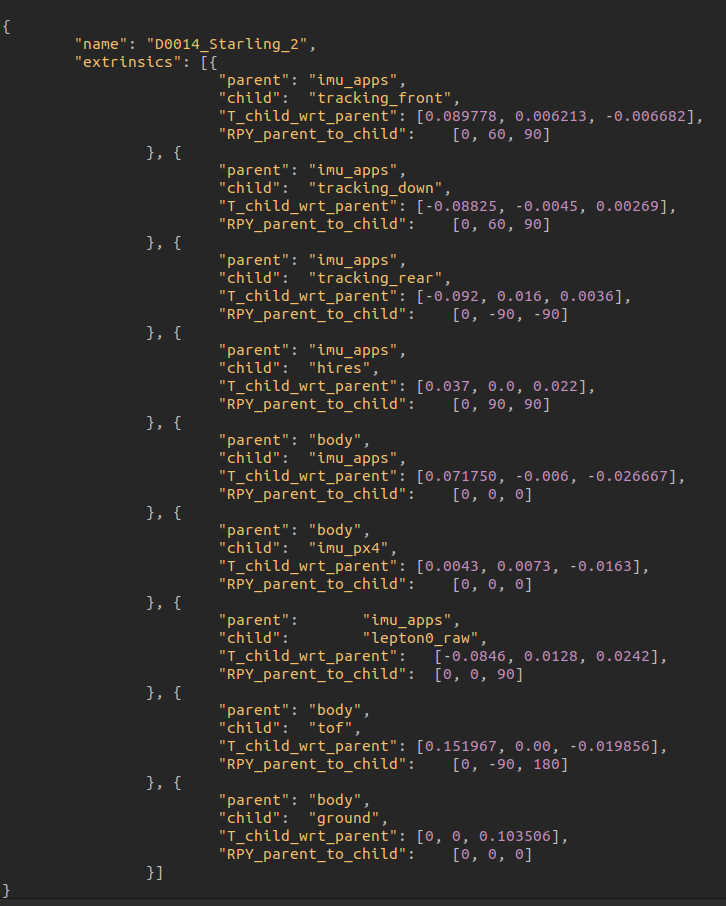
    Unsure, if you have resolved this so I am going to attempt to help but I am going to need more information if possible. I am unsure how the setup is for the drone seems like you have one camera (Tracking_rear) pointed straight backwards and two cameras (Tracking_front, Tracking_down) facing forward at a 30 degree downward angle? I am not sure that you are showing with the log output. Have you tried hand testing using the command voxl-inspect-pose -l and seeing how RPY and translational movement (moving the drone up, right, forward) are behaving for the local frame?
  • Setting up Joystick Button to Activate AUX1 For Turtle Mode

    4
    0 Votes
    4 Posts
    974 Views
    Jetson NanoJ
    @Jacob-Camarillo @wilkinsaf Hi guys, I tested turtle mode out with internal FC and it is working. Now I have updated the system with Flight core V2 external FC, and I would like to achieve the same with this configuration. could you help me out here. Since we can not use px4-listener anymore. I am bit confused with what approach to go take.
  • Creating image of current state

    2
    0 Votes
    2 Posts
    409 Views
    tomT
    @Kessie Not exactly, but the important data to retain lives in /data/ or /data/modalai The SDK flash will attempt to retain this partition, but in certain cases it requires a wipe. I would take note of /data/modalai/sku.txt as well as pull off any calibration files in /data/modalai, you can see if you have any onboard currently by running voxl-check-calibration If you have this data saved you'll have no issue getting back to your previous state, I can help guide you through it if you run into any issues.
  • Unbricking a VOXL 2 - Pass but no ADB?

    15
    0 Votes
    15 Posts
    2k Views
    tomT
    @czarsimon When you run through the QDL process how long does it take for the flash to finish? seconds? minutes? Also, are you able to ADB onto functional devices on this machine? Want to rule it weird permission issues