
How to enable Turtle Mode
-
@Jetson-Nano Please be very careful with turtle mode. This should only be used by very experienced pilots. The parameter to control it is here: https://github.com/modalai/px4-firmware/blob/039064b897cf0a123bc1badb269e352186c8946d/src/drivers/actuators/voxl_esc/voxl_esc_params.c#L106
@Eric-Katzfey Hi,
Thanks for sharing the link! Could you clarify the following for setting up Turtle Mode on the Voxel ESC?What specific value should be set for the parameter on line 106 to enable Turtle Mode?
Are there any other parameters I need to adjust?
Could you provide a brief outline of steps to activate and test it safely?
Thanks very much for the guidance! -
@Eric-Katzfey Hi,
Thanks for sharing the link! Could you clarify the following for setting up Turtle Mode on the Voxel ESC?What specific value should be set for the parameter on line 106 to enable Turtle Mode?
Are there any other parameters I need to adjust?
Could you provide a brief outline of steps to activate and test it safely?
Thanks very much for the guidance!@Jetson-Nano As the comments for that parameter state, you set it to 1 to use AUX1 to trigger it and 2 to use AUX2 to trigger it. You map the desired RC channel to AUX1 using the parameter RC_MAP_AUX1 and to AUX2 using the parameter RC_MAP_AUX2. We cannot provide a test setup for you. You need to use your own best judgement in coming up with a way that you feel comfortable testing this feature. As I said before, this should only be used by very experienced pilots. I would suggest reading through the source code to familiarize yourself with what the ESC driver is doing before attempting to test it.
-
@Jetson-Nano As the comments for that parameter state, you set it to 1 to use AUX1 to trigger it and 2 to use AUX2 to trigger it. You map the desired RC channel to AUX1 using the parameter RC_MAP_AUX1 and to AUX2 using the parameter RC_MAP_AUX2. We cannot provide a test setup for you. You need to use your own best judgement in coming up with a way that you feel comfortable testing this feature. As I said before, this should only be used by very experienced pilots. I would suggest reading through the source code to familiarize yourself with what the ESC driver is doing before attempting to test it.
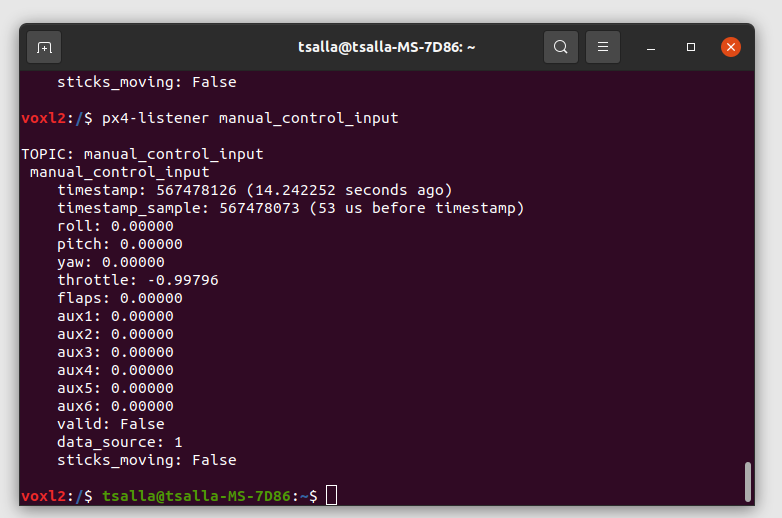
I followed the setup steps as described, including:
Setting up the parameters in QGC according to the documentation.
Using px4-listener manual_control_input to monitor AUX1 and AUX2 values while pressing buttons on my Radiomaster transmitter.
Despite this, I am only seeing zero values for AUX1 and AUX2. I also tried setting up the channels on my Radiomaster, but I still couldn’t get any non-zero AUX values.I am testing this feature on a Starling 2 drone. Could you please guide me on.
*How to ensure the transmitter is correctly mapped to AUX1 or AUX2?
*How to get a not zero value for the AUXS?#When I change the motor spin directions in the Actuators tab, I expect only the intended motors to rotate when triggered with the AUX switch (which I’m still figuring out). However, after changing the motor directions and arming the drone, the motor mapping seems to go off, and the setup doesn’t work as intended. Could you clarify why this happens and how to ensure only the intended motors rotate correctly after arming?
-
I followed the setup steps as described, including:
Setting up the parameters in QGC according to the documentation.
Using px4-listener manual_control_input to monitor AUX1 and AUX2 values while pressing buttons on my Radiomaster transmitter.
Despite this, I am only seeing zero values for AUX1 and AUX2. I also tried setting up the channels on my Radiomaster, but I still couldn’t get any non-zero AUX values.I am testing this feature on a Starling 2 drone. Could you please guide me on.
*How to ensure the transmitter is correctly mapped to AUX1 or AUX2?
*How to get a not zero value for the AUXS?#When I change the motor spin directions in the Actuators tab, I expect only the intended motors to rotate when triggered with the AUX switch (which I’m still figuring out). However, after changing the motor directions and arming the drone, the motor mapping seems to go off, and the setup doesn’t work as intended. Could you clarify why this happens and how to ensure only the intended motors rotate correctly after arming?
@Jetson-Nano How did you set RC_MAP_AUX1 and RC_MAP_AUX2?
-
@Jetson-Nano How did you set RC_MAP_AUX1 and RC_MAP_AUX2?
@Eric-Katzfey I mapped the desired RC Transmitter channels to AUX1 OR AUX2 using parameters RC_MAP_AUX1 or RC_MAP_AUX2 in QGC.
Then to varify the AUX inputs i ran px4-listener manual_control_input in the command line. I am not getting any non zero value in any of the AUXS.
Tell me if i am missing something here?
-
@Eric-Katzfey I mapped the desired RC Transmitter channels to AUX1 OR AUX2 using parameters RC_MAP_AUX1 or RC_MAP_AUX2 in QGC.
Then to varify the AUX inputs i ran px4-listener manual_control_input in the command line. I am not getting any non zero value in any of the AUXS.
Tell me if i am missing something here?
@Jetson-Nano If you listen to the input_rc topic can you see the channel values that you mapped to AUX1 or AUX2 changing as you move the desired switch on the RC?
-
@Jetson-Nano If you listen to the input_rc topic can you see the channel values that you mapped to AUX1 or AUX2 changing as you move the desired switch on the RC?
@Eric-Katzfey Yes, it seems I was doing the mapping correctly. The issue was that I wasn’t checking the RC input in the command prompt correctly, I hadn’t enabled the switch on the transmitter while testing. After figuring that out, I researched the correct sequence to enable Turtle Mode. However, while testing, I encountered an "attitude failure" message. To resolve this, I set FD_FAIL_R and FD_FAIL_P to 0, which now allows me to arm the drone even when it’s toppled. Could you confirm if this is the correct approach or if I missed anything? Thanks again for your guidance!
-
@Eric-Katzfey Yes, it seems I was doing the mapping correctly. The issue was that I wasn’t checking the RC input in the command prompt correctly, I hadn’t enabled the switch on the transmitter while testing. After figuring that out, I researched the correct sequence to enable Turtle Mode. However, while testing, I encountered an "attitude failure" message. To resolve this, I set FD_FAIL_R and FD_FAIL_P to 0, which now allows me to arm the drone even when it’s toppled. Could you confirm if this is the correct approach or if I missed anything? Thanks again for your guidance!
@Jetson-Nano Yes, you can set those to 0. Setting them to 180 should also work.
-
@Jetson-Nano Yes, you can set those to 0. Setting them to 180 should also work.
@Eric-Katzfey Thank you for reverting back. I tested it out with internal FC and it is working.
Now I have updated the system with Flight core V2 external FC, and I would like to achieve the same with this configuration. could you help me out here.
Since we can not usepx4-listeneranymore. I am bit confused with what approach to go take. -
@Eric-Katzfey Thank you for reverting back. I tested it out with internal FC and it is working.
Now I have updated the system with Flight core V2 external FC, and I would like to achieve the same with this configuration. could you help me out here.
Since we can not usepx4-listeneranymore. I am bit confused with what approach to go take.@Jetson-Nano Instead of listening to the input_rc topic with the listener function you can now monitor the RC_CHANNELS Mavlink message from the FC v2.


Reading along? Create a free ModalAI Forum account to join in.
With an account you can reply, ask your own question, get an email when a ModalAI engineer answers, and mark the reply that solved it. Your place in each thread is saved between visits.
Questions about VOXL, Flight Core, ESCs and ModalAI drones are answered here by the engineers who build them.
Register Login