Skip to content

Ask your questions right here!

2.3k Topics 11.7k Posts

Note sure where to post? Ask questions here for direct access to the ModalAI engineering team

Subcategories


  • 164 Topics
    751 Posts
    Ben LinneB
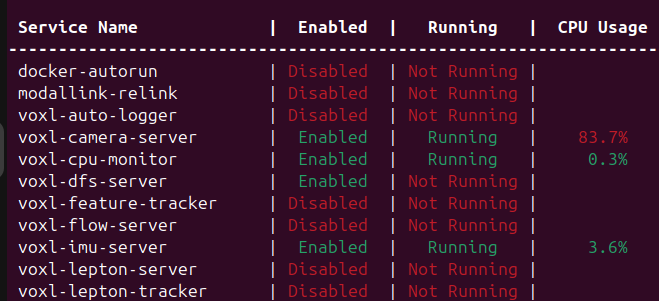
    @heiko.lizan Any elrs radio that's 900mhz or dual band compatible should work when in low band mode. If the transmitter is running v4+ you should be able to downgrade it to v3 following the elrs update guide It's normal that some services aren't running. You may need to re-enable px4 with systemctl enable voxl-px4
  • Do you have a great idea for our products you would like to see implemented?

    27 90
    27 Topics
    90 Posts
    Serhii RovnyiS
    Hello everyone, I am looking for some expert advice on a VOXL 2 companion computer setup for a long-range platform. I have two main integration challenges: Challenge A: VIO at Higher Altitudes To solve the motion blur and pixel density issues at higher altitudes, I am planning a 6-camera configuration. I want to use 4 downward-facing sensors (2 daylight + 2 IR) equipped with narrow-angle lenses, alongside 2 standard wide-angle sensors (front and rear). Could you advise on the best supported sensors (e.g., IMX series) for this? Has anyone successfully tuned the voxl-qvio-server for narrow-angle lenses, and what were the altitude limits you achieved? Challenge B: LAN Integration & WireGuard The payload data flow will be: External RTSP Camera -> Ethernet -> VOXL 2 (WireGuard encryption) -> Ethernet -> Digital RX. Because VOXL 2 lacks multiple LAN ports, I will need a miniature industrial Ethernet switch. Does ModalAI have any tested hardware recommendations for this? Furthermore, what is the best practice for routing this VPN traffic through the VOXL 2 Ubuntu environment without bottlenecking the CPU? We are currently evaluating the VOXL 2 for a broader fleet deployment and want to ensure the ecosystem can support this custom optics requirement. Any feedback on off-the-shelf solutions or standard configurations for this use case would be greatly appreciated. Thank you!
  • Are you looking for a 3D model of one of our products?

    33 86
    33 Topics
    86 Posts
    Alex KushleyevA
    @nl_vdi , if you log into developer.modalai.com, you will see the CAD models. the latest model we have is: D0012-4-V3-C28-M36-T7-K0-Starling2-Max-V3-20260317.step [image: 1781036132877-376bf0dd-494a-4bf1-8d92-1b2d91afb83d-image.png]
  • Fatal: ThreadLocker acquire: QSystemSemaphore::handle: unknown error 38

    8
    0 Votes
    8 Posts
    693 Views
    Alex KushleyevA
    @voxl2_user , i will ask around.. Also, there may be some sysv compatibility mode, instead of fully utilizing sysv for all IPC. I think i saw something like that when grepping the kernel build source for sysv supprt. I will check a bit later. Alex
  • VOXL-ESC (output) + VOXL IO (output)

    3
    2
    0 Votes
    3 Posts
    652 Views
    Alex KushleyevA
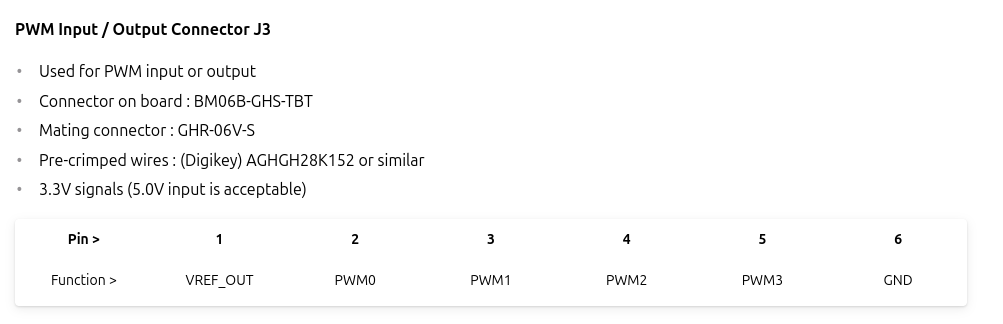
    @valvarez , i believe i have previously tried VOXL_ESC + VOXL2 IO drivers running at the same time and it worked. You just have two output interfaces that you can configure and test via GCS. As Eric mentioned, you just need to make sure you configure the two drivers to start together and to connect to the correct ports (and baud rates). Regarding outputting PWM from VOXL_ESC, there is a way to make it work. We do not have the PWM ports on the ESC exposed as normal PWM outputs in PX4, but you can use a special tool / command on voxl2, which will send message to the ESC (via PX4) and control the PWM port: https://gitlab.com/voxl-public/voxl-sdk/services/voxl-io-server/-/blob/master/tools/voxl-send-esc-pwm-cmd.c (which is also part of our SDK) . voxl2:/$ voxl-send-esc-pwm-cmd -h Tool to send command a VOXL ESC to make it output a PWM signal If timeout is disabled (default) then the esc will keep sending the same pwm command even after this program exits. If enabled, the signal will stop after 0.5s. Oneshot mode will automatically exit this program after one message is sent to the esc, otherwise it will keep going untill you hit ctrl-C ESC_PIN_M0129_AUX0 2 ESC_PIN_M0129_AUX1 258 ESC_PIN_M0129_AUX2 514 ESC_PIN_M0129_AUX3 770 ESC_PIN_M0129_AUX_REG_EN 6 ESC_PIN_M0129_AUX_REG_ADJ 22 ESC_PIN_M0138_VTX_REG 80 ESC_PIN_M0138_RGB_OUT 24 ESC_PIN_M0138_AUX0 2 ESC_PIN_M0138_AUX1 770 ESC_PIN_M0138_AUX_REG_EN 12 ESC_PIN_M0138_AUX_REG_ADJ 11 D0008_V5_LIGHT_BAR_PIN 2 D0008_V5_PAYLOAD_PIN_0 770 D0008_V5_PAYLOAD_PIN_1 24 -h, --help print this help message -o, --one-shot only send one command then quit, not to be confused with short duration 125us oneshot mode -p, --pin {pin} output pin -t, --timeout enable 0.5s timeout, otherwise pwm will continue indefinitely -w, --width {val} pulse width microseconds (default 1500) typical use: voxl-send-esc-pwm-cmd -p 2 -t -w 1500 You will need to provide the pin number. See the usage helps, which provides the pin mapping (look at pins for M0129 ESC, but pwm pins are the same on M0117, M0134 ESCs as well). For a simple test, you can use pin=2 (meaning this will control Pin A2 on ESC ID 0 ), which should control the PWM0 output on your ESC. The 4 PWM outputs on the ESC are each connected to A2 port of the corresponding microcontroller, responsible for each ESC ID. The pin mapping is also documented here : https://gitlab.com/voxl-public/voxl-sdk/services/voxl-io-server/-/blob/master/lib/modal_io.h?ref_type=heads#L66 Alex
  • QVIO Flight violently unstable

    10
    1
    0 Votes
    10 Posts
    2k Views
    Alex KushleyevA
    @Gary-Holmgren , we have not tried the mask with 1280x800 resolution. Can you please try using the mask of size 160x120 and make it half white / half black for sanity testing. It is possible that the mask size has to be of these specific dimensions (and it would get resized to match the aspect ratio of the actual image, not sure). Also, you should enable the debug prints in QVIO, as mentioned here https://forum.modalai.com/topic/3459/masking-qvio/6 and there is another potential "gotcha", the mask path is relative to working directory where qvio server starts.. but after you enable the qvio server debug prints, you will see the path from which the mask file is being loaded, as you can see from screen shots from the other post. Unfortunately, the underlying QVIO source code is not available, so I cant check the exact behavior of the masking feature. Alex
  • Dual Tracking qvio

    4
    2
    0 Votes
    4 Posts
    663 Views
    tomT
    @tkddnjs825 Nope, if you run through install.sh it'll get everything setup as necessary
  • Where to see fprintf messages coming from voxl-tflite-server?

    4
    0 Votes
    4 Posts
    678 Views
    tomT
    @arcj Try voxl-tflite-server -d
  • Unable to connect to wifi network

    3
    0 Votes
    3 Posts
    772 Views
    Alex KushleyevA
    @KnightHawk , Please try unplugging the USB dongle from the USB extension (connected to VOXL2) then plugging it back in and check output of dmesg on your voxl2. It should say something about the new usb device connected and whether there are any errros. Also, in order to confirm that the wifi dongle itself is working, you could try plugging that into a standard linux PC, it should be recognized. Alex
  • Arm the RB5 drone with Mavros only

    5
    0 Votes
    5 Posts
    716 Views
    S
    @Eric-Katzfey Thanks for answering! I have managed to solved this problem by using proper MOCAP data instead of GPS. I did not test in the QGC. But for mavros I succesfully armed the drone, which is what I really want for doing more control. I wonder if there is any tutorial or documentation for doing low-level control, such as to do control specifically on motors, PWM, instead of using PX4 to do high-level control. Thanks for your help again!
  • Starling 2 - Voxl-dfs-server

    7
    4
    0 Votes
    7 Posts
    1k Views
    ModeratorM
    @JoeAR_21 voxl-vision-hub handles VOA, not voxl-dfs-server You can see the tof callback function in voa_manager here: https://gitlab.com/voxl-public/voxl-sdk/services/voxl-vision-hub/-/blob/master/src/voa_manager.c?ref_type=heads#L380
  • Ghost atto Sentinel

    6
    1
    0 Votes
    6 Posts
    843 Views
    Eric KatzfeyE
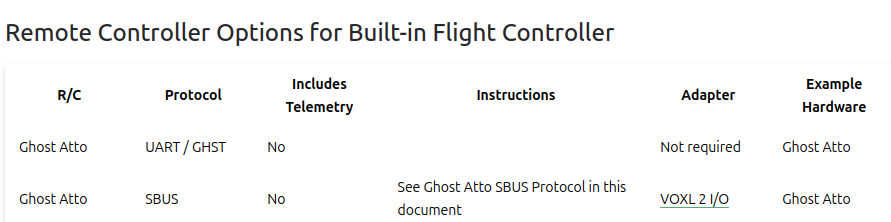
    @valvarez Sorry about that, but looks like that ghst_rc driver is specific to the DSP and cannot be used on the apps processor right now. I'm afraid the current build cannot support what you are looking to do without some changes. Probably best for you to put the receiver in SBUS mode and connect to the IO board.
  • 0 Votes
    12 Posts
    2k Views
    Jetson NanoJ
    @Jeremy-Frederick Thanks for reverting. In your setup do you have the Radio directly paired or connected with ground unit of the MH carrier without having to any other workarounds?
  • Timeline for open-vins documentation

    28
    0 Votes
    28 Posts
    9k Views
    dleeD
    @Viktor-Gal I am troubling localization with QVIO. So I wanted to change vio algorithm to OpenVINS. I flashed my drone to nightly version but openvins still very unstable. Could you give me some guidance for openvins? Questions openvins configuration & versions Did you enable the voxl-feature-tracker? camera settings (single or multi, camera model, etc) My status voxl-suite: 1.4.1-202502132201 Camera: old-version of tracking camera (640x480) - link voxl-open-vins-server: 0.3.0-202502061726 voxl-feature-tracker: 0.5.2-202412171357
  • Retrieving Apriltag offset from MAV local frame offset

    3
    1 Votes
    3 Posts
    562 Views
    J
    @Moderator said in Retrieving Apriltag offset from MAV local frame offset: We love incorporating merge requests if you do end up with something useful! Reply I've made a quick fix here for anyone looking for it, ill try to make a merge request/real fix for it soon https://github.com/Joe1Ontiveros/ApriltagPublisher_Starling
  • VOXL2 vlan

    8
    0 Votes
    8 Posts
    1k Views
    J
    @modaltb As far as I can tell, I'm building a perf kernel. These are my changes: MODAL_REPO_BRANCH=v1.8.02 in bin/qrb5165-common.sh I've added the following lines to ./lu.um.1.2.1/apps_proc/poky/meta-voxl2-bsp/recipes-kernel/linux-msm/files/fragments/m005x.cfg: CONFIG_MACVLAN=y CONFIG_VLAN_8021Q=y And then building: ./qrb5165-build.sh -m M0054
  • Configuring VOXL 2 with a new UDP port

    9
    0 Votes
    9 Posts
    1k Views
    Gary HolmgrenG
    @Eric-Katzfey Ahh that makes more sense, thankyou for explaining!
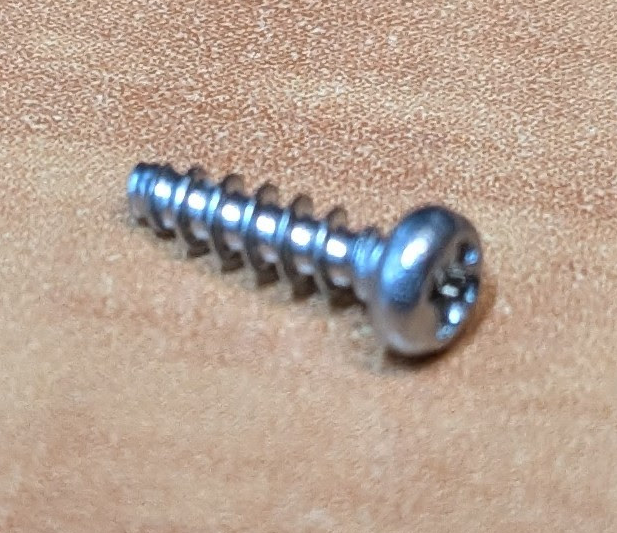
  • Screw size for Starling 2 frame

    3
    2
    0 Votes
    3 Posts
    422 Views
    S
    @Alex-Kushleyev Thank you, appreciate it!
  • 0 Votes
    1 Posts
    271 Views
    No one has replied
  • Trying to mask qvio with AR0144 cam

    1
    0 Votes
    1 Posts
    401 Views
    No one has replied
  • VOXL2 Product Lifecycle and OS Update Compatibility Inquiry

    2
    0 Votes
    2 Posts
    375 Views
    Alex KushleyevA
    Hello @Janelletran , Please reach out to https://www.modalai.com/pages/contact-us since the specific project details may need to be discussed directly via email. Alex Kushleyev
  • This topic is deleted!

    1
    0 Votes
    1 Posts
    1 Views
    No one has replied
  • VOXL 2 Cant bind to ERLS or DSMX

    6
    0 Votes
    6 Posts
    936 Views
    Gary HolmgrenG
    @Gary-Holmgren I managed to finally get it working after flashing a few times with the web portal when the receiver and transmitter were in WiFi mode. It helped to connect instantaneously after flashing when making a binding phrase on both the receiver and transmitter.