Skip to content

Development Drones

642 Topics 3.3k Posts

Starling 2, Starling 2 Max, Sentinel, Seeker, m500, RB5, the PX4 Autonomy Developer Kit and Stinger FPV: flying, tuning, repairs and spare parts.

  • 3d cad files of both Sentinel and Seeker

    sentinel
    2
    1 Votes
    2 Posts
    984 Views
    ModeratorM
    Yes, the Sentinel 3D STEP files can be found here: https://docs.modalai.com/sentinel-functional-description/#3d-step We do not have the 3D STEP file for Seeker available, but the CAD model for VOXL-CAM can be found here: https://docs.modalai.com/voxl-cam-datasheet/
  • Request backup files for system image re-flashing

    Unsolved rb5
    3
    1 Votes
    3 Posts
    1k Views
    K
    Hi @modaltb , Excuse me how to use RB5 on VOXL Web Portal, are there any teaching materials? Thanks. https://www.youtube.com/watch?v=gqlSKRP8prc https://docs.modalai.com/voxl-portal/
  • Sentinel VOA software not available

    Unsolved sentinel
    6
    0 Votes
    6 Posts
    2k Views
    M
    @Alex-Gardner said in Sentinel VOA software not available: platform 1.3.1-0.8 Yes, it worked! I am able to see correct data via voxl-vision-px4 -s and use PX4's Collision Prevention feature. The drone was shipped with system-image: 1.2.1-M0054-14.1a-perf and voxl-suite: 0.7.0, but after flashing to Voxl2 Platform 1.3.1-0.8, VOA worked out of the box as described. (Note: during the flashing, I noticed the Sentinel documentation does not list this newest release.) To others reading this, some tips: Use your /data folder to backup any files you don't want wiped, such as changes to /home/root. In QGroundControl, save your factory params so you don't have to recalibrate your sensors. (Parameters -> Tools -> Save to file...) Run and save apt list --installed in case there's some apt packages you don't want to forget. Don't forget to redo the parameters in QGroundControl as mentioned in the VOA documentation. Thanks, @Alex-Gardner!
  • RB5 with VOXL SDK cannot calibrate Stereo cameras

    Unsolved rb5
    1
    0 Votes
    1 Posts
    466 Views
    No one has replied
  • Seeker's landing gear

    Unsolved seeker
    3
    0 Votes
    3 Posts
    819 Views
    張為超張
    @Alex-Gardner Sorry for responding late. Yeah it looks like seeker have it's own landing gear. Since we lose and break M500's landing gear before... so, I wonder if there any spare landing gear that I can buy, just in case. Thanks!
  • POSITION_TARGET_LOCAL_NED

    Unsolved m500
    2
    4
    0 Votes
    2 Posts
    594 Views
    G
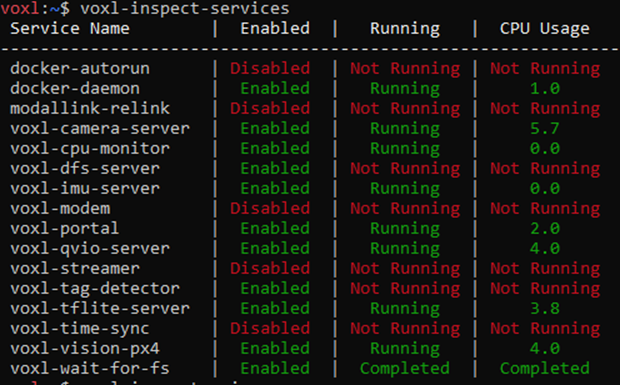
    I have enabled voxl-tag-detector on boot, it did not help. I used systemctl enable voxl-tag-detector and in the **.service I used Restart=always .
  • How to re-calibrate PID and sensors of QRB5 as the shipped condition?

    Unsolved rb5
    5
    0 Votes
    5 Posts
    1k Views
    K
    @Jeremy-Schmidt Could you please check the email I sent PX4 parameters? Thank you.
  • Seeker's QVIO

    Unsolved seeker
    2
    0 Votes
    2 Posts
    693 Views
    Chad SweetC
    Yes to both
  • Help to debug why QRB5 crashed

    Unsolved rb5
    1
    0 Votes
    1 Posts
    538 Views
    No one has replied
  • Occasional instability and crashes (possible positioning error)

    Unsolved m500
    7
    0 Votes
    7 Posts
    1k Views
    Umut JohnU
    Still need some troubleshooting on the logs I've posted if anyone in the team have some time. Cheers to all!
  • rb5-streamer with ethernet

    Unsolved rb5
    1
    0 Votes
    1 Posts
    335 Views
    No one has replied
  • Offboard mode and figure 8

    Unsolved rb5
    3
    0 Votes
    3 Posts
    1k Views
    S
    We cannot access the download, it requires authentication. Is there a fix for this issue?
  • Streaming 4K video from Qualcomm RB5 drone

    Unsolved rb5
    12
    0 Votes
    12 Posts
    4k Views
    Eric KatzfeyE
    @kitkatSG There's generally a couple of different possible video distortions. One is due to the vibration from the motors. If you mount the camera on rubber dampeners you can remove most of this type of distortion. But of course the drone is moving and that causes motion as well. We don't have a recommendation on gimbal but would love to hear if you are able to find something that works well for you. And we have not tried any GStreamer stabilization software so cannot comment on that, but would love to hear if you find a software stabilization solution that works.
  • RB5 Drone and ROS

    Unsolved rb5
    7
    0 Votes
    7 Posts
    2k Views
    alfa budimanA
    @Chad-Sweet Alright, if MAVROS hasn't been tested on the RB5 drone then what is the currently established method of programmatically flying it?
  • Extensive Problems with RB5 Drones

    Unsolved rb5
    3
    0 Votes
    3 Posts
    771 Views
    alfa budimanA
    Thanks. CTV, CTU and CTT*: detected by usb, connects to wifi / Q Ground control and can be armed / throttled. For some reason these just worked after I pushed the button and powered them on, didn't have to go through the full-flash process. *For CTT it was a Q Ground Control related issue. I saved the parameter file from CTV and loaded it onto CTT. CU7: non-responsive to flash-full process: [INFO] version: 0.0 [INFO] adb installed [INFO] fastboot installed [INFO] qti-ubuntu-robotics-image-qrb5165-rb5-boot.img present [INFO] abl.elf present [INFO] qti-ubuntu-robotics-image-qrb5165-rb5-sysfs.ext4 present [ERROR] Device in fastboot mode. Unable to backup camera files. [INFO] Please bring device out of fastboot mode by first running: fastboot reboot I then enter fastboot reboot and try sudo ./flash-full.sh again. It gets stuck at [INFO] version: 0.0 [INFO] adb installed [INFO] fastboot installed [INFO] qti-ubuntu-robotics-image-qrb5165-rb5-boot.img present [INFO] abl.elf present [INFO] qti-ubuntu-robotics-image-qrb5165-rb5-sysfs.ext4 present [INFO] Saving camera calibration files and is no longer detected by usb. However, when I push the button again, it does appear on lsub and fastboot devices. c9ce2d0d fastboot
  • Resetting ssh password

    Unsolved m500
    8
    0 Votes
    8 Posts
    1k Views
    Dean HartD
    Seems to be an issue with QGC itself. The latest v4.2.3 I’m running is where it’s failing. If I revert back to the latest 4.1.* (4.1.7) it works.
  • 4G LTE bands for Seeker

    Unsolved seeker
    2
    0 Votes
    2 Posts
    861 Views
    tomT
    @rstoleru There are a few different modem options, you can see in the dropdown on this page: https://www.modalai.com/collections/voxl-add-ons/products/voxl-lte?variant=32449203601459 Most NA folks order the WP 7610 while EU folks order the 7607. The supported bands vary but you can look up the datasheets from Sierra Wireless for more info. You can enable / disable certain bands via. AT commands, in NA for example, we legally have to disable band 5 for civilian drone flight.
  • m500 Motor Hot and Vibration

    Unsolved m500
    7
    0 Votes
    7 Posts
    2k Views
    yu zhangY
    @Adrian-Hidalgo All right, thanks. I will check them step by step, and hope it will be solved soon
  • How to unplug the MCBL-00007?

    Unsolved m500
    3
    2
    0 Votes
    3 Posts
    799 Views
    Adrian HidalgoA
    @DarkKnightCH Use a flat tipped screwdriver or similar device to slowly pry it out. Take your time working both sides of the the Hirose connector. Take care as the pins can get bent if too much force is applied
  • voxl-camera-server.conf tracking camera settings not applying

    Unsolved m500
    3
    0 Votes
    3 Posts
    601 Views
    ?
    Hi Jonathan, The underlying pipelines for the CV sensors are all delicately built and only support very specific resolutions. I'll update our documentation to better reflect this, but in general: The stereo pipeline can only do 30hz(for now, we're working on this) since it's very custom and the tracking camera can do 30,60,90, and 120hz. The hires camera is more standard and has more robust pipelines implemented to support more standard video stream configurations. As for the manual exposure/gain, have you set the auto exposure mode to "off", if not you're just setting up the starting point for the camera and the AE library will still perform it's usual duties. If you're still having issues after this let me know and we can dig through more of what you're seeing.