Skip to content

Ask your questions right here!

2.4k Topics 11.7k Posts

Note sure where to post? Ask questions here for direct access to the ModalAI engineering team

Subcategories


  • 167 Topics
    757 Posts
    Colby HowellC
    Hello. I purchased a Starling 2 Max development drone and when attempting a first flight test I discovered that one of the batteries arrived entirely dead. I was curious if there was a way to receive replacements, and if this falls within replacement territory. I contacted the support email and was directed here. I can provide more information if needed.
  • Do you have a great idea for our products you would like to see implemented?

    27 90
    27 Topics
    90 Posts
    Serhii RovnyiS
    Hello everyone, I am looking for some expert advice on a VOXL 2 companion computer setup for a long-range platform. I have two main integration challenges: Challenge A: VIO at Higher Altitudes To solve the motion blur and pixel density issues at higher altitudes, I am planning a 6-camera configuration. I want to use 4 downward-facing sensors (2 daylight + 2 IR) equipped with narrow-angle lenses, alongside 2 standard wide-angle sensors (front and rear). Could you advise on the best supported sensors (e.g., IMX series) for this? Has anyone successfully tuned the voxl-qvio-server for narrow-angle lenses, and what were the altitude limits you achieved? Challenge B: LAN Integration & WireGuard The payload data flow will be: External RTSP Camera -> Ethernet -> VOXL 2 (WireGuard encryption) -> Ethernet -> Digital RX. Because VOXL 2 lacks multiple LAN ports, I will need a miniature industrial Ethernet switch. Does ModalAI have any tested hardware recommendations for this? Furthermore, what is the best practice for routing this VPN traffic through the VOXL 2 Ubuntu environment without bottlenecking the CPU? We are currently evaluating the VOXL 2 for a broader fleet deployment and want to ensure the ecosystem can support this custom optics requirement. Any feedback on off-the-shelf solutions or standard configurations for this use case would be greatly appreciated. Thank you!
  • Are you looking for a 3D model of one of our products?

    33 86
    33 Topics
    86 Posts
    Alex KushleyevA
    @nl_vdi , if you log into developer.modalai.com, you will see the CAD models. the latest model we have is: D0012-4-V3-C28-M36-T7-K0-Starling2-Max-V3-20260317.step [image: 1781036132877-376bf0dd-494a-4bf1-8d92-1b2d91afb83d-image.png]
  • Sentinel (VOXL2) not connecting via ADB and not able to boot

    16
    0 Votes
    16 Posts
    3k Views
    tomT
    @JoshRebello Our only office is in San Diego.
  • Remote connection to VOXL2 from VSCode

    6
    0 Votes
    6 Posts
    1k Views
    ?
    @rsr4z Yeah no worries, let me know if I can help out with anything else!
  • 0 Votes
    4 Posts
    2k Views
    VinnyV
    Hi @Ivan-Gambit Good questions. M0078 Tech Docs Reference: https://docs.modalai.com/usb-epxansion-with-fastboot-v2-datasheet/ Yes, if you have a Voxl or Voxl-Flight in an M500, you will need the M0078 PCB to expose the USB host port from J13. You will not use the provided MCBL-00009 in the M0078 kit. Yes, Voxl or Voxl-Flight J13 port was not designed with Doodle in mind, so you are best to use a splice direct from the power cable. The way to do this is as follows: Use the D+/D- and GND from the M0078 4-pin JST "J3" to the Doodle USB D+/D- and one GND [image: 1706645581587-af2cb12a-9843-46f2-b691-8db5c063c365-image.png] use the 5VDC and a GND from the Power Module to the Doodle 5V input and GND. In your case, you can remove the jumper from M0078 "J2" since you are not using any VBUS from the M0078 USB connector. If you remove the jumper on M0078 J2, that allows you to use a simple 4-pin JST to JST cable to the Doodle such as https://docs.modalai.com/cable-datasheets/#mcbl-00015 , or convert it to a breakout cable to connect to the Doodle (Sorry I do not know how to advise further since I am not familiar with the socketed versions) Note: Yes, we have that jumper on M0078 to provide an easy way to access the 5V from the power module, but we did also not design that jumper and the traces with Doodle in mind. It was more for devices needing 1A of USB VBUS, not 2A+ that Doodle requires. You can try it, but you may have limited range at the highest power modes, and most of our cables that you would then use are also 1A limited, so problems like voltage droops/sags may occur with that approach. The key thing in all of this is to make sure you have a common GND, and the return current for USB will go where it needs and the return current for the 5V will follow it's associated GND return path. Also make sure you do not short VBUS to the 5VDC of your splice if you use that jumper J2. Might be best to just leave it off, but since those pins are "HOT" maybe add a bit of Kapton over them to protect against inadvertent shorts. If you are hesitant to make splices in the power feed for Voxl, you can see if one of our pre-spliced power cables we offer can give you a jump start, such as: https://docs.modalai.com/cable-datasheets/#mcbl-00211 and then remove the JST to provide what you need on the Doodle side. But, if you need all 4 wires for the I2C port on Voxl, you can start with an MCBL-00001 and then just move contacts from one cable to another.... https://docs.modalai.com/cable-datasheets/#mcbl-00001 There really are a lot of ways to do this (sorry if it's info overload). I'm happy to review your final solution. If you want some extra support we can email you if you want to share more non-public drawings or such. Just let us know! But, if you are willing to share your setup and pics, it would be faster and you'd be helping others in the same situation Thanks!
  • 0 Votes
    7 Posts
    1k Views
    Darshit DesaiD
    @Zachary-Lowell-0 Yes that was my initial question, thanks it worked, although I didn't know NV12 means YUV format @Darshit-Desai said in Extracting images from a rosbag and image format of hires_small_color mpa topic: is the image of a specific encoding which is causing this,
  • Can anyone recommend a Tflite Colab Notebook for VOXL2 Training

    53
    1 Votes
    53 Posts
    30k Views
    ?
    @Darshit-Desai Yeah, for reference almost all of the voxl-tflite-server code and documentation was written by a former employee so I don't always have the source of ground truth for things. I think there may be some logic in there that deals with reshaping the output tensors but I'm not fully sure. Same thing with the --half argument, I think we advise it but if you can get your model to work without quantization that's awesome. Glad to see it's working!! The results look good Keep me posted on how I can help, Thomas Patton
  • Seeker VIO doesn't do Position mode

    9
    4
    0 Votes
    9 Posts
    1k Views
    P
    @tom It's done. Thank you so much for the help.
  • no data while querying /run/mpa/tflight_data/request using Python

    18
    0 Votes
    18 Posts
    4k Views
    ?
    @sansoy Oh great, if you already have a function that works with libmodal-pipe then you shouldn't have much trouble writing one for the cameras. Take a look at these lines for the initial code to register the callback function to the camera pipe, this sets up _camera_helper_cb to receive images on callback. For an example of parsing that data, maybe check out these lines in a different module. There's a bit of extra info here but this shows the gist of casting the raw char* bytes into something like an OpenCV image. Definitely modify as needed to fit your use case! Keep me posted, happy to help however I can! Thomas Patton
  • Failed to start docker autorun service for VOXL

    2
    3
    0 Votes
    2 Posts
    546 Views
    tomT
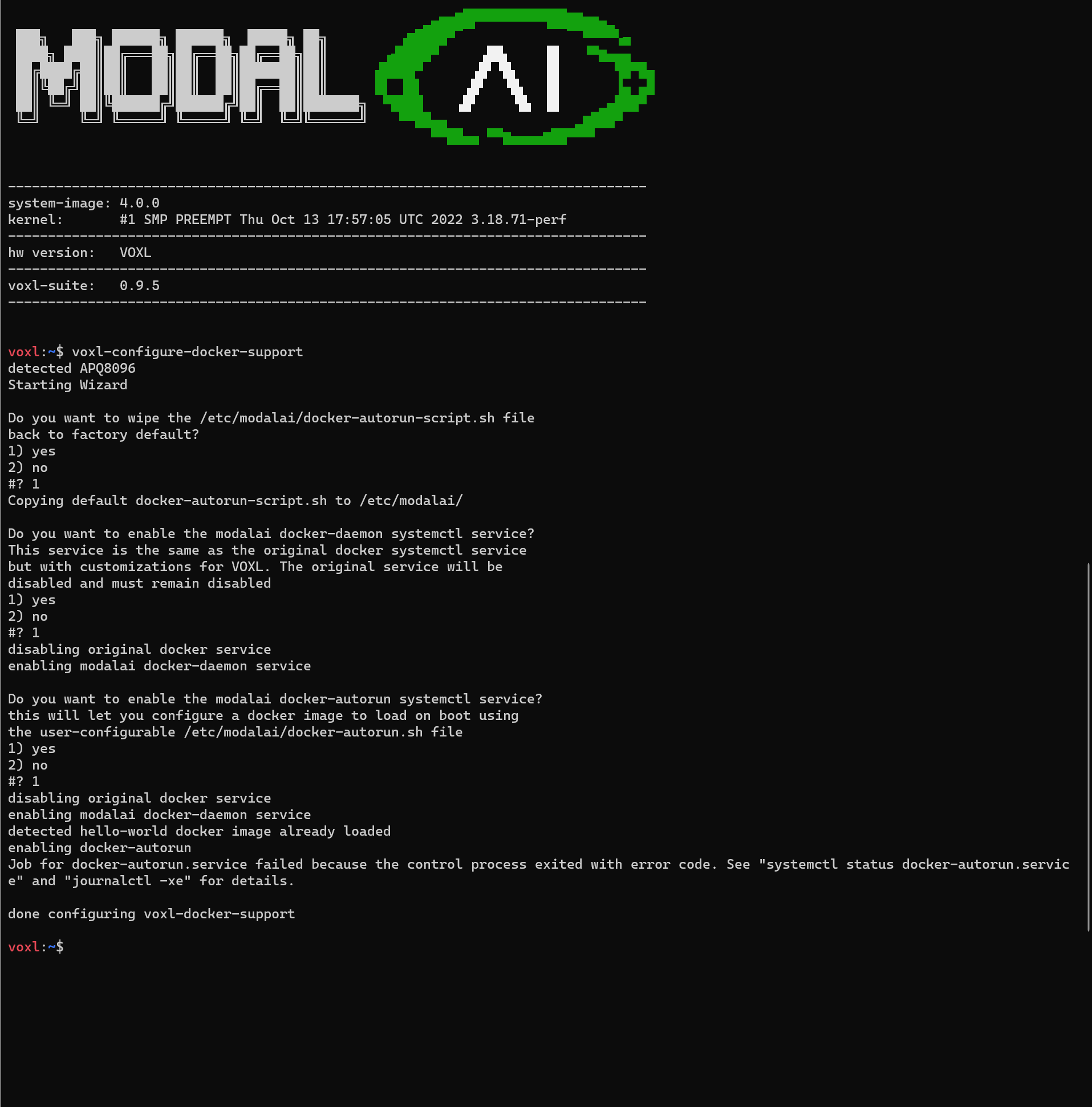
    @Pooyan Take a look at this thread and see if that helps resolve the issue: https://forum.modalai.com/topic/2989/docker-not-working-correctly-on-voxl/4?_=1706311436242
  • Custom System Image

    7
    0 Votes
    7 Posts
    1k Views
    tomT
    @Rowan-Dempster If the packages you're looking to include are small I can look into getting them into our default system image. Otherwise yeah we may have to discuss other avenues for supporting a custom system image (not a decision that I can make personally) Also most python packages are available via. apt with something like apt-get install python3-numpy
  • Are SELECT_TF_OPS supported on VOXL2?

    tflite tflite-server voxl2
    2
    0 Votes
    2 Posts
    1k Views
    ?
    @eric Sorry for the late response on this!! Your best bet would be to just try it out, I can't say without trying it myself. It's possible it works, it's possible something fails. I've never had to deal with this so I can't say for certain. It's also worth pointing out that voxl-tflite-server is more meant to be an example of how TFLite models can be run on VOXL and not an in-depth ML framework for deploying custom models. If voxl-tflite-server doesn't support it, by all means fork the repository and build out the functionality to be able to. Even better, make a pull request with that functionality and I'll test and approve it! Hope this helps, Thomas Patton
  • Can you power VOXL2 from the ModalAI 6s ESC?

    51
    0 Votes
    51 Posts
    27k Views
    Matthew WellnerM
    @Alex-Kushleyev Awesome!! Thanks!
  • Sentinel not arming in OFFBOARD mode

    2
    0 Votes
    2 Posts
    569 Views
    Dawid MościckiD
    @SMRazaRizvi in order to arm drone in offboard mode, px4 must be first able to arm in position mode. i would recommend checking if this drone arms in position mode (not manual)
  • Way to reduce motor arming spin speed in PX4 params?

    2
    0 Votes
    2 Posts
    1k Views
    Alex KushleyevA
    @Matthew-Wellner, The ESC params should have min_rpm parameter set to the minimum RPM that you obtained during your tests, specifically the RPM that motor spins when you send ./voxl-esc-spin.py --power 10 command, as 10% power is pretty much the minimum you would want to use on the ESC itself. Then you make sure your PX4 params also use this value for min_rpm for the following param: VOXL_ESC_RPM_MIN , however you also want to make sure the max_rpm ESC param corresponds to VOXL_ESC_RPM_MAX in PX4 params, otherwise the rpm range will not work correctly in PX4. You should also do some sanity checking. Knowing your propeller's thrust vs rpm curve helps a lot. Then you can check the commanded / actual motor RPMs versus your vehicles weight. It is possible to build a very lightweight vehicle, such that even small amount of thrust % would result in above hover thrust. You typically want to avoid those situations because it would be hard to achieve stable flight. Finally, you should check your px4 log, you could load it here to generate plots, including actuator commands and reported RPMS and you can check if those RPMs make sense. https://review.px4.io/ . Please take note that this is a public site.
  • USB3.0 port is not working.

    3
    0 Votes
    3 Posts
    801 Views
    I
    @Moderator Thank you for reply. This connecter is not working. [image: 1706060134869-9bb90eef-d3df-44a6-9311-3521bcc67dca-image.png] I connect usb3-camera device into this connecter, but not recognized. I checked to using bellow commands lsusb: did not add new device. dmesg: did not output new kernel messages(info. warn error etc.). When using Cable USB3 10-pin JST, usb3-camera device is recognized and working. So I think hub IC and peripheral circuit are working.
  • Data Collection from Ground Sensors

    3
    0 Votes
    3 Posts
    779 Views
    Alex KushleyevA
    @Evan-D , VOXL m500 uses VOXL1 computing board, which comes with a wifi module on board. The wifi module can be configured in SoftAP mode (access point) or station mode. If the ground sensors have wifi access points, then once m500 gets close to the access points, it can connect to those access points. Alternatively, m500 could be an access point and once it is within range of the ground sensor, the ground sensor could detect m500 wifi SSID and connect to it.
  • Data Fusion Routines

    3
    0 Votes
    3 Posts
    781 Views
    L
    Unfortunately, there is no publicly available documentation or technical paper that specifically details the lead data enrichment fusion routines and their underlying mathematics used on the VOXL flight board's IMU and cameras. This information is often considered proprietary by the manufacturers or research institutions involved in the project. However, some resources might help understand the general principles and approaches used in sensor fusion for attitude estimation and motion tracking: PX4 Autopilot Documentation: The PX4 Autopilot is an open-source autopilot system commonly used in research and hobbyist drones. It implements sensor fusion algorithms for various sensors, including IMUs, magnetometers, GPS, and optical flow sensors. While not directly related to the VOXL flight board, the PX4 documentation provides a good overview of sensor fusion concepts and the underlying Kalman filter and complementary filter techniques. You can find the relevant documentation here: https://docs.px4.io/main/en/ Research Papers on Sensor Fusion: Several research papers have been published on the topic of sensor fusion for attitude estimation and motion tracking. These papers often discuss different algorithms and their mathematical formulations. "Sensor Fusion for Attitude Estimation: A Tutorial" by Mahony et al. (2008): https://arxiv.org/pdf/1912.13077 "A Comparative Study of Kalman Filter and Extended Kalman Filter for Attitude Estimation" by Julier and Uhlmann (1997): https://www.researchgate.net/publication/269254094_Extended_Kalman_Filter_vs_Error_State_Kalman_Filter_for_Aircraft_Attitude_Estimation "Real-Time Attitude Estimation from Gyroscopes and Accelerometers" by Madgwick et al. (2011): https://arxiv.org/pdf/2002.10205
  • Certificate of Origin

    3
    0 Votes
    3 Posts
    928 Views
    T
    Thank you!
  • Docker not working correctly on VOXL

    4
    0 Votes
    4 Posts
    1k Views
    M
    @tom Thanks - that worked.
  • Replacing tracking camera on voxl2 flight deck

    2
    0 Votes
    2 Posts
    310 Views
    ModeratorM
    Yes, the M0014 from the flight deck replaced M0072+M0008 and are identical from an electrical standpoint
  • reporting a bug for cameras configuration

    17
    0 Votes
    17 Posts
    4k Views
    Alex KushleyevA
    @Abdullah01 , OK this is strange. So it seems like all the cameras are functional, because originally you were able to detect TOF and Hires camera, but not tracking camera. However, now you can detect hires and tracking but not TOF. I am not sure why this is happening. Are you able to do a clean install of SDK 1.1.2 and follow the same configuration option as you originally tried (TOF + Hires + Tracking). Make sure to plug the cameras as instructed here : https://docs.modalai.com/voxl2-camera-configs/#c-14-tof-hires-and-tracking