Skip to content
  • 0 Votes
    1 Posts
    690 Views
    No one has replied
  • 0 Votes
    1 Posts
    697 Views
    No one has replied
  • Communication module

    VOXL 2
    4
    0 Votes
    4 Posts
    1k Views
    Jetson NanoJ
    @Robbie-McCue Thank you for your feedback I will look into this.
  • Recording

    FPV Drones
    2
    0 Votes
    2 Posts
    1k Views
    ModeratorM
    Hi Christopher We currently support two forms of recording, both at the pilot internal to the VRX onboard storage on goggles to the SD Card We do have on our list to implement recording at the UAS itself, but that will need to be in a future software update.
  • Stinger FPV Cam Assembly Model/Shop Ambiguity

    Stinger Vision FPV
    2
    0 Votes
    2 Posts
    1k Views
    A
    Similarly, I cannot find the model for the new "slim" VTX mount, only the older, taller one.
  • adding payload to max2?

    Ask your questions right here!
    4
    0 Votes
    4 Posts
    2k Views
    Alex KushleyevA
    @Ebenezer-Afrifa , sorry, but Starling 2 Max is not capable of carrying such a large payload. We currently do not offer any platforms capable of carrying 3-4 pounds. Alex
  • VOXL2 Stuck in Fastboot

    VOXL 2
    3
    3 Votes
    3 Posts
    1k Views
    S
    Hi @wilkinsaf Thank you for this post! I had the same issue and was able to solve it using these steps.
  • Odometry not showing in QGC mavlink inspector

    VOXL 2 Mini
    2
    0 Votes
    2 Posts
    1k Views
    Eric KatzfeyE
    @Samuel-Marchetti Perhaps this can help with the odometry? https://forum.modalai.com/topic/3341/odometry-message/3?_=1782862595827
  • 0 Votes
    2 Posts
    3k Views
    nickanickN
    @nickanick is this the right place to ask these questions?
  • 0 Votes
    2 Posts
    1k Views
    VinnyV
    @Raiyan-Alam said in Is there a way to power this Wi-Fi Adapter + Radio using this specific ModalAI UART adapter board?: rfd900x Hi @Raiyan-Alam, My suggestion: keep the Wi-Fi adapter on USB and feed the RFD900X separately. You can pull an extra 5V feed using this power module cable, which splices off a 5V red JST SFHR connector: https://docs.modalai.com/cable-datasheets/#mcbl-00095 Splice from that into the RFD900X's 5V input. For the M0151, don't power the RFD900X off USB but pull it directly from the power module supplying VOXL 2 instead.
  • 0 Votes
    11 Posts
    5k Views
    Eric KatzfeyE
    @NikosMav Yes, things will get hotter when running QVIO. But once you arm and start the props everything will cool down. When reflashing the SDK I would grab one of the official releases from our downloads page and not a nightly.
  • 0 Votes
    2 Posts
    2k Views
    김진혁
    Hi team — just bumping this in case it slipped through. We're ready to buy one evaluation unit and would really appreciate a quick steer: can the Stinger Vision FPV run AUTONOMOUS VIO/SLAM + AprilTag precision landing, or would Starling 2 / Starling 2 Max be the better evaluation platform for the requirements above? I've also emailed sales@modalai.com in parallel, so whichever channel is easier works for us. Thanks!
  • Starling 2 max not booting

    VOXL Dev Kits
    4
    0 Votes
    4 Posts
    2k Views
    Alex KushleyevA
    Sorry to hear that. https://www.modalai.com/pages/rma You can provide a link to this post when you submit it.
  • 0 Votes
    2 Posts
    1k Views
    Suvasis MS
    if no internet is available onboard llm+NPU can help repairing-agent to fix the issue or provide reason of failure.
  • 0 Votes
    3 Posts
    995 Views
    Adrian HidalgoA
    Hello Timothy, Excellent! That is certainly possible to do. Yes, with some configuration it can be compatible. You will need to reconfigure MPA from the C28 camera config to the C29 camera config. They will need a new front camera bezel(M10001278), TOF safety shield(M10000537) and everything in MSU-M0178-1-01. Most of the hardware can be reused but as a precaution would also recommend QTY. 4 M10000884(M1.6X6 Screws) & QTY. 4 M10000882(M2.2X10 Screws). If you would like to proceed with the purchase, please email contact@modalai.com with the contents above. Regards.
  • 0 Votes
    2 Posts
    1k Views
    Alex KushleyevA
    Hi @Julian , Thank you for the detailed report. It does look like there is a missing (or broken? hard to see) magnet in the motor, in which case the motor will not work properly and should be replaced. No further testing is needed, as this is most likely a manufacturing defect of the motor or a result of an impact. If you believe that the motor was defective when you received the product, you should request a free replacement motor (submit an RMA form) . If the motor was damaged while testing, you can purchase a new motor. The Starling 2 Max replacement parts can be found here : https://www.modalai.com/products/starling-2-max-replacement-parts (however i don't see just motors without a frame + motors kit, will double check..) Alex
  • Throttle not working in Stabilize mode

    VOXL 2 Mini
    3
    0 Votes
    3 Posts
    1k Views
    S
    @Eric-Katzfey Thank you so much this fixed the issue!
  • Drone Issues

    Stinger Vision FPV
    2
    0 Votes
    2 Posts
    1k Views
    Eric KatzfeyE
    @ralinaresg What SDK version is loaded on the Stinger?
  • VOXL2 BT5.0 Support?

    Ask your questions right here!
    2
    0 Votes
    2 Posts
    1k Views
    Steven GonciarS
    For visibility, since this seems related to the old BLE/VOXL discussion here: https://forum.modalai.com/topic/1730/bluetooth-ble-communication-on-the-voxl-is-it-possible I was able to get BLE 5.0 extended advertising scanning working on VOXL2 / Starling 2 with an ASUS BT500 / Realtek RTL8761B USB adapter by backporting newer upstream Linux Bluetooth HCI event parsing logic into the QRB5165 4.19 kernel tree. My understanding is future revisions of VOXL will have more up to date kernels that solve this issue without back porting. The issue we were hitting was with LE Extended Advertising Reports. With BLE 5.0 beacons transmitting extended advertising, the older 4.19 Bluetooth path could mis-handle extended advertising report parsing / event-type bits, leading to bad report handling and, in our case, Bluetooth instability / crashes during scanning. The relevant upstream Linux changes I used as reference include: b48b833f9e8a - Bluetooth: HCI: Use skb_pull_data to parse LE Ext Advertising Report event ad38e55e1c89 - Bluetooth: hci_event: Ignore reserved bits in LE Extended Adv Report 0cadf8534f2a - Bluetooth: hci_event: Mask data status from LE ext adv reports There are also related Realtek / extended-scan quirk changes upstream, but for our immediate case the stronger LE extended advertising parser backport was enough to stop the crash path and allow scanning. Validated result: VOXL2 / Starling 2 QRB5165 4.19 kernel ASUS BT500 / RTL8761B USB BLE adapter BLE 5.0 beacons using extended advertising btmgmt --index 0 find -l successfully reports devices and RSSI btmon captures LE Extended Advertising Report events no more Bluetooth NULL pointer dereference / hci_le_ext_adv_report_evt crash during the test observed all 16 expected beacons and repeated RSSI samples I’m not proposing this as a merge-ready ModalAI patch, but I put the build changes and notes here in case anyone else needs BLE 5.0 extended advertising / RSSI collection on VOXL2: https://gitlab.com/steven323/qrb5165-kernel-build-docker Relevant upstream commit links: https://git.kernel.org/pub/scm/linux/kernel/git/torvalds/linux.git/commit/?id=b48b833f9e8a https://git.kernel.org/pub/scm/linux/kernel/git/torvalds/linux.git/commit/?id=ad38e55e1c89 https://git.kernel.org/pub/scm/linux/kernel/git/torvalds/linux.git/commit/?id=0cadf8534f2a
  • 0 Votes
    9 Posts
    4k Views
    Alex KushleyevA
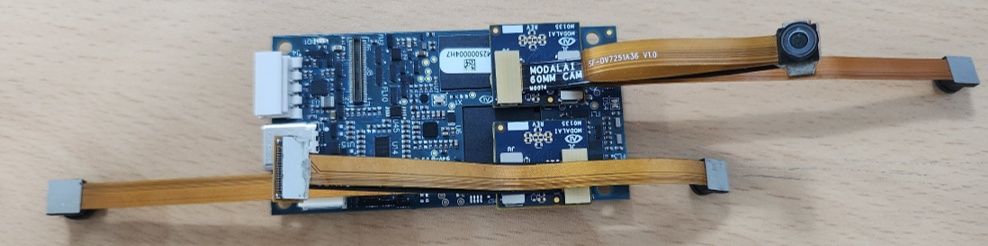
    @astro_phil , I just tested your configuration on voxl2 mini ov7251 connected to M0135 JL imx214 connected to M0135 JU M0135 interposer connected to Voxl2 mini J7 cameras are connected to hardware camera slots 2 and 3 respectively This particular board is using an old SDK but it should not matter, kernel variant 2.0.0 hw platform: M0104 mach.var: 2.0.0 -------------------------------------------------------------------------------- voxl-suite: 1.3.3 voxl-camera-server -l DEBUG: Attempting to open the hal module DEBUG: SUCCESS: Camera module opened on attempt 0 DEBUG: ----------- Number of cameras: 2 DEBUG: Cam idx: 0, Cam slot: 2, Slave Address: 0x00E2, Sensor Id: 0x7750 DEBUG: Cam idx: 1, Cam slot: 3, Slave Address: 0x0020, Sensor Id: 0x0214 DEBUG: Note: This list comes from the HAL module and may not be indicative DEBUG: of configurations that have full pipelines DEBUG: Number of cameras: 2 dmesg: [ 209.617719] CAM_INFO: CAM-ICP: cam_icp_mgr_hw_open: 3879 FW download done successfully [ 209.648730] qcom,camera ac50000.qcom,cci:qcom,cam-sensor3: Linked as a consumer to regulator.59 [ 209.649003] qcom,camera ac50000.qcom,cci:qcom,cam-sensor3: Linked as a consumer to regulator.55 [ 209.649103] qcom,camera ac50000.qcom,cci:qcom,cam-sensor3: Linked as a consumer to regulator.60 [ 209.649137] qcom,camera ac50000.qcom,cci:qcom,cam-sensor3: Linked as a consumer to regulator.79 [ 209.666156] CAM_INFO: CAM-SENSOR: cam_sensor_driver_cmd: 918 Probe success,slot:3,slave_addr:0x20,sensor_id:0x214 [ 209.666263] qcom,camera ac50000.qcom,cci:qcom,cam-sensor3: Dropping the link to regulator.79 [ 209.670389] qcom,camera ac50000.qcom,cci:qcom,cam-sensor3: Dropping the link to regulator.60 [ 209.670476] qcom,camera ac50000.qcom,cci:qcom,cam-sensor3: Dropping the link to regulator.55 [ 209.670541] qcom,camera ac50000.qcom,cci:qcom,cam-sensor3: Dropping the link to regulator.59 [ 209.688989] qcom,camera ac50000.qcom,cci:qcom,cam-sensor2: Linked as a consumer to regulator.59 [ 209.691170] qcom,camera ac50000.qcom,cci:qcom,cam-sensor2: Linked as a consumer to regulator.55 [ 209.693356] qcom,camera ac50000.qcom,cci:qcom,cam-sensor2: Linked as a consumer to regulator.60 [ 209.693454] qcom,camera ac50000.qcom,cci:qcom,cam-sensor2: Linked as a consumer to regulator.79 [ 209.717968] CAM_INFO: CAM-SENSOR: cam_sensor_set_alt_id: 731 [Applying Alternative Address] : Sensor Index : 2538021044 [ 209.717979] CAM_INFO: CAM-SENSOR: cam_sensor_set_alt_id: 732 [Applying Alternative Address] : Slave Address : 0xE2 [ 209.717988] CAM_INFO: CAM-SENSOR: cam_sensor_set_alt_id: 733 [Applying Alternative Address] : Slave sensor id: 0x7750 [ 209.717997] CAM_INFO: CAM-SENSOR: cam_sensor_set_alt_id: 734 [Applying Alternative Address] : cci_client sid : 0x71 [ 209.718308] CAM_INFO: CAM-SENSOR: cam_sensor_set_alt_id: 770 [Applying Alternative Address] : Probe : Alternate address updated [ 209.718543] CAM_INFO: CAM-SENSOR: cam_sensor_driver_cmd: 918 Probe success,slot:2,slave_addr:0xe2,sensor_id:0x7750 I also tested the same configuration in J6: voxl-camera-server -l DEBUG: Attempting to open the hal module DEBUG: SUCCESS: Camera module opened on attempt 0 DEBUG: ----------- Number of cameras: 2 DEBUG: Cam idx: 0, Cam slot: 0, Slave Address: 0x00E2, Sensor Id: 0x7750 DEBUG: Cam idx: 1, Cam slot: 1, Slave Address: 0x0020, Sensor Id: 0x0214 DEBUG: Note: This list comes from the HAL module and may not be indicative DEBUG: of configurations that have full pipelines DEBUG: Number of cameras: 2 dmesg [ 216.996797] CAM_INFO: CAM-ICP: cam_icp_mgr_hw_open: 3879 FW download done successfully [ 217.029303] qcom,camera ac4f000.qcom,cci:qcom,cam-sensor1: Linked as a consumer to regulator.58 [ 217.029395] qcom,camera ac4f000.qcom,cci:qcom,cam-sensor1: Linked as a consumer to regulator.55 [ 217.029484] qcom,camera ac4f000.qcom,cci:qcom,cam-sensor1: Linked as a consumer to regulator.60 [ 217.029516] qcom,camera ac4f000.qcom,cci:qcom,cam-sensor1: Linked as a consumer to regulator.79 [ 217.046069] CAM_INFO: CAM-SENSOR: cam_sensor_driver_cmd: 918 Probe success,slot:1,slave_addr:0x20,sensor_id:0x214 [ 217.046191] qcom,camera ac4f000.qcom,cci:qcom,cam-sensor1: Dropping the link to regulator.79 [ 217.050324] qcom,camera ac4f000.qcom,cci:qcom,cam-sensor1: Dropping the link to regulator.60 [ 217.050407] qcom,camera ac4f000.qcom,cci:qcom,cam-sensor1: Dropping the link to regulator.55 [ 217.050470] qcom,camera ac4f000.qcom,cci:qcom,cam-sensor1: Dropping the link to regulator.58 [ 217.069409] qcom,camera ac4f000.qcom,cci:qcom,cam-sensor0: Linked as a consumer to regulator.58 [ 217.071541] qcom,camera ac4f000.qcom,cci:qcom,cam-sensor0: Linked as a consumer to regulator.55 [ 217.073710] qcom,camera ac4f000.qcom,cci:qcom,cam-sensor0: Linked as a consumer to regulator.60 [ 217.073801] qcom,camera ac4f000.qcom,cci:qcom,cam-sensor0: Linked as a consumer to regulator.79 [ 217.097221] CAM_INFO: CAM-SENSOR: cam_sensor_set_alt_id: 731 [Applying Alternative Address] : Sensor Index : 390152372 [ 217.097229] CAM_INFO: CAM-SENSOR: cam_sensor_set_alt_id: 732 [Applying Alternative Address] : Slave Address : 0xE2 [ 217.097234] CAM_INFO: CAM-SENSOR: cam_sensor_set_alt_id: 733 [Applying Alternative Address] : Slave sensor id: 0x7750 [ 217.097239] CAM_INFO: CAM-SENSOR: cam_sensor_set_alt_id: 734 [Applying Alternative Address] : cci_client sid : 0x71 [ 217.097532] CAM_INFO: CAM-SENSOR: cam_sensor_set_alt_id: 770 [Applying Alternative Address] : Probe : Alternate address updated [ 217.097747] CAM_INFO: CAM-SENSOR: cam_sensor_driver_cmd: 918 Probe success,slot:0,slave_addr:0xe2,sensor_id:0x7750 By the way, i think the SDKs are now not including the imx214 driver for slot 1. If you need it, you can use the following drivers https://storage.googleapis.com/modalai_public/temp/imx214_test_bins/imx214_eis_drivers_20250815.zip for all camera slots. The only functional change of these drivers is that the maximum resolution of the sensor has been changed from 4208 x 3120 to 4196 x 3120 due to some optimizations in gpu-based debayering that require certain image width (long story, but you can still use this driver, just may need to adjust your camera server config so that you are not requesting impossible resolution). When you do your tests, please make sure you have the correct sensormodule id's for each camera in /usr/lib/camera . The slot number where the camera is physically plugged in has to match the index at the end of the sensormodule file name (before .bin). Alex