Subcategories

  • 155 Topics
    710 Posts
    Alex KushleyevA
    @astro_phil , I just tested your configuration on voxl2 mini ov7251 connected to M0135 JL imx214 connected to M0135 JU M0135 interposer connected to Voxl2 mini J7 cameras are connected to hardware camera slots 2 and 3 respectively This particular board is using an old SDK but it should not matter, kernel variant 2.0.0 hw platform: M0104 mach.var: 2.0.0 -------------------------------------------------------------------------------- voxl-suite: 1.3.3 voxl-camera-server -l DEBUG: Attempting to open the hal module DEBUG: SUCCESS: Camera module opened on attempt 0 DEBUG: ----------- Number of cameras: 2 DEBUG: Cam idx: 0, Cam slot: 2, Slave Address: 0x00E2, Sensor Id: 0x7750 DEBUG: Cam idx: 1, Cam slot: 3, Slave Address: 0x0020, Sensor Id: 0x0214 DEBUG: Note: This list comes from the HAL module and may not be indicative DEBUG: of configurations that have full pipelines DEBUG: Number of cameras: 2 dmesg: [ 209.617719] CAM_INFO: CAM-ICP: cam_icp_mgr_hw_open: 3879 FW download done successfully [ 209.648730] qcom,camera ac50000.qcom,cci:qcom,cam-sensor3: Linked as a consumer to regulator.59 [ 209.649003] qcom,camera ac50000.qcom,cci:qcom,cam-sensor3: Linked as a consumer to regulator.55 [ 209.649103] qcom,camera ac50000.qcom,cci:qcom,cam-sensor3: Linked as a consumer to regulator.60 [ 209.649137] qcom,camera ac50000.qcom,cci:qcom,cam-sensor3: Linked as a consumer to regulator.79 [ 209.666156] CAM_INFO: CAM-SENSOR: cam_sensor_driver_cmd: 918 Probe success,slot:3,slave_addr:0x20,sensor_id:0x214 [ 209.666263] qcom,camera ac50000.qcom,cci:qcom,cam-sensor3: Dropping the link to regulator.79 [ 209.670389] qcom,camera ac50000.qcom,cci:qcom,cam-sensor3: Dropping the link to regulator.60 [ 209.670476] qcom,camera ac50000.qcom,cci:qcom,cam-sensor3: Dropping the link to regulator.55 [ 209.670541] qcom,camera ac50000.qcom,cci:qcom,cam-sensor3: Dropping the link to regulator.59 [ 209.688989] qcom,camera ac50000.qcom,cci:qcom,cam-sensor2: Linked as a consumer to regulator.59 [ 209.691170] qcom,camera ac50000.qcom,cci:qcom,cam-sensor2: Linked as a consumer to regulator.55 [ 209.693356] qcom,camera ac50000.qcom,cci:qcom,cam-sensor2: Linked as a consumer to regulator.60 [ 209.693454] qcom,camera ac50000.qcom,cci:qcom,cam-sensor2: Linked as a consumer to regulator.79 [ 209.717968] CAM_INFO: CAM-SENSOR: cam_sensor_set_alt_id: 731 [Applying Alternative Address] : Sensor Index : 2538021044 [ 209.717979] CAM_INFO: CAM-SENSOR: cam_sensor_set_alt_id: 732 [Applying Alternative Address] : Slave Address : 0xE2 [ 209.717988] CAM_INFO: CAM-SENSOR: cam_sensor_set_alt_id: 733 [Applying Alternative Address] : Slave sensor id: 0x7750 [ 209.717997] CAM_INFO: CAM-SENSOR: cam_sensor_set_alt_id: 734 [Applying Alternative Address] : cci_client sid : 0x71 [ 209.718308] CAM_INFO: CAM-SENSOR: cam_sensor_set_alt_id: 770 [Applying Alternative Address] : Probe : Alternate address updated [ 209.718543] CAM_INFO: CAM-SENSOR: cam_sensor_driver_cmd: 918 Probe success,slot:2,slave_addr:0xe2,sensor_id:0x7750 I also tested the same configuration in J6: voxl-camera-server -l DEBUG: Attempting to open the hal module DEBUG: SUCCESS: Camera module opened on attempt 0 DEBUG: ----------- Number of cameras: 2 DEBUG: Cam idx: 0, Cam slot: 0, Slave Address: 0x00E2, Sensor Id: 0x7750 DEBUG: Cam idx: 1, Cam slot: 1, Slave Address: 0x0020, Sensor Id: 0x0214 DEBUG: Note: This list comes from the HAL module and may not be indicative DEBUG: of configurations that have full pipelines DEBUG: Number of cameras: 2 dmesg [ 216.996797] CAM_INFO: CAM-ICP: cam_icp_mgr_hw_open: 3879 FW download done successfully [ 217.029303] qcom,camera ac4f000.qcom,cci:qcom,cam-sensor1: Linked as a consumer to regulator.58 [ 217.029395] qcom,camera ac4f000.qcom,cci:qcom,cam-sensor1: Linked as a consumer to regulator.55 [ 217.029484] qcom,camera ac4f000.qcom,cci:qcom,cam-sensor1: Linked as a consumer to regulator.60 [ 217.029516] qcom,camera ac4f000.qcom,cci:qcom,cam-sensor1: Linked as a consumer to regulator.79 [ 217.046069] CAM_INFO: CAM-SENSOR: cam_sensor_driver_cmd: 918 Probe success,slot:1,slave_addr:0x20,sensor_id:0x214 [ 217.046191] qcom,camera ac4f000.qcom,cci:qcom,cam-sensor1: Dropping the link to regulator.79 [ 217.050324] qcom,camera ac4f000.qcom,cci:qcom,cam-sensor1: Dropping the link to regulator.60 [ 217.050407] qcom,camera ac4f000.qcom,cci:qcom,cam-sensor1: Dropping the link to regulator.55 [ 217.050470] qcom,camera ac4f000.qcom,cci:qcom,cam-sensor1: Dropping the link to regulator.58 [ 217.069409] qcom,camera ac4f000.qcom,cci:qcom,cam-sensor0: Linked as a consumer to regulator.58 [ 217.071541] qcom,camera ac4f000.qcom,cci:qcom,cam-sensor0: Linked as a consumer to regulator.55 [ 217.073710] qcom,camera ac4f000.qcom,cci:qcom,cam-sensor0: Linked as a consumer to regulator.60 [ 217.073801] qcom,camera ac4f000.qcom,cci:qcom,cam-sensor0: Linked as a consumer to regulator.79 [ 217.097221] CAM_INFO: CAM-SENSOR: cam_sensor_set_alt_id: 731 [Applying Alternative Address] : Sensor Index : 390152372 [ 217.097229] CAM_INFO: CAM-SENSOR: cam_sensor_set_alt_id: 732 [Applying Alternative Address] : Slave Address : 0xE2 [ 217.097234] CAM_INFO: CAM-SENSOR: cam_sensor_set_alt_id: 733 [Applying Alternative Address] : Slave sensor id: 0x7750 [ 217.097239] CAM_INFO: CAM-SENSOR: cam_sensor_set_alt_id: 734 [Applying Alternative Address] : cci_client sid : 0x71 [ 217.097532] CAM_INFO: CAM-SENSOR: cam_sensor_set_alt_id: 770 [Applying Alternative Address] : Probe : Alternate address updated [ 217.097747] CAM_INFO: CAM-SENSOR: cam_sensor_driver_cmd: 918 Probe success,slot:0,slave_addr:0xe2,sensor_id:0x7750 By the way, i think the SDKs are now not including the imx214 driver for slot 1. If you need it, you can use the following drivers https://storage.googleapis.com/modalai_public/temp/imx214_test_bins/imx214_eis_drivers_20250815.zip for all camera slots. The only functional change of these drivers is that the maximum resolution of the sensor has been changed from 4208 x 3120 to 4196 x 3120 due to some optimizations in gpu-based debayering that require certain image width (long story, but you can still use this driver, just may need to adjust your camera server config so that you are not requesting impossible resolution). When you do your tests, please make sure you have the correct sensormodule id's for each camera in /usr/lib/camera . The slot number where the camera is physically plugged in has to match the index at the end of the sensormodule file name (before .bin). Alex

  • Do you have a great idea for our products you would like to see implemented?

    26 Topics
    89 Posts
    Andriy LomakinA
    Dear Sir or Madam, We are currently evaluating navigation technologies for UAV and robotic platforms operating in GNSS-denied and contested environments. In particular, we are interested in solutions capable of operating without GPS/GNSS and, where possible, without relying on active radio-frequency communication links. Could you please provide information on your relevant products, including: GNSS-denied navigation capability; GPS-independent positioning; visual-inertial odometry, SLAM, inertial or terrain/map-based navigation capabilities; operation in radio-silent mode; integration options with UAV autopilots such as PX4, ArduPilot or proprietary flight controllers; technical specifications; pricing indication; delivery terms for Europe; export-control or end-user restrictions, if applicable. We would be grateful if you could also indicate the most appropriate contact person or department for further technical and commercial discussion. Kind regards, Andriy Lomakin
  • Are you looking for a 3D model of one of our products?

    33 Topics
    86 Posts
    Alex KushleyevA
    @nl_vdi , if you log into developer.modalai.com, you will see the CAD models. the latest model we have is: D0012-4-V3-C28-M36-T7-K0-Starling2-Max-V3-20260317.step [image: 1781036132877-376bf0dd-494a-4bf1-8d92-1b2d91afb83d-image.png]
  • Flight Core not passing RC input PWM commands

    5
    2
    0 Votes
    5 Posts
    1k Views
    Chad SweetC
    This sounds similar to the R/C passthrough instructions for the gimbal found here
  • Flying Predetermined Course in GPS-Denied Environments

    3
    0 Votes
    3 Posts
    664 Views
    todd45040T
    Thanks for the info., it's not too late. We will work the task in the upcoming week. We'll make a few attempts and report back our outcome. Thanks again, -Todd
  • 0 Votes
    6 Posts
    2k Views
    S
    @shlee853 I found a v3.5.6 on the github. I'll try on this version. https://github.com/mavlink/qgroundcontrol/releases/tag/v3.5.6 Thannks,
  • object avoidance feature is disabled?

    2
    0 Votes
    2 Posts
    523 Views
    ?
    The obstacle avoidance on voxl uses the disparity map coming out of voxl-dfs-server (so make sure this is running if you want obstacle avoidance), and passes the obstacle data into the standard px4 bins (thus using the px4 avoidance algorithm)
  • execute script to start docker container on start up

    4
    0 Votes
    4 Posts
    1k Views
    kasarrowtecK
    So i managed to get it to work with the following service file and script file - [Unit] After=docker-autorun.service [Service] Type=simple ExecStart=/bin/bash /home/root/mastervoxl_init.sh [Install] WantedBy=multi-user.target #!/bin/bash echo 'initializing mastervoxl docker container' docker run --restart=always -i mastervoxl /bin/bash
  • Sanity test for unusual use-case

    8
    0 Votes
    8 Posts
    1k Views
    Eric KatzfeyE
    @Thomas-MacNamara Awesome! What a cool application!
  • USB Gadget ConfigFS in VOXL

    9
    0 Votes
    9 Posts
    1k Views
    Thomas MacNamaraT
    After no small amount of playing around and Googling I think I have hit the wall. If I set them as = y then the build won't boot when deployed through fastboot if I set them as =m then they just stay as unset # CONFIG_USB_CONFIGFS is not set # CONFIG_USB_GADGETFS is not set I did check to see if the WIFI was running on the failed boots just incase the change was breaking ADB but it seems the build just does not like those flags. It is so frustrating to know the hardware is there and the implementation is possible (Rasberry-pi HID is pritty dang easy). Especially seeing as the underwater stuff is working. The non USB solution is just to go via ethernet but that is just a lot of things being bolted on to the poor thing. Thanks for the help though.
  • Obstacle_Detection messages not appearing

    17
    0 Votes
    17 Posts
    2k Views
    Daniel RyuD
    @Alex-Gardner That was it, the ip address was not inputted correctly. Thanks!
  • MAVSDK Image not building

    3
    1
    0 Votes
    3 Posts
    437 Views
    Daniel RyuD
    @modaltb Not an issue anymore, thanks. I simply rebuilt the image from the very first step. Best guess is something corrupted the original
  • Obstacle avoidance - Offboard mode

    1
    0 Votes
    1 Posts
    448 Views
    No one has replied
  • VOXL VIO not sending position over Odometry Message

    4
    4
    0 Votes
    4 Posts
    508 Views
    Daniel RyuD
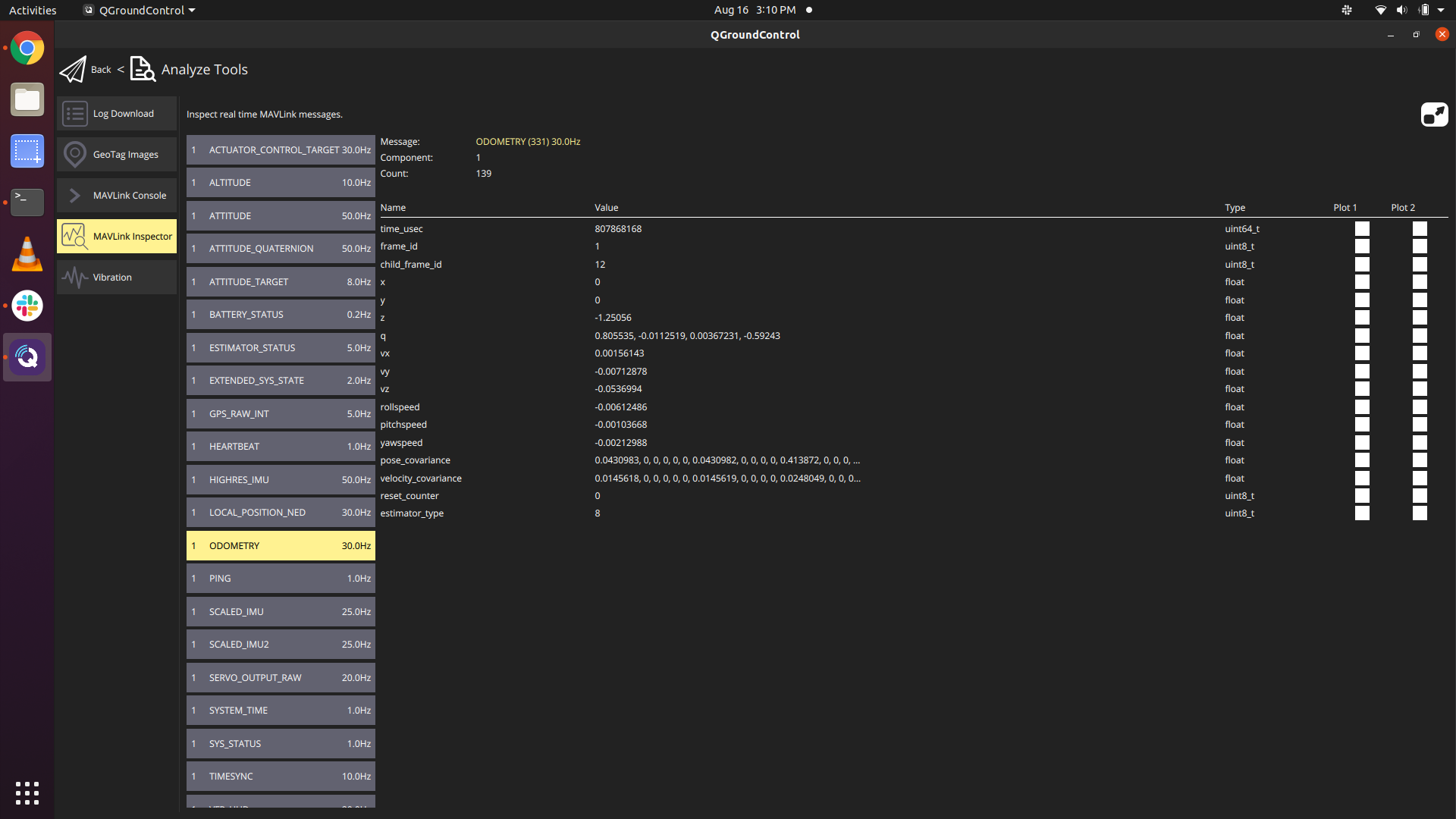
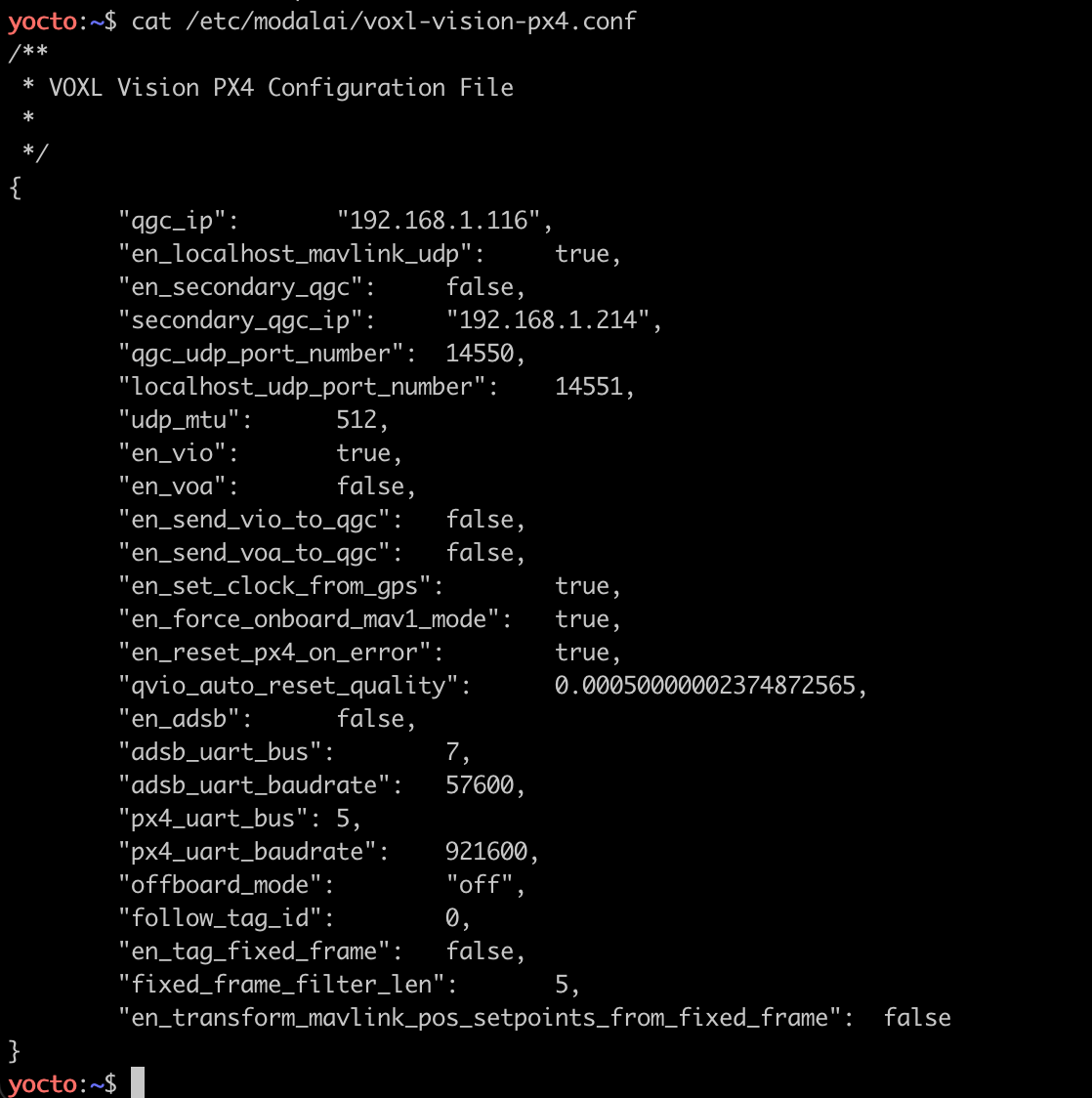
    @Alex-Gardner Found the solution. Here are the steps to make sure VIO is working properly. Make sure VIO is enabled in the voxl-vision-px4.conf file Make sure PX4 parameters are updated Ensure voxl-camera-server, voxl-qvio-server, and voxl-vision-px4 services are all running in the background If you could add step 2 into the documentation it would help a lot. As is, I had to do a lot of forum searching to figure this out. https://forum.modalai.com/topic/140/vio-indoor-navigation
  • voxl-streamer through IPv6

    2
    0 Votes
    2 Posts
    541 Views
    Eric KatzfeyE
    Unfortunately, we have never tried anything but IPv4, and don't really have much of any experience using IPv6 in general.
  • Can't find April tag settings in system image 3.3.0

    2
    1
    0 Votes
    2 Posts
    335 Views
    ?
    The vvpx4 option is the second to last one there: "en_tag_fixed_frame". In order to use tag localization, make sure the voxl-tag-detector service is running. The config file for this is at /etc/modalai/voxl-tag-detector.conf and you can specify the tag locations at /etc/modalai/tag_locations.conf
  • Error in building voxl-build

    5
    0 Votes
    5 Posts
    826 Views
    tomT
    Great, thank you!
  • 0 Votes
    10 Posts
    2k Views
    modaltbM
    Hi @DarkKnightCH , It's likely something you can setup in your transmitter, or perhaps reset the transmitter to default state. What make and model do you have?
  • Documentation clarification in Camera IMU coordinate frames

    2
    0 Votes
    2 Posts
    464 Views
    Chad SweetC
    That page needs to be updated. The concepts are good but that xml format is out of date. So, voxl-configure-extrinsics is likely the right approach for changing the values We will try to get that page updated in the next day or two to be more clear
  • How to Power Xavier boards from VOXL?

    2
    0 Votes
    2 Posts
    331 Views
    Chad SweetC
    We have never used a Xavier, sorry
  • 0 Votes
    1 Posts
    331 Views
    No one has replied
  • Why VOXL-M500 choose Spektrum satellite receiver as the receiver?

    2
    0 Votes
    2 Posts
    570 Views
    modaltbM
    Hi @DarkKnightCH , We offer other receivers to be installed on the m500 as well, but roughly: weight and size, indoor flying was a primary first use case, spectrum is good for that. For outdoor it works but the range isn’t great, so you could use another receiver. The satellite receiver 100 percent works as we’ve shipped hundreds in this config, but please choose from the options that fit your need for longer range. If you need BVLOS, consider LTE instead, but you should be savvy to setup a VPN server! No main reciever needed. The satellite receiver is put into binding mode via a button in QGC. We’ve bound hundreds of vehicles this way. After pressing the button, the reciever flashes it’s LED quickly to indicate it’s in binding mode. Please note, there are knock offs “spektrums” in the world that may not work.
  • Position Drift in Outdoor GPS Flight (non-VIO)

    2
    0 Votes
    2 Posts
    465 Views
    B
    Here is a link to my .param file: https://drive.google.com/file/d/14DA0fQ8Q4PowwlFXMUfU_w1wteXpM9rk/view?usp=sharing