Subcategories

  • 155 Topics
    710 Posts
    Alex KushleyevA
    @astro_phil , I just tested your configuration on voxl2 mini ov7251 connected to M0135 JL imx214 connected to M0135 JU M0135 interposer connected to Voxl2 mini J7 cameras are connected to hardware camera slots 2 and 3 respectively This particular board is using an old SDK but it should not matter, kernel variant 2.0.0 hw platform: M0104 mach.var: 2.0.0 -------------------------------------------------------------------------------- voxl-suite: 1.3.3 voxl-camera-server -l DEBUG: Attempting to open the hal module DEBUG: SUCCESS: Camera module opened on attempt 0 DEBUG: ----------- Number of cameras: 2 DEBUG: Cam idx: 0, Cam slot: 2, Slave Address: 0x00E2, Sensor Id: 0x7750 DEBUG: Cam idx: 1, Cam slot: 3, Slave Address: 0x0020, Sensor Id: 0x0214 DEBUG: Note: This list comes from the HAL module and may not be indicative DEBUG: of configurations that have full pipelines DEBUG: Number of cameras: 2 dmesg: [ 209.617719] CAM_INFO: CAM-ICP: cam_icp_mgr_hw_open: 3879 FW download done successfully [ 209.648730] qcom,camera ac50000.qcom,cci:qcom,cam-sensor3: Linked as a consumer to regulator.59 [ 209.649003] qcom,camera ac50000.qcom,cci:qcom,cam-sensor3: Linked as a consumer to regulator.55 [ 209.649103] qcom,camera ac50000.qcom,cci:qcom,cam-sensor3: Linked as a consumer to regulator.60 [ 209.649137] qcom,camera ac50000.qcom,cci:qcom,cam-sensor3: Linked as a consumer to regulator.79 [ 209.666156] CAM_INFO: CAM-SENSOR: cam_sensor_driver_cmd: 918 Probe success,slot:3,slave_addr:0x20,sensor_id:0x214 [ 209.666263] qcom,camera ac50000.qcom,cci:qcom,cam-sensor3: Dropping the link to regulator.79 [ 209.670389] qcom,camera ac50000.qcom,cci:qcom,cam-sensor3: Dropping the link to regulator.60 [ 209.670476] qcom,camera ac50000.qcom,cci:qcom,cam-sensor3: Dropping the link to regulator.55 [ 209.670541] qcom,camera ac50000.qcom,cci:qcom,cam-sensor3: Dropping the link to regulator.59 [ 209.688989] qcom,camera ac50000.qcom,cci:qcom,cam-sensor2: Linked as a consumer to regulator.59 [ 209.691170] qcom,camera ac50000.qcom,cci:qcom,cam-sensor2: Linked as a consumer to regulator.55 [ 209.693356] qcom,camera ac50000.qcom,cci:qcom,cam-sensor2: Linked as a consumer to regulator.60 [ 209.693454] qcom,camera ac50000.qcom,cci:qcom,cam-sensor2: Linked as a consumer to regulator.79 [ 209.717968] CAM_INFO: CAM-SENSOR: cam_sensor_set_alt_id: 731 [Applying Alternative Address] : Sensor Index : 2538021044 [ 209.717979] CAM_INFO: CAM-SENSOR: cam_sensor_set_alt_id: 732 [Applying Alternative Address] : Slave Address : 0xE2 [ 209.717988] CAM_INFO: CAM-SENSOR: cam_sensor_set_alt_id: 733 [Applying Alternative Address] : Slave sensor id: 0x7750 [ 209.717997] CAM_INFO: CAM-SENSOR: cam_sensor_set_alt_id: 734 [Applying Alternative Address] : cci_client sid : 0x71 [ 209.718308] CAM_INFO: CAM-SENSOR: cam_sensor_set_alt_id: 770 [Applying Alternative Address] : Probe : Alternate address updated [ 209.718543] CAM_INFO: CAM-SENSOR: cam_sensor_driver_cmd: 918 Probe success,slot:2,slave_addr:0xe2,sensor_id:0x7750 I also tested the same configuration in J6: voxl-camera-server -l DEBUG: Attempting to open the hal module DEBUG: SUCCESS: Camera module opened on attempt 0 DEBUG: ----------- Number of cameras: 2 DEBUG: Cam idx: 0, Cam slot: 0, Slave Address: 0x00E2, Sensor Id: 0x7750 DEBUG: Cam idx: 1, Cam slot: 1, Slave Address: 0x0020, Sensor Id: 0x0214 DEBUG: Note: This list comes from the HAL module and may not be indicative DEBUG: of configurations that have full pipelines DEBUG: Number of cameras: 2 dmesg [ 216.996797] CAM_INFO: CAM-ICP: cam_icp_mgr_hw_open: 3879 FW download done successfully [ 217.029303] qcom,camera ac4f000.qcom,cci:qcom,cam-sensor1: Linked as a consumer to regulator.58 [ 217.029395] qcom,camera ac4f000.qcom,cci:qcom,cam-sensor1: Linked as a consumer to regulator.55 [ 217.029484] qcom,camera ac4f000.qcom,cci:qcom,cam-sensor1: Linked as a consumer to regulator.60 [ 217.029516] qcom,camera ac4f000.qcom,cci:qcom,cam-sensor1: Linked as a consumer to regulator.79 [ 217.046069] CAM_INFO: CAM-SENSOR: cam_sensor_driver_cmd: 918 Probe success,slot:1,slave_addr:0x20,sensor_id:0x214 [ 217.046191] qcom,camera ac4f000.qcom,cci:qcom,cam-sensor1: Dropping the link to regulator.79 [ 217.050324] qcom,camera ac4f000.qcom,cci:qcom,cam-sensor1: Dropping the link to regulator.60 [ 217.050407] qcom,camera ac4f000.qcom,cci:qcom,cam-sensor1: Dropping the link to regulator.55 [ 217.050470] qcom,camera ac4f000.qcom,cci:qcom,cam-sensor1: Dropping the link to regulator.58 [ 217.069409] qcom,camera ac4f000.qcom,cci:qcom,cam-sensor0: Linked as a consumer to regulator.58 [ 217.071541] qcom,camera ac4f000.qcom,cci:qcom,cam-sensor0: Linked as a consumer to regulator.55 [ 217.073710] qcom,camera ac4f000.qcom,cci:qcom,cam-sensor0: Linked as a consumer to regulator.60 [ 217.073801] qcom,camera ac4f000.qcom,cci:qcom,cam-sensor0: Linked as a consumer to regulator.79 [ 217.097221] CAM_INFO: CAM-SENSOR: cam_sensor_set_alt_id: 731 [Applying Alternative Address] : Sensor Index : 390152372 [ 217.097229] CAM_INFO: CAM-SENSOR: cam_sensor_set_alt_id: 732 [Applying Alternative Address] : Slave Address : 0xE2 [ 217.097234] CAM_INFO: CAM-SENSOR: cam_sensor_set_alt_id: 733 [Applying Alternative Address] : Slave sensor id: 0x7750 [ 217.097239] CAM_INFO: CAM-SENSOR: cam_sensor_set_alt_id: 734 [Applying Alternative Address] : cci_client sid : 0x71 [ 217.097532] CAM_INFO: CAM-SENSOR: cam_sensor_set_alt_id: 770 [Applying Alternative Address] : Probe : Alternate address updated [ 217.097747] CAM_INFO: CAM-SENSOR: cam_sensor_driver_cmd: 918 Probe success,slot:0,slave_addr:0xe2,sensor_id:0x7750 By the way, i think the SDKs are now not including the imx214 driver for slot 1. If you need it, you can use the following drivers https://storage.googleapis.com/modalai_public/temp/imx214_test_bins/imx214_eis_drivers_20250815.zip for all camera slots. The only functional change of these drivers is that the maximum resolution of the sensor has been changed from 4208 x 3120 to 4196 x 3120 due to some optimizations in gpu-based debayering that require certain image width (long story, but you can still use this driver, just may need to adjust your camera server config so that you are not requesting impossible resolution). When you do your tests, please make sure you have the correct sensormodule id's for each camera in /usr/lib/camera . The slot number where the camera is physically plugged in has to match the index at the end of the sensormodule file name (before .bin). Alex

  • Do you have a great idea for our products you would like to see implemented?

    26 Topics
    89 Posts
    Andriy LomakinA
    Dear Sir or Madam, We are currently evaluating navigation technologies for UAV and robotic platforms operating in GNSS-denied and contested environments. In particular, we are interested in solutions capable of operating without GPS/GNSS and, where possible, without relying on active radio-frequency communication links. Could you please provide information on your relevant products, including: GNSS-denied navigation capability; GPS-independent positioning; visual-inertial odometry, SLAM, inertial or terrain/map-based navigation capabilities; operation in radio-silent mode; integration options with UAV autopilots such as PX4, ArduPilot or proprietary flight controllers; technical specifications; pricing indication; delivery terms for Europe; export-control or end-user restrictions, if applicable. We would be grateful if you could also indicate the most appropriate contact person or department for further technical and commercial discussion. Kind regards, Andriy Lomakin
  • Are you looking for a 3D model of one of our products?

    33 Topics
    86 Posts
    Alex KushleyevA
    @nl_vdi , if you log into developer.modalai.com, you will see the CAD models. the latest model we have is: D0012-4-V3-C28-M36-T7-K0-Starling2-Max-V3-20260317.step [image: 1781036132877-376bf0dd-494a-4bf1-8d92-1b2d91afb83d-image.png]
  • Obstacle Course conference competition using the M500

    3
    0 Votes
    3 Posts
    533 Views
    modaltbM
    @Cool-Karp , Congrats on your success! We are all here to learn so if you have any features you find missing that you found on another development platform please let us know! Thanks
  • Altitude accuracy

    4
    0 Votes
    4 Posts
    628 Views
    m4v3rM
    @blakekrpec As I understand the ECL/EKF library integration so far, you can run several instances that each will fuse different sensor combinations (with individual blending) to accommodate for estimation state errors and the like....
  • MAVROS not connecting to FCU on m500

    2
    3
    0 Votes
    2 Posts
    698 Views
    Chad SweetC
    Have you followed the mavros tutorial here?
  • Screws used on VOXL Flight Deck for Hires Cam

    2
    1
    0 Votes
    2 Posts
    731 Views
    Sam ArmstrongS
    Hello, they are M1.6 x 6mm.
  • Collision Prevention

    14
    0 Votes
    14 Posts
    2k Views
    Daniel RyuD
    @Prasad-Antervedi Try following these: https://docs.modalai.com/calibrate-cameras/
  • Determine if auto exposure is turned on

    2
    0 Votes
    2 Posts
    595 Views
    ?
    Camera server has auto-exposure enabled by default on all the cameras, you can verify this by looking at /etc/modalai/voxl-camera-server.conf and by running voxl-inspect-cam hires_preview and shading the lens with your hand, watching the exposure go up and down.
  • TOF Images and Frame data not sending

    3
    3
    0 Votes
    3 Posts
    510 Views
    Daniel RyuD
    @Alex-Gardner Worked, thanks!
  • VİO

    4
    0 Votes
    4 Posts
    834 Views
    Daniel RyuD
    Not modalai, but something that helped me debug this very same issue was installing voxl-portal, and using that to view the qvio stream, which will overlay the points onto the tracking camera screen. If it creates points at your drone's motors and feet, then I presume it would be a problem
  • TOF Ros launch file not found

    2
    0 Votes
    2 Posts
    528 Views
    Daniel RyuD
    Found the repository that stores the code here https://gitlab.com/voxl-public/old-projects/voxl-hal3-tof-cam-ros. If this link could be placed in the documentation for future viewers, that would be great
  • Intermittent crashing of voxl-camera-server during VOA testing

    6
    0 Votes
    6 Posts
    1k Views
    J
    Thanks for printing out those resolutions. Very helpful! yocto:~$ voxl-camera-server -d 1 exising instance of voxl-camera-server found, attempting to stop it ------ voxl-camera-server INFO: Port J2 ------ voxl-camera-server: Done configuring hires camera Port : port_J2 Name : hires Enabled : 1 Type : hires Api : hal3 P-W : 640 P-H : 480 P-Fmt : nv21 FPS : 30 OverrideId : -1 AEAlgo : isp ------ voxl-camera-server INFO: Port J3 ------ voxl-camera-server: Done configuring stereo camera Port : port_J3 Name : stereo Enabled : 1 Type : stereo Api : hal3 P-W : 1280 P-H : 480 P-Fmt : nv21 FPS : 30 OverrideId : -1 AEAlgo : modalai =================MODALAI Auto Exposure Settings================== gain_min: 0 gain_max: 1000 exposure_min_us: 100 exposure_max_us: 33000 desired_msv: 58.000000 k_p_ns: 32000.000000 k_i_ns: 20.000000 max_i: 250.000000 p_good_thresh: 3 exposure_period: 1 gain_period: 2 display_debug: no exposure_offset_for_gain_calc: 8000 ================================================================= ------ voxl-camera-server INFO: Port J4 ------ voxl-camera-server: Done configuring tracking camera Port : port_J4 Name : tracking Enabled : 1 Type : tracking Api : hal3 P-W : 640 P-H : 480 P-Fmt : raw8 FPS : 30 OverrideId : -1 AEAlgo : modalai =================MODALAI Auto Exposure Settings================== gain_min: 0 gain_max: 1000 exposure_min_us: 100 exposure_max_us: 33000 desired_msv: 58.000000 k_p_ns: 32000.000000 k_i_ns: 20.000000 max_i: 250.000000 p_good_thresh: 3 exposure_period: 1 gain_period: 2 display_debug: no exposure_offset_for_gain_calc: 8000 ================================================================= Writing new configuration to /etc/modalai/voxl-camera-server.conf Created pipe: hires_preview channel: 0 Created pipe: stereo channel: 1 Created pipe: tracking channel: 2 Starting Camera: tracking SUCCESS: Camera module opened ----------- Number of cameras: 3 ------ voxl-camera-server INFO: Client: qvio-server0 connected to channel: 2 ------ voxl-camera-server ERROR: Client connected to invalid channel: 0 ------ voxl-camera-server ERROR: Client connected to invalid channel: 1 ----------- HiRes camera id: 0 ----------- Stereo camera id: 2 ----------- Mono camera id: 1 ------ voxl-camera-server INFO: Client: voxl-streamer0 connected to channel: 2 Available resolutions for camera: tracking: 640 x 480 320 x 240 Resolution: 640 x 480 Found! ------ voxl-camera-server: Preview buffer allocations Internal Exposure for: tracking 2 /builds/voxl-public/modal-pipe-architecture/voxl-camera-server/src/expgain_interface/expgain_interface_factory.cpp 45 Creating exposure interface Creating ModalAI exposure interface Port : port_J4 Name : tracking Enabled : 1 Type : tracking Api : hal3 P-W : 640 P-H : 480 P-Fmt : raw8 FPS : 30 OverrideId : -1 AEAlgo : modalai =================MODALAI Auto Exposure Settings================== gain_min: 0 gain_max: 1000 exposure_min_us: 100 exposure_max_us: 33000 desired_msv: 58.000000 k_p_ns: 32000.000000 k_i_ns: 20.000000 max_i: 250.000000 p_good_thresh: 3 exposure_period: 1 gain_period: 2 display_debug: no exposure_offset_for_gain_calc: 8000 ================================================================= Starting Camera: hires Available resolutions for camera: hires: 4160 x 3120 4056 x 3040 4000 x 3000 3040 x 3040 3016 x 3016 3840 x 2160 3648 x 2736 3264 x 2448 3200 x 2400 2976 x 2976 3044 x 1720 2704 x 2028 2704 x 1520 2592 x 1944 2688 x 1512 2028 x 1144 2160 x 2160 1920 x 2160 1920 x 1920 1880 x 1880 2048 x 1536 1920 x 1440 1920 x 1080 1600 x 1600 1600 x 1200 1520 x 1520 1440 x 1080 1080 x 1080 1280 x 960 1340 x 760 1280 x 768 1280 x 720 1200 x 1200 1280 x 640 1280 x 480 1040 x 780 1024 x 768 960 x 960 720 x 720 800 x 600 960 x 720 848 x 480 858 x 480 864 x 480 800 x 480 720 x 480 640 x 480 640 x 240 640 x 360 480 x 640 480 x 480 480 x 360 480 x 320 432 x 240 352 x 288 320 x 240 Resolution: 640 x 480 Found! ------ voxl-camera-server: Preview buffer allocations Port : port_J2 Name : hires Enabled : 1 Type : hires Api : hal3 P-W : 640 P-H : 480 P-Fmt : nv21 FPS : 30 OverrideId : -1 AEAlgo : isp Starting Camera: stereo Available resolutions for camera: stereo: 1280 x 480 848 x 480 858 x 480 864 x 480 800 x 480 720 x 480 640 x 480 640 x 240 640 x 360 480 x 480 480 x 360 480 x 320 432 x 240 352 x 288 320 x 240 Resolution: 1280 x 480 Found! ------ voxl-camera-server: Preview buffer allocations Internal Exposure for: stereo 1 /builds/voxl-public/modal-pipe-architecture/voxl-camera-server/src/expgain_interface/expgain_interface_factory.cpp 45 Creating exposure interface Creating ModalAI exposure interface Received raw10 frame, checking to see if is actually raw8 Frame was actually 8 bit, sending as is Port : port_J3 Name : stereo Enabled : 1 Type : stereo Api : hal3 P-W : 1280 P-H : 480 P-Fmt : nv21 FPS : 30 OverrideId : -1 AEAlgo : modalai =================MODALAI Auto Exposure Settings================== gain_min: 0 gain_max: 1000 exposure_min_us: 100 exposure_max_us: 33000 desired_msv: 58.000000 k_p_ns: 32000.000000 k_i_ns: 20.000000 max_i: 250.000000 p_good_thresh: 3 exposure_period: 1 gain_period: 2 display_debug: no exposure_offset_for_gain_calc: 8000 ================================================================= ------ voxl-camera-server: Camera server is now running
  • voxl-tflite-server: "FATAL: Unsupported model provided!!"

    9
    0 Votes
    9 Posts
    2k Views
    ?
    @colerose we selected mobilenetv2 because of its exceptional performance on embedded devices - currently, inference time in the voxl-tflite-server is ~22ms per frame with very high precision. Also, the mobilenet family is fairly easy to retrain with a custom dataset!
  • VOXL on Intel-Galileo & Pixhawk Cube

    5
    0 Votes
    5 Posts
    683 Views
    modaltbM
    Hi @Ador , Unfortunately it's not that straight forward. Most of the code won't be portable, the first candidates to be ported would be from here: https://gitlab.com/voxl-public/core-libs The system image (what Yocto is building) has many hardware dependent items, and we aren't pulling the application layer in during the bitbake process, rather later on we install on top. As an example, part of our software stack run on Hexagon DSP processor (a MAVLink parser) which wouldn't exist on RPi etc so it wouldn't work.
  • Stream from Gimbal freezes in 2 seconds

    14
    3
    0 Votes
    14 Posts
    1k Views
    Daniel RyuD
    https://forum.modalai.com/topic/460/integrating-flir-boson-as-usb-connected-camera-on-voxl/3 Issue with UVC cameras in general has moved here
  • Rotating the tracking camera

    2
    0 Votes
    2 Posts
    420 Views
    ?
    That should work fine, keep in mind that you should change the extrinsic with relation to imu0 as well, and that you may need to change the translation if you're not able to rotate it perfectly in place. VIO will converge internally to the actual rotation/translation values as long as they're close enough, but it can lead to errors if they're not.
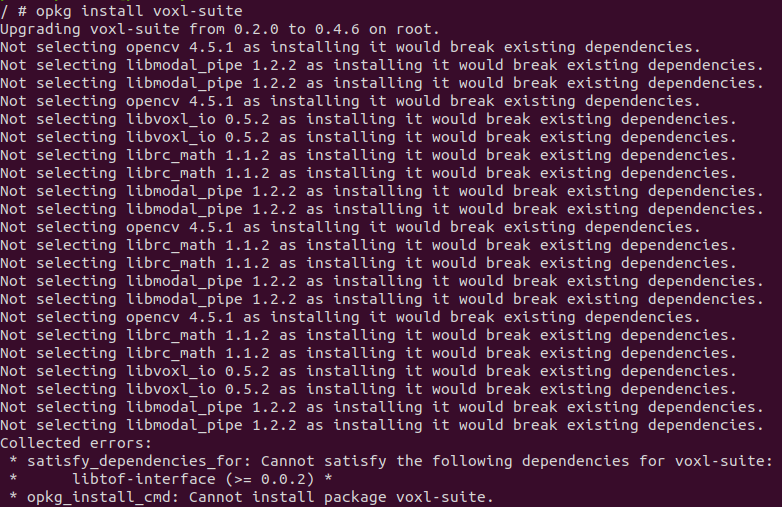
  • Problems updating voxl-suite

    3
    2
    0 Votes
    3 Posts
    628 Views
    A
    Oh thank you! I will try to flash this new image. Thanks for the fast response.
  • Gimbal camera streaming not starting

    19
    2
    0 Votes
    19 Posts
    3k Views
    Daniel RyuD
    Solution: sometimes when just binding the RC controller, the inputs aren't shown. Make sure to restart drone after rebinding. Additionally, I've found different controllers have different lever/switch inputs, so its good to use QGC to look for the responsive switches and assign the ones you want accordingly
  • M500 Checklist

    3
    0 Votes
    3 Posts
    573 Views
    todd45040T
    Thank you! Very helpful. I figured out where I had seen the checklist, it was available for download in an email you folks sent out July 20th.
  • Companion Computer NVIDIA Nano

    2
    0 Votes
    2 Posts
    535 Views
    modaltbM
    Hi @simo , That's likely a question for NVIDIA We can help you with our companion computer though! In general, you'll want to get a 3.3V TTL port on the NVIDIA side, setup the correct baud rate, and then use their mavros software). Thanks! Travis
  • Stereo Cameras are highly inaccurate

    11
    4
    0 Votes
    11 Posts
    2k Views
    Daniel RyuD
    @Chad-Sweet The fix in the dev branch successfully populates the 0th degree bin for obstacle detection. We are now able to run VOA mostly successfully, with one observable bug with the voxl-camera-server/voxl-dfs-server. Please see this post for details: https://forum.modalai.com/topic/450/intermittent-crashing-of-voxl-camera-server-during-voa-testing?_=1631837674205
  • Unable to ssh into voxl m500

    3
    0 Votes
    3 Posts
    404 Views
    Ahmed MekkyA
    Hi Chad, I tried a different windows ssh software and it worked fine. I could ssh into the VOXL using "Termius". It could be an issue of encryption or inherent setup. Thanks,