Subcategories

  • 155 Topics
    710 Posts
    Alex KushleyevA
    @astro_phil , I just tested your configuration on voxl2 mini ov7251 connected to M0135 JL imx214 connected to M0135 JU M0135 interposer connected to Voxl2 mini J7 cameras are connected to hardware camera slots 2 and 3 respectively This particular board is using an old SDK but it should not matter, kernel variant 2.0.0 hw platform: M0104 mach.var: 2.0.0 -------------------------------------------------------------------------------- voxl-suite: 1.3.3 voxl-camera-server -l DEBUG: Attempting to open the hal module DEBUG: SUCCESS: Camera module opened on attempt 0 DEBUG: ----------- Number of cameras: 2 DEBUG: Cam idx: 0, Cam slot: 2, Slave Address: 0x00E2, Sensor Id: 0x7750 DEBUG: Cam idx: 1, Cam slot: 3, Slave Address: 0x0020, Sensor Id: 0x0214 DEBUG: Note: This list comes from the HAL module and may not be indicative DEBUG: of configurations that have full pipelines DEBUG: Number of cameras: 2 dmesg: [ 209.617719] CAM_INFO: CAM-ICP: cam_icp_mgr_hw_open: 3879 FW download done successfully [ 209.648730] qcom,camera ac50000.qcom,cci:qcom,cam-sensor3: Linked as a consumer to regulator.59 [ 209.649003] qcom,camera ac50000.qcom,cci:qcom,cam-sensor3: Linked as a consumer to regulator.55 [ 209.649103] qcom,camera ac50000.qcom,cci:qcom,cam-sensor3: Linked as a consumer to regulator.60 [ 209.649137] qcom,camera ac50000.qcom,cci:qcom,cam-sensor3: Linked as a consumer to regulator.79 [ 209.666156] CAM_INFO: CAM-SENSOR: cam_sensor_driver_cmd: 918 Probe success,slot:3,slave_addr:0x20,sensor_id:0x214 [ 209.666263] qcom,camera ac50000.qcom,cci:qcom,cam-sensor3: Dropping the link to regulator.79 [ 209.670389] qcom,camera ac50000.qcom,cci:qcom,cam-sensor3: Dropping the link to regulator.60 [ 209.670476] qcom,camera ac50000.qcom,cci:qcom,cam-sensor3: Dropping the link to regulator.55 [ 209.670541] qcom,camera ac50000.qcom,cci:qcom,cam-sensor3: Dropping the link to regulator.59 [ 209.688989] qcom,camera ac50000.qcom,cci:qcom,cam-sensor2: Linked as a consumer to regulator.59 [ 209.691170] qcom,camera ac50000.qcom,cci:qcom,cam-sensor2: Linked as a consumer to regulator.55 [ 209.693356] qcom,camera ac50000.qcom,cci:qcom,cam-sensor2: Linked as a consumer to regulator.60 [ 209.693454] qcom,camera ac50000.qcom,cci:qcom,cam-sensor2: Linked as a consumer to regulator.79 [ 209.717968] CAM_INFO: CAM-SENSOR: cam_sensor_set_alt_id: 731 [Applying Alternative Address] : Sensor Index : 2538021044 [ 209.717979] CAM_INFO: CAM-SENSOR: cam_sensor_set_alt_id: 732 [Applying Alternative Address] : Slave Address : 0xE2 [ 209.717988] CAM_INFO: CAM-SENSOR: cam_sensor_set_alt_id: 733 [Applying Alternative Address] : Slave sensor id: 0x7750 [ 209.717997] CAM_INFO: CAM-SENSOR: cam_sensor_set_alt_id: 734 [Applying Alternative Address] : cci_client sid : 0x71 [ 209.718308] CAM_INFO: CAM-SENSOR: cam_sensor_set_alt_id: 770 [Applying Alternative Address] : Probe : Alternate address updated [ 209.718543] CAM_INFO: CAM-SENSOR: cam_sensor_driver_cmd: 918 Probe success,slot:2,slave_addr:0xe2,sensor_id:0x7750 I also tested the same configuration in J6: voxl-camera-server -l DEBUG: Attempting to open the hal module DEBUG: SUCCESS: Camera module opened on attempt 0 DEBUG: ----------- Number of cameras: 2 DEBUG: Cam idx: 0, Cam slot: 0, Slave Address: 0x00E2, Sensor Id: 0x7750 DEBUG: Cam idx: 1, Cam slot: 1, Slave Address: 0x0020, Sensor Id: 0x0214 DEBUG: Note: This list comes from the HAL module and may not be indicative DEBUG: of configurations that have full pipelines DEBUG: Number of cameras: 2 dmesg [ 216.996797] CAM_INFO: CAM-ICP: cam_icp_mgr_hw_open: 3879 FW download done successfully [ 217.029303] qcom,camera ac4f000.qcom,cci:qcom,cam-sensor1: Linked as a consumer to regulator.58 [ 217.029395] qcom,camera ac4f000.qcom,cci:qcom,cam-sensor1: Linked as a consumer to regulator.55 [ 217.029484] qcom,camera ac4f000.qcom,cci:qcom,cam-sensor1: Linked as a consumer to regulator.60 [ 217.029516] qcom,camera ac4f000.qcom,cci:qcom,cam-sensor1: Linked as a consumer to regulator.79 [ 217.046069] CAM_INFO: CAM-SENSOR: cam_sensor_driver_cmd: 918 Probe success,slot:1,slave_addr:0x20,sensor_id:0x214 [ 217.046191] qcom,camera ac4f000.qcom,cci:qcom,cam-sensor1: Dropping the link to regulator.79 [ 217.050324] qcom,camera ac4f000.qcom,cci:qcom,cam-sensor1: Dropping the link to regulator.60 [ 217.050407] qcom,camera ac4f000.qcom,cci:qcom,cam-sensor1: Dropping the link to regulator.55 [ 217.050470] qcom,camera ac4f000.qcom,cci:qcom,cam-sensor1: Dropping the link to regulator.58 [ 217.069409] qcom,camera ac4f000.qcom,cci:qcom,cam-sensor0: Linked as a consumer to regulator.58 [ 217.071541] qcom,camera ac4f000.qcom,cci:qcom,cam-sensor0: Linked as a consumer to regulator.55 [ 217.073710] qcom,camera ac4f000.qcom,cci:qcom,cam-sensor0: Linked as a consumer to regulator.60 [ 217.073801] qcom,camera ac4f000.qcom,cci:qcom,cam-sensor0: Linked as a consumer to regulator.79 [ 217.097221] CAM_INFO: CAM-SENSOR: cam_sensor_set_alt_id: 731 [Applying Alternative Address] : Sensor Index : 390152372 [ 217.097229] CAM_INFO: CAM-SENSOR: cam_sensor_set_alt_id: 732 [Applying Alternative Address] : Slave Address : 0xE2 [ 217.097234] CAM_INFO: CAM-SENSOR: cam_sensor_set_alt_id: 733 [Applying Alternative Address] : Slave sensor id: 0x7750 [ 217.097239] CAM_INFO: CAM-SENSOR: cam_sensor_set_alt_id: 734 [Applying Alternative Address] : cci_client sid : 0x71 [ 217.097532] CAM_INFO: CAM-SENSOR: cam_sensor_set_alt_id: 770 [Applying Alternative Address] : Probe : Alternate address updated [ 217.097747] CAM_INFO: CAM-SENSOR: cam_sensor_driver_cmd: 918 Probe success,slot:0,slave_addr:0xe2,sensor_id:0x7750 By the way, i think the SDKs are now not including the imx214 driver for slot 1. If you need it, you can use the following drivers https://storage.googleapis.com/modalai_public/temp/imx214_test_bins/imx214_eis_drivers_20250815.zip for all camera slots. The only functional change of these drivers is that the maximum resolution of the sensor has been changed from 4208 x 3120 to 4196 x 3120 due to some optimizations in gpu-based debayering that require certain image width (long story, but you can still use this driver, just may need to adjust your camera server config so that you are not requesting impossible resolution). When you do your tests, please make sure you have the correct sensormodule id's for each camera in /usr/lib/camera . The slot number where the camera is physically plugged in has to match the index at the end of the sensormodule file name (before .bin). Alex

  • Do you have a great idea for our products you would like to see implemented?

    26 Topics
    89 Posts
    Andriy LomakinA
    Dear Sir or Madam, We are currently evaluating navigation technologies for UAV and robotic platforms operating in GNSS-denied and contested environments. In particular, we are interested in solutions capable of operating without GPS/GNSS and, where possible, without relying on active radio-frequency communication links. Could you please provide information on your relevant products, including: GNSS-denied navigation capability; GPS-independent positioning; visual-inertial odometry, SLAM, inertial or terrain/map-based navigation capabilities; operation in radio-silent mode; integration options with UAV autopilots such as PX4, ArduPilot or proprietary flight controllers; technical specifications; pricing indication; delivery terms for Europe; export-control or end-user restrictions, if applicable. We would be grateful if you could also indicate the most appropriate contact person or department for further technical and commercial discussion. Kind regards, Andriy Lomakin
  • Are you looking for a 3D model of one of our products?

    33 Topics
    86 Posts
    Alex KushleyevA
    @nl_vdi , if you log into developer.modalai.com, you will see the CAD models. the latest model we have is: D0012-4-V3-C28-M36-T7-K0-Starling2-Max-V3-20260317.step [image: 1781036132877-376bf0dd-494a-4bf1-8d92-1b2d91afb83d-image.png]
  • Autonomous Gimbal Clarification

    5
    0 Votes
    5 Posts
    1k Views
    Chad SweetC
    We do plan to bring the gimbal version back to life, hopefully by the end of the year. We have other, higher priority, products in the pipeline right now.
  • Connecting VOXL to Jetson NX

    7
    0 Votes
    7 Posts
    2k Views
    PawelJP
    Thanks, I just wanted to check if I was totally off track. I'll let you know how it goes, the potential of over the air adb updates are very tantalizing
  • Where is apriltag relocalization used in control error signal?

    2
    0 Votes
    2 Posts
    624 Views
    PawelJP
    Where does the april tag localization change the drone position being sent to the pixhawk to affect the error signal of target-position? I will need to use this position so I can correctly offset my path starting point The setpoints are are sent to uart_mavlink.c where they are transformed by geometry_transform_fixed_setpoints_to_local where the april tag transformation matrix is used to convert from fixed to local frame, which is sent off to the pixhawk. If no april tags are used local_frame == fixed_frame Does the px4 expect path in the same reference frame as vio state (ie position in world coordinates, velocities in body frame?) px4 expects setpoints in local frame, but offboard figure eight assumes they are set in fixed frame (see above). Please correct me if I am wrong here. Cheers
  • snav fails to find libsensor_imu.so

    10
    1
    0 Votes
    10 Posts
    1k Views
    L
    I see! Yes after changing this params I can calibrate the imu now with snav!! Thanks for your help!
  • Clarification on px4 home position in vvpx4

    1
    0 Votes
    1 Posts
    451 Views
    No one has replied
  • Is it possible to know the thrust of the quadcopter?

    2
    0 Votes
    2 Posts
    552 Views
    D
    Also, is it possible to log the IMU data of PX4? Will you provide some library functions to implement that?
  • This topic is deleted!

    2
    0 Votes
    2 Posts
    8 Views
  • This topic is deleted!

    1
    0 Votes
    1 Posts
    5 Views
    No one has replied
  • Gimbal commands

    3
    0 Votes
    3 Posts
    465 Views
    modaltbM
    @Daniel-Ryu , here's a possibility: https://docs.modalai.com/voxl-m500-gimbal-user-guide/#mavsdk-behavior-with-mavlink This gimbal is fairly simple, the stabilization occurs on bootup automatically only.
  • Can't get QGroundControl to connect

    8
    0 Votes
    8 Posts
    834 Views
    P
    @Alex-Gardner thank you. I'll head down that path with ROS. Any readmes/docs/guidance on how I can extract the telemetry/pose data via UART(J10)? I have the hardware connected, but a bit lost on where to start. Would it be easier if I added the Flight Core to the VOXL to get the telemetry ports J4/J5? Is Flight Core required to allow qGroundControl to connect to VOXL? Thanks.
  • MAV_1_MODE not changing from Onboard on QGC

    2
    1
    0 Votes
    2 Posts
    367 Views
    modaltbM
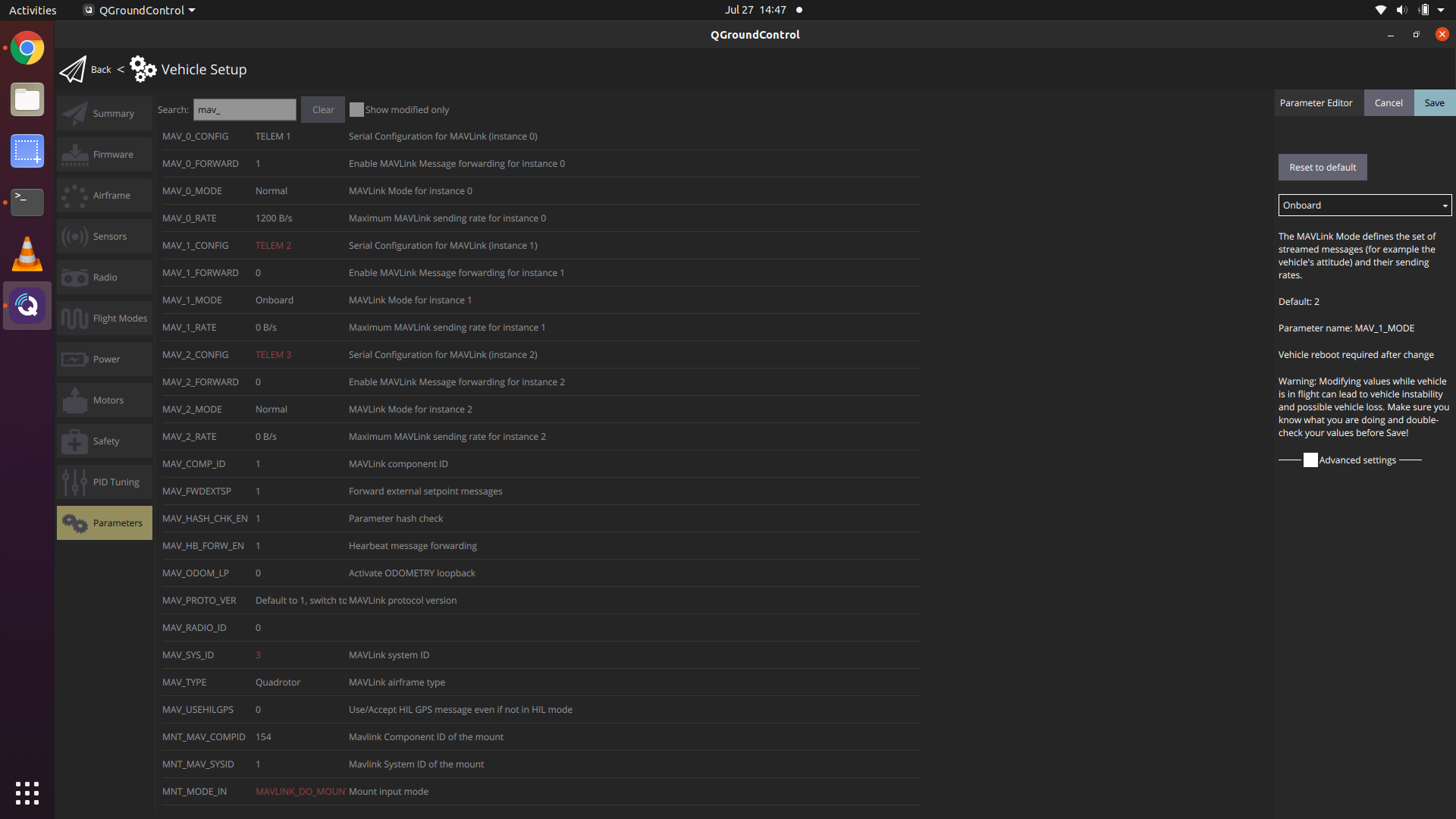
    If you have an M500, it contains either a VOXL Flight, and there's an internal UART from the PX4 processor (STM32F7) to the Snapdragon processor running linux. This is setup on MAV1, and if changed would halt comms between the two systems. https://github.com/PX4/PX4-Autopilot/blob/master/boards/modalai/fc-v1/init/rc.board_defaults#L23
  • camera client node for voxl-dfs-server or voxl-qvio-server

    3
    0 Votes
    3 Posts
    636 Views
    S
    Great, Thank you for your reply.
  • NR Support

    3
    0 Votes
    3 Posts
    414 Views
    M NortonM
    thank you
  • build voxl-qvio-server

    2
    1
    0 Votes
    2 Posts
    450 Views
    ?
    MV is Qualcomm's Machine Vision library. The source is not public, but the binaries are baked into the voxl system image and the voxl-emulator docker image, so you won't need to do anything special to build/run a custom qvio server.
  • How to move gimbal autonomously

    2
    0 Votes
    2 Posts
    395 Views
    modaltbM
    Hi @Daniel-Ryu , This isn't something we currently support. The gimbal is primarily for stabilized video, but there's no autonomous control in or stack at this time. Thanks, Travis
  • Issue with running cam calibration

    4
    0 Votes
    4 Posts
    656 Views
    modaltbM
    Hey @Thomas-MacNamara , I totally hear you... We are reeeeal close to a big docs update...... Should be dropping on the server within days and hopefully we can clear things up. Appreciate the patience and please keep providing feedback as you have issues! -Travis
  • ADB will not find Flight Deck if the tracking camera is connected (J4)

    20
    0 Votes
    20 Posts
    3k Views
    D
    Sorry for the late response, I've been doing some testing. so I've narrowed it down to the error lying in the stereo cameras, I connected each sensor one at a time, reconfigured, and ran the voxl-streamer and was able to get footage for the hires and tracking, but when it came to the stereo it would not work. When I would reboot the system and inspect the services I would see that the voxl-camera-server is running, but once I tried to voxl-streamer -c stereo it would get stuck at the same place and the voxl-camera-server would stop running. I've confirmed that both of my extension cables are working by testing them with the hires camera. I checked the physcial connections on the stereo cameras and there are no creases in them, they look just as they were folded with the original setup, and I believe that if any of the connections were inverted then the VOXL wouldn't even start up.
  • voxl-rtsp jpeg is all green

    11
    1
    0 Votes
    11 Posts
    1k Views
    Alex KushleyevA
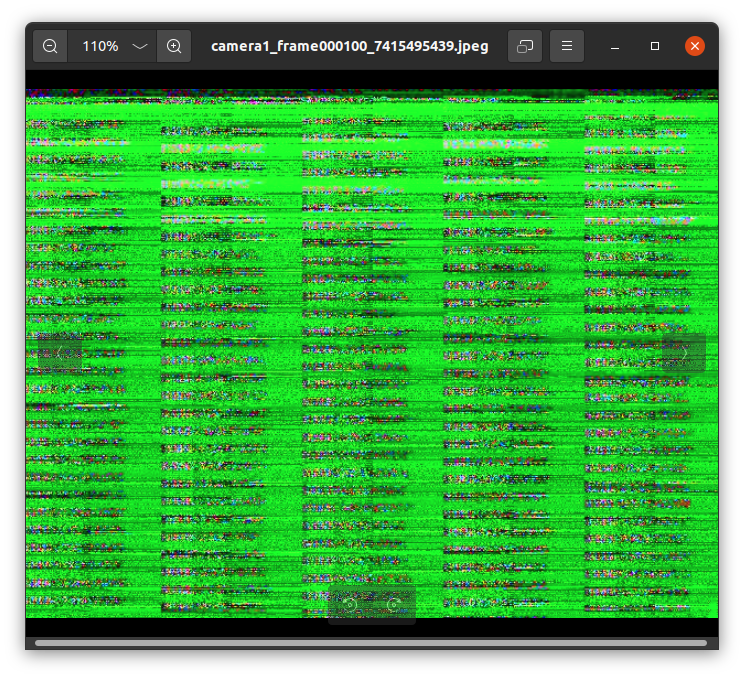
    The tracking camera (OV7251) is a grayscale camera, so it cannot sense color.
  • Flight Deck USB not connecting to QGroundControl

    20
    0 Votes
    20 Posts
    3k Views
    tomT
    @DillonAllen Without WiFi, the only way you'll be able to debug VOXL related things is via. ADB so I would follow this guide: https://docs.modalai.com/setup-adb/ in order to setup ADB on your host computer.
  • max MIPI cable extension length

    3
    0 Votes
    3 Posts
    808 Views
    Alex KushleyevA
    Like Chad said, this depends on many factors. I just wanted to add a bit more details. TOF is not pushing nearly as much data as, say, 4K30 camera, so it is using CSI speeds vs 4K camera. There is a chance it may work with double extender. You should try it! Regarding Raspberry pi (and corresponding discussions), I have personally tried a few of those cables and found that some long cables (~50cm) with raspberry pi and pi camera and saw that long cables result in pixel noise in the image. But it looks kind of strange, since the raspberry pi ISP tries to de-noise the noise and image ends up being kind of noisy and more blurry at the same time and the colors are off. I don't remember exactly what the picture looks like, but the failure mode of long cables may not always be "no image" (no image in the worst case). On VOXL, I have seen some bad cables (occasionally) and I was seeing frame sync issues (image rolling up/down) or sometimes no image at all. I don't think you can damage the camera or VOXL by using too long of a cable, but at some length you will get corruptions and that length depends on the camera and its operating mode. Alex