Subcategories

  • 155 Topics
    710 Posts
    Alex KushleyevA
    @astro_phil , I just tested your configuration on voxl2 mini ov7251 connected to M0135 JL imx214 connected to M0135 JU M0135 interposer connected to Voxl2 mini J7 cameras are connected to hardware camera slots 2 and 3 respectively This particular board is using an old SDK but it should not matter, kernel variant 2.0.0 hw platform: M0104 mach.var: 2.0.0 -------------------------------------------------------------------------------- voxl-suite: 1.3.3 voxl-camera-server -l DEBUG: Attempting to open the hal module DEBUG: SUCCESS: Camera module opened on attempt 0 DEBUG: ----------- Number of cameras: 2 DEBUG: Cam idx: 0, Cam slot: 2, Slave Address: 0x00E2, Sensor Id: 0x7750 DEBUG: Cam idx: 1, Cam slot: 3, Slave Address: 0x0020, Sensor Id: 0x0214 DEBUG: Note: This list comes from the HAL module and may not be indicative DEBUG: of configurations that have full pipelines DEBUG: Number of cameras: 2 dmesg: [ 209.617719] CAM_INFO: CAM-ICP: cam_icp_mgr_hw_open: 3879 FW download done successfully [ 209.648730] qcom,camera ac50000.qcom,cci:qcom,cam-sensor3: Linked as a consumer to regulator.59 [ 209.649003] qcom,camera ac50000.qcom,cci:qcom,cam-sensor3: Linked as a consumer to regulator.55 [ 209.649103] qcom,camera ac50000.qcom,cci:qcom,cam-sensor3: Linked as a consumer to regulator.60 [ 209.649137] qcom,camera ac50000.qcom,cci:qcom,cam-sensor3: Linked as a consumer to regulator.79 [ 209.666156] CAM_INFO: CAM-SENSOR: cam_sensor_driver_cmd: 918 Probe success,slot:3,slave_addr:0x20,sensor_id:0x214 [ 209.666263] qcom,camera ac50000.qcom,cci:qcom,cam-sensor3: Dropping the link to regulator.79 [ 209.670389] qcom,camera ac50000.qcom,cci:qcom,cam-sensor3: Dropping the link to regulator.60 [ 209.670476] qcom,camera ac50000.qcom,cci:qcom,cam-sensor3: Dropping the link to regulator.55 [ 209.670541] qcom,camera ac50000.qcom,cci:qcom,cam-sensor3: Dropping the link to regulator.59 [ 209.688989] qcom,camera ac50000.qcom,cci:qcom,cam-sensor2: Linked as a consumer to regulator.59 [ 209.691170] qcom,camera ac50000.qcom,cci:qcom,cam-sensor2: Linked as a consumer to regulator.55 [ 209.693356] qcom,camera ac50000.qcom,cci:qcom,cam-sensor2: Linked as a consumer to regulator.60 [ 209.693454] qcom,camera ac50000.qcom,cci:qcom,cam-sensor2: Linked as a consumer to regulator.79 [ 209.717968] CAM_INFO: CAM-SENSOR: cam_sensor_set_alt_id: 731 [Applying Alternative Address] : Sensor Index : 2538021044 [ 209.717979] CAM_INFO: CAM-SENSOR: cam_sensor_set_alt_id: 732 [Applying Alternative Address] : Slave Address : 0xE2 [ 209.717988] CAM_INFO: CAM-SENSOR: cam_sensor_set_alt_id: 733 [Applying Alternative Address] : Slave sensor id: 0x7750 [ 209.717997] CAM_INFO: CAM-SENSOR: cam_sensor_set_alt_id: 734 [Applying Alternative Address] : cci_client sid : 0x71 [ 209.718308] CAM_INFO: CAM-SENSOR: cam_sensor_set_alt_id: 770 [Applying Alternative Address] : Probe : Alternate address updated [ 209.718543] CAM_INFO: CAM-SENSOR: cam_sensor_driver_cmd: 918 Probe success,slot:2,slave_addr:0xe2,sensor_id:0x7750 I also tested the same configuration in J6: voxl-camera-server -l DEBUG: Attempting to open the hal module DEBUG: SUCCESS: Camera module opened on attempt 0 DEBUG: ----------- Number of cameras: 2 DEBUG: Cam idx: 0, Cam slot: 0, Slave Address: 0x00E2, Sensor Id: 0x7750 DEBUG: Cam idx: 1, Cam slot: 1, Slave Address: 0x0020, Sensor Id: 0x0214 DEBUG: Note: This list comes from the HAL module and may not be indicative DEBUG: of configurations that have full pipelines DEBUG: Number of cameras: 2 dmesg [ 216.996797] CAM_INFO: CAM-ICP: cam_icp_mgr_hw_open: 3879 FW download done successfully [ 217.029303] qcom,camera ac4f000.qcom,cci:qcom,cam-sensor1: Linked as a consumer to regulator.58 [ 217.029395] qcom,camera ac4f000.qcom,cci:qcom,cam-sensor1: Linked as a consumer to regulator.55 [ 217.029484] qcom,camera ac4f000.qcom,cci:qcom,cam-sensor1: Linked as a consumer to regulator.60 [ 217.029516] qcom,camera ac4f000.qcom,cci:qcom,cam-sensor1: Linked as a consumer to regulator.79 [ 217.046069] CAM_INFO: CAM-SENSOR: cam_sensor_driver_cmd: 918 Probe success,slot:1,slave_addr:0x20,sensor_id:0x214 [ 217.046191] qcom,camera ac4f000.qcom,cci:qcom,cam-sensor1: Dropping the link to regulator.79 [ 217.050324] qcom,camera ac4f000.qcom,cci:qcom,cam-sensor1: Dropping the link to regulator.60 [ 217.050407] qcom,camera ac4f000.qcom,cci:qcom,cam-sensor1: Dropping the link to regulator.55 [ 217.050470] qcom,camera ac4f000.qcom,cci:qcom,cam-sensor1: Dropping the link to regulator.58 [ 217.069409] qcom,camera ac4f000.qcom,cci:qcom,cam-sensor0: Linked as a consumer to regulator.58 [ 217.071541] qcom,camera ac4f000.qcom,cci:qcom,cam-sensor0: Linked as a consumer to regulator.55 [ 217.073710] qcom,camera ac4f000.qcom,cci:qcom,cam-sensor0: Linked as a consumer to regulator.60 [ 217.073801] qcom,camera ac4f000.qcom,cci:qcom,cam-sensor0: Linked as a consumer to regulator.79 [ 217.097221] CAM_INFO: CAM-SENSOR: cam_sensor_set_alt_id: 731 [Applying Alternative Address] : Sensor Index : 390152372 [ 217.097229] CAM_INFO: CAM-SENSOR: cam_sensor_set_alt_id: 732 [Applying Alternative Address] : Slave Address : 0xE2 [ 217.097234] CAM_INFO: CAM-SENSOR: cam_sensor_set_alt_id: 733 [Applying Alternative Address] : Slave sensor id: 0x7750 [ 217.097239] CAM_INFO: CAM-SENSOR: cam_sensor_set_alt_id: 734 [Applying Alternative Address] : cci_client sid : 0x71 [ 217.097532] CAM_INFO: CAM-SENSOR: cam_sensor_set_alt_id: 770 [Applying Alternative Address] : Probe : Alternate address updated [ 217.097747] CAM_INFO: CAM-SENSOR: cam_sensor_driver_cmd: 918 Probe success,slot:0,slave_addr:0xe2,sensor_id:0x7750 By the way, i think the SDKs are now not including the imx214 driver for slot 1. If you need it, you can use the following drivers https://storage.googleapis.com/modalai_public/temp/imx214_test_bins/imx214_eis_drivers_20250815.zip for all camera slots. The only functional change of these drivers is that the maximum resolution of the sensor has been changed from 4208 x 3120 to 4196 x 3120 due to some optimizations in gpu-based debayering that require certain image width (long story, but you can still use this driver, just may need to adjust your camera server config so that you are not requesting impossible resolution). When you do your tests, please make sure you have the correct sensormodule id's for each camera in /usr/lib/camera . The slot number where the camera is physically plugged in has to match the index at the end of the sensormodule file name (before .bin). Alex

  • Do you have a great idea for our products you would like to see implemented?

    26 Topics
    89 Posts
    Andriy LomakinA
    Dear Sir or Madam, We are currently evaluating navigation technologies for UAV and robotic platforms operating in GNSS-denied and contested environments. In particular, we are interested in solutions capable of operating without GPS/GNSS and, where possible, without relying on active radio-frequency communication links. Could you please provide information on your relevant products, including: GNSS-denied navigation capability; GPS-independent positioning; visual-inertial odometry, SLAM, inertial or terrain/map-based navigation capabilities; operation in radio-silent mode; integration options with UAV autopilots such as PX4, ArduPilot or proprietary flight controllers; technical specifications; pricing indication; delivery terms for Europe; export-control or end-user restrictions, if applicable. We would be grateful if you could also indicate the most appropriate contact person or department for further technical and commercial discussion. Kind regards, Andriy Lomakin
  • Are you looking for a 3D model of one of our products?

    33 Topics
    86 Posts
    Alex KushleyevA
    @nl_vdi , if you log into developer.modalai.com, you will see the CAD models. the latest model we have is: D0012-4-V3-C28-M36-T7-K0-Starling2-Max-V3-20260317.step [image: 1781036132877-376bf0dd-494a-4bf1-8d92-1b2d91afb83d-image.png]
  • hires camera issue

    2
    1
    0 Votes
    2 Posts
    386 Views
    ?
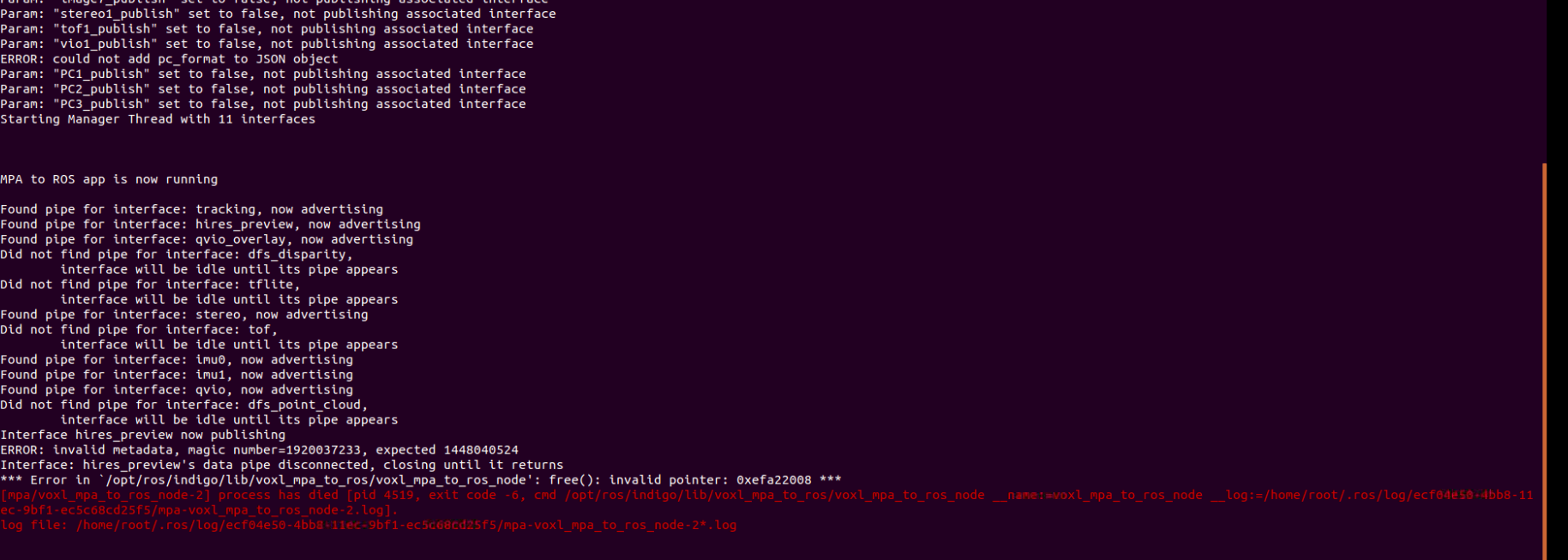
    Hi Prasobh, It looks like rosnode got an invalid metadata when reading from the hires camera pipe. This is an uncommon issue and should really only occur if the CPU is overloaded and starts throttling the client reading the camera images, eventually overflowing the camera pipe, thus getting out of sync. Additionally, it says that the data pipe disconnected, possibly indicating a problem with voxl-camera-server. If this occurs again, checking the logs with journalctl -u voxl-camera-server may provide some useful information as to what issue may have occurred on the hardware side.
  • Dual Camera Adapter

    2
    0 Votes
    2 Posts
    552 Views
    Chad SweetC
    That cable was posted as a mistake, it is now deleted. You can stream any sensor connected to QGC. This doc here articulates all of the possible connections
  • USB to Ethernet Adapter

    4
    0 Votes
    4 Posts
    857 Views
    tomT
    Interesting, can you post a picture of the hardware setup you are attempting to use that isn’t working?
  • 0 Votes
    2 Posts
    381 Views
    Chad SweetC
    The VOXL platforms are all open, with the code available at https://code.modalai.com . This enables our customers to modify however they see fit. The qvio server that ships takes ~33% of one CPU core (out of 4 cores). So it might not be a worthwhile exercise to move that to the could. If you were processing a much larger state estimate, like a full keyframe SLAM, then that processing could be done on a server. It might be hard to close the control loops in flight if you are trying to fly with it. As an outer loop though, it should work fine.
  • OpenVpn don't launch on boot

    5
    2
    0 Votes
    5 Posts
    799 Views
    tomT
    Also, ensure you aren't connecting to your VPN with the same key on a different machine.
  • Is it possible to use the VOXL CAM with a second companion computer?

    4
    0 Votes
    4 Posts
    639 Views
    M
    Thanks @modaltb , I appreciate your feedback. I think the usb-to-ethernet can make sense at least for proof-of-concept. @Chad-Sweet Yes, I am aware there is already a companion computer on the VOXL Cam. In my current work, I've already got an autonomy stack implemented on-top of a custom px4 drone platform with the upboard as the companion. My first interest is to add the VOXL Cam purely as a "tracking module" to replace something like the intel t265, and integrate the odometry out of it into my existing software. This would give me a way to evaluate the VOXL Cam in the use-cases I am exploring with a drone/autonomy configuration that is known to work. From there, depending on how well it works, I might consider replacing the upboard with the VOXL Cam, but that would not be the first thing I would do, as I would have quite a bit of software to re-work/port edit: It's good the VOXL can already run ros; I figure I could use voxl_mpa_to_ros to pass the VIO data over ROS from the VOXL to the Upboard in this PoC just to get started easily.
  • Comparison between VOXL Cam and RB5 Companion Computer

    1
    0 Votes
    1 Posts
    227 Views
    No one has replied
  • OPEN-VINS compile error

    3
    0 Votes
    3 Posts
    800 Views
    R
    Hi @Chad-Sweet, even though this is not public (yet?), I setup a docker running open-vins. It runs without problems but I keep getting fast divergent behavior. Do you happen to have a launch file / parameter settings for open-vins with good parameter estimates for the flight-deck platform? I am not sure if my I set the extrinsics correct. I thought it must be simply the inverse of the output of voxl-inspect-extrinsics as open-vins expect a T_C0toI matrix: <rosparam param="cam0_wh">[640, 480]</rosparam> <param name="cam0_is_fisheye" type="bool" value="true" /> <rosparam param="cam0_k">[277.207560, 277.285144, 335.460288, 218.329580]</rosparam> <rosparam param="cam0_d">[-0.002486, 0.006832, -0.006556, 0.001300]</rosparam> <rosparam param="T_C0toI"> [ 0.0, 1.0, 0.0, -0.015, -0.70711, 0.0, 0.70711, 0.00283, 0.70711, 0.0, 0.70711, -0.0212, 0.0, 0.0, 0.0, 1.0 ] </rosparam> Another possible reason would be badly calibrated imu noise values. A reference file would be really helpful. Thanks!
  • Modifying VOXL Portal

    4
    0 Votes
    4 Posts
    514 Views
    wilkinsafW
    @Matt-Turi @Chad-Sweet Sweeeettt. Thanks guys
  • 98% Packet Loss between QGC & Vehicle

    13
    0 Votes
    13 Posts
    2k Views
    tomT
    @Chuck-Bokath Great to hear that you're making progress. As for developing your new program you can use the voxl-emulator docker image: https://docs.modalai.com/voxl-emulator/ in order to compile programs for VOXL on an Ubuntu machine. Here is a good doc on MPA https://docs.modalai.com/voxl-sdk/#what-is-modal-pipe-architecture-mpa
  • Docker Pull is not working for my own hosted image

    2
    0 Votes
    2 Posts
    558 Views
    modaltbM
    Hi @Aldo-Castro-Freire , The docker on target is somewhat old (see this post) and there's a chance there's compatibility issues going on with docker hub. We've tested with google cloud registry and had success but haven't tried docker hub.
  • Mavlink Camera Manager not appearing on QGC

    19
    2
    0 Votes
    19 Posts
    4k Views
    wilkinsafW
    @Daniel-Ryu I figured. We just wanted to double check that this was the case. Thank you!
  • TOF Depth Image Encoding changed from 32FC1 to mono8

    3
    0 Votes
    3 Posts
    662 Views
    J
    For anyone who runs into this same issue, I changed my subscriber to listen to /map/tof_pc (which has the PointCloud2 type). My code (to extract the z value) is this: # get the depth image dep_frame = np.fromstring(data.data, dtype=np.single) # get numpy array dep_frame = dep_frame.reshape(172, 224, 3)[:,:,2]
  • VOXL PWM AUX output not working

    2
    4
    0 Votes
    2 Posts
    609 Views
    modaltbM
    Hi @Cole-Mathieu , We have a little bit of documentation here with respect to AUX outputs. The FlightCore form factor only has the 8 PWM outputs, so it's a little limited, but we've used it to control a two channel gimbal: https://docs.modalai.com/voxl-m500-gimbal-user-guide/#auxillary-outputs
  • TOF sensor not working with latest VOXL SW

    8
    0 Votes
    8 Posts
    1k Views
    ?
    Yep, This was an bug with voxl-utils v0.8.4 sourcing ros files in the wrong order, I just pushed a patch (0.8.5) up that fixes this, should be available in a few minutes.
  • VPN but not internet

    10
    0 Votes
    10 Posts
    2k Views
    tomT
    @Aldo-Castro-Freire We use Google Cloud to host our VPN servers so I would assume AWS would be just fine. This sounds like a configuration issue to me that the OpenVPN forum could help you out with.
  • Flight Core PWM ESC Calibration

    5
    0 Votes
    5 Posts
    1k Views
    modaltbM
    Hi @John-Mccarty , checking in to see if you've progressed at all through this? The process is a little picky and sometimes requires a few tried.
  • ROS Bag File Example

    10
    0 Votes
    10 Posts
    3k Views
    BrandMetis WidthB
    @BrandMetis-Width Also this might be of interst to you - https://github.com/facontidavide/Bonxai Not yet ROS integrated - but could be an excellent match. Core implemented in < 1000 lines of code too.
  • LTE strength

    11
    0 Votes
    11 Posts
    1k Views
    tomT
    Can you show an example output of what you are seeing? Also, which modem are you using?
  • Ad-hoc networking possibilities

    3
    0 Votes
    3 Posts
    560 Views
    Chad SweetC
    I'm sorry, we do not have any experience with ad-hoc mode. You could try an external wifi module that supports this. If you need to rebuild the kernel, the source code is here