Subcategories

  • 155 Topics
    710 Posts
    Alex KushleyevA
    @astro_phil , I just tested your configuration on voxl2 mini ov7251 connected to M0135 JL imx214 connected to M0135 JU M0135 interposer connected to Voxl2 mini J7 cameras are connected to hardware camera slots 2 and 3 respectively This particular board is using an old SDK but it should not matter, kernel variant 2.0.0 hw platform: M0104 mach.var: 2.0.0 -------------------------------------------------------------------------------- voxl-suite: 1.3.3 voxl-camera-server -l DEBUG: Attempting to open the hal module DEBUG: SUCCESS: Camera module opened on attempt 0 DEBUG: ----------- Number of cameras: 2 DEBUG: Cam idx: 0, Cam slot: 2, Slave Address: 0x00E2, Sensor Id: 0x7750 DEBUG: Cam idx: 1, Cam slot: 3, Slave Address: 0x0020, Sensor Id: 0x0214 DEBUG: Note: This list comes from the HAL module and may not be indicative DEBUG: of configurations that have full pipelines DEBUG: Number of cameras: 2 dmesg: [ 209.617719] CAM_INFO: CAM-ICP: cam_icp_mgr_hw_open: 3879 FW download done successfully [ 209.648730] qcom,camera ac50000.qcom,cci:qcom,cam-sensor3: Linked as a consumer to regulator.59 [ 209.649003] qcom,camera ac50000.qcom,cci:qcom,cam-sensor3: Linked as a consumer to regulator.55 [ 209.649103] qcom,camera ac50000.qcom,cci:qcom,cam-sensor3: Linked as a consumer to regulator.60 [ 209.649137] qcom,camera ac50000.qcom,cci:qcom,cam-sensor3: Linked as a consumer to regulator.79 [ 209.666156] CAM_INFO: CAM-SENSOR: cam_sensor_driver_cmd: 918 Probe success,slot:3,slave_addr:0x20,sensor_id:0x214 [ 209.666263] qcom,camera ac50000.qcom,cci:qcom,cam-sensor3: Dropping the link to regulator.79 [ 209.670389] qcom,camera ac50000.qcom,cci:qcom,cam-sensor3: Dropping the link to regulator.60 [ 209.670476] qcom,camera ac50000.qcom,cci:qcom,cam-sensor3: Dropping the link to regulator.55 [ 209.670541] qcom,camera ac50000.qcom,cci:qcom,cam-sensor3: Dropping the link to regulator.59 [ 209.688989] qcom,camera ac50000.qcom,cci:qcom,cam-sensor2: Linked as a consumer to regulator.59 [ 209.691170] qcom,camera ac50000.qcom,cci:qcom,cam-sensor2: Linked as a consumer to regulator.55 [ 209.693356] qcom,camera ac50000.qcom,cci:qcom,cam-sensor2: Linked as a consumer to regulator.60 [ 209.693454] qcom,camera ac50000.qcom,cci:qcom,cam-sensor2: Linked as a consumer to regulator.79 [ 209.717968] CAM_INFO: CAM-SENSOR: cam_sensor_set_alt_id: 731 [Applying Alternative Address] : Sensor Index : 2538021044 [ 209.717979] CAM_INFO: CAM-SENSOR: cam_sensor_set_alt_id: 732 [Applying Alternative Address] : Slave Address : 0xE2 [ 209.717988] CAM_INFO: CAM-SENSOR: cam_sensor_set_alt_id: 733 [Applying Alternative Address] : Slave sensor id: 0x7750 [ 209.717997] CAM_INFO: CAM-SENSOR: cam_sensor_set_alt_id: 734 [Applying Alternative Address] : cci_client sid : 0x71 [ 209.718308] CAM_INFO: CAM-SENSOR: cam_sensor_set_alt_id: 770 [Applying Alternative Address] : Probe : Alternate address updated [ 209.718543] CAM_INFO: CAM-SENSOR: cam_sensor_driver_cmd: 918 Probe success,slot:2,slave_addr:0xe2,sensor_id:0x7750 I also tested the same configuration in J6: voxl-camera-server -l DEBUG: Attempting to open the hal module DEBUG: SUCCESS: Camera module opened on attempt 0 DEBUG: ----------- Number of cameras: 2 DEBUG: Cam idx: 0, Cam slot: 0, Slave Address: 0x00E2, Sensor Id: 0x7750 DEBUG: Cam idx: 1, Cam slot: 1, Slave Address: 0x0020, Sensor Id: 0x0214 DEBUG: Note: This list comes from the HAL module and may not be indicative DEBUG: of configurations that have full pipelines DEBUG: Number of cameras: 2 dmesg [ 216.996797] CAM_INFO: CAM-ICP: cam_icp_mgr_hw_open: 3879 FW download done successfully [ 217.029303] qcom,camera ac4f000.qcom,cci:qcom,cam-sensor1: Linked as a consumer to regulator.58 [ 217.029395] qcom,camera ac4f000.qcom,cci:qcom,cam-sensor1: Linked as a consumer to regulator.55 [ 217.029484] qcom,camera ac4f000.qcom,cci:qcom,cam-sensor1: Linked as a consumer to regulator.60 [ 217.029516] qcom,camera ac4f000.qcom,cci:qcom,cam-sensor1: Linked as a consumer to regulator.79 [ 217.046069] CAM_INFO: CAM-SENSOR: cam_sensor_driver_cmd: 918 Probe success,slot:1,slave_addr:0x20,sensor_id:0x214 [ 217.046191] qcom,camera ac4f000.qcom,cci:qcom,cam-sensor1: Dropping the link to regulator.79 [ 217.050324] qcom,camera ac4f000.qcom,cci:qcom,cam-sensor1: Dropping the link to regulator.60 [ 217.050407] qcom,camera ac4f000.qcom,cci:qcom,cam-sensor1: Dropping the link to regulator.55 [ 217.050470] qcom,camera ac4f000.qcom,cci:qcom,cam-sensor1: Dropping the link to regulator.58 [ 217.069409] qcom,camera ac4f000.qcom,cci:qcom,cam-sensor0: Linked as a consumer to regulator.58 [ 217.071541] qcom,camera ac4f000.qcom,cci:qcom,cam-sensor0: Linked as a consumer to regulator.55 [ 217.073710] qcom,camera ac4f000.qcom,cci:qcom,cam-sensor0: Linked as a consumer to regulator.60 [ 217.073801] qcom,camera ac4f000.qcom,cci:qcom,cam-sensor0: Linked as a consumer to regulator.79 [ 217.097221] CAM_INFO: CAM-SENSOR: cam_sensor_set_alt_id: 731 [Applying Alternative Address] : Sensor Index : 390152372 [ 217.097229] CAM_INFO: CAM-SENSOR: cam_sensor_set_alt_id: 732 [Applying Alternative Address] : Slave Address : 0xE2 [ 217.097234] CAM_INFO: CAM-SENSOR: cam_sensor_set_alt_id: 733 [Applying Alternative Address] : Slave sensor id: 0x7750 [ 217.097239] CAM_INFO: CAM-SENSOR: cam_sensor_set_alt_id: 734 [Applying Alternative Address] : cci_client sid : 0x71 [ 217.097532] CAM_INFO: CAM-SENSOR: cam_sensor_set_alt_id: 770 [Applying Alternative Address] : Probe : Alternate address updated [ 217.097747] CAM_INFO: CAM-SENSOR: cam_sensor_driver_cmd: 918 Probe success,slot:0,slave_addr:0xe2,sensor_id:0x7750 By the way, i think the SDKs are now not including the imx214 driver for slot 1. If you need it, you can use the following drivers https://storage.googleapis.com/modalai_public/temp/imx214_test_bins/imx214_eis_drivers_20250815.zip for all camera slots. The only functional change of these drivers is that the maximum resolution of the sensor has been changed from 4208 x 3120 to 4196 x 3120 due to some optimizations in gpu-based debayering that require certain image width (long story, but you can still use this driver, just may need to adjust your camera server config so that you are not requesting impossible resolution). When you do your tests, please make sure you have the correct sensormodule id's for each camera in /usr/lib/camera . The slot number where the camera is physically plugged in has to match the index at the end of the sensormodule file name (before .bin). Alex

  • Do you have a great idea for our products you would like to see implemented?

    26 Topics
    89 Posts
    Andriy LomakinA
    Dear Sir or Madam, We are currently evaluating navigation technologies for UAV and robotic platforms operating in GNSS-denied and contested environments. In particular, we are interested in solutions capable of operating without GPS/GNSS and, where possible, without relying on active radio-frequency communication links. Could you please provide information on your relevant products, including: GNSS-denied navigation capability; GPS-independent positioning; visual-inertial odometry, SLAM, inertial or terrain/map-based navigation capabilities; operation in radio-silent mode; integration options with UAV autopilots such as PX4, ArduPilot or proprietary flight controllers; technical specifications; pricing indication; delivery terms for Europe; export-control or end-user restrictions, if applicable. We would be grateful if you could also indicate the most appropriate contact person or department for further technical and commercial discussion. Kind regards, Andriy Lomakin
  • Are you looking for a 3D model of one of our products?

    33 Topics
    86 Posts
    Alex KushleyevA
    @nl_vdi , if you log into developer.modalai.com, you will see the CAD models. the latest model we have is: D0012-4-V3-C28-M36-T7-K0-Starling2-Max-V3-20260317.step [image: 1781036132877-376bf0dd-494a-4bf1-8d92-1b2d91afb83d-image.png]
  • Which Vibration dampers are you using with the Voxl flight?

    2
    0 Votes
    2 Posts
    395 Views
    Chad SweetC
    These are the dampeners we are using on VOXL Flight The dampening may needed to be tuned for your flight platform though, and can definitely be different depending on flight dynamics. We have had a lot of success sticking a piece of foam between the plate and the frame. https://www.amazon.com/gp/product/B073LPTHCL/ref=ppx_yo_dt_b_asin_title_o02_s00?ie=UTF8&psc=1
  • VOXL Deck Spacer Size

    3
    0 Votes
    3 Posts
    437 Views
    L
    are you sure that this is the Vibration damper that you are using? cause your 3D cad model calls for a damper with different dimensions: [image: 1641735336418-b6107c8a-e568-4839-99d0-4387f6c68533-image.png] please advise which damper are you using in your Voxl flight deck.
  • This topic is deleted!

    1
    0 Votes
    1 Posts
    7 Views
    No one has replied
  • VOXL rebooting PX4

    2
    0 Votes
    2 Posts
    570 Views
    wilkinsafW
    It appears this happens when the sensors are not calibrated on the drone. voxl-vision-px4 picks up on sensor inconsistency and restarts PX4. So, calibrated the sensors. Looks better resolved
  • [Suggestion] Add fastboot device udev rule to "Setup ADB" tutorial

    2
    1 Votes
    2 Posts
    457 Views
    modaltbM
    @omer-b thanks!! Added: [image: 1640270590811-5dc619fb-ca85-4b54-9d6a-e6e9c4567512-image.png]
  • VOXL FLIGHT with Arducopter (Ardupilot)

    3
    0 Votes
    3 Posts
    457 Views
    R
    Thank you.
  • Hires Camera

    1
    0 Votes
    1 Posts
    419 Views
    No one has replied
  • TOF Sensor Range

    1
    0 Votes
    1 Posts
    453 Views
    No one has replied
  • New image not installing waiting for fastboot

    2
    1
    0 Votes
    2 Posts
    300 Views
    tomT
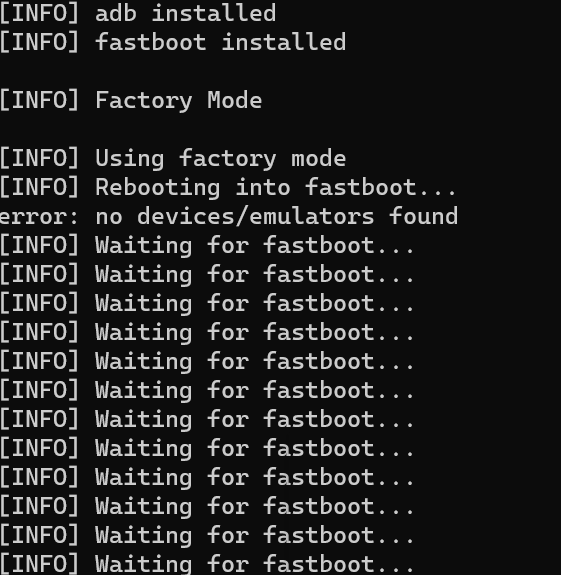
    @Shlok-Agarwal I assume you've taken a look at this page in our docs: https://docs.modalai.com/unbrick-voxl/ If not, give that a read through and it'll give you a bunch of good info. Were you able to ADB into the VOXL before you started the flashing process?
  • Setting up network interfaces

    7
    1 Votes
    7 Posts
    2k Views
    Eric KatzfeyE
    @Nirge You should use voxl-wifi for wlan0.
  • Invalid local position

    30
    0 Votes
    30 Posts
    9k Views
    A
    I found the QGC EKF2_AID_MASK parameter settings above (configuring to 280: Vision position fusion, vision yaw fusion, vision velocity fusion) to allow the seeker to enter position and off-board modes. Prior to configuring, QGC was receiving VIO but was still unable to enter position mode as referenced here To make the forum search engine happy: seeker position mode rejected
  • Change Pwm channel

    8
    0 Votes
    8 Posts
    1k Views
    modaltbM
    Alright! Thanks for the update, I'll likely use this post to get some updates to our docs, appreciate it!
  • Voxl-mapper instructions

    2
    0 Votes
    2 Posts
    504 Views
    ?
    Hello @alarm_hq! Please see the updated readme on voxl-mapper's dev branch for an overview guide of this package. As for the timestamp too new error, this error typically arises when there is a VIO blowup, and one way to prevent this is by ensuring that the tracking camera is correctly calibrated pre-flight. Also, please see the overview guide for instructions on viewing, as RVIZ is no longer utilized!
  • This topic is deleted!

    2
    0 Votes
    2 Posts
    3 Views
  • Unable to run example TFlite model in emulator docker image

    3
    0 Votes
    3 Posts
    459 Views
    Michael BarrowM
    Thanks, so what is the emulator for exactly? emulating native compilation? I am unclear of the emulator use case if it is not intended to emulate the voxl platform for application testing. Let me know, cheers!
  • Seeker replacement props

    2
    0 Votes
    2 Posts
    446 Views
    ?
    Hey @alarm_hq! The props for the Seeker development drone can be found here.
  • How to: Seeker ESC calibration

    9
    0 Votes
    9 Posts
    1k Views
    James StrawsonJ
    @alarm_hq said in How to: Seeker ESC calibration: And if I've already made the "mistake" of reflashing px4 firmware, is the closed loop RPM control affected? The ModalAI ESCs used on Seeker have their own firmware and settings stored on the ESC itself, independent from PX4 so your ESC is fine after changing PX4 firmware.
  • Unstable Seeker after flashing

    6
    0 Votes
    6 Posts
    915 Views
    T
    Thanks Chad. We did the calibration again with a better calibration target, and this fixed the problem.
  • hires Camera for barcode

    2
    0 Votes
    2 Posts
    374 Views
    Chad SweetC
    Have you looked at voxl-tag-detector?
  • voxl-uart-loopback problems

    2
    1
    0 Votes
    2 Posts
    346 Views
    Alex KushleyevA
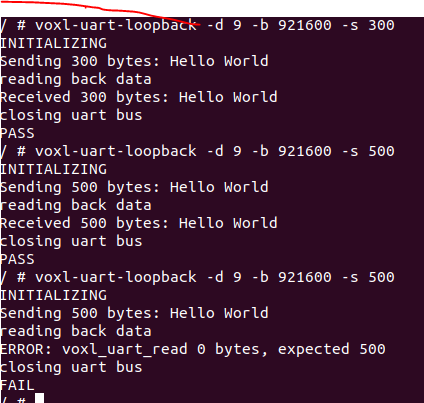
    Hello, There were a few issues with the uart loopback example: the test buffer size was not handled properly (if test size is larger than HelloWorld strin the sleep time was not enough to allow the transfer to happen (the write function is non-blocking, it seems) I have made some fixes here: https://gitlab.com/voxl-public/core-libs/libvoxl_io/-/blob/dev/lib/apps/voxl-uart-loopback.c Now the behavior is as shown below.. please try it. ./voxl-uart-loopback -d 7 -b 9600 -s 20 INITIALIZING Sending 20 bytes: 0123456789:;<=>?@ABC Transfer should take ~20833us, sleeping for 25833us (+5000us overhead) Reading back data... Received 20 bytes: 0123456789:;<=>?@ABC closing uart bus PASS ./voxl-uart-loopback -d 7 -b 9600 -s 500 INITIALIZING Sending 500 bytes: 0123456789:;<=>?@ABCDEFGHIJKLMNOPQRSTUVWXYZ0123456789:;<=>?@ABCDEFGHIJKLMNOPQRSTUVWXYZ0123456789:;<=>?@ABCDEFGHIJKLMNOPQRSTUVWXYZ0123456789:;<=>?@ABCDEFGHIJKLMNOPQRSTUVWXYZ0123456789:;<=>?@ABCDEFGHIJKLMNOPQRSTUVWXYZ0123456789:;<=>?@ABCDEFGHIJKLMNOPQRSTUVWXYZ0123456789:;<=>?@ABCDEFGHIJKLMNOPQRSTUVWXYZ0123456789:;<=>?@ABCDEFGHIJKLMNOPQRSTUVWXYZ0123456789:;<=>?@ABCDEFGHIJKLMNOPQRSTUVWXYZ0123456789:;<=>?@ABCDEFGHIJKLMNOPQRSTUVWXYZ0123456789:;<=>?@ABCDEFGHIJKLMNOPQRSTUVWXYZ0123456789:;<=>?@ABCDEFGHIJ Transfer should take ~520833us, sleeping for 525833us (+5000us overhead) Reading back data... Received 500 bytes: 0123456789:;<=>?@ABCDEFGHIJKLMNOPQRSTUVWXYZ0123456789:;<=>?@ABCDEFGHIJKLMNOPQRSTUVWXYZ0123456789:;<=>?@ABCDEFGHIJKLMNOPQRSTUVWXYZ0123456789:;<=>?@ABCDEFGHIJKLMNOPQRSTUVWXYZ0123456789:;<=>?@ABCDEFGHIJKLMNOPQRSTUVWXYZ0123456789:;<=>?@ABCDEFGHIJKLMNOPQRSTUVWXYZ0123456789:;<=>?@ABCDEFGHIJKLMNOPQRSTUVWXYZ0123456789:;<=>?@ABCDEFGHIJKLMNOPQRSTUVWXYZ0123456789:;<=>?@ABCDEFGHIJKLMNOPQRSTUVWXYZ0123456789:;<=>?@ABCDEFGHIJKLMNOPQRSTUVWXYZ0123456789:;<=>?@ABCDEFGHIJKLMNOPQRSTUVWXYZ0123456789:;<=>?@ABCDEFGHIJ closing uart bus PASS