Skip to content

General Questions

2.2k Topics 11.3k Posts

Not sure where your question goes? Ask here. ModalAI engineers and the community answer questions about any VOXL product.

  • Gaining VIO altitude estimates only in one direction

    Unsolved
    7
    0 Votes
    7 Posts
    859 Views
    H
    @James-Strawson ah I get it now. There was nothing wrong at all, it was all about reference frames. I should be looking at voxl-inspect-pose -l instead. Thanks!
  • voxl-camera-server

    Unsolved
    8
    1
    0 Votes
    8 Posts
    2k Views
    VOXL FlightV
    For your information, voxl:~$ voxl-version cat: /etc/modalai/voxl-software-bundle-version.txt: No such file or directory -------------------------------------------------------------------------------- system-image: ModalAI 3.3.0 BUILDER: ekatzfey BUILD_TIME: 2021-06-06_19:28 kernel: #1 SMP PREEMPT Sun Jun 6 19:41:01 UTC 2021 3.18.71-perf factory-bundle: 1.0.1 (Yocto installation) -------------------------------------------------------------------------------- architecture: aarch64 processor: apq8096 os: GNU/Linux -------------------------------------------------------------------------------- voxl-suite: Package: voxl-suite Version: 0.5.0 Depends: libjpeg_turbo (>= 9.0.4), libmodal_exposure (>= 0.0.2), libmodal_json (>= 0.3.6), libmodal_pipe (>= 2.1.1), librc_math (>= 1.1.5), libvoxl_cutils (>= 0.0.2), libvoxl_io (>= 0.5.4), mavlink-camera-manager (>= 0.0.2), mongoose (>= 7.3.0), opencv (>= 4.5.2-2), openmp (>= 10.0.2), voxl-camera-calibration (>= 0.1.1), voxl-camera-server (>= 0.8.1), voxl-cpu-monitor (>= 0.2.0), voxl-dfs-server (>= 0.2.2), voxl-docker-support (>= 1.1.3), voxl-gphoto2 (>= 0.0.5), voxl-imu-server (>= 0.9.1), voxl-mavlink (>= 0.0.2), voxl-modem (>= 0.12.0), voxl-mpa-tools (>= 0.3.6), voxl-nodes (>= 0.2.0), voxl-portal (>= 0.1.2), voxl-qvio-server (>= 0.3.4), voxl-streamer (>= 0.2.6), voxl-tag-detector (>= 0.0.2), voxl-tflite (>= 2.2.3), voxl-tflite-server (>= 0.1.5), voxl-utils (>= 0.8.4), voxl-vision-px4 (>= 0.9.5), voxl-vpn (>= 0.0.3) Status: install user installed Architecture: all Installed-Time: 5549
  • This topic is deleted!

    1
    0 Votes
    1 Posts
    4 Views
    No one has replied
  • Multiple mavparser connections

    Unsolved
    2
    1
    0 Votes
    2 Posts
    620 Views
    No one has replied
  • Heavy Drone Stability Problem.

    Unsolved
    2
    0 Votes
    2 Posts
    621 Views
    Chad SweetC
    Hi Caleb, All new multirotor vehicles need to go through PID tuning before being safe for flight Our systems mostly run PX4, so it is definitely recommended to follow the px4 PID tuning guide https://docs.px4.io/v1.12/en/config_mc/pid_tuning_guide_multicopter.html
  • Voxl cam to external flight controller

    Unsolved
    3
    0 Votes
    3 Posts
    652 Views
    H
    HELLO, As mentioned above I made a cable to connect VOXL to Pixhawk cube. How can I verify if the UART is working? Thank you
  • problems cloning MAVSDK Python docker from Gitlab

    Unsolved
    16
    0 Votes
    16 Posts
    3k Views
    tomT
    @parbat101 Since it is included in that image, one (bad) option is to modify the script and then re-build the Docker image and it will pull in the modified script. The better solution that I would recommend is create a new script i.e my-script.py and then mount it inside the Docker image on run time using something like this: docker run -it --rm --privileged --net=host -v $(pwd)/my-script.py:/path/to/my-script.py gcr.io/modalai-public/voxl-mavsdk-python:v1.1 /bin/bash where you mount the script from your host os inside of the Docker container. You can read more about docker + mounting here: https://docs.docker.com/storage/bind-mounts/ This would allow you to modify the script on your host os, then run the above command to pull it into the docker container on run-time. Keep in mind if you modify the script inside of the docker container and then exit the container, the edits will be lost. So make sure you edit the script outside of the container and then re-run the above command to pull in the updated script. Another note, /path/to/my-script.py will denote the path at which you would like to have the script live inside of the docker container, so you will need to modify that to your liking.
  • Error when using opencv dnn module.

    Unsolved
    3
    1
    0 Votes
    3 Posts
    615 Views
    Nguyen Tien SuN
    Thank @Chad-Sweet !
  • Cooling question

    Unsolved
    2
    0 Votes
    2 Posts
    635 Views
    Adrian HidalgoA
    Yes, it is a good idea to cool the Voxl-Flight with some sort of cooling device. We have not performed comprehensive environmental testing, but for Voxl 0-55C Ambient, Guaranteed by Test. Enclosures or other structures which raise the ambient temperature will impact this range. The performance will be better with cooler temps. Hope this helps
  • Replacing the VIO pose message with the MoCap pose message

    Unsolved
    1
    0 Votes
    1 Posts
    452 Views
    No one has replied
  • Voxl cam to qgc

    Unsolved
    4
    0 Votes
    4 Posts
    755 Views
    ?
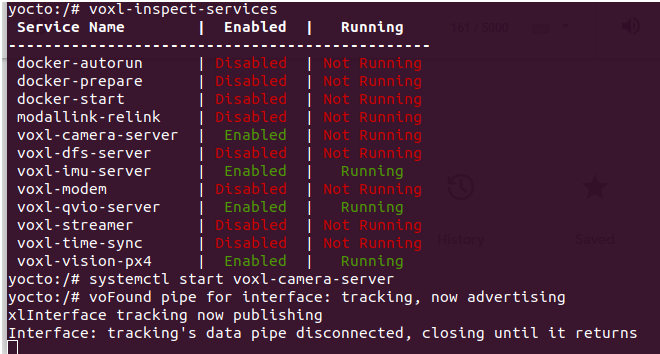
    @keil said in Voxl cam to qgc: voxl-camera-server | Enabled | Not Running | Not Running Hi, It looks like the camera server has encountered an error when trying to start since it's enabled but not running, this is usually due to either a misconfiguration or a hardware issue. Can you show what journalctl -u voxl-camera-server and cat /etc/modalai/voxl-camera-server.conf look like. These are the camera server logs and config file respectively.
  • generate a map using pointclouds

    Unsolved
    4
    0 Votes
    4 Posts
    748 Views
    ?
    @keil, Errors referencing the tf ringbuffer in voxl-mapper typically mean there is an issue getting position data back from the voxl-vision-px4 service. Please read through the user guide before getting started, as you will need a few other services active in order to use voxl-mapper without errors.
  • BETA Updates on VOXL1

    Unsolved
    2
    0 Votes
    2 Posts
    533 Views
    RowinR
    Or VOXL System Image 3.8 as mentioned here (https://docs.modalai.com/voxl-suite/#v070) We would like to be up-to-date with the latest updates as the changelogs might fix some problems we are having.
  • Connecting VOXL m500 drone to a mobile hotspot

    Unsolved
    3
    0 Votes
    3 Posts
    704 Views
    P
    @Alex-Gardner Thank you. I have been trying the same instructions but I did not realize that I was having problems because of my mobile hotspot's name. Just fixed it. Thanks.
  • How can I connect FPV cameras to voxl2?

    Unsolved
    2
    0 Votes
    2 Posts
    601 Views
    Chad SweetC
    Some options are: https://docs.modalai.com/voxl-uvc-server/ https://docs.modalai.com/voxl-libgphoto2/
  • Micro hard add-on emergency boot switch

    Unsolved
    5
    0 Votes
    5 Posts
    1k Views
    R
    @Chad-Sweet - thanks, that's my experience with it, I just wanted to know for sure what it was doing. I think in the documentation it would be helpful to be specific about what direction is normal operation mode, or an off-on type label.
  • How to access cameras with opencv

    Unsolved opencv voxl2 help
    2
    0 Votes
    2 Posts
    2k Views
    Chad SweetC
    Please see the documentation for voxl-camera-server here: https://docs.modalai.com/voxl-camera-server/ There are many examples in our SDK code base of how to consume that data. Here is a good place to look for each of our services: https://gitlab.com/voxl-public/voxl-sdk/services Here is some exact code here: https://gitlab.com/voxl-public/voxl-sdk/services/voxl-qvio-server/-/blob/master/server/main.cpp#L474 And another example here: https://gitlab.com/voxl-public/voxl-sdk/services/voxl-tflite-server/-/blob/master/src/main.cpp#L208
  • Query /run/mpa/vvpx4_sys_status in terminal

    Unsolved
    4
    0 Votes
    4 Posts
    754 Views
    W
    @Alex-Gardner Thank for your reply, could you maybe look at my question I still have?
  • Done use in school safety

    Unsolved
    1
    0 Votes
    1 Posts
    328 Views
    No one has replied
  • Private 5G Network Connection

    Unsolved
    4
    0 Votes
    4 Posts
    990 Views
    tomT
    @kitkatSG @LudwigBAH Copying my response from another thread: Here is an example of how to send an AT command to the Quectel modem: echo -ne "AT+QNWPREFCFG=\"mode_pref\",LTE:NR5G\r" | busybox microcom -t 1000 /dev/ttyUSB2 The above gets ran as part of rb5-modem in order to set the network preference to allow both LTE and 5G. Here is a link to the Quectel RM5* series modem AT command manual, you can probably find a relevant AT command to use there: https://www.quectel.com/wp-content/uploads/2021/05/Quectel_RG50xQRM5xxQ_Series_AT_Commands_Manual_V1.2.pdf