Skip to content

General Questions

2.3k Topics 11.3k Posts

Not sure where your question goes? Ask here. ModalAI engineers and the community answer questions about any VOXL product.

  • Please Read: Support Request Format for Best Results

    Pinned Locked
    1
    1 Votes
    1 Posts
    3k Views
    No one has replied
  • VOXL ADB or Wi-Fi no longer communicating!?!

    Pinned Locked
    1
    0 Votes
    1 Posts
    3k Views
    No one has replied
  • Bots Unlimited Wifi Crash

    Unsolved
    13
    0 Votes
    13 Posts
    980 Views
    L
    Hi @davidtorres , To answer some of your questions: The RSSI_INFO looks like a symptom of something else and is not a known issue. The firmware for the Bots Sparrow board seems to be EOL so no updates or any fixes as far as I know, There is not an maximum load throughput as it depends on the signal strength, but 800M is very high and would be expected to queue packets, but it still should not be hanging like you are seeing. Yes those versions are shipped together as a part of our SDK and are expected The easiest way would be to set a udev rule that sets it on boot, something like =========== ACTION=="add", SUBSYSTEM=="net", KERNEL=="mlan0", RUN+="<path to iw> reg set <country>" =========== My questions for you: can you send the full dmesg log when you reproduce this along with the files produced by sparrow-ba-fix.sh collect from the earlier workaround How often do you see this when doing your UDP test at -b 800M and do you see it when its slower than that, 200M 400M? Did you run into this issue without the mitigation workaround from earlier installed? Was the issue earlier in the thread something you have also seen and made you apply the workaround? Are you running iperf3 with the voxl as the client or the server? If you could include the full commands you used on the host and client side that would be very helpful Thanks!
  • VOXL 2 DS1 LED Flicker Problem?

    Unsolved
    1
    0 Votes
    1 Posts
    21 Views
    No one has replied
  • 0 Votes
    1 Posts
    23 Views
    No one has replied
  • inquiry about your drone

    Unsolved
    1
    0 Votes
    1 Posts
    95 Views
    No one has replied
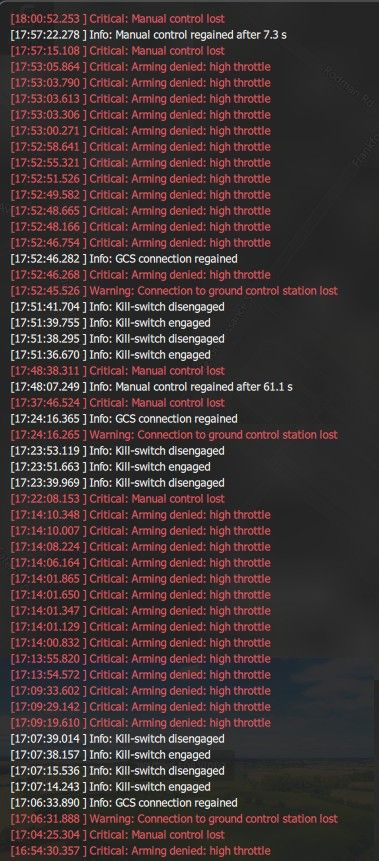
  • Need support with Starling Max 2 Arming denied, high throtle issue

    Unsolved
    2
    1
    0 Votes
    2 Posts
    161 Views
    Eric KatzfeyE
    It is saying that your throttle is not at lowest position. Is that the case? Can you calibrate the RC in QGC and see all of the sticks moving as expected?
  • 0 Votes
    2 Posts
    98 Views
    Z
    Potentially try to register using another email address. Our public files (including CAD files) are located here https://modalai.filecloudonline.com/ui/core/index.html#/
  • voxl-ardupilot crashing on mission planner reconnect

    Unsolved
    12
    0 Votes
    12 Posts
    930 Views
    E
    Thanks for sharing this. The details about the Mission Planner reconnect issue and how it affects the VOXL ArduPilot setup were really useful. Hopefully, the troubleshooting discussion here helps others facing something similar.
  • Swarming Oriented Platform

    Unsolved
    4
    0 Votes
    4 Posts
    176 Views
    Eric KatzfeyE
    It's not really a priority for us at the moment but our platform is open and you should be able to adapt Crazyswarm2 to work with PX4. But there are no plans at the moment to design a new drone specifically for that use case.
  • Zorro Blue Audio

    Unsolved
    2
    0 Votes
    2 Posts
    185 Views
    Maxwell SchaeferM
    @Nick-Stroumtsos The Zorro Blue does not have any audio capabilities. It is built with custom electronics which do not include support for a speaker so no firmware can enable audio features.
  • This topic is deleted!

    Unsolved
    1
    0 Votes
    1 Posts
    2 Views
    No one has replied
  • USB camera live streaming through Microhard carrier board

    Unsolved
    15
    0 Votes
    15 Posts
    952 Views
    Jetson NanoJ
    @Zachary-Lowell-0 Thank you for testing it out and for fast response. I am also feeling it is a network issue. I will also try to replicate the same test condition as yours, also will verify the bandwidth. Thanks!
  • Custom companion data Stinger → Ground Control Station

    Solved
    4
    0 Votes
    4 Posts
    374 Views
    J
    Hi Alex, Thanks for clarifying the direction. For UAS → GCS with your current voxl-vtx 1.7.1: Autopilot telemetry already goes VTX → VRX → Ethernet UDP: voxl-vtx subscribes to the autopilot's MAVLink stream from voxl-mavlink-server and sends it over the RF link next to the video. The VRX then re-sends it as UDP to: destination: gcs_ip in /etc/modalai/voxl-vrx.conf (default 10.0.0.1), port 14550 (fixed in 1.7.1) source: the VRX at 10.0.0.2 Give your GCS laptop 10.0.0.1 on the VRX Ethernet link (or set gcs_ip to its address) and listen on UDP 14550. QGC will pick it up automatically. This is a one-way telemetry snapshot, not a transparent MAVLink link. The VTX sends at mavlink_telem_rate_hz (30 Hz in your config) and keeps one message of each message ID per send window. Custom companion data: not supported in this release. voxl-vtx only forwards what voxl-mavlink-server publishes on its mavlink_onboard pipe, and that pipe only carries messages received from the autopilot. If a companion app writes MAVLink into that pipe, voxl-mavlink-server sends it to the autopilot and doesn't publish it back onto the pipe, so voxl-vtx never sees it. Writing to the mavlink_to_gcs pipe doesn't help either: voxl-mavlink-server sends those messages out its own UDP sockets, and they have no way to reach the ground over the MVX link. There is currently no supported way to put your observation data onto the VTX → VRX link. Upgrading to SDK 1.6.4, if these features are useful to you: Your voxl-vtx 1.7.1 is older than what ships in SDK 1.6.4, the latest SDK release for Stinger. SDK 1.6.4 includes voxl-vtx 2.2.x, which adds: Parameter, mission and FTP forwarding to the GCS, so QGC can read and set parameters and download missions over the MVX link. GCS → drone MAVLink through the VRX. MAVLink your GCS sends to the VRX on the GCS port is forwarded over the link to the aircraft, for example mission uploads. By default this forwarding stops while the vehicle is armed. To keep GCS → drone MAVLink flowing in flight, set this in /etc/modalai/voxl-vrx.conf and restart voxl-vrx: "allow_mavlink_forward_while_armed": true Only enable this if you want the GCS able to send commands to the aircraft while it is armed. MANUAL_CONTROL messages are dropped. A configurable GCS port (mavlink_gcs_port), replacing the fixed 14550. None of these add a path for custom companion data, so they don't solve the observation use case. WiFi client mode with the VTX active: On the Stinger the M0185 is the VTX radio, and it runs in raw injection/monitor mode while it sends video. It can't also join a network as a WiFi client. A TCP/IP WiFi link would need a second, separate WiFi adapter. Even then, running it on the same band as the video link could hurt video quality, so we'd advise against it for a flight setup unless you deconflict the frequency used by each network device.
  • Starling 2 - Voxl 2

    Unsolved
    2
    0 Votes
    2 Posts
    161 Views
    Marcos CorreaM
    Pressing down on the The M0141 also causes this reboot any thoughts I can show video if needed. @administrators
  • Camera Calibration – Starling 2 Max

    Solved Development Drones
    5
    0 Votes
    5 Posts
    343 Views
    V
    @tom thank you
  • Starling 2 FAA Remote ID

    Unsolved
    1
    0 Votes
    1 Posts
    142 Views
    No one has replied
  • Drone Swarms Hardware Questions

    Unsolved
    1
    0 Votes
    1 Posts
    137 Views
    No one has replied
  • Starling 2 Max: WiFi dongle USB link (error -71,) - dongle tested good on PC

    Solved
    4
    1 Votes
    4 Posts
    476 Views
    tomT
    Hi @kristi , Not a known issue. error -71 on the descriptor read happens before the WiFi driver loads, and getting worse over weeks with only a power cycle recovering it points to a failing part in the USB path rather than software. Working on a PC does not rule out the dongle, since we have seen these Alfa dongles fail in service (https://forum.modalai.com/topic/4538). On Starling 2 Max the dongle sits in the M0141 breakout on VOXL 2 J3, so the likely fix is replacing one of them: Try a new AWUS036EACS or AWUS036ACS (https://docs.modalai.com/voxl-2-wifi-setup/). If a new dongle fails the same way, open an RMA so we can inspect the board: https://www.modalai.com/rma Posting voxl-version and dmesg | grep -i usb from a failing boot would help us confirm.
  • Support for SXGA LWIR Cameras

    Solved
    2
    0 Votes
    2 Posts
    289 Views
    VinnyV
    Hi @greg We have not investigated or researched that image sensor. I do not know of any plans for us to officially support it at this point. Sorry if this is not what you wanted to hear.