
Micro hard add-on emergency boot switch
-
This is also a really quick one for you guys. I don't feel like the documentation is clear about the precise function and use of the microhard emergency boot switch. The VOXL only functions with it in one position, and the label is not clear what each position means. What are the conditions for each switch position in use? The datasheet page is not clear on this.
-
That switch is for internal use only for factory programming. It should be off. You do not want "USB Boot"
-
Thank you for the response. So it's a little unclear which side is 'off' for normal operation - does the arrow point to the side that is 'on?'
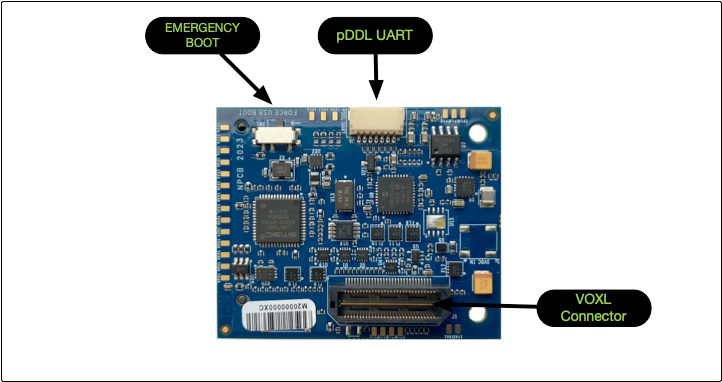
In this image from documentation, is the switch on or off?
-
The arrow points to which way to slide the switch to enable emergency boot. If you are in emergency boot, you cannot use your VOXL at all so it's fairly obvious when it is enabled
-
The arrow points to which way to slide the switch to enable emergency boot. If you are in emergency boot, you cannot use your VOXL at all so it's fairly obvious when it is enabled
@Chad-Sweet - thanks, that's my experience with it, I just wanted to know for sure what it was doing. I think in the documentation it would be helpful to be specific about what direction is normal operation mode, or an off-on type label.

Reading along? Create a free ModalAI Forum account to join in.
With an account you can reply, ask your own question, get an email when a ModalAI engineer answers, and mark the reply that solved it. Your place in each thread is saved between visits.
Questions about VOXL, Flight Core, ESCs and ModalAI drones are answered here by the engineers who build them.
Register Login