Skip to content

ESCs

98 Topics 759 Posts
  • ESC Calibration Error Voxl2

    3
    0 Votes
    3 Posts
    834 Views
    Alex KushleyevA
    @Abdullah01 , the original issue was that ESC calibration was actually done without propellers mounted, you can see the current at 94% power was very small, 0.4A However, the script still produced the a0, a1, a2 parameters (which would have been wrong to use because calibration was done without a propeller..) The error at the end was a result of attempted plot - since voxl2 does not have a display attached, the plot failed. Since that version, we have transitioned to using plotly for plotting, and calibration plots are saved to disk in addition to attempt to plot it to display. The plot feature was updated after SDK 1.1.2 release, but you can get it directly from gitlab here : https://gitlab.com/voxl-public/voxl-sdk/utilities/voxl-esc/-/blob/dev/voxl-esc-tools/voxl-esc-calibrate.py (just get the whole voxl-esc repo from dev branch on your voxl2 and run the calibration procedure). Meanwhile, we will add additional checking of the calibration to catch the conditions that do not look like proper calibration (when propeller is not mounted, etc..).
  • ESC failure error after SDK 1.1.2 upgrade

    14
    1
    0 Votes
    14 Posts
    3k Views
    Chase RileyC
    @Alex-Kushleyev I ran voxl-configure-mpa and was able to get the ESC to function again. Of course it caused other issues due to resetting files and params so I am now trying to work through setting everything back up. Im not sure what would have caused the mpa to need to be reconfigured because I had just done that obviously with the flash of SDK 1.1.2.
  • KDE 4012XF motors with 16 in props

    22
    0 Votes
    22 Posts
    6k Views
    Alex KushleyevA
    @Matthew-Wellner FYI
  • ESC Current Readings

    8
    0 Votes
    8 Posts
    1k Views
    Alex KushleyevA
    @hanzichi , esc_status in px4 would contain individual current for each ESC and since this is not possible to measure on the mini ESC, the esc_status message does not contain any current measurements. So the total current goes into the Battery Status message. Please make sure you enable publishing of battery status in the voxl-esc driver here : param_get(param_find("VOXL_ESC_PUB_BST"), &params->publish_battery_status); and the status is published here
  • 4 in 1 ESC caught fire!

    5
    0 Votes
    5 Posts
    1k Views
    Alex KushleyevA
    @AP123 please contact us before testing a replacement ESC - we need to figure out what happened and prevent such failure in the future. I am working on enabling thermal protection on the ESC, which will reduce power and shut off ESC in order to prevent catching on fire. Before you test again, I would like you to use the updated firmware with such protection. Thank you Alex
  • Do i need to calibrate 4 in 1 ESC for Voxl 2?

    3
    0 Votes
    3 Posts
    836 Views
    J
    HI @AP123, you can find information about calibration for M0134 here. The calibration procedure in voxl2_io driver in voxl-px4 is not designed to work with 4 in 1 ESC, it is for off the shelf ESCs such as BLHeli. Additional information about if you need to calibrate your 4 in 1 ESC can be found in this repo. I believe we already provide parameters (calibration) for 4 in 1 ESC for certain motor/propeller combinations which can be loaded via voxl-esc utility on voxl2. From tech docs: Q: When is ESC Calibration Required? A: When switching battery types (from 3S LiPo to 4S LiPo, etc), or when a new type of motor or new type of propeller is used.
  • Update fw and params causing NO ESC detected

    21
    0 Votes
    21 Posts
    5k Views
    Alex KushleyevA
    @Will , this is great to hear! Thank you for your patience as we are resolving this issue. It does sound like you are ready for flight testing. Meanwhile we will continue testing of the fix and will release an official firmware update to resolve the issue soon (probably this week). However, you don't need to wait for it, the test firmware you already have should be sufficient. If you run into any other ESC-related issues, please let us know! Alex
  • voxl2 and dshot esc

    3
    0 Votes
    3 Posts
    825 Views
    m4v3rM
    @Kyuhyong-You I think they want you to use an external flight control for all that stuff.
  • Voxl2 ESC Error

    4
    0 Votes
    4 Posts
    984 Views
    Eric KatzfeyE
    @AP123 I'm guessing that voxl-px4 is running and the voxl-esc commands are not able to stop it. You can try to do this manually. Run systemctl disable voxl-px4 and then reboot. You should then be able to use the voxl-esc tools. After you are done use systemctl enable voxl-px4 to get voxl-px4 on auto start again.
  • ESC RPM Parameters

    5
    0 Votes
    5 Posts
    916 Views
    H
    @Alex-Kushleyev OK, thanks for the reply. It is actually behaving as expected now. At first it did not seem like the PX4 params were having an effect. If I have the understanding correct: On the PX4 side, the controller efforts (0-1) are getting spanned to the RPM MIN/MAX params. The RPM (in RPM units) command is then being sent across the UART to the esc.
  • esc 4 in i issue

    14
    0 Votes
    14 Posts
    2k Views
    A
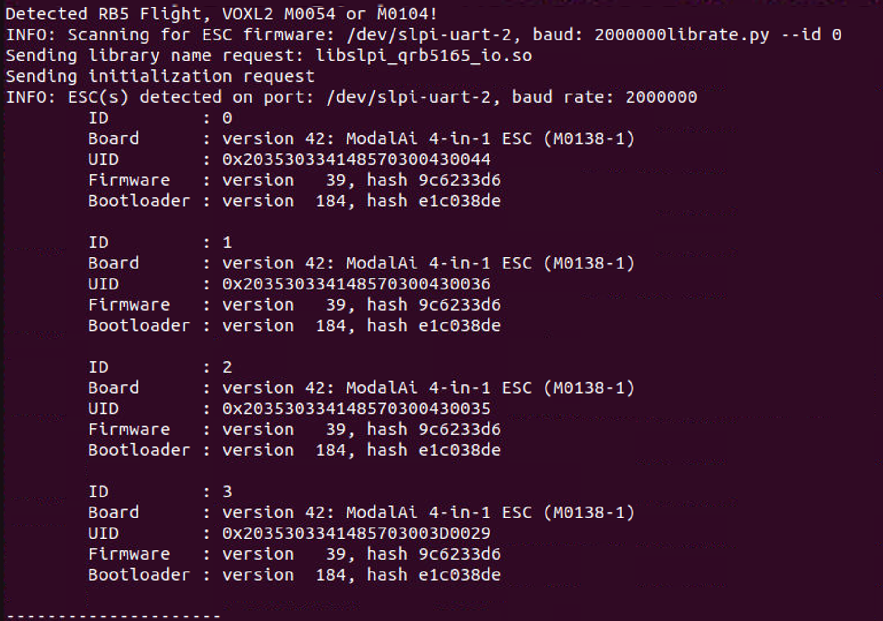
    @Alex-Kushleyev here is out put from ./voxl-esc-scan.py. ~/voxl-esc/voxl-esc-tools$ ./voxl-esc-scan.py Detected Python version : 3.8.10 (default, May 26 2023, 14:05:08) [GCC 9.4.0] Found voxl-esc tools bin version: 1.2 INFO: All COM ports: /dev/ttyS0 : ttyS0 /dev/ttyUSB0 : FT232R USB UART - FT232R USB UART INFO: UART Port Candidates: /dev/ttyUSB0 INFO: Scanning for ESC firmware: /dev/ttyUSB0, baud: 2000000 INFO: ESC(s) detected on port: /dev/ttyUSB0, baud rate: 2000000 INFO: Detected protocol: firmware INFO: Additional Information: INFO: --------------------- ID : 0 Board : version 34: ModalAi 4-in-1 ESC (M0117-1) UID : 0x203034305743570C00280022 Firmware : version 38, hash 83faccfa Bootloader : version 183, hash 25317f42 ID : 1 Board : version 34: ModalAi 4-in-1 ESC (M0117-1) UID : 0x203034305743570C00190039 Firmware : version 38, hash 83faccfa Bootloader : version 183, hash 25317f42 ID : 2 Board : version 34: ModalAi 4-in-1 ESC (M0117-1) UID : 0x203034305743570C001A0047 Firmware : version 38, hash 83faccfa Bootloader : version 183, hash 25317f42 ID : 3 Board : version 34: ModalAi 4-in-1 ESC (M0117-1) UID : 0x203034305743570C003B004F Firmware : version 38, hash 83faccfa Bootloader : version 183, hash 25317f42 and we supplied 12v in esc.
  • ESC 4 in 1 Control Firmware

    3
    1
    0 Votes
    3 Posts
    574 Views
    Alex KushleyevA
    updated docs to reflect firmware and params locations : https://docs.modalai.com/modal-esc-v2-manual/
  • PX4 modal_io: esc_status not updating

    2
    0 Votes
    2 Posts
    430 Views
    0
    Update: It was an issue on my end regarding the baud-rate configuration. All is good.
  • ESC cuts out on high RPM

    12
    0 Votes
    12 Posts
    2k Views
    Alex KushleyevA
    OK, quick update.. I did a quick test.. ramp from 0 to 100% power runs fine on ID3, see image below. optical encoder test was good, i did 3 measurements : ESC: 8040, 11800, 1850rpm, tachometer 8035, 11810, 18500. (rounded to closest 100rpm). The optical tachometer was very very close to reported rpm of the ESC. I used the following command to do a quick ramp test: ./voxl-esc-spin.py --id 3 --power 100 --ramp-time 4.0 --timeout 5.0 --enable-plot 1 (btw, i just updated voxl-esc on dev branch to plot the total current, since M0129 does not have individual current measurement, but if you test one motor at a time, you will get current for one motor) got to about 33000 rpm at 100% power, 14.8V, about 5.8A current.. More details will follow as I tune for RPM control. [image: 1696005724291-0867e8c5-fa0a-4c21-9d2a-58edb1adcb2a-image.png]
  • ESC Mini 4 in 1 - params crc

    6
    2
    0 Votes
    6 Posts
    897 Views
    Alex KushleyevA
    @0x45, Great to hear! Sorry again about the bug and thank you for reporting it. Alex
  • ESC Calibration

    11
    0 Votes
    11 Posts
    3k Views
    Alex KushleyevA
    @dlee , sorry for the delay. Just to clarify, it is possible that your CW and CCW propellers are not exactly the same, therefore the CW and CCW motors are showing slightly different response to calibration. In this case we can calculate an average for this calibration and use that for all 4 motors. I modified the script to calculate the quadratic fit for all four calibration results together. import numpy as np import plotly.graph_objects as go rpms = np.arange(0,13000) #rpm range for the quadratic fit cals = [] fits = [] all_fits = [] #enter the calibration results from each motor cals.append([7.53669159958e-06, 0.336081465707, 112.878194918]) cals.append([2.9479165331e-06, 0.37353561309, 35.6265065345]) cals.append([8.8413818561e-06, 0.3256003514, 132.362831923]) cals.append([7.1523119742e-07, 0.405821707061, -98.2189291548]) fig = go.Figure() for idx in range(len(cals)): fit = np.polyval(cals[idx], rpms) fits.append(fit) fig.add_trace(go.Scatter(x=rpms, y=fits[idx], name='Fit %d'%idx)) #plot each fit #create an array that contains points sampled from each curve #and perform a polynomial fit on all the data to find the average all_data = np.array(fits).flatten('C') all_rpms = np.array([rpms,rpms,rpms,rpms]).flatten('C') #evaluate the average poly fit ply = np.polyfit(all_rpms, all_data, 2) av_fit = np.polyval(ply, rpms) #print the average fit coefficients print('Average Fit coefficients:') print(' pwm_vs_rpm_curve_a0 = ' + str(ply[2])) print(' pwm_vs_rpm_curve_a1 = ' + str(ply[1])) print(' pwm_vs_rpm_curve_a2 = ' + str(ply[0])) #plot the average fig.add_trace(go.Scatter(x=rpms, y=av_fit, name='Average Fit')) #finalize and show the figure fig.update_layout(title='Motor Voltage vs. RPM') fig.update_xaxes(title_text="RPM") fig.update_yaxes(title_text="Motor Voltage (mV)") fig.show() It results in the following plot and average coefficients. You can enter these coefficients into your custom esc parameters xml file. Average Fit coefficients: pwm_vs_rpm_curve_a0 = 45.66215105517507 pwm_vs_rpm_curve_a1 = 0.36025978431449995 pwm_vs_rpm_curve_a2 = 5.01030529655002e-06 [image: 1692214971344-2dd75e2f-f722-464d-be82-5548568ec25b-image.png]
  • Performance VOXL Mini 4-in-1 ESC

    2
    0 Votes
    2 Posts
    530 Views
    Alex KushleyevA
    Hello @floooH Sorry about that, we will update the performance section soon. The mini ESC has been tested at 16V 15A continuous for 1 minute (15A per each channel, so 60A total). The test condition was under full air flow of 5" tri-blade propellers spinning at around 20K RPM and the temperature of ESC (measured by the MCU) was around 80 degrees C. You generally want to keep your ESC under 100C (temperature is measured by the sensor inside each MCU and reported via ESC feedback). The maximum voltage is 4S (up to at least 18V is safe). Maximum burst current at least 30A per channel (for few seconds) Even though the ESC can handle pretty large currents, due to its small form factor you need to be careful and watch the ESC temperature when you are designing / testing your drone. Small PCB of the mini ESC does not have much area for heat dissipation, so good airflow is required for large current flows. So the ESC is unlikely to break from over current (within reasonable range) but it could overheat if it is not appropriately cooled. In general we recommend the mini ESC to be used on drones < 750g, where you should not have much problem at all with heat dissipation even with minimal cooling. But for any larger drone or racing applications you will need to perform testing to ensure the ESC can stay < 100 deg C (ideally around 60-80C during the whole flight). I hope this helps, let me know if you need more info Alex
  • VOXL 2 Mini with Mini 4 in 1 ESC - No battery Information

    6
    2
    0 Votes
    6 Posts
    1k Views
    Jack BishopJ
    @Alex-Kushleyev @Eric-Katzfey Managed to get everything up and running with your advice - One thing I needed to do first was flash V1.0.0 as the system was running V1.0.0beta and had an older version of ESC tools V1.08. Once V1.0.0 was flashed the ESC tools was update to 1.20 and allowed me to update to the ESC firmware version 38. After everything flashed and updated I now have the battery information in QGroundControl! Many thanks again for your assistance!
  • VOXL ESC Mini 6s support

    4
    0 Votes
    4 Posts
    1k Views
    VinnyV
    Hi @Jon305Johnson We will not be offering 60A support for some months yet, but we are now testing our standard 4-in-1 ESC at 6S support. We built the first few proto units and expect to have some results in a matter of weeks. All forward progress. Thanks! Vinny
  • voxl Tmotor f55 esc

    26
    0 Votes
    26 Posts
    8k Views
    Alex KushleyevA
    @ErezI When it comes to comparing the quadratic curve fits, it is difficult to look at just the coefficients and compare them. If you have multiple tests, you should plot the quadratic plots on the same figure and see how repeatable they are. What may seem like a noticeable variation in the coefficients, could still result in curves that are very similar. By the way, you should not just average values of a0, a1, and a2 to get a0_average, a1_average, and a2_average, as this will result in wrong curve. If you would like to find an average of all 4 runs, then you can just create a quadratic fit of all the points from the 4 data sets - that is the proper way to do it. However, if after plotting the 4 curves they look very similar, you can use any of the 4 individual fits. The PI (Proportional Integral) controller on the ESC will compensate for minor deviations. The error you saw with params not being valid was due to the latest version of voxl-esc tools using new parameter structure. So the solution is (which is what you already figured out) to update the firmware and params to latest. This type of change does not happen too often. We will add this to documentation to make this clear. Alex