Skip to content

ESCs

98 Topics 759 Posts
  • This topic is deleted!

    1
    0 Votes
    1 Posts
    5 Views
    No one has replied
  • M0138 FPV ESC capabilities

    11
    0 Votes
    11 Posts
    2k Views
    Alex KushleyevA
    @tonygurney , yes. Please see the comment about pin availability and pin numbers here : https://gitlab.com/voxl-public/voxl-sdk/utilities/voxl-esc/-/blob/master/voxl-esc-tools/voxl-esc-pwm.py?ref_type=heads#L17 Please note that running voxl-esc-pwm.py script will use the serial port and cannot be done concurrently with PX4. This is a standalone tool, unlike voxl-send-esc-pwm-cmd tool, which sends a message to voxl-px4 and the pwm control message is then forwarded to the ESC by the voxl_esc px4 driver. Alex
  • ESC lights turn off when plugged into voxl2

    4
    2
    0 Votes
    4 Posts
    485 Views
    tomT
    @brendan424 https://www.modalai.com/pages/rma
  • ESC 2 MINI rapidly blinking after firmware update

    14
    0 Votes
    14 Posts
    2k Views
    astro_philA
    @Eric-Katzfey Okay, then I'm gonna do that. Thanks for the assist.
  • Flight Core V2 - VOXL ESC 4in1 Integration

    18
    4
    0 Votes
    18 Posts
    2k Views
    Eric KatzfeyE
    @Jetson-Nano To install the new voxl-io-server try dpkg --force-all -i voxl-io-server_0.0.5-202502191136_arm64.deb.
  • FPV ESC with Ardupilot

    2
    0 Votes
    2 Posts
    358 Views
    Eric KatzfeyE
    @Robert-Boffey Currently ArduPilot only supports use of the ModalAI ESCs on the VOXL 2 platform. We hope to add support for our ESCs in ArduPilot on ChibiOS platforms as well in the future but it isn't available now.
  • VOXL Mini 4-in-1 ESC Missing Capacitor

    4
    3
    0 Votes
    4 Posts
    1k Views
    Alex KushleyevA
    Hi @sssagara, Great to hear that it worked! I checked with our team and we suspect that the capacitor was not damaged due to a crash, but potentially a finger nail clipped it off during battery removal. Please take a note and see if that was a possibility. We will certainly work on addressing it in the future. Alex
  • Query regarding connecting bigger ESCs

    15
    0 Votes
    15 Posts
    3k Views
    astro_philA
    @astro_phil px4 version: 1.14.0-2.0.68
  • Mini ESC with Motor spin problems

    2
    0 Votes
    2 Posts
    440 Views
    Alex KushleyevA
    @astro_phil can you please share a video of the issue and the esc params that you are using? Thanks! Alex
  • Performance of the VOXL ESC

    2
    0 Votes
    2 Posts
    472 Views
    Alex KushleyevA
    @voxl-phoenix , The M0134 ESC can work at 15A per channel (continuous) with 3S battery, however it needs direct air flow to cool it down. The limiting factor is going to be heat / temperature of the ESC, so I cannot answer your question conclusively. For example, if you enclose the ESC (no air flow) and then run 4 motors at 10-15A, then practically any ESC will overheat. If you already have the M0134 ESC, I suggest that you first figure out the maximum continuous current draw with your motor / propeller. You can do this test using our voxl-esc tools, specifically the test i would recommend is the power ramp test : https://gitlab.com/voxl-public/voxl-sdk/utilities/voxl-esc/-/blob/master/voxl-esc-tools/doc/low_kv_motor_tuning.md?ref_type=heads#power-ramp-test (since your motor is not low kv, you can ignore the main topic of that document, but you can see the results of the power ramp test). The maximum current should be at the maximum applied power. If you share your test plot, i can confirm that it looks OK. The power ramp test will slowly ramp ESC output power from 10 to 100% (or whatever you set it to) and will also show the RPM and current drawn. Note that ESC temperature is also provided. If you have your drone frame, you could mount the ESC, motors, propellers and secure the drone to a desk or something heavy (so that it does not fly away), then you can actually these tests on all 4 motors and monitor ESC temperature in these conditions. The tests can be run for a lot time, simulating RPMs at hover or higher RPMs. Even though the drone would be strapped down (not actually flying), most of the air flow over the ESC is usually coming from the propellers, so that would be a good estimate of ESC performance / temperature during flight testing. ESC Temperature: the critical ESC temperature would be above 105C, although i would not recommend operating above 80-90C (during normal flight) - that probably means you do not have sufficient cooling. We typically like to see the ESC around 50-60C (or less) during non-aggressive flight. If you would like an ESC that will certainly be able to handle your motors / propellers (while still needing cooling, but not as much, due to lower resistance Mosfets and other design features), you should try our FPV ESC : https://docs.modalai.com/voxl-fpv-esc-datasheet/ https://www.modalai.com/products/m0138 If you are not familiar with the voxl-esc tools, I suggest that you check the documentation there because the tools can be used to fine tune the performance and analyze performance / prevent crashes, since you can run tests and analyze data in a test environment. If you have any more questions, let me know. Alex
  • VOXL ESC FPV queries

    32
    0 Votes
    32 Posts
    7k Views
    Alex KushleyevA
    @Jetson-Nano , I am sorry, I don't have this hardware set up right now, so I can't actually test what you are trying to do. I will check with the team regarding who can test it. Alex
  • ESC Boot mode?

    3
    0 Votes
    3 Posts
    805 Views
    Stefan AmundarainS
    @Alex-Kushleyev this issue was due to poor amperage out of the shore power module. swapped for a different power source and issue was resolved.
  • 4-in-1 mini ESC max ratings

    3
    0 Votes
    3 Posts
    657 Views
    Morten NissovM
    @Alex-Kushleyev Sorry for the delay, didn't notice the alert. But great, thanks!
  • Bad Tunning

    12
    1
    0 Votes
    12 Posts
    2k Views
    Alex KushleyevA
    Hi @Stefan-Amundarain , Thank you for uploading the video with the detailed demonstration. What I see from the video is that the initial "sinusoidal" spin-up works (almost) every time, but the ESC fails to transition to regular non-sinusoidal control mode. There are typically two reasons for this: a bad motor / wiring / connection or one of the ESC Mosfets is not working properly. In some failures, the sinusoidal spin-up is still able to rotate the motor, but during the transition to normal operating mode, there are some checks to ensure proper motor behavior and if those checks fail, the ESC stops (and then restarts since you are commanding it to spin). The behavior i am seeing is very similar to this. sometimes if you have spin-up time too fast (and spin-up power too low), the ESC will lose sync with the motor during sinusoidal spin-up. I would suggest trying to (you can do both changes at once): increase the spin-up time (double it from what you have now) increase the spin-up power by 20% (if it is 100 (which is 10% power), set it to 120, so it will be 12% power). also double check that the motor kV is set correctly, because it is used during sinusoidal spin-up for back-emf compensation. I would also suggest swapping out the motor for an identical new motor, so you can eliminate the motor being an issue. You can also check the motor winding resistance to make sure all 3 possible pair-wise resistance measurements have the same resistance. Finally, if all of these steps fail, please try to use another ESC channel to see if it is a dead ESC channel (which should be unlikely). Please try these out and let me know what you find! Alex
  • VOXL ESC Mini Integration with px4 on pixhawk6x and KakuteH7

    2
    0 Votes
    2 Posts
    400 Views
    Alex KushleyevA
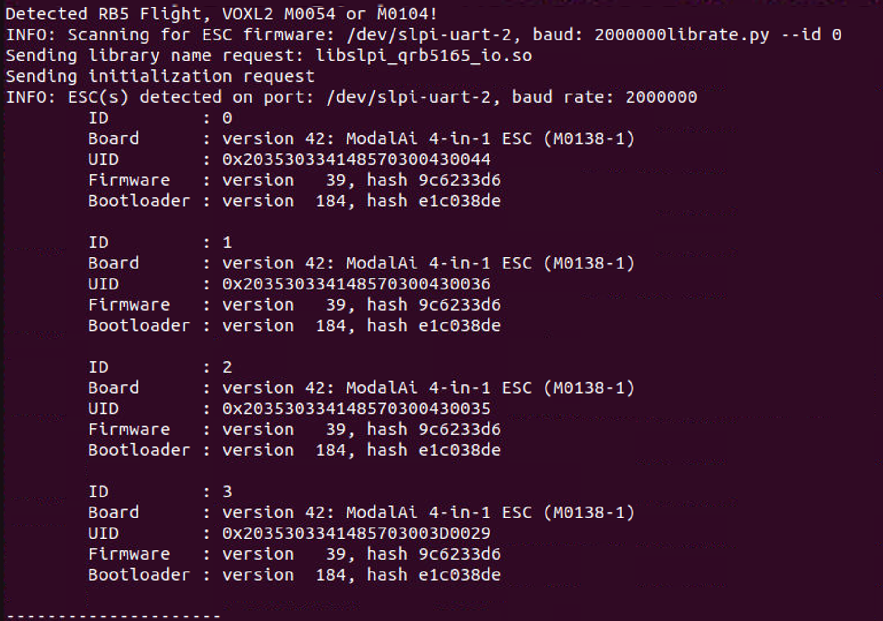
    @MChehadeh , the PX4 ESC driver in v1.14.3 should be functional, but outdated. The latest version lives here : https://github.com/modalai/px4-firmware/tree/voxl-dev/src/drivers/actuators/voxl_esc, it would be best if you are able to build that for your board. If you want to stick with the current version, please double check: uart port that you are using to connect to the ESC. In that version of the ESC driver, you specify the port with -d param when you spawn the task : https://github.com/PX4/PX4-Autopilot/blob/v1.14.3/src/drivers/actuators/modal_io/modal_io.cpp#L237 double check the baud rate that the ESC is running at, you should know it from running the voxl-esc tools, which are working for you.'' If you switch to the latest version of the ESC driver in PX4, you should have the following debug information that is very helpful to diagnose any issues: #run px4 in foreground and grep for VOXL_ESC: voxl-px4 -d | grep VOXL_ESC INFO [muorb] SLPI: VOXL_ESC: Starting VOXL ESC driver INFO [muorb] SLPI: VOXL_ESC: Opening UART ESC device 2, baud rate 2000000 INFO [muorb] SLPI: VOXL_ESC: Successfully opened UART ESC device INFO [muorb] SLPI: VOXL_ESC: Detecting ESCs... INFO [muorb] SLPI: VOXL_ESC: ESC ID : 0 INFO [muorb] SLPI: VOXL_ESC: Board Type : 37: ModalAi 4-in-1 ESC (M0134-1) INFO [muorb] SLPI: VOXL_ESC: Unique ID : 0x203330385246571900480024 INFO [muorb] SLPI: VOXL_ESC: Firmware : version 39, hash eb6fb500 INFO [muorb] SLPI: VOXL_ESC: Bootloader : version 183, hash b4fa2cf8 INFO [muorb] SLPI: VOXL_ESC: Reply time : 1646us INFO [muorb] SLPI: VOXL_ESC: INFO [muorb] SLPI: VOXL_ESC: ESC ID : 1 INFO [muorb] SLPI: VOXL_ESC: Board Type : 37: ModalAi 4-in-1 ESC (M0134-1) INFO [muorb] SLPI: VOXL_ESC: Unique ID : 0x2033303852465719004D004D INFO [muorb] SLPI: VOXL_ESC: Firmware : version 39, hash eb6fb500 INFO [muorb] SLPI: VOXL_ESC: Bootloader : version 183, hash b4fa2cf8 INFO [muorb] SLPI: VOXL_ESC: Reply time : 621us INFO [muorb] SLPI: VOXL_ESC: INFO [muorb] SLPI: VOXL_ESC: ESC ID : 2 INFO [muorb] SLPI: VOXL_ESC: Board Type : 37: ModalAi 4-in-1 ESC (M0134-1) INFO [muorb] SLPI: VOXL_ESC: Unique ID : 0x203330385246571900500042 INFO [muorb] SLPI: VOXL_ESC: Firmware : version 39, hash eb6fb500 INFO [muorb] SLPI: VOXL_ESC: Bootloader : version 183, hash b4fa2cf8 INFO [muorb] SLPI: VOXL_ESC: Reply time : 1120us INFO [muorb] SLPI: VOXL_ESC: INFO [muorb] SLPI: VOXL_ESC: ESC ID : 3 INFO [muorb] SLPI: VOXL_ESC: Board Type : 37: ModalAi 4-in-1 ESC (M0134-1) INFO [muorb] SLPI: VOXL_ESC: Unique ID : 0x2033303852465719004D0050 INFO [muorb] SLPI: VOXL_ESC: Firmware : version 39, hash eb6fb500 INFO [muorb] SLPI: VOXL_ESC: Bootloader : version 183, hash b4fa2cf8 INFO [muorb] SLPI: VOXL_ESC: Reply time : 617us INFO [muorb] SLPI: VOXL_ESC: INFO [muorb] SLPI: VOXL_ESC: Use extened rpm packet : 1 INFO [muorb] SLPI: VOXL_ESC: All ESCs successfully detected No Changes are needed on the hardware side. If the UART-based communication does not work for you and you want to use traditional PWM-based (1-2ms) output from the STM board, the ESC mini supports PWM input, just make sure to use the latest ESC firmware. https://gitlab.com/voxl-public/voxl-sdk/utilities/voxl-esc/-/tree/master/voxl-esc-tools/firmware https://docs.modalai.com/voxl-mini-esc-datasheet/#pwm-inputs--outputs be very careful soldering and using the test points to make sure not to pull the wires to prevent pulling off the board pads this method is not recommended because you will not receive any feedback about ESC state and closed loop RPM control is not used. We use this for bench testing, for example when using a dyno or something like that (which controls the ESC with standard pwm signal) if you wanted to try PWM input, it is easier using M0134 ESC because it has a JST GH connector : https://docs.modalai.com/modal-esc-datasheet/#pwm-inputs--outputs
  • Maximum rate of rpm, current and voltage measurements of VOXL ESCs

    2
    0 Votes
    2 Posts
    492 Views
    Alex KushleyevA
    @MChehadeh , If you need the maximum throughput of the ESC feedback data, you should use the uart-to-serial connection to a linux PC, which you have already done. Additionally, the voxl-esc test scripts already provide an option to specify the command rate (--cmd-rate). Please see the checklist below for best performance: make sure the ESC baud rate is set to 2Mbit (first make sure your usb-to-serial adapter can support it). here is an example esc param file showing the baud rate set to 2Mbit. It may already be set to 2Mbit for your esc, you can verify using voxl-esc-scan.py some USB to serial adapters may add some delay, sometimes it helps to experiment with a few. Any particular adapter you have in mind for testing? maximum command rate that has been tested is 4000hz, but it has not been tested extensively, i suggest starting with 2000hz. keep in mind that in order to achieve the maximum rate of esc feedback, you should only test / request feedback from one ESC at a time. The voxl-esc-spin.py test script will request feedback from a single ESC if you only spin one motor (using --id 0, for example), and will automatically request feedback from all ESC at 1/4 of the rate if you spin all motors (using --id 255). So if your cmd-rate is set to 2000 and you spin 4 motors, each ESC will send feedback at 500hz, but if you only spin one motor, the ESC that is spinning will send feedback at the cmd-rate. here is an example of the most basic command that will set the cmd-rate to 2000, spin motor for for 5 seconds and plot the results (including rpm, power %, voltage, current). ./voxl-esc-spin.py --id 0 --cmd-rate 2000 --power 10 --timeout 5 --enable-plot 1 please note that M0129 only measures total battery current that is flowing thru it (not individual), and only ID3 has the current sensor, so you need to test ID3 if you want the total current reported (it will print as BOARD CURRENT in your test script). M0134 ESC has individual current sensing for each ESC channel. if you need the data logged to a file, you can use --enable-logging 1 flag, and the ASCII log will be saved to logs folder inside voxl-esc-tools directory, where you are running the test. The log format is a s follows: PACKET_TYPE LINUX_TIMESTAMP_MS ESC_ID ESC_POWER (RESERVED) ACTUAL_RPM VOLTAGE CURRENT ESC_TEMPERATURE ESC_RCVD_COMMAND_COUNTER RESERVED RESERVED RESERVED here is what a typical log entry looks like: 128 1722869479610 3 10 0 980 11.989 0.024 38.500 20 0 0 0 the standard feedback packet type is 128, in this case the ID 3 is sending feedback, it is spun at power 10%, 980RPM, voltage is 11.989, current is 0.024A (no load spin), ESC temperature is 38.5 deg C if you use M0129, there will be additional packets in the log, with just voltage and current please note that if you use the logging option, the timestamp is saved in milliseconds, so if the feedback is coming back at a higher rate than 1khz, you could not tell the timestamps apart. I will fix this.. one more tip, it helps to run the linux PC in performance mode in order to minimize the cpu delays / sleeps. The ESC feedback packets (currently) do not have the timestamp from the ESC itself, so the accuracy / jitter of the timestamp depends on how quickly the PC can wake up and send/receive the data. you can also modify the spin script to save the data in the format you need, but the log file is probably more reliable to make sure no data is missed. Regarding PX4, on VOXL2, the ESC driver runs at 800hz (which is the update rate of the flight loop), each ESC sends feedback at 200hz. ESC status is published at that rate, but it may not logged at full rate to px4 log file, i would need to double check. Here is the code reference : https://github.com/modalai/px4-firmware/blob/voxl-dev/src/drivers/actuators/voxl_esc/voxl_esc.cpp#L1342 I know this is quite a lot of information, please let me know if you need any other clarification. Alex
  • Arduino ESC Compatibility

    2
    0 Votes
    2 Posts
    370 Views
    Alex KushleyevA
    @kcmacauley , the voxl-esc driver is implemented in PX4, so you can see how the data packets are generated to send RPM commands and receive the feedback from each ESC. https://github.com/modalai/px4-firmware/blob/voxl-dev/src/drivers/actuators/voxl_esc/voxl_esc.cpp#L1230 https://github.com/modalai/px4-firmware/blob/voxl-dev/src/drivers/actuators/voxl_esc/voxl_esc.cpp#L1252 Also, an outdated implementation, which you can also refer to, can be found here : https://gitlab.com/voxl-public/support/esc-driver -- it can be compiled and tested standalone, but we do not maintain or support it. Our voxl-esc python tools provide a lot more functionality, but not entirely open source : https://gitlab.com/voxl-public/voxl-sdk/utilities/voxl-esc Finally, an even more outdated (but more formal) document can be found here : https://developer.qualcomm.com/qfile/34042/80-p4698-19_b_qualcomm_snapdragon_navigator_esc_protocol_spec.pdf. Also, not supported or complete, but can be used as a reference. If you have any specific questions about protocol, I can answer, but you should be able to get what you need for basic flight from the PX4 driver. For offline testing and tuning it is best to use the voxl-esc python tools. Alex
  • Motor issues when running ESC calibration

    108
    0 Votes
    108 Posts
    58k Views
    Alex KushleyevA
    @rdjarvis , I received the M0138 ESC that you sent back (reported that you were unable to communicate with the ESC). The issue was that the baud rate in ESC params was set to 2.5Mbit instead of 250K by accident, so our auto-scan in ESC tools could not detect the ESC (and VOXL2 DSP does not support 2.5Mbit). We will fix this in future ESC firmware to prevent accidental setting of unsupported baud rates. Sorry about that. Alex
  • Control two 4in1 VOXL ESCs with one Voxl 2 Mini

    2
    0 Votes
    2 Posts
    448 Views
    M
    @Alex-Kushleyev This forum post can be considered resolved with this answer: https://forum.modalai.com/post/17782 Thanks for the update. Cheers!
  • NACK Received when updating voxl esc

    6
    0 Votes
    6 Posts
    1k Views
    Alex KushleyevA
    @wilkinsaf , yes, you got it. By the way, you did not have to restore the old firmware, you could have just done this: ./voxl-esc-upload-firmware.py --firmware-baud-rate 57600 -f firmware/modalai_esc_firmware_m0117_1_v0_39_RC10_eb6fb500.bin --id 0 The following note does not really help, if you also have power connected to VOXL2.. WARNING: Specified ESC ID not detected; perform manual power cycle now However, if the ESC is connected to a PC, you can just power cycle the ESC and the the bootloader will start up and firmware update will being. Alex