Skip to content
  • Treatment of log for a ROVER with an odometer

    Unsolved Flight Core and Legacy VOXL voxl-cam
    5
    2
    0 Votes
    5 Posts
    1k Views
    Cliff WongC
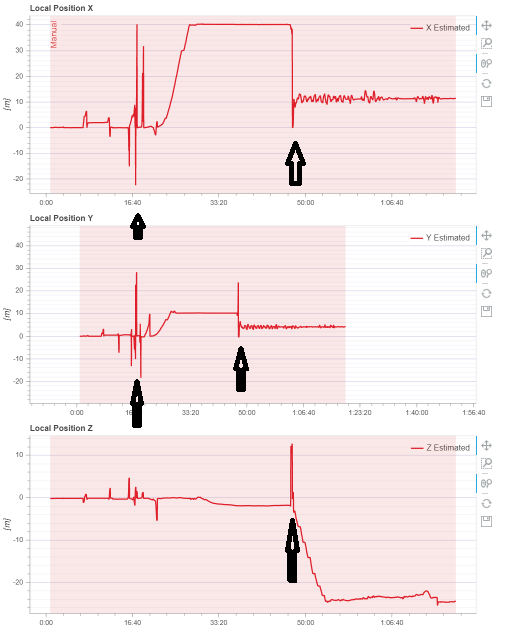
    Looking at your mavlink log on estimator_visual_odometry_aligned, I can confirm VIO resetting to 0 at the moment your local position resets (picture #1). (pic 1) [image: 1659554580119-screenshot-from-2022-08-03-12-22-32.png] On a rover typically VIO will reset on 3 situations (everything else working normally as specified): Fast yaw transitions (I do see a large manual input/actuator output around that time--indicated on pic #2). To solve this, have your vehicle turn/tuned slower on yaw motions. auto-exposure not keeping up with rapid lighting conditions (high noon sunlight + tree shadows), the too much vehicle vibration (e.g. treads). From the logs it appears you have a max yaw/roll input into the rover, that indicates scenario #1 above. If you slow down you yaw movements may solve the problem, please try that 1st (there are other, more complicated options). (pic 2) [image: 1659554883412-screenshot-from-2022-08-03-12-26-11.png] What you can do aside from following the vio troubleshooting guide is to monitor the vio stream on QGC. In order to do that, you need to edit the voxl-streamer service file on VOXL. Basically: login to VOXL edit /etc/systemd/system/voxl-streamer.service on the Exec line that says /usr/bin/voxl-streamer, append to the end of it "-c qvio-overlay". cycle power and QGC video should show the VIO debug video (and not the high resolution stream), showing at the top: vio xyz position and number of features Run thru your test again to recreate the error, when it occurs, keep in mind the number of features, if it drops under 5, you'll see vio reset confirming the reset is due to one of 3 scenarios above. If not, post a video of that as it would be a configuration issue & we'd need to see the video stream on what's happening to debug further. Good luck.
  • Openvpn not updating from 2.1.3 to 2.4.6

    Unsolved Flight Core and Legacy VOXL voxl-cam
    5
    0 Votes
    5 Posts
    713 Views
    tomT
    @Aks Ah okay, I wasn't using the systemd service so that makes sense.
  • Multiple tracking cameras

    Unsolved Flight Core and Legacy VOXL voxl-cam
    3
    0 Votes
    3 Posts
    818 Views
    Andy JaroszA
    @Chad-Sweet said in Multiple tracking cameras: Yes, these fisheye modules plug in to the stereo flex adapter https://www.modalai.com/products/m0072 They are the same lens and sensor spec as the tracking sensor Thanks! I've yet to play around with the system--the platform can handle VIO with 2 cameras, from a system performance perspective?
  • Cooling solution for VOXLCAM

    Unsolved Flight Core and Legacy VOXL voxl-cam
    2
    0 Votes
    2 Posts
    439 Views
    ?
    Hi, We've run into this issue as well when the VOXL-CAM is sitting on a desk, for which we've designed this cooling stand. As for when the cam is in motion on a body, we've only flown it on the seeker where the propwash is enough to keep the unit cool enough to utilize all of the cores fully. The cam unit wasn't designed around that smaller fan, we use that primarily on our other platforms with an open board where we can direct air directly onto the board. As for QVIO, we've also seen this behavior when cores shut down, but we try to avoid overheating at all costs, and generally don't carry any expectation for software to continue operating properly once the pmic is shutting down cores. Generally, I'd recommend : Trying to make sure that the cam is placed on a spot on your drone with as much airflow as possible Optimizing your code as much as possible to minimize CPU utilization Download the latest software release (3.8.0-0.7) from here since we've spent most of the last year improving and optimizing our services and libraries and there should be significant improvements since 3.3.0 was released
  • VOXL CAM/Seeker Drone Power Supply Question

    Unsolved Flight Core and Legacy VOXL voxl-cam
    3
    0 Votes
    3 Posts
    784 Views
    M
    @Adrian-Hidalgo Appreciate the response, thank you!
  • voxlcam stereo calibration issue

    Unsolved Flight Core and Legacy VOXL voxl-cam
    2
    0 Votes
    2 Posts
    1k Views
    A
    @serge I am also facing the same issue, did you solve it?
  • Cooling fan for Voxl cam on board

    Unsolved Flight Core and Legacy VOXL voxl-cam
    3
    0 Votes
    3 Posts
    946 Views
    H
    okay,Thank you
  • Replacement for trcking camera

    Unsolved Flight Core and Legacy VOXL voxl-cam
    2
    0 Votes
    2 Posts
    753 Views
    ?
    It should be possible to plug in the hires cam to j4 and have frames appear, but vio server and the camera calibrator are not set up to handle the non-fisheye color images, I'd strongly recommend getting a new tracking camera from here
  • voxl-calibrate-camera not working

    Unsolved Flight Core and Legacy VOXL voxl-cam
    4
    1
    0 Votes
    4 Posts
    965 Views
    ?
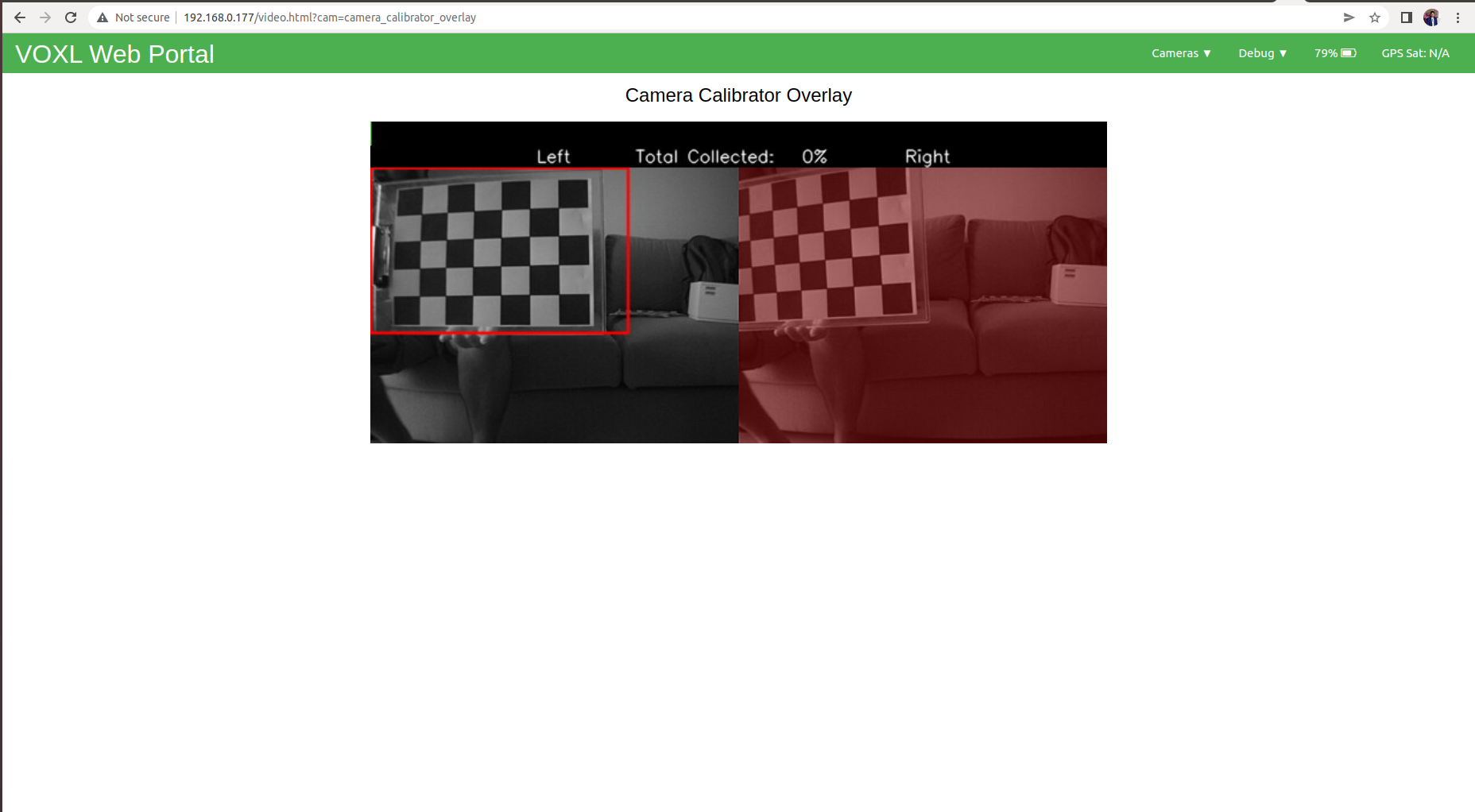
    Hi, i think your issue is the board size, it's counting the number of inside corners not the number of squares so it should be 6x8 not 7x9
  • 0 Votes
    3 Posts
    2k Views
    Deeshant SharmaD
    Thank you for your reply. Its working now
  • ARDUPILOT VOXL CAM ORIENTATION ISSUE ?

    Unsolved Flight Core and Legacy VOXL voxl-cam
    21
    0 Votes
    21 Posts
    6k Views
    Cliff WongC
    Hi Sergio. I'm handle a number of rover configurations here for the team. Reading thru the posts, let's take a step back to confirm your setup. a. you are using the cube to output IMU data into voxl-cam. b. you are using voxl-cam to output odom data [back] to the cube for (e.g. external vision localization) c. the camera has been moved from the stock position of -45deg from horizon w.r.t. voxl-cam body to 0deg from horizon w.r.t. voxl cam body. d. the cube is mounted w/IMU in standard orientation (0 deg to horizon/forward, aka imu RPY is 0,0,0) e. you are not using a modalai flight core (option for voxl-cam purchase) First of make sure your PX4 SENS_BOARD_ROT (or AHRS_ORIENTATION if Ardupilot) is set for a cube setup (I recall should be "No rotation" as well as from your photo). Please reply if that is all correct. If so, then we can move to the next step where I can show you how confirm vio's pose estimation (after that then we'll look at position accuracy).
  • VOXL ToF sensor rotated

    Unsolved Flight Core and Legacy VOXL voxl-cam
    5
    0 Votes
    5 Posts
    1k Views
    Chad SweetC
    voxl-mapper is an example of taking TOF point cloud data and exercising path planning
  • Does VOXL-CAM yet support Flir thermal sensors

    Unsolved Flight Core and Legacy VOXL voxl-cam
    2
    0 Votes
    2 Posts
    713 Views
    Eric KatzfeyE
    @janis_blank No, the needed SPI driver for the Lepton that goes in that socket has not yet been created.
  • VOXL not connecting to QGC

    Unsolved Flight Core and Legacy VOXL voxl-cam
    17
    0 Votes
    17 Posts
    4k Views
    Bright NnadiB
    @Steve-Turner Hey please I need you help setting up ADB for my newly purchased VOXL CAM. I already started a discussion "Broken parts".
  • YouTube video, office navigation

    Unsolved Flight Core and Legacy VOXL voxl-cam
    6
    0 Votes
    6 Posts
    1k Views
    tomT
    @Zeev-Mindali apq8096
  • 0 Votes
    11 Posts
    2k Views
    David SmythD
    @Adrian-Hidalgo @Eric-Katzfey Thanks for the reply, much appreciated. I'll give that a go.
  • Link VIO to stereo instead of tracking camera

    Unsolved Flight Core and Legacy VOXL voxl-cam
    8
    0 Votes
    8 Posts
    2k Views
    M
    @Alex-Gardner Thank you, is looking good and promising for this use case. I'll give it a try.
  • Realsense driver installation on docker image

    Unsolved Flight Core and Legacy VOXL voxl-cam
    2
    0 Votes
    2 Posts
    877 Views
    ?
    Voxl and it's software build image use ros indigo, not kinetic. You'll either need to install the indigo version of this package or use an ubuntu 18.04 docker image with ros kinetic installed (and use this on voxl). A sample such image for using kinetic on voxl can be found near the bottom of our downlods page (roskinetic-xenial docker image)
  • ADB devices not found

    Unsolved Flight Core and Legacy VOXL voxl-cam
    31
    0 Votes
    31 Posts
    16k Views
    Hyunsoo Kim 0H
    @tom Thank you so much! I was having the exact same problem with @marian. I could connect to the voxl via ssh but could not via adb shell. But could solve it after removing the /etc/udev/rules.d/51-android.rules. Try to remove the file, who are facing the same problem with me.
  • 0 Votes
    5 Posts
    1k Views
    M
    No answer from Chad, so I put the problem again here hoping someone can advice me how to advance with this topic. I took a look at the parameters send over, but there is nothing about the rotation of the board. These params are installed on my board, but the results are the same: whenever I use it for indoor, I do the accel & gyro calibration with ROTATION-NONE, but I have a roll failure detected once I try to arm and I got the visio for local position whenever I use it for outdoor, I add a M8N GPS with compass, I can't calibrate de compass because the position indicated on the QGC is different as the position of the drone if ROTATION-NONE is selected. By the modalai doc. is ROTATION-NONE that it should be used. Did I get it correctly, or do I need to select another ROTATION value of the board for calibration? Thanks!