Skip to content

VOXL SDK and Software

389 Topics 2.0k Posts

voxl-sdk releases, MPA services, camera and video pipelines, Remote ID, and building and deploying your own software on VOXL.

  • J8 Sensor Header Use with M0173 Micro-Coax Kit on VOXL2

    Unsolved camera
    3
    0 Votes
    3 Posts
    552 Views
    I
    Hi @Alex-Kushleyev, thank you kindly for the support and apologies for the late response. My earlier question was for an attempt to equip an M0173 to VOXL2 for a C26/27/28 config, plus an M0010 stereo pair on a M0076 interposer on VOXL J8 (sorry for the lack of clarity). Our team is now looking to use a default camera config for M0173, but minus the ToF sensor and with an added M0161 4K Hires camera connected to VOXL J8 via the M0155 adapter. Planning to test this hardware config shortly
  • voxl-mavlink-server incorrectly sets UTC clock from GPS time

    Unsolved voxl-sdk
    8
    0 Votes
    8 Posts
    1k Views
    TjarkT
    @Eric-Katzfey Thanks for your update. We tried it on one of our drones but we had some strange issues regarding invalid setpoints afterwards and we think it may be caused by a voxl-px4 version mismatch. We were running version 1.14.0-2.0.98 of voxl-px4 and the version you provided is 1.14.0-2.0.116. Would it be difficult to provide a patch for version 1.14.0-2.0.98? We also had our first log of that it occurred again with our forked voxl-mavlink-server. The drone continued its flight now which is good. This is the changed function: void mavlink_services_handle_system_time(mavlink_message_t* msg) { // collect and consolidate information int64_t time_now_ns = my_time_realtime_ns(); int64_t time_now_s = time_now_ns / 1e9; int64_t gps_time_us = mavlink_msg_system_time_get_time_unix_usec(msg); int64_t gps_time_s = gps_time_us / 1e6; // check gps time is valid if(gps_time_s == 0) return; bool within_10_seconds_original = abs(time_now_s - gps_time_s)<10; bool within_10_seconds_correct = llabs(time_now_s - gps_time_s)<10; if (within_10_seconds_original != within_10_seconds_correct) { printf( "WARNING! The check if we are within 10 seconds gives an incorrect result due to wrong usage of abs.\n" "Original: %s, Correct: %s (time_now_s=%lld, gps_time_s=%lld, diff_original=%d, diff_correct=%lld)\n", within_10_seconds_original ? "true" : "false", within_10_seconds_correct ? "true" : "false", (long long)time_now_s, (long long)gps_time_s, abs(time_now_s - gps_time_s), // truncated 32-bit diff llabs(time_now_s - gps_time_s) // correct 64-bit diff ); } // if we are within 10 seconds, good enough if(within_10_seconds_correct){ if(time_needs_setting){ printf("detected system time has already been set\n"); } time_needs_setting = 0; return; } else time_needs_setting = 1; if(!time_needs_setting) return; struct timespec ts_now; ts_now.tv_sec = time_now_s; ts_now.tv_nsec = 0; struct timespec ts_gps; ts_gps.tv_sec = gps_time_s; ts_gps.tv_nsec = 0; printf("WARNING! System wants to use GPS system time message to set UTC clock from %s to: %s", asctime(gmtime(&ts_now.tv_sec)), asctime(gmtime(&ts_gps.tv_sec))); printf("We will ignore this system time message and we won't update the clock"); // if (clock_settime(CLOCK_REALTIME, &ts) < 0) { // perror("Failed to set system time to GPS time"); // return; // } time_needs_setting = 0; return; } And we got log lines like this: Nov 07 09:07:28 JOHN voxl-mavlink-server[2237]: We will ignore this system time message and we won't update the clockWARNING! System wants to use GPS system time message to set UTC clock from Fri Nov 7 09:07:29 2025 Nov 07 09:07:28 JOHN voxl-mavlink-server[2237]: to: Fri Nov 7 09:07:29 2025 Nov 07 09:07:28 JOHN voxl-mavlink-server[2237]: We will ignore this system time message and we won't update the clockWARNING! System wants to use GPS system time message to set UTC clock from Fri Nov 7 09:07:30 2025 Nov 07 09:07:28 JOHN voxl-mavlink-server[2237]: to: Fri Nov 7 09:07:30 2025 Nov 07 09:07:28 JOHN voxl-mavlink-server[2237]: We will ignore this system time message and we won't update the clockWARNING! System wants to use GPS system time message to set UTC clock from Fri Nov 7 09:07:31 2025 Nov 07 09:07:28 JOHN voxl-mavlink-server[2237]: to: Fri Nov 7 09:07:31 2025 Nov 07 09:07:28 JOHN voxl-mavlink-server[2237]: We will ignore this system time message and we won't update the clockWARNING! System wants to use GPS system time message to set UTC clock from Fri Nov 7 09:07:32 2025 Nov 07 09:07:28 JOHN voxl-mavlink-server[2237]: to: Fri Nov 7 09:07:32 2025 Nov 07 09:07:28 JOHN voxl-mavlink-server[2237]: We will ignore this system time message and we won't update the clockWARNING! System wants to use GPS system time message to set UTC clock from Fri Nov 7 09:07:33 2025 Nov 07 09:07:28 JOHN voxl-mavlink-server[2237]: to: Fri Nov 7 09:07:33 2025 but I don't yet understand why it is triggering this log because both timestamps seem to be identical. Maybe you have an idea?
  • voxl-mavlink-server GCS udp port

    Unsolved voxl-sdk
    13
    0 Votes
    13 Posts
    4k Views
    Eric KatzfeyE
    @brandon The latest voxl-mavlink-server is available here: http://voxl-packages.modalai.com/dists/qrb5165/dev/binary-arm64/voxl-mavlink-server_1.4.12-202511040816_arm64.deb. This has added configuration for the GCS ports and also fixes the above issue so that it now responds to the correct port.
  • Boson 640 MIPI M0153 16-bit

    Unsolved camera
    18
    0 Votes
    18 Posts
    3k Views
    Alex KushleyevA
    save image on voxl: voxl-record-raw-image boson640_bayer -n 1 -d ./ display image using python3: import cv2 import numpy as np WIDTH = 640 HEIGHT = 512 FILENAME = "boson640_bayer_640x512.gray" # read 16-bit file img = np.fromfile(FILENAME, dtype=np.uint16).reshape(HEIGHT, WIDTH) # simple normalize vmin = np.min(img) vmax = np.max(img) img_8bit = cv2.convertScaleAbs(img-vmin, alpha=255.0/(vmax-vmin)) # show image cv2.imshow("Normalized Image", img_8bit) cv2.waitKey(3000) cv2.destroyAllWindows() [image: 1761928549434-b0c7843e-dbec-41e6-918b-b0f25085ee82-image.png]
  • Camera calibration fails

    Unsolved voxl-sdk
    3
    1
    0 Votes
    3 Posts
    543 Views
    A
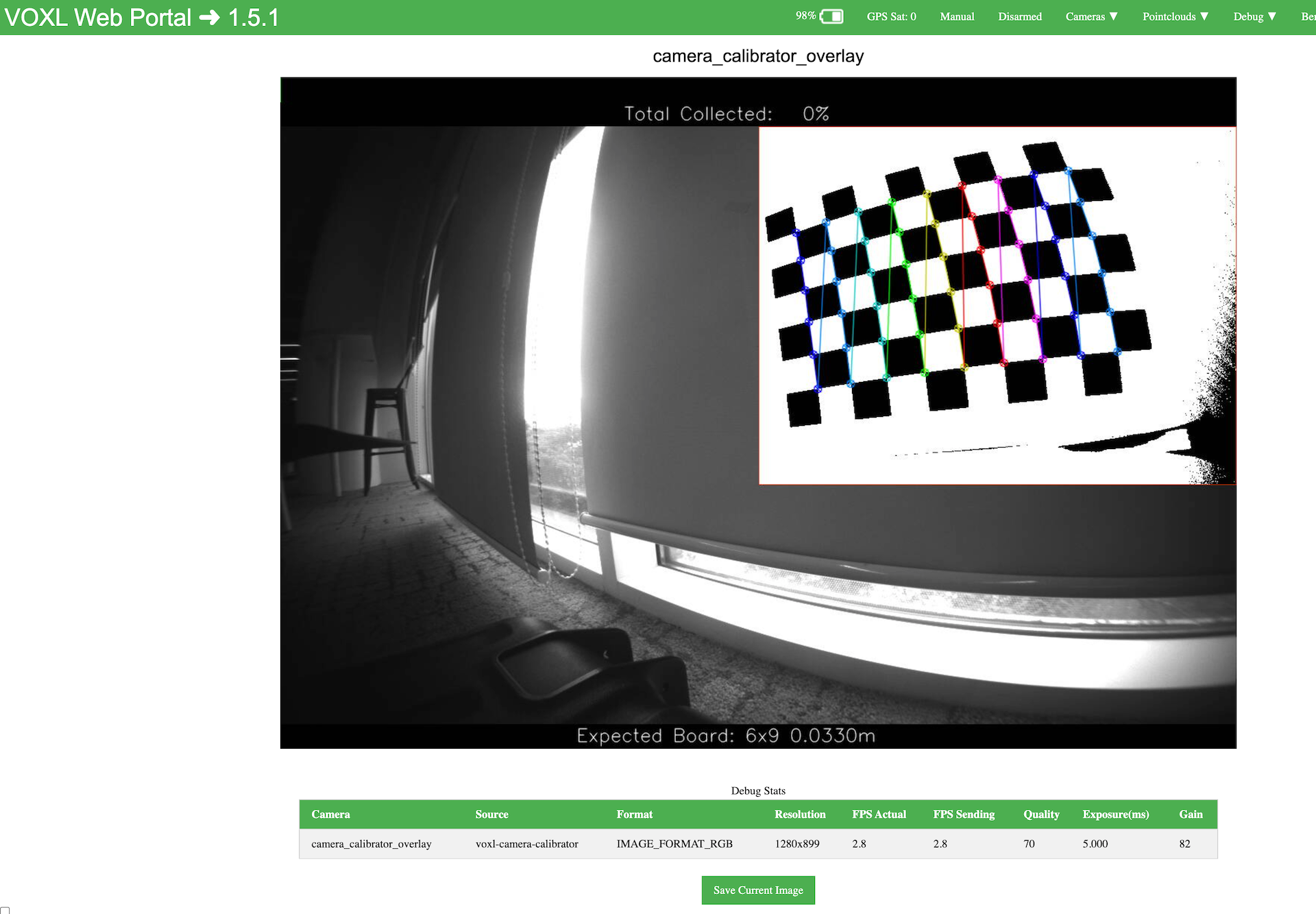
    @Alex-Kushleyev Thank you for the information and support! the calibration worked well after stopping other services. Akira
  • ADB stops working followed by failed unbricking

    Unsolved voxl-sdk
    2
    0 Votes
    2 Posts
    462 Views
    VinnyV
    Hi @SKA Apologies no one responded promptly. From what I gather, these are best to be sent back as an RMA and we can try to recover them. D1 (green) is an indication of the local 3.3V power being Good. So, that implies you have 3.8V input, and the 3.3V reg is OK. DS2 (RGB) is controlled by Qty-3 GPIOs from the SoC. This can briefly blink on boot until the GPIOs are configured by apps software. D2 (green) is the 5V USB VBUS USB1 (10-pin) port power indicator, which only comes ON after the QRB5165 boots and Apps controls the GPIO to turn the VBUS ON. On failed SW loads, it is common to diagnose that by seeing DS2 or D2 blink, which indicates boot loops. D1 should NEVER go off, if so, something is wrong in HW or cabling. We do caution any customer that sets up their own CI or internal validation automation to include a nice pause before repeated power cycles. A common 5 second rule is good to let the large caps discharge, or certain ICs will never fully reset. This is the most common cause of "bricking" devices. The RMA is your best bet here and we can try to recover them for you, or diagnose for any other issues: https://www.modalai.com/pages/rma
  • CICD SDK

    Unsolved voxl-sdk
    3
    0 Votes
    3 Posts
    605 Views
    wilkinsafW
    @tom Thank you @tom
  • 0 Votes
    1 Posts
    978 Views
    No one has replied
  • Be careful building voxl-cross on older SDKS (Other than V1.50.0)

    Unsolved mpa
    3
    2
    0 Votes
    3 Posts
    2k Views
    monkescriptsM
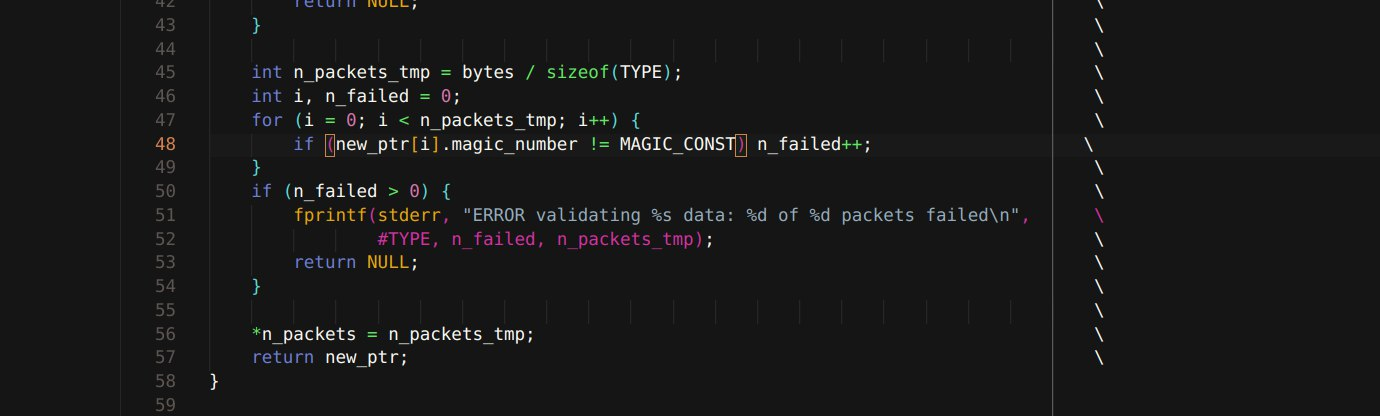
    Thank you @Alex-Kushleyev for the clarification. Currently I just redefined the magic numbers on my own and voxl-inspect-pose works as usual. I am hoping that this breaking change only affects a small number of use cases. If anyone else faces the same issue with magic numbers theres at least the discussion that might help them as well
  • VOXL2 IMX412 Camera "Received 0 buffers" Error

    Unsolved camera
    14
    1
    0 Votes
    14 Posts
    3k Views
    VinnyV
    Hi @ysc We do not need it back. Please keep it for mechanical reference. Glad we were able to help you out here. Thanks!
  • FAILED TO WRITE CONFIG TO DISK

    Unsolved voxl-sdk
    3
    1
    0 Votes
    3 Posts
    655 Views
    wilkinsafW
    @tom [image: giphy.gif]
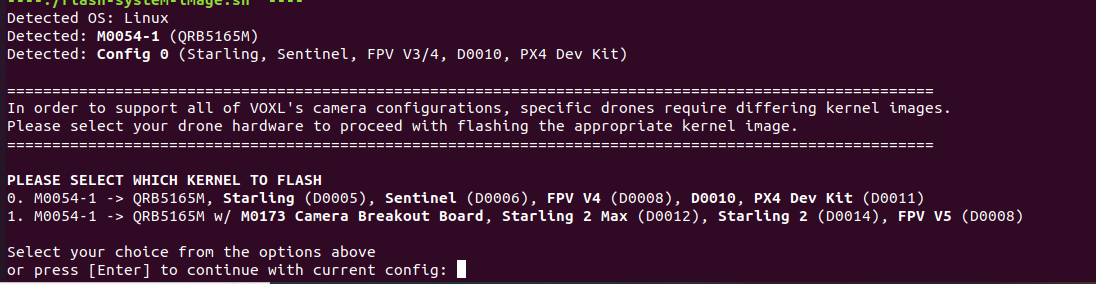
  • Which kernel should I flash? PLEASE SELECT WHICH KERNEL TO FLASH

    Unsolved voxl-sdk
    2
    1
    0 Votes
    2 Posts
    658 Views
    wilkinsafW
    Choose Option 1 if you DO NOT have the camera board attached [image: 1758735212722-d9a9defd-3783-452a-a735-7cb2c38d7065-image.png] Choose Option 2 if you are using the camera board [image: 1758735235936-3a551368-4c35-4edd-8f0d-09b2f6cd47da-image.png]
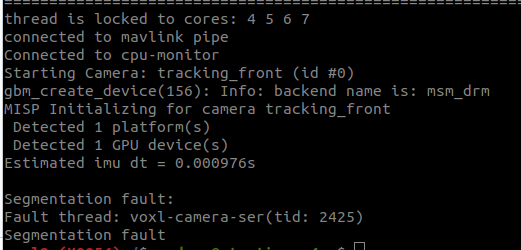
  • voxl-camera-server segmentation fault

    Unsolved camera
    4
    1
    0 Votes
    4 Posts
    1k Views
    Alex KushleyevA
    @psafi , There was a libmodal-pipe library update earlier this week, so if you have updated that library on your VOXL2, then any other library or app (which uses libmodal-pipe) that you deploy to that VOXL2 needs to be built against the same version of libmodal-pipe. So if you want use the latest dev version, you would update the drone. make sure you are using dev for apt sources: in /etc/apt/sources.list.d/modalai.list: deb [trusted=yes] http://voxl-packages.modalai.com/ ./dists/qrb5165/dev/binary-arm64/ then update libmodal-pipe on VOXL2, this should also update any other packages that depend on it. apt update apt install libmodal-pipe When building your application using voxl-cross docker, make sure you run the following in order to get the latest deps from dev: ./install_build_deps.sh qrb5165 dev Most of the time you can get away not doing this, but this time there was an interface change in libmodal-pipe, so a mismatch occurred. Alex
  • IMU stream rate fixed at 10Hz (PX4)

    Unsolved ros
    11
    0 Votes
    11 Posts
    7k Views
    K
    @Eric-Katzfey got it, thank you for the info.
  • Rotate imx412 stream

    Unsolved camera
    16
    0 Votes
    16 Posts
    3k Views
    Jetson NanoJ
    @Alex-Kushleyev Thank you for sharing the files and the support, I was able to flip the video by using the flip file for camera 1. Now it is working fine.
  • Inquiry About Smart Modl AI Drone Simulation Tools

    Unsolved
    3
    0 Votes
    3 Posts
    2k Views
    Eric KatzfeyE
    @Muhammad-Faraz We do have PX4 HITL: https://docs.modalai.com/voxl2-PX4-hitl/
  • Compile and linker libmavsdk.so tag>=3.9.0 Not use Docker

    Unsolved voxl-sdk
    3
    0 Votes
    3 Posts
    467 Views
    Hai Le QuocH
    @Eric-Katzfey Thanks for the reply. You’ve correctly identified my problem. Due to time constraints, I need to deploy my system soon. I hope to have a solution that works on your hardware or to wait for the Ubuntu 20 update.
  • Voxl 2 Mini with Starvis 2 not detected

    Unsolved camera
    6
    0 Votes
    6 Posts
    1k Views
    Alex KushleyevA
    @aheyne , Thank you for the update. Please note that our standard configuration 50 has the IMX664 camera in slot 3, as shown in the link below ( J7 upper = slot ID 3). Since it is the only camera connected in this config, it would still show up as ID 0 in the voxl-camera-server.conf file. https://gitlab.com/voxl-public/voxl-sdk/services/voxl-camera-server/-/blob/master/misc_files/usr/share/modalai/voxl-camera-server/standard_configs/platform_config_2/50 - MVX-T0001 voxl2 mini hires imx664 Also, i think you meant that you copied the com.qti.sensormodule.imx664_1.bin file, not 3 after running voxl-configure-cameras. The extra sensormodule file for slot number 3 in this case does not do anything because there is no camera actually connected in slot 3, so the camera pipeline will just try to probe the camera in this slot and will fail and move on. In general. I would recommend having only the sensormodule files that you are actually using in /usr/lib/camera in order to avoid any confusion in the future. Also, thank you for letting me know what happened when you connected the camera to the wrong ucoax port (J1L, which is designed for a Boson camera, which needs 5V). Yes, the camera shorted the 5V rail to ground inside the camera, but it seems it has survived? Don't try it again By the way, did you have to update the kernel? Is there anything else I can help you with, so you can get the most use of the IMX664 camera? Alex
  • Yocto build instructions

    Unsolved
    3
    0 Votes
    3 Posts
    2k Views
    Peter MilaniP
    @Moderator Hi I'm just trying to find a good way to deploy to multiple devices via a "golden image" type setup. Is there a way to do that. Should I just follow the rules for the custom kernel instructions and add a custom bitbake layer onto that?
  • 0 Votes
    1 Posts
    656 Views
    No one has replied