
voxl-camera-server segmentation fault
-
I am seeing a pattern which voxl-camera-server will crash every time I have an image sensor plugged into a specific port (J6) on my VOXL. Could I have accidentally damaged hardware by plugging in the adapter board the wrong way?
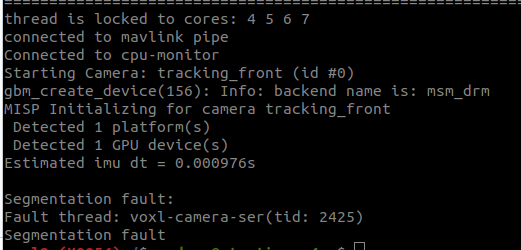
@psafi with debug turned on:
DEBUG: Attempting to open the hal module DEBUG: SUCCESS: Camera module opened on attempt 0 DEBUG: ----------- Number of cameras: 2 VERBOSE: cci-direct: using voxl_platform_mod config 1 and 2 layout DEBUG: Cam idx: 0, Cam slot: 0, Slave Address: 0x0030, Sensor Id: 0x0356 DEBUG: Cam idx: 1, Cam slot: 2, Slave Address: 0x0030, Sensor Id: 0x0356 thread is locked to cores: 4 5 6 7 connected to mavlink pipe Connected to cpu-monitor DEBUG: ------ voxl-camera-server: Starting IMU manager DEBUG: ------ voxl-camera-server: Starting 2 cameras Starting Camera: tracking_front (id #0) DEBUG: Checking Gain limits for Camera: tracking_front DEBUG: Using gain limits min: 54 max: 1596 DEBUG: cam ID 0 checking for fmt: 38 w: 1280 h: 800 o: 0 DEBUG: ==> option 0: format= 34 width=1280 height= 800 is_input=0 DEBUG: ==> option 4: format= 34 width=1280 height= 800 is_input=1 DEBUG: ==> option 8: format= 35 width=1280 height= 800 is_input=0 DEBUG: ==> option 12: format= 35 width=1280 height= 800 is_input=1 DEBUG: ==> option 16: format= 33 width=1280 height= 800 is_input=0 DEBUG: ==> option 20: format= 34 width=1280 height= 768 is_input=0 DEBUG: ==> option 24: format= 34 width=1280 height= 768 is_input=1 DEBUG: ==> option 28: format= 35 width=1280 height= 768 is_input=0 DEBUG: ==> option 32: format= 35 width=1280 height= 768 is_input=1 DEBUG: ==> option 36: format= 33 width=1280 height= 768 is_input=0 DEBUG: ==> option 40: format= 34 width=1280 height= 720 is_input=0 DEBUG: ==> option 44: format= 34 width=1280 height= 720 is_input=1 DEBUG: ==> option 48: format= 35 width=1280 height= 720 is_input=0 DEBUG: ==> option 52: format= 35 width=1280 height= 720 is_input=1 DEBUG: ==> option 56: format= 33 width=1280 height= 720 is_input=0 DEBUG: ==> option 60: format= 34 width=1024 height= 738 is_input=0 DEBUG: ==> option 64: format= 34 width=1024 height= 738 is_input=1 DEBUG: ==> option 68: format= 35 width=1024 height= 738 is_input=0 DEBUG: ==> option 72: format= 35 width=1024 height= 738 is_input=1 DEBUG: ==> option 76: format= 33 width=1024 height= 738 is_input=0 DEBUG: ==> option 80: format= 34 width=1024 height= 768 is_input=0 DEBUG: ==> option 84: format= 34 width=1024 height= 768 is_input=1 DEBUG: ==> option 88: format= 35 width=1024 height= 768 is_input=0 DEBUG: ==> option 92: format= 35 width=1024 height= 768 is_input=1 DEBUG: ==> option 96: format= 33 width=1024 height= 768 is_input=0 DEBUG: ==> option 100: format= 34 width= 864 height= 480 is_input=0 DEBUG: ==> option 104: format= 34 width= 864 height= 480 is_input=1 DEBUG: ==> option 108: format= 35 width= 864 height= 480 is_input=0 DEBUG: ==> option 112: format= 35 width= 864 height= 480 is_input=1 DEBUG: ==> option 116: format= 33 width= 864 height= 480 is_input=0 DEBUG: ==> option 120: format= 34 width= 800 height= 600 is_input=0 DEBUG: ==> option 124: format= 34 width= 800 height= 600 is_input=1 DEBUG: ==> option 128: format= 35 width= 800 height= 600 is_input=0 DEBUG: ==> option 132: format= 35 width= 800 height= 600 is_input=1 DEBUG: ==> option 136: format= 33 width= 800 height= 600 is_input=0 DEBUG: ==> option 140: format= 34 width= 800 height= 480 is_input=0 DEBUG: ==> option 144: format= 34 width= 800 height= 480 is_input=1 DEBUG: ==> option 148: format= 35 width= 800 height= 480 is_input=0 DEBUG: ==> option 152: format= 35 width= 800 height= 480 is_input=1 DEBUG: ==> option 156: format= 33 width= 800 height= 480 is_input=0 DEBUG: ==> option 160: format= 34 width= 720 height= 480 is_input=0 DEBUG: ==> option 164: format= 34 width= 720 height= 480 is_input=1 DEBUG: ==> option 168: format= 35 width= 720 height= 480 is_input=0 DEBUG: ==> option 172: format= 35 width= 720 height= 480 is_input=1 DEBUG: ==> option 176: format= 33 width= 720 height= 480 is_input=0 DEBUG: ==> option 180: format= 34 width= 640 height= 512 is_input=0 DEBUG: ==> option 184: format= 34 width= 640 height= 512 is_input=1 DEBUG: ==> option 188: format= 35 width= 640 height= 512 is_input=0 DEBUG: ==> option 192: format= 35 width= 640 height= 512 is_input=1 DEBUG: ==> option 196: format= 33 width= 640 height= 512 is_input=0 DEBUG: ==> option 200: format= 34 width= 640 height= 480 is_input=0 DEBUG: ==> option 204: format= 34 width= 640 height= 480 is_input=1 DEBUG: ==> option 208: format= 35 width= 640 height= 480 is_input=0 DEBUG: ==> option 212: format= 35 width= 640 height= 480 is_input=1 DEBUG: ==> option 216: format= 33 width= 640 height= 480 is_input=0 DEBUG: ==> option 220: format= 34 width= 640 height= 400 is_input=0 DEBUG: ==> option 224: format= 34 width= 640 height= 400 is_input=1 DEBUG: ==> option 228: format= 35 width= 640 height= 400 is_input=0 DEBUG: ==> option 232: format= 35 width= 640 height= 400 is_input=1 DEBUG: ==> option 236: format= 33 width= 640 height= 400 is_input=0 DEBUG: ==> option 240: format= 34 width= 640 height= 360 is_input=0 DEBUG: ==> option 244: format= 34 width= 640 height= 360 is_input=1 DEBUG: ==> option 248: format= 35 width= 640 height= 360 is_input=0 DEBUG: ==> option 252: format= 35 width= 640 height= 360 is_input=1 DEBUG: ==> option 256: format= 33 width= 640 height= 360 is_input=0 DEBUG: ==> option 260: format= 34 width= 352 height= 288 is_input=0 DEBUG: ==> option 264: format= 34 width= 352 height= 288 is_input=1 DEBUG: ==> option 268: format= 35 width= 352 height= 288 is_input=0 DEBUG: ==> option 272: format= 35 width= 352 height= 288 is_input=1 DEBUG: ==> option 276: format= 33 width= 352 height= 288 is_input=0 DEBUG: ==> option 280: format= 34 width= 320 height= 240 is_input=0 DEBUG: ==> option 284: format= 34 width= 320 height= 240 is_input=1 DEBUG: ==> option 288: format= 35 width= 320 height= 240 is_input=0 DEBUG: ==> option 292: format= 35 width= 320 height= 240 is_input=1 DEBUG: ==> option 296: format= 33 width= 320 height= 240 is_input=0 DEBUG: ==> option 300: format= 34 width= 240 height= 320 is_input=0 DEBUG: ==> option 304: format= 34 width= 240 height= 320 is_input=1 DEBUG: ==> option 308: format= 35 width= 240 height= 320 is_input=0 DEBUG: ==> option 312: format= 35 width= 240 height= 320 is_input=1 DEBUG: ==> option 316: format= 33 width= 240 height= 320 is_input=0 DEBUG: ==> option 320: format= 34 width= 176 height= 144 is_input=0 DEBUG: ==> option 324: format= 34 width= 176 height= 144 is_input=1 DEBUG: ==> option 328: format= 35 width= 176 height= 144 is_input=0 DEBUG: ==> option 332: format= 35 width= 176 height= 144 is_input=1 DEBUG: ==> option 336: format= 33 width= 176 height= 144 is_input=0 DEBUG: ==> option 340: format= 37 width=1280 height= 800 is_input=0 DEBUG: ==> option 344: format= 38 width=1280 height= 800 is_input=0 DEBUG: ==> option 348: format= 32 width=1280 height= 800 is_input=0 DEBUG: ==> option 352: format= 36 width=1280 height= 800 is_input=0 VERBOSE: Successfully found configuration match for camera 0: 1280x800 VERBOSE: Adding preview stream for camera: 0 gbm_create_device(156): Info: backend name is: msm_drm DEBUG: Successfully set up pipeline for stream: PREVIEW MISP Initializing for camera tracking_front Detected 1 platform(s) Detected 1 GPU device(s) Estimated imu dt = 0.000976s DEBUG: Entering pitmode DEBUG: Value of pitmode_active is: 1 Segmentation fault: Fault thread: voxl-camera-ser(tid: 2486) Segmentation fault -
@psafi with debug turned on:
DEBUG: Attempting to open the hal module DEBUG: SUCCESS: Camera module opened on attempt 0 DEBUG: ----------- Number of cameras: 2 VERBOSE: cci-direct: using voxl_platform_mod config 1 and 2 layout DEBUG: Cam idx: 0, Cam slot: 0, Slave Address: 0x0030, Sensor Id: 0x0356 DEBUG: Cam idx: 1, Cam slot: 2, Slave Address: 0x0030, Sensor Id: 0x0356 thread is locked to cores: 4 5 6 7 connected to mavlink pipe Connected to cpu-monitor DEBUG: ------ voxl-camera-server: Starting IMU manager DEBUG: ------ voxl-camera-server: Starting 2 cameras Starting Camera: tracking_front (id #0) DEBUG: Checking Gain limits for Camera: tracking_front DEBUG: Using gain limits min: 54 max: 1596 DEBUG: cam ID 0 checking for fmt: 38 w: 1280 h: 800 o: 0 DEBUG: ==> option 0: format= 34 width=1280 height= 800 is_input=0 DEBUG: ==> option 4: format= 34 width=1280 height= 800 is_input=1 DEBUG: ==> option 8: format= 35 width=1280 height= 800 is_input=0 DEBUG: ==> option 12: format= 35 width=1280 height= 800 is_input=1 DEBUG: ==> option 16: format= 33 width=1280 height= 800 is_input=0 DEBUG: ==> option 20: format= 34 width=1280 height= 768 is_input=0 DEBUG: ==> option 24: format= 34 width=1280 height= 768 is_input=1 DEBUG: ==> option 28: format= 35 width=1280 height= 768 is_input=0 DEBUG: ==> option 32: format= 35 width=1280 height= 768 is_input=1 DEBUG: ==> option 36: format= 33 width=1280 height= 768 is_input=0 DEBUG: ==> option 40: format= 34 width=1280 height= 720 is_input=0 DEBUG: ==> option 44: format= 34 width=1280 height= 720 is_input=1 DEBUG: ==> option 48: format= 35 width=1280 height= 720 is_input=0 DEBUG: ==> option 52: format= 35 width=1280 height= 720 is_input=1 DEBUG: ==> option 56: format= 33 width=1280 height= 720 is_input=0 DEBUG: ==> option 60: format= 34 width=1024 height= 738 is_input=0 DEBUG: ==> option 64: format= 34 width=1024 height= 738 is_input=1 DEBUG: ==> option 68: format= 35 width=1024 height= 738 is_input=0 DEBUG: ==> option 72: format= 35 width=1024 height= 738 is_input=1 DEBUG: ==> option 76: format= 33 width=1024 height= 738 is_input=0 DEBUG: ==> option 80: format= 34 width=1024 height= 768 is_input=0 DEBUG: ==> option 84: format= 34 width=1024 height= 768 is_input=1 DEBUG: ==> option 88: format= 35 width=1024 height= 768 is_input=0 DEBUG: ==> option 92: format= 35 width=1024 height= 768 is_input=1 DEBUG: ==> option 96: format= 33 width=1024 height= 768 is_input=0 DEBUG: ==> option 100: format= 34 width= 864 height= 480 is_input=0 DEBUG: ==> option 104: format= 34 width= 864 height= 480 is_input=1 DEBUG: ==> option 108: format= 35 width= 864 height= 480 is_input=0 DEBUG: ==> option 112: format= 35 width= 864 height= 480 is_input=1 DEBUG: ==> option 116: format= 33 width= 864 height= 480 is_input=0 DEBUG: ==> option 120: format= 34 width= 800 height= 600 is_input=0 DEBUG: ==> option 124: format= 34 width= 800 height= 600 is_input=1 DEBUG: ==> option 128: format= 35 width= 800 height= 600 is_input=0 DEBUG: ==> option 132: format= 35 width= 800 height= 600 is_input=1 DEBUG: ==> option 136: format= 33 width= 800 height= 600 is_input=0 DEBUG: ==> option 140: format= 34 width= 800 height= 480 is_input=0 DEBUG: ==> option 144: format= 34 width= 800 height= 480 is_input=1 DEBUG: ==> option 148: format= 35 width= 800 height= 480 is_input=0 DEBUG: ==> option 152: format= 35 width= 800 height= 480 is_input=1 DEBUG: ==> option 156: format= 33 width= 800 height= 480 is_input=0 DEBUG: ==> option 160: format= 34 width= 720 height= 480 is_input=0 DEBUG: ==> option 164: format= 34 width= 720 height= 480 is_input=1 DEBUG: ==> option 168: format= 35 width= 720 height= 480 is_input=0 DEBUG: ==> option 172: format= 35 width= 720 height= 480 is_input=1 DEBUG: ==> option 176: format= 33 width= 720 height= 480 is_input=0 DEBUG: ==> option 180: format= 34 width= 640 height= 512 is_input=0 DEBUG: ==> option 184: format= 34 width= 640 height= 512 is_input=1 DEBUG: ==> option 188: format= 35 width= 640 height= 512 is_input=0 DEBUG: ==> option 192: format= 35 width= 640 height= 512 is_input=1 DEBUG: ==> option 196: format= 33 width= 640 height= 512 is_input=0 DEBUG: ==> option 200: format= 34 width= 640 height= 480 is_input=0 DEBUG: ==> option 204: format= 34 width= 640 height= 480 is_input=1 DEBUG: ==> option 208: format= 35 width= 640 height= 480 is_input=0 DEBUG: ==> option 212: format= 35 width= 640 height= 480 is_input=1 DEBUG: ==> option 216: format= 33 width= 640 height= 480 is_input=0 DEBUG: ==> option 220: format= 34 width= 640 height= 400 is_input=0 DEBUG: ==> option 224: format= 34 width= 640 height= 400 is_input=1 DEBUG: ==> option 228: format= 35 width= 640 height= 400 is_input=0 DEBUG: ==> option 232: format= 35 width= 640 height= 400 is_input=1 DEBUG: ==> option 236: format= 33 width= 640 height= 400 is_input=0 DEBUG: ==> option 240: format= 34 width= 640 height= 360 is_input=0 DEBUG: ==> option 244: format= 34 width= 640 height= 360 is_input=1 DEBUG: ==> option 248: format= 35 width= 640 height= 360 is_input=0 DEBUG: ==> option 252: format= 35 width= 640 height= 360 is_input=1 DEBUG: ==> option 256: format= 33 width= 640 height= 360 is_input=0 DEBUG: ==> option 260: format= 34 width= 352 height= 288 is_input=0 DEBUG: ==> option 264: format= 34 width= 352 height= 288 is_input=1 DEBUG: ==> option 268: format= 35 width= 352 height= 288 is_input=0 DEBUG: ==> option 272: format= 35 width= 352 height= 288 is_input=1 DEBUG: ==> option 276: format= 33 width= 352 height= 288 is_input=0 DEBUG: ==> option 280: format= 34 width= 320 height= 240 is_input=0 DEBUG: ==> option 284: format= 34 width= 320 height= 240 is_input=1 DEBUG: ==> option 288: format= 35 width= 320 height= 240 is_input=0 DEBUG: ==> option 292: format= 35 width= 320 height= 240 is_input=1 DEBUG: ==> option 296: format= 33 width= 320 height= 240 is_input=0 DEBUG: ==> option 300: format= 34 width= 240 height= 320 is_input=0 DEBUG: ==> option 304: format= 34 width= 240 height= 320 is_input=1 DEBUG: ==> option 308: format= 35 width= 240 height= 320 is_input=0 DEBUG: ==> option 312: format= 35 width= 240 height= 320 is_input=1 DEBUG: ==> option 316: format= 33 width= 240 height= 320 is_input=0 DEBUG: ==> option 320: format= 34 width= 176 height= 144 is_input=0 DEBUG: ==> option 324: format= 34 width= 176 height= 144 is_input=1 DEBUG: ==> option 328: format= 35 width= 176 height= 144 is_input=0 DEBUG: ==> option 332: format= 35 width= 176 height= 144 is_input=1 DEBUG: ==> option 336: format= 33 width= 176 height= 144 is_input=0 DEBUG: ==> option 340: format= 37 width=1280 height= 800 is_input=0 DEBUG: ==> option 344: format= 38 width=1280 height= 800 is_input=0 DEBUG: ==> option 348: format= 32 width=1280 height= 800 is_input=0 DEBUG: ==> option 352: format= 36 width=1280 height= 800 is_input=0 VERBOSE: Successfully found configuration match for camera 0: 1280x800 VERBOSE: Adding preview stream for camera: 0 gbm_create_device(156): Info: backend name is: msm_drm DEBUG: Successfully set up pipeline for stream: PREVIEW MISP Initializing for camera tracking_front Detected 1 platform(s) Detected 1 GPU device(s) Estimated imu dt = 0.000976s DEBUG: Entering pitmode DEBUG: Value of pitmode_active is: 1 Segmentation fault: Fault thread: voxl-camera-ser(tid: 2486) Segmentation fault -
@psafi UPDATE: I re-flashed the SDK and it fixed it. voxl-camera-server is running and cameras are working. I am setting up VIO for a custom system. I believe a change I made along the way for VIO set up process could have caused this.
@psafi ,
There was a
libmodal-pipelibrary update earlier this week, so if you have updated that library on your VOXL2, then any other library or app (which useslibmodal-pipe) that you deploy to that VOXL2 needs to be built against the same version oflibmodal-pipe.So if you want use the latest
devversion, you would update the drone.make sure you are using
devfor apt sources:
in/etc/apt/sources.list.d/modalai.list:deb [trusted=yes] http://voxl-packages.modalai.com/ ./dists/qrb5165/dev/binary-arm64/then update
libmodal-pipeon VOXL2, this should also update any other packages that depend on it.apt update apt install libmodal-pipeWhen building your application using
voxl-crossdocker, make sure you run the following in order to get the latest deps from dev:./install_build_deps.sh qrb5165 devMost of the time you can get away not doing this, but this time there was an interface change in
libmodal-pipe, so a mismatch occurred.Alex

Reading along? Create a free ModalAI Forum account to join in.
With an account you can reply, ask your own question, get an email when a ModalAI engineer answers, and mark the reply that solved it. Your place in each thread is saved between visits.
Questions about VOXL, Flight Core, ESCs and ModalAI drones are answered here by the engineers who build them.
Register Login