ModalAI Forum
    • Categories
    • Recent
    • Tags
    • Popular
    • Users
    • Groups
    • Register
    • Login
    1. Home
    2. VOXL Compute & Autopilot
    3. VOXL 2
    Log in to post
    • Newest to Oldest
    • Oldest to Newest
    • Most Posts
    • Most Votes
    • Most Views
    • A

      Hires camera not working with TFlite server

      • • arcj
      2
      0
      Votes
      2
      Posts
      243
      Views

      ModeratorM

      @arcj can you share your working tflite configuration with M0014 and the configuration that is not working with M0025?

    • voxl-phoenixV

      Migrating from VOXL-flight to VOXL-2

      • • voxl-phoenix
      4
      0
      Votes
      4
      Posts
      337
      Views

      voxl-phoenixV

      Hi @Alex-Kushleyev ,
      Thank you for your suggestion. Now I understood. how to use my existing stereo, and tracking cameras on voxel-2.

    • P

      Looking for Voxl 2 techs

      • • perfx
      5
      0
      Votes
      5
      Posts
      359
      Views

      tomT

      @perfx I'd recommend reaching out to Ascend Engineering, they're ModalAI product experts and they'll be able to help you out: https://www.ascendengineer.com/

    • D

      Issue recognizing camera MSU-0107 using M0135 dual camera board

      m0135 msu-0107 camera firmware • • daniel.p.nikolov
      4
      0
      Votes
      4
      Posts
      472
      Views

      Zachary Lowell 0Z

      @daniel-p-nikolov said in Issue recognizing camera MSU-0107 using M0135 dual camera board:

      Tried various setups, however, it does not see any camera connected to the VOXL2.

      Reply

      @daniel-p-nikolov I would recommend doing a custom camera config setup. What you can do here is run voxl-configure-cameras C and then vim into /data/modalai/custom_camera_config.txt and then proceed to edit the file for this port and position - so in this case it would be

      J7 lower info is hires, imx412, and false.

      Then proceed to rerun voxl-configure-cameras C again and then rerun voxl-camera-server and see if cameras are detected. There could be a mismatch occuring of the port and such when using the non custom script.

      Zach

    • Chase RileyC

      UART Conneciton for Companion Computer / External Flight Controller

      • • Chase Riley
      2
      0
      Votes
      2
      Posts
      292
      Views

      ModeratorM

      @Chase-Riley the recommended approach is to use J18 ESC port directly: https://docs.modalai.com/voxl2-external-flight-controller/#voxl-2-connecting-an-external-flight-controller

    • G

      Unknown Mavlink Messages

      mavlink • • griffin
      1
      0
      Votes
      1
      Posts
      347
      Views

      No one has replied

    • M

      Microhard support

      • • McMason
      21
      0
      Votes
      21
      Posts
      3702
      Views

      VinnyV

      Hi @Chase-Riley
      Your best bet might be to start a new thread, that will help ensure you get more eyes on it for the best person on our side to help you along!
      Thanks!

    • Chase RileyC

      VOXL2 and NextVision Trip2 Module Integration

      • • Chase Riley
      5
      0
      Votes
      5
      Posts
      709
      Views

      Chase RileyC

      @Eric-Katzfey Yes the Mavlink Packets will be sent form PX4 running on the VOXL2 through the Trip Module and then to the Doodle, and vice versa for the data flow from the GCS to PX4.

      My understanding is that the Trip is just running a extension of Mavlink to allow for specific gimbal and camera commands. Also it is performing Video compression.

    • S

      This topic is deleted!

      • • svempati
      1
      0
      Votes
      1
      Posts
      39
      Views

      No one has replied

    • H

      Need VOXL2 with 256GB Flash

      • • henrytrinh
      5
      0
      Votes
      5
      Posts
      338
      Views

      H

      @Vinny Thank you for your info. I will review with my team and see if it makes sense for us to pursuit that direction/option.

      Best Regards,
      -Henry

    • C

      SD Card Power Supply on M0062 Expansion

      • • cobbp
      2
      0
      Votes
      2
      Posts
      186
      Views

      VinnyV

      Hi @cobbp
      It's the 2.96V directly from the Snapdragon PMIC as you noted, and SD Cards from UHS I and onward negotiate their link speeds and I/O voltage. So, a proper 1.8V SD card will internally use that 2.96V and create the 1.8V I/O rail.
      For cards that operate at "3.3V", they are claimed to be supported in the Snapdragon chipsets at this lowered ~3V rail.
      The slot on M0062 actually accepts UFS or uSD.

      For more details on just the SD portion, please see this design where we opened our Schematics. In this case, this is just uSD, but otherwise matches the M0062 exactly for uSD functionality: https://docs.modalai.com/voxl2-dev-test-board/

      Hope this helps!

    • Peter MilaniP

      Update on operating system upgrades to 20.04, 22.04 and 24.04

      • • Peter Milani
      3
      0
      Votes
      3
      Posts
      361
      Views

      tomT

      @Peter-Milani Nothing available for the public just yet but I can tell you we're working extremely hard on this and hope to start publishing builds soon

    • voxl-phoenixV

      TBS crossfire nano receiver with VOXL 2 USB3.0 / UART Expansion Adapter M0151-1-00 expansion board.

      • • voxl-phoenix
      6
      0
      Votes
      6
      Posts
      563
      Views

      Eric KatzfeyE

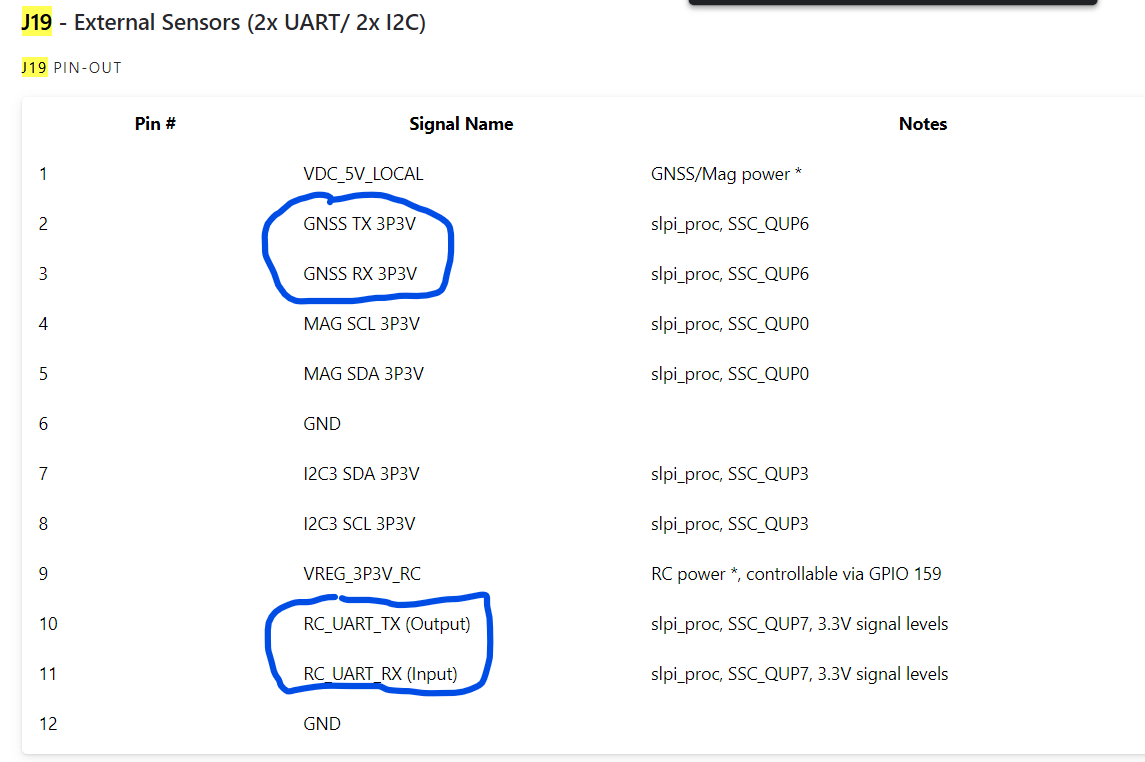
      @voxl-phoenix J19 has pins for 2 UARTs. We put GNSS on one and RC on the other. So if you are able to hook up everything correctly, configure the TBS crossfire receiver correctly, and configure PX4 correctly then it should work.

    • J

      Enabling internet access over USB??

      • • jklre
      2
      0
      Votes
      2
      Posts
      238
      Views

      Alex KushleyevA

      @jklre , one way to achieve what you need is to set up a VPN client on VOXL2 (and VPN server on your linux server) and create a adb TCP bridge via adb forward or reverse (which you already found). Your VPN client would connect to the VPN server on your linux server via the ADB TCP tunnel.

      The VPN client / server would then take care of proper data routing (just like regular VPN).

      I believe guys from Ascend Engineering were able to to achieve this : https://ascend-engineering.gitbook.io/modalai/sharing-internet-over-adb but it requires initial internet connection to set up.

      Your best bet may be to get all the dependencies downloaded to your linux server, then push them to voxl2 via ADB, and add a local package source for apt on voxl2 (so that it can find new packages) and install.

      Similarly for python modules, you should be able to do an offline install, i think..

      Alex

    • yashas katteY

      VOXL2 IMU server not working

      • • yashas katte
      10
      0
      Votes
      10
      Posts
      706
      Views

      tomT

      @Achyut-Sapariya That all looks normal, I'd recommend submitting an RMA and our team can diagnose the issue: https://www.modalai.com/pages/rma

    • M

      Voxl2/Microhard/NV Trip 2

      • • McMason
      29
      0
      Votes
      29
      Posts
      5062
      Views

      Chase RileyC

      @rogerli or @McMason Were either of you successful in getting the VOXL2 to connect to the NV Trip2? Working the same issue on my end.

    • K

      VOXL2 custom Camera configs?

      • • kzid
      6
      0
      Votes
      6
      Posts
      650
      Views

      K

      Hi @Alex-Kushleyev ,
      Thank you very much for such a detailed reply, we will carefully refer to your suggestions to make the purchase.

      thanks again!

    • Dhatchayani LD

      VOXL2 Board: Unable to Connect to ADB Shell, DS2 LED Issue

      • • Dhatchayani L
      7
      0
      Votes
      7
      Posts
      536
      Views

      tomT

      @Dhatchayani-L It appears that your board is booting into QUSB_BULK mode, which will require following the unbricking process to resolve:
      https://docs.modalai.com/voxl2-unbricking/#unbricking-your-voxl-2

    • W

      How to control PWM using VOXL2 IO expander ?

      • • winnie.tsai
      8
      0
      Votes
      8
      Posts
      803
      Views

      Alex KushleyevA

      @Gary-Holmgren , oh yeah, I almost forgot about the issue of not being able to use the DSP uart ports while PX4 is running.. 🙂

      To work around that, you could potentially connect M0065 board to one of the UART ports that are actually connected to CPU and access it directly from linux use /dev/ttyHSx devices

      You can find the linux uart ports here : https://docs.modalai.com/voxl2-linux-user-guide/#uarts - you will need an expansion board, but even something like M0141 or M0151 will do (which is probably the simplest).

      However, it sounds like maybe you are close to figuring out he pwm output via px4, so perhaps this is not needed, but you can keep it in mind.

      Alex

    • A

      Using wireguard on VOXL 2

      • • achanana
      5
      0
      Votes
      5
      Posts
      670
      Views

      modaltbM

      @smilon we're still working on it but slower than I had originally planned. we're using it on a feature light product right now without camera support, once we have camera support in place I'll try to get some preview releases in place, 'hoping' that's in Q1/Q2 but as an optimistic engineer speaking 😉

    Powered by NodeBB | Contributors