Skip to content

Ask your questions right here!

2.3k Topics 11.7k Posts

Note sure where to post? Ask questions here for direct access to the ModalAI engineering team

Subcategories


  • 164 Topics
    751 Posts
    Ben LinneB
    @heiko.lizan Any elrs radio that's 900mhz or dual band compatible should work when in low band mode. If the transmitter is running v4+ you should be able to downgrade it to v3 following the elrs update guide It's normal that some services aren't running. You may need to re-enable px4 with systemctl enable voxl-px4
  • Do you have a great idea for our products you would like to see implemented?

    27 90
    27 Topics
    90 Posts
    Serhii RovnyiS
    Hello everyone, I am looking for some expert advice on a VOXL 2 companion computer setup for a long-range platform. I have two main integration challenges: Challenge A: VIO at Higher Altitudes To solve the motion blur and pixel density issues at higher altitudes, I am planning a 6-camera configuration. I want to use 4 downward-facing sensors (2 daylight + 2 IR) equipped with narrow-angle lenses, alongside 2 standard wide-angle sensors (front and rear). Could you advise on the best supported sensors (e.g., IMX series) for this? Has anyone successfully tuned the voxl-qvio-server for narrow-angle lenses, and what were the altitude limits you achieved? Challenge B: LAN Integration & WireGuard The payload data flow will be: External RTSP Camera -> Ethernet -> VOXL 2 (WireGuard encryption) -> Ethernet -> Digital RX. Because VOXL 2 lacks multiple LAN ports, I will need a miniature industrial Ethernet switch. Does ModalAI have any tested hardware recommendations for this? Furthermore, what is the best practice for routing this VPN traffic through the VOXL 2 Ubuntu environment without bottlenecking the CPU? We are currently evaluating the VOXL 2 for a broader fleet deployment and want to ensure the ecosystem can support this custom optics requirement. Any feedback on off-the-shelf solutions or standard configurations for this use case would be greatly appreciated. Thank you!
  • Are you looking for a 3D model of one of our products?

    33 86
    33 Topics
    86 Posts
    Alex KushleyevA
    @nl_vdi , if you log into developer.modalai.com, you will see the CAD models. the latest model we have is: D0012-4-V3-C28-M36-T7-K0-Starling2-Max-V3-20260317.step [image: 1781036132877-376bf0dd-494a-4bf1-8d92-1b2d91afb83d-image.png]
  • Unricking VOXL 2 - Failing after flashing the Flat Build

    1
    0 Votes
    1 Posts
    279 Views
    No one has replied
  • Rear Tracking Camera Not Working

    5
    1
    0 Votes
    5 Posts
    724 Views
    Alex KushleyevA
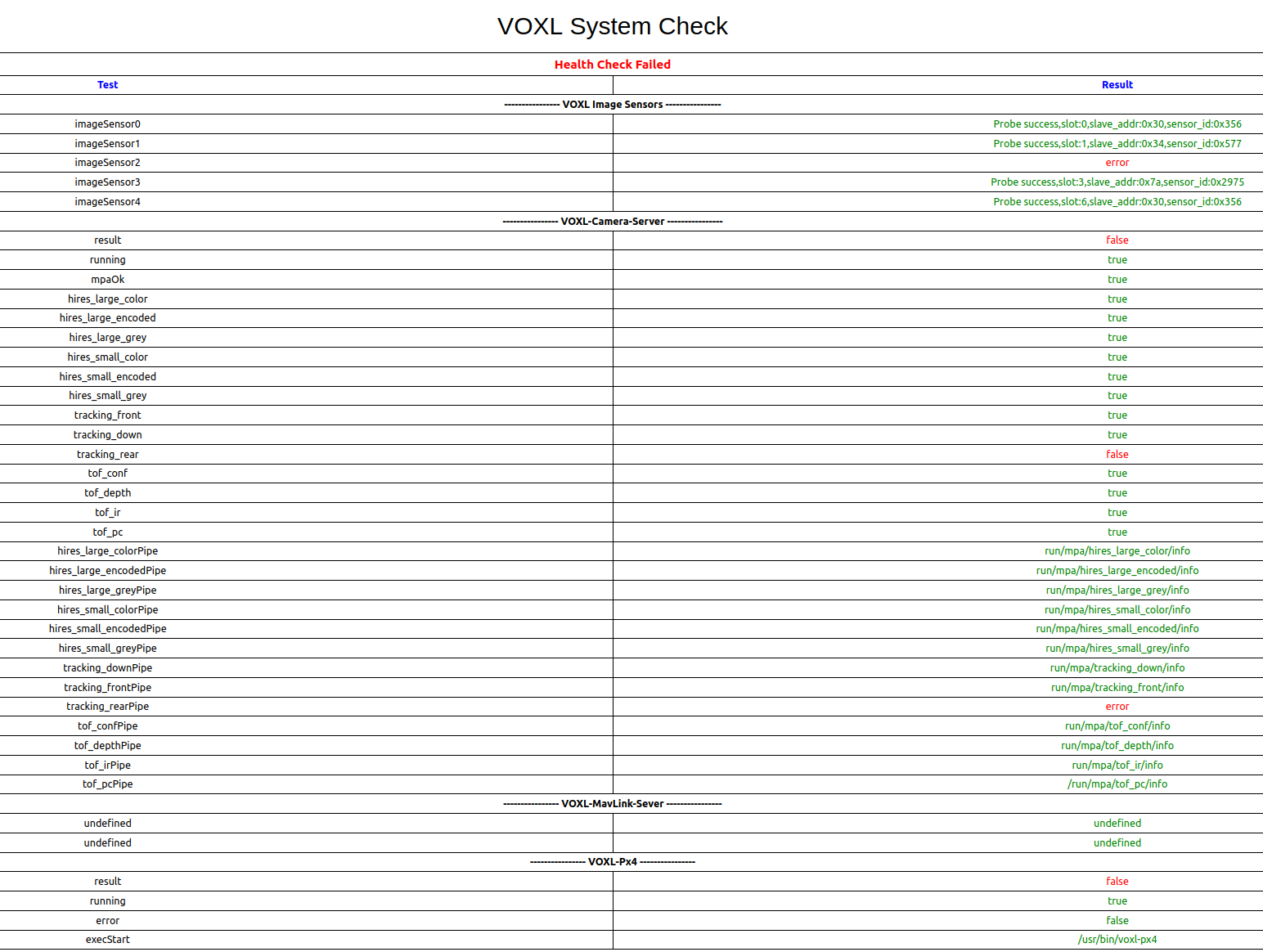
    @george-kollamkulam , i am assuming the drone is already set up with the correct camera config (you can also re-do it using voxl-configure-cameras and select 27. If your drone was incorrectly set up in C28 configuration, you would see the same error. One way to check this before re-running voxl-configure-cameras is to list contents of /usr/lib/camera and see which sensormodule files are in there. For C27, you should see three AR0144 sensormodules (for slots 0, 2, 6), one IMX412 sensormodule for slot 1 and another one for the TOF in slot 3. From debug info when running voxl-camera-server -l, the three types of cameras have different sensor ID, as follows: AR0144: 0x0356 IMX412: 0x0577 TOF : 0x2975 Assuming that step above will result in the same issue (AR0144 camera (sensor ID 0x0356) not detected in camera slot 2), then i think you need to inspect the M0173 board and specifically the connection of the camera in port J5 of M0173. Make sure the ucoax cable is plugged in properly, similarly like others. Unfortunately that will require some disassembly. You could also double check first the ucoax connection at the camera itself if that is easier to access. If you have a spare AR0144 camera, you could try to disconnect the camera cable from the non-functioning camera and connect the spare AR0144 to see if the camera is the issue or the cable (or downstream connections). Hopefully it is just a software mis-configuration, but please inspect the cables as suggested. Alex
  • unable to bind after voxl-sdk upgrade

    1
    0 Votes
    1 Posts
    229 Views
    No one has replied
  • Depth images from Max2?

    2
    0 Votes
    2 Posts
    359 Views
    ModeratorM
    @Breanne-Crockett yes, the depth sensor is pointed straight forward We do not have support for Realsense
  • Upgrading Starling 2 Max (C28) model to C29 Model

    2
    0 Votes
    2 Posts
    447 Views
    ModeratorM
    @lohithvamsi it is probably easiest to return Please reach out at https://modalai.com/contact and reference this post.
  • Flir Boson+ Issues on VOXL2 Mini

    6
    0 Votes
    6 Posts
    1k Views
    Alex KushleyevA
    @jonathankampia , Have you checked that your Boson actually works (using a USB interface with either Flir GUI or a UVC interface)? Also, is your Boson configured to send MIPI data in 8-bit raw format? The camera server cannot change the FPS of Boson (or any of its streaming parameters). In fact there is no communication at all happening from VOXL2 to Boson (besides just probing / detection) - all the settings have to be configured by the user prior connecting to VOXL2 (including resolution, fps, etc). https://docs.modalai.com/M0153/#boson-software-setup Please double check these points.. Alex
  • Screws for Starling 2 Max Top Bracket

    2
    0 Votes
    2 Posts
    322 Views
    tomT
    @wilt From the production team, these should work for you: https://www.mcmaster.com/99461A923/
  • Using VOXL Mini 4-in-1 ESC (UART) + VOXL 2 IO (PWM) at the same time

    3
    0 Votes
    3 Posts
    645 Views
    Gary HolmgrenG
    @Alex-Kushleyev Thanks for clarifying this!
  • 0 Votes
    1 Posts
    334 Views
    No one has replied
  • Starling unresponsive, No usb detection, unable to enter edl or fastboot

    3
    0 Votes
    3 Posts
    583 Views
    tomT
    @Taylor814 I would recommend starting the RMA process: https://www.modalai.com/pages/rma
  • fc_sensor_get_time_offset functionality

    4
    0 Votes
    4 Posts
    511 Views
    N
    In fact, I think the whole voxl-mavlink-server scheme to set the system time from the SYSTEM_TIME mavlink message is fundamentally flawed for the case when PX4 is run on SLPI. The SYSTEM_TIME message emitted from voxl-px4 uses the system clock of the apps processor as it's time basis. So essentially, it either never changes the system clock if the offset between SLPI monotonic clock and apps monotonic clock is less than ten seconds continually sets the clock to either the future or the past by the offset of the monotonic clocks in the case where the offset is greater than 10 seconds It seems like this system should really be based on GNSS clock time instead of the SYSTEM_TIME message for this setup.
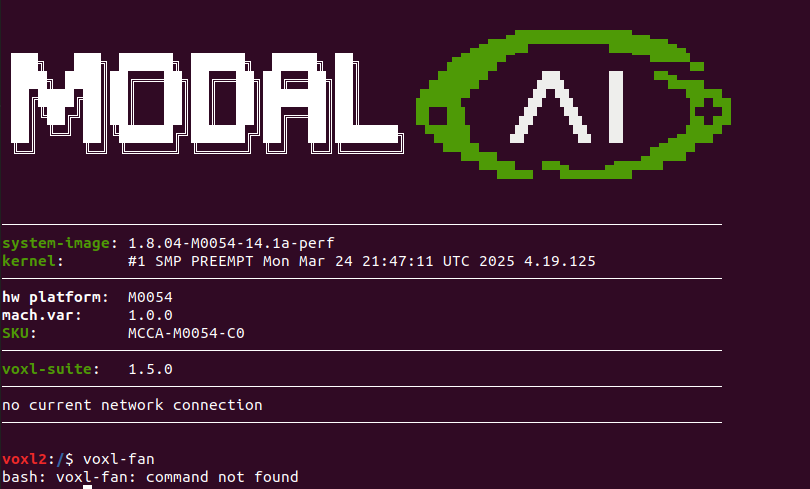
  • voxl-fan

    1
    1
    2 Votes
    1 Posts
    355 Views
    No one has replied
  • No permissions when running adb devices

    2
    0 Votes
    2 Posts
    2k Views
    tomT
    @tonygurney See here for adb install instructions and debugging tips: https://docs.modalai.com/setting-up-adb/#setting-up-adb The udev rules at the bottom may solve your issue
  • VOXL FPV Racing 4-in-1 ESC with flight core v2 and voxl2

    31
    0 Votes
    31 Posts
    6k Views
    Eric KatzfeyE
    @Jetson-Nano Can you please start a new thread for this new topic?
  • Flow Server

    2
    1
    0 Votes
    2 Posts
    439 Views
    wilkinsafW
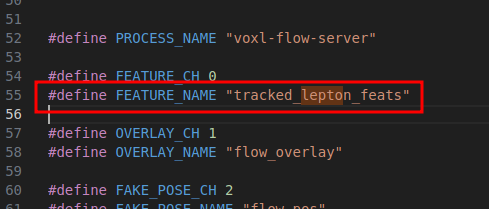
    @wilkinsaf Yes this is definitely possible You would need to modify flow-server and possibly feature-tracker to ensure this is pointed at the right pipe Might also need a bit of calibration here and there Have not tested having multiple versions of flow-server, but should be possible. Would need to ensure this works with a downard facing tof for accurate height estimate To get a rough draft of this working, would take ~2 days
  • Teledyne FLIR Lepton 3.5 Integration

    18
    0 Votes
    18 Posts
    3k Views
    george kollamkulamG
    @Alex-Kushleyev would you be able to help troubleshoot this error with the rear tracking camera?
  • 0 Votes
    1 Posts
    781 Views
    No one has replied
  • PWM Channel Support on VOXL 2 and SDK Version Inquiry

    2
    1
    0 Votes
    2 Posts
    422 Views
    ModeratorM
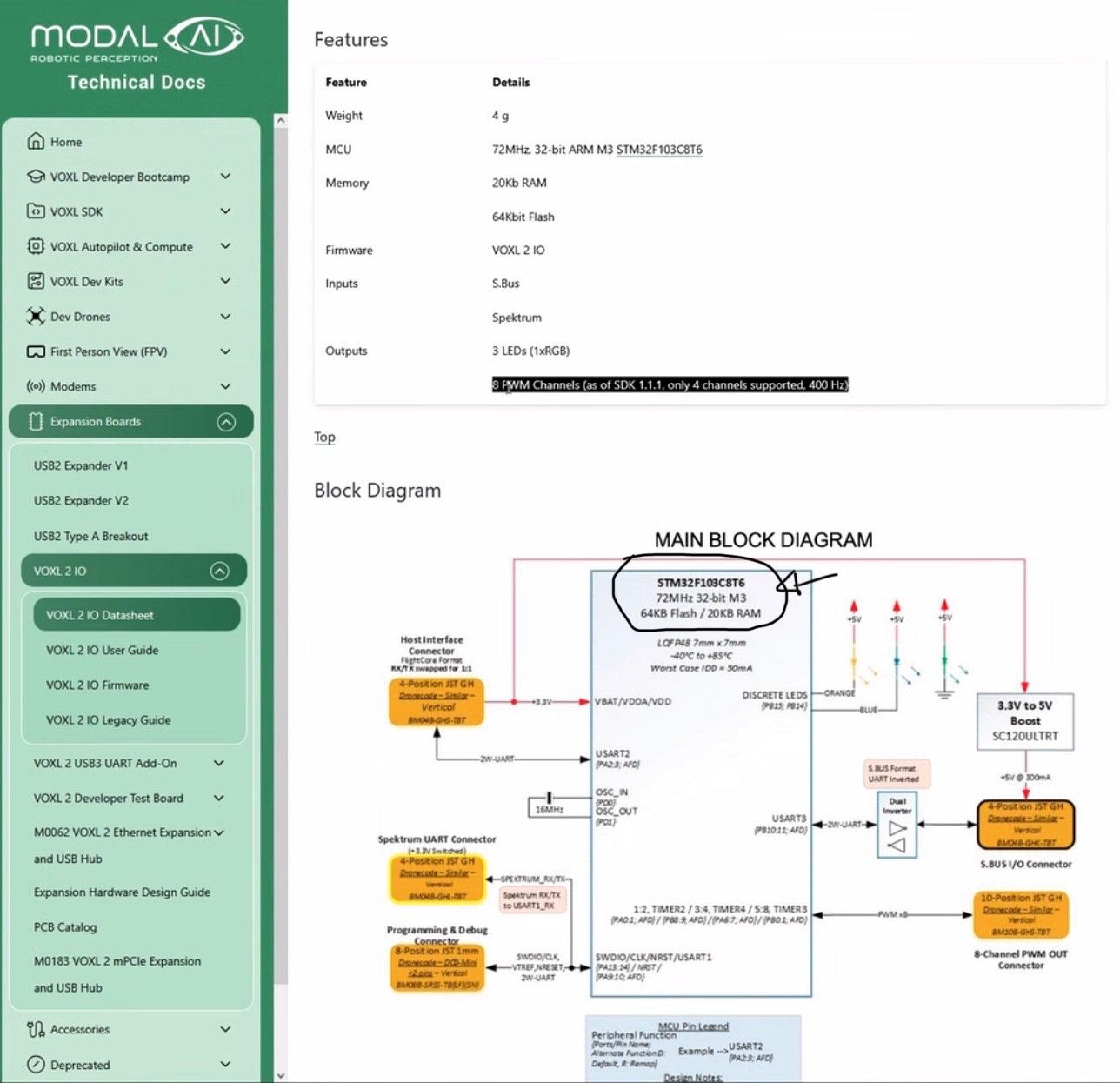
    @cmall the VOXL 2 IO connects via UART. You could use any breakout board, like an Arduino, to generate PWM
  • Unresponsive polling from FPV Racing 4-in-1 ESC

    7
    2
    0 Votes
    7 Posts
    1k Views
    Alex KushleyevA
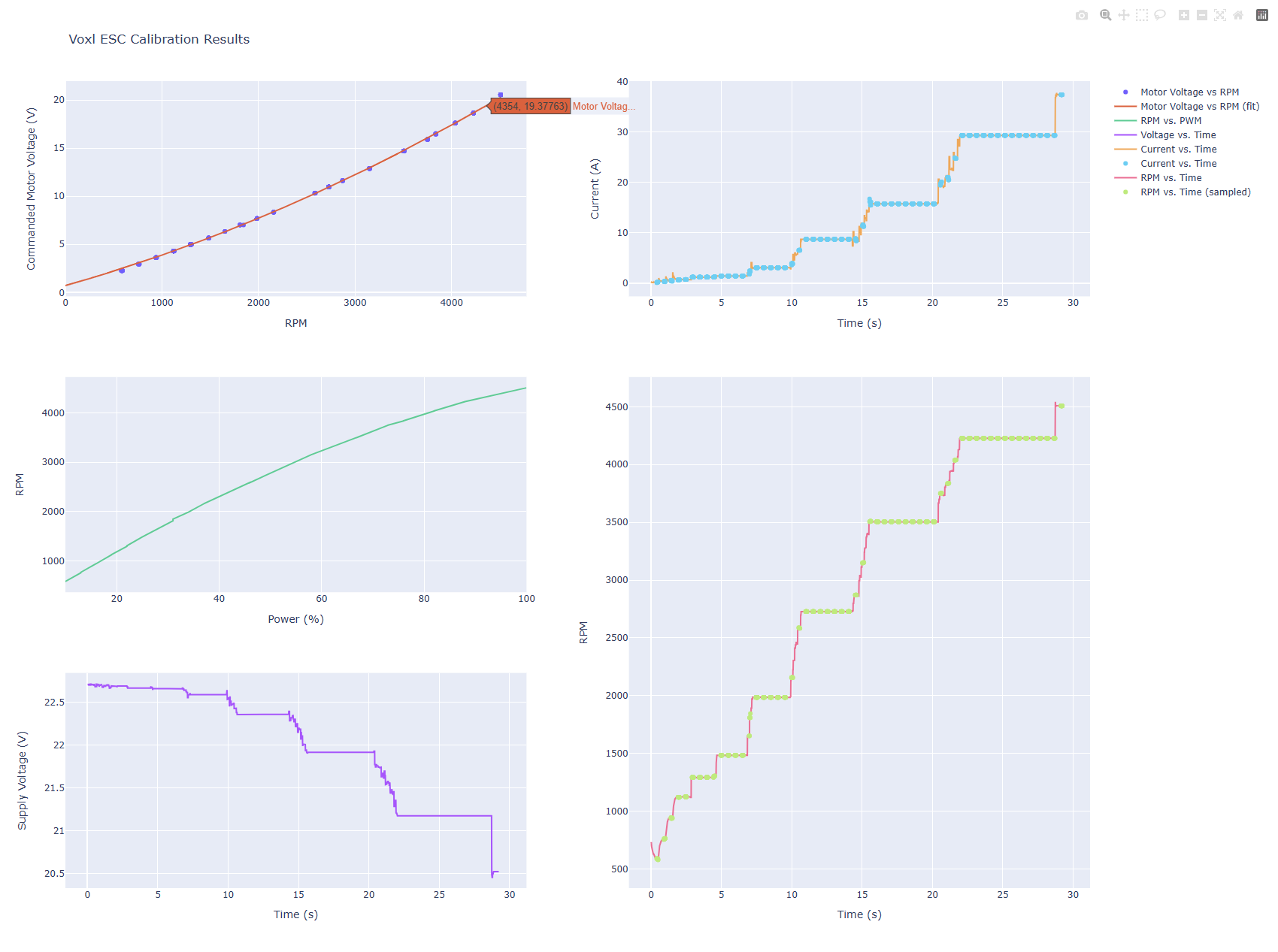
    @shawn_ricardo , just to close the loop on the original issue.. the delay in the calibration procedure was caused by UART data or processing of the ESC feedback backing up. The fix is to just slow down the command rate, seen in this commit : https://gitlab.com/voxl-public/voxl-sdk/utilities/voxl-esc/-/commit/b512f9e3d5e695868775de3d40eedb2ad15cf6d9 . Additionally, using command line argument --cmd-rate 100 when you run the calibration script on VOXL2 will fix the issue. Regarding the issue in the step response where the feedback data appears not smooth, i believe it is related to FTID's buffer / delay. FTDI adapters have this parameter latency_timer which is 16ms by default, which amount of time the FTDI board holds the RX'ed data before passing forwarding it to the PC (and vice versa, i believe). You can set that value to 1: You can check this value: cat /sys/bus/usb-serial/devices/ttyUSB0/latency_timer And set it: sudo su echo 1 > /sys/bus/usb-serial/devices/ttyUSB0/latency_timer You would need to do this every time you unplug / plug the FTDI device back in. (note that this applies only to Linux PC, not VOXL2). Besides this, i think the plots look good. It looks like you have set the kp pretty low, which keeps the response softer (less chance of de-sync). Alex
  • Incorrect battery0 voltage on QGC

    10
    3
    0 Votes
    10 Posts
    2k Views
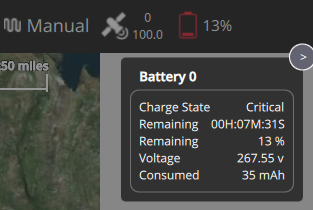
    Eric KatzfeyE
    @Eric-Katzfey The update has been pulled into our fork now. You can access the updated package here: http://voxl-packages.modalai.com/dists/qrb5165/dev/binary-arm64/voxl-px4_1.14.0-2.0.106-202507311432_arm64.deb