Skip to content

General Questions

2.3k Topics 11.3k Posts

Not sure where your question goes? Ask here. ModalAI engineers and the community answer questions about any VOXL product.

  • voxl-microdds-agent topic list

    Unsolved
    4
    0 Votes
    4 Posts
    957 Views
    Beniamino PozzanB
    it's more likely I will be commanding attitude / body rate which are already available Indeed. I highly suggest you to use those two unless your application stricly requires direct actuation control. I just wanted to get a clear overview of what the information dds client / agent can give me access to in the modalai version of px4. By editing src/modules/microdds_client/dds_topics.yaml you can access any PX4 uorb message so the limit here is just about what has been implemented on PX4 that is or is not available in the voxl version. How do you know what types of control / input & output data are not directly supported in px4 voxl version, as you said? the type of offboard control you can achieve is exposed by OffboardControlMode.msg. As you can see in main PX4 you have bool position bool velocity bool acceleration bool attitude bool body_rate bool thrust_and_torque bool direct_actuator I've added thrust_and_torque and direct_actuator one year ago (more or less). However, latest voxl is still using the old version: this old version let's you control via thrust and torque setpoints but does not let you control the single motor individually.
  • External INS & airspeed sensor hookup - VOXL 2 mini

    Unsolved
    2
    0 Votes
    2 Posts
    537 Views
    Eric KatzfeyE
    @jonathankampia Correct, The VectorNAV needs to have the serial port implementation changed to support SLPI. That can either be done by modifying the code on our branch or going to mainline PX4 and modifying the implementation to use the platform independent Serial port abstraction.
  • MDK-M0048-2-01 pDDL UART

    Unsolved
    1
    0 Votes
    1 Posts
    247 Views
    No one has replied
  • PX4 VOXL2 ROS2 Starling Reading Battery Voltage Through Code

    Unsolved
    1
    0 Votes
    1 Posts
    403 Views
    No one has replied
  • QGC Cant See Seaker but SSH Works

    Unsolved
    4
    0 Votes
    4 Posts
    734 Views
    Eric KatzfeyE
    @nekolny You should be able to use voxl-mavlink-server --help to see the various debug options available. You can stop voxl-mavlink-server from running as a service and then start it manually from the command line with the desired debug options to see which messages it is getting from the autopilot and what it is sending to QGC (and vice-versa). Then you can also use tcpdump to look at the IP traffic on both VOXL 1 and the QGC computer to see which messages are being sent.
  • Seeeker ESC PWM Port External Control

    Unsolved
    4
    0 Votes
    4 Posts
    664 Views
    Alex KushleyevA
    @nekolny , you should use a linux PC to run voxl-esc tools in order to connect to the ESC and check / update the ESC firmware. VOXL1 does not have support for voxl-esc python tools to communicate directly with the ESC. Alex
  • Warranty and Replacement Parts for PX4 Autonomy Development Kit & Starling 2 Drones

    Unsolved
    2
    0 Votes
    2 Posts
    577 Views
    ModeratorM
    @Ege-Yüceel You can find our warranty information at https://www.modalai.com/warranty You can find the STEP file for the design here: https://docs.modalai.com/starling-2-datasheet/#starling-datasheet Starling 2 replacement parts can be found here: https://www.modalai.com/products/starling-2-replacement-parts If there is a part you need, we can make it available for purchase.
  • voxl-streamer disconnecting live connection

    Unsolved
    2
    0 Votes
    2 Posts
    550 Views
    Alex KushleyevA
    @jcai, I just tested this. I do see that "Removed 1 sessions" message comes in after ~1 min after the first disconnect, but my second session is not interrupted when this happens. Please make sure you are using the latest version of voxl-streamer (you can try from nightly dev build). Also, something to double check, whether the two sessions are coming from the same or different port (maybe if you are using vpn or something, there new session starts from the same client port). Alex
  • Pinout Description of Image Sensor 4k High-resolution for VOXL (MSU-M0024)

    Unsolved
    19
    0 Votes
    19 Posts
    3k Views
    Hung PhamH
    @Vinny As per the parameters you provided, this sensor cannot operate at temperatures below 0 degrees Celsius. Thank you!
  • Motion capture with Rb5

    Unsolved
    2
    0 Votes
    2 Posts
    514 Views
    Alex KushleyevA
    @tahawaru , you may want to investigate the PX4 documentation for using a motion capture system for flight : https://docs.px4.io/main/en/computer_vision/motion_capture.html . We have not done this type of testing, so may not be able to help. Alex
  • Difficulty to run GEPRC SPEEDX2 1303.5 3800KV/5500KV motors with ESC

    Unsolved
    2
    0 Votes
    2 Posts
    634 Views
    Alex KushleyevA
    Hi @ashwin, Our ESC needs to be tuned for the motor / propeller in order to achieve the best performance. In some cases, without tuning, the performance will be very poor, as there is an expectation of the ESC parameters to match the actual motor + propeller. This is done to ensure consistent and responsive behavior of the ESC. If you are changing motor / propeller, you should perform the tuning procedure described here : https://gitlab.com/voxl-public/voxl-sdk/utilities/voxl-esc/-/blob/master/voxl-esc-tools/calibration.md . Since you are using a 2S battery, you can start with the Starling ESC params (https://gitlab.com/voxl-public/voxl-sdk/utilities/voxl-esc/-/blob/master/voxl-esc-params/D0014_starling_1504_3000kv_ms_props/D0014_starling_1504_3000kv_ms_props.xml) and update the tuning parameters as instructed. Since you mentioned the sinusoidal spinup, not working properly, you will need to enter the correct kV value in to the ESC param file and may need to adjust the start-up power or target spin-up rpm. the voxl-esc tools come installed on voxl2 in /usr/share/modalai/voxl-esc-tools and the following are useful commands: make sure to stop voxl-px4 before using voxl-esc tools : systemctl stop voxl-px4 voxl-esc-scan.py will tell you which ESC firmware you are using - you should upload the latest, which is 39.20. voxl-esc-upload-firmware-all.sh script will autodetect the esc and upload the latest firmware to all 4 of the ESC channels voxl-esc-verify-params.py can be used to check which esc params are installed voxl-esc-upload-params.py can be used to upload new ESC parameters. Please let me know if you have any other questions. Alex
  • 0 Votes
    8 Posts
    2k Views
    T
    @Alex-Kushleyev Thank you for the reply Currently we are buying Voxl2 flight deck from you, I will be integrating in my drone after integrating what I need to do how to make it fly autonomously can you guide that how sdk works and how 3d map will be created how we need to plan a machine in the sdk
  • [Starling2Max] Unable to take off due to no valid local position estimate

    Unsolved
    9
    2
    1 Votes
    9 Posts
    3k Views
    Yoshimaru TanakaY
    I resolved this issue with replacing indoor_vio.params with indoor_vio_missing_gps.params. Thanks!
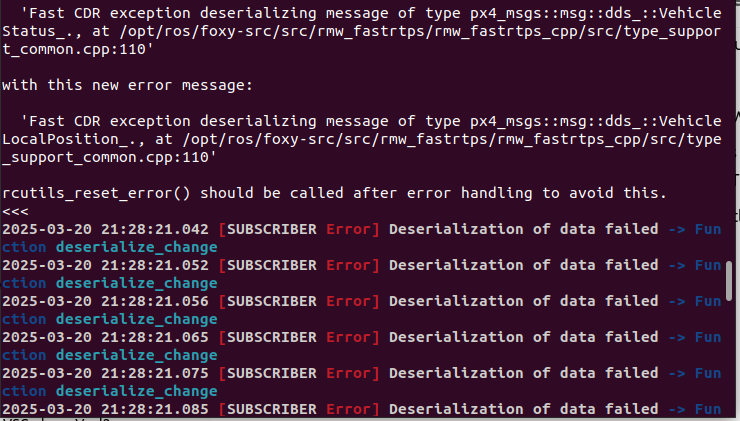
  • ROS2 VOXL2 Deserialization Errors

    Unsolved
    10
    1
    0 Votes
    10 Posts
    2k Views
    T
    @GlennTee Great!
  • getting omni-vision capability

    Unsolved
    6
    0 Votes
    6 Posts
    853 Views
    Alex KushleyevA
    @Mark-Ogata , Starling 2 Max already has 4 or 5 cameras (depending on configuration - 5th could be a TOF sensor if selected). There are two high resolution IMX412 cameras (up to 4056x3040 resolution rolling shutter RGB cameras) and there are two AR0144 monochrome global shutter cameras that are used for feature tracking / VIO (1280x800 resolution). If you really wanted to, you could add two more high resolution cameras to VOXL camera port J8 (camera ports J6 and J7 are fully used up). Adding the first IMX412 camera would just require you to buy a camera with the correct adapter, such as M0161 camera (with ucoax cable) and M0155 adapter which would plug in to VOXL2's J8. In order to get two IMX412 cameras added to starling 2 Max, it will be a bit more complicated, including a small Kernel change. It looks like you are potentially looking to re-configure cameras on Starling 2 Max, so my suggestion is first to understand the capabilities of the cameras you have (resolution, field of view, etc) . The lenses on the IMX412 cameras have about 120 degress of horizontal FOV (and you can check it) : https://www.modalai.com/products/msu-m0161 . So for full 360 degree coverage, you would technically only need three of these cameras. However, you have a total of 4 cameras already and the lower resolution AR0144 cameras also have a wide FOV (almost 140 degrees horizontal : https://docs.modalai.com/M0166/) and can be used to supplement the two high resolutions cameras. It seems to me that you could take the cameras that you already have and build a hardware mount for them. Also, as Eric said you might want to consider using VOXL2 for whatever you are trying to do on the Raspberry pi, since VOXL2 runs Ubuntu linux (but no display). In terms of USB adapters, your startling 2 max already has a wifi module that uses a USB2 adapter, so you can plug in an ethernet adapter instead of that wifi dongle. BTW M0151 adapter board (which is part of Starling 2 Max, this is were the wifi dongle is plugged in) supports USB 3.0 : https://www.modalai.com/products/m0151 Alex
  • Compatibility of (VOXL ESC FPV 4 in 1 SEC) with T-motor MN2806

    Unsolved
    2
    0 Votes
    2 Posts
    543 Views
    Alex KushleyevA
    Hi @Tamilselvan, Yes, our FPV ESC should be a good match for this motor in terms of power, however you will need to perform tuning and testing (non-flying) to prevent de-syncs, as described here: https://gitlab.com/voxl-public/voxl-sdk/utilities/voxl-esc/-/blob/master/voxl-esc-tools/doc/low_kv_motor_tuning.md You would first need to follow our standard tuning guide as described here, but first increase timing advance and sense advance to the numbers from the above link, so that you don't have a de-sync during calibration : https://gitlab.com/voxl-public/voxl-sdk/utilities/voxl-esc/-/blob/master/voxl-esc-tools/calibration.md Please note that the FPV ESC only has the total current sensing, so you would want to run the tests with the ESC ID2, which measures the total current, so it will be reported to the python test scripts. Just for full disclosure, we do not do a lot of testing using low kV motors, but the parameters are there to adjust and test performance. You would need to do sufficient bench testing to convince yourself that the ESC tuning is good and you are ready to test flying. If you need more guidance for testing the ESC performance, I can help you. You should first start with the link I mentioned above and then modify the script to run continuous tests and perhaps detect anomalies. We may extend our test script to support testing like this with automatic error detection in the future. If you do not have experience with ESC tuning or do not wish to go through this procedure, then our ESC may not be the best choice for this motor. Alex
  • 5G Performance

    Unsolved
    6
    0 Votes
    6 Posts
    1k Views
    B
    @groupo Thanks for this! I am pretty familiar with the AT Commands I just haven't tried disabling bands yet. Will add it to me to-do list
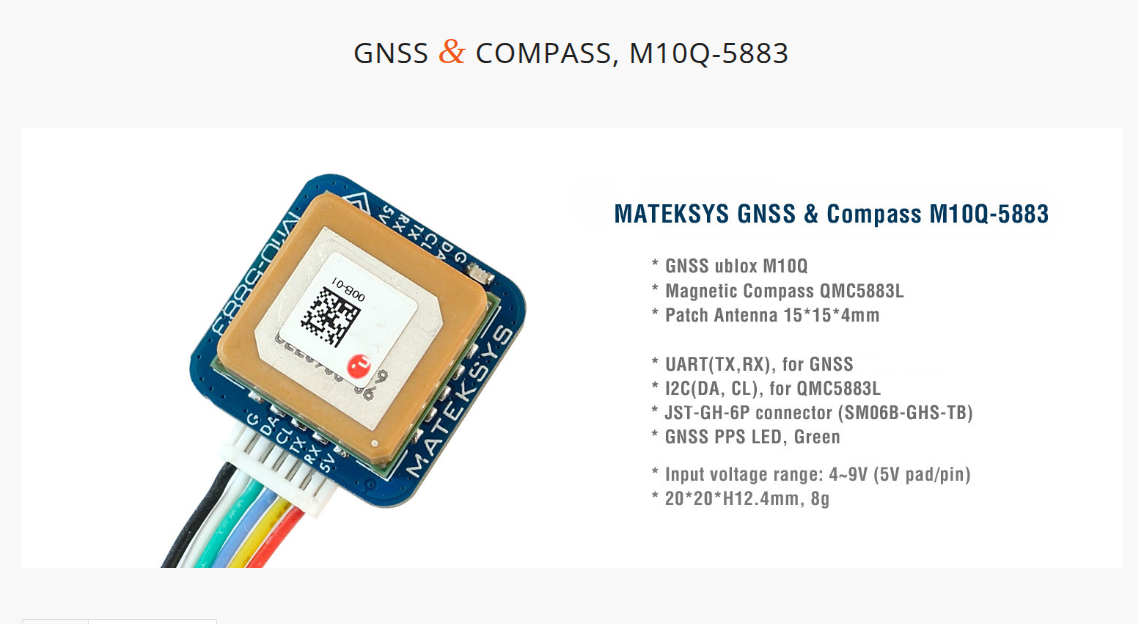
  • GPS Troubleshooting

    Unsolved
    6
    2
    0 Votes
    6 Posts
    1k Views
    Eric KatzfeyE
    @rdjarvis Okay, great! Instead of starting voxl-px4 with systemctl start voxl-px4 can you start it as a foreground process using voxl-px4 -d and then capture the output and paste as a response? I'd like to see if there are any error messages printed that could help determine why it isn't seeing your GPS unit.
  • SeekThermal camera integration on VOXL2 Starling

    Unsolved
    4
    3
    0 Votes
    4 Posts
    708 Views
    Eric KatzfeyE
    @buem799 Yes, you would be able to use Seek. We do not currently support this, it's just some internal stuff we are using for Seek evaluation and development. Here is the contents of our Dockerfile, hopefully this is helpful to you. FROM arm64v8/ubuntu:focal WORKDIR /home RUN apt-get update RUN DEBIAN_FRONTEND=noninteractive apt-get install -y cmake libopencv-dev libusb-1.0-0-dev RUN DEBIAN_FRONTEND=noninteractive apt-get install -y git RUN DEBIAN_FRONTEND=noninteractive apt-get install -y g++ vim # This will update if there have been any updates to the voxl-dev branch and force a new git clone # ADD https://api.github.com/repos/modalai/libseek-thermal/git/refs/heads/dev version.json RUN git clone https://github.com/modalai/libseek-thermal.git RUN mkdir libseek-thermal/build WORKDIR /home/libseek-thermal/build RUN cmake .. RUN make RUN make install RUN ldconfig WORKDIR /home COPY Seek_Thermal_SDK_4.4.2.20.zip . RUN DEBIAN_FRONTEND=noninteractive apt-get install -y zip RUN unzip Seek_Thermal_SDK_4.4.2.20.zip RUN rm Seek_Thermal_SDK_4.4.2.20.zip RUN DEBIAN_FRONTEND=noninteractive apt-get install -y libsdl2-dev WORKDIR /home/Seek_Thermal_SDK_4.4.2.20/aarch64-linux-gnu RUN DEBIAN_FRONTEND=noninteractive apt-get install -y usbutils RUN DEBIAN_FRONTEND=noninteractive apt-get install -y udev RUN cp lib/libseekcamera.so /usr/local/lib RUN cp -r include/* /usr/local/include RUN mkdir -p /etc/udev RUN cp driver/udev/10-seekthermal.rules /etc/udev/rules.d # RUN udevadm control --reload RUN chmod a+x bin/* WORKDIR /home/Seek_Thermal_SDK_4.4.2.20/aarch64-linux-gnu/examples/build RUN cmake .. RUN make WORKDIR /home COPY libmodal-json*.deb . RUN dpkg -i libmodal-json*.deb RUN rm libmodal-json_*.deb COPY libmodal-pipe*.deb . RUN dpkg -i libmodal-pipe*.deb RUN rm libmodal-pipe*.deb ENV LD_LIBRARY_PATH=/usr/lib64 WORKDIR /usr/local/workspace
  • voxl 2 and micro hard integration

    Unsolved
    4
    0 Votes
    4 Posts
    693 Views
    Eric KatzfeyE
    @Tamilselvan Correct, for example take a look at our UVC camera server: https://docs.modalai.com/voxl-uvc-server/