
SeekThermal camera integration on VOXL2 Starling
-
Hi devs,
I was trying to get a SeekThermal camera running through the VOXL drone. It's a model that is NOT listed on the supported devices but I still wanted to try because it would be a good middle ground option between the FLIR Lepton and Boson. I am aware that since it's not supported officially that there's no guarantee for it to work but I still wanted to quickly ask if you had any ideas that could maybe fix the fact that the VOXL2 Starling doesn't recognise the camera even after installing their SDK which is supposed to work on the VOXL architecture. (The 289d:0011 is the camera)
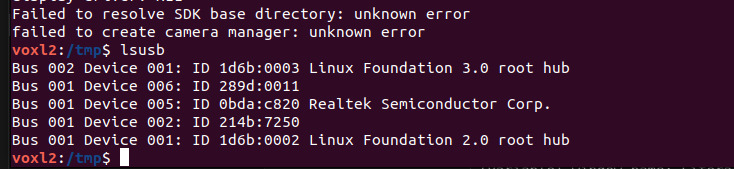
On my laptop it looks like this:

And when I run a script given by SeekThermal I get the following error:
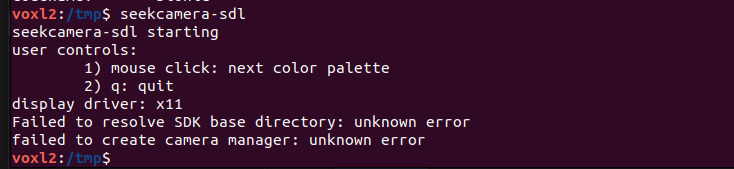
Thanks in advance
-
Hi devs,
I was trying to get a SeekThermal camera running through the VOXL drone. It's a model that is NOT listed on the supported devices but I still wanted to try because it would be a good middle ground option between the FLIR Lepton and Boson. I am aware that since it's not supported officially that there's no guarantee for it to work but I still wanted to quickly ask if you had any ideas that could maybe fix the fact that the VOXL2 Starling doesn't recognise the camera even after installing their SDK which is supposed to work on the VOXL architecture. (The 289d:0011 is the camera)
On my laptop it looks like this:
And when I run a script given by SeekThermal I get the following error:
Thanks in advance
@buem799 Yes, we use Seek camera but we do not support it externally yet. We have to run it in a Docker since the native VOXL 2 environment does not support the Seek SDK.
-
@buem799 Yes, we use Seek camera but we do not support it externally yet. We have to run it in a Docker since the native VOXL 2 environment does not support the Seek SDK.
@Eric-Katzfey Thanks for the info. Does that mean it would also be possible for me to access the SeekThermal if I set up the docker like you?
If that's the case would you be so kind as to provide the docker image and whatever else I need or is that not publicly available? -
@Eric-Katzfey Thanks for the info. Does that mean it would also be possible for me to access the SeekThermal if I set up the docker like you?
If that's the case would you be so kind as to provide the docker image and whatever else I need or is that not publicly available?@buem799 Yes, you would be able to use Seek. We do not currently support this, it's just some internal stuff we are using for Seek evaluation and development. Here is the contents of our Dockerfile, hopefully this is helpful to you.
FROM arm64v8/ubuntu:focal

WORKDIR /home

RUN apt-get update
RUN DEBIAN_FRONTEND=noninteractive apt-get install -y cmake libopencv-dev libusb-1.0-0-dev
RUN DEBIAN_FRONTEND=noninteractive apt-get install -y git
RUN DEBIAN_FRONTEND=noninteractive apt-get install -y g++ vim

# This will update if there have been any updates to the voxl-dev branch and force a new git clone
# ADD https://api.github.com/repos/modalai/libseek-thermal/git/refs/heads/dev version.json

RUN git clone https://github.com/modalai/libseek-thermal.git
RUN mkdir libseek-thermal/build

WORKDIR /home/libseek-thermal/build

RUN cmake ..
RUN make
RUN make install
RUN ldconfig

WORKDIR /home

COPY Seek_Thermal_SDK_4.4.2.20.zip .

RUN DEBIAN_FRONTEND=noninteractive apt-get install -y zip

RUN unzip Seek_Thermal_SDK_4.4.2.20.zip
RUN rm Seek_Thermal_SDK_4.4.2.20.zip

RUN DEBIAN_FRONTEND=noninteractive apt-get install -y libsdl2-dev

WORKDIR /home/Seek_Thermal_SDK_4.4.2.20/aarch64-linux-gnu

RUN DEBIAN_FRONTEND=noninteractive apt-get install -y usbutils
RUN DEBIAN_FRONTEND=noninteractive apt-get install -y udev

RUN cp lib/libseekcamera.so /usr/local/lib
RUN cp -r include/* /usr/local/include
RUN mkdir -p /etc/udev
RUN cp driver/udev/10-seekthermal.rules /etc/udev/rules.d
# RUN udevadm control --reload
RUN chmod a+x bin/*

WORKDIR /home/Seek_Thermal_SDK_4.4.2.20/aarch64-linux-gnu/examples/build

RUN cmake ..
RUN make

WORKDIR /home

COPY libmodal-json*.deb .
RUN dpkg -i libmodal-json*.deb
RUN rm libmodal-json_*.deb

COPY libmodal-pipe*.deb .
RUN dpkg -i libmodal-pipe*.deb
RUN rm libmodal-pipe*.deb


ENV LD_LIBRARY_PATH=/usr/lib64

WORKDIR /usr/local/workspace

Reading along? Create a free ModalAI Forum account to join in.
With an account you can reply, ask your own question, get an email when a ModalAI engineer answers, and mark the reply that solved it. Your place in each thread is saved between visits.
Questions about VOXL, Flight Core, ESCs and ModalAI drones are answered here by the engineers who build them.
Register Login