Skip to content
  • Categories
  • Recent
  • Tags
  • Popular
  • Users
  • Groups
Collapse
Brand Logo

ModalAI Forum

  1. ModalAI Support Forum
  2. Ask your questions right here!
  3. Streaming Stereo Camera

Streaming Stereo Camera

Scheduled Pinned Locked Moved Ask your questions right here!
21 Posts 4 Posters 5.5k Views 3 Watching
  • Oldest to Newest
  • Newest to Oldest
  • Most Votes
Reply
  • Reply as topic
Log in to reply
This topic has been deleted. Only users with topic management privileges can see it.
  • tomT tom

    @Kris Again, you've ran through voxl-configure-sku and voxl-configure-mpa there is no reason to start a service manually. In your first post you could see that voxl-mavcam-manager was already running as a service.

    What do your video stream settings look like in QGC? Do you have it setup correctly to expect an rtsp stream?

    KrisK Offline
    KrisK Offline
    Kris
    Regular
    wrote on last edited by
    #9

    @tom
    Yes, I have ran through the voxl-configure-sku and the voxl-configure-mpa.
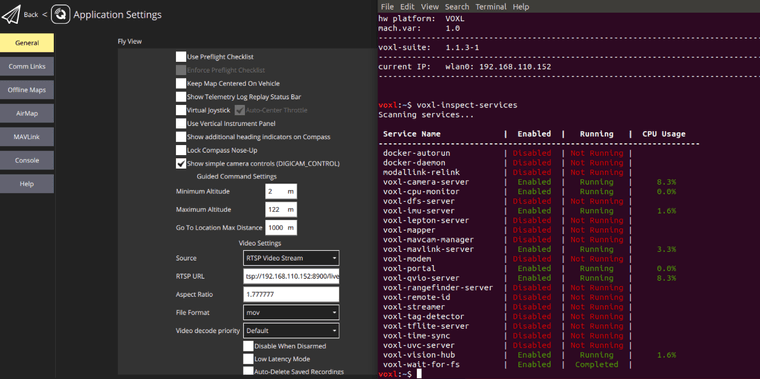
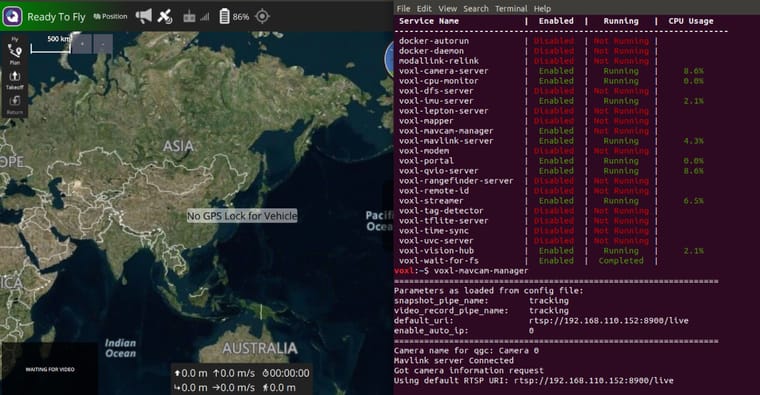
    This is what my video stream seetings look like in QGC, if its the correct location.
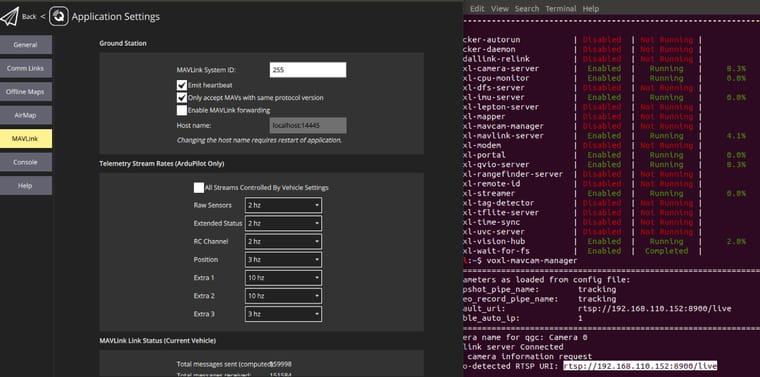
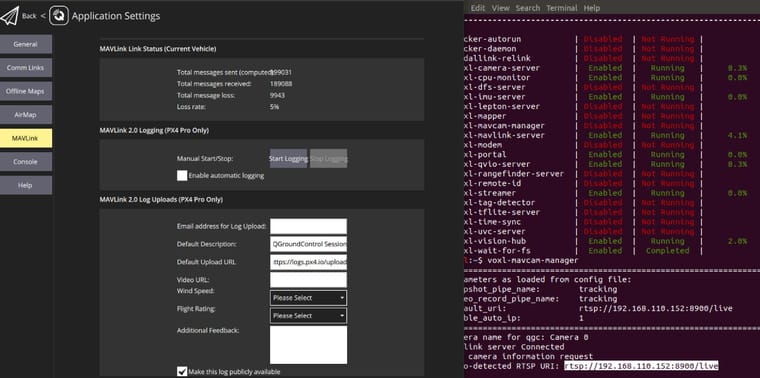
    QGC1.jpg

    QGC2.jpg

    tomT 1 Reply Last reply
    0
    • KrisK Kris

      @tom
      Yes, I have ran through the voxl-configure-sku and the voxl-configure-mpa.
      This is what my video stream seetings look like in QGC, if its the correct location.

      QGC1.jpg

      QGC2.jpg

      tomT Offline
      tomT Offline
      tom
      admin
      wrote on last edited by
      #10

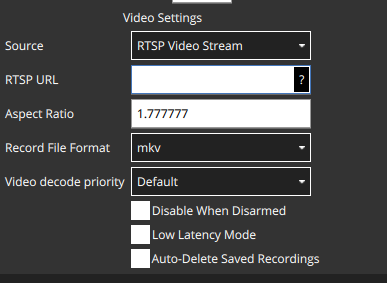
      @Kris 27359e0b-c763-47ba-9635-adf90f5bcca1-image.png

      The video stream settings are under "General", you'll want to enter the RTSP URI there

      KrisK 3 Replies Last reply
      0
      • tomT tom

        @Kris 27359e0b-c763-47ba-9635-adf90f5bcca1-image.png

        The video stream settings are under "General", you'll want to enter the RTSP URI there

        KrisK Offline
        KrisK Offline
        Kris
        Regular
        wrote on last edited by
        #11

        @tom Thank you so much, I just found it and I will try it.

        1 Reply Last reply
        0
        • tomT tom

          @Kris 27359e0b-c763-47ba-9635-adf90f5bcca1-image.png

          The video stream settings are under "General", you'll want to enter the RTSP URI there

          KrisK Offline
          KrisK Offline
          Kris
          Regular
          wrote on last edited by
          #12

          @tom
          I am sorry, it is still not working....

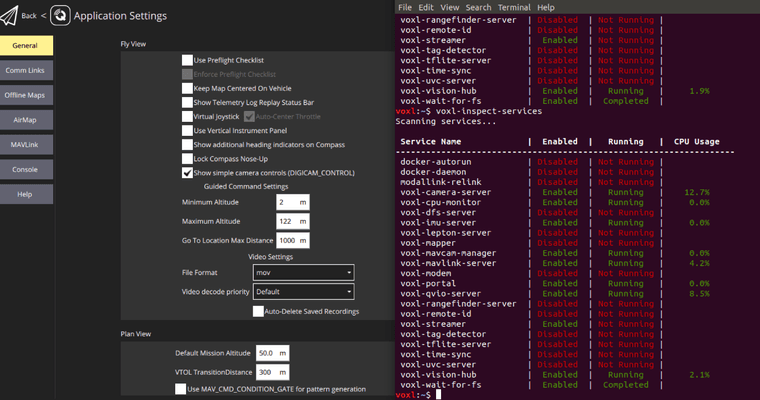
          QGC3.png

          KrisK 1 Reply Last reply
          0
          • KrisK Kris

            @tom
            I am sorry, it is still not working....

            QGC3.png

            KrisK Offline
            KrisK Offline
            Kris
            Regular
            wrote on last edited by
            #13

            QGC4.png

            QGC5.jpg

            1 Reply Last reply
            0
            • tomT tom

              @Kris 27359e0b-c763-47ba-9635-adf90f5bcca1-image.png

              The video stream settings are under "General", you'll want to enter the RTSP URI there

              KrisK Offline
              KrisK Offline
              Kris
              Regular
              wrote on last edited by
              #14

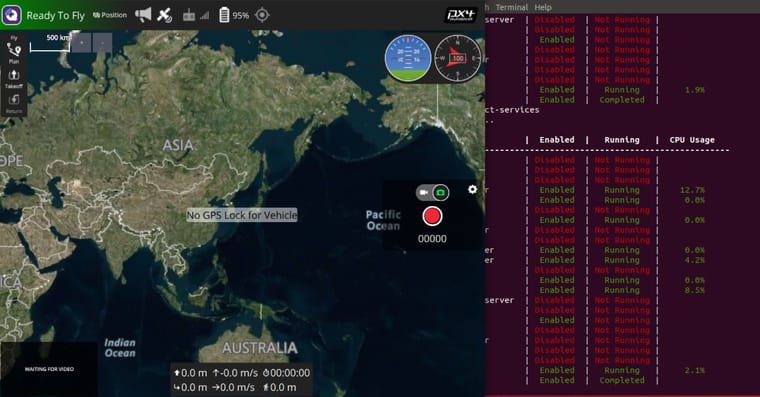
              QGC6.jpg

              tomT 1 Reply Last reply
              0
              • KrisK Kris

                QGC6.jpg

                tomT Offline
                tomT Offline
                tom
                admin
                wrote on last edited by
                #15

                @Kris What do you see with systemctl status voxl-streamer?

                KrisK 4 Replies Last reply
                0
                • tomT tom

                  @Kris What do you see with systemctl status voxl-streamer?

                  KrisK Offline
                  KrisK Offline
                  Kris
                  Regular
                  wrote on last edited by Kris
                  #16

                  @tom This is what I see.

                  voxl:~$ systemctl status voxl-streamer
                  ● voxl-streamer.service - voxl-streamer
                     Loaded: loaded (/usr/bin/voxl-streamer; enabled; vendor preset: enabled)
                     Active: active (running) since Tue 2024-03-05 01:18:42 UTC; 13min ago
                    Process: 17793 ExecStartPre=/bin/sleep 5 (code=exited, status=0/SUCCESS)
                   Main PID: 17800 (voxl-streamer)
                     CGroup: /system.slice/voxl-streamer.service
                             └─17800 /usr/bin/voxl-streamer
                  
                  Mar 05 01:31:34 apq8096 voxl-streamer[17800]: A new client rtsp://192.168.11...1
                  Mar 05 01:31:34 apq8096 voxl-streamer[17800]: Camera server Connected
                  Mar 05 01:31:34 apq8096 voxl-streamer[17800]: rtsp client disconnected, tota...0
                  Mar 05 01:31:34 apq8096 voxl-streamer[17800]: no more rtsp clients, closing ...y
                  Mar 05 01:31:34 apq8096 voxl-streamer[17800]: A new client rtsp://192.168.11...1
                  Mar 05 01:31:34 apq8096 voxl-streamer[17800]: Camera server Connected
                  Mar 05 01:31:34 apq8096 voxl-streamer[17800]: rtsp client disconnected, tota...0
                  Mar 05 01:31:34 apq8096 voxl-streamer[17800]: no more rtsp clients, closing ...y
                  Mar 05 01:31:34 apq8096 voxl-streamer[17800]: A new client rtsp://192.168.11...1
                  Mar 05 01:31:34 apq8096 voxl-streamer[17800]: Camera server Connected
                  Hint: Some lines were ellipsized, use -l to show in full.
                  
                  
                  voxl:~$ systemctl status voxl-streamer -l
                  ● voxl-streamer.service - voxl-streamer
                     Loaded: loaded (/usr/bin/voxl-streamer; enabled; vendor preset: enabled)
                     Active: active (running) since Tue 2024-03-05 01:18:42 UTC; 14min ago
                    Process: 17793 ExecStartPre=/bin/sleep 5 (code=exited, status=0/SUCCESS)
                   Main PID: 17800 (voxl-streamer)
                     CGroup: /system.slice/voxl-streamer.service
                             └─17800 /usr/bin/voxl-streamer
                  
                  Mar 05 01:33:33 apq8096 voxl-streamer[17800]: no more rtsp clients, closing source pipe intentionally
                  Mar 05 01:33:33 apq8096 voxl-streamer[17800]: A new client rtsp://192.168.110.159:48596(null) has connected, total clients: 1
                  Mar 05 01:33:33 apq8096 voxl-streamer[17800]: Camera server Connected
                  Mar 05 01:33:33 apq8096 voxl-streamer[17800]: rtsp client disconnected, total clients: 0
                  Mar 05 01:33:33 apq8096 voxl-streamer[17800]: no more rtsp clients, closing source pipe intentionally
                  Mar 05 01:33:33 apq8096 voxl-streamer[17800]: A new client rtsp://192.168.110.159:48604(null) has connected, total clients: 1
                  Mar 05 01:33:33 apq8096 voxl-streamer[17800]: Camera server Connected
                  Mar 05 01:33:33 apq8096 voxl-streamer[17800]: rtsp client disconnected, total clients: 0
                  Mar 05 01:33:33 apq8096 voxl-streamer[17800]: no more rtsp clients, closing source pipe intentionally
                  Mar 05 01:33:33 apq8096 voxl-streamer[17800]: A new client rtsp://192.168.110.159:48606(null) has connected, total clients: 1
                  
                  
                  1 Reply Last reply
                  0
                  • tomT tom

                    @Kris What do you see with systemctl status voxl-streamer?

                    KrisK Offline
                    KrisK Offline
                    Kris
                    Regular
                    wrote on last edited by
                    #17
                    voxl:~$ systemctl status voxl-mavcam-manager -l
                    ● voxl-mavcam-manager.service - voxl-mavcam-manager
                       Loaded: loaded (/usr/bin/voxl-mavcam-manager; enabled; vendor preset: enabled)
                       Active: failed (Result: signal) since Tue 2024-03-05 01:18:39 UTC; 20min ago
                      Process: 17657 ExecStart=/bin/bash -c /usr/bin/voxl-mavcam-manager (code=killed, signal=ABRT)
                     Main PID: 17657 (code=killed, signal=ABRT)
                    
                    Mar 05 01:18:39 apq8096 bash[17657]: snapshot_pipe_name:        tracking
                    Mar 05 01:18:39 apq8096 bash[17657]: video_record_pipe_name:    tracking
                    Mar 05 01:18:39 apq8096 bash[17657]: default_uri:               rtsp://192.168.110.152:8900/live
                    Mar 05 01:18:39 apq8096 bash[17657]: enable_auto_ip:            0
                    Mar 05 01:18:39 apq8096 bash[17657]: =================================================================
                    Mar 05 01:18:39 apq8096 bash[17657]: Camera name for qgc: Camera 0
                    Mar 05 01:18:39 apq8096 bash[17657]: Mavlink server Connected
                    Mar 05 01:18:39 apq8096 systemd[1]: voxl-mavcam-manager.service: Main process exited, code=killed, status=6/ABRT
                    Mar 05 01:18:39 apq8096 systemd[1]: voxl-mavcam-manager.service: Unit entered failed state.
                    Mar 05 01:18:39 apq8096 systemd[1]: voxl-mavcam-manager.service: Failed with result 'signal'.
                    
                    
                    1 Reply Last reply
                    0
                    • tomT tom

                      @Kris What do you see with systemctl status voxl-streamer?

                      KrisK Offline
                      KrisK Offline
                      Kris
                      Regular
                      wrote on last edited by
                      #18
                      voxl:~$ voxl-inspect-sku
                      
                      family code:   MRB-D0003 (seeker)
                      compute board: 1 (voxl1)
                      hw version:    7
                      cam config:    7
                      SKU:           MRB-D0003-1-V7-C7
                      
                      
                      1 Reply Last reply
                      0
                      • tomT tom

                        @Kris What do you see with systemctl status voxl-streamer?

                        KrisK Offline
                        KrisK Offline
                        Kris
                        Regular
                        wrote on last edited by
                        #19

                        voxl-inspect-mavlink mavlink_sys_status

                        |   ID  |      Mavlink MSG Name       |Counter|  Hz  |
                        |-------|-----------------------------|-------|------|
                        |     1 | sys_status                  |    92 |  5.0 |
                        
                        
                        Alex KushleyevA 1 Reply Last reply
                        0
                        • KrisK Kris

                          voxl-inspect-mavlink mavlink_sys_status

                          |   ID  |      Mavlink MSG Name       |Counter|  Hz  |
                          |-------|-----------------------------|-------|------|
                          |     1 | sys_status                  |    92 |  5.0 |
                          
                          
                          Alex KushleyevA Offline
                          Alex KushleyevA Offline
                          Alex Kushleyev
                          ModalAI Team
                          wrote on last edited by Alex Kushleyev
                          #20

                          @Kris , please try the following:

                          • verify the ip address of voxl2
                            • when you adb into voxl2, the ip address is printed
                            • you can use ifconfig to check the ip address
                          • make sure voxl-streamer is running (it looks like it is based on output of systemctl status voxl-streamer
                          • ping your voxl2 ip from your host machine (just to make sure it can reach voxl2)
                          • download ffmpeg / ffplay to your host machine
                            • perhaps something in VLC is not working, but ffmpeg / ffplay usually works
                            • on linux OS should be able to do it using apt-get ffmpeg
                            • for other OS you can find direct download : https://www.ffmpeg.org/download.html

                          play the video on the host machine (replace voxl2-ip with actual ip address)

                          ffplay rtsp://<voxl2-ip>:8900/live
                          
                          ModeratorM 1 Reply Last reply
                          0
                          • Alex KushleyevA Alex Kushleyev

                            @Kris , please try the following:

                            • verify the ip address of voxl2
                              • when you adb into voxl2, the ip address is printed
                              • you can use ifconfig to check the ip address
                            • make sure voxl-streamer is running (it looks like it is based on output of systemctl status voxl-streamer
                            • ping your voxl2 ip from your host machine (just to make sure it can reach voxl2)
                            • download ffmpeg / ffplay to your host machine
                              • perhaps something in VLC is not working, but ffmpeg / ffplay usually works
                              • on linux OS should be able to do it using apt-get ffmpeg
                              • for other OS you can find direct download : https://www.ffmpeg.org/download.html

                            play the video on the host machine (replace voxl2-ip with actual ip address)

                            ffplay rtsp://<voxl2-ip>:8900/live
                            
                            ModeratorM Offline
                            ModeratorM Offline
                            Moderator
                            ModalAI Team
                            wrote on last edited by
                            #21

                            Typically hires is the only pipe with encoding enabled by default, but in this case tracking is being used. Can you make sure encoding is enabled for the tracking camera in voxl-camera-server.conf ?

                            Or, can you just see if hires_enc is working in QGC first? That's what we ship by default on a fresh install hires_enc to QGC should by enabled by default.

                            1 Reply Last reply
                            0

                            Hello! It looks like you're interested in this conversation, but you don't have an account yet.

                            Getting fed up of having to scroll through the same posts each visit? When you register for an account, you'll always come back to exactly where you were before, and choose to be notified of new replies (either via email, or push notification). You'll also be able to save bookmarks and upvote posts to show your appreciation to other community members.

                            With your input, this post could be even better 💗

                            Register Login
                            Reply
                            • Reply as topic
                            Log in to reply
                            • Oldest to Newest
                            • Newest to Oldest
                            • Most Votes


                            ModalAI
                            Categories Recent Tags ModalAI.com Docs
                            © 2026 ModalAI® · Accelerating autonomy for smaller, smarter, safer drones · Powered by NodeBB
                            • Login

                            • Don't have an account? Register

                            • Login or register to search.
                            • First post
                              Last post
                            0
                            • Categories
                            • Recent
                            • Tags
                            • Popular
                            • Users
                            • Groups