Skip to content
  • Categories
  • Recent
  • Tags
  • Popular
  • Users
  • Groups
Collapse
Brand Logo

ModalAI Forum

  1. ModalAI Support Forum
  2. Ask your questions right here!
  3. MAVLink Odometry X Y value 0

MAVLink Odometry X Y value 0
Scheduled Pinned Locked Moved Ask your questions right here!
78 Posts 4 Posters 36.2k Views 2 Watching
  • Oldest to Newest
  • Newest to Oldest
  • Most Votes
Reply
  • Reply as topic
Log in to reply
This topic has been deleted. Only users with topic management privileges can see it.
  • Chad SweetC Chad Sweet

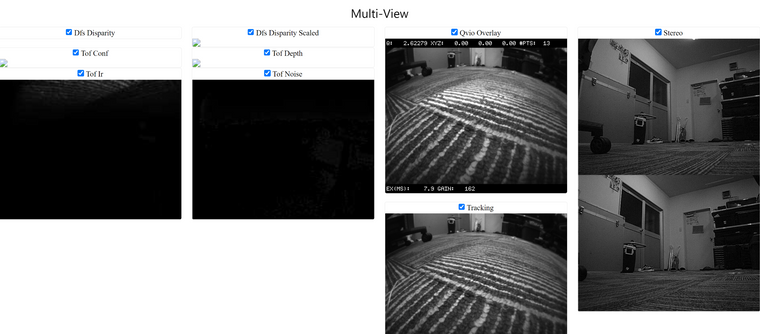
    If voxl-inspect-qvio shows functioning VIO data, there is no need to calibrate cameras. VIO is working. PX4 is most likely misconfigured.

    If you have a GPS, then you likely have a magnetometer?

    Seeker should have arrived pre-configured for VIO flight. No need to change anything. VIO is flight tested for 20 minutes before being shipped.

    KrisK Offline
    KrisK Offline
    Kris
    Regular
    wrote on last edited by
    #24

    @Chad-Sweet
    Multi-View-r.png

    1 Reply Last reply
    0
    • Chad SweetC Chad Sweet

      If voxl-inspect-qvio shows functioning VIO data, there is no need to calibrate cameras. VIO is working. PX4 is most likely misconfigured.

      If you have a GPS, then you likely have a magnetometer?

      Seeker should have arrived pre-configured for VIO flight. No need to change anything. VIO is flight tested for 20 minutes before being shipped.

      KrisK Offline
      KrisK Offline
      Kris
      Regular
      wrote on last edited by
      #25

      @Chad-Sweet
      Yes, I have this GPS/Magnetometer that is on the back of the Seeker above the battery compartment.
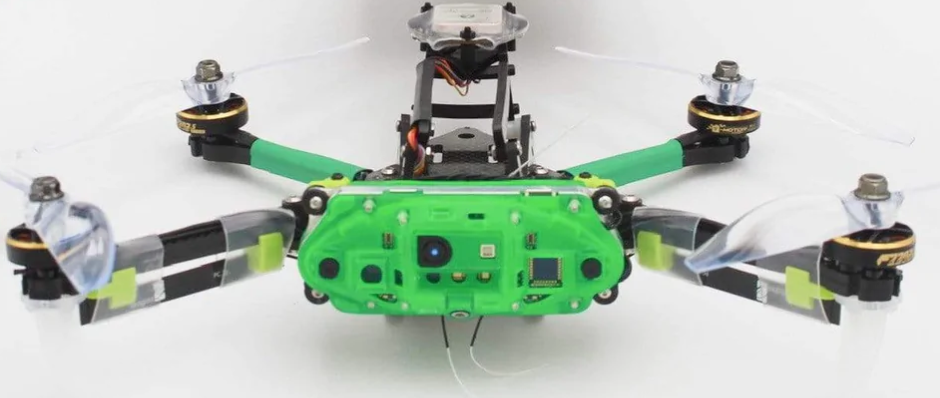
      Seeker.png

      If my PX4 is possibly misconfigured, should I just remove PX4 and start clean?
      Or, is there something you might know that could be causing the problem in PX4?

      1 Reply Last reply
      0
      • Chad SweetC Offline
        Chad SweetC Offline
        Chad Sweet
        ModalAI Team
        wrote on last edited by
        #26

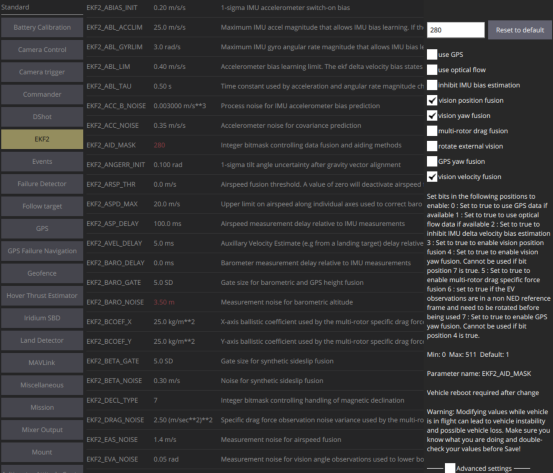
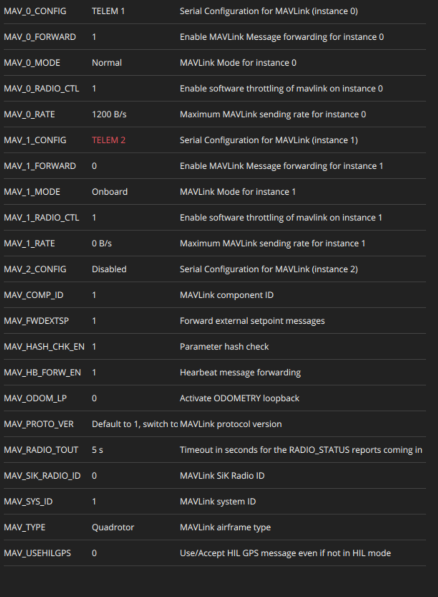
        Here are the default Seeker parameters for PX4 1.11

        Here are the helper parameters for Seeker indoor VIO flight

        KrisK 1 Reply Last reply
        0
        • Chad SweetC Chad Sweet

          Here are the default Seeker parameters for PX4 1.11

          Here are the helper parameters for Seeker indoor VIO flight

          KrisK Offline
          KrisK Offline
          Kris
          Regular
          wrote on last edited by
          #27

          @Chad-Sweet Thank you 🙏
          I will load these into PX4 and test it.

          1 Reply Last reply
          0
          • Adrian HidalgoA Offline
            Adrian HidalgoA Offline
            Adrian Hidalgo
            ModalAI Team
            wrote on last edited by
            #28

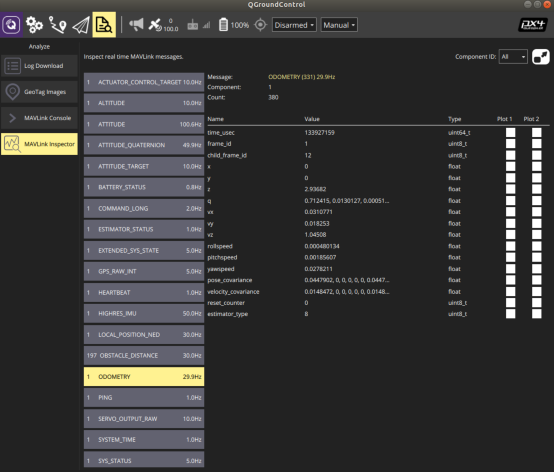
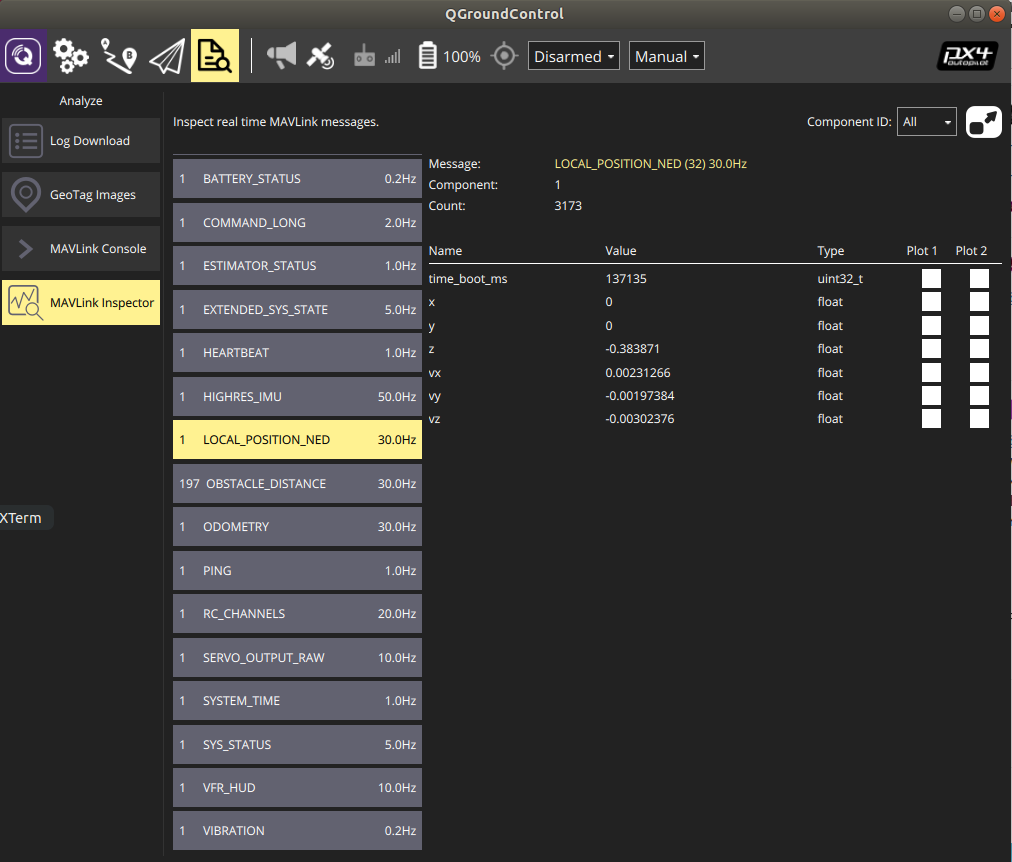
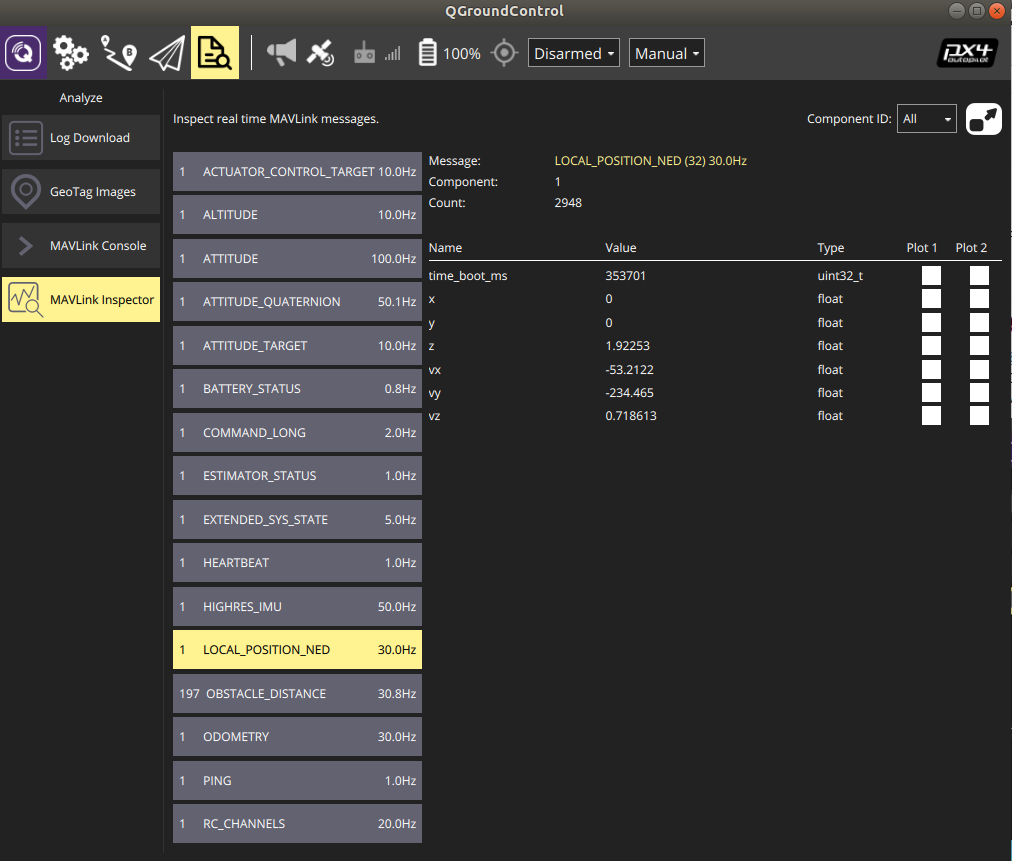
            @Kris Can you post a pic of QGC under MavLink Inspector, go to the tab that says Local_Position_Ned and see what the X, Y, Z show. I want to verify how those numbers are numerating.
            Normally if the X & Y are zeroed out, VIO hasn't started yet or has blown up. A power-cycle can fix this, but I would think you've already attempted that. Looks like you've already attempted resetting voxl-vision-px4 & qvio.
            You may want to try reconfiguring mpa:

            voxl-configure-mpa -p -f seeker -b blue -c 7 --fc yes
            

            Power-cycle afterwards. You'll have to set your qgc-ip again since mpa will reset it to factory.

            KrisK 4 Replies Last reply
            0
            • Adrian HidalgoA Adrian Hidalgo

              @Kris Can you post a pic of QGC under MavLink Inspector, go to the tab that says Local_Position_Ned and see what the X, Y, Z show. I want to verify how those numbers are numerating.
              Normally if the X & Y are zeroed out, VIO hasn't started yet or has blown up. A power-cycle can fix this, but I would think you've already attempted that. Looks like you've already attempted resetting voxl-vision-px4 & qvio.
              You may want to try reconfiguring mpa:

              voxl-configure-mpa -p -f seeker -b blue -c 7 --fc yes
              

              Power-cycle afterwards. You'll have to set your qgc-ip again since mpa will reset it to factory.

              KrisK Offline
              KrisK Offline
              Kris
              Regular
              wrote on last edited by
              #29

              @Adrian-Hidalgo
              Ok, I will try that now.
              My position is still being rejected after resetting PX4 and loading the new paremeter files.

              NED.png

              1 Reply Last reply
              0
              • Adrian HidalgoA Adrian Hidalgo

                @Kris Can you post a pic of QGC under MavLink Inspector, go to the tab that says Local_Position_Ned and see what the X, Y, Z show. I want to verify how those numbers are numerating.
                Normally if the X & Y are zeroed out, VIO hasn't started yet or has blown up. A power-cycle can fix this, but I would think you've already attempted that. Looks like you've already attempted resetting voxl-vision-px4 & qvio.
                You may want to try reconfiguring mpa:

                voxl-configure-mpa -p -f seeker -b blue -c 7 --fc yes
                

                Power-cycle afterwards. You'll have to set your qgc-ip again since mpa will reset it to factory.

                KrisK Offline
                KrisK Offline
                Kris
                Regular
                wrote on last edited by
                #30

                @Adrian-Hidalgo
                I have actually reconfigured mpa before, but I will try it again after I have loaded these new PX4 parameters.

                1 Reply Last reply
                0
                • Adrian HidalgoA Adrian Hidalgo

                  @Kris Can you post a pic of QGC under MavLink Inspector, go to the tab that says Local_Position_Ned and see what the X, Y, Z show. I want to verify how those numbers are numerating.
                  Normally if the X & Y are zeroed out, VIO hasn't started yet or has blown up. A power-cycle can fix this, but I would think you've already attempted that. Looks like you've already attempted resetting voxl-vision-px4 & qvio.
                  You may want to try reconfiguring mpa:

                  voxl-configure-mpa -p -f seeker -b blue -c 7 --fc yes
                  

                  Power-cycle afterwards. You'll have to set your qgc-ip again since mpa will reset it to factory.

                  KrisK Offline
                  KrisK Offline
                  Kris
                  Regular
                  wrote on last edited by
                  #31

                  @Adrian-Hidalgo
                  Unfortunatly that didnt work either 😢

                  NED2.png

                  1 Reply Last reply
                  0
                  • Adrian HidalgoA Adrian Hidalgo

                    @Kris Can you post a pic of QGC under MavLink Inspector, go to the tab that says Local_Position_Ned and see what the X, Y, Z show. I want to verify how those numbers are numerating.
                    Normally if the X & Y are zeroed out, VIO hasn't started yet or has blown up. A power-cycle can fix this, but I would think you've already attempted that. Looks like you've already attempted resetting voxl-vision-px4 & qvio.
                    You may want to try reconfiguring mpa:

                    voxl-configure-mpa -p -f seeker -b blue -c 7 --fc yes
                    

                    Power-cycle afterwards. You'll have to set your qgc-ip again since mpa will reset it to factory.

                    KrisK Offline
                    KrisK Offline
                    Kris
                    Regular
                    wrote on last edited by
                    #32

                    @Adrian-Hidalgo @Chad-Sweet , Is there anything else you would like to look at on my end or something else I can try to resolve this issue?

                    1 Reply Last reply
                    0
                    • Adrian HidalgoA Offline
                      Adrian HidalgoA Offline
                      Adrian Hidalgo
                      ModalAI Team
                      wrote on last edited by
                      #33

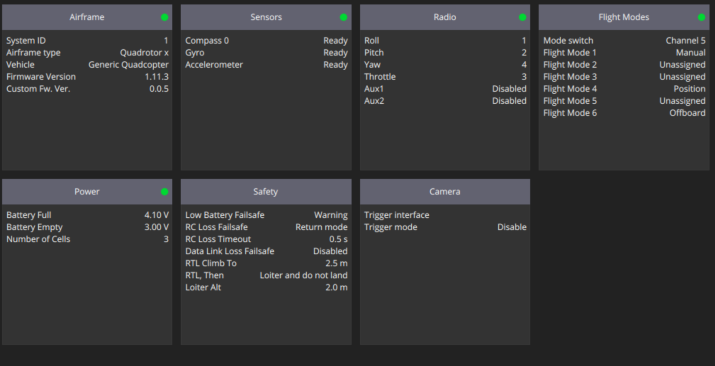
                      @Kris what version of PX4 are you using?
                      This forum may have similar issues and it was resolved by updating PX4

                      KrisK 2 Replies Last reply
                      0
                      • Adrian HidalgoA Adrian Hidalgo

                        @Kris what version of PX4 are you using?
                        This forum may have similar issues and it was resolved by updating PX4

                        KrisK Offline
                        KrisK Offline
                        Kris
                        Regular
                        wrote on last edited by
                        #34

                        @Adrian-Hidalgo I honestly don't remember which one I installed. Could you please remind me how to check for the version?

                        1 Reply Last reply
                        0
                        • Adrian HidalgoA Adrian Hidalgo

                          @Kris what version of PX4 are you using?
                          This forum may have similar issues and it was resolved by updating PX4

                          KrisK Offline
                          KrisK Offline
                          Kris
                          Regular
                          wrote on last edited by
                          #35
                          This post is deleted!
                          1 Reply Last reply
                          0
                          • Adrian HidalgoA Offline
                            Adrian HidalgoA Offline
                            Adrian Hidalgo
                            ModalAI Team
                            wrote on last edited by
                            #36

                            @Kris select the Q, should say in the menu selection below application settings

                            KrisK 1 Reply Last reply
                            0
                            • Adrian HidalgoA Offline
                              Adrian HidalgoA Offline
                              Adrian Hidalgo
                              ModalAI Team
                              wrote on last edited by
                              #37

                              @Kris you could try loading a previous sys-image & sdk. Did it work before updating?

                              KrisK 1 Reply Last reply
                              0
                              • Adrian HidalgoA Adrian Hidalgo

                                @Kris you could try loading a previous sys-image & sdk. Did it work before updating?

                                KrisK Offline
                                KrisK Offline
                                Kris
                                Regular
                                wrote on last edited by
                                #38

                                @Adrian-Hidalgo I have not had it for very long. I have not gotten it to work before.

                                1 Reply Last reply
                                0
                                • Adrian HidalgoA Offline
                                  Adrian HidalgoA Offline
                                  Adrian Hidalgo
                                  ModalAI Team
                                  wrote on last edited by
                                  #39

                                  @Kris all Seekers get test flown before shipping to validate functionality. They are loaded with VOXL Platform 3.3.0-0.5.0, test flown with px4 platform 1.11 seeker & helper files for seeker ekf_2_indoor & spektrum_dx6e_config.
                                  You can try loading the platform 1.12 seeker to see if that helps

                                  1 Reply Last reply
                                  0
                                  • Adrian HidalgoA Adrian Hidalgo

                                    @Kris select the Q, should say in the menu selection below application settings

                                    KrisK Offline
                                    KrisK Offline
                                    Kris
                                    Regular
                                    wrote on last edited by
                                    #40

                                    @Adrian-Hidalgo

                                    I dont see where the version is listed.
                                    Also, this message keeps popping up everytime I open QGC, about a newer version.
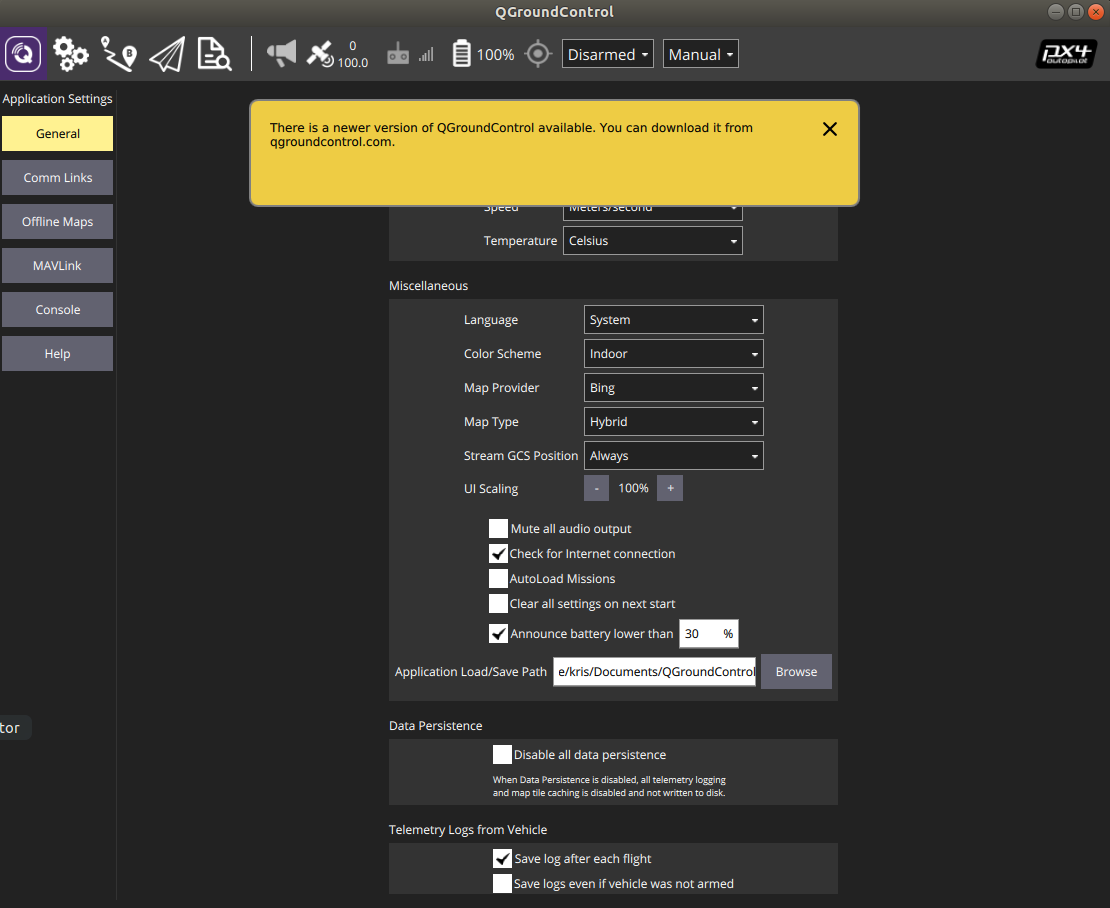
                                    PX4-v.png

                                    Adrian HidalgoA 2 Replies Last reply
                                    0
                                    • KrisK Kris

                                      @Adrian-Hidalgo

                                      I dont see where the version is listed.
                                      Also, this message keeps popping up everytime I open QGC, about a newer version.

                                      PX4-v.png

                                      Adrian HidalgoA Offline
                                      Adrian HidalgoA Offline
                                      Adrian Hidalgo
                                      ModalAI Team
                                      wrote on last edited by
                                      #41

                                      @Kris in the page, scroll to the bottom

                                      KrisK 1 Reply Last reply
                                      0
                                      • KrisK Kris

                                        @Adrian-Hidalgo

                                        I dont see where the version is listed.
                                        Also, this message keeps popping up everytime I open QGC, about a newer version.

                                        PX4-v.png

                                        Adrian HidalgoA Offline
                                        Adrian HidalgoA Offline
                                        Adrian Hidalgo
                                        ModalAI Team
                                        wrote on last edited by
                                        #42

                                        @Kris wouldn't hurt to update QGC with the latest

                                        1 Reply Last reply
                                        0
                                        • Adrian HidalgoA Adrian Hidalgo

                                          @Kris in the page, scroll to the bottom

                                          KrisK Offline
                                          KrisK Offline
                                          Kris
                                          Regular
                                          wrote on last edited by
                                          #43

                                          @Adrian-Hidalgo Oh, ok sorry.

                                          versionQGC.png

                                          Adrian HidalgoA 1 Reply Last reply
                                          0

                                          Hello! It looks like you're interested in this conversation, but you don't have an account yet.

                                          Getting fed up of having to scroll through the same posts each visit? When you register for an account, you'll always come back to exactly where you were before, and choose to be notified of new replies (either via email, or push notification). You'll also be able to save bookmarks and upvote posts to show your appreciation to other community members.

                                          With your input, this post could be even better 💗

                                          Register Login
                                          Reply
                                          • Reply as topic
                                          Log in to reply
                                          • Oldest to Newest
                                          • Newest to Oldest
                                          • Most Votes


                                          ModalAI
                                          Categories Recent Tags ModalAI.com Docs
                                          © 2026 ModalAI® · Accelerating autonomy for smaller, smarter, safer drones · Powered by NodeBB
                                          • Login

                                          • Don't have an account? Register

                                          • Login or register to search.
                                          • First post
                                            Last post
                                          0
                                          • Categories
                                          • Recent
                                          • Tags
                                          • Popular
                                          • Users
                                          • Groups