Skip to content
  • Starling 2 Max Ardupilot GPS

    Unsolved Development Drones starling
    3
    1
    0 Votes
    3 Posts
    1k Views
    wilkinsafW
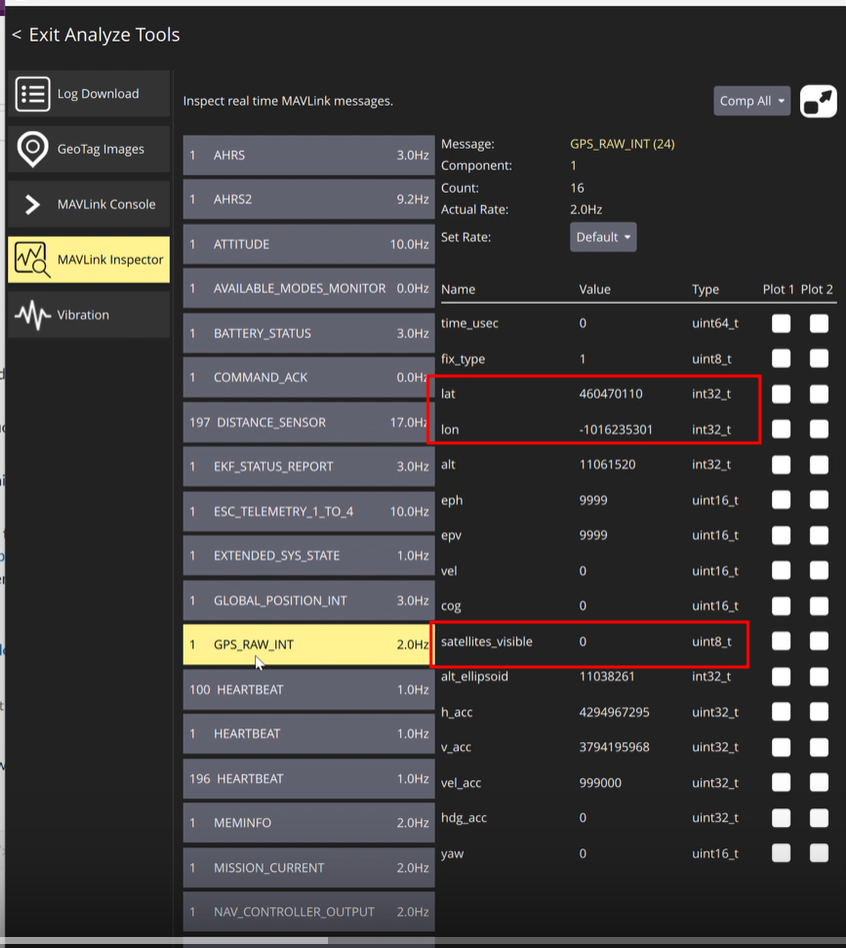
    Update fix Replace defaults.parm with upstream version: https://github.com/ArduPilot/ardupilot/blob/ee1e4bbf74061760826b17464383d63c1a11924c/Tools/Frame_params/ModalAI/Starling2Max.parm Rename Starling2Max.parm to defaults.parm in /data/APM Edit SERIAL3_BAUD=9 (in defaults.parm) Edit GPS1_TYPE=2 (in defaults.parm) Remove *.stg files in /data/APM Reboot and power off the voxl2 multiple times, checking the gps driver
  • Starling 2 Max Motor Catches

    Unsolved Development Drones starling
    9
    0 Votes
    9 Posts
    674 Views
    Alex KushleyevA
    @RyanH , from the spin log above, i can only tell that the motor attempts to spin up but re-starts after the open-loop sinusoidal spinup is done and the ESC detects that the motor is not spinning. You should try to clear the debris by spinning the motor by hand first (or use compressed air) and then use the test script to spin for longer periods of time without propeller (changing speeds, etc). You could use a spin step command to automate increasing and decreasing spin speed (without rpm control, since it's not needed): ./voxl-esc-spin-step.py --id 0 --step-delay 2.5 --step-frequency 1 --power 20 --step-amplitude 30 Alex
  • TOF sensor flex cable replacement

    Unsolved Development Drones starling
    2
    1
    0 Votes
    2 Posts
    239 Views
    Alex KushleyevA
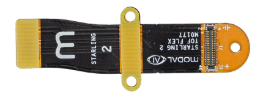
    @aheyne , please send us a message via contact form. We don't sell this part separately as a product, but will help you with a replacement. You will need the M0177 flex cable (as the print states on the cable). https://www.modalai.com/pages/contact-us Alex
  • GNSS EMI Mitigation Guidelines

    Development Drones starling
    7
    1 Votes
    7 Posts
    2k Views
    Alex KushleyevA
    Hi @bschulzhf You need to copy the new sensormodule file with the correct slot id (number at the end) to /usr/lib/camera and (re)move the existing one, so that it does not get picked up by the camera pipeline. Good idea to back up your existing configuration before making changes. Also more general details here : https://docs.modalai.com/configure-cameras/#connect-a-new-camera Alex
  • Starling 2 Max GPS

    Unsolved Development Drones starling
    3
    0 Votes
    3 Posts
    432 Views
    Alex KushleyevA
    @colombe-ai , please see https://forum.modalai.com/topic/5116/gnss-emi-mitigation-guidelines
  • Accessories

    Unsolved Development Drones starling
    2
    0 Votes
    2 Posts
    189 Views
    Alex KushleyevA
    @Roy-Azriel , the description of Starling 2 Max states that it uses VOXL2, as well as lists other major components and options for camera configurations : https://www.modalai.com/products/starling-2-max?variant=48216084087088 Please let us know what Lidar you are considering adding. Alex
  • 0 Votes
    1 Posts
    255 Views
    No one has replied
  • Replacement piece for Starling 2

    Unsolved Development Drones starling
    2
    2
    0 Votes
    2 Posts
    238 Views
    Alex KushleyevA
    @ey , please send us a request via http://www.modalai.com/pages/contact-us Alex
  • 0 Votes
    3 Posts
    343 Views
    S
    @Maxwell-Schaefer Thanks for your reply. Is this step also applicable for the BetaFPV Nano RX? Should this also used ModalAI's firmware repo? Or will this use BetaFPV's? I did look into trying to flash the Nano RX initially, but stopped short of doing it as the physical RX itself did not have a BetaFPV silkscreen on it, so I assumed that it might be using a different firmware from the stock BetaFPV Are you able to advise on the other queries regarding the new wifi adapter board?
  • Request for Updated Guidance on Starling 2 GPS Issue

    Unsolved Development Drones starling
    10
    0 Votes
    10 Posts
    1k Views
    groupoG
    @Alex-Kushleyev I reached out to Travis last week. I'll bump you here if I don't hear back this week.
  • Starling GPS Missing delivery!!

    Unsolved Development Drones starling
    3
    1
    0 Votes
    3 Posts
    364 Views
    JoonaRJ
    @Moderator Order #7559 And, yes I ordered the configuration without the radio? But I wasn't told that it wouldn't include a GPS module?
  • No EKF2 Config Produces Stable Altitude

    Unsolved Development Drones starling
    3
    0 Votes
    3 Posts
    427 Views
    ModeratorM
    @brandon there are likely a number of things going on If the drone sits idle for a period of time, the sensors heat up (accel and baro). When the props start spinning, the temperature drops causing significant drift. If you let the props spin for 10 or 20s cooling off the board, that can help I would guess after 30-60s of flight, the altitude stabilizes. That is the temperature of the sensors stabilizng. The latest SDKs have temperature compensated calibration for IMU and baro. Try calibrating accel and baro and see if that helps. https://docs.modalai.com/calibrate-baro/ https://docs.modalai.com/calibrate-imu/ The GPS on Starling 2 Max has been tricky. We do have a new GPS on the way that looks promising, and hope to make it available in the next 2mo.
  • Starling V2 cameras not being detected

    Unsolved Development Drones starling
    18
    0 Votes
    18 Posts
    1k Views
    Alex KushleyevA
    @Leo-Allesch , if you are talking about VSLAM, which stands for Visual Simultaneous Localization and Mapping, then this is a sub-class of SLAM which uses only cameras (and often IMUs, then it is VISLAM). VSLAM and VISLAM usually generate and maintain a sparse map of 3D features (points), which is used for self localization. If you want to be able to detect a target, and you have your 3D pose from VIO (VIO = VISLAM), then you can either triangulate the target location or get it's location from a single frame if you know the size of the target (such as April tag, etc). Then you can transform the coordinate of the tag from the camera frame into your "world" (VIO) coordinates. The depth sensor would allow you to build a more detailed 3D map / point cloud using the 3D pose output from the VIO algorithm (or just using a depth sensor, which may be more complicated). You can also build a dense 3D map using camera only (and IMU), but that typically requires a lot more computation than using a depth sensor. You don't necessarily need a depth sensor for identifying the position of a specific target that is easily detected by a camera. There is a lot of research material you can find on these topics, please look into it deeper and let us know if you have specific questions about using VOXL2 hardware and software. Alex
  • Yaw Estimate Error

    Unsolved Development Drones starling
    4
    0 Votes
    4 Posts
    454 Views
    Nitin Varma VegesnaN
    @lhermosillo It was 15 with/without the GPS.
  • 0 Votes
    1 Posts
    172 Views
    No one has replied
  • Repair

    Unsolved Development Drones starling
    2
    2
    0 Votes
    2 Posts
    275 Views
    Nitin Varma VegesnaN
    @Nitin-Varma-Vegesna said in Repair: My Starling 2 drone crashed, and a good amount of damage was done. The PCB board was cracked, and the GPS mount was broken, and I was wondering whether I should submit a Repair Merchandise Authorization, and generally how long does the entire process take from submit an RMA to receiving the drone back? I submitted an RMA form, but I would still like to know how long the entire process takes generally please?
  • Starling V1 - cannot use RC and GPS

    Unsolved Development Drones starling
    7
    0 Votes
    7 Posts
    713 Views
    Eric KatzfeyE
    @colombe-ai I'm not sure how much we're going to be able to help to get this going but I'd start with that magnetometer. Put an oscilloscope in the lines and see if you see any activity.
  • 0 Votes
    1 Posts
    144 Views
    No one has replied
  • How to adjust focus on HIRES Camera for Starling 2?

    Unsolved Development Drones starling
    2
    0 Votes
    2 Posts
    272 Views
    Alex KushleyevA
    Hello @newdroneflyer , In order to adjust focus of the hires camera, you need to do the following: loosen the screw that holds the lens and prevents it from turning. this will allow the lens to turn within the assembly turn the lens using the lens focus tool (should have come with your Starling 2), it is a black plastic tool that goes around the rim of the lens and allows you to turn the lens. after focusing, tighten the screw that was loosened in step 1. [image: 1768501077911-starling2_hires_focus_steps.png] Here is the picture of the focus tool, it has two sizes - one for hires camera, one for tracking camera (if needed). You should have received one with the Starling2 (in an envelope, probably different packaging). [image: 1768505172374-starling2_focus_tool.jpg] Alex