
How to adjust focus on HIRES Camera for Starling 2?
-
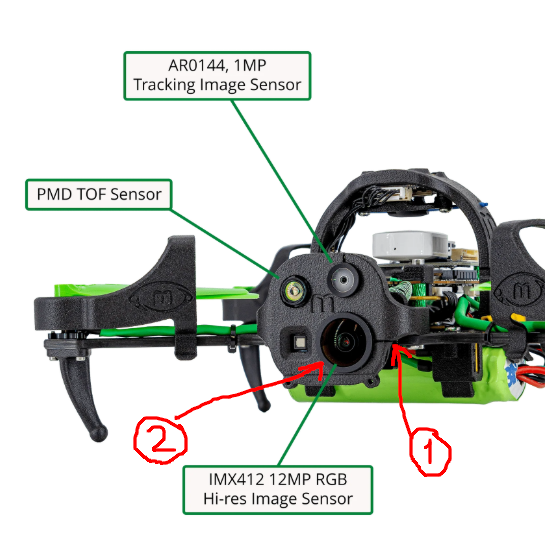
My Starling2 HIRES camera is very blurry and likely out of focus. Is there a focus ring/screw to turn for the lens? Can you please post a picture of what ring/screw to turn? Is there a way to set it to infinity?
Thank you!
-
My Starling2 HIRES camera is very blurry and likely out of focus. Is there a focus ring/screw to turn for the lens? Can you please post a picture of what ring/screw to turn? Is there a way to set it to infinity?
Thank you!
Hello @newdroneflyer ,
In order to adjust focus of the hires camera, you need to do the following:
- loosen the screw that holds the lens and prevents it from turning. this will allow the lens to turn within the assembly
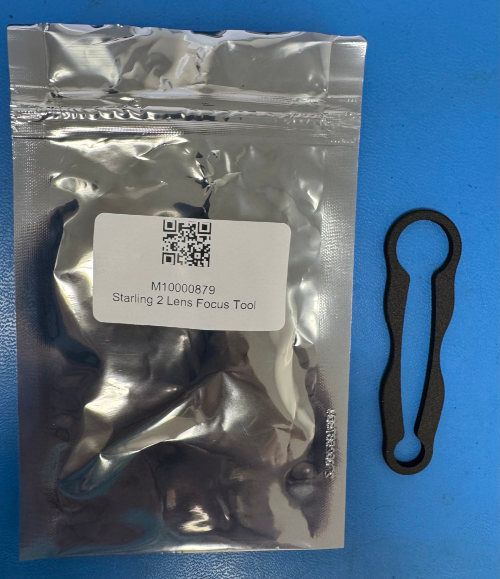
- turn the lens using the lens focus tool (should have come with your Starling 2), it is a black plastic tool that goes around the rim of the lens and allows you to turn the lens.
- after focusing, tighten the screw that was loosened in step 1.
Here is the picture of the focus tool, it has two sizes - one for hires camera, one for tracking camera (if needed). You should have received one with the Starling2 (in an envelope, probably different packaging).
Alex

Reading along? Create a free ModalAI Forum account to join in.
With an account you can reply, ask your own question, get an email when a ModalAI engineer answers, and mark the reply that solved it. Your place in each thread is saved between visits.
Questions about VOXL, Flight Core, ESCs and ModalAI drones are answered here by the engineers who build them.
Register Login