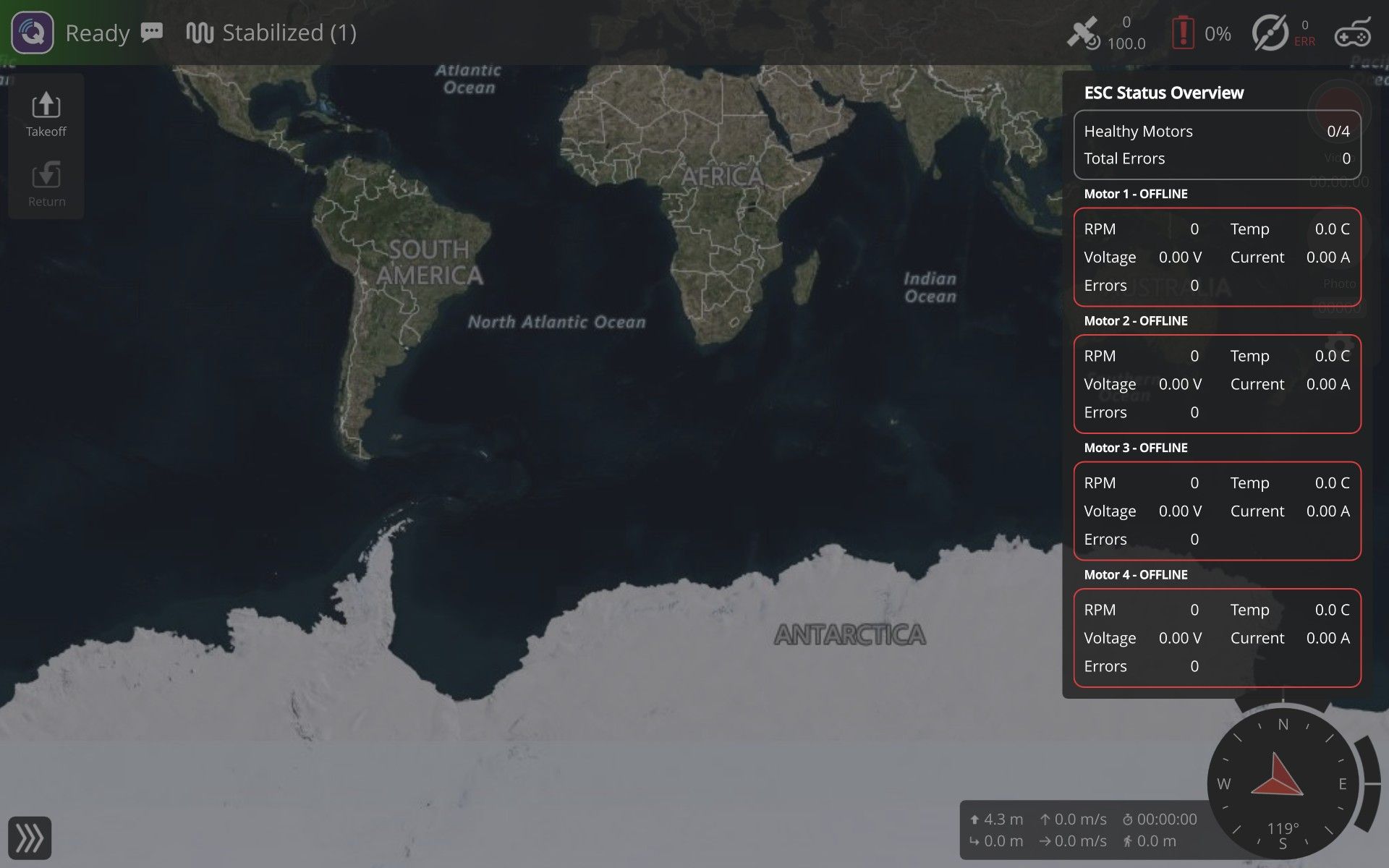
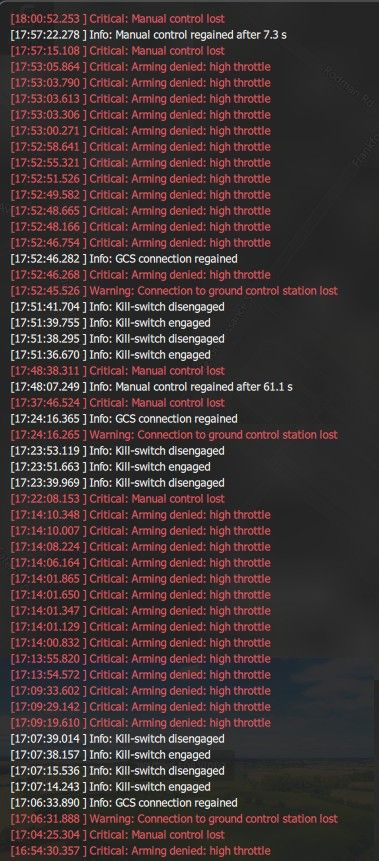
HI @oiler251 , we will work on a more detailed step by step guide for debugging VIO. Meanwhile, you may found the below unofficial guide useful.
VOXL 2 / OpenVINS Drift Troubleshooting Guide
Applies to: Starling 2 / Starling 2 Max and other VOXL 2 vehicles running voxl-open-vins-server with PX4
How to use this guide
The steps are ordered by cost × likelihood: the first few take minutes and catch the problems that cause most "my drone drifts" reports. Each step has a pass/fail check. Don't skip ahead. If a step fails, fix it and restart from Step 1, because a fix upstream often changes what you see downstream.
The pipeline you're debugging, end to end:
tracking cams + imu_apps ──► voxl-open-vins-server ──► voxl-vision-hub ──► PX4 EKF2 ──► position controller
(Steps 4, 7, 8) (Steps 3, 5, 9) (Step 6) (Steps 1, 6) (Step 0, 8)
The core diagnostic split, straight from ModalAI's docs: if voxl-inspect-vins shows valid, moving position data, VIO is working, and no amount of camera recalibration will help; the problem is on the PX4 side. Use that rule constantly.
Quick triage table
Symptom
Most likely cause
Go to
Drifts in Manual / Stabilized mode
Expected; no position control in that mode
Step 0
QGC says "position mode rejected" / falls back to Altitude
PX4 not getting or not fusing VIO; outdoor/GPS params loaded
Step 1
Position mode accepted, but slow wander
VIO quality, environment, calibration
Steps 3–5, 7
Position mode accepted, vehicle runs away fast after takeoff
Frame/extrinsics mismatch
Step 6
Holds OK, then sudden jump/lurch mid-flight
VIO reset in flight
Step 9
"Bouncing" up and down, oscillating
Height source, vibration, tether, or tuning
Step 8
VIO stays in INIT on the ground
IMU cal, cam cal, texture at takeoff spot
Step 9
Step 0 — Confirm which flight mode the drift happens in (2 min)
Why first: this single question resolves a large share of reports. Manual mode will drift because it has no position control.
Do:
Note the mode on the RC mode switch and in QGC at the moment of drift.
Manual / Stabilized / Altitude: horizontal drift is expected. Altitude mode holds height only.
Only Position (and Offboard) mode uses VIO to hold X/Y.
Pass: the drift is happening in Position mode. → Continue.
Fail: the drift is in Manual/Altitude. → The fix is to get Position mode working; go to Step 1.
Note for the #5505 case: the user also re-ran QGC's sensor calibration hoping to fix drift. That calibrates PX4's flight IMU, which helps attitude, but it does not touch imu_apps, the IMU OpenVINS uses (see Step 7). It also cannot make Manual mode hold position.
Step 1 — Is PX4 configured for indoor VIO? (5–10 min, highest-yield check)
Why: a ModalAI moderator stated that the Starling 2 Max is marketed as an outdoor drone and ships with "outdoor GPS" PX4 parameters, so its default Position mode tries to use GPS. Indoors with no GPS fix, PX4 then rejects Position mode or flies on a bad estimate. Another Starling 2 Max user's drift was resolved by loading indoor_vio_missing_gps.params.
Do:
Plug in the battery, wait ~30 s for voxl-vision-hub to start, connect QGC.
Flip the mode switch Manual → Position with the props off or disarmed. Listen for QGC's announcement:
"position" → PX4 accepts the VIO.
"position mode rejected, altitude flight mode" → PX4 isn't getting or isn't fusing VIO.
Load the version-matched indoor VIO parameter file from voxl-px4-params (for PX4 v1.14: params/v1.14/EKF2_helpers/indoor_vio.params, or indoor_vio_missing_gps.params if no GPS is attached). In QGC: Parameters → Tools → Load from file, then reboot.
Spot-check these parameters afterward:
Param
Indoor VIO-only value
Notes
EKF2_EV_CTRL
per param file
ModalAI calls this the most often overlooked VIO param
SYS_HAS_MAG
0
Otherwise PX4 may reject Position mode for want of a magnetometer
EKF2_MAG_TYPE
5
Disables mag fusion
SYS_HAS_GPS
0
Only if no GPS is on the vehicle
EKF2_AID_MASK no longer exists on PX4 1.14; ignore older guides that reference it.
Pass: QGC accepts Position mode on the bench.
Fail: continue to Steps 2–3 to find out why VIO isn't reaching EKF2.
Watch for: params from the wrong PX4 version cause subtle breakage. Also, a connected GPS/mag unit fighting VIO can corrupt local position. For a quick experiment, ModalAI suggests disconnecting it.
Step 2 — Are the right services running, and only one VIO engine? (2 min)
Do:
voxl-version
voxl-inspect-services
Pass criteria:
voxl-camera-server, voxl-open-vins-server, voxl-vision-hub, voxl-px4 are Enabled + Running.
voxl-qvio-server is Disabled / Not Running. Only one VIO engine should run at a time.
/etc/modalai/voxl-vision-hub.conf has:"vio_pipe": "ov",
"secondary_vio_pipe": "",
Vehicles set up on older SDKs may still have "vio_pipe": "qvio" with OpenVINS as the fallback.
All packages come from one SDK release. Mixed package versions break the pipeline. Prefer flashing a complete SDK over upgrading single packages.
Fix if needed:
voxl-configure-qvio disable
systemctl stop voxl-qvio-server
systemctl enable voxl-open-vins-server
systemctl restart voxl-open-vins-server voxl-vision-hub
Nuclear option: voxl-configure-mpa resets every service config to the SKU defaults.
Step 3 — Is VIO healthy on the ground before arming? (2 min)
Do:
voxl-inspect-vins
Read three fields:
State: FAIL (0), INIT (1), or OKAY (2). Must be OKAY.
Quality: higher is better; -1 = failed. OpenVINS applies hysteresis, so it shouldn't flicker.
Error codes: a hex bitfield decoded by the tool. Mostly meaningful when the state is FAIL. The full table is on the Pipe Interface page.
Pass: OKAY, stable quality, position near zero and not wandering while the vehicle sits still.
Fail: stuck in INIT → Step 9's "won't initialize from rest" list. Wandering while stationary → Steps 4 and 7.
Operational rule: ModalAI recommends that if you need VIO from takeoff, you initialize statically on the ground, confirm OKAY, and only then take off. Make "wait for OKAY" part of the preflight.
Step 4 — Look at the camera images (5 min)
Why: VIO depends on visible features plus low-noise IMU data. Bad imagery is the most common physical cause of drift indoors.
Do: open voxl-portal in a browser (drone's IP) and view each tracking camera and the VIO tab.
Checklist:
Lens covers removed, lenses clean (plastic lens; microfiber only)
In focus: for OV7251 fisheye, everything beyond ~15 cm should be sharp (test with high-contrast objects at 15 cm and 1 m)
Enough light; no glare or hot spots
Texture at both near and far range. A plain lab floor under the down camera, blank walls, or a boundary net filling the view all starve the tracker. Far-only features give orientation but poor position.
Nothing intruding into the view (legs, tether, payloads, wiring)
Cameras detected: voxl-camera-server -l
Also check camera-server health. A Starling 2 Max user on SDK 1.6.3 / OpenVINS 0.6.0 saw massive drift from feature loss. Running voxl-camera-server in the foreground showed repeated Received "Result"/"Buffer" error from camera: tracking_down and dropping frame after re-init. ModalAI's fix was updating OpenVINS to the GitLab master branch (or the synced-timestamp branch for epoch-synced AR0144 tracking cams). To look for this:
systemctl stop voxl-camera-server
voxl-camera-server # watch for repeated per-frame errors, then Ctrl-C
systemctl start voxl-camera-server
Fix: add texture (tape patterns, posters, mats on the floor), improve lighting, or move the takeoff spot. ModalAI's guidance is to fix the scene rather than tune the estimator.
For the 20' × 30' netted demo area: a uniform floor plus a net perimeter is a weak VIO environment. Put high-contrast texture on the floor under the takeoff point and along the walls the front camera will see.
Step 5 — Hand-held test (5 min, props off)
This is the definitive "is VIO itself healthy?" test. Repeat it after any VIO config change.
Props off, VIO running, VIO tab open in voxl-portal.
Slowly lift and move the vehicle about half a meter. Features should stay locked on the same physical points. Features that pop in and out or slide off their targets usually mean wrong camera-to-IMU extrinsics.
Walk it around the room and return it to the exact start position and heading. Reported drift should be a few percent of distance traveled, with very small yaw drift.
While moving, sanity-check axes in voxl-inspect-vins. Forward should give +X; up should give −Z (FRD/NED).
Pass: drift is a few percent and features are locked → VIO is fine. Go to Step 6.
Fail: large drift or sliding features → Step 7 (calibration/extrinsics). If calibration checks out → Step 9 logging.
Step 6 — Verify the pose that actually reaches PX4 (5 min)
Why: VIO can be perfect while the estimate PX4 flies on is wrong, because extrinsics or EKF2 fusion sit in between. A coordinate mismatch makes PX4 take off and then quickly run away out of control.
Do:
Pose after extrinsics are applied (should match PX4's local position):voxl-inspect-pose vvhub_body_wrt_local
Good VIO but wrong pose here → extrinsics problem. Check with voxl-inspect-extrinsics and see Configure Extrinsics.
In QGC → Analyze → MAVLink Inspector:
ODOMETRY: X/Y non-zero and moving correctly in NED as you carry the drone (forward = +X North-ish in local frame, right = +Y, up = −Z).
LOCAL_POSITION_NED: Z updating but X/Y stuck at zero = EKF2 config problem, not VIO. Go back to Step 1.
Check camera selection: voxl-inspect-vio-cams (config in /etc/modalai/vio_cams.conf).
Pass: VIO pose, vision-hub pose, and PX4 local position all agree and move in the right directions.
Step 7 — Calibration (15–60 min)
Only do this if Steps 3–6 point at estimation quality. Recalibrating isn't free, and it doesn't help when VIO is already good (see the decision rule at the top).
7a. VIO IMU (imu_apps), not the PX4 IMU
The VIO IMU is the apps-processor IMU (imu_apps), not the one PX4 flies on. QGC sensor calibration does not calibrate it.
Recalibrate with voxl-calibrate-imu (or from voxl-portal), then confirm gravity reads ≈ 9.81 m/s²:voxl-inspect-imu imu_apps
A wrong gravity magnitude or bad biases give a static init that looks fine on the bench and falls apart once airborne.
Try removing the IMU temperature-calibration file from /data/modalai/. It's optional and can hurt if captured poorly. Back it up first.
7b. Camera intrinsics
Files: /data/modalai/opencv_<pipe>_intrinsics.yml.
Resolution in the cal file must match the camera's current streaming resolution. A 640×480 cal is invalid at 1280×800.
Check the stored reprojection_error. The ModalAI calibrator accepts ≤ 0.75 px (pinhole) / ≤ 0.60 px (fisheye); recalibrate if you're near the limit.
Tracking cameras are factory-calibrated. If you've lost the factory cal, ModalAI keeps production backups; ask on the forum with the board's serial number.
7c. Extrinsics
/etc/modalai/extrinsics.conf defines camera/IMU geometry. ModalAI ships these from CAD, so they're accurate but not per-unit calibrated. They only need changing if cameras were moved or the airframe was modified.
️ Documentation discrepancy (calibration threshold): ModalAI's calibrator accepts up to 0.75 px (pinhole) / 0.60 px (fisheye). Upstream OpenVINS says a good calibration has reprojection error under about 0.2–0.5 px. A cal that "passes" ModalAI's gate can still be mediocre by OpenVINS's standard. If you're chasing residual drift, treat anything above ~0.5 px as a recalibration candidate.
Step 8 — Mechanical & flight-dynamics confounders (10 min)
These make a good estimate look like drift, or degrade it in flight only.
Vibration: degrades VIO significantly. Check with:voxl-inspect-vibration
and the PX4 log. Fix damping, balance props, and replace damaged props before touching software.
Tether / test fixture: the #5505 user is flying tethered to a fixture. A taut tether pulls the vehicle, so the position controller fights it, which can look like "jumping up and down" and drift. It may also intrude into a camera view. Validate VIO with a slack tether, or untethered at low altitude in a netted area.
Height "bouncing": check which height source EKF2 uses in the indoor param file you loaded and confirm it actually applied. In a small enclosed room, prop wash and ground effect disturb a barometer.
Airframe changes: added payloads, lights, or prop guards affect both vibration and camera view.
Step 9 — Initialization & in-flight resets
VIO won't initialize from rest (stuck in INIT)
ModalAI's ordered list:
Recalibrate IMU; confirm ≈ 9.81 m/s² (Step 7a).
Camera calibration resolution matches current stream (Step 7b).
Lighting/texture at the takeoff spot. Static init doesn't need features, but the filter needs them immediately after.
Static vs dynamic init: static needs the vehicle stationary and level-ish. Dynamic needs ~2 s of motion with parallax, which a vehicle sitting still never provides.
Vibration / airframe intrusions.
Record a log (Step 10).
Sudden jump or lurch mid-flight
That's likely an auto-reset. The health monitor (30 Hz) resets on estimator-health codes (corrupt covariance, sustained low quality, feature starvation, velocity-uncertainty breaches). Transport warnings such as dropped frames do not trigger resets. A dynamic re-init can produce a jump discontinuity in the estimate, which PX4 will chase.
Watch voxl-inspect-vins during a hover for state changes and error codes.
If the use case can't tolerate jumps, ModalAI's advice is not to rely on dynamic init or warm resets. Initialize statically on the ground instead.
Relevant knobs: en_auto_reset, auto_reset_max_velocity, auto_reset_max_v_cov_timeout_s, auto_reset_min_features, auto_reset_min_feature_timeout_s in /etc/modalai/voxl-open-vins-server.conf; init_dyn_use in estimator_config.yaml. The shipped values are sensible, so change one group at a time and validate with replays.
️ Documentation discrepancy (initialization defaults and where init_dyn_use lives):
The Flying with VIO page says Open-VINS "initializes dynamically at any attitude."
A 2025 forum reply from ModalAI staff (SDK 1.4.1) says the default config does not use dynamic initialization, and puts init_dyn_use in voxl-open-vins-server.conf.
The current Initialization & Resets page puts init_dyn_use in estimator_config.yaml (under the yaml_folder, default /usr/share/modalai/voxl-open-vins/VoxlConfig/starling2) and presents static vs dynamic as an application choice.
Behavior has changed across SDK versions. Check init_dyn_use in both files on the actual vehicle rather than trusting any one page, and match it to the SDK reported by voxl-version.
Step 10 — Capture data and escalate
If you got here without a fix, collect a complete package before posting to the forum. It turns a multi-day back-and-forth into one reply.
voxl-version > voxl-version.txt
voxl-inspect-services > services.txt
cp /etc/modalai/voxl-open-vins-server.conf /etc/modalai/vio_cams.conf /etc/modalai/extrinsics.conf .
voxl-logger -b -v ov # record VIO around a failing hover/takeoff
PX4 flight log (.ulg
adb shell ls /data/px4/log
adb pull /data/px4/log/<session>/<log>.ulg .
# or: QGC → Analyze → Log Download
Upload the .ulg to https://logs.px4.io. The VIO log can be replayed offline with voxl-benchmark-vio.
Include: flight mode at time of drift, the hand-held test result, and screenshots of the voxl-portal VIO tab and the QGC ODOMETRY / LOCAL_POSITION_NED inspector.
Appendix A — Likely path for forum thread #5505
Based only on what the user posted. Not confirmed.
Flew in Manual mode → drift is expected (Step 0).
Indoor GPS-denied lab on a Starling 2 Max → very likely still on the factory outdoor/GPS params; load the indoor VIO params (Step 1). This is the single most likely fix.
Recalibrated sensors in QGC → doesn't affect imu_apps; if VIO is bad, use voxl-calibrate-imu (Step 7a).
Tethered to a fixture, "jumping up and down" → tether loading and/or height source; test with slack tether (Step 8).
Demo in a netted 20'×30' room → add floor/wall texture and wait for OKAY before arming (Steps 3–4).
Appendix B — Command cheat sheet
Purpose
Command
SDK/package versions
voxl-version
Service status
voxl-inspect-services
VIO state/quality/errors
voxl-inspect-vins
Reset VIO
voxl-reset-vins
Pose sent to PX4
voxl-inspect-pose vvhub_body_wrt_local
VIO camera selection
voxl-inspect-vio-cams
Extrinsics
voxl-inspect-extrinsics
Detected cameras
voxl-camera-server -l
VIO IMU check
voxl-inspect-imu imu_apps
VIO IMU calibration
voxl-calibrate-imu
Vibration
voxl-inspect-vibration
Reset all configs to SKU default
voxl-configure-mpa
Log VIO for replay
voxl-logger -b -v ov
Sources
ModalAI — Flying with VIO (triage ladder, hand-held test, X/Y-zero rule, IMU and calibration checks, PX4 params)
ModalAI — voxl-open-vins-server
ModalAI — Initialization & Resets
ModalAI — Pipe Interface / error codes
ModalAI — voxl-px4-params
OpenVINS — Sensor Calibration
Forum — #5505 Starling Max 2 arming/drift
Forum — Starling 2 Max drifting off (manual mode)
Forum — Position Mode Unavailable (outdoor GPS params)
Forum — OpenVINS drift from camera-server errors
Forum — Problems resetting voxl-open-vins-server
Forum — voxl-open-vins-server config (SDK 1.4.1)