
Starling 2 Max no GPS data
-
ModalAI Support,
I received a new Starling 2 Max a few days ago, and overall it's great, but I'm having a problem with GPS. Basically, the drone appears to NEVER receive any GPS signals even when left outside for long periods of time. My system info and results of px4-listener are pasted below.
This issue appears similar to these other forum discussions, where they seem to think the problem relates to EMI:
https://forum.modalai.com/topic/3879/gps-not-working-for-starling-2-max/16
I did unplug the Lepton 8-pin JST SH connector as suggested by James Strawson in the forum discussions above, but that had no effect. I also powered down the WiFI as suggested by Alex Kushleyev, but this also had no effect, although kind of a bad test for me because I couldn't put the drone outside due to USB cable length:
- pin GPIO_157 controls VBUS, which is USB power on VOXL2
- to disable, run voxl-gpio write 157 0
- to enable, run voxl-gpio write 157 1
What do you think I should do next? Is there some way to turn the power off to various subsystems via software in an attempt to figure out if and where EMI is the problem? Any other ideas?
Thanks for your help !
Starling 2 Max Outdoor GPS-denied Development Drone × 1
with Battery Pack and Controller and Case
Dual 4k & Dual Tracking & ToF (C29)
5G WiFi and Ghost Atto 2.4GHz
ECCN: EAR99, NLR
system-image: 1.8.02-M0054-14.1a-perf
kernel: #1 SMP PREEMPT Mon Nov 11 22:47:44 UTC 2024 4.19.125
hw platform: M0054
mach.var: 1.0.1
voxl-suite: 1.4.1
current IP: wlan0: 10.0.0.19
voxl2:~$ px4-listener sensor_gps
TOPIC: sensor_gps
sensor_gps
timestamp: 841732144 (0.020669 seconds ago)
timestamp_sample: 0
time_utc_usec: 0
device_id: 11272245 (Type: 0xAC, SERIAL:6 (0x00))
lat: 0
lon: 0
alt: -17000
alt_ellipsoid: 0
s_variance_m_s: 999.00006
c_variance_rad: 3.14159
eph: 4294967.50000
epv: 3796926.25000
hdop: 99.99000
vdop: 99.99000
noise_per_ms: 64
jamming_indicator: 15
vel_m_s: 0.00000
vel_n_m_s: 0.00000
vel_e_m_s: 0.00000
vel_d_m_s: 0.00000
cog_rad: 0.00000
timestamp_time_relative: 0
heading: nan
heading_offset: 0.00000
heading_accuracy: 0.00000
rtcm_injection_rate: 0.00000
automatic_gain_control: 0
fix_type: 0
jamming_state: 0
spoofing_state: 1
vel_ned_valid: False
satellites_used: 0
selected_rtcm_instance: 0voxl2:~$ px4-listener sensor_mag
TOPIC: sensor_mag
sensor_mag
timestamp: 861420482 (0.006257 seconds ago)
timestamp_sample: 861420007 (475 us before timestamp)
device_id: 527625 (Type: 0x08, I2C:1 (0x0D))
x: -0.04417
y: -0.32142
z: 0.42167
temperature: nan
error_count: 0
voxl2:~$ -
PS or maybe EMI is a red herring and the actual problem is a defective GPS antenna and/or poor electrical contact at the GPS antenna mounting pin?
-
@Alex-Kushleyev : Is this something you could help me with? Thank you!
-
@Alex-Kushleyev : Is this something you could help me with? Thank you!
In this case, my recommendation would be to make sure the GPS receiver is actually properly functioning. In order to do this independently from VOXL2, I usually just plug in a USB to serial adapter directly into the GPS unit and use Ublox Ucenter to interface to the GPS receiver directly.
Have you used Ublox Ucenter for testing GPS receivers before?
You may need to make a cable for the USB to serial connection to the GPS receiver. I can provide the instructions for that if you need.
The idea is to test the GPS receiver without removing from the drone, but with the whole drone being powered off and GPS receiver communicating to a laptop running Ublox Ucenter. This way, there will be no interference from the drone and satellite signal strength can be verified.
Alex
-
In this case, my recommendation would be to make sure the GPS receiver is actually properly functioning. In order to do this independently from VOXL2, I usually just plug in a USB to serial adapter directly into the GPS unit and use Ublox Ucenter to interface to the GPS receiver directly.
Have you used Ublox Ucenter for testing GPS receivers before?
You may need to make a cable for the USB to serial connection to the GPS receiver. I can provide the instructions for that if you need.
The idea is to test the GPS receiver without removing from the drone, but with the whole drone being powered off and GPS receiver communicating to a laptop running Ublox Ucenter. This way, there will be no interference from the drone and satellite signal strength can be verified.
Alex
@Alex-Kushleyev That's a great idea. I have not used Ucenter before, but I found it online and I think I could figure that part out. If you could provide instructions on how to make a cable for the USB to serial connection to the GPS receiver that would be super helpful. Sorry for the extra work and thank you!
Bob
-
In this case, my recommendation would be to make sure the GPS receiver is actually properly functioning. In order to do this independently from VOXL2, I usually just plug in a USB to serial adapter directly into the GPS unit and use Ublox Ucenter to interface to the GPS receiver directly.
Have you used Ublox Ucenter for testing GPS receivers before?
You may need to make a cable for the USB to serial connection to the GPS receiver. I can provide the instructions for that if you need.
The idea is to test the GPS receiver without removing from the drone, but with the whole drone being powered off and GPS receiver communicating to a laptop running Ublox Ucenter. This way, there will be no interference from the drone and satellite signal strength can be verified.
Alex
@Alex-Kushleyev Maybe this cable would work? https://www.amazon.com/dp/B0D9BDJBKK/
-
In this case, my recommendation would be to make sure the GPS receiver is actually properly functioning. In order to do this independently from VOXL2, I usually just plug in a USB to serial adapter directly into the GPS unit and use Ublox Ucenter to interface to the GPS receiver directly.
Have you used Ublox Ucenter for testing GPS receivers before?
You may need to make a cable for the USB to serial connection to the GPS receiver. I can provide the instructions for that if you need.
The idea is to test the GPS receiver without removing from the drone, but with the whole drone being powered off and GPS receiver communicating to a laptop running Ublox Ucenter. This way, there will be no interference from the drone and satellite signal strength can be verified.
Alex
@Alex-Kushleyev
or maybe this device: https://www.amazon.com/dp/B00LZVEQEY/
using this wiring: https://docs.modalai.com/flight-core-v2-external-sensors/#gpscompass -
@Alex-Kushleyev
or maybe this device: https://www.amazon.com/dp/B00LZVEQEY/
using this wiring: https://docs.modalai.com/flight-core-v2-external-sensors/#gpscompass@ROBERT-JUDD , Any USB-to-serial adapter should work you should probably get two different ones just in case. Just make sure the usb adapter can provide 5V and uses 3.3V logic levels.
In terms of the pinout, the following table is correct : https://docs.modalai.com/flight-core-v2-external-sensors/#gpscompass , however i wanted to clarify the TX / RX.
pin 1: 5V power from USB adapter to GPS receiver
pin 2: TX out of USB adapter, RX into GPS
pin 3: RX into USB adapter, TX out of GPS
pin 4: I2C SCL (unused in this case)
pin 5: I2C SDA (unused in this case)
pin 6: GND
If you need help with using Ucenter for basic satellite signal strength monitoring, i can make a simple video. There are many settings you can change in Ucenter, but you don't need to do much in order to do a basic satellite view.
Alex
-
@ROBERT-JUDD , Any USB-to-serial adapter should work you should probably get two different ones just in case. Just make sure the usb adapter can provide 5V and uses 3.3V logic levels.
In terms of the pinout, the following table is correct : https://docs.modalai.com/flight-core-v2-external-sensors/#gpscompass , however i wanted to clarify the TX / RX.
pin 1: 5V power from USB adapter to GPS receiver
pin 2: TX out of USB adapter, RX into GPS
pin 3: RX into USB adapter, TX out of GPS
pin 4: I2C SCL (unused in this case)
pin 5: I2C SDA (unused in this case)
pin 6: GND
If you need help with using Ucenter for basic satellite signal strength monitoring, i can make a simple video. There are many settings you can change in Ucenter, but you don't need to do much in order to do a basic satellite view.
Alex
@Alex-Kushleyev Got it, will do and let you know. Thanks very much for your help!
Bob -
@ROBERT-JUDD , Any USB-to-serial adapter should work you should probably get two different ones just in case. Just make sure the usb adapter can provide 5V and uses 3.3V logic levels.
In terms of the pinout, the following table is correct : https://docs.modalai.com/flight-core-v2-external-sensors/#gpscompass , however i wanted to clarify the TX / RX.
pin 1: 5V power from USB adapter to GPS receiver
pin 2: TX out of USB adapter, RX into GPS
pin 3: RX into USB adapter, TX out of GPS
pin 4: I2C SCL (unused in this case)
pin 5: I2C SDA (unused in this case)
pin 6: GND
If you need help with using Ucenter for basic satellite signal strength monitoring, i can make a simple video. There are many settings you can change in Ucenter, but you don't need to do much in order to do a basic satellite view.
Alex
@Alex-Kushleyev I'm having trouble identifying the type of 6-pin connector on the 3DR GPS board. I'm trying to but a connector so I can build the cable. Is that a JST GH 1.25? Or some other type of connector? I'd prefer not to solder wires onto the GPS board at this stage.
-
@Alex-Kushleyev I'm having trouble identifying the type of 6-pin connector on the 3DR GPS board. I'm trying to but a connector so I can build the cable. Is that a JST GH 1.25? Or some other type of connector? I'd prefer not to solder wires onto the GPS board at this stage.
@ROBERT-JUDD , yes it is JST GH.
-
@ROBERT-JUDD , yes it is JST GH.
@Alex-Kushleyev OK, I made a cable and connectors and the GPS receiver appears to work fine when connected to my PC USB serial port and the whole drone is powered off, details below. Definitely a major step forward. What do you think I should test next? I'm thinking of testing the pin-to-pin continuity of the GPS-to-VOXL cable, and also checking that the wires are connected to the correct pins. Any other suggestions?
Thanks for your help!

-
@ROBERT-JUDD , yes it is JST GH.
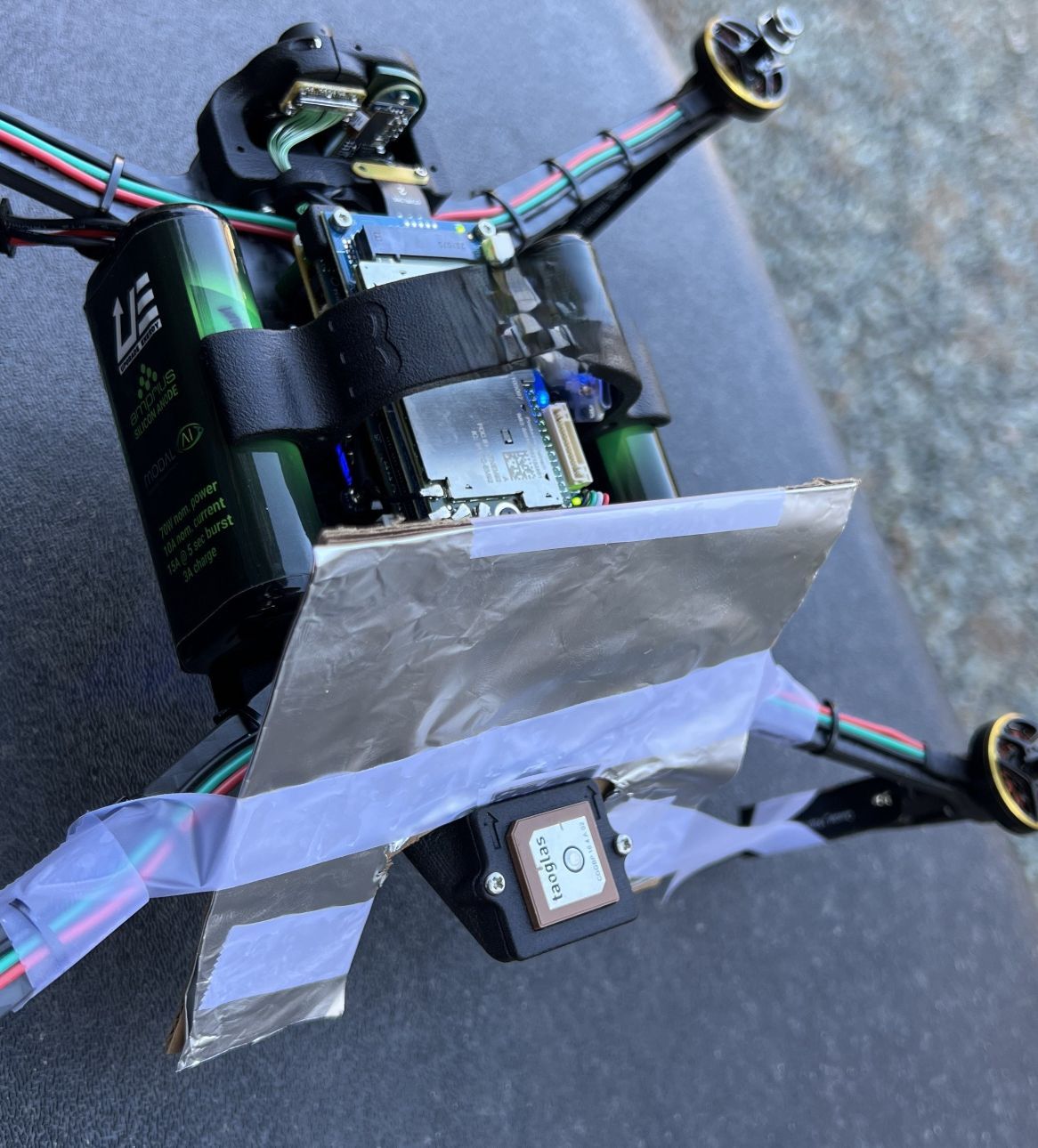
@Alex-Kushleyev Actually I discovered something very interesting. No matter how long you leave the drone outside it will not lock onto any satellites, BUT if you add an aluminum foil shield between the GPS antenna and the rest of the drone you immediately get satellites, a total of 11 after a few minutes. See pics below.
I think this means I need an RF shield of some sort. Open to suggestions.
Note that this is with the Lepton cable disconnected, and the ALFA wifi module removed. I'm communicating using ssh via 5G Google Fi and Tailscale as per ModalAI documentation, which was super helpful, thanks!
Thanks again for helping me figure this out!

-
@ROBERT-JUDD , yes it is JST GH.
@Alex-Kushleyev I'm hoping you or someone at ModalAI will get back to me ASAP about this because frankly I'm getting very frustrated. I added the shield below and I do get a GPS fix, but the quality is poor and when flying it is nearly impossible to avoid crashing. Why do I need to add a RF shield in the first place? Did someone at ModalAI test this $5,000 drone before shipping it to me? Does the Starling 2 Max have a GPS design issue? In view of the two similar reports below I'm beginning to think so. Please let me know how we can make this right.
https://forum.modalai.com/topic/3879/gps-not-working-for-starling-2-max/16

-
@Alex-Kushleyev I'm hoping you or someone at ModalAI will get back to me ASAP about this because frankly I'm getting very frustrated. I added the shield below and I do get a GPS fix, but the quality is poor and when flying it is nearly impossible to avoid crashing. Why do I need to add a RF shield in the first place? Did someone at ModalAI test this $5,000 drone before shipping it to me? Does the Starling 2 Max have a GPS design issue? In view of the two similar reports below I'm beginning to think so. Please let me know how we can make this right.
https://forum.modalai.com/topic/3879/gps-not-working-for-starling-2-max/16
I have looked at your plot of satellite signal strengths - was this test done in open sky? The average signal strength appears to be around 33dB, which is relatively low. Since the drone is powered off, there should not be any active interference from it.
In open sky, I would expect majority of GPS satellites to be in the 40-45dB range (depending on the elevation).
It is possible that something is wrong with the GPS receiver itself (if the test was done in the open sky).
Just did a quick search for a good reference for a signal strength to expect in excellent conditions (this is not my image). In the past GPS tests i have been able to observe such results in ideal conditions.
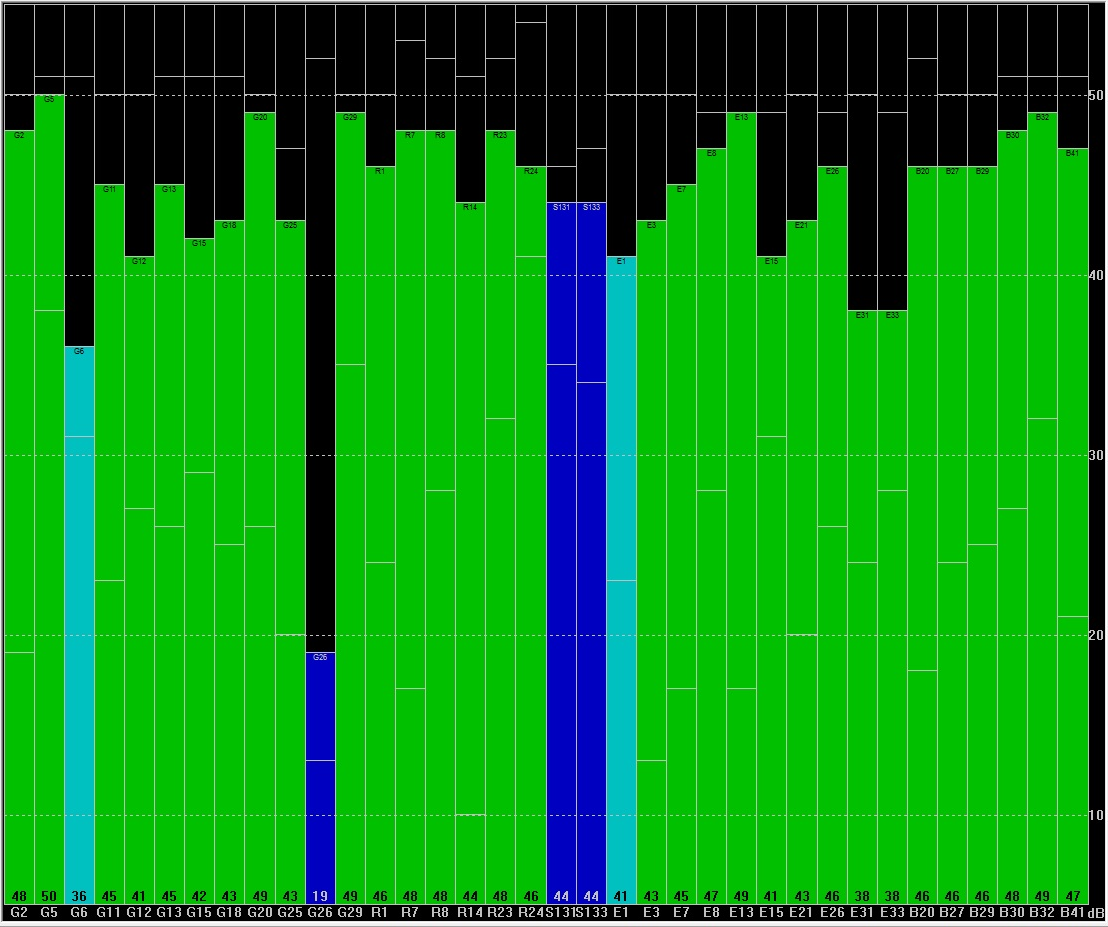
In your case, the signal is at least 10dB lower on average, which is not a great sign.
Do you have any other Ublox receivers you can test in the same conditions to check if you get higher signal strength? I suspect the GPS module in the Starling 2 Max may be bad, so that would explain seeing low signal even with the drone powered off.
Alex
-
I have looked at your plot of satellite signal strengths - was this test done in open sky? The average signal strength appears to be around 33dB, which is relatively low. Since the drone is powered off, there should not be any active interference from it.
In open sky, I would expect majority of GPS satellites to be in the 40-45dB range (depending on the elevation).
It is possible that something is wrong with the GPS receiver itself (if the test was done in the open sky).
Just did a quick search for a good reference for a signal strength to expect in excellent conditions (this is not my image). In the past GPS tests i have been able to observe such results in ideal conditions.
In your case, the signal is at least 10dB lower on average, which is not a great sign.
Do you have any other Ublox receivers you can test in the same conditions to check if you get higher signal strength? I suspect the GPS module in the Starling 2 Max may be bad, so that would explain seeing low signal even with the drone powered off.
Alex
@Alex-Kushleyev The previous screen shot was not open sky because I didn't have a USB extension cable, which I bought today. Here is the open sky result. What do you think I should do next? Thanks

-
@Alex-Kushleyev The previous screen shot was not open sky because I didn't have a USB extension cable, which I bought today. Here is the open sky result. What do you think I should do next? Thanks
@ROBERT-JUDD , the open sky result looks good, so the gps receiver seems just fine.
Now, as a next test, to confirm that interference is coming from the drone (and see what level of interference), make sure that you are getting similar results as you just shown while drone is off and while your u-center is running, turn on the drone and you will likely observe the signal drop as the drone boots up (which may vary over time).
I am curious what that looks like (initial drop when you first power on the drone and then steady state (after 5-10 seconds).
Also, it seems you may have a 5G modem on the Starling 2 Max (if i am not mistaken), please try to see if disabling it will help with the GPS signal. Perhaps certain settings of the 5G modem are affecting GPS signal.
Alex
-
@ROBERT-JUDD , the open sky result looks good, so the gps receiver seems just fine.
Now, as a next test, to confirm that interference is coming from the drone (and see what level of interference), make sure that you are getting similar results as you just shown while drone is off and while your u-center is running, turn on the drone and you will likely observe the signal drop as the drone boots up (which may vary over time).
I am curious what that looks like (initial drop when you first power on the drone and then steady state (after 5-10 seconds).
Also, it seems you may have a 5G modem on the Starling 2 Max (if i am not mistaken), please try to see if disabling it will help with the GPS signal. Perhaps certain settings of the 5G modem are affecting GPS signal.
Alex
@Alex-Kushleyev OK I will try that tomorrow and let you know.
Yes, I do have a 5G Sierra Wireless EM9291 modem active and connected via Google Fi. If I execute “systemctl disable voxl-modem” do I need to reboot for that to take effect? And does that actually remove power from the modem board? Any other modem commands I should try?
Thanks very much for your help.
-
I have looked at your plot of satellite signal strengths - was this test done in open sky? The average signal strength appears to be around 33dB, which is relatively low. Since the drone is powered off, there should not be any active interference from it.
In open sky, I would expect majority of GPS satellites to be in the 40-45dB range (depending on the elevation).
It is possible that something is wrong with the GPS receiver itself (if the test was done in the open sky).
Just did a quick search for a good reference for a signal strength to expect in excellent conditions (this is not my image). In the past GPS tests i have been able to observe such results in ideal conditions.
In your case, the signal is at least 10dB lower on average, which is not a great sign.
Do you have any other Ublox receivers you can test in the same conditions to check if you get higher signal strength? I suspect the GPS module in the Starling 2 Max may be bad, so that would explain seeing low signal even with the drone powered off.
Alex
@Alex-Kushleyev This morning I could not get the GPS to communicate reliably with my PC - the serial data connection kept fading in and out. I checked all the wiring, made a new cable, and tried a second PC, but the serial connection kept fading in and out. Maybe the GPS module was defective the whole time. Can you tell me how I can get a replacement GPS module? Here are the pics.


-
@Alex-Kushleyev This morning I could not get the GPS to communicate reliably with my PC - the serial data connection kept fading in and out. I checked all the wiring, made a new cable, and tried a second PC, but the serial connection kept fading in and out. Maybe the GPS module was defective the whole time. Can you tell me how I can get a replacement GPS module? Here are the pics.
@ROBERT-JUDD , please contact https://www.modalai.com/pages/rma for any replacements you need.
From the picture you posted, i see a big scratch on the antenna, which seems to be deep enough to break up the conductive plane. I am not an antenna expert, but i believe that damage like this will affect the antenna characteristics.
By the way the two notches on the antenna (at 12 and 3 o'clock) are done at the factory when the antennas are fine tuned to the exact frequency. The scratch could throw off the tuning.
Regarding serial connection, sometimes you need to switch your gps receiver to a higher baud rate, otherwise the port will overflow at the default 9600 baud. Please double check. You can send a special command using u center to switch the receiver to a higher baud rate and then autodetect or manually specify the new baud rate in ucenter for the serial connection. I typically always switch to at least 115200 or 230400 first then do my testing.
Regarding disabling the modem, I will ask my colleagues if there is a SW command to power it down.
Alex


Reading along? Create a free ModalAI Forum account to join in.
With an account you can reply, ask your own question, get an email when a ModalAI engineer answers, and mark the reply that solved it. Your place in each thread is saved between visits.
Questions about VOXL, Flight Core, ESCs and ModalAI drones are answered here by the engineers who build them.
Register Login