Skip to content

General Questions

2.2k Topics 11.3k Posts

Not sure where your question goes? Ask here. ModalAI engineers and the community answer questions about any VOXL product.

  • Specification of Starling2 Sensors

    Unsolved
    1
    0 Votes
    1 Posts
    307 Views
    No one has replied
  • Stereo cameras not working with 14.5cm extension cable

    Unsolved
    19
    0 Votes
    19 Posts
    3k Views
    Alex KushleyevA
    @robertociuch , I tested the dual stereo configuration with M0036 14.5cm extensions on each stereo. Stereo pairs plugged into J6 and J8, just like Camera Configuration 11 shows (link), I unplugged all other cameras. Seems to be working fine. I am attaching the voxl-camera-server.conf file with just stereo set up. Also, i am using SDK 1.3.2, however it should be working with older SDKs. If you find that installing the longer flex is an issue, it is possible that the flex itself is problematic. You can test the stereo pairs individually to find if there is a particular cable that is bad. Also, please double check that the following sensormodules (camera drivers) are present in the correct location: voxl2:/$ ls /usr/lib/camera/*combo* /usr/lib/camera/com.qti.sensormodule.ov7251_combo_0.bin /usr/lib/camera/com.qti.sensormodule.ov7251_combo_4.bin /usr/lib/camera/com.qti.sensormodule.ov7251_combo_1.bin /usr/lib/camera/com.qti.sensormodule.ov7251_combo_5.bin { "version": 0.1, "fsync_en": false, "fsync_gpio": 109, "cameras": [{ "type": "ov7251", "name": "stereo_front", "enabled": true, "camera_id": 0, "camera_id_second": 1, "independent_exposure": false, "fps": 30, "en_rotate": true, "en_rotate_second": true, "en_preview": true, "preview_width": 640, "preview_height": 480, "en_raw_preview": true, "ae_mode": "lme_msv", "ae_desired_msv": 60, "exposure_min_us": 20, "exposure_max_us": 33000, "gain_min": 54, "gain_max": 8000, "exposure_soft_min_us": 5000, "ae_filter_alpha": 0.600000023841858, "ae_ignore_fraction": 0.20000000298023224, "ae_slope": 0.05000000074505806, "ae_exposure_period": 1, "ae_gain_period": 1 }, { "type": "ov7251", "name": "stereo_rear", "enabled": true, "camera_id": 3, "camera_id_second": 2, "independent_exposure": false, "fps": 30, "en_rotate": false, "en_rotate_second": false, "en_preview": true, "preview_width": 640, "preview_height": 480, "en_raw_preview": true, "ae_mode": "lme_msv", "ae_desired_msv": 60, "exposure_min_us": 20, "exposure_max_us": 33000, "gain_min": 54, "gain_max": 8000, "exposure_soft_min_us": 5000, "ae_filter_alpha": 0.600000023841858, "ae_ignore_fraction": 0.20000000298023224, "ae_slope": 0.05000000074505806, "ae_exposure_period": 1, "ae_gain_period": 1 }] }
  • SENS_EN_LL40LS parameter not visible and i2cdetect -b X command not working

    Unsolved
    2
    1
    0 Votes
    2 Posts
    466 Views
    Eric KatzfeyE
    @jonathankampia We only add drivers to the build that we have used and tested with. The ll40ls driver is not one of them so you would have to add that to the build yourself.
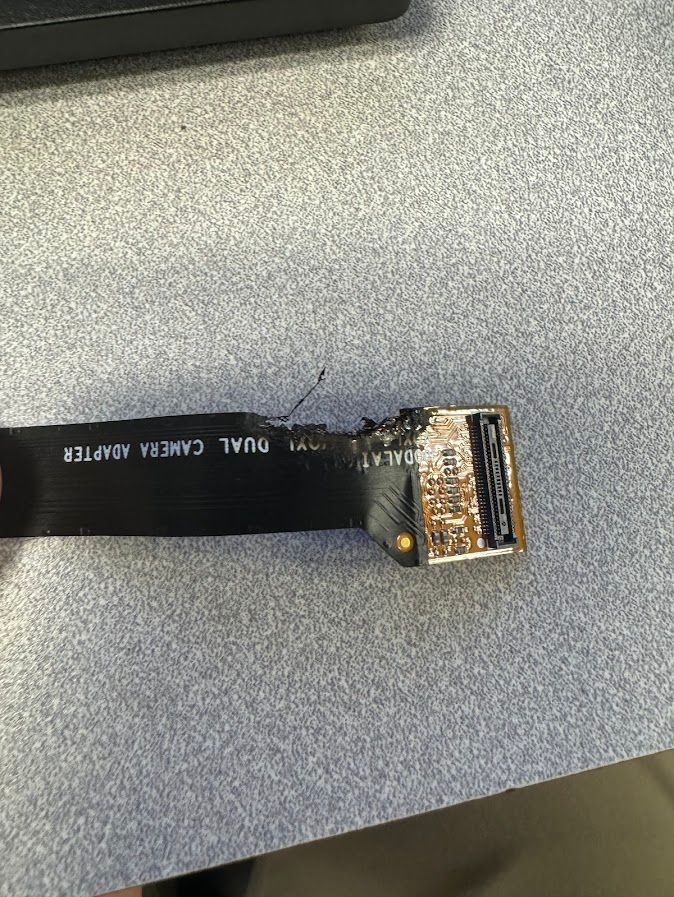
  • Camera Cable Failure

    Unsolved
    2
    1
    0 Votes
    2 Posts
    395 Views
    VinnyV
    Hi @Jeremy-Frederick This appears to be a fusing open of some (one or more) power signals on the flex, indicating that excessive current was demanded of the flex. A short at the image sensor module of a power rail could cause this, so a loose connector may have certainly been your culprit, and a voltage likely contacted a GND signal or component.
  • XACTIC Gimbal Integration with Sentinel

    Unsolved
    11
    0 Votes
    11 Posts
    2k Views
    S
    @modaltb I see. Just one last thing, do you think a gimbal of ~900g would be ok to be attached to the Sentinel without any issues? As the quoted max. payload for the Sentinel is 1kg?
  • This topic is deleted!

    8
    0 Votes
    8 Posts
    30 Views
  • Micro DDS Failure

    Unsolved
    1
    0 Votes
    1 Posts
    428 Views
    No one has replied
  • IMX214 min exposure time

    Unsolved
    5
    0 Votes
    5 Posts
    926 Views
    Alex KushleyevA
    @stephengerdts , in majority of cameras, the exposure time of the whole frame is set as a multiple of a specific number, let's call it T0. T0 is the minimum exposure of the whole frame and you can set any other exposure values, which will get rounded to a multiple of T0 ( K*T0 ). This T0 number is actually exactly equal to something called the Line Readout Time, which is the time it takes for the camera hardware to sample, process and send out a single line of pixels. This may be a little confusing, but if you think about how rolling shutter camera works, it "reads out" one line at a time (it cannot store the whole image in memory, so exposure and read out of each line are staggered). Please take a look at this link that shows how exposure time relates to readout time : https://www.researchgate.net/figure/Timing-diagram-of-the-CMOS-sensor-array-shown-in-Fig-2-The-readout-times-of-the_fig2_3328923 I believe that in order to simplify the exposure timing logic, the cameras then use the readout time as a unit of increment for the exposure time. So, the minimum exposure time reported by the voxl-camera-server is the minimum exposure time for the whole frame, which is also equal to the readout time of a single line In case of IMX214, the line readout time is 10.449us which is also the increment for adjusting exposure. The logic inside the camera framework will take the desired exposure time from the user / voxl-camera-server and then set the correct integer number of exposure in terms of "lines" (not microseconds) in order to achieve the correct exposure duration in units of time. Alex
  • Imu_apps Gyro Error on VOXL2

    Unsolved
    9
    2
    0 Votes
    9 Posts
    2k Views
    modaltbM
    OK all shipped ok. Above looks good with flat on table test results... Here's factory test data which shows OK: [image: 1721926383343-0a21b33e-3335-48ba-b756-2a84a9b9f6f9-image.png] 2024-05-03T22:01:18.648Z -- {"desc": "IMU1 - APPS PROC - OK", "GYRO_X": 1.001, "GYRO_Y": 0.998, "GYRO_Z": 0.994, "ACCL_X": 0.99, "ACCL_Y": 0.987, "ACCL_Z": 0.957, "FAILURES": []} 2024-05-03T22:01:19.361Z -- {"desc": "IMU0 - SLPI ACCEL - OK", "ACCL_X": 0.11492, "ACCL_Y": 0.20016, "ACCL_Z": 9.89428, "FAILURES": ""} 2024-05-03T22:01:19.960Z -- {"desc": "IMU0 - SLPI GYRO - OK", "GYRO_X": 0.02435, "GYRO_Y": 0.03108, "GYRO_Z": 0.00174, "FAILURES": ""} If it passes flat on table I think things are OK and it's a result of expecting certain tests to run in this flat orientation during factory test.
  • Accedently replaced ./bash with adb push command

    Unsolved
    2
    0 Votes
    2 Posts
    353 Views
    tomT
    @QuiroJ6427 I'd recommend just downloading the latest SDK from downloads.modalai.com and installing it. The latest for M500 should be SDK 1.2.0. 0.9 is quite old at this point so this will be a nice upgrade regardless
  • MSU-M0107 IMX412 I2C address selection

    Unsolved
    1
    1
    0 Votes
    1 Posts
    431 Views
    No one has replied
  • Companion computer to VOXL 2 over UART

    Unsolved
    2
    0 Votes
    2 Posts
    699 Views
    tomT
    @jonathankampia You could run UART based comms like an external flight controller on that UART: https://docs.modalai.com/voxl2-external-flight-controller/ but no you couldn't connect a USB device there
  • Mismatching measures between VIO and Mavor local pose

    Unsolved
    1
    0 Votes
    1 Posts
    427 Views
    No one has replied
  • Voxl2: how to enable PCIe?

    Unsolved
    3
    0 Votes
    3 Posts
    585 Views
    J
    @modaltb Thanks for the response, Travis. My manager told me in the mean time, he is in contact with you regarding that topic already via mail. I think we'll focus on that, instead of having 2 communication channels
  • VOXL1 and 2 Environmental Testing Documents

    Unsolved
    8
    0 Votes
    8 Posts
    1k Views
    J
    @Vinny That's really helpful information, thank you!
  • TOF rate only 5 or 15

    Unsolved
    2
    0 Votes
    2 Posts
    468 Views
    tomT
    @jameskuesel Support for more framerates was added in voxl-camera-server v1.9.3 Here is the commit it was added: https://gitlab.com/voxl-public/voxl-sdk/services/voxl-camera-server/-/commit/9a3f042ad607b968d452303dd108ced3cf2c4328 I recommend you update to the latest SDK
  • obstacle avoidance

    Unsolved
    9
    0 Votes
    9 Posts
    2k Views
    James StrawsonJ
    @rogerli vibration and lead to the lenses rotating. I often use a dab of hot-glue to hold the lens in place after focusing. On the new Starling 2 and Starling 2 Max drones we now use a clamping ring around the entire camera and lens assembly to lock them in place.
  • VOXL Mapper

    Unsolved
    2
    0 Votes
    2 Posts
    430 Views
    tomT
    @Prasanth-Kumar-Duba What hardware are you using? VOXL 1? VOXL 2? I'm guessing VOXL 1 based on the opkg reference. You can install voxl-mapper by doing the following: adb shell opkg install voxl-mapper
  • voxl-configure-vision-px4 does not exist

    Unsolved
    4
    0 Votes
    4 Posts
    528 Views
    tomT
    @Scott-Lobdell That would be great, thank you.
  • Flight core v2 ardupilot

    Unsolved
    3
    0 Votes
    3 Posts
    1k Views
    Andrew TridgellA
    see https://forum.modalai.com/topic/3640/ardupilot-on-voxl2