Skip to content

Ask your questions right here!

2.3k Topics 11.7k Posts

Note sure where to post? Ask questions here for direct access to the ModalAI engineering team

Subcategories


  • 164 Topics
    751 Posts
    Ben LinneB
    @heiko.lizan Any elrs radio that's 900mhz or dual band compatible should work when in low band mode. If the transmitter is running v4+ you should be able to downgrade it to v3 following the elrs update guide It's normal that some services aren't running. You may need to re-enable px4 with systemctl enable voxl-px4
  • Do you have a great idea for our products you would like to see implemented?

    27 90
    27 Topics
    90 Posts
    Serhii RovnyiS
    Hello everyone, I am looking for some expert advice on a VOXL 2 companion computer setup for a long-range platform. I have two main integration challenges: Challenge A: VIO at Higher Altitudes To solve the motion blur and pixel density issues at higher altitudes, I am planning a 6-camera configuration. I want to use 4 downward-facing sensors (2 daylight + 2 IR) equipped with narrow-angle lenses, alongside 2 standard wide-angle sensors (front and rear). Could you advise on the best supported sensors (e.g., IMX series) for this? Has anyone successfully tuned the voxl-qvio-server for narrow-angle lenses, and what were the altitude limits you achieved? Challenge B: LAN Integration & WireGuard The payload data flow will be: External RTSP Camera -> Ethernet -> VOXL 2 (WireGuard encryption) -> Ethernet -> Digital RX. Because VOXL 2 lacks multiple LAN ports, I will need a miniature industrial Ethernet switch. Does ModalAI have any tested hardware recommendations for this? Furthermore, what is the best practice for routing this VPN traffic through the VOXL 2 Ubuntu environment without bottlenecking the CPU? We are currently evaluating the VOXL 2 for a broader fleet deployment and want to ensure the ecosystem can support this custom optics requirement. Any feedback on off-the-shelf solutions or standard configurations for this use case would be greatly appreciated. Thank you!
  • Are you looking for a 3D model of one of our products?

    33 86
    33 Topics
    86 Posts
    Alex KushleyevA
    @nl_vdi , if you log into developer.modalai.com, you will see the CAD models. the latest model we have is: D0012-4-V3-C28-M36-T7-K0-Starling2-Max-V3-20260317.step [image: 1781036132877-376bf0dd-494a-4bf1-8d92-1b2d91afb83d-image.png]
  • Seeker receiver not binding

    4
    0 Votes
    4 Posts
    546 Views
    Eric KatzfeyE
    @LR Better to get a FrSky transmitter than to try to rework the drone.
  • VOXL2 Sentinel no wifi after new SDK

    21
    0 Votes
    21 Posts
    4k Views
    Alex KushleyevA
    @craigphoenix , I think the SDK install is failing somewhere in the middle (but goes unnoticed) and the ESC update and wifi issue is a result of that. We have not see this behavior before, so it is best to send the board back for inspection. Thanks! Alex
  • Can't connect IMX678 to VOXL2

    11
    4
    0 Votes
    11 Posts
    1k Views
    Alex KushleyevA
    @itsnav , based on your test, it does appear that the camera itself is not functioning. The camera detection and configuration happens via i2c bus but the image data is being sent via the high speed MIPI bus, so that is why you could have a case where the camera is detected and appears to be running but there is no actual data. It is possible that one of 10 (!) high speed connections is not working (one clock, 4 lanes -- all differential, so x2 number of connections). You should probably RMA this camera unit. I am also curious what dmesg -w will output while you are running the camera server with the non-working camera and trying to inspect the stream. dmesg will output any major issues from the Kernel driver that may relate to the camera not working. Alex
  • VOXL2 kernel version

    17
    0 Votes
    17 Posts
    3k Views
    J
    @Alex-Kushleyev Yup, editing kona-perf_defconfig looks to have worked, thanks!
  • ToF Sensor Model (w.r.t. unmeasured points)

    2
    0 Votes
    2 Posts
    491 Views
    ModeratorM
    @Rowan-Dempster I think it is safest to just not use data that reads 0,0,0 as the sensor cannot measure that close anyways
  • QVIO breaks after updating PX4 and fc-sensor on SDK 1.0.0

    1
    0 Votes
    1 Posts
    299 Views
    No one has replied
  • Missing User Guide and Setup Instructions for Starling 2 Max

    starling2
    4
    0 Votes
    4 Posts
    2k Views
    D
    @Zachary-Lowell-0 Additionally, when I push the left stick on the controller up or down, it stays in that position after I release it, instead of returning to the center. Is this by design? It behaves differently from the right stick, which returns to the center automatically.
  • USB network interface

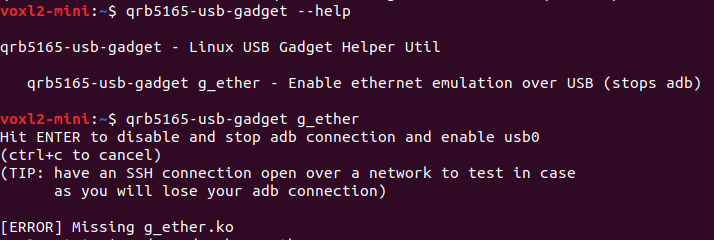
    missing gether
    1
    1
    0 Votes
    1 Posts
    410 Views
    No one has replied
  • Getting m500 to hover

    3
    0 Votes
    3 Posts
    490 Views
    Kiazoa JoaoK
    @Moderator I am aware. I've been using this drone for research purposes and I always make sure to follow safety guidelines. Thanks, I'll follow these instructions.
  • VOXL 2 IO with external 4in1 ESC

    6
    3
    0 Votes
    6 Posts
    833 Views
    J
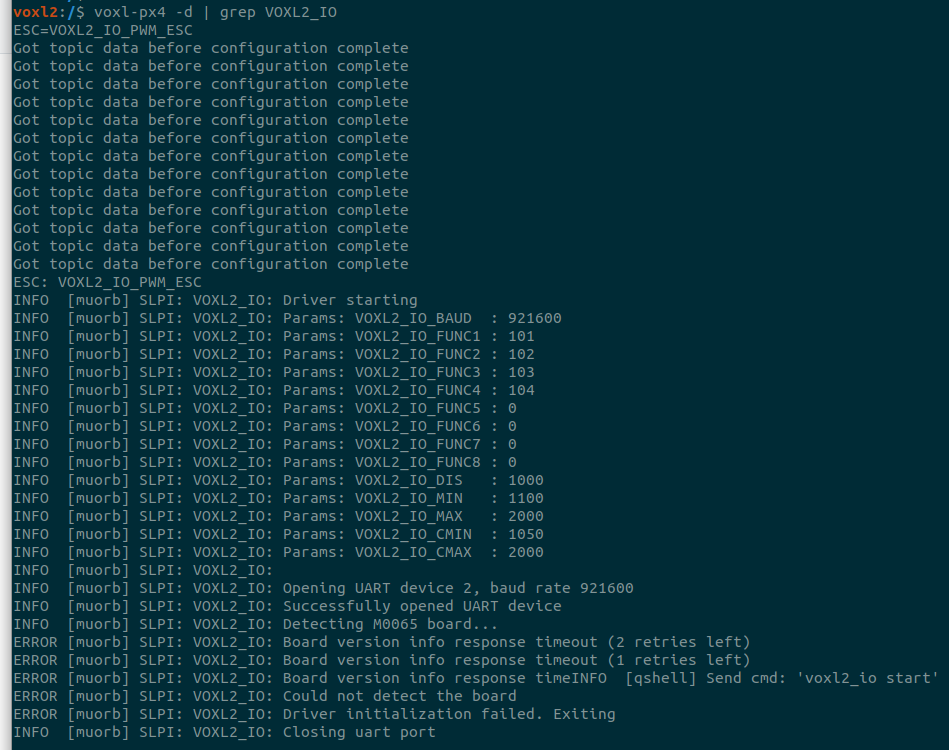
    @Alex-Kushleyev I never uploaded any parameters, just used both escs out of the box. maybe that caused the issue?
  • Add-On Ethernet Hat ETH0 (RJ45) port not creating a network connection.

    3
    0 Votes
    3 Posts
    528 Views
    VinnyV
    Hi @Jeremy-Frederick Can you please provide some pictures? It almost sounds as if you have a faulty RJ45 jack, but these are tested in factory before shipping. If you can get some close ups of the non-working RJ45 and the LAN7500 chip, that may help. And, can you clarify that you have Qty-2 M0062's and one works, yet one doesn't? Did the faulty one ever work for you? Was the faulty one in any type of handling mishap (like an accidental drop/fall)? The RJ45 has integrated magnetics to save space (which is why it is so tall), but that makes them more vulnerable to shock failure than typical RJ45's. One thing I do know that may also occur is the jack can be installed slightly tilted, making it hard to seat the RJ45 cable in firmly. There is an odd feature on the connector that sometimes allows it to seat at an off-angle, slightly pointing down making the cable slightly interfere with the PCB (but still ok to insert, since as I mentioned, we tested at the factory). Also, the metal along the sides of the RJ5 may also be stiff, preventing a smooth insertion, so sometimes just inserting the RJ45 cable a few times making sure you get that nice tactile "click" may be what is needed to ensure the contacts are engaged and kinda "breaking in" the stiff connector.
  • SBus on Starling 2 Max

    2
    0 Votes
    2 Posts
    437 Views
    Alex KushleyevA
    @wetherbeej , VOXL2 does not have ability to un-invert the SBUS signal, so you cannot plug in a standard SBUS receiver directly into VOXL2. However, we offer VOXL2_IO board, which supports standard SBUS input and will send the SBUS data to PX4 using standard UART. https://docs.modalai.com/voxl2-io-user-guide/ If you don't want to add another board and if you find a receiver that is capable of outputting "inverted SBUS", which is actually using standard UART levels, you may be able to use the PX4 standard sbus driver. However the PX4 sbus driver is not currently built for VOXL2 because it is requires some support of UART port, which VOXL2 does not support (specifically inverted signal level and maybe some other options). Long story short, if you want a solution that will just work, it is better to use our VOXL2 IO board, but if you absolutely do not want to add another board to the drone, then you will need a rx with inverted SBUS + modify PX4 sbus rc driver to work on VOXL2. Alex
  • VOXL ESC bootup tone

    2
    0 Votes
    2 Posts
    349 Views
    tomT
    @jonathankampia Yes, it would require modifying the "tones" in whichever esc param file you're using. For example for starling 2 it is defined here: https://gitlab.com/voxl-public/voxl-sdk/utilities/voxl-esc/-/blob/master/voxl-esc-params/D0014_starling_1504_3000kv_ms_props/D0014_starling_1504_3000kv_ms_props.xml?ref_type=heads#L90
  • ROS2 ToF topic not showing proper data

    2
    1
    0 Votes
    2 Posts
    526 Views
    B
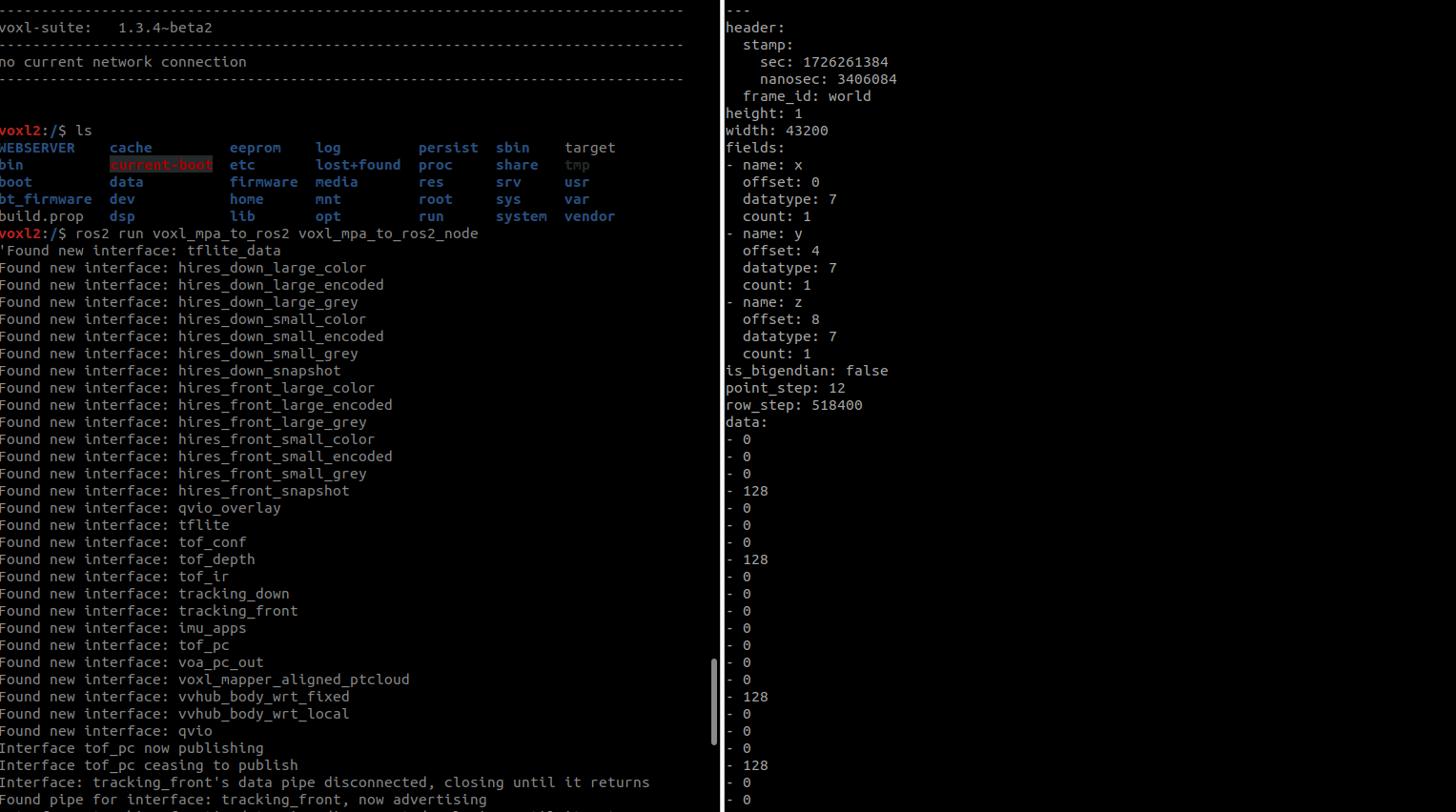
    Please verify the PC data in rviz2. What you see in rviz2 should look exactly alike to what is shown in voxal portal for tof_pc. Note that the point step size is 12. See this guide for more info on pointcloud data message data Point cloud data will look very different from image data, since the data field is constructed very different from BGR image formats. I have replicated these results in a starling2 as well, with voxl-mpa-to-ros2 dev branch:[image: 1727726700892-rospc_.png] Note that you may need to spin up a static transform to see the pointcloud data in ROS: ros2 run tf2_ros static_transform_publisher 0 0 0 0 0 0 map world
  • docker pull returns 410 Gone

    3
    0 Votes
    3 Posts
    2k Views
    Zachary Lowell 0Z
    Hi @wouter the reason this is happening is recently docker depricated their api v1 version and are only using v2 api calls now. Meaning the original voxl is not able to pull down pre made docker images. The solution around this is to build the docker image on a parent computer, tar it up via docker save, then push that to the voxl and run a docker load -i on the tar file. You can follow similar to what we do in voxl-docker-mavsdk: https://gitlab.com/voxl-public/voxl-docker-images/voxl-docker-mavsdk/-/blob/main/Dockerfile?ref_type=heads
  • Failsafe activated, triggering disarm ESC failure

    1
    3
    0 Votes
    1 Posts
    6k Views
    No one has replied
  • gps_dump not recorded in .ulg, even when GPS_DUMP_COMM set

    8
    0 Votes
    8 Posts
    1k Views
    Eric KatzfeyE
    @groupo Yes, we have used px4-listener <topic name> for external monitoring of PX4 topic data in other applications.
  • GPS never published

    5
    0 Votes
    5 Posts
    845 Views
    groupoG
    Thank you @ben-grocholsky! I should be more clear, when I ran px4-listener sensor_gps I received something along the lines of "GPS never published". I just went to go get the verbatim output but everything seems to be working. I do indeed see the uorb now. Puzzling
  • LTE or 5G carrier USB Mode

    4
    0 Votes
    4 Posts
    749 Views
    VinnyV
    Hi @Matthew-Wellner Yes, we sell some modem products as "stand-alone" which can be connected to any USB host. We have not offered our popular M0090 5G modem in that mode, but we have offered it for the older Microhard and Sierra 4G modules, but right now we only offer it on Microhard: https://www.modalai.com/collections/modems/products/mdk-m0048-2
  • VOXL2 stream video through /dev/video0

    6
    0 Votes
    6 Posts
    889 Views
    Eric KatzfeyE
    @jcai It should then be rtsp://192.168.1.222:9976/live. Ah, but you don't want that live part on the end?