Skip to content

Cellular Modems

52 Topics 348 Posts

Discuss questions related to integrating VOXL products with cellular modems

  • Serial communication with Sierra Wireless EM9291

    8
    0 Votes
    8 Posts
    3k Views
    tomT
    @groupo em9191 should work for you
  • Doodle Labs Not Connecting to QGC

    6
    0 Votes
    6 Posts
    1k Views
    tomT
    @Chase-Riley yes, we can work with Doodle Labs to get this resolved
  • Doodle Labs Mini Integration with VOXL 2

    7
    0 Votes
    7 Posts
    1k Views
    VinnyV
    @Denver-Bennett Great, glad to hear that helped!
  • LTE Modem v2 Pro

    1
    0 Votes
    1 Posts
    433 Views
    No one has replied
  • Quectel 5G modem firmware version compatibility

    quectel 5g modem
    1
    0 Votes
    1 Posts
    824 Views
    No one has replied
  • This topic is deleted!

    1
    0 Votes
    1 Posts
    7 Views
    No one has replied
  • Quectel 5G modem update/firmware for RB5 platform

    2
    0 Votes
    2 Posts
    685 Views
    tomT
    @Ainars-Bralitis The quectel-CM program is part of the voxl-modem package, you can find the latest release here: http://voxl-packages.modalai.com/dists/qrb5165/sdk-1.0/binary-arm64/voxl-modem_1.0.5_arm64.deb
  • 5G Modem - Voxl-modem ERROR can not ready GPIOs

    16
    1 Votes
    16 Posts
    3k Views
    D
    @tom Curriously, it does not seem to accept -p 0000, which was our pin. We changed it to 1234, which is accepted, but that didn't help with the issue, and it acted identically to providing the wrong pin. quectel-CM -p 0000 [03-02_13:02:16:064] Quectel_QConnectManager_Linux_V1.6.0.24 [03-02_13:02:16:064] unknow -p '0000' quectel-CM -p 1234 [03-02_13:02:39:300] Quectel_QConnectManager_Linux_V1.6.0.24 [03-02_13:02:39:305] Find /sys/bus/usb/devices/2-1.1 idVendor=0x2c7c idProduct=0x800, bus=0x002, dev=0x003 [03-02_13:02:39:307] Auto find qmichannel = /dev/cdc-wdm0 [03-02_13:02:39:307] Auto find usbnet_adapter = wwan0 [03-02_13:02:39:307] netcard driver = qmi_wwan, driver version = 22-Aug-2005 [03-02_13:02:39:308] Modem works in QMI mode [03-02_13:02:39:325] cdc_wdm_fd = 7 [03-02_13:02:39:399] Get clientWDS = 15 [03-02_13:02:39:430] Get clientDMS = 1 [03-02_13:02:39:462] Get clientNAS = 4 [03-02_13:02:39:494] Get clientUIM = 1 [03-02_13:02:39:526] Get clientWDA = 1 [03-02_13:02:39:557] requestBaseBandVersion RM502QAEAAR11A04M4G [03-02_13:02:39:686] requestGetSIMStatus SIMStatus: SIM_PIN [03-02_13:02:39:718] requestGetProfile[1] 3gnet/carl/1234/1 [03-02_13:02:39:749] requestRegistrationState2 MCC: 238, MNC: 20, PS: Detached, DataCap: UNKNOW [03-02_13:02:39:781] requestQueryDataCall IPv4ConnectionStatus: DISCONNECTED [03-02_13:02:39:781] ifconfig wwan0 0.0.0.0 [03-02_13:02:39:803] ifconfig wwan0 down
  • LTE Modem

    2
    0 Votes
    2 Posts
    623 Views
    Chad SweetC
    The modules support different LTE bands for different cellular network regions EMEA is Europe, Middle East, Asia NA is North America
  • VoxlCam needs better instructions for success

    2
    0 Votes
    2 Posts
    691 Views
    tomT
    @jconk If you're struggling with an issue you are more than welcome to create a post here with a description of the problem, things you've tried, things that aren't working, etc. and we will gladly help you resolve your issue. It seems as though this is your first post on this forum meaning you haven't reached out previously. We want people to succeed using our platforms and our team monitors this forum every day providing solutions.
  • Resurrecting this modem issue as I have an identical problem

    3
    0 Votes
    3 Posts
    644 Views
    B
    @tom Tom, Thanks for the Saturday reply! I' know I won't be able to ping the device's IP from the internet, just like I can't ping my phone or any other cellular device. They're inside the carrier's NAT'd subnet. I get that. But I cannot ping any public ip FROM the device. At the end of that old thread, he shows the Voxl pinging 8.8.8.8 and getting a response. I still don't, after following all of the suggestions in that thread. Like I said, I can get a DNS response if I ping a hostname, just no response to the ICMP from the host. Things that might help me: Another SIM from a different carrier or (or carrier's reseller, as most of the IoT SIM providers tout using ATT, T-Mobile and Verizon's networks, but have their own APN's..) to try. I'm working on that. In the meantime, coming from my early beginnings jockeying Hayes modems from DOS 3.3 running a BBS (Bulletin Board System, the pre-internet way we communicated..) I'm familiar with the Hayes AT command set (or used to be..) so I'd like a document (that I can't find on the Sierra site) listing my modem's AT command set so I can dig deeper into this problem myself. The Tailscale VPN looks nice and may be the simplest route (at a cost, and once I can actually talk to the outside world with this thing..) but I'm linking to a good video for you guys to look at. This guy is pretty savvy, and what he's doing here works. Without a VPN I might add.. The reverse SSH tunnel is quite interesting. Worth a look. https://www.youtube.com/watch?v=IokyotAGbJI
  • Connecting V2 LTE modem to Rpi4

    8
    0 Votes
    8 Posts
    2k Views
    B
    @Vinny Thanks Vinny! Just trying to maximize the versitility of my investments! Same way you guys do when you use the same board for both products! I'll leave it alone...
  • USB leds not illuminating

    8
    0 Votes
    8 Posts
    2k Views
    Henry CappelH
    @Vinny Thanks that does! So I made a new wire and it worked! It turns out my issue was that because I created a custom USB 2.0 to 4 pin JST connector I had too much exposed wiring. USB apparently requires a ton of shielding around all the wires to work which I did not know until now. Thanks for all the help with clarification
  • PCIe M.2 E-Key Wifi compatibility with 5G Modem Carrier

    2
    1
    0 Votes
    2 Posts
    816 Views
    VinnyV
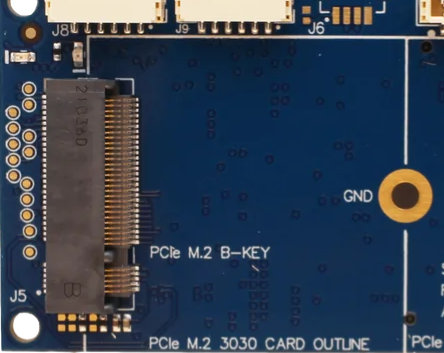
    @Eloi Hi Eloi, We only support B key on that design and do not support any plug in adapters like your link. There is strong certainty that it will not work. B key vs A/E key is not just a pin block difference, but several electrical differences exist as well (voltage settings and port options). B key is largely defined for modem devices which run on 1S "vbat" and A/E key devices largely for WiFi or I/O devices which run at 3.3V.
  • LTE v2 no connector

    5
    0 Votes
    5 Posts
    1k Views
    modaltbM
    @Henry-Cappel let me send an email to kick things off
  • "UIM Uninitialized" error even when SIM Card is not locked

    4
    0 Votes
    4 Posts
    872 Views
    ?
    @Chad-Sweet My region operating bands in India are 4,30 and 1. All these bands match with modem since I was using the modem since past few months successfully. All of sudden it has stopped working. What inference can we derive from above logs? My region code are getting fetched correctly but registration isn't happening for Sim cards. I have tried multiple sim cards as well but no success. Can it be hardware issue? Is there any way to factory reset modem? How to debug this further?
  • Access kernel debug serial port from M0090 5G modem

    2
    3 Votes
    2 Posts
    839 Views
    VinnyV
    By default on all M0090 variants, all the transceiver/buffer circuits which take the 1.8V Kernel Debug UART to 3.3V TTL for J6 are DNI'd (not populated). The only thing that can be done is to probe on raw circuit pad locations for TX and RX to get the signals at a 1.8V level. Here are those snapshots to help guide you should you wish to pursue that route: [image: 1658427255298-637f7086-e575-4be7-a94f-4eaea8658da8-image.png] However, the ICs are located on the bottom side of the PCB, so when mated with Voxl2, you cannot probe directly, which would require soldering on wires to the PCB pads. That would likely violate any warranties on this specific PCB if you did that. [image: 1658427443052-0049d0fe-caea-4884-8da0-2364d45c2302-image.png]
  • LTE stops working after some time

    6
    3
    0 Votes
    6 Posts
    1k Views
    Philemon BennerP
    @Chad-Sweet Ok thanks for your time.
  • Required antenna

    Moved
    3
    1
    0 Votes
    3 Posts
    956 Views
    local adL
    @modalab Thanks, starting my assembly and verifying parts. I didn't recall any antenna with the kit, will have to get some in the mail. Thanks for the reply
  • SIM card pin issue for LTE v2 module

    4
    0 Votes
    4 Posts
    1k Views
    Chad SweetC
    Thank you very much for sharing!