
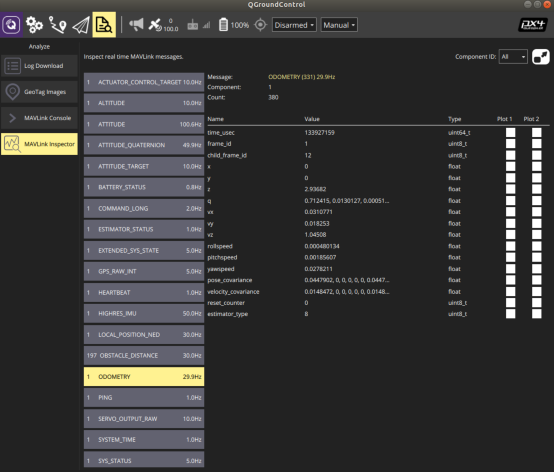
MAVLink Odometry X Y value 0
-
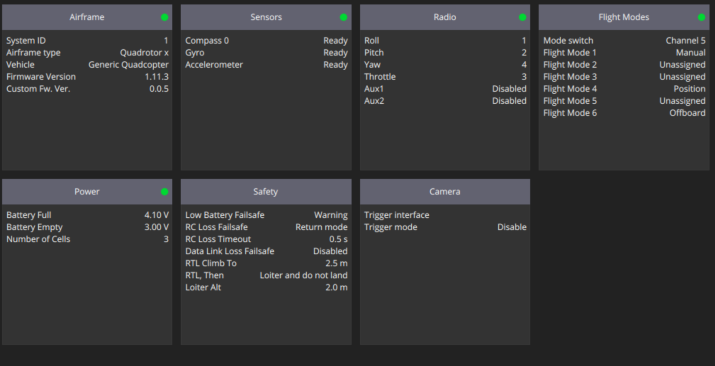
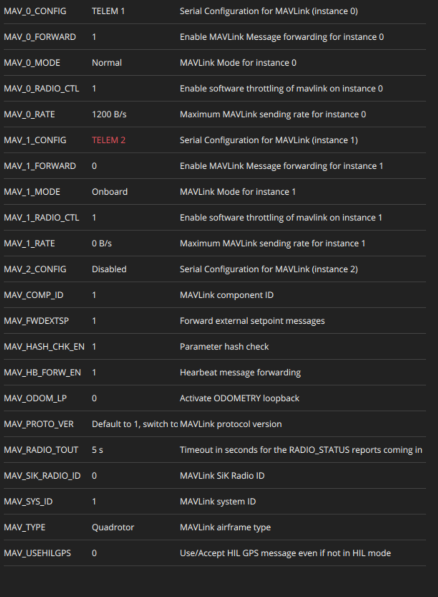
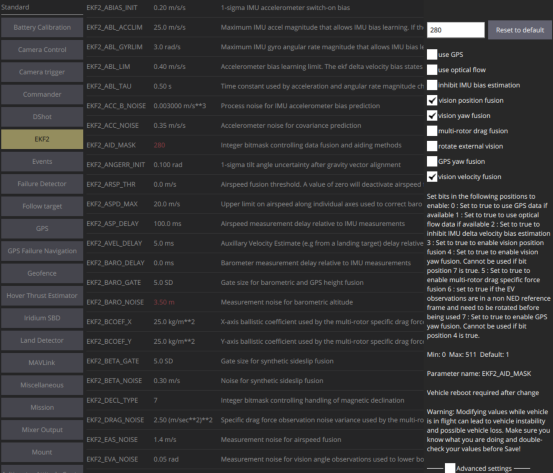
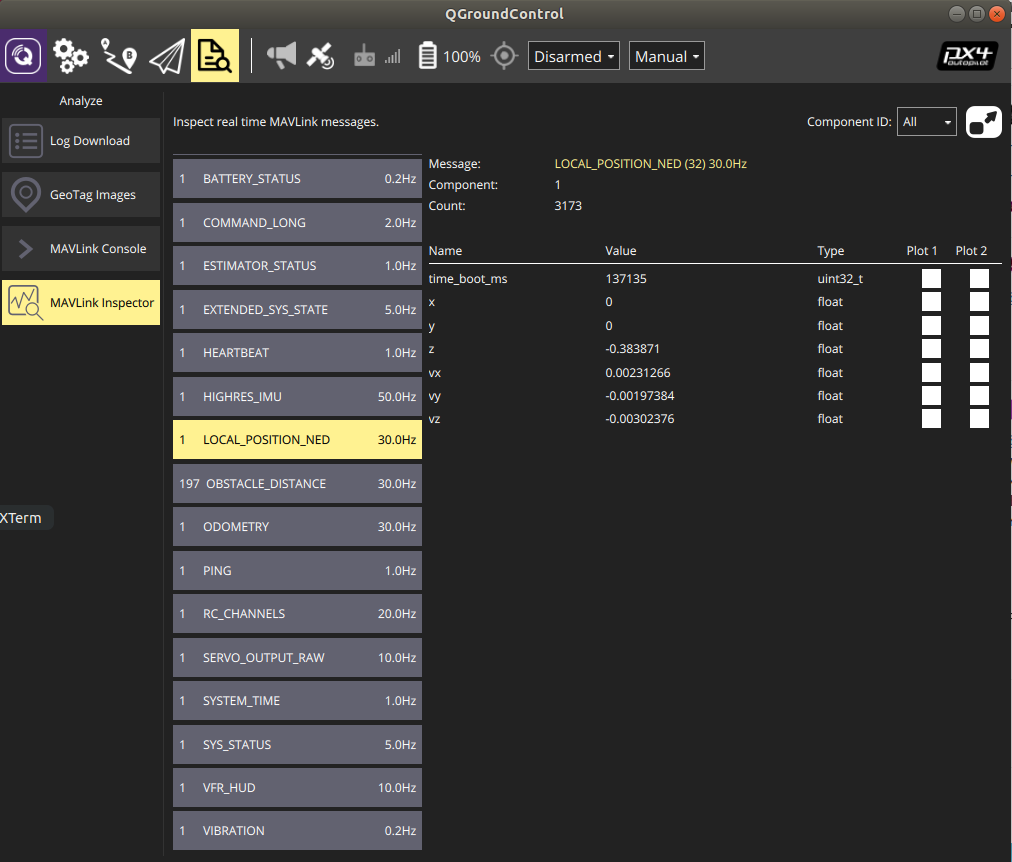
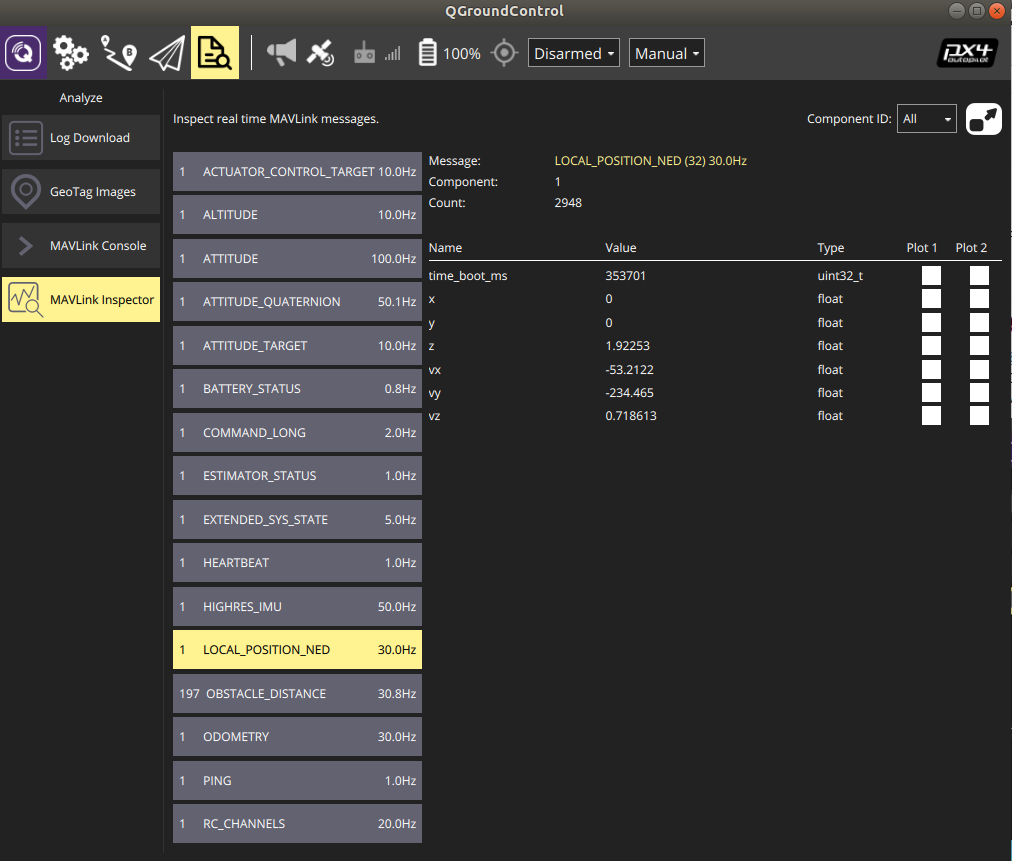
@Kris Can you post a pic of QGC under MavLink Inspector, go to the tab that says Local_Position_Ned and see what the X, Y, Z show. I want to verify how those numbers are numerating.
Normally if the X & Y are zeroed out, VIO hasn't started yet or has blown up. A power-cycle can fix this, but I would think you've already attempted that. Looks like you've already attempted resetting voxl-vision-px4 & qvio.
You may want to try reconfiguring mpa:voxl-configure-mpa -p -f seeker -b blue -c 7 --fc yesPower-cycle afterwards. You'll have to set your qgc-ip again since mpa will reset it to factory.
-
@Kris Can you post a pic of QGC under MavLink Inspector, go to the tab that says Local_Position_Ned and see what the X, Y, Z show. I want to verify how those numbers are numerating.
Normally if the X & Y are zeroed out, VIO hasn't started yet or has blown up. A power-cycle can fix this, but I would think you've already attempted that. Looks like you've already attempted resetting voxl-vision-px4 & qvio.
You may want to try reconfiguring mpa:voxl-configure-mpa -p -f seeker -b blue -c 7 --fc yesPower-cycle afterwards. You'll have to set your qgc-ip again since mpa will reset it to factory.
-
@Kris Can you post a pic of QGC under MavLink Inspector, go to the tab that says Local_Position_Ned and see what the X, Y, Z show. I want to verify how those numbers are numerating.
Normally if the X & Y are zeroed out, VIO hasn't started yet or has blown up. A power-cycle can fix this, but I would think you've already attempted that. Looks like you've already attempted resetting voxl-vision-px4 & qvio.
You may want to try reconfiguring mpa:voxl-configure-mpa -p -f seeker -b blue -c 7 --fc yesPower-cycle afterwards. You'll have to set your qgc-ip again since mpa will reset it to factory.
-
@Kris Can you post a pic of QGC under MavLink Inspector, go to the tab that says Local_Position_Ned and see what the X, Y, Z show. I want to verify how those numbers are numerating.
Normally if the X & Y are zeroed out, VIO hasn't started yet or has blown up. A power-cycle can fix this, but I would think you've already attempted that. Looks like you've already attempted resetting voxl-vision-px4 & qvio.
You may want to try reconfiguring mpa:voxl-configure-mpa -p -f seeker -b blue -c 7 --fc yesPower-cycle afterwards. You'll have to set your qgc-ip again since mpa will reset it to factory.
@Adrian-Hidalgo @Chad-Sweet , Is there anything else you would like to look at on my end or something else I can try to resolve this issue?
-
-
-
@Kris select the Q, should say in the menu selection below application settings
-
@Kris you could try loading a previous sys-image & sdk. Did it work before updating?
-
@Kris you could try loading a previous sys-image & sdk. Did it work before updating?
-
@Kris all Seekers get test flown before shipping to validate functionality. They are loaded with VOXL Platform 3.3.0-0.5.0, test flown with px4 platform 1.11 seeker & helper files for seeker ekf_2_indoor & spektrum_dx6e_config.
You can try loading the platform 1.12 seeker to see if that helps -
@Kris select the Q, should say in the menu selection below application settings
I dont see where the version is listed.
Also, this message keeps popping up everytime I open QGC, about a newer version.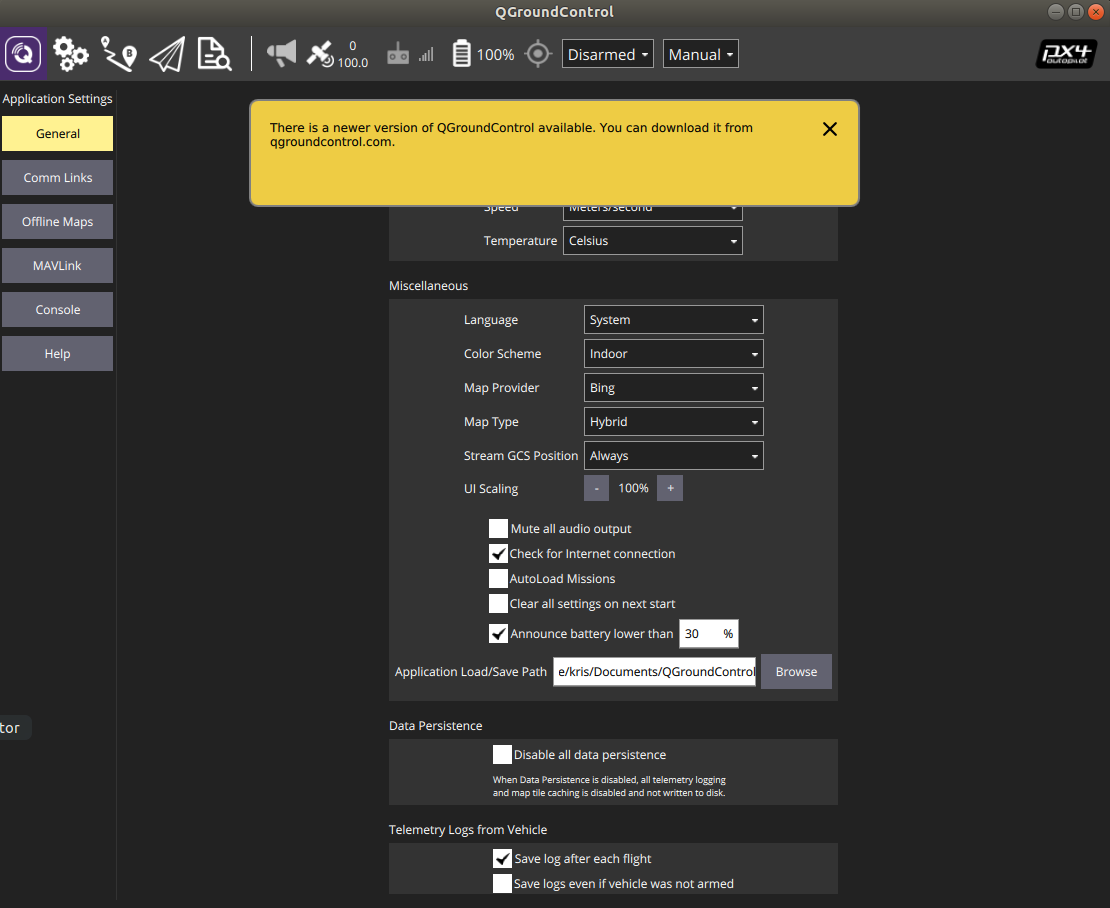
-
I dont see where the version is listed.
Also, this message keeps popping up everytime I open QGC, about a newer version.@Kris in the page, scroll to the bottom
-
I dont see where the version is listed.
Also, this message keeps popping up everytime I open QGC, about a newer version.@Kris wouldn't hurt to update QGC with the latest
-
@Kris in the page, scroll to the bottom
-
@Adrian-Hidalgo Oh, ok sorry.

@Kris yeah, that's an older version of QGC. Would recommend updating, could be a mismatch of settings.
After updating, check again local_position_ned
If that doesn't work, try loading platform 1.12 seeker parameters
If that doesn't work, try I'd shift to system_image 3.3.0 to see if that would change it. Be sure to save the data partition when asks to wipe. -
@Kris yeah, that's an older version of QGC. Would recommend updating, could be a mismatch of settings.
After updating, check again local_position_ned
If that doesn't work, try loading platform 1.12 seeker parameters
If that doesn't work, try I'd shift to system_image 3.3.0 to see if that would change it. Be sure to save the data partition when asks to wipe. -
@Kris yeah, that's an older version of QGC. Would recommend updating, could be a mismatch of settings.
After updating, check again local_position_ned
If that doesn't work, try loading platform 1.12 seeker parameters
If that doesn't work, try I'd shift to system_image 3.3.0 to see if that would change it. Be sure to save the data partition when asks to wipe.@Adrian-Hidalgo Sorry to bother you.
When I started the new version of PX4 v4.2.3 it was ok.
Then I started the Seeker and tons of errors started to happen.[D] at ../../qgroundcontrol/qgroundcontrol/src/QGCApplication.cc:281 - "Settings location "/home/kris/.config/QGroundControl.org/QGroundControl.ini" Is writable?: true" [D] at ../../qgroundcontrol/qgroundcontrol/src/QGCLoggingCategory.cc:120 - "Filter rules "*Log.debug=false\nGStreamerAPILog.debug=true\nqt.qml.connections=false"" [D] at ../../qgroundcontrol/qgroundcontrol/src/QGCApplication.cc:384 - "System reported locale: QLocale(English, Latin, United States) ; Name "en_US" ; Preffered (used in maps): "en-US"" [D] at ../../qgroundcontrol/qgroundcontrol/src/Vehicle/MAVLinkLogManager.cc:360 - "MAVLink logs directory: "/home/kris/Documents/QGroundControl/Logs"" [D] at ../../qgroundcontrol/qgroundcontrol/src/QtLocationPlugin/QGCMapEngine.cpp:164 - "Map Cache in: "/home/kris/.cache/QGCMapCache300" / "qgcMapCache.db"" [D] at qrc:/qml/MainRootWindow.qml:51 - "QGCCorePlugin(0x55bb212c6fa0) []" [D] at ../../qgroundcontrol/qgroundcontrol/src/MissionManager/MissionController.cc:2371 - "setCurrentPlanViewSeqNum" [D] at ../../qgroundcontrol/qgroundcontrol/src/MissionManager/MissionController.cc:2371 - "setCurrentPlanViewSeqNum" [E] at ../../qgroundcontrol/qgroundcontrol/src/VideoReceiver/GstVideoReceiver.cc:284 - "Stop called on empty URI" [E] at ../../qgroundcontrol/qgroundcontrol/src/VideoReceiver/GstVideoReceiver.cc:284 - "Stop called on empty URI" [D] at ../../qgroundcontrol/qgroundcontrol/src/MissionManager/MissionController.cc:1272 - "_recalcFlightPathSegments homePositionValid false" [D] at ../../qgroundcontrol/qgroundcontrol/src/MissionManager/MissionController.cc:1272 - "_recalcFlightPathSegments homePositionValid false" [D] at ../../qgroundcontrol/qgroundcontrol/src/QGCApplication.cc:848 - ""v4.2.0"" [!] at :0 - "Unable to start the client: "org.freedesktop.DBus.Error.AccessDenied" "Geolocation disabled for UID 1000"" [E] at ../../qgroundcontrol/qgroundcontrol/src/PositionManager/PositionManager.cpp:188 - "QGCPositionManager error 0" [D] at ../../qgroundcontrol/qgroundcontrol/src/comm/UDPLink.cc:205 - "Adding target QHostAddress("192.168.110.152") 14550" [D] at ../../qgroundcontrol/qgroundcontrol/src/MissionManager/MissionController.cc:1272 - "_recalcFlightPathSegments homePositionValid false" [D] at ../../qgroundcontrol/qgroundcontrol/src/MissionManager/MissionController.cc:2371 - "setCurrentPlanViewSeqNum" [D] at ../../qgroundcontrol/qgroundcontrol/src/MissionManager/MissionController.cc:2371 - "setCurrentPlanViewSeqNum" [D] at ../../qgroundcontrol/qgroundcontrol/src/MissionManager/MissionController.cc:1272 - "_recalcFlightPathSegments homePositionValid false" [D] at ../../qgroundcontrol/qgroundcontrol/src/MissionManager/MissionController.cc:1272 - "_recalcFlightPathSegments homePositionValid false" [E] at qrc:/qml/QGroundControl/FlightDisplay/ObstacleDistanceOverlayMap.qml:42 - "qrc:/qml/QGroundControl/FlightDisplay/ObstacleDistanceOverlayMap.qml:42: Error: createRadialGradient(): Incorrect arguments" [I] at ../../qgroundcontrol/qgroundcontrol/src/FactSystem/ParameterManager.cc:829 - "Attemping load from cache" [I] at ../../qgroundcontrol/qgroundcontrol/src/FactSystem/ParameterManager.cc:919 - "Parameters cache match failed /home/kris/.config/QGroundControl.org/ParamCache/1_1.v2" [E] at qrc:/qml/QGroundControl/FlightDisplay/ObstacleDistanceOverlayMap.qml:42 - "qrc:/qml/QGroundControl/FlightDisplay/ObstacleDistanceOverlayMap.qml:42: Error: createRadialGradient(): Incorrect arguments" [E] at qrc:/qml/QGroundControl/FlightDisplay/ObstacleDistanceOverlayMap.qml:42 - "qrc:/qml/QGroundControl/FlightDisplay/ObstacleDistanceOverlayMap.qml:42: Error: createRadialGradient(): Incorrect arguments" [E] at qrc:/qml/QGroundControl/FlightDisplay/ObstacleDistanceOverlayMap.qml:42 - "qrc:/qml/QGroundControl/FlightDisplay/ObstacleDistanceOverlayMap.qml:42: Error: createRadialGradient(): Incorrect arguments" [E] at qrc:/qml/QGroundControl/FlightDisplay/ObstacleDistanceOverlayMap.qml:42 - "qrc:/qml/QGroundControl/FlightDisplay/ObstacleDistanceOverlayMap.qml:42: Error: createRadialGradient(): Incorrect arguments" [E] at qrc:/qml/QGroundControl/FlightDisplay/ObstacleDistanceOverlayMap.qml:42 - "qrc:/qml/QGroundControl/FlightDisplay/ObstacleDistanceOverlayMap.qml:42: Error: createRadialGradient(): Incorrect arguments" [E] at qrc:/qml/QGroundControl/FlightDisplay/ObstacleDistanceOverlayMap.qml:42 - "qrc:/qml/QGroundControl/FlightDisplay/ObstacleDistanceOverlayMap.qml:42: Error: createRadialGradient(): Incorrect arguments" [E] at qrc:/qml/QGroundControl/FlightDisplay/ObstacleDistanceOverlayMap.qml:42 - "qrc:/qml/QGroundControl/FlightDisplay/ObstacleDistanceOverlayMap.qml:42: Error: createRadialGradient(): Incorrect arguments" [E] at qrc:/qml/QGroundControl/FlightDisplay/ObstacleDistanceOverlayMap.qml:42 - "qrc:/qml/QGroundControl/FlightDisplay/ObstacleDistanceOverlayMap.qml:42: Error: createRadialGradient(): Incorrect arguments" [E] at qrc:/qml/QGroundControl/FlightDisplay/ObstacleDistanceOverlayMap.qml:42 - "qrc:/qml/QGroundControl/FlightDisplay/ObstacleDistanceOverlayMap.qml:42: Error: createRadialGradient(): Incorrect arguments" [E] at ../../qgroundcontrol/qgroundcontrol/src/comm/UDPLink.cc:167 - "Error writing to QHostAddress("192.168.110.152") 14550" [E] at qrc:/qml/QGroundControl/FlightDisplay/ObstacleDistanceOverlayMap.qml:42 - "qrc:/qml/QGroundControl/FlightDisplay/ObstacleDistanceOverlayMap.qml:42: Error: createRadialGradient(): Incorrect arguments" [E] at qrc:/qml/QGroundControl/FlightDisplay/ObstacleDistanceOverlayMap.qml:42 - "qrc:/qml/QGroundControl/FlightDisplay/ObstacleDistanceOverlayMap.qml:42: Error: createRadialGradient(): Incorrect arguments" [E] at qrc:/qml/QGroundControl/FlightDisplay/ObstacleDistanceOverlayMap.qml:42 - "qrc:/qml/QGroundControl/FlightDisplay/ObstacleDistanceOverlayMap.qml:42: Error: createRadialGradient(): Incorrect arguments" [E] at qrc:/qml/QGroundControl/FlightDisplay/ObstacleDistanceOverlayMap.qml:42 - "qrc:/qml/QGroundControl/FlightDisplay/ObstacleDistanceOverlayMap.qml:42: Error: createRadialGradient(): Incorrect arguments" [E] at qrc:/qml/QGroundControl/FlightDisplay/ObstacleDistanceOverlayMap.qml:42 - "qrc:/qml/QGroundControl/FlightDisplay/ObstacleDistanceOverlayMap.qml:42: Error: createRadialGradient(): Incorrect arguments" [E] at qrc:/qml/QGroundControl/FlightDisplay/ObstacleDistanceOverlayMap.qml:42 - "qrc:/qml/QGroundControl/FlightDisplay/ObstacleDistanceOverlayMap.qml:42: Error: createRadialGradient(): Incorrect arguments" [E] at qrc:/qml/QGroundControl/FlightDisplay/ObstacleDistanceOverlayMap.qml:42 - "qrc:/qml/QGroundControl/FlightDisplay/ObstacleDistanceOverlayMap.qml:42: Error: createRadialGradient(): Incorrect arguments" [E] at qrc:/qml/QGroundControl/FlightDisplay/ObstacleDistanceOverlayMap.qml:42 - "qrc:/qml/QGroundControl/FlightDisplay/ObstacleDistanceOverlayMap.qml:42: Error: createRadialGradient(): Incorrect arguments" [E] at qrc:/qml/QGroundControl/FlightDisplay/ObstacleDistanceOverlayMap.qml:42 - "qrc:/qml/QGroundControl/FlightDisplay/ObstacleDistanceOverlayMap.qml:42: Error: createRadialGradient(): Incorrect arguments" [E] at qrc:/qml/QGroundControl/FlightDisplay/ObstacleDistanceOverlayMap.qml:42 - "qrc:/qml/QGroundControl/FlightDisplay/ObstacleDistanceOverlayMap.qml:42: Error: createRadialGradient(): Incorrect arguments" [E] at qrc:/qml/QGroundControl/FlightDisplay/ObstacleDistanceOverlayMap.qml:42 - "qrc:/qml/QGroundControl/FlightDisplay/ObstacleDistanceOverlayMap.qml:42: Error: createRadialGradient(): Incorrect arguments" [E] at qrc:/qml/QGroundControl/FlightDisplay/ObstacleDistanceOverlayMap.qml:42 - "qrc:/qml/QGroundControl/FlightDisplay/ObstacleDistanceOverlayMap.qml:42: Error: createRadialGradient(): Incorrect arguments" [E] at qrc:/qml/QGroundControl/FlightDisplay/ObstacleDistanceOverlayMap.qml:42 - "qrc:/qml/QGroundControl/FlightDisplay/ObstacleDistanceOverlayMap.qml:42: Error: createRadialGradient(): Incorrect arguments" [E] at qrc:/qml/QGroundControl/FlightDisplay/ObstacleDistanceOverlayMap.qml:42 - "qrc:/qml/QGroundControl/FlightDisplay/ObstacleDistanceOverlayMap.qml:42: Error: createRadialGradient(): Incorrect arguments" [E] at qrc:/qml/QGroundControl/FlightDisplay/ObstacleDistanceOverlayMap.qml:42 - "qrc:/qml/QGroundControl/FlightDisplay/ObstacleDistanceOverlayMap.qml:42: Error: createRadialGradient(): Incorrect arguments" [E] at qrc:/qml/QGroundControl/FlightDisplay/ObstacleDistanceOverlayMap.qml:42 - "qrc:/qml/QGroundControl/FlightDisplay/ObstacleDistanceOverlayMap.qml:42: Error: createRadialGradient(): Incorrect arguments" [E] at qrc:/qml/QGroundControl/FlightDisplay/ObstacleDistanceOverlayMap.qml:42 - "qrc:/qml/QGroundControl/FlightDisplay/ObstacleDistanceOverlayMap.qml:42: Error: createRadialGradient(): Incorrect arguments" [E] at qrc:/qml/QGroundControl/FlightDisplay/ObstacleDistanceOverlayMap.qml:42 - "qrc:/qml/QGroundControl/FlightDisplay/ObstacleDistanceOverlayMap.qml:42: Error: createRadialGradient(): Incorrect arguments" [E] at qrc:/qml/QGroundControl/FlightDisplay/ObstacleDistanceOverlayMap.qml:42 - "qrc:/qml/QGroundControl/FlightDisplay/ObstacleDistanceOverlayMap.qml:42: Error: createRadialGradient(): Incorrect arguments" [E] at qrc:/qml/QGroundControl/FlightDisplay/ObstacleDistanceOverlayMap.qml:42 - "qrc:/qml/QGroundControl/FlightDisplay/ObstacleDistanceOverlayMap.qml:42: Error: createRadialGradient(): Incorrect arguments" [E] at qrc:/qml/QGroundControl/FlightDisplay/ObstacleDistanceOverlayMap.qml:42 - "qrc:/qml/QGroundControl/FlightDisplay/ObstacleDistanceOverlayMap.qml:42: Error: createRadialGradient(): Incorrect arguments" [E] at ../../qgroundcontrol/qgroundcontrol/src/comm/UDPLink.cc:167 - "Error writing to QHostAddress("192.168.110.152") 14550" [E] at ../../qgroundcontrol/qgroundcontrol/src/comm/UDPLink.cc:167 - "Error writing to QHostAddress("192.168.110.152") 14550" [E] at ../../qgroundcontrol/qgroundcontrol/src/comm/UDPLink.cc:167 - "Error writing to QHostAddress("192.168.110.152") 14550" [E] at qrc:/qml/QGroundControl/FlightDisplay/ObstacleDistanceOverlayMap.qml:42 - "qrc:/qml/QGroundControl/FlightDisplay/ObstacleDistanceOverlayMap.qml:42: Error: createRadialGradient(): Incorrect arguments" [E] at qrc:/qml/QGroundControl/FlightDisplay/ObstacleDistanceOverlayMap.qml:42 - "qrc:/qml/QGroundControl/FlightDisplay/ObstacleDistanceOverlayMap.qml:42: Error: createRadialGradient(): Incorrect arguments" [E] at qrc:/qml/QGroundControl/FlightDisplay/ObstacleDistanceOverlayMap.qml:42 - "qrc:/qml/QGroundControl/FlightDisplay/ObstacleDistanceOverlayMap.qml:42: Error: createRadialGradient(): Incorrect arguments" [E] at qrc:/qml/QGroundControl/FlightDisplay/ObstacleDistanceOverlayMap.qml:42 - "qrc:/qml/QGroundControl/FlightDisplay/ObstacleDistanceOverlayMap.qml:42: Error: createRadialGradient(): Incorrect arguments" [E] at qrc:/qml/QGroundControl/FlightDisplay/ObstacleDistanceOverlayMap.qml:42 - "qrc:/qml/QGroundControl/FlightDisplay/ObstacleDistanceOverlayMap.qml:42: Error: createRadialGradient(): Incorrect arguments" [E] at qrc:/qml/QGroundControl/FlightDisplay/ObstacleDistanceOverlayMap.qml:42 - "qrc:/qml/QGroundControl/FlightDisplay/ObstacleDistanceOverlayMap.qml:42: Error: createRadialGradient(): Incorrect arguments" [E] at qrc:/qml/QGroundControl/FlightDisplay/ObstacleDistanceOverlayMap.qml:42 - "qrc:/qml/QGroundControl/FlightDisplay/ObstacleDistanceOverlayMap.qml:42: Error: createRadialGradient(): Incorrect arguments" [E] at qrc:/qml/QGroundControl/FlightDisplay/ObstacleDistanceOverlayMap.qml:42 - "qrc:/qml/QGroundControl/FlightDisplay/ObstacleDistanceOverlayMap.qml:42: Error: createRadialGradient(): Incorrect arguments" [E] at qrc:/qml/QGroundControl/FlightDisplay/ObstacleDistanceOverlayMap.qml:42 - "qrc:/qml/QGroundControl/FlightDisplay/ObstacleDistanceOverlayMap.qml:42: Error: createRadialGradient(): Incorrect arguments" [E] at qrc:/qml/QGroundControl/FlightDisplay/ObstacleDistanceOverlayMap.qml:42 - "qrc:/qml/QGroundControl/FlightDisplay/ObstacleDistanceOverlayMap.qml:42: Error: createRadialGradient(): Incorrect arguments" [E] at qrc:/qml/QGroundControl/FlightDisplay/ObstacleDistanceOverlayMap.qml:42 - "qrc:/qml/QGroundControl/FlightDisplay/ObstacleDistanceOverlayMap.qml:42: Error: createRadialGradient(): Incorrect arguments" [E] at qrc:/qml/QGroundControl/FlightDisplay/ObstacleDistanceOverlayMap.qml:42 - "qrc:/qml/QGroundControl/FlightDisplay/ObstacleDistanceOverlayMap.qml:42: Error: createRadialGradient(): Incorrect arguments" [E] at ../../qgroundcontrol/qgroundcontrol/src/comm/UDPLink.cc:167 - "Error writing to QHostAddress("192.168.110.152") 14550" [E] at qrc:/qml/QGroundControl/FlightDisplay/ObstacleDistanceOverlayMap.qml:42 - "qrc:/qml/QGroundControl/FlightDisplay/ObstacleDistanceOverlayMap.qml:42: Error: createRadialGradient(): Incorrect arguments" [E] at qrc:/qml/QGroundControl/FlightDisplay/ObstacleDistanceOverlayMap.qml:42 - "qrc:/qml/QGroundControl/FlightDisplay/ObstacleDistanceOverlayMap.qml:42: Error: createRadialGradient(): Incorrect arguments" [E] at ../../qgroundcontrol/qgroundcontrol/src/comm/UDPLink.cc:167 - "Error writing to QHostAddress("192.168.110.152") 14550" [E] at qrc:/qml/QGroundControl/FlightDisplay/ObstacleDistanceOverlayMap.qml:42 - "qrc:/qml/QGroundControl/FlightDisplay/ObstacleDistanceOverlayMap.qml:42: Error: createRadialGradient(): Incorrect arguments" [E] at qrc:/qml/QGroundControl/FlightDisplay/ObstacleDistanceOverlayMap.qml:42 - "qrc:/qml/QGroundControl/FlightDisplay/ObstacleDistanceOverlayMap.qml:42: Error: createRadialGradient(): Incorrect arguments" [E] at qrc:/qml/QGroundControl/FlightDisplay/ObstacleDistanceOverlayMap.qml:42 - "qrc:/qml/QGroundControl/FlightDisplay/ObstacleDistanceOverlayMap.qml:42: Error: createRadialGradient(): Incorrect arguments" [E] at qrc:/qml/QGroundControl/FlightDisplay/ObstacleDistanceOverlayMap.qml:42 - "qrc:/qml/QGroundControl/FlightDisplay/ObstacleDistanceOverlayMap.qml:42: Error: createRadialGradient(): Incorrect arguments" [E] at qrc:/qml/QGroundControl/FlightDisplay/ObstacleDistanceOverlayMap.qml:42 - "qrc:/qml/QGroundControl/FlightDisplay/ObstacleDistanceOverlayMap.qml:42: Error: createRadialGradient(): Incorrect arguments" [E] at qrc:/qml/QGroundControl/FlightDisplay/ObstacleDistanceOverlayMap.qml:42 - "qrc:/qml/QGroundControl/FlightDisplay/ObstacleDistanceOverlayMap.qml:42: Error: createRadialGradient(): Incorrect arguments" -
@Kris before turning on the Seeker, QGC works fine? Are you able to navigate around the gui?
Hmm...You could try deleting the px4 parameters that were loaded onto the voxl. You'll have to calibrate all the sensors and load the correct parameters if you do choose to go this route.
It kinda seems like there's something with the obstacle avoidance. May first want to try disabling en_voa in vvpx4 (marking it false) as well as disabling dfs server before deleting px4 parameters



Reading along? Create a free ModalAI Forum account to join in.
With an account you can reply, ask your own question, get an email when a ModalAI engineer answers, and mark the reply that solved it. Your place in each thread is saved between visits.
Questions about VOXL, Flight Core, ESCs and ModalAI drones are answered here by the engineers who build them.
Register Login