Skip to content

ESCs, Sensors and Accessories

392 Topics 2.3k Posts

ESCs, image sensors, ToF and tracking cameras, Microhard and cellular modems, power modules, GPS and other add-on boards.

  • ELRS receiver keeps getting unbinded after a reboot

    Unsolved
    5
    0 Votes
    5 Posts
    2k Views
    Jetson NanoJ
    @Zachary-Lowell-0 Below is the output of what I get from executing cat /etc/modalai/voxl-px4.confg voxl2:/etc/modalai$ cat voxl-px4.conf #!/bin/bash # # voxl-px4 Configuration File # # GPS: # Tell PX4 which GPS to use. If there is no GPS unit use NONE. Otherwise # choose AUTODETECT and the startup script will attempt to automatically # configure the GPS, magnetometer, and status LED # Options include: [NONE, AUTODETECT] # # RC: # Tell PX4 which RC transmitter to use. # Use EXTERNAL when getting RC control from external Mavlink messages (e.g Via QGC) # Options include: [SPEKTRUM, CRSF_MAV, CRSF_RAW, M0065_SBUS, EXTERNAL, FAKE_RC_INPUT] # # ESC: # Tell PX4 which type of ESC to use. # Options include: [VOXL_ESC, VOXL2_IO_PWM_ESC] # # POWER_MANAGER: # Tell PX4 which power manager to use. # Use NONE for ModalAI Mini-ESC since the ESC driver handles PM. # Use EXTERNAL when not using the ModalAI APM power manager to power the board # This also just disables the voxlpm driver, same as the NONE option # Options include: [VOXLPM, EXTERNAL, NONE] # # DISTANCE_SENSOR: # Tell PX4 which distance sensor peripheral to use. # Note: The sensor will be started on the RC port so it is only # really possible to use it when using external RC. # Options include: [NONE, LIGHTWARE_SF000] # # OSD: # Tell PX4 whether to enable OSD (on-screen display). # Options include: [ENABLE, DISABLE] # # DAEMON_MODE: # Tell PX4 whether to enable daemon mode. # Options include: [ENABLE, DISABLE] # # SENSOR_CAL: # Tell PX4 where to source sensor calibration information. # Options include: [ACTUAL, FAKE] # # EXTRA_STEPS: # Optional field that allows a user to define custom commands to be run by PX4 on boot. # Must be a valid bash array as seen below # Example: EXTRA_STEPS=( "qshell gps start" "qshell commander mode manual" ) # # GPS=AUTODETECT RC=CRSF_RAW ESC=VOXL_ESC POWER_MANAGER=VOXLPM DISTANCE_SENSOR=NONE OSD=DISABLE DAEMON_MODE=ENABLE SENSOR_CAL=ACTUAL EXTRA_STEPS=() Thanks for the follow-up. Here’s more information based on your questions: Initial Binding: Initially, I ran voxl-elrs --bind, and it connected successfully to the transmitter without any issues. It would automatically reconnect after each power cycle as expected. However, after a period of use, this new behavior started happening where it no longer connects automatically after rebooting. Controller Reboot: Rebooting the controller has not resolved the issue. When the drone is powered on, the receiver’s LED stays solid rather than blinking slowly as it should when searching for the transmitter, and rebooting the controller doesn’t seem to initiate the connection. Intermittent Connection: Interestingly, there are times when, if I power on the drone before powering on the controller, the connection will establish without needing to reboot the receiver. However, this is inconsistent, and I still often have to physically unplug and replug the receiver to get it to connect. Possible Driver Issue: As you suggested, it does seem like the driver might be getting stuck in the search process at times. Here’s the output you requested from cat /etc/modalai/voxl-px4.config Hopefully, this helps to pinpoint what might be causing the issue. Thanks again for your assistance!
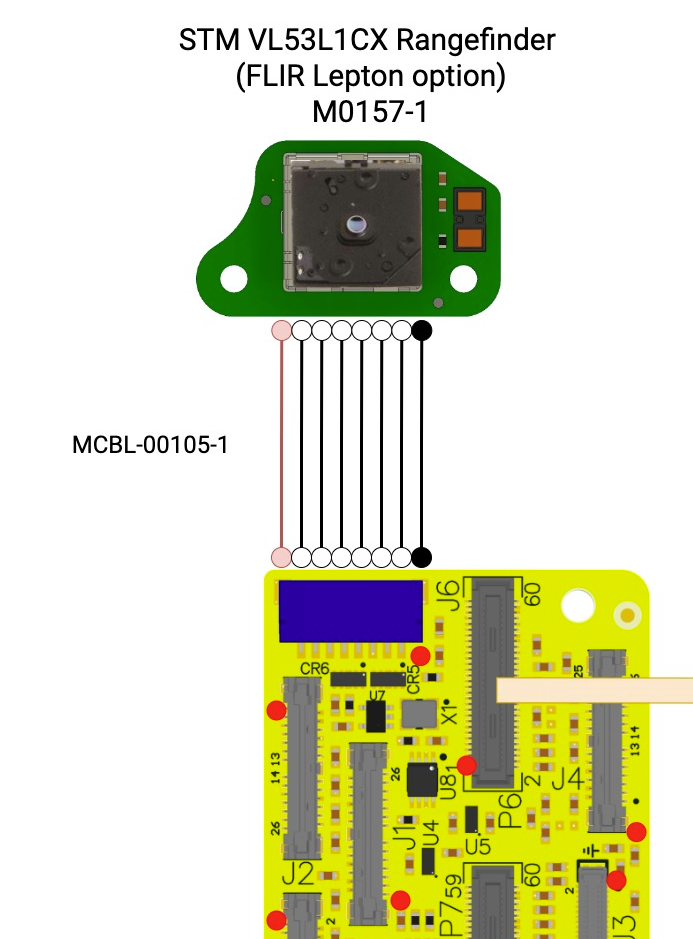
  • M0173 VOXL 2 Front End - Pinouts for STM VL53L1CX Rangefinder

    Unsolved
    1
    2
    0 Votes
    1 Posts
    387 Views
    No one has replied
  • 4-in-1 mini ESC max ratings

    Unsolved esc
    3
    0 Votes
    3 Posts
    706 Views
    Morten NissovM
    @Alex-Kushleyev Sorry for the delay, didn't notice the alert. But great, thanks!
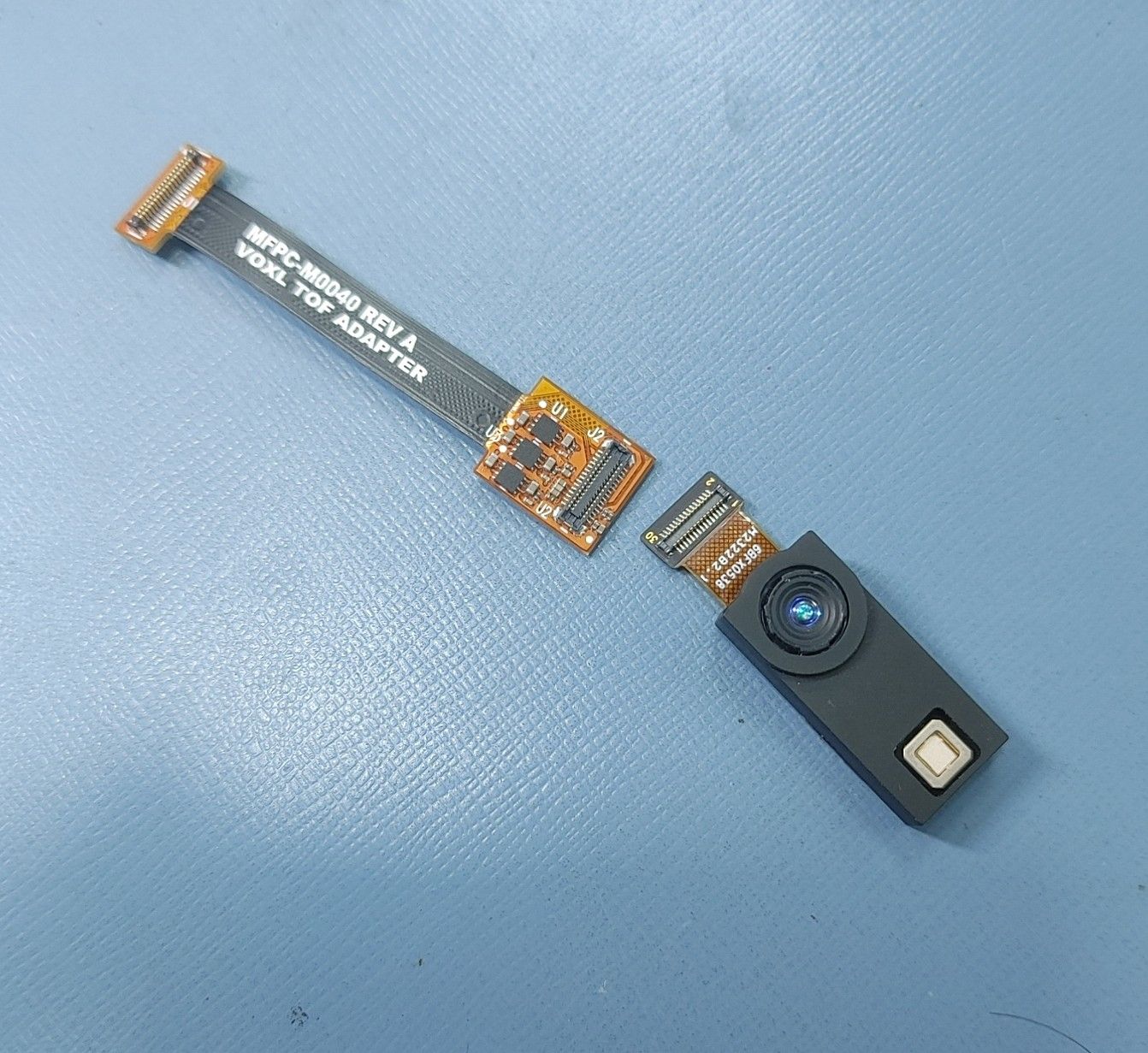
  • VOXL2 - Legacy TOF MSU-M0040-1-01

    Unsolved image-sensor
    1
    1
    0 Votes
    1 Posts
    295 Views
    No one has replied
  • Monitor Sierra Wireless 5G signal?

    Unsolved cellular
    11
    1 Votes
    11 Posts
    4k Views
    P
    @Thomas-Eiszler That's the plan we're working towards also, I did make some tries with AT commands also, but had to put the work aside for other commitments in the past few weeks. The information from yourself and @groupo above helps a lot. It shouldn't be too hard to make a service out of a python script for this. I'd been pursuing getting the data direct from the Qualcomm chipset, but AT commands and gpsd queries seen to be the way to go.
  • White Balance

    Unsolved image-sensor
    3
    0 Votes
    3 Posts
    513 Views
    G
    @Alex-Kushleyev Thanks for getting back to me. For what I am working on setting a fixed whitebalance seems like it would work, but I would at least find it useful if the white balance were tune-able. For my application I'm using the Modal drone for supervising Gaussian Splat training with an image stream, and color consistency across frames is important for good reconstruction otherwise I'll have to do color correction in the map which is a pain. Not sure if a lot of other people are using the HiRes for scene reconstructions so maybe its not universally useful though!
  • Not able to connect IMX678 with VOXL2 M0154

    Unsolved image-sensor
    1
    4
    0 Votes
    1 Posts
    326 Views
    No one has replied
  • GCS setup with Doodle Labs

    Unsolved
    1
    0 Votes
    1 Posts
    476 Views
    No one has replied
  • Quectel 5G-Modem doesn't work at all

    Unsolved cellular
    25
    0 Votes
    25 Posts
    7k Views
    Jerry LinJ
    OK, cool thanks Will try.
  • Add-on boards with support for Doodle Labs

    2
    0 Votes
    2 Posts
    750 Views
    ModeratorM
    We have updated our docs here: https://docs.modalai.com/doodle-labs-user-guide/#voxl-2-10-pin-usb-add-on-boards
  • Compatibility and Usage of 5G Modem with Starling 2 Drone

    Unsolved cellular
    1
    0 Votes
    1 Posts
    559 Views
    No one has replied
  • What is the maximum number of hires cameras can be connect?

    Unsolved image-sensor
    5
    0 Votes
    5 Posts
    799 Views
    Alex KushleyevA
    Hi @Leon-Vaidman , We offer several high resolution cameras: IMX214 (4208x3120) : 13Mpix IMX412 (4056x3040) : 12Mpix IMX678 (3840x2160) : 8Mpix We are looking into supporting a 64Mpix camera, but it is not yet available. There is no problem getting RAW10 frames at 30fps from 2 cameras. I believe the limitation will come from saving the frames to VOXL2 storage (which may not be an issue if your target FPS is very low). Each 4056x3040 frame is 4056 * 3040 * 1.2= 14.8MB, so 30FPS would be around 440MB/s. I have set up a test where i connected two IMX214 cameras and two IMX412 cameras and configured for maximum resolution and the system is able to grab 30fps from each camera using voxl-inspect-cam, however streaming all this data to the inspect tool puts too much stress on the system and is only possible for a short period of time. | Pipe Name | bytes | wide | hgt |exp(ms)| gain | frame id |latency(ms)| fps | mbps | format | hires0_bayer |18534400 | 4056 | 3040 | 14.34 | 1330 | 73 | 70.6 | 30.1 | 4462.2 | RAW10 | hires1_bayer |19722240 | 4208 | 3120 | 33.00 | 800 | 74 | 104.8 | 30.3 | 4781.1 | RAW10 | hires2_bayer |18534400 | 4056 | 3040 | 17.20 | 1442 | 74 | 76.5 | 30.1 | 4466.4 | RAW10 | hires3_bayer |19722240 | 4208 | 3120 | 33.00 | 800 | 73 | 130.5 | 30.3 | 4780.8 | RAW10 Interacting with RAW frames of this resolution at high rate is not practical because even sending them from one process to another takes substantial cpu time. It seems that in your case the FPS will be very low, so that should not be an issue. if you wanted to save a few FPS RAW10 data from 2 cameras. I have described, more or less, the current limit of VOXL2 capabilities in terms of getting RAW images. Please keep in mind if you wanted processed images (YUV or video), you can currently only get that for two cameras. With this in mind, let me know please let me know what else you need to know or if you are ready to start testing, i can help you set this up. For low enough FPS, you may be able to use voxl-logger or voxl-record-raw-image tools or may need to modify them depending on your needs (I can help you with that). Alex
  • Bad Tunning

    Unsolved esc
    12
    1
    0 Votes
    12 Posts
    2k Views
    Alex KushleyevA
    Hi @Stefan-Amundarain , Thank you for uploading the video with the detailed demonstration. What I see from the video is that the initial "sinusoidal" spin-up works (almost) every time, but the ESC fails to transition to regular non-sinusoidal control mode. There are typically two reasons for this: a bad motor / wiring / connection or one of the ESC Mosfets is not working properly. In some failures, the sinusoidal spin-up is still able to rotate the motor, but during the transition to normal operating mode, there are some checks to ensure proper motor behavior and if those checks fail, the ESC stops (and then restarts since you are commanding it to spin). The behavior i am seeing is very similar to this. sometimes if you have spin-up time too fast (and spin-up power too low), the ESC will lose sync with the motor during sinusoidal spin-up. I would suggest trying to (you can do both changes at once): increase the spin-up time (double it from what you have now) increase the spin-up power by 20% (if it is 100 (which is 10% power), set it to 120, so it will be 12% power). also double check that the motor kV is set correctly, because it is used during sinusoidal spin-up for back-emf compensation. I would also suggest swapping out the motor for an identical new motor, so you can eliminate the motor being an issue. You can also check the motor winding resistance to make sure all 3 possible pair-wise resistance measurements have the same resistance. Finally, if all of these steps fail, please try to use another ESC channel to see if it is a dead ESC channel (which should be unlikely). Please try these out and let me know what you find! Alex
  • Using a raspberry pi pivpn to tunnel for communication

    Unsolved cellular
    5
    1 Votes
    5 Posts
    2k Views
    P
    @David-Smyth Would you be willing to share the .service files you created?
  • VOXL ESC Mini Integration with px4 on pixhawk6x and KakuteH7

    Unsolved esc
    2
    0 Votes
    2 Posts
    442 Views
    Alex KushleyevA
    @MChehadeh , the PX4 ESC driver in v1.14.3 should be functional, but outdated. The latest version lives here : https://github.com/modalai/px4-firmware/tree/voxl-dev/src/drivers/actuators/voxl_esc, it would be best if you are able to build that for your board. If you want to stick with the current version, please double check: uart port that you are using to connect to the ESC. In that version of the ESC driver, you specify the port with -d param when you spawn the task : https://github.com/PX4/PX4-Autopilot/blob/v1.14.3/src/drivers/actuators/modal_io/modal_io.cpp#L237 double check the baud rate that the ESC is running at, you should know it from running the voxl-esc tools, which are working for you.'' If you switch to the latest version of the ESC driver in PX4, you should have the following debug information that is very helpful to diagnose any issues: #run px4 in foreground and grep for VOXL_ESC: voxl-px4 -d | grep VOXL_ESC INFO [muorb] SLPI: VOXL_ESC: Starting VOXL ESC driver INFO [muorb] SLPI: VOXL_ESC: Opening UART ESC device 2, baud rate 2000000 INFO [muorb] SLPI: VOXL_ESC: Successfully opened UART ESC device INFO [muorb] SLPI: VOXL_ESC: Detecting ESCs... INFO [muorb] SLPI: VOXL_ESC: ESC ID : 0 INFO [muorb] SLPI: VOXL_ESC: Board Type : 37: ModalAi 4-in-1 ESC (M0134-1) INFO [muorb] SLPI: VOXL_ESC: Unique ID : 0x203330385246571900480024 INFO [muorb] SLPI: VOXL_ESC: Firmware : version 39, hash eb6fb500 INFO [muorb] SLPI: VOXL_ESC: Bootloader : version 183, hash b4fa2cf8 INFO [muorb] SLPI: VOXL_ESC: Reply time : 1646us INFO [muorb] SLPI: VOXL_ESC: INFO [muorb] SLPI: VOXL_ESC: ESC ID : 1 INFO [muorb] SLPI: VOXL_ESC: Board Type : 37: ModalAi 4-in-1 ESC (M0134-1) INFO [muorb] SLPI: VOXL_ESC: Unique ID : 0x2033303852465719004D004D INFO [muorb] SLPI: VOXL_ESC: Firmware : version 39, hash eb6fb500 INFO [muorb] SLPI: VOXL_ESC: Bootloader : version 183, hash b4fa2cf8 INFO [muorb] SLPI: VOXL_ESC: Reply time : 621us INFO [muorb] SLPI: VOXL_ESC: INFO [muorb] SLPI: VOXL_ESC: ESC ID : 2 INFO [muorb] SLPI: VOXL_ESC: Board Type : 37: ModalAi 4-in-1 ESC (M0134-1) INFO [muorb] SLPI: VOXL_ESC: Unique ID : 0x203330385246571900500042 INFO [muorb] SLPI: VOXL_ESC: Firmware : version 39, hash eb6fb500 INFO [muorb] SLPI: VOXL_ESC: Bootloader : version 183, hash b4fa2cf8 INFO [muorb] SLPI: VOXL_ESC: Reply time : 1120us INFO [muorb] SLPI: VOXL_ESC: INFO [muorb] SLPI: VOXL_ESC: ESC ID : 3 INFO [muorb] SLPI: VOXL_ESC: Board Type : 37: ModalAi 4-in-1 ESC (M0134-1) INFO [muorb] SLPI: VOXL_ESC: Unique ID : 0x2033303852465719004D0050 INFO [muorb] SLPI: VOXL_ESC: Firmware : version 39, hash eb6fb500 INFO [muorb] SLPI: VOXL_ESC: Bootloader : version 183, hash b4fa2cf8 INFO [muorb] SLPI: VOXL_ESC: Reply time : 617us INFO [muorb] SLPI: VOXL_ESC: INFO [muorb] SLPI: VOXL_ESC: Use extened rpm packet : 1 INFO [muorb] SLPI: VOXL_ESC: All ESCs successfully detected No Changes are needed on the hardware side. If the UART-based communication does not work for you and you want to use traditional PWM-based (1-2ms) output from the STM board, the ESC mini supports PWM input, just make sure to use the latest ESC firmware. https://gitlab.com/voxl-public/voxl-sdk/utilities/voxl-esc/-/tree/master/voxl-esc-tools/firmware https://docs.modalai.com/voxl-mini-esc-datasheet/#pwm-inputs--outputs be very careful soldering and using the test points to make sure not to pull the wires to prevent pulling off the board pads this method is not recommended because you will not receive any feedback about ESC state and closed loop RPM control is not used. We use this for bench testing, for example when using a dyno or something like that (which controls the ESC with standard pwm signal) if you wanted to try PWM input, it is easier using M0134 ESC because it has a JST GH connector : https://docs.modalai.com/modal-esc-datasheet/#pwm-inputs--outputs
  • MAVLink not connecting on 5G

    Unsolved cellular
    3
    0 Votes
    3 Posts
    1k Views
    P
    @pthomason Anyone have thoughts on correcting IP bindings, or the list of services that need to be restarted to notice a new 5G connection?
  • Camera not recognised

    Unsolved image-sensor
    2
    1
    0 Votes
    2 Posts
    456 Views
    Alex KushleyevA
    @TomP , if you look at C19 configuration (https://docs.modalai.com/voxl2-camera-configs/#c-17-tof-tracking-stereo0v9782-and-hiresimx412) , the IMX412 camera is connected to the other camera port on the dual camera flex. You have it connected to the connector that goes straight out (7JU), C19 shows IMX412 connected to the port going off to the side (7JL). If you want to keep IMX412 connected as shown in your picture, please copy the following file, which will tell the camera pipeline to try to detect the IMX412 camera on 7JU: cp /usr/share/modalai/chi-cdk/imx412/com.qti.sensormodule.imx412_3.bin /usr/lib/camera/ Please double check this
  • Vision sensors not detected in VOXL2

    Unsolved image-sensor
    17
    1
    0 Votes
    17 Posts
    3k Views
    Alex KushleyevA
    @Jetson-Nano , the ToF V1 calibration file is downloaded from the sensor itself via i2c . No internet connection is required.
  • What wavelength does ir-cut filter cover on the imx577/412 camera w/ filter?

    Unsolved image-sensor
    1
    0 Votes
    1 Posts
    343 Views
    No one has replied
  • M0062 Ethernet not discovered

    Unsolved
    10
    0 Votes
    10 Posts
    3k Views
    Alex KushleyevA
    @ksl , if the issue is only with the debug build, could you just use a regular perf build of the Kernel?