
voxl-docker-mavsdk-python build issues
-
@Alexander-Saunders You run build-image.sh on your host computer, not on the voxl
-
@Eric-Katzfey Hey Eric, I'm running the ./build-image.sh on a laptop and am running into this error.
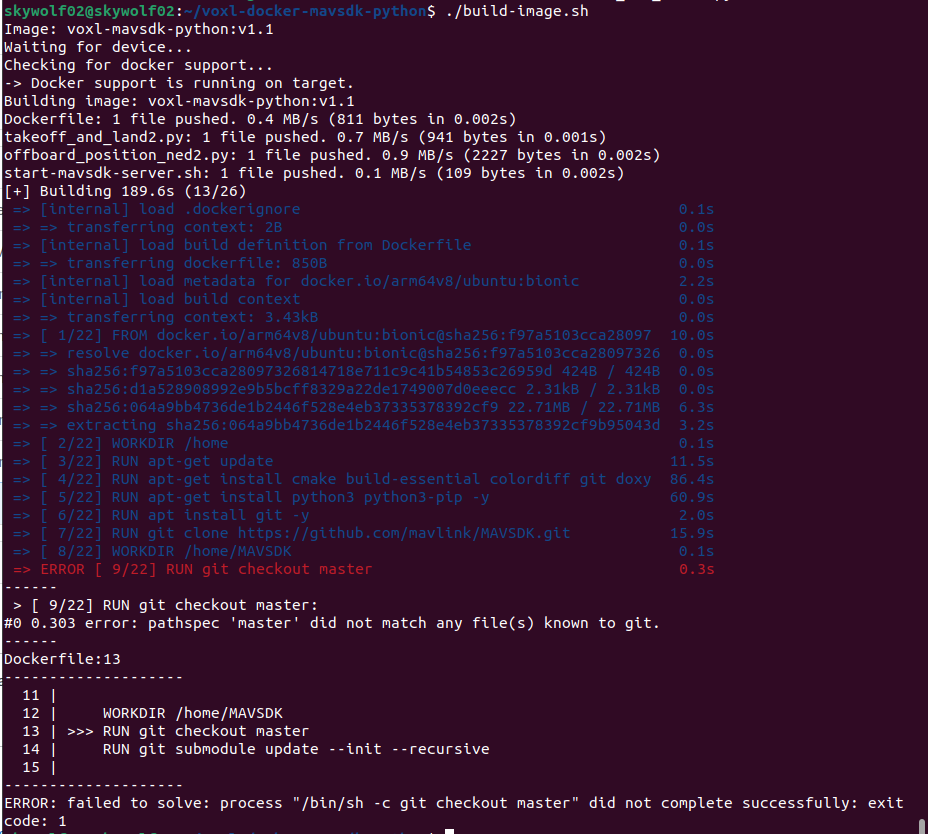
@Alexander-Saunders Oh, the repo probably has the name
masterchanged tomain. Can you change the Dockerfile to try to use main instead of master and see if that works? -
@Alexander-Saunders Oh, the repo probably has the name
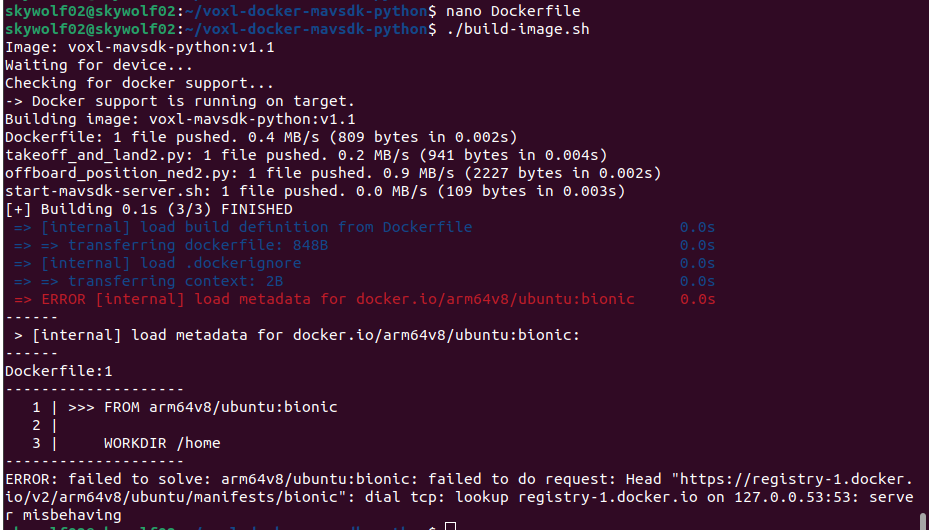
masterchanged tomain. Can you change the Dockerfile to try to use main instead of master and see if that works?@Eric-Katzfey No luck with that. Also the branch is a master.
-
@Eric-Katzfey No luck with that. Also the branch is a master.
@Alexander-Saunders But that's a different problem. Before it was the checkout of master. This is something else.
-
@Eric-Katzfey No luck with that. Also the branch is a master.
@Alexander-Saunders I'll try it and see what happens.
-
@Eric-Katzfey No luck with that. Also the branch is a master.
@Alexander-Saunders Okay, yes, I see the same error. Sorry about that. Let me see if I can figure out what is going wrong.
-
@Eric-Katzfey No luck with that. Also the branch is a master.
@Alexander-Saunders Can you try with the
origin/ascend/dockerbranch of voxl-docker-mavsdk-python instead? Seems like that's where the latest updates have happened and haven't been merged back into master yet. -
@Alexander-Saunders But that's a different problem. Before it was the checkout of master. This is something else.
@Eric-Katzfey I went ahead and tried the voxl-docker-mavsdk repo also and get the same issue. I tried docker pull docker.io/arm64v8/ubuntu:bionic and giving the user permissions for the file/folder.
What is stumping me is the registry-1.docker.io. I can ping it and do a DNS lookup just fine. Also pinging google is fine. But the error is persisting in relation to it.
I will try the other branches for voxl-docker-mavsdk andvoxl-docker-mavsdk-python. Will that require changing main to the branch name for the DockerFile?
-
@Alexander-Saunders Can you try with the
origin/ascend/dockerbranch of voxl-docker-mavsdk-python instead? Seems like that's where the latest updates have happened and haven't been merged back into master yet.@Eric-Katzfey
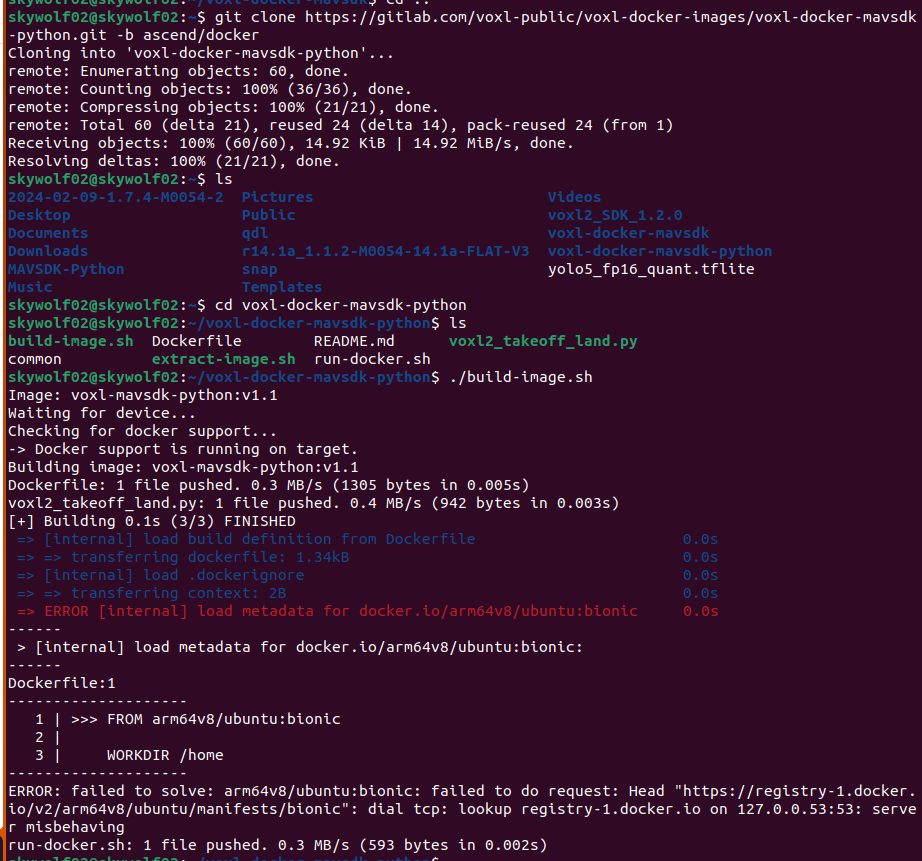 This is from the ascend branch
 -
@Eric-Katzfey
This is from the ascend branch@Alexander-Saunders Not sure why that is happening. That does not happen when I try it. I'm guessing that you have a networking issue of some sort or perhaps all this messing with Docker on the target has somehow corrupted it and it needs to be reinstalled.
-
@Alexander-Saunders Not sure why that is happening. That does not happen when I try it. I'm guessing that you have a networking issue of some sort or perhaps all this messing with Docker on the target has somehow corrupted it and it needs to be reinstalled.
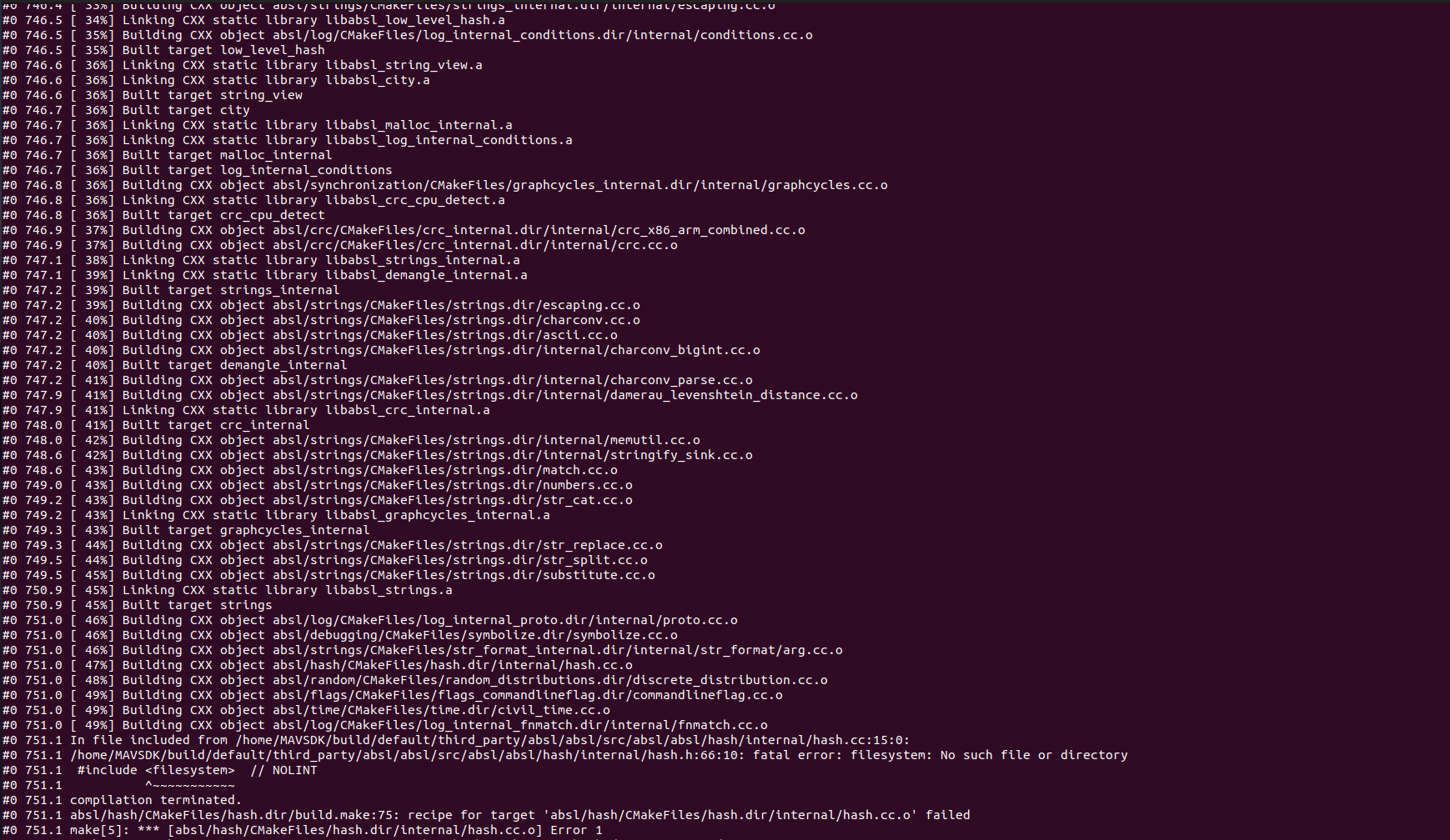
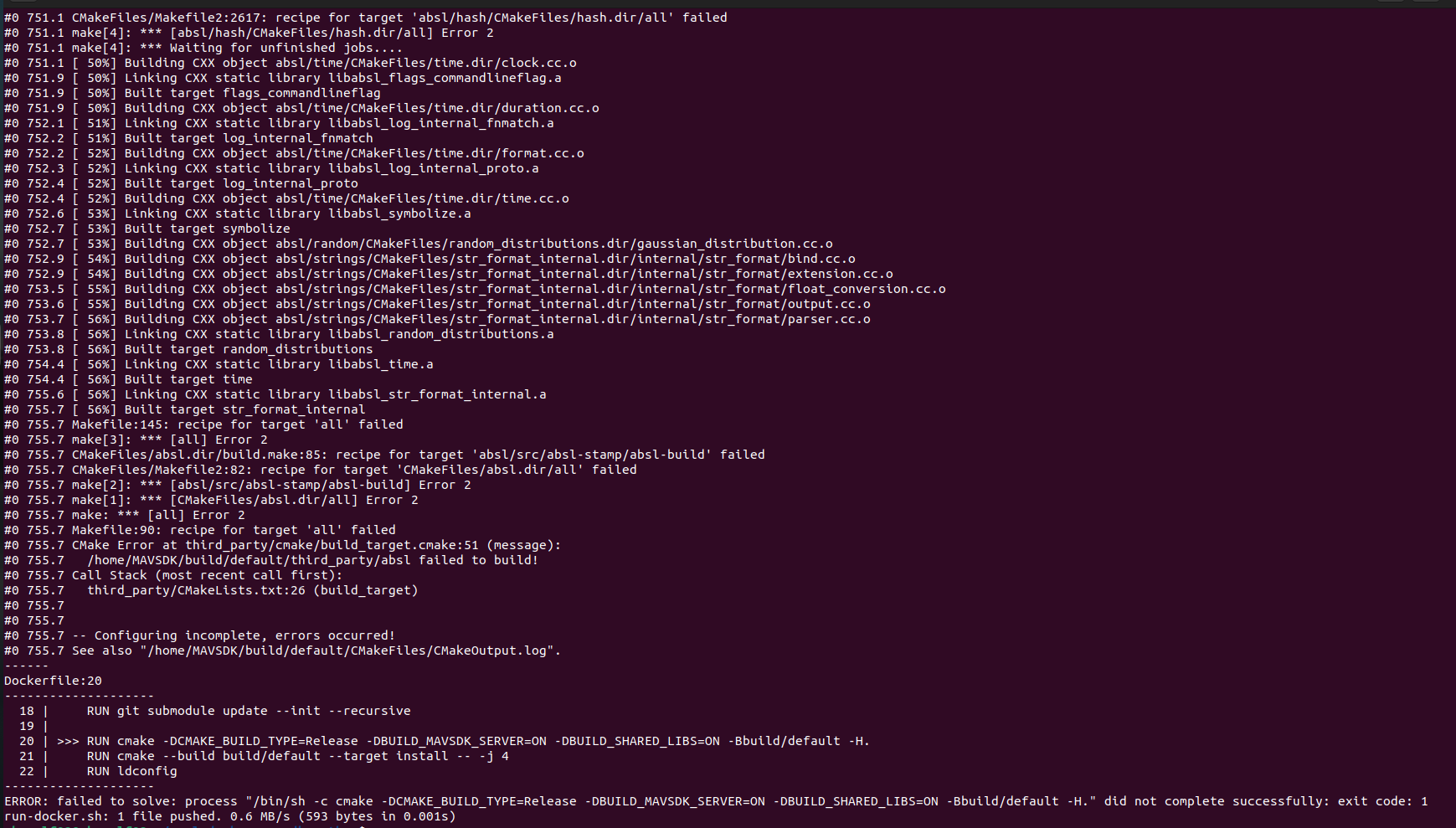
@Eric-Katzfey So I deleted and re cloned voxl-docker-mavsdk-python branch ascend/docker. The build image failed halfway in. Is there any work that needs to be done on the VOXL2 or host computer that I am not aware of?
-
@Alexander-Saunders Not sure why that is happening. That does not happen when I try it. I'm guessing that you have a networking issue of some sort or perhaps all this messing with Docker on the target has somehow corrupted it and it needs to be reinstalled.
@Eric-Katzfey Also in the environment, the SDK is 1.2, python 3.10.12, Ubuntu 22.04.4 LTS
-
@Eric-Katzfey Also in the environment, the SDK is 1.2, python 3.10.12, Ubuntu 22.04.4 LTS
@Alexander-Saunders Okay, we're looking into it, thanks!
-
@Alexander-Saunders Okay, we're looking into it, thanks!
@Eric-Katzfey Thank you! What kind of timeline should I expect to hear back from you?
-
@Eric-Katzfey Thank you! What kind of timeline should I expect to hear back from you?
@Alexander-Saunders I am testing a fix for this issue as we speak. I've sourced the problem to a Mavsdk dependency that had a recent upstream change which is causing issues on the voxl2 build image script.
-
@Eric-Katzfey Thank you! What kind of timeline should I expect to hear back from you?
@Alexander-Saunders can you try the following patch to the Dockerfile?
I noticed that the mavsdk 3rd party package updated their header files to include a filesystem header that is incompatible with standard cpp libraries on ubuntu 18.04, hence switching the dockerfile to focal instead of bionic. You can save the text in a *.patch file (e.g. "filesystem.patch") and then run
git apply filesystem.patchAlternatively just switch the docker base image from "bionic" to "focal"
diff --git a/Dockerfile b/Dockerfile index c38a5c7..08e668b 100644 --- a/Dockerfile +++ b/Dockerfile @@ -1,4 +1,4 @@ -FROM arm64v8/ubuntu:bionic +FROM arm64v8/ubuntu:focal WORKDIR /home @@ -8,7 +8,7 @@ RUN wget -O - https://apt.kitware.com/keys/kitware-archive-latest.asc 2>/dev/nul RUN apt-add-repository 'deb https://apt.kitware.com/ubuntu/ bionic main' RUN apt-get update RUN apt-get install -y cmake build-essential colordiff git doxygen -y -RUN apt-get install -y python3 python3-pip -y +RUN apt-get install -y python3 python3-pip -y RUN apt-get install -y git libxml2-dev libxslt-dev curl RUN git clone https://github.com/mavlink/MAVSDK.git -
@Alexander-Saunders can you try the following patch to the Dockerfile?
I noticed that the mavsdk 3rd party package updated their header files to include a filesystem header that is incompatible with standard cpp libraries on ubuntu 18.04, hence switching the dockerfile to focal instead of bionic. You can save the text in a *.patch file (e.g. "filesystem.patch") and then run
git apply filesystem.patchAlternatively just switch the docker base image from "bionic" to "focal"
diff --git a/Dockerfile b/Dockerfile index c38a5c7..08e668b 100644 --- a/Dockerfile +++ b/Dockerfile @@ -1,4 +1,4 @@ -FROM arm64v8/ubuntu:bionic +FROM arm64v8/ubuntu:focal WORKDIR /home @@ -8,7 +8,7 @@ RUN wget -O - https://apt.kitware.com/keys/kitware-archive-latest.asc 2>/dev/nul RUN apt-add-repository 'deb https://apt.kitware.com/ubuntu/ bionic main' RUN apt-get update RUN apt-get install -y cmake build-essential colordiff git doxygen -y -RUN apt-get install -y python3 python3-pip -y +RUN apt-get install -y python3 python3-pip -y RUN apt-get install -y git libxml2-dev libxslt-dev curl RUN git clone https://github.com/mavlink/MAVSDK.git@brahim Thank you for getting back to me! I do not have access to the VOXL at this moment, but will be able to test first thing in the morning.
-
@Alexander-Saunders can you try the following patch to the Dockerfile?
I noticed that the mavsdk 3rd party package updated their header files to include a filesystem header that is incompatible with standard cpp libraries on ubuntu 18.04, hence switching the dockerfile to focal instead of bionic. You can save the text in a *.patch file (e.g. "filesystem.patch") and then run
git apply filesystem.patchAlternatively just switch the docker base image from "bionic" to "focal"
diff --git a/Dockerfile b/Dockerfile index c38a5c7..08e668b 100644 --- a/Dockerfile +++ b/Dockerfile @@ -1,4 +1,4 @@ -FROM arm64v8/ubuntu:bionic +FROM arm64v8/ubuntu:focal WORKDIR /home @@ -8,7 +8,7 @@ RUN wget -O - https://apt.kitware.com/keys/kitware-archive-latest.asc 2>/dev/nul RUN apt-add-repository 'deb https://apt.kitware.com/ubuntu/ bionic main' RUN apt-get update RUN apt-get install -y cmake build-essential colordiff git doxygen -y -RUN apt-get install -y python3 python3-pip -y +RUN apt-get install -y python3 python3-pip -y RUN apt-get install -y git libxml2-dev libxslt-dev curl RUN git clone https://github.com/mavlink/MAVSDK.git@brahim Changing from bionic to focal lead to Docker being installed successfully. I am currently following this documentation: https://docs.modalai.com/voxl2-PX4-hitl/ .
The commands were ran fine:
1. wget https://storage.googleapis.com/modalai_public/modal_dockers/voxl-gazebo-docker_v1_2.tgz
2. docker load < voxl-gazebo-docker_v1_2.tgz
3. docker tag voxl-gazebo-docker:v1.2 voxl-gazebo-docker:latest
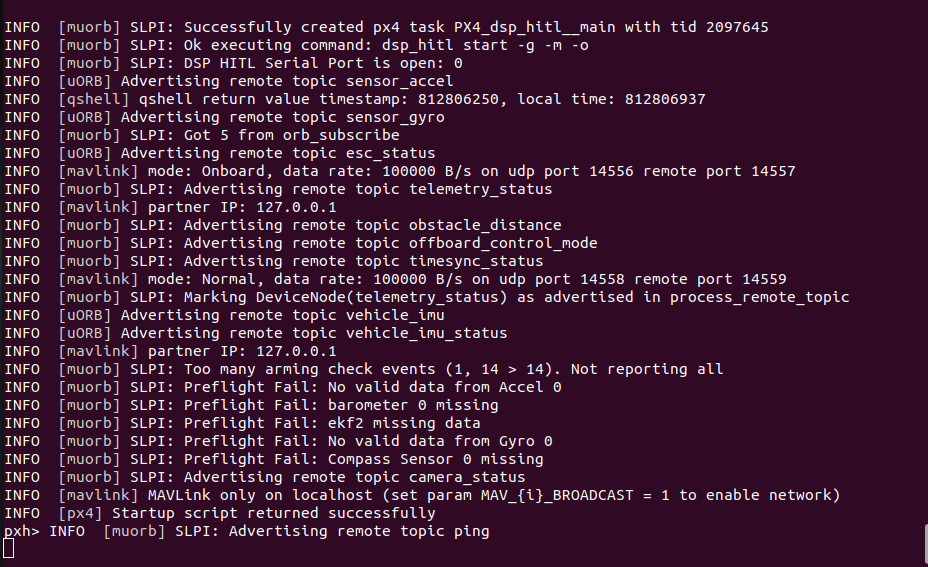
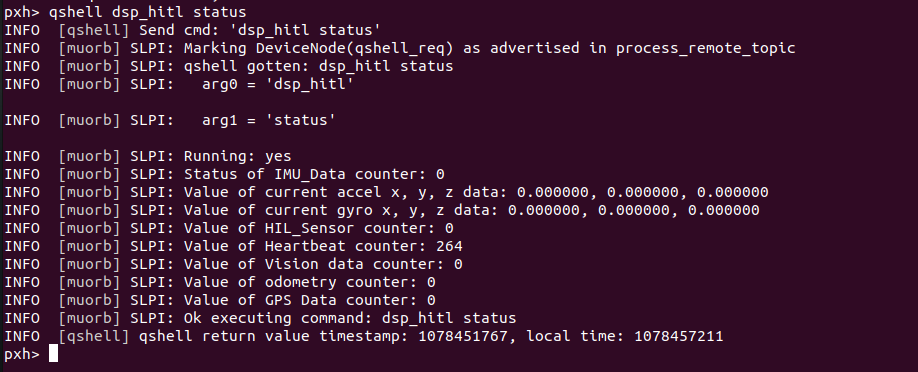
I am not using QGC because I am troubleshooting why only heartbeat packages are being sent and not GPS, Odometry, etc. voxl-px4 and qvio-server have been disabled.
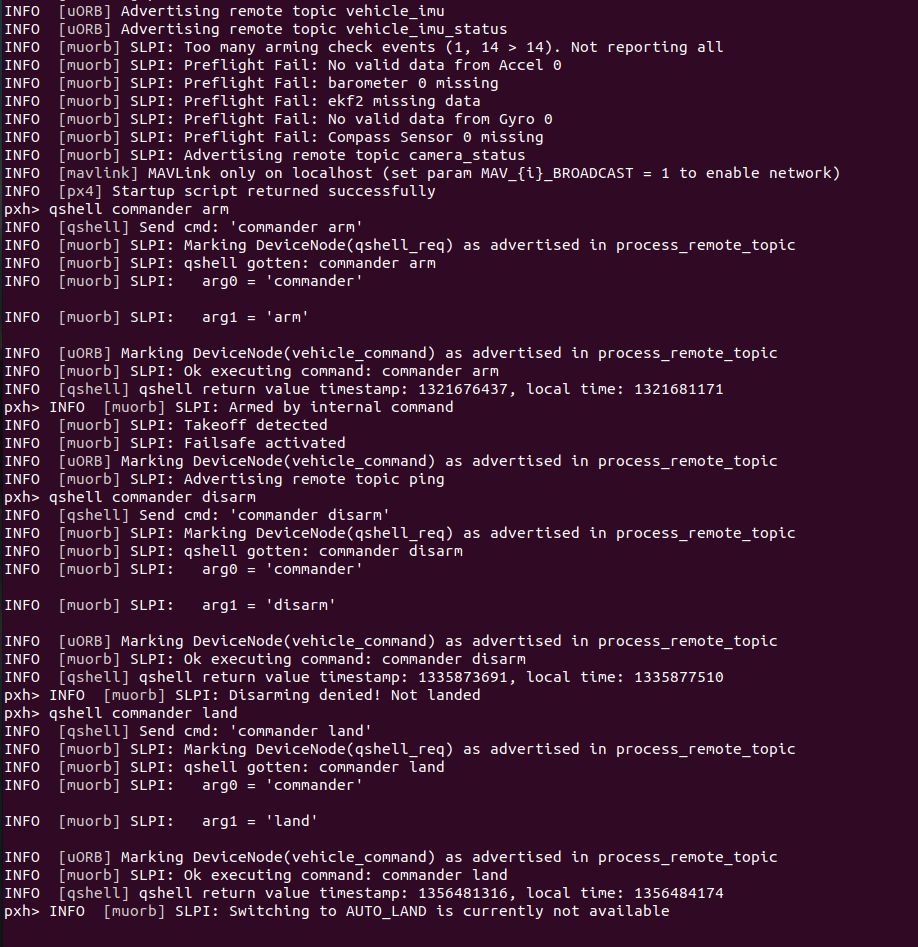
In a separate terminal, voxl-px4-hitl is being ran as called for in the documentation. The main issues are gazebo seems to not give expected outputs with some of the commands and the lack of status data from dsp_hitl. I've also looked through the forum to see if anyone else had a similar problem. If you or anyone could point me in the correct direction, I would greatly appreciate that!
-Alexander
-
@brahim Changing from bionic to focal lead to Docker being installed successfully. I am currently following this documentation: https://docs.modalai.com/voxl2-PX4-hitl/ .
The commands were ran fine:
1. wget https://storage.googleapis.com/modalai_public/modal_dockers/voxl-gazebo-docker_v1_2.tgz
2. docker load < voxl-gazebo-docker_v1_2.tgz
3. docker tag voxl-gazebo-docker:v1.2 voxl-gazebo-docker:latest
I am not using QGC because I am troubleshooting why only heartbeat packages are being sent and not GPS, Odometry, etc. voxl-px4 and qvio-server have been disabled.
In a separate terminal, voxl-px4-hitl is being ran as called for in the documentation. The main issues are gazebo seems to not give expected outputs with some of the commands and the lack of status data from dsp_hitl. I've also looked through the forum to see if anyone else had a similar problem. If you or anyone could point me in the correct direction, I would greatly appreciate that!
-Alexander
@Alexander-Saunders @brahim to add on a follow up, what is the correct pin out of the FTDI cable we plug into the j18 port? Documentation says no power, just RX, TX, and Gnd; but YouTube instruction by Ascend Engineering uses Power as well. YouTube video by ModalAI matches instructions but the information doesn’t seem to be read, just heartbeat packets.
-
@Alexander-Saunders @brahim to add on a follow up, what is the correct pin out of the FTDI cable we plug into the j18 port? Documentation says no power, just RX, TX, and Gnd; but YouTube instruction by Ascend Engineering uses Power as well. YouTube video by ModalAI matches instructions but the information doesn’t seem to be read, just heartbeat packets.
Hi @Stefan-Amundarain
Not all FTDI cables are the same. There are literally over a dozen variations out there.
If the specific FTDI cable requires a "VTREF" to set the logic levels, then a VCC is needed as on Ascend's example. If you use one that is USB powered and TTL levles, then likely it is already set for 3.3V, and no power is required.
So, please double check your specific FTDI cable before following any tutorials you may see and make appropriate mods as needed.Thanks!
-
A Alex Kushleyev referenced this topic on




Reading along? Create a free ModalAI Forum account to join in.
With an account you can reply, ask your own question, get an email when a ModalAI engineer answers, and mark the reply that solved it. Your place in each thread is saved between visits.
Questions about VOXL, Flight Core, ESCs and ModalAI drones are answered here by the engineers who build them.
Register Login