Skip to content
  • Categories
  • Recent
  • Tags
  • Popular
  • Users
  • Groups
Collapse
Brand Logo

ModalAI Forum

  1. ModalAI Support Forum
  2. VOXL Compute & Autopilot
  3. VOXL
  4. voxl-docker-mavsdk-python build issues

voxl-docker-mavsdk-python build issues

Scheduled Pinned Locked Moved VOXL
48 Posts 6 Posters 19.0k Views 4 Watching
  • Oldest to Newest
  • Newest to Oldest
  • Most Votes
Reply
  • Reply as topic
Log in to reply
This topic has been deleted. Only users with topic management privileges can see it.
  • Eric KatzfeyE Eric Katzfey

    @Alexander-Saunders Can you try with the origin/ascend/docker branch of voxl-docker-mavsdk-python instead? Seems like that's where the latest updates have happened and haven't been merged back into master yet.

    Alexander SaundersA Offline
    Alexander SaundersA Offline
    Alexander Saunders
    Contributor
    wrote on last edited by Alexander Saunders
    #20

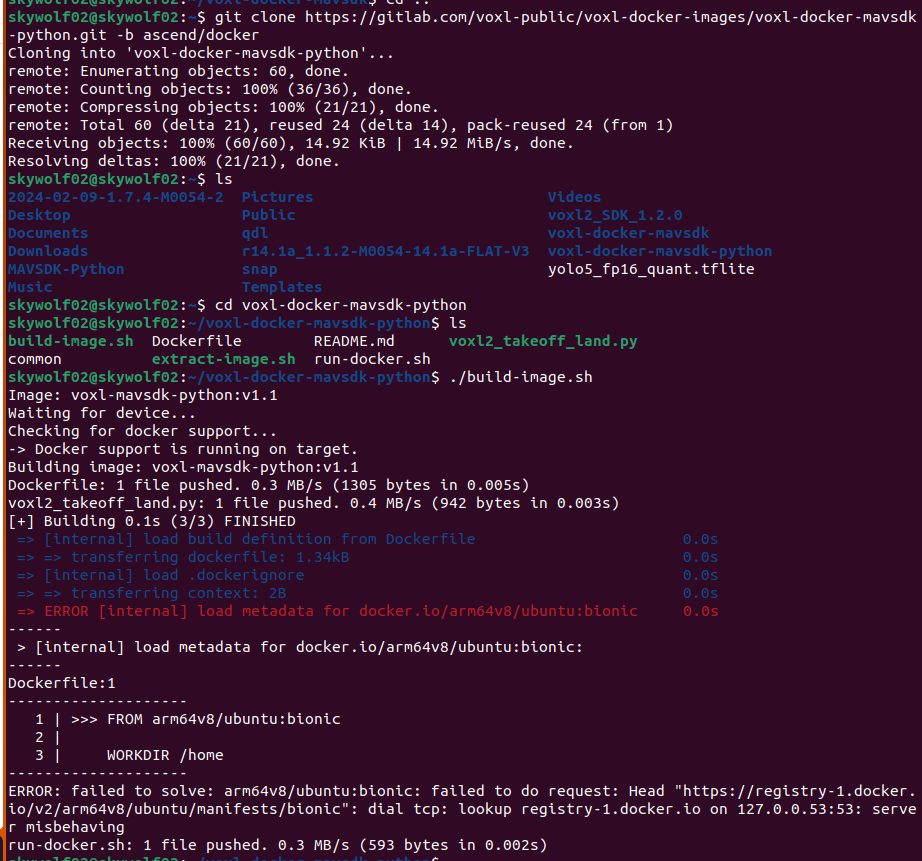
    @Eric-Katzfey image (2).png This is from the ascend branch

    Eric KatzfeyE 1 Reply Last reply
    0
    • Alexander SaundersA Alexander Saunders

      @Eric-Katzfey image (2).png This is from the ascend branch

      Eric KatzfeyE Offline
      Eric KatzfeyE Offline
      Eric Katzfey
      ModalAI Team
      wrote on last edited by
      #21

      @Alexander-Saunders Not sure why that is happening. That does not happen when I try it. I'm guessing that you have a networking issue of some sort or perhaps all this messing with Docker on the target has somehow corrupted it and it needs to be reinstalled.

      Alexander SaundersA 2 Replies Last reply
      0
      • Eric KatzfeyE Eric Katzfey

        @Alexander-Saunders Not sure why that is happening. That does not happen when I try it. I'm guessing that you have a networking issue of some sort or perhaps all this messing with Docker on the target has somehow corrupted it and it needs to be reinstalled.

        Alexander SaundersA Offline
        Alexander SaundersA Offline
        Alexander Saunders
        Contributor
        wrote on last edited by
        #22

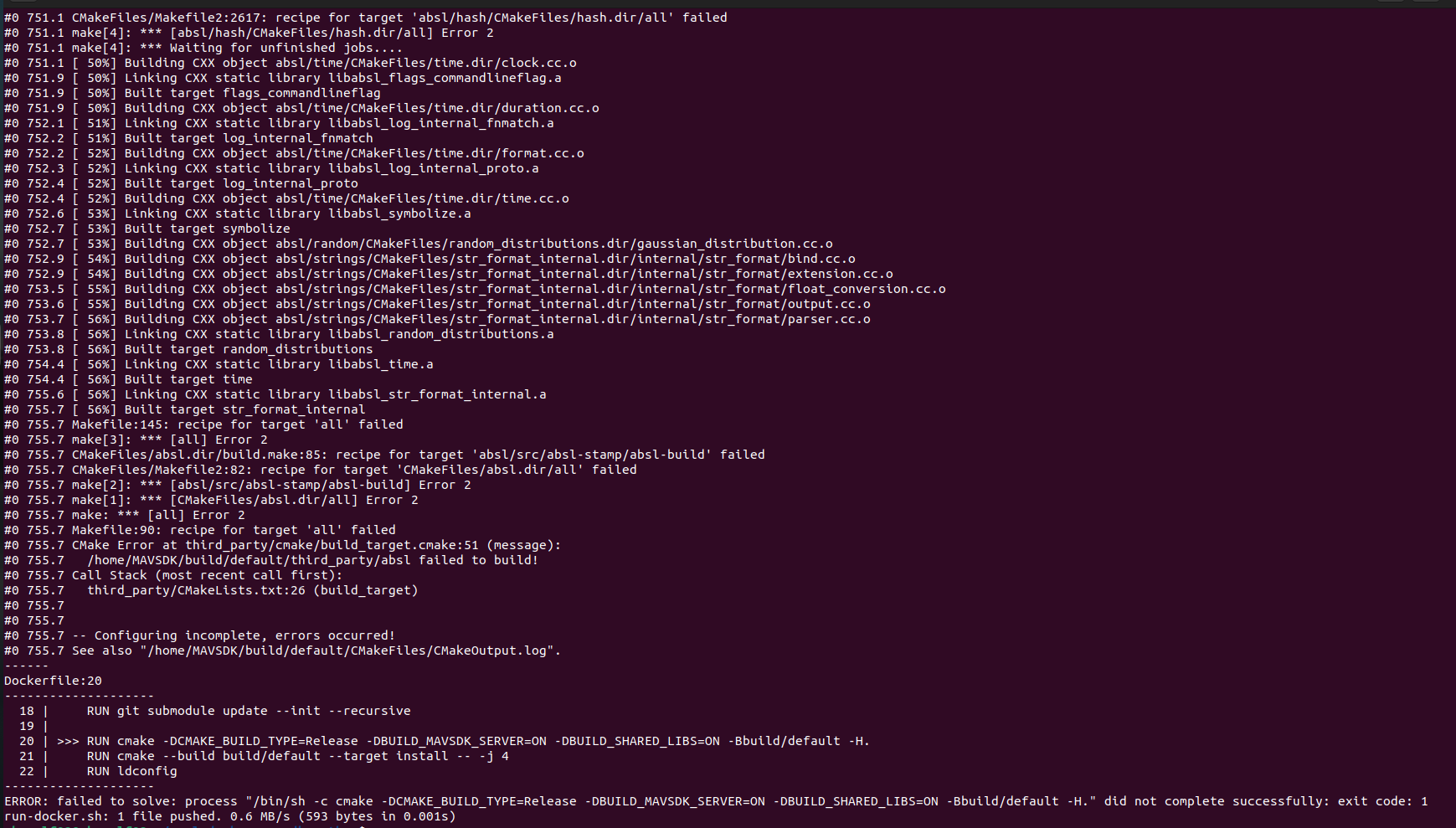
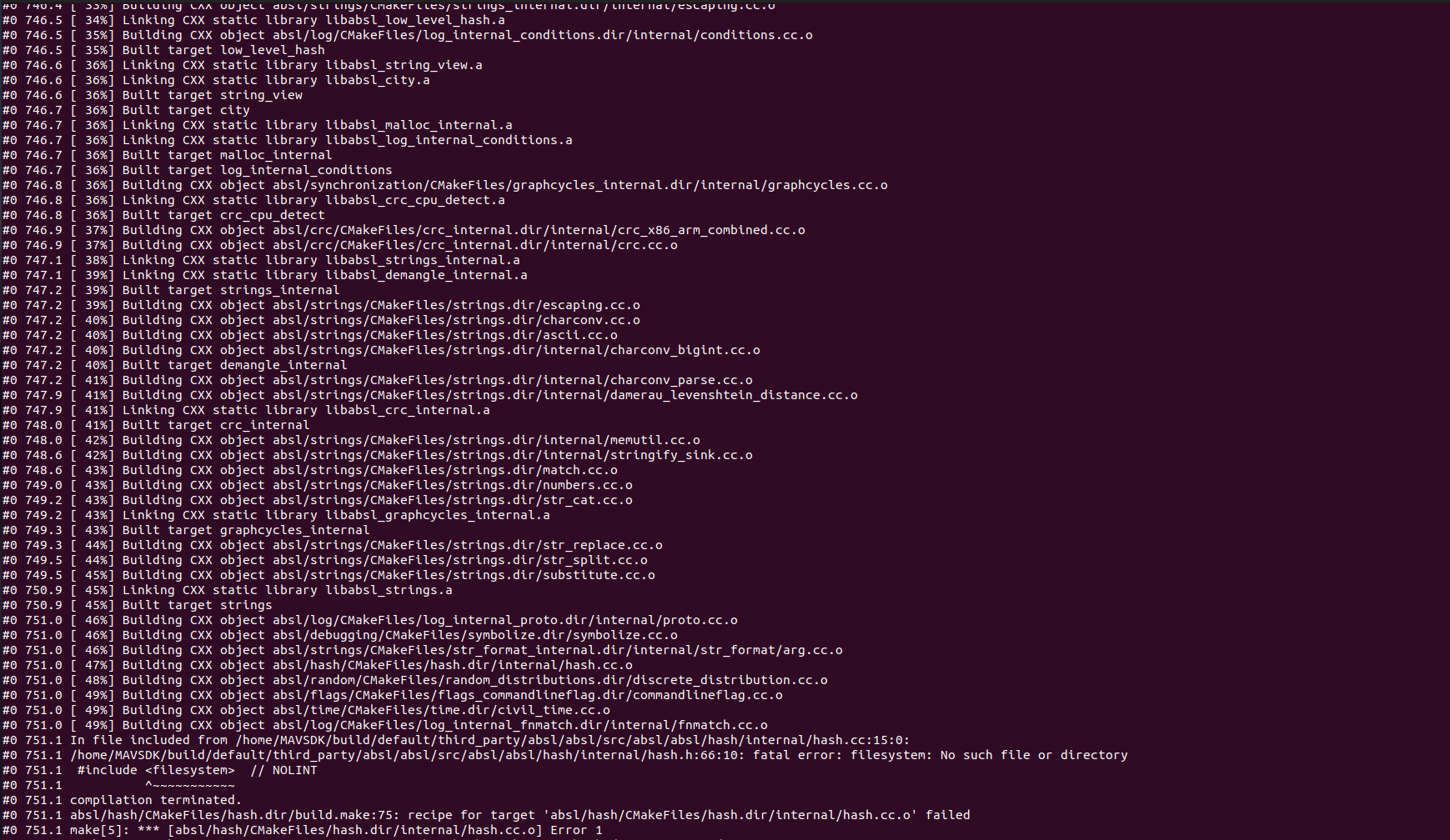
        @Eric-Katzfey So I deleted and re cloned voxl-docker-mavsdk-python branch ascend/docker. The build image failed halfway in. Is there any work that needs to be done on the VOXL2 or host computer that I am not aware of? Screenshot from 2024-05-28 10-15-10.png Screenshot from 2024-05-28 10-14-45.png
        1 Reply Last reply
        0
        • Eric KatzfeyE Eric Katzfey

          @Alexander-Saunders Not sure why that is happening. That does not happen when I try it. I'm guessing that you have a networking issue of some sort or perhaps all this messing with Docker on the target has somehow corrupted it and it needs to be reinstalled.

          Alexander SaundersA Offline
          Alexander SaundersA Offline
          Alexander Saunders
          Contributor
          wrote on last edited by
          #23

          @Eric-Katzfey Also in the environment, the SDK is 1.2, python 3.10.12, Ubuntu 22.04.4 LTS

          Eric KatzfeyE 1 Reply Last reply
          0
          • Alexander SaundersA Alexander Saunders

            @Eric-Katzfey Also in the environment, the SDK is 1.2, python 3.10.12, Ubuntu 22.04.4 LTS

            Eric KatzfeyE Offline
            Eric KatzfeyE Offline
            Eric Katzfey
            ModalAI Team
            wrote on last edited by
            #24

            @Alexander-Saunders Okay, we're looking into it, thanks!

            Alexander SaundersA 1 Reply Last reply
            0
            • Eric KatzfeyE Eric Katzfey

              @Alexander-Saunders Okay, we're looking into it, thanks!

              Alexander SaundersA Offline
              Alexander SaundersA Offline
              Alexander Saunders
              Contributor
              wrote on last edited by
              #25

              @Eric-Katzfey Thank you! What kind of timeline should I expect to hear back from you?

              B 2 Replies Last reply
              0
              • Alexander SaundersA Alexander Saunders

                @Eric-Katzfey Thank you! What kind of timeline should I expect to hear back from you?

                B Offline
                B Offline
                brahim
                Contributor
                wrote on last edited by
                #26

                @Alexander-Saunders I am testing a fix for this issue as we speak. I've sourced the problem to a Mavsdk dependency that had a recent upstream change which is causing issues on the voxl2 build image script.

                1 Reply Last reply
                0
                • Alexander SaundersA Alexander Saunders

                  @Eric-Katzfey Thank you! What kind of timeline should I expect to hear back from you?

                  B Offline
                  B Offline
                  brahim
                  Contributor
                  wrote on last edited by
                  #27

                  @Alexander-Saunders can you try the following patch to the Dockerfile?

                  I noticed that the mavsdk 3rd party package updated their header files to include a filesystem header that is incompatible with standard cpp libraries on ubuntu 18.04, hence switching the dockerfile to focal instead of bionic. You can save the text in a *.patch file (e.g. "filesystem.patch") and then run

                  git apply filesystem.patch
                  

                  Alternatively just switch the docker base image from "bionic" to "focal"

                  diff --git a/Dockerfile b/Dockerfile
                  index c38a5c7..08e668b 100644
                  --- a/Dockerfile
                  +++ b/Dockerfile
                  @@ -1,4 +1,4 @@
                  -FROM arm64v8/ubuntu:bionic
                  +FROM arm64v8/ubuntu:focal
                   
                   WORKDIR /home
                   
                  @@ -8,7 +8,7 @@ RUN wget -O - https://apt.kitware.com/keys/kitware-archive-latest.asc 2>/dev/nul
                   RUN apt-add-repository 'deb https://apt.kitware.com/ubuntu/ bionic main'
                   RUN apt-get update
                   RUN apt-get install -y cmake build-essential colordiff git doxygen -y
                  -RUN apt-get install -y python3 python3-pip -y 
                  +RUN apt-get install -y python3 python3-pip -y
                   RUN apt-get install -y git libxml2-dev libxslt-dev curl
                   
                   RUN git clone https://github.com/mavlink/MAVSDK.git
                  
                  
                  Alexander SaundersA 2 Replies Last reply
                  0
                  • B brahim

                    @Alexander-Saunders can you try the following patch to the Dockerfile?

                    I noticed that the mavsdk 3rd party package updated their header files to include a filesystem header that is incompatible with standard cpp libraries on ubuntu 18.04, hence switching the dockerfile to focal instead of bionic. You can save the text in a *.patch file (e.g. "filesystem.patch") and then run

                    git apply filesystem.patch
                    

                    Alternatively just switch the docker base image from "bionic" to "focal"

                    diff --git a/Dockerfile b/Dockerfile
                    index c38a5c7..08e668b 100644
                    --- a/Dockerfile
                    +++ b/Dockerfile
                    @@ -1,4 +1,4 @@
                    -FROM arm64v8/ubuntu:bionic
                    +FROM arm64v8/ubuntu:focal
                     
                     WORKDIR /home
                     
                    @@ -8,7 +8,7 @@ RUN wget -O - https://apt.kitware.com/keys/kitware-archive-latest.asc 2>/dev/nul
                     RUN apt-add-repository 'deb https://apt.kitware.com/ubuntu/ bionic main'
                     RUN apt-get update
                     RUN apt-get install -y cmake build-essential colordiff git doxygen -y
                    -RUN apt-get install -y python3 python3-pip -y 
                    +RUN apt-get install -y python3 python3-pip -y
                     RUN apt-get install -y git libxml2-dev libxslt-dev curl
                     
                     RUN git clone https://github.com/mavlink/MAVSDK.git
                    
                    
                    Alexander SaundersA Offline
                    Alexander SaundersA Offline
                    Alexander Saunders
                    Contributor
                    wrote on last edited by
                    #28

                    @brahim Thank you for getting back to me! I do not have access to the VOXL at this moment, but will be able to test first thing in the morning.

                    1 Reply Last reply
                    0
                    • B brahim

                      @Alexander-Saunders can you try the following patch to the Dockerfile?

                      I noticed that the mavsdk 3rd party package updated their header files to include a filesystem header that is incompatible with standard cpp libraries on ubuntu 18.04, hence switching the dockerfile to focal instead of bionic. You can save the text in a *.patch file (e.g. "filesystem.patch") and then run

                      git apply filesystem.patch
                      

                      Alternatively just switch the docker base image from "bionic" to "focal"

                      diff --git a/Dockerfile b/Dockerfile
                      index c38a5c7..08e668b 100644
                      --- a/Dockerfile
                      +++ b/Dockerfile
                      @@ -1,4 +1,4 @@
                      -FROM arm64v8/ubuntu:bionic
                      +FROM arm64v8/ubuntu:focal
                       
                       WORKDIR /home
                       
                      @@ -8,7 +8,7 @@ RUN wget -O - https://apt.kitware.com/keys/kitware-archive-latest.asc 2>/dev/nul
                       RUN apt-add-repository 'deb https://apt.kitware.com/ubuntu/ bionic main'
                       RUN apt-get update
                       RUN apt-get install -y cmake build-essential colordiff git doxygen -y
                      -RUN apt-get install -y python3 python3-pip -y 
                      +RUN apt-get install -y python3 python3-pip -y
                       RUN apt-get install -y git libxml2-dev libxslt-dev curl
                       
                       RUN git clone https://github.com/mavlink/MAVSDK.git
                      
                      
                      Alexander SaundersA Offline
                      Alexander SaundersA Offline
                      Alexander Saunders
                      Contributor
                      wrote on last edited by Alexander Saunders
                      #29

                      @brahim Changing from bionic to focal lead to Docker being installed successfully. I am currently following this documentation: https://docs.modalai.com/voxl2-PX4-hitl/ .

                      The commands were ran fine:

                      1. wget https://storage.googleapis.com/modalai_public/modal_dockers/voxl-gazebo-docker_v1_2.tgz
                      2. docker load < voxl-gazebo-docker_v1_2.tgz
                      3. docker tag voxl-gazebo-docker:v1.2 voxl-gazebo-docker:latest
                      

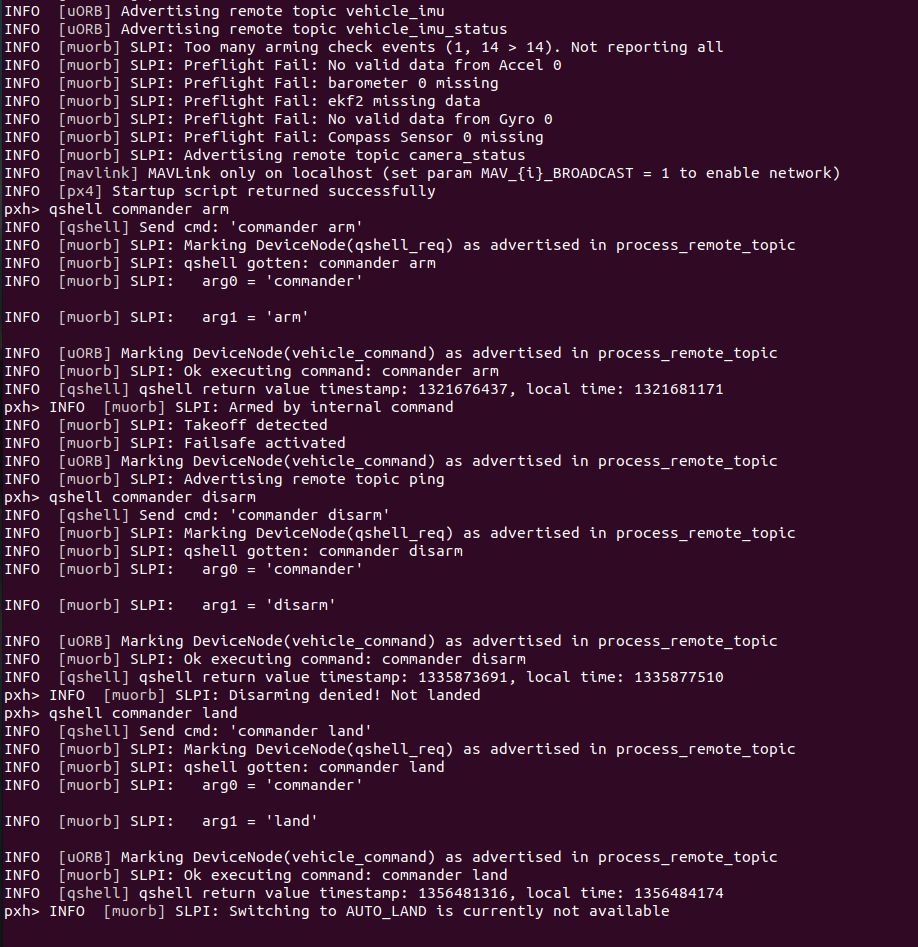
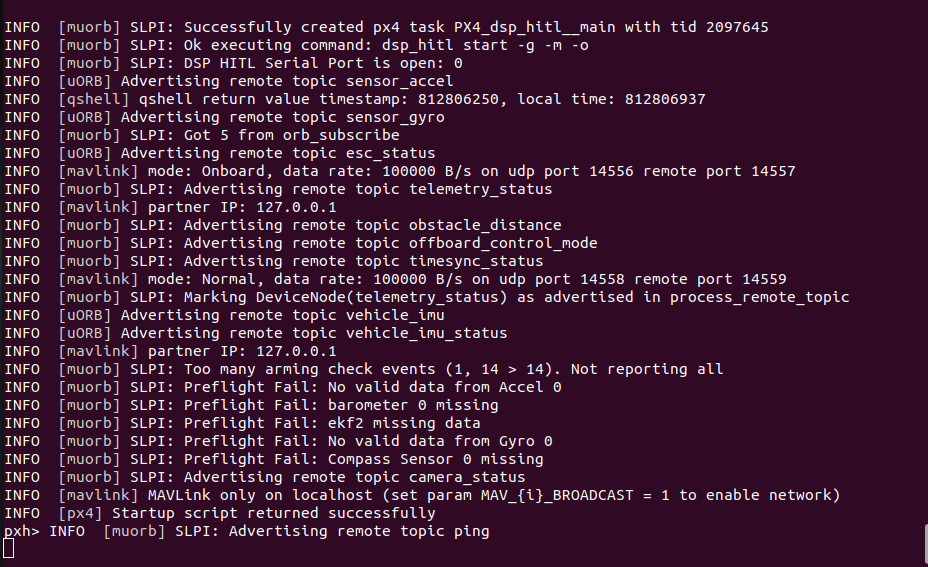
                      I am not using QGC because I am troubleshooting why only heartbeat packages are being sent and not GPS, Odometry, etc. voxl-px4 and qvio-server have been disabled.

                      In a separate terminal, voxl-px4-hitl is being ran as called for in the documentation. The main issues are gazebo seems to not give expected outputs with some of the commands and the lack of status data from dsp_hitl. I've also looked through the forum to see if anyone else had a similar problem. If you or anyone could point me in the correct direction, I would greatly appreciate that!

                      -Alexander
                      Screenshot from 2024-05-29 13-27-31.png Screenshot from 2024-05-29 13-28-05.png Screenshot from 2024-05-29 13-32-45.png

                      Stefan AmundarainS 1 Reply Last reply
                      0
                      • Alexander SaundersA Alexander Saunders

                        @brahim Changing from bionic to focal lead to Docker being installed successfully. I am currently following this documentation: https://docs.modalai.com/voxl2-PX4-hitl/ .

                        The commands were ran fine:

                        1. wget https://storage.googleapis.com/modalai_public/modal_dockers/voxl-gazebo-docker_v1_2.tgz
                        2. docker load < voxl-gazebo-docker_v1_2.tgz
                        3. docker tag voxl-gazebo-docker:v1.2 voxl-gazebo-docker:latest
                        

                        I am not using QGC because I am troubleshooting why only heartbeat packages are being sent and not GPS, Odometry, etc. voxl-px4 and qvio-server have been disabled.

                        In a separate terminal, voxl-px4-hitl is being ran as called for in the documentation. The main issues are gazebo seems to not give expected outputs with some of the commands and the lack of status data from dsp_hitl. I've also looked through the forum to see if anyone else had a similar problem. If you or anyone could point me in the correct direction, I would greatly appreciate that!

                        -Alexander
                        Screenshot from 2024-05-29 13-27-31.png Screenshot from 2024-05-29 13-28-05.png Screenshot from 2024-05-29 13-32-45.png

                        Stefan AmundarainS Offline
                        Stefan AmundarainS Offline
                        Stefan Amundarain
                        Contributor
                        wrote on last edited by Stefan Amundarain
                        #30

                        @Alexander-Saunders @brahim to add on a follow up, what is the correct pin out of the FTDI cable we plug into the j18 port? Documentation says no power, just RX, TX, and Gnd; but YouTube instruction by Ascend Engineering uses Power as well. YouTube video by ModalAI matches instructions but the information doesn’t seem to be read, just heartbeat packets.

                        VinnyV 1 Reply Last reply
                        0
                        • Stefan AmundarainS Stefan Amundarain

                          @Alexander-Saunders @brahim to add on a follow up, what is the correct pin out of the FTDI cable we plug into the j18 port? Documentation says no power, just RX, TX, and Gnd; but YouTube instruction by Ascend Engineering uses Power as well. YouTube video by ModalAI matches instructions but the information doesn’t seem to be read, just heartbeat packets.

                          VinnyV Offline
                          VinnyV Offline
                          Vinny
                          ModalAI Team
                          wrote on last edited by
                          #31

                          Hi @Stefan-Amundarain
                          Not all FTDI cables are the same. There are literally over a dozen variations out there.
                          If the specific FTDI cable requires a "VTREF" to set the logic levels, then a VCC is needed as on Ascend's example. If you use one that is USB powered and TTL levles, then likely it is already set for 3.3V, and no power is required.
                          So, please double check your specific FTDI cable before following any tutorials you may see and make appropriate mods as needed.

                          Thanks!

                          Alexander SaundersA 1 Reply Last reply
                          0
                          • Alex KushleyevA Alex Kushleyev referenced this topic on
                          • VinnyV Vinny

                            Hi @Stefan-Amundarain
                            Not all FTDI cables are the same. There are literally over a dozen variations out there.
                            If the specific FTDI cable requires a "VTREF" to set the logic levels, then a VCC is needed as on Ascend's example. If you use one that is USB powered and TTL levles, then likely it is already set for 3.3V, and no power is required.
                            So, please double check your specific FTDI cable before following any tutorials you may see and make appropriate mods as needed.

                            Thanks!

                            Alexander SaundersA Offline
                            Alexander SaundersA Offline
                            Alexander Saunders
                            Contributor
                            wrote on last edited by Alexander Saunders
                            #32

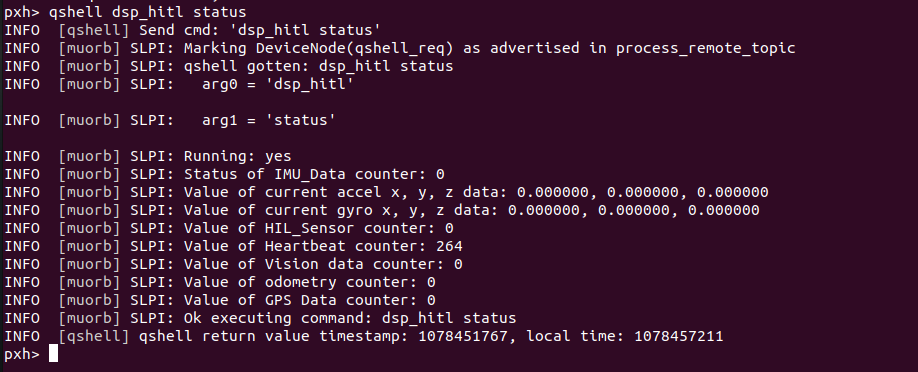
                            @Vinny @brahim @Eric-Katzfey We're still running into the issue of no meaningful data being sent to gazebo. The only data is still the heartbeat packets.
                            We're referencing: https://docs.modalai.com/voxl2-PX4-hitl/

                            We've done the steps up to: docker run --rm -it --net=host --privileged -e DISPLAY=$DISPLAY -v /dev/input:/dev/input:rw -v /tmp/.X11-unix:/tmp/.X11-unix:ro voxl-gazebo-docker ./run_gazebo.bash

                            and

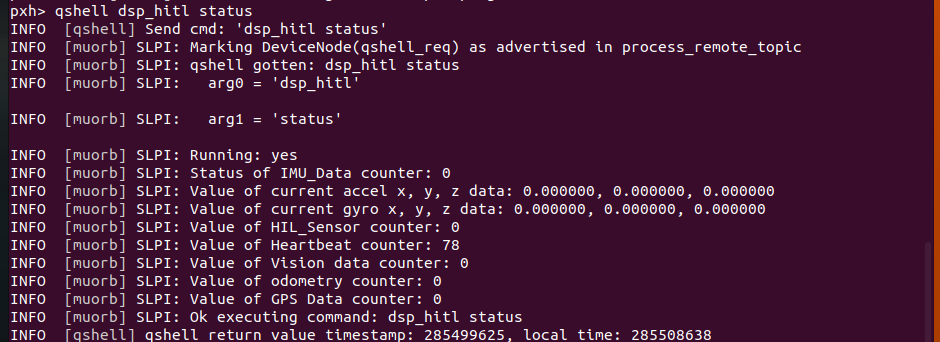
                            qshell dsp_hitl status which is telling us about the heartbeat only.

                            Also, we tried the archived instructions to see if we would get a different output.

                            The FTDI cable used is the same, but the serial port closed issue has stopped. Don't know why.

                            The warning for SDF I feel like is the source of the problem.

                            The warning when running docker run --rm:
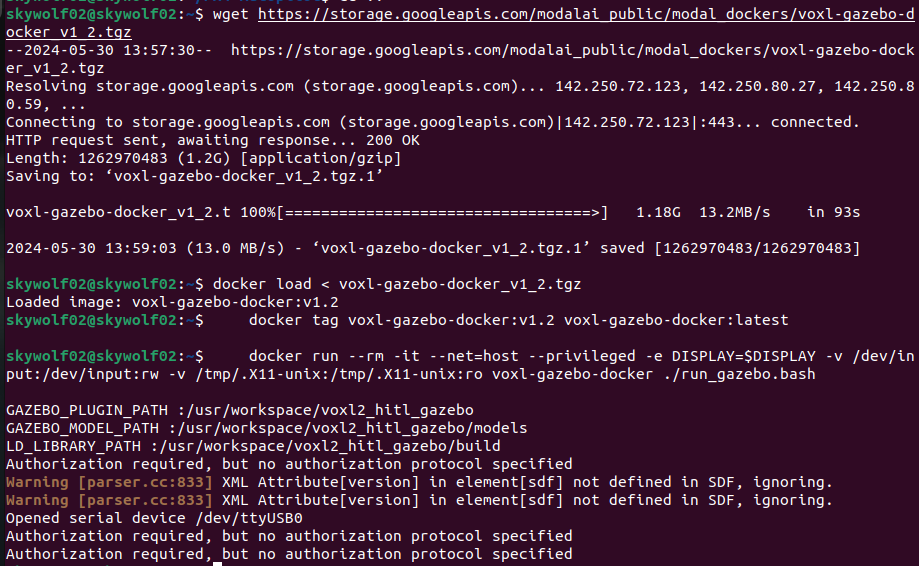
                            image (5).png

                            Status output:
                            image (3).png

                            Eric KatzfeyE 1 Reply Last reply
                            0
                            • Alexander SaundersA Alexander Saunders

                              @Vinny @brahim @Eric-Katzfey We're still running into the issue of no meaningful data being sent to gazebo. The only data is still the heartbeat packets.
                              We're referencing: https://docs.modalai.com/voxl2-PX4-hitl/

                              We've done the steps up to: docker run --rm -it --net=host --privileged -e DISPLAY=$DISPLAY -v /dev/input:/dev/input:rw -v /tmp/.X11-unix:/tmp/.X11-unix:ro voxl-gazebo-docker ./run_gazebo.bash

                              and

                              qshell dsp_hitl status which is telling us about the heartbeat only.

                              Also, we tried the archived instructions to see if we would get a different output.

                              The FTDI cable used is the same, but the serial port closed issue has stopped. Don't know why.

                              The warning for SDF I feel like is the source of the problem.

                              The warning when running docker run --rm:
                              image (5).png

                              Status output:
                              image (3).png

                              Eric KatzfeyE Offline
                              Eric KatzfeyE Offline
                              Eric Katzfey
                              ModalAI Team
                              wrote on last edited by
                              #33

                              @Alexander-Saunders Are you doing xhost + before running docker?

                              Alexander SaundersA 1 Reply Last reply
                              0
                              • Eric KatzfeyE Eric Katzfey

                                @Alexander-Saunders Are you doing xhost + before running docker?

                                Alexander SaundersA Offline
                                Alexander SaundersA Offline
                                Alexander Saunders
                                Contributor
                                wrote on last edited by
                                #34

                                @Eric-Katzfey The latest attempts, yes. After running that and

                                docker run --rm -it --net=host --privileged -e DISPLAY=$DISPLAY -v /dev/input:/dev/input:rw -v /tmp/.X11-unix:/tmp/.X11-unix:ro voxl-gazebo-docker ./run_gazebo.bash
                                

                                gazebo will open up. The issue is connect gazebo with VOXL2 to run in HITL mode. I've followed two of the video from Modalai and Ascend exactly with no luck. Also went through the documentation again.

                                All instances are being ran on the host computer. When comparing the image from above to docs, we are only getting heartbeat packets.
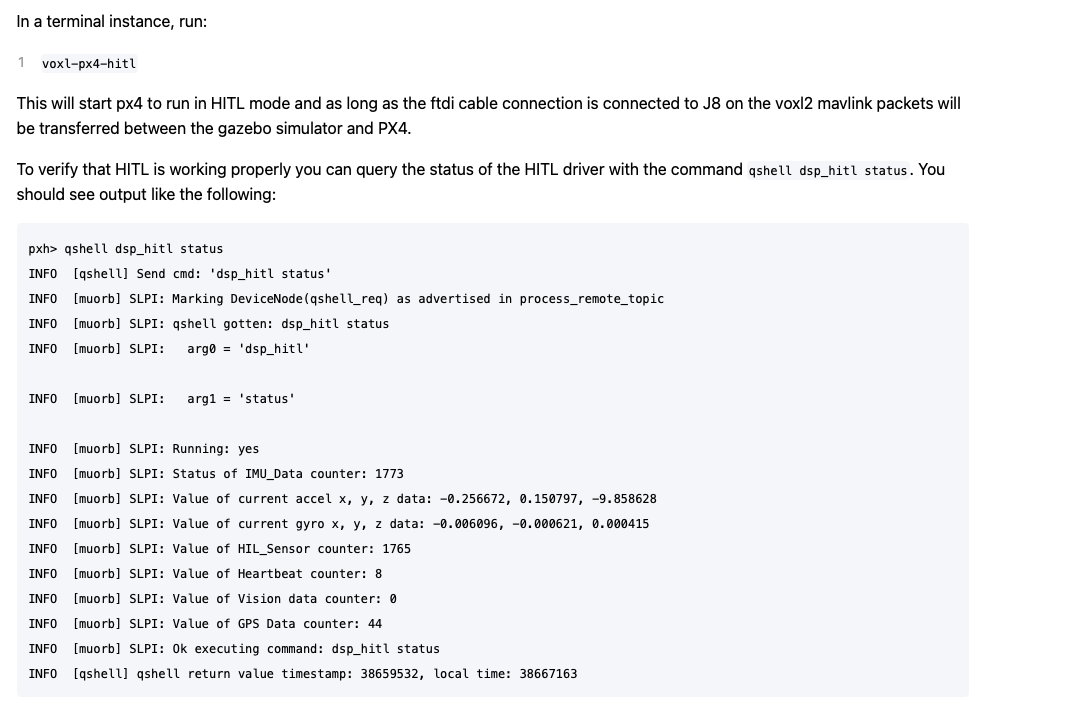
                                Screenshot 2024-05-31 at 8.48.34 AM.png

                                Eric KatzfeyE 3 Replies Last reply
                                0
                                • Alexander SaundersA Alexander Saunders

                                  @Eric-Katzfey The latest attempts, yes. After running that and

                                  docker run --rm -it --net=host --privileged -e DISPLAY=$DISPLAY -v /dev/input:/dev/input:rw -v /tmp/.X11-unix:/tmp/.X11-unix:ro voxl-gazebo-docker ./run_gazebo.bash
                                  

                                  gazebo will open up. The issue is connect gazebo with VOXL2 to run in HITL mode. I've followed two of the video from Modalai and Ascend exactly with no luck. Also went through the documentation again.

                                  All instances are being ran on the host computer. When comparing the image from above to docs, we are only getting heartbeat packets.
                                  Screenshot 2024-05-31 at 8.48.34 AM.png

                                  Eric KatzfeyE Offline
                                  Eric KatzfeyE Offline
                                  Eric Katzfey
                                  ModalAI Team
                                  wrote on last edited by
                                  #35

                                  @Alexander-Saunders The heartbeat counter is the amount of heartbeat messages being sent out, not received. So you are not getting anything on the serial port.

                                  1 Reply Last reply
                                  0
                                  • Alexander SaundersA Alexander Saunders

                                    @Eric-Katzfey The latest attempts, yes. After running that and

                                    docker run --rm -it --net=host --privileged -e DISPLAY=$DISPLAY -v /dev/input:/dev/input:rw -v /tmp/.X11-unix:/tmp/.X11-unix:ro voxl-gazebo-docker ./run_gazebo.bash
                                    

                                    gazebo will open up. The issue is connect gazebo with VOXL2 to run in HITL mode. I've followed two of the video from Modalai and Ascend exactly with no luck. Also went through the documentation again.

                                    All instances are being ran on the host computer. When comparing the image from above to docs, we are only getting heartbeat packets.
                                    Screenshot 2024-05-31 at 8.48.34 AM.png

                                    Eric KatzfeyE Offline
                                    Eric KatzfeyE Offline
                                    Eric Katzfey
                                    ModalAI Team
                                    wrote on last edited by
                                    #36

                                    @Alexander-Saunders Also, take a look at this: https://www.reddit.com/r/linux4noobs/comments/lu1plx/hi_i_get_this_authorization_required_but_no/

                                    1 Reply Last reply
                                    0
                                    • Alexander SaundersA Alexander Saunders

                                      @Eric-Katzfey The latest attempts, yes. After running that and

                                      docker run --rm -it --net=host --privileged -e DISPLAY=$DISPLAY -v /dev/input:/dev/input:rw -v /tmp/.X11-unix:/tmp/.X11-unix:ro voxl-gazebo-docker ./run_gazebo.bash
                                      

                                      gazebo will open up. The issue is connect gazebo with VOXL2 to run in HITL mode. I've followed two of the video from Modalai and Ascend exactly with no luck. Also went through the documentation again.

                                      All instances are being ran on the host computer. When comparing the image from above to docs, we are only getting heartbeat packets.
                                      Screenshot 2024-05-31 at 8.48.34 AM.png

                                      Eric KatzfeyE Offline
                                      Eric KatzfeyE Offline
                                      Eric Katzfey
                                      ModalAI Team
                                      wrote on last edited by
                                      #37

                                      @Alexander-Saunders Definitely looks like a permissions issue of some sort in your system.

                                      Alexander SaundersA 1 Reply Last reply
                                      0
                                      • Eric KatzfeyE Eric Katzfey

                                        @Alexander-Saunders Definitely looks like a permissions issue of some sort in your system.

                                        Alexander SaundersA Offline
                                        Alexander SaundersA Offline
                                        Alexander Saunders
                                        Contributor
                                        wrote on last edited by
                                        #38

                                        @Eric-Katzfey Are you suggesting giving the file/repo permissions with

                                        xhost si:localuser:root
                                        

                                        Also we are using the FDTI cable provided with the ESC AND USB C to A to connect to host.

                                        Eric KatzfeyE 1 Reply Last reply
                                        0
                                        • Alexander SaundersA Alexander Saunders

                                          @Eric-Katzfey Are you suggesting giving the file/repo permissions with

                                          xhost si:localuser:root
                                          

                                          Also we are using the FDTI cable provided with the ESC AND USB C to A to connect to host.

                                          Eric KatzfeyE Offline
                                          Eric KatzfeyE Offline
                                          Eric Katzfey
                                          ModalAI Team
                                          wrote on last edited by
                                          #39

                                          @Alexander-Saunders I'm only suggesting that there is a permissions problem of some sort. I don't see that on my machine so just trying to figure out what is different in your environment.

                                          Alexander SaundersA 3 Replies Last reply
                                          0

                                          Hello! It looks like you're interested in this conversation, but you don't have an account yet.

                                          Getting fed up of having to scroll through the same posts each visit? When you register for an account, you'll always come back to exactly where you were before, and choose to be notified of new replies (either via email, or push notification). You'll also be able to save bookmarks and upvote posts to show your appreciation to other community members.

                                          With your input, this post could be even better 💗

                                          Register Login
                                          Reply
                                          • Reply as topic
                                          Log in to reply
                                          • Oldest to Newest
                                          • Newest to Oldest
                                          • Most Votes


                                          ModalAI
                                          Categories Recent Tags ModalAI.com Docs
                                          © 2026 ModalAI® · Accelerating autonomy for smaller, smarter, safer drones · Powered by NodeBB
                                          • Login

                                          • Don't have an account? Register

                                          • Login or register to search.
                                          • First post
                                            Last post
                                          0
                                          • Categories
                                          • Recent
                                          • Tags
                                          • Popular
                                          • Users
                                          • Groups