
Unable to locate package libmodal-json in docker with ubuntu 22.04LTS
-
@Judoor-0 , this version of voxl-cross docker image (2.5) is old, you should use version 2.6 (for building pre SDK 1.2.0 packages) or 2.7 for SDK 1.2.0 and later.
Please try the newer docker image, you can download it from developer.modalai.com , click on Protected Downloads -> Docker Images.
Alex
@Alex-Kushleyev I've got the same issue with voxl-cross 2.7
Docker is working well cause i've done the tutorial and everythings work well.
It's weird it's like their is something blocking me from accessing to : http://voxl-packages.modalai.com ./dists/qrb5165/dev/binary-arm64/ InRelease -
I still don't know why I cannot install the dependecies with this line ./install_build_deps.sh qrb5165 dev but I directly downloaded the three dependecies that were required to run voxl-cross-templates from http://voxl-packages.modalai.com/dists/qrb5165/sdk-1.2/binary-arm64/.
So, I copied the depencies in my running voxl-docker :docker cp ~/downloads/libvoxl-cutils_0.1.1_arm64.deb <container_id>:/home/root docker cp ~/downloads/libmodal-pipe_2.10.0_arm64.deb <container_id>:/home/root docker cp ~/downloads/libmodal-json_0.4.3_arm64.deb <container_id>:/home/rootThen I installed the dependencies
sudo dpkg -i libvoxl-cutils_0.1.1_arm64.deb
sudo dpkg -i libmodal-json_0.4.3_arm64.deb
sudo dpkg -i libmodal-pipe_2.10.0_arm64.deb

# Fix any dependency issues
sudo apt-get install -f
And everythings is working fine now.
Julien
-
I still don't know why I cannot install the dependecies with this line ./install_build_deps.sh qrb5165 dev but I directly downloaded the three dependecies that were required to run voxl-cross-templates from http://voxl-packages.modalai.com/dists/qrb5165/sdk-1.2/binary-arm64/.
So, I copied the depencies in my running voxl-docker :docker cp ~/downloads/libvoxl-cutils_0.1.1_arm64.deb <container_id>:/home/root docker cp ~/downloads/libmodal-pipe_2.10.0_arm64.deb <container_id>:/home/root docker cp ~/downloads/libmodal-json_0.4.3_arm64.deb <container_id>:/home/rootThen I installed the dependencies
sudo dpkg -i libvoxl-cutils_0.1.1_arm64.deb
sudo dpkg -i libmodal-json_0.4.3_arm64.deb
sudo dpkg -i libmodal-pipe_2.10.0_arm64.deb

# Fix any dependency issues
sudo apt-get install -f
And everythings is working fine now.
Julien
@Judoor-0 , it seems it is a connection problem - can you do some test ping of different sites from within voxl-cross docker container? Can you ping the packages site? What about 8.8.8.8? What about manually wget the deb from the docker container?
Also, what command do you use to launch the voxl-cross docker container?
-
@Judoor-0 , it seems it is a connection problem - can you do some test ping of different sites from within voxl-cross docker container? Can you ping the packages site? What about 8.8.8.8? What about manually wget the deb from the docker container?
Also, what command do you use to launch the voxl-cross docker container?
@Alex-Kushleyev
I'm connecting like this :julien@julien-Titan-GT77-12UHS:~$ cd git/voxl-cross-template/ julien@julien-Titan-GT77-12UHS:~/git/voxl-cross-template$ voxl-docker -i voxl-cross launching image: voxl-cross with the following command: docker run --rm -it --net=host --privileged -w /home/julien --volume=/dev/bus/usb:/dev/bus/usb -e LOCAL_USER_ID=0 -e LOCAL_USER_NAME=root -e LOCAL_GID=0 -v /home/julien/git/voxl-cross-template:/home/root:rw -w /home/root voxl-cross /bin/bash -l voxl-cross(2.7):~(master)(0.0.1)$For the ping, I can ping :
voxl-cross(2.7):~(master)(0.0.1)$ ping voxl-packages.modalai.com
.
.
.
--- voxl-packages.modalai.com ping statistics ---
3 packets transmitted, 3 received, 0% packet loss, time 2003msit works with wget :
voxl-cross(2.7):~(master)(0.0.1)$ wget http://voxl-packages.modalai.com/dists/qrb5165/sdk-1.2/binary-arm64/libmodal-pipe_2.10.0_arm64.deb --2024-05-29 16:17:28-- http://voxl-packages.modalai.com/dists/qrb5165/sdk-1.2/binary-arm64/libmodal-pipe_2.10.0_arm64.deb Resolving voxl-packages.modalai.com (voxl-packages.modalai.com)... 35.215.116.197 Connecting to voxl-packages.modalai.com (voxl-packages.modalai.com)|35.215.116.197|:80... connected. HTTP request sent, awaiting response... 200 OK Length: 86660 (85K) [application/octet-stream] Saving to: 'libmodal-pipe_2.10.0_arm64.deb' libmodal-pipe_2.10. 100%[===================>] 84.63K 138KB/s in 0.6s 2024-05-29 16:17:29 (138 KB/s) - 'libmodal-pipe_2.10.0_arm64.deb' saved [86660/86660] -
@Judoor-0 , it seems it is a connection problem - can you do some test ping of different sites from within voxl-cross docker container? Can you ping the packages site? What about 8.8.8.8? What about manually wget the deb from the docker container?
Also, what command do you use to launch the voxl-cross docker container?
@Alex-Kushleyev And still this output for the "normal" command :
voxl-cross(2.7):~(master)(0.0.1)$ ./install_build_deps.sh qrb5165 sdk-1.2 using qrb5165 sdk-1.2 debian repo Err:1 http://voxl-packages.modalai.com ./dists/qrb5165/sdk-1.2/binary-arm64/ InRelease Connection failed [IP: 35.215.116.197 80] Reading package lists... Done W: Failed to fetch http://voxl-packages.modalai.com/./dists/qrb5165/sdk-1.2/binary-arm64/InRelease Connection failed [IP: 35.215.116.197 80] W: Some index files failed to download. They have been ignored, or old ones used instead. installing: libmodal-json libmodal-pipe libvoxl-cutils Reading package lists... Done Building dependency tree Reading state information... Done E: Unable to locate package libmodal-json E: Unable to locate package libmodal-pipe E: Unable to locate package libvoxl-cutils Done installing dependencies -
@Alex-Kushleyev And still this output for the "normal" command :
voxl-cross(2.7):~(master)(0.0.1)$ ./install_build_deps.sh qrb5165 sdk-1.2 using qrb5165 sdk-1.2 debian repo Err:1 http://voxl-packages.modalai.com ./dists/qrb5165/sdk-1.2/binary-arm64/ InRelease Connection failed [IP: 35.215.116.197 80] Reading package lists... Done W: Failed to fetch http://voxl-packages.modalai.com/./dists/qrb5165/sdk-1.2/binary-arm64/InRelease Connection failed [IP: 35.215.116.197 80] W: Some index files failed to download. They have been ignored, or old ones used instead. installing: libmodal-json libmodal-pipe libvoxl-cutils Reading package lists... Done Building dependency tree Reading state information... Done E: Unable to locate package libmodal-json E: Unable to locate package libmodal-pipe E: Unable to locate package libvoxl-cutils Done installing dependencies@Judoor-0 , this is very strange. I tried using your long docker run command and also a shorter one:
docker run -it --rm -v `pwd`:/opt/code -w /opt/code voxl-cross:V2.7 bashi can ping
voxl-packages.modalai.comjust fine. So it seems there may be some networking issue on your end that is blocking access (issue not related to docker, or the install deps script)Alex
-
@Judoor-0 , this is very strange. I tried using your long docker run command and also a shorter one:
docker run -it --rm -v `pwd`:/opt/code -w /opt/code voxl-cross:V2.7 bashi can ping
voxl-packages.modalai.comjust fine. So it seems there may be some networking issue on your end that is blocking access (issue not related to docker, or the install deps script)Alex
@Alex-Kushleyev I tried with a vpn located in the us and now it worked. You were right it was indeed a network issue.
I tried to install docker on the voxl2 with this command voxl-configure-docker-support but I had the same error as before (it was before I found a way to solve it), but docker was installed anyway but with old parameters and I want to do a clean installation. So, how can I uninstall it and reinstall it?
Julien
-
@Alex-Kushleyev I tried with a vpn located in the us and now it worked. You were right it was indeed a network issue.
I tried to install docker on the voxl2 with this command voxl-configure-docker-support but I had the same error as before (it was before I found a way to solve it), but docker was installed anyway but with old parameters and I want to do a clean installation. So, how can I uninstall it and reinstall it?
Julien
@Judoor-0 , the voxl-configure-docker-support script is intended for voxl1 only. Voxl2 runs standard Ubuntu, so you can install docker using standard docker installation instructions from docker web site. Regarding uninstallation, i am not sure, since I dont know what you did to i stall it :). But i believe the standard docker install instructions have a part where you uninstall old versions of docker.
-
@Judoor-0 , the voxl-configure-docker-support script is intended for voxl1 only. Voxl2 runs standard Ubuntu, so you can install docker using standard docker installation instructions from docker web site. Regarding uninstallation, i am not sure, since I dont know what you did to i stall it :). But i believe the standard docker install instructions have a part where you uninstall old versions of docker.
@Alex-Kushleyev ok thank you, you should really update your doc and your wiki, it's very confusing.
I've installed docker the normal way and verified that everything was working, now which tutorial am i suppose to follow to install mavsdk?Julien
-
@Alex-Kushleyev ok thank you, you should really update your doc and your wiki, it's very confusing.
I've installed docker the normal way and verified that everything was working, now which tutorial am i suppose to follow to install mavsdk?Julien
@Judoor-0 , the instructions say that for VOXL2 you install docker using the official Docker installation instructions : https://docs.modalai.com/docker-on-voxl/#voxl-2
VOXL 2 has a Debian operating system and does not need any special treatment to use Docker beyond a normal apt style install.

For VOXL 2, please ignore the rest of this document and do not run any of the commands listed here.

Instead, follow the official Docker installation instructions.
Can you please let me know which part of documentation is not clear?
regarding
mavsdk, perhaps this would be helpful :https://docs.modalai.com/mavsdk/#mavsdk-on-voxl2 . Also please see this post : https://forum.modalai.com/topic/3463/voxl-docker-mavsdk-python-build-issues . -
@Judoor-0 , the instructions say that for VOXL2 you install docker using the official Docker installation instructions : https://docs.modalai.com/docker-on-voxl/#voxl-2
VOXL 2 has a Debian operating system and does not need any special treatment to use Docker beyond a normal apt style install.

For VOXL 2, please ignore the rest of this document and do not run any of the commands listed here.

Instead, follow the official Docker installation instructions.
Can you please let me know which part of documentation is not clear?
regarding
mavsdk, perhaps this would be helpful :https://docs.modalai.com/mavsdk/#mavsdk-on-voxl2 . Also please see this post : https://forum.modalai.com/topic/3463/voxl-docker-mavsdk-python-build-issues .@Alex-Kushleyev thanks for the post it's really helpfull cause I have the exact same problem, except that when I try to install mavsdk and change the Dockerfile my build is stuck endlessely on step seven. And if I don't change the ubuntu version in the dockerfile, i'm prompted with an error that says Cmake is not on the right version. So I'm kinda stuck here, what can I do ?
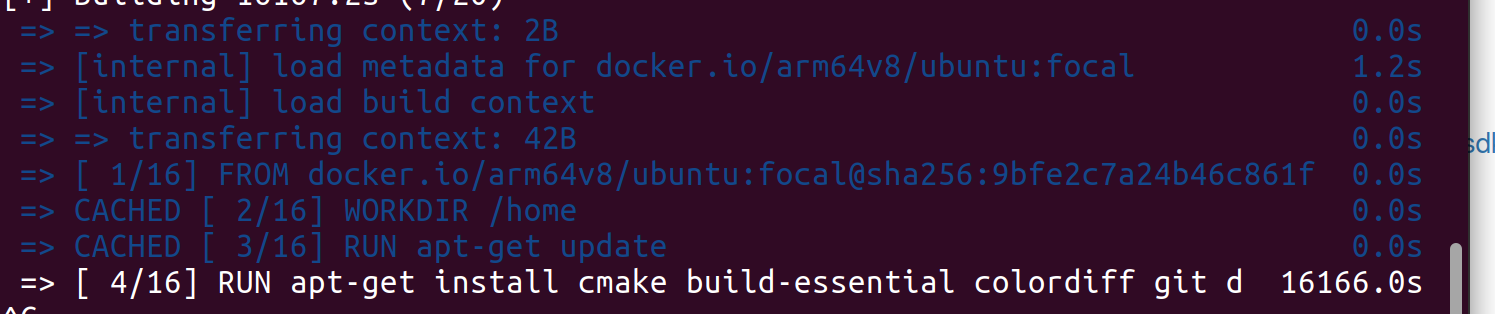
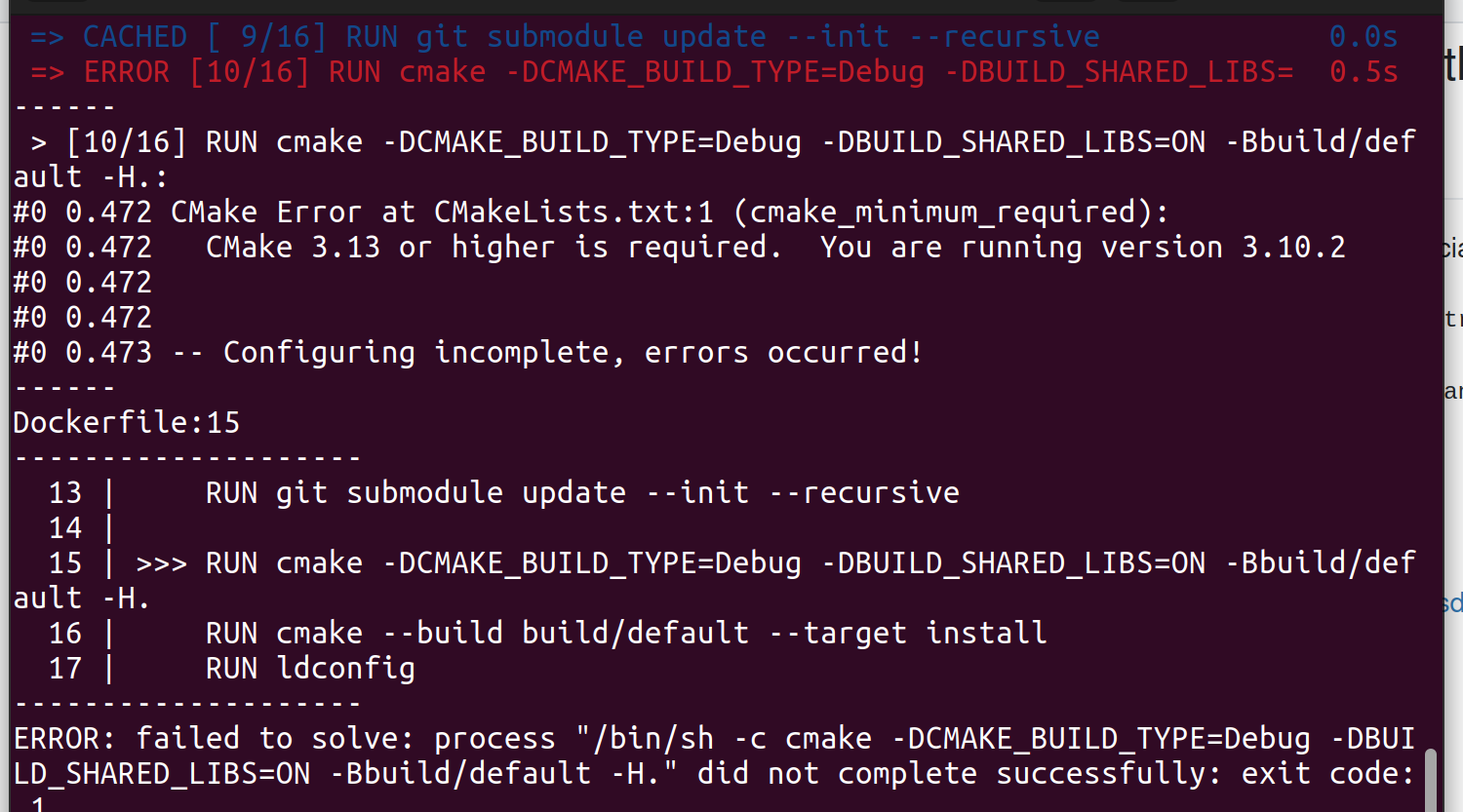
Also, I don't know if it is related but after installing docker by following the official docker tutorial the directory /data/docker doesn't exist but docker is working fine.
And for whatt's confusing, there is some things like the gitlab page for mavsdk, they told you to install docker with the command for the voxl1 and it says nothing for the voxl2, so that's why I started by doing the voxl1 command to install docker. -
@Judoor-0 , the instructions say that for VOXL2 you install docker using the official Docker installation instructions : https://docs.modalai.com/docker-on-voxl/#voxl-2
VOXL 2 has a Debian operating system and does not need any special treatment to use Docker beyond a normal apt style install.

For VOXL 2, please ignore the rest of this document and do not run any of the commands listed here.

Instead, follow the official Docker installation instructions.
Can you please let me know which part of documentation is not clear?
regarding
mavsdk, perhaps this would be helpful :https://docs.modalai.com/mavsdk/#mavsdk-on-voxl2 . Also please see this post : https://forum.modalai.com/topic/3463/voxl-docker-mavsdk-python-build-issues .@Alex-Kushleyev Also npw that i'm trying to builmd manually the mavsdk, what does this sentence mean : Note: if you built the image locally, you need to use the image name you build with, e.g. voxl-mavsdk-cpp:v1.0 ?
How am I suppose to lainch mavsdk takeoff exemple ? -
@Alex-Kushleyev Also npw that i'm trying to builmd manually the mavsdk, what does this sentence mean : Note: if you built the image locally, you need to use the image name you build with, e.g. voxl-mavsdk-cpp:v1.0 ?
How am I suppose to lainch mavsdk takeoff exemple ?@Judoor-0 , I am sorry, but i cannot help you with the mavsdk issue due to lack of knowledge of the subject. Please follow up in the appropriate thread and someone else should help you out!
Alex

Reading along? Create a free ModalAI Forum account to join in.
With an account you can reply, ask your own question, get an email when a ModalAI engineer answers, and mark the reply that solved it. Your place in each thread is saved between visits.
Questions about VOXL, Flight Core, ESCs and ModalAI drones are answered here by the engineers who build them.
Register Login