
voxl-docker-mavsdk-python build issues
-
@Alexander-Saunders Okay, we're looking into it, thanks!
@Eric-Katzfey Thank you! What kind of timeline should I expect to hear back from you?
-
@Eric-Katzfey Thank you! What kind of timeline should I expect to hear back from you?
@Alexander-Saunders I am testing a fix for this issue as we speak. I've sourced the problem to a Mavsdk dependency that had a recent upstream change which is causing issues on the voxl2 build image script.
-
@Eric-Katzfey Thank you! What kind of timeline should I expect to hear back from you?
@Alexander-Saunders can you try the following patch to the Dockerfile?
I noticed that the mavsdk 3rd party package updated their header files to include a filesystem header that is incompatible with standard cpp libraries on ubuntu 18.04, hence switching the dockerfile to focal instead of bionic. You can save the text in a *.patch file (e.g. "filesystem.patch") and then run
git apply filesystem.patchAlternatively just switch the docker base image from "bionic" to "focal"
diff --git a/Dockerfile b/Dockerfile index c38a5c7..08e668b 100644 --- a/Dockerfile +++ b/Dockerfile @@ -1,4 +1,4 @@ -FROM arm64v8/ubuntu:bionic +FROM arm64v8/ubuntu:focal WORKDIR /home @@ -8,7 +8,7 @@ RUN wget -O - https://apt.kitware.com/keys/kitware-archive-latest.asc 2>/dev/nul RUN apt-add-repository 'deb https://apt.kitware.com/ubuntu/ bionic main' RUN apt-get update RUN apt-get install -y cmake build-essential colordiff git doxygen -y -RUN apt-get install -y python3 python3-pip -y +RUN apt-get install -y python3 python3-pip -y RUN apt-get install -y git libxml2-dev libxslt-dev curl RUN git clone https://github.com/mavlink/MAVSDK.git -
@Alexander-Saunders can you try the following patch to the Dockerfile?
I noticed that the mavsdk 3rd party package updated their header files to include a filesystem header that is incompatible with standard cpp libraries on ubuntu 18.04, hence switching the dockerfile to focal instead of bionic. You can save the text in a *.patch file (e.g. "filesystem.patch") and then run
git apply filesystem.patchAlternatively just switch the docker base image from "bionic" to "focal"
diff --git a/Dockerfile b/Dockerfile index c38a5c7..08e668b 100644 --- a/Dockerfile +++ b/Dockerfile @@ -1,4 +1,4 @@ -FROM arm64v8/ubuntu:bionic +FROM arm64v8/ubuntu:focal WORKDIR /home @@ -8,7 +8,7 @@ RUN wget -O - https://apt.kitware.com/keys/kitware-archive-latest.asc 2>/dev/nul RUN apt-add-repository 'deb https://apt.kitware.com/ubuntu/ bionic main' RUN apt-get update RUN apt-get install -y cmake build-essential colordiff git doxygen -y -RUN apt-get install -y python3 python3-pip -y +RUN apt-get install -y python3 python3-pip -y RUN apt-get install -y git libxml2-dev libxslt-dev curl RUN git clone https://github.com/mavlink/MAVSDK.git@brahim Thank you for getting back to me! I do not have access to the VOXL at this moment, but will be able to test first thing in the morning.
-
@Alexander-Saunders can you try the following patch to the Dockerfile?
I noticed that the mavsdk 3rd party package updated their header files to include a filesystem header that is incompatible with standard cpp libraries on ubuntu 18.04, hence switching the dockerfile to focal instead of bionic. You can save the text in a *.patch file (e.g. "filesystem.patch") and then run
git apply filesystem.patchAlternatively just switch the docker base image from "bionic" to "focal"
diff --git a/Dockerfile b/Dockerfile index c38a5c7..08e668b 100644 --- a/Dockerfile +++ b/Dockerfile @@ -1,4 +1,4 @@ -FROM arm64v8/ubuntu:bionic +FROM arm64v8/ubuntu:focal WORKDIR /home @@ -8,7 +8,7 @@ RUN wget -O - https://apt.kitware.com/keys/kitware-archive-latest.asc 2>/dev/nul RUN apt-add-repository 'deb https://apt.kitware.com/ubuntu/ bionic main' RUN apt-get update RUN apt-get install -y cmake build-essential colordiff git doxygen -y -RUN apt-get install -y python3 python3-pip -y +RUN apt-get install -y python3 python3-pip -y RUN apt-get install -y git libxml2-dev libxslt-dev curl RUN git clone https://github.com/mavlink/MAVSDK.git@brahim Changing from bionic to focal lead to Docker being installed successfully. I am currently following this documentation: https://docs.modalai.com/voxl2-PX4-hitl/ .
The commands were ran fine:
1. wget https://storage.googleapis.com/modalai_public/modal_dockers/voxl-gazebo-docker_v1_2.tgz
2. docker load < voxl-gazebo-docker_v1_2.tgz
3. docker tag voxl-gazebo-docker:v1.2 voxl-gazebo-docker:latest
I am not using QGC because I am troubleshooting why only heartbeat packages are being sent and not GPS, Odometry, etc. voxl-px4 and qvio-server have been disabled.
In a separate terminal, voxl-px4-hitl is being ran as called for in the documentation. The main issues are gazebo seems to not give expected outputs with some of the commands and the lack of status data from dsp_hitl. I've also looked through the forum to see if anyone else had a similar problem. If you or anyone could point me in the correct direction, I would greatly appreciate that!
-Alexander
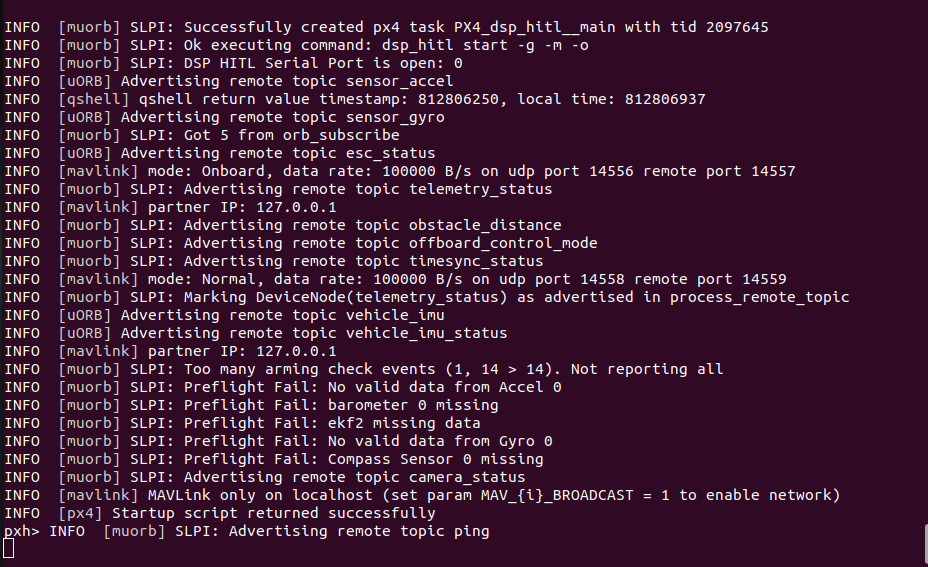
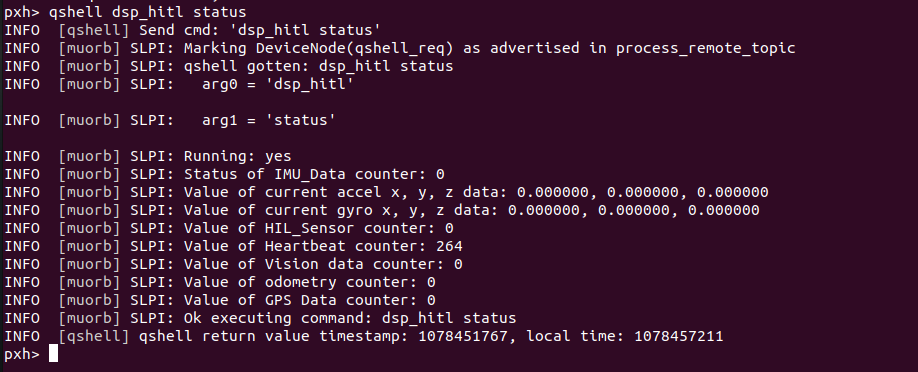
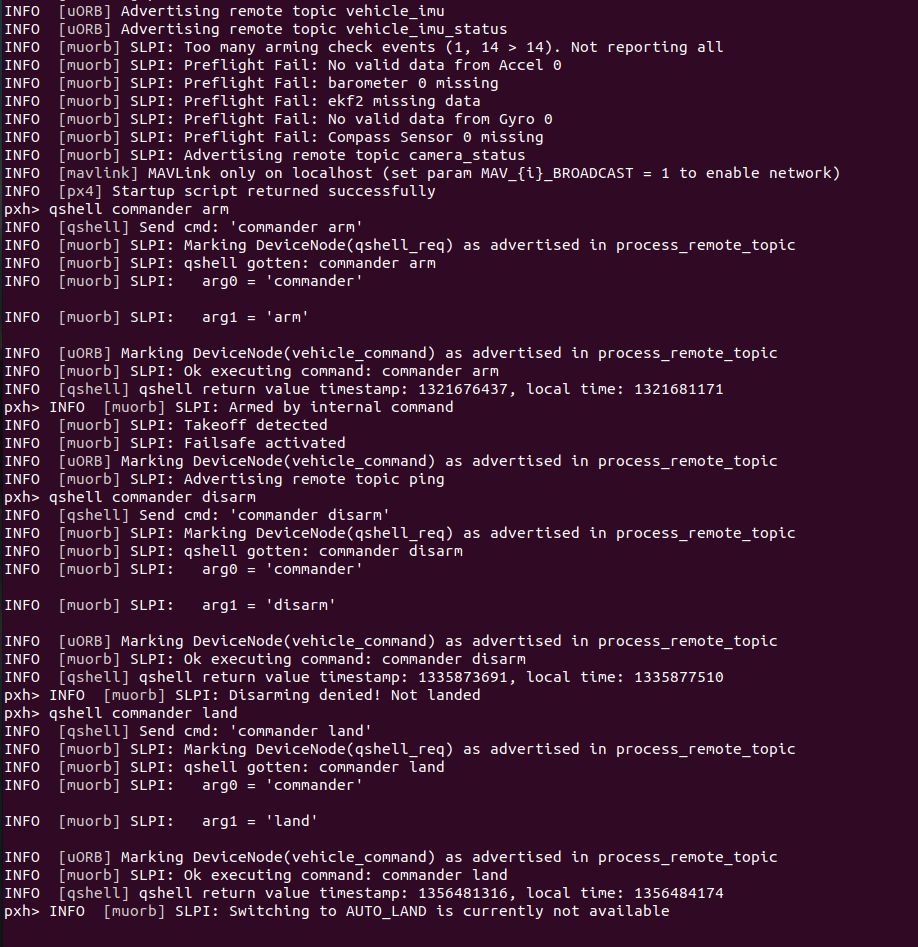
-
@brahim Changing from bionic to focal lead to Docker being installed successfully. I am currently following this documentation: https://docs.modalai.com/voxl2-PX4-hitl/ .
The commands were ran fine:
1. wget https://storage.googleapis.com/modalai_public/modal_dockers/voxl-gazebo-docker_v1_2.tgz
2. docker load < voxl-gazebo-docker_v1_2.tgz
3. docker tag voxl-gazebo-docker:v1.2 voxl-gazebo-docker:latest
I am not using QGC because I am troubleshooting why only heartbeat packages are being sent and not GPS, Odometry, etc. voxl-px4 and qvio-server have been disabled.
In a separate terminal, voxl-px4-hitl is being ran as called for in the documentation. The main issues are gazebo seems to not give expected outputs with some of the commands and the lack of status data from dsp_hitl. I've also looked through the forum to see if anyone else had a similar problem. If you or anyone could point me in the correct direction, I would greatly appreciate that!
-Alexander
@Alexander-Saunders @brahim to add on a follow up, what is the correct pin out of the FTDI cable we plug into the j18 port? Documentation says no power, just RX, TX, and Gnd; but YouTube instruction by Ascend Engineering uses Power as well. YouTube video by ModalAI matches instructions but the information doesn’t seem to be read, just heartbeat packets.
-
@Alexander-Saunders @brahim to add on a follow up, what is the correct pin out of the FTDI cable we plug into the j18 port? Documentation says no power, just RX, TX, and Gnd; but YouTube instruction by Ascend Engineering uses Power as well. YouTube video by ModalAI matches instructions but the information doesn’t seem to be read, just heartbeat packets.
Hi @Stefan-Amundarain
Not all FTDI cables are the same. There are literally over a dozen variations out there.
If the specific FTDI cable requires a "VTREF" to set the logic levels, then a VCC is needed as on Ascend's example. If you use one that is USB powered and TTL levles, then likely it is already set for 3.3V, and no power is required.
So, please double check your specific FTDI cable before following any tutorials you may see and make appropriate mods as needed.Thanks!
-
A Alex Kushleyev referenced this topic on
-
Hi @Stefan-Amundarain
Not all FTDI cables are the same. There are literally over a dozen variations out there.
If the specific FTDI cable requires a "VTREF" to set the logic levels, then a VCC is needed as on Ascend's example. If you use one that is USB powered and TTL levles, then likely it is already set for 3.3V, and no power is required.
So, please double check your specific FTDI cable before following any tutorials you may see and make appropriate mods as needed.Thanks!
@Vinny @brahim @Eric-Katzfey We're still running into the issue of no meaningful data being sent to gazebo. The only data is still the heartbeat packets.
We're referencing: https://docs.modalai.com/voxl2-PX4-hitl/We've done the steps up to: docker run --rm -it --net=host --privileged -e DISPLAY=$DISPLAY -v /dev/input:/dev/input:rw -v /tmp/.X11-unix:/tmp/.X11-unix:ro voxl-gazebo-docker ./run_gazebo.bash
and
qshell dsp_hitl status which is telling us about the heartbeat only.
Also, we tried the archived instructions to see if we would get a different output.
The FTDI cable used is the same, but the serial port closed issue has stopped. Don't know why.
The warning for SDF I feel like is the source of the problem.
The warning when running docker run --rm:
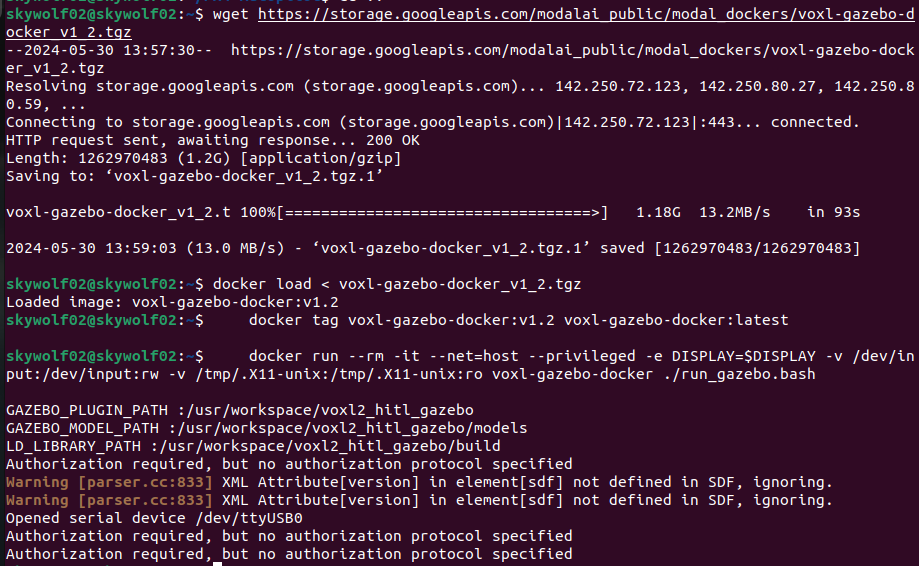
Status output:
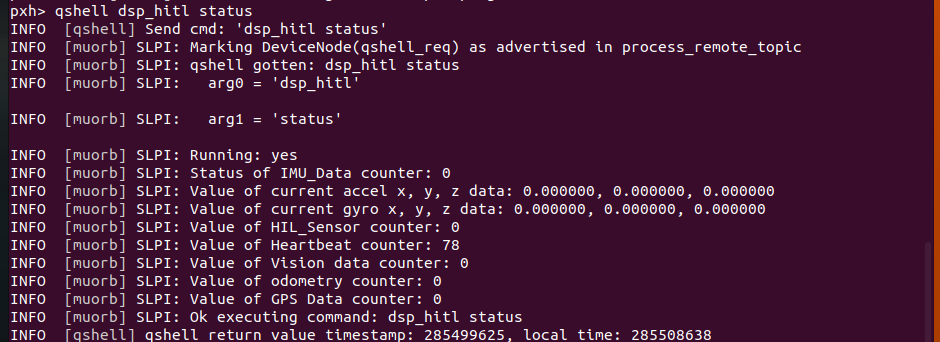
-
@Vinny @brahim @Eric-Katzfey We're still running into the issue of no meaningful data being sent to gazebo. The only data is still the heartbeat packets.
We're referencing: https://docs.modalai.com/voxl2-PX4-hitl/We've done the steps up to: docker run --rm -it --net=host --privileged -e DISPLAY=$DISPLAY -v /dev/input:/dev/input:rw -v /tmp/.X11-unix:/tmp/.X11-unix:ro voxl-gazebo-docker ./run_gazebo.bash
and
qshell dsp_hitl status which is telling us about the heartbeat only.
Also, we tried the archived instructions to see if we would get a different output.
The FTDI cable used is the same, but the serial port closed issue has stopped. Don't know why.
The warning for SDF I feel like is the source of the problem.
The warning when running docker run --rm:
Status output:
@Alexander-Saunders Are you doing
xhost +before running docker? -
@Alexander-Saunders Are you doing
xhost +before running docker?@Eric-Katzfey The latest attempts, yes. After running that and
docker run --rm -it --net=host --privileged -e DISPLAY=$DISPLAY -v /dev/input:/dev/input:rw -v /tmp/.X11-unix:/tmp/.X11-unix:ro voxl-gazebo-docker ./run_gazebo.bashgazebo will open up. The issue is connect gazebo with VOXL2 to run in HITL mode. I've followed two of the video from Modalai and Ascend exactly with no luck. Also went through the documentation again.
All instances are being ran on the host computer. When comparing the image from above to docs, we are only getting heartbeat packets.
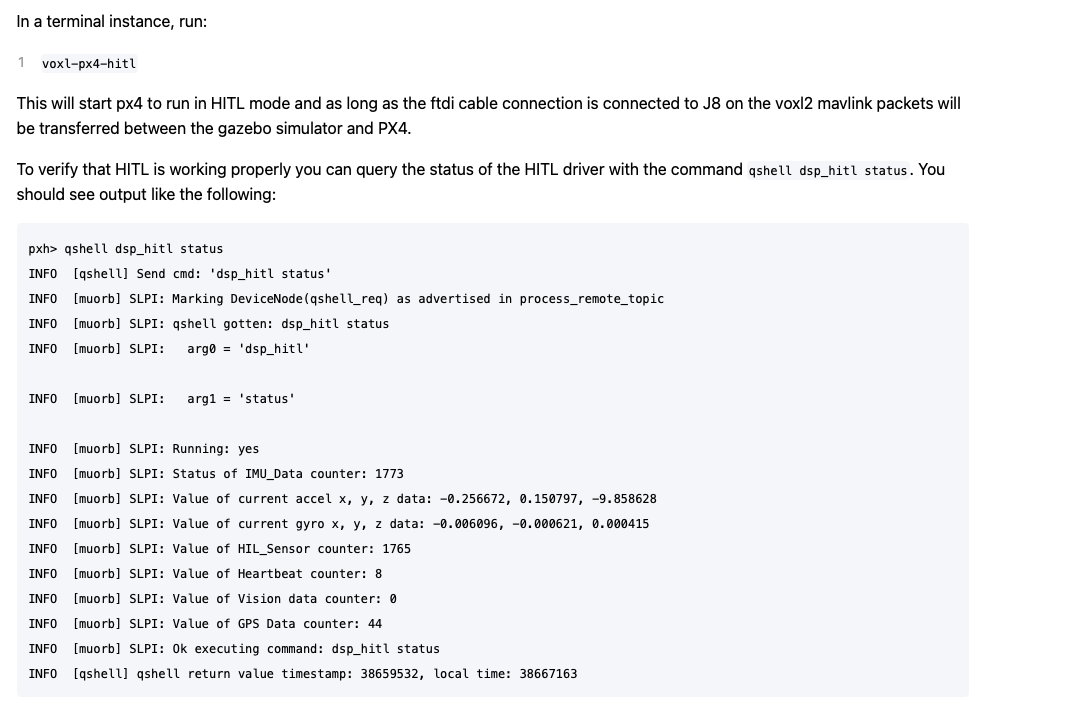
-
@Eric-Katzfey The latest attempts, yes. After running that and
docker run --rm -it --net=host --privileged -e DISPLAY=$DISPLAY -v /dev/input:/dev/input:rw -v /tmp/.X11-unix:/tmp/.X11-unix:ro voxl-gazebo-docker ./run_gazebo.bashgazebo will open up. The issue is connect gazebo with VOXL2 to run in HITL mode. I've followed two of the video from Modalai and Ascend exactly with no luck. Also went through the documentation again.
All instances are being ran on the host computer. When comparing the image from above to docs, we are only getting heartbeat packets.
@Alexander-Saunders The heartbeat counter is the amount of heartbeat messages being sent out, not received. So you are not getting anything on the serial port.
-
@Eric-Katzfey The latest attempts, yes. After running that and
docker run --rm -it --net=host --privileged -e DISPLAY=$DISPLAY -v /dev/input:/dev/input:rw -v /tmp/.X11-unix:/tmp/.X11-unix:ro voxl-gazebo-docker ./run_gazebo.bashgazebo will open up. The issue is connect gazebo with VOXL2 to run in HITL mode. I've followed two of the video from Modalai and Ascend exactly with no luck. Also went through the documentation again.
All instances are being ran on the host computer. When comparing the image from above to docs, we are only getting heartbeat packets.
-
@Eric-Katzfey The latest attempts, yes. After running that and
docker run --rm -it --net=host --privileged -e DISPLAY=$DISPLAY -v /dev/input:/dev/input:rw -v /tmp/.X11-unix:/tmp/.X11-unix:ro voxl-gazebo-docker ./run_gazebo.bashgazebo will open up. The issue is connect gazebo with VOXL2 to run in HITL mode. I've followed two of the video from Modalai and Ascend exactly with no luck. Also went through the documentation again.
All instances are being ran on the host computer. When comparing the image from above to docs, we are only getting heartbeat packets.
@Alexander-Saunders Definitely looks like a permissions issue of some sort in your system.
-
@Alexander-Saunders Definitely looks like a permissions issue of some sort in your system.
@Eric-Katzfey Are you suggesting giving the file/repo permissions with
xhost si:localuser:rootAlso we are using the FDTI cable provided with the ESC AND USB C to A to connect to host.
-
@Eric-Katzfey Are you suggesting giving the file/repo permissions with
xhost si:localuser:rootAlso we are using the FDTI cable provided with the ESC AND USB C to A to connect to host.
@Alexander-Saunders I'm only suggesting that there is a permissions problem of some sort. I don't see that on my machine so just trying to figure out what is different in your environment.
-
@Alexander-Saunders I'm only suggesting that there is a permissions problem of some sort. I don't see that on my machine so just trying to figure out what is different in your environment.
@Eric-Katzfey I tried giving permission to user with no change.
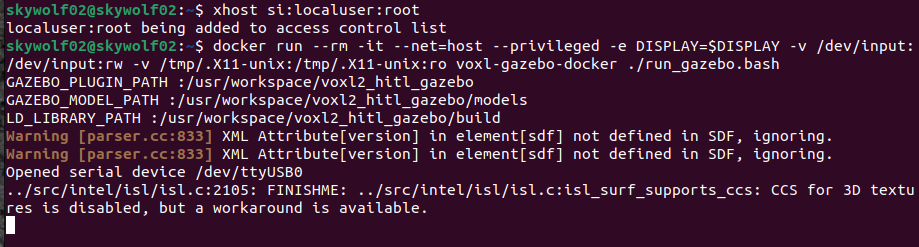
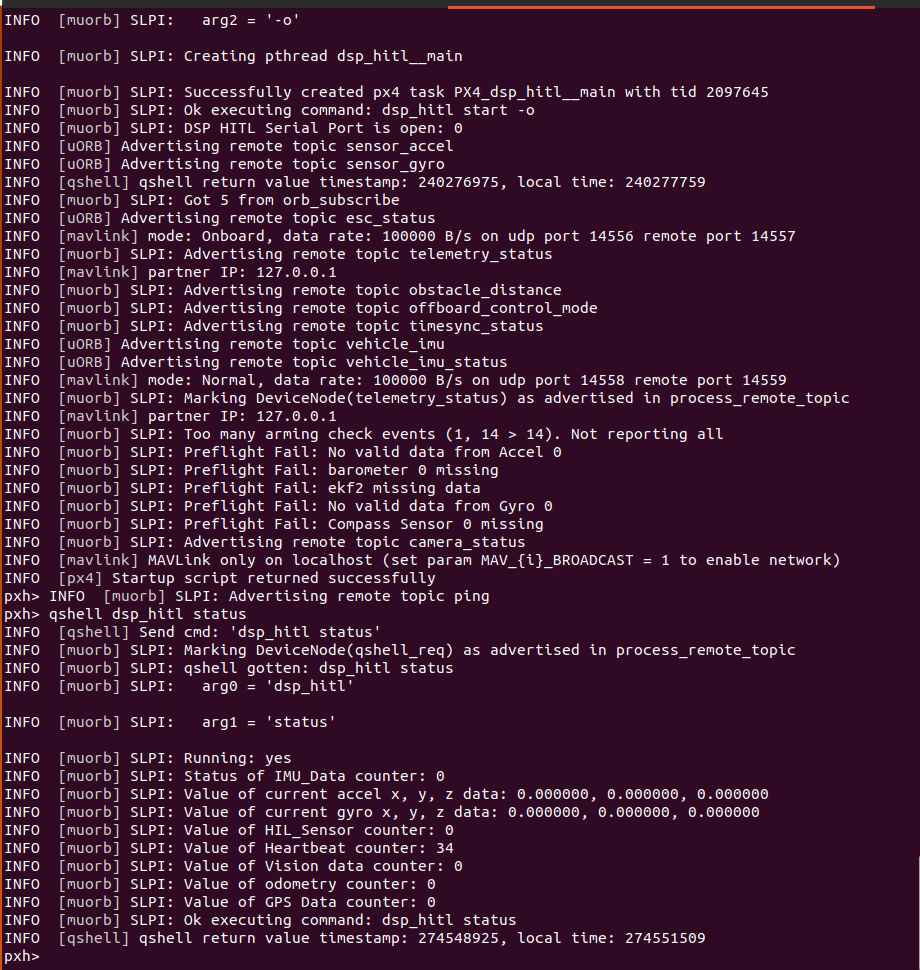
-
@Alexander-Saunders I'm only suggesting that there is a permissions problem of some sort. I don't see that on my machine so just trying to figure out what is different in your environment.
@Eric-Katzfey Is it possible to see a picture of your terminal of the commands you sent?
-
@Alexander-Saunders I'm only suggesting that there is a permissions problem of some sort. I don't see that on my machine so just trying to figure out what is different in your environment.
-
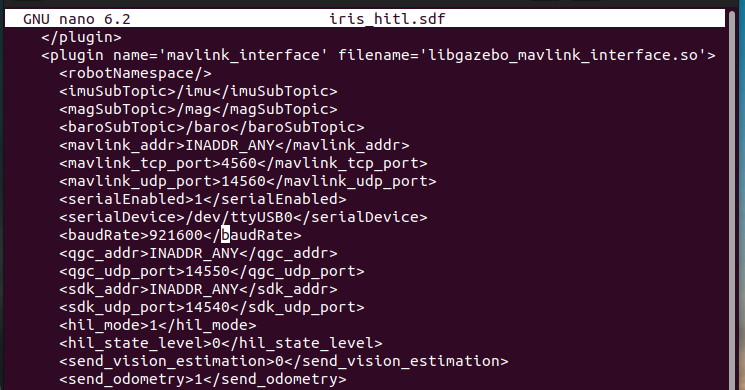
@Alexander-Saunders iris_hitl.sdf is part of the docker image so it will be the same.
-
@Eric-Katzfey Is it possible to see a picture of your terminal of the commands you sent?
modalai@modalai-XPS-15-9570:~$ docker run --rm -it --net=host --privileged -v /dev/input:/dev/input:rw voxl-gazebo-docker
root@modalai-XPS-15-9570:/usr/workspace/voxl2_hitl_gazebo# ls
CMakeLists.txt           build-gazebo.bash    include       package.xml            scripts
Dockerfile               build-mavlink.bash   mavlink       resources              src
README.md                cmake                mavlink-libs  run-docker-image.bash  unit_tests
build                    docker-commands.txt  models        run_gazebo.bash        worlds
build-docker-image.bash  external             msgs          run_headless.bash
root@modalai-XPS-15-9570:/usr/workspace/voxl2_hitl_gazebo# ls /dev/ttyUSB0
/dev/ttyUSB0
root@modalai-XPS-15-9570:/usr/workspace/voxl2_hitl_gazebo# ls -l /dev/ttyUSB0
crw-rw---- 1 root dialout 188, 0 Jun  3 16:02 /dev/ttyUSB0
root@modalai-XPS-15-9570:/usr/workspace/voxl2_hitl_gazebo# ./run_headless.bash
GAZEBO_PLUGIN_PATH :/usr/workspace/voxl2_hitl_gazebo
GAZEBO_MODEL_PATH :/usr/workspace/voxl2_hitl_gazebo/models
LD_LIBRARY_PATH :/usr/workspace/voxl2_hitl_gazebo/build
Warning [parser.cc:833] XML Attribute[version] in element[sdf] not defined in SDF, ignoring.
Warning [parser.cc:833] XML Attribute[version] in element[sdf] not defined in SDF, ignoring.
Opened serial device /dev/ttyUSB0




Reading along? Create a free ModalAI Forum account to join in.
With an account you can reply, ask your own question, get an email when a ModalAI engineer answers, and mark the reply that solved it. Your place in each thread is saved between visits.
Questions about VOXL, Flight Core, ESCs and ModalAI drones are answered here by the engineers who build them.
Register Login