
VOXL2 - Cube Orange External Flight Controller Integration
-
Hello @Chad-Sweet @Eric-Katzfey @tom @Alex-Kushleyev ,
I'm using VOXL2 as a compute unit and need to connect a external flight controller for port availability and other feasibility needs. In my application, I'm using Pixhawk standard Cube Orange as external FC.
For hardware integration, I'm referring to the documentation as listed here as a model reference.
-
I'm integrating the the USB3/UART Add-On Board (M0125) to VOXL 2 (M0054) which giving a 4 pin JST GH connector with a UART available at /dev/ttyHS1 from the applications processor.
-
I'm connecting the 4 pin JST type Output to the Cube Orange's Telemetry (TELEM1) port using 4 Ping JST GH connector to 6 pin GH Connector.
-
In VOXL2, under
/etc/modalai/voxl-mavlink-server.conf, I set external_ap_flight_controller paramater to true instead of default. -
In QGC, once I check by connecting the debug port of Cube to host PC through a USB data cable, under mavlink console upon checking using mavlink status, I receive the following outputs,
mavlink status

instance #0:
    mavlink chan: #0
    type:        GENERIC LINK OR RADIO
    flow control: OFF
    rates:
      tx: 487.3 B/s
      txerr: 0.0 B/s
      tx rate mult: 1.000
      tx rate max: 2880 B/s
      rx: 0.0 B/s
      rx loss: 0.0%
    FTP enabled: NO, TX enabled: YES
    mode: Minimal
    Forwarding: Off
    MAVLink version: 1
    transport protocol: serial (/dev/ttyS4 @57600)

instance #1:
    mavlink chan: #1
    type:        GENERIC LINK OR RADIO
    flow control: OFF
    rates:
      tx: 601.9 B/s
      txerr: 0.0 B/s
      tx rate mult: 0.306
      tx rate max: 1200 B/s
      rx: 0.0 B/s
      rx loss: 0.0%
    FTP enabled: YES, TX enabled: YES
    mode: Normal
    Forwarding: On
    MAVLink version: 1
    transport protocol: serial (/dev/ttyS0 @921600)

instance #2:
    mavlink chan: #2
    type:        GENERIC LINK OR RADIO
    flow control: OFF
    rates:
      tx: 817.9 B/s
      txerr: 0.0 B/s
      tx rate mult: 0.306
      tx rate max: 1200 B/s
      rx: 12875.7 B/s
      rx loss: 125.2%
    Received Messages:
      sysid:  1, compid:197, Total: 47361 (lost: 5999736)
      sysid:  1, compid:196, Total: 568 (lost: 24)
    FTP enabled: YES, TX enabled: YES
    mode: Normal
    Forwarding: On
    MAVLink version: 2
    transport protocol: serial (/dev/ttyS1 @921600)

instance #3:
    GCS heartbeat valid
    mavlink chan: #3
    type:        USB CDC
    flow control: ON
    rates:
      tx: 32408.2 B/s
      txerr: 0.0 B/s
      tx rate mult: 1.000
      tx rate max: 100000 B/s
      rx: 20.9 B/s
      rx loss: 0.0%
    Received Messages:
      sysid:255, compid:190, Total: 1196 (lost: 0)
    FTP enabled: YES, TX enabled: YES
    mode: Config
    Forwarding: On
    MAVLink version: 2
    transport protocol: serial (/dev/ttyACM0 @2000000)
    ping statistics:
      last: 34.42 ms
      mean: 17.87 ms
      max: 426.75 ms
      min: 0.28 ms
      dropped packets: 0
nsh>
Is this the recommended method of integrating an external FC with VOXL2? How do I verify further to know that my external FC is being used instead of VOXL's internal FC?
Assuming, I'm having a custom Starling drone setup on my hardware build and integrating external FC, how do I do vehicle actuator setup in QGC once I'm done setting up external FC?
-
-
@Jetson-Nano You can disable px4 on voxl with
systemctl disable voxl-px4to ensure its not running -
@tom yes, I have done that.
@Jetson-Nano If you have disabled the internal flight controller and remove the USB connection to the external flight controller and are still seeing the connection to QGC then I think you are setup. Are seeing any issues?
-
@Jetson-Nano If you have disabled the internal flight controller and remove the USB connection to the external flight controller and are still seeing the connection to QGC then I think you are setup. Are seeing any issues?
@Eric-Katzfey, I'm having a Starling drone setup on my custom airframe build and having integrated external FC, how do I do vehicle actuator setup in QGC once I'm done setting up external FC?
-
@Eric-Katzfey, I'm having a Starling drone setup on my custom airframe build and having integrated external FC, how do I do vehicle actuator setup in QGC once I'm done setting up external FC?
@Jetson-Nano Once you are up and running on your external Orange Cube then VOXL 2 is just a conduit for mavlink packets. You should be able to interact with your Orange Cube normally. I do not know anything about Orange Cubes so can't answer how to do vehicle actuator setup in QGC with it.
-
@Jetson-Nano Once you are up and running on your external Orange Cube then VOXL 2 is just a conduit for mavlink packets. You should be able to interact with your Orange Cube normally. I do not know anything about Orange Cubes so can't answer how to do vehicle actuator setup in QGC with it.
Hey @Eric-Katzfey , I saw this post and in this you have asked to add the driver to the build configuration, but how do I include the voxl_esc driver to a build of different board configuration?
One more question, can I use the J5 connector of this to connect to the telemetry port of the FC?
-
Hey @Eric-Katzfey , I saw this post and in this you have asked to add the driver to the build configuration, but how do I include the voxl_esc driver to a build of different board configuration?
One more question, can I use the J5 connector of this to connect to the telemetry port of the FC?
@Jetson-Nano To add the driver you need to modify the build configuration file (https://github.com/PX4/PX4-Autopilot/blob/main/boards/cubepilot/cubeorange/default.px4board). You can add the voxl-esc driver to that with
CONFIG_DRIVERS_ACTUATORS_VOXL_ESC=y -
Hey @Eric-Katzfey , I saw this post and in this you have asked to add the driver to the build configuration, but how do I include the voxl_esc driver to a build of different board configuration?
One more question, can I use the J5 connector of this to connect to the telemetry port of the FC?
@Jetson-Nano Yes, you should be able to use the UART pins on that J5 connector.
-
@Jetson-Nano Yes, you should be able to use the UART pins on that J5 connector.
Thank you @Eric-Katzfey , I'll test this out and get back to you on the result
-
Thank you @Eric-Katzfey , I'll test this out and get back to you on the result
Hey @Eric-Katzfey , I tested whatever you told,
- I connected to the UART port on the J5 of M0141, and I tested, it is not working. When using a companion computer you can run
cat /dev/ttyHSxto get data from the FC, you'll get random symbols. I tried it and it is not working, when I tested yesterday with this I got the output as said previously, but still with J5 I tried the pymavlink part by changing the baud rate, but I am getting this output
voxl2:/home$ python3 mavlink_shell.py /dev/ttyTHS1
Connecting to MAVLINK...
And what will be the port for the J5 connector of M0141, it is not listed in the below table.
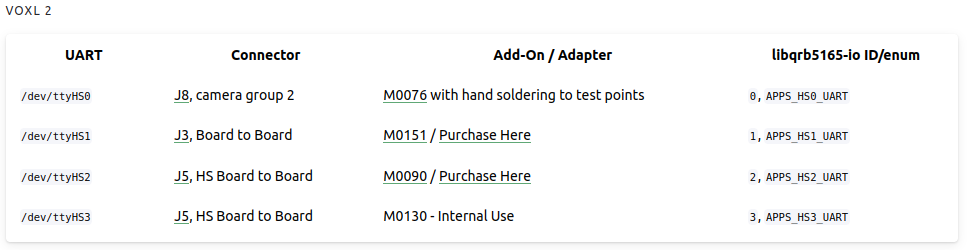
- The VOXL ESC Driver part, I added that to the board config and built, after that I am not able to see any VOXL_ESC parameters.
-
Hey @Eric-Katzfey , I tested whatever you told,
- I connected to the UART port on the J5 of M0141, and I tested, it is not working. When using a companion computer you can run
cat /dev/ttyHSxto get data from the FC, you'll get random symbols. I tried it and it is not working, when I tested yesterday with this I got the output as said previously, but still with J5 I tried the pymavlink part by changing the baud rate, but I am getting this output
voxl2:/home$ python3 mavlink_shell.py /dev/ttyTHS1
Connecting to MAVLINK...
And what will be the port for the J5 connector of M0141, it is not listed in the below table.
- The VOXL ESC Driver part, I added that to the board config and built, after that I am not able to see any VOXL_ESC parameters.
@Jetson-Nano For the UART issue it's best to take things step by step. I would first verify the Orange Cube telemetry port by attaching it to a laptop or desktop computer. Make sure you can attach to QGC that way. And note the baudrate being used when it is working. That will validate the Orange Cube. Then validate the port of the add on card that you want to use with VOXL 2. For example, with M0141, validate /dev/ttyHS1 by attaching to a computer with a serial to UART cable and sending / receiving test data with a simple Python script. Once you are sure that the parts are working individually then you can hook them together and start debugging higher level things like voxl-mavlink-server.
-
Hey @Eric-Katzfey , I tested whatever you told,
- I connected to the UART port on the J5 of M0141, and I tested, it is not working. When using a companion computer you can run
cat /dev/ttyHSxto get data from the FC, you'll get random symbols. I tried it and it is not working, when I tested yesterday with this I got the output as said previously, but still with J5 I tried the pymavlink part by changing the baud rate, but I am getting this output
voxl2:/home$ python3 mavlink_shell.py /dev/ttyTHS1
Connecting to MAVLINK...
And what will be the port for the J5 connector of M0141, it is not listed in the below table.
- The VOXL ESC Driver part, I added that to the board config and built, after that I am not able to see any VOXL_ESC parameters.
@Jetson-Nano For the VOXL ESC part, now that you have the driver in your build you need to start the driver. For testing you can just go to the Nuttx shell and run
voxl_esc start -d <uart-port>. This will show you if it is starting correctly. Once it is working correctly you should see theVOXL_ESC_XXXparameters and then you need to add the device start into your Orange Cube start scripts. -
@Jetson-Nano For the UART issue it's best to take things step by step. I would first verify the Orange Cube telemetry port by attaching it to a laptop or desktop computer. Make sure you can attach to QGC that way. And note the baudrate being used when it is working. That will validate the Orange Cube. Then validate the port of the add on card that you want to use with VOXL 2. For example, with M0141, validate /dev/ttyHS1 by attaching to a computer with a serial to UART cable and sending / receiving test data with a simple Python script. Once you are sure that the parts are working individually then you can hook them together and start debugging higher level things like voxl-mavlink-server.
Thank you @Eric-Katzfey , it worked, I tested each port individually and made sure the individual ports are working, and then integrated the two and is working fine.
Here is my solution if anyone needs.
I used Telem 1 port of the cube and the UART pins on the J5 connector of USB2 Type A Breakout (M0141) . The parameters I set for MAV 1 is here
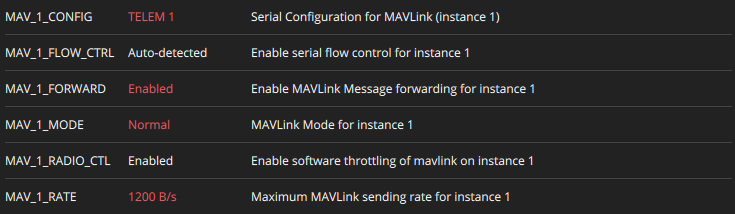

After disabling the voxl-px4 services, Connect to VOXL wifi and check QGC, you'll get the FC data in which the cube is used as the flight controller.
The VOXL ESC, I haven't tested it yet, I'll test and get back if any problems.



Reading along? Create a free ModalAI Forum account to join in.
With an account you can reply, ask your own question, get an email when a ModalAI engineer answers, and mark the reply that solved it. Your place in each thread is saved between visits.
Questions about VOXL, Flight Core, ESCs and ModalAI drones are answered here by the engineers who build them.
Register Login