Skip to content
  • Categories
  • Recent
  • Tags
  • Popular
  • Users
  • Groups
Collapse
Brand Logo

ModalAI Forum

  1. ModalAI Support Forum
  2. Software Development
  3. VOXL SDK
  4. m500 VOXL Flight sdk update to v1.1.x

m500 VOXL Flight sdk update to v1.1.x

Scheduled Pinned Locked Moved VOXL SDK
26 Posts 4 Posters 9.5k Views 2 Watching
  • Oldest to Newest
  • Newest to Oldest
  • Most Votes
Reply
  • Reply as topic
Log in to reply
This topic has been deleted. Only users with topic management privileges can see it.
  • Darshit DesaiD Darshit Desai

    @Moderator Is the update procedure the same as this one for v1.14 firmware?

    Link Preview Image
    Update Flight Core Firmware

    ModalAI technical documentation for VOXL and VOXL 2 Companion Computers for PX4 and ArduPilot Obstacle Avoidance and GPS-denied navigation, assembled in the USA

    favicon

    ModalAI Technical Docs (docs.modalai.com)

    Also since I dont have the desired cable if I want to fallback to v0.9.5 I don't need to change anything in the firmware right?

    Also when I try to go back v0.9.5 sdk and configure my qvio it always shows this error.

    / # voxl-configure-qvio
    Starting Wizard
     
    Do you want to reset the config file to factory defaults?
    1) yes
    2) no
    #? 1
    wiping old config file
    loading config file
    Creating new config file: /etc/modalai/voxl-qvio-server.conf
     
    Do you want to enable the voxl-qvio-server service to allow
    visual inertial odometry?
    1) yes
    2) no
    #? 1
     
    Now we are going to do a preliminary configuration of /etc/modalai/voxl-qvio-server.conf
     
    Which config voxl-qvio-server use?
    
    imu0_tracking          for VOXL Flight all-in-one board, M500
    imu1_tracking          for VOXL1 and VOXL-CAM, Seeker V1
    imu_px4_tracking       for RB5 Flight 5G
    imu_apps_tracking      for VOXL2, Sentinel
    imu_apps_stereo_lower  for Starling V2 stereo version
    
    1) imu0_tracking	  3) imu_px4_tracking	    5) imu_apps_stereo_lower
    2) imu1_tracking	  4) imu_apps_tracking
    #? 1
    enabling  voxl-qvio-server systemd service
    starting  voxl-qvio-server systemd service
    Done configuring voxl-qvio-server
    / # voxl-inspect-qvio 
    waiting for server
    
     dt(ms) |    T_imu_wrt_vio (m)   |Roll Pitch Yaw (deg)|features|quality| state| error_codes |
       30.2 |    0.00    0.00    0.00|   0.0   -0.0    0.0|     0  |   -1% | FAIL | IMU_MISSING STALLED ^C
    received SIGINT Ctrl-C
    
    closing and exiting
    / #
    
    ModeratorM Offline
    ModeratorM Offline
    Moderator
    ModalAI Team
    wrote on last edited by
    #4

    @Darshit-Desai your firmware should match what was used in the SDK, they are paired together

    why would you go to SDK 0.9.5? It is really old and no longer supported

    Darshit DesaiD 1 Reply Last reply
    0
    • ModeratorM Moderator

      @Darshit-Desai your firmware should match what was used in the SDK, they are paired together

      why would you go to SDK 0.9.5? It is really old and no longer supported

      Darshit DesaiD Offline
      Darshit DesaiD Offline
      Darshit Desai
      Regular
      wrote on last edited by
      #5

      @Moderator I don't have the usb-jst connector for the firmware update and I think 0.95 that was the original factory sdk version

      Darshit DesaiD 1 Reply Last reply
      0
      • Darshit DesaiD Darshit Desai

        @Moderator I don't have the usb-jst connector for the firmware update and I think 0.95 that was the original factory sdk version

        Darshit DesaiD Offline
        Darshit DesaiD Offline
        Darshit Desai
        Regular
        wrote on last edited by
        #6

        @Moderator

        @Moderator said in m500 VOXL Flight sdk update to v1.1.x:

        your firmware should match what was used in the SDK, they are paired together

        What firmware matches the voxl-1 sdk 1.1.2 version

        Darshit DesaiD 1 Reply Last reply
        0
        • Darshit DesaiD Darshit Desai

          @Moderator

          @Moderator said in m500 VOXL Flight sdk update to v1.1.x:

          your firmware should match what was used in the SDK, they are paired together

          What firmware matches the voxl-1 sdk 1.1.2 version

          Darshit DesaiD Offline
          Darshit DesaiD Offline
          Darshit Desai
          Regular
          wrote on last edited by
          #7

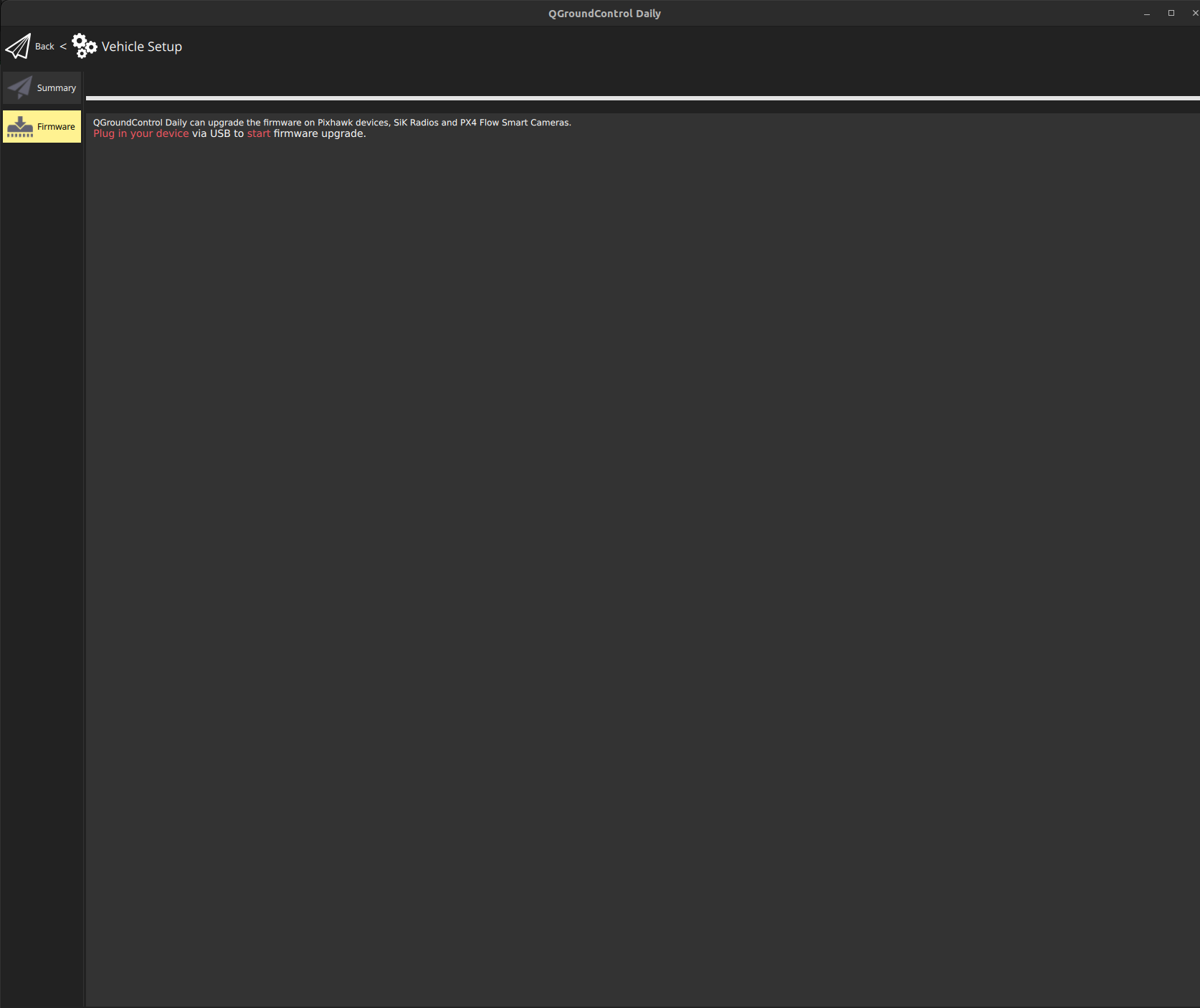
          @Moderator I have got the cable for flight core update, I upgraded the sdk to 1.1.2 again but then I am following the instructions as shown in the below but nothing shows up in the firmware tab

          Link Preview Image
          Update Flight Core Firmware

          ModalAI technical documentation for VOXL and VOXL 2 Companion Computers for PX4 and ArduPilot Obstacle Avoidance and GPS-denied navigation, assembled in the USA

          favicon

          ModalAI Technical Docs (docs.modalai.com)

          944c8d72-c319-474a-8141-a5e41b310c75-image.png

          tomT 1 Reply Last reply
          0
          • Darshit DesaiD Darshit Desai

            @Moderator I have got the cable for flight core update, I upgraded the sdk to 1.1.2 again but then I am following the instructions as shown in the below but nothing shows up in the firmware tab

            Link Preview Image
            Update Flight Core Firmware

            ModalAI technical documentation for VOXL and VOXL 2 Companion Computers for PX4 and ArduPilot Obstacle Avoidance and GPS-denied navigation, assembled in the USA

            favicon

            ModalAI Technical Docs (docs.modalai.com)

            944c8d72-c319-474a-8141-a5e41b310c75-image.png

            tomT Offline
            tomT Offline
            tom
            admin
            wrote on last edited by tom
            #8

            @Darshit-Desai The .px4 file is in the SDK release zip:

            for FCv1: voxl_SDK_1.1.2/flight-core/modalai_fc-v1_1.14.0-2.0.63.px4

            Follow the instructions here (ModalAI Build) with the above .px4 file:

            Link Preview Image
            Update Flight Core Firmware

            ModalAI technical documentation for VOXL and VOXL 2 Companion Computers for PX4 and ArduPilot Obstacle Avoidance and GPS-denied navigation, assembled in the USA

            favicon

            ModalAI Technical Docs (docs.modalai.com)

            Darshit DesaiD 1 Reply Last reply
            0
            • tomT tom

              @Darshit-Desai The .px4 file is in the SDK release zip:

              for FCv1: voxl_SDK_1.1.2/flight-core/modalai_fc-v1_1.14.0-2.0.63.px4

              Follow the instructions here (ModalAI Build) with the above .px4 file:

              Link Preview Image
              Update Flight Core Firmware

              ModalAI technical documentation for VOXL and VOXL 2 Companion Computers for PX4 and ArduPilot Obstacle Avoidance and GPS-denied navigation, assembled in the USA

              favicon

              ModalAI Technical Docs (docs.modalai.com)

              Darshit DesaiD Offline
              Darshit DesaiD Offline
              Darshit Desai
              Regular
              wrote on last edited by Darshit Desai
              #9

              @tom Yes but in the firmware page nothing shows up in QGC

              @tom said in m500 VOXL Flight sdk update to v1.1.x:

              Link Preview Image
              Update Flight Core Firmware

              ModalAI technical documentation for VOXL and VOXL 2 Companion Computers for PX4 and ArduPilot Obstacle Avoidance and GPS-denied navigation, assembled in the USA

              favicon

              ModalAI Technical Docs (docs.modalai.com)

              tomT 1 Reply Last reply
              0
              • Darshit DesaiD Darshit Desai

                @tom Yes but in the firmware page nothing shows up in QGC

                @tom said in m500 VOXL Flight sdk update to v1.1.x:

                Link Preview Image
                Update Flight Core Firmware

                ModalAI technical documentation for VOXL and VOXL 2 Companion Computers for PX4 and ArduPilot Obstacle Avoidance and GPS-denied navigation, assembled in the USA

                favicon

                ModalAI Technical Docs (docs.modalai.com)

                tomT Offline
                tomT Offline
                tom
                admin
                wrote on last edited by
                #10

                @Darshit-Desai Did you unplug power and re-connect power while keeping USB attached?

                Darshit DesaiD 1 Reply Last reply
                0
                • tomT tom

                  @Darshit-Desai Did you unplug power and re-connect power while keeping USB attached?

                  Darshit DesaiD Offline
                  Darshit DesaiD Offline
                  Darshit Desai
                  Regular
                  wrote on last edited by Darshit Desai
                  #11

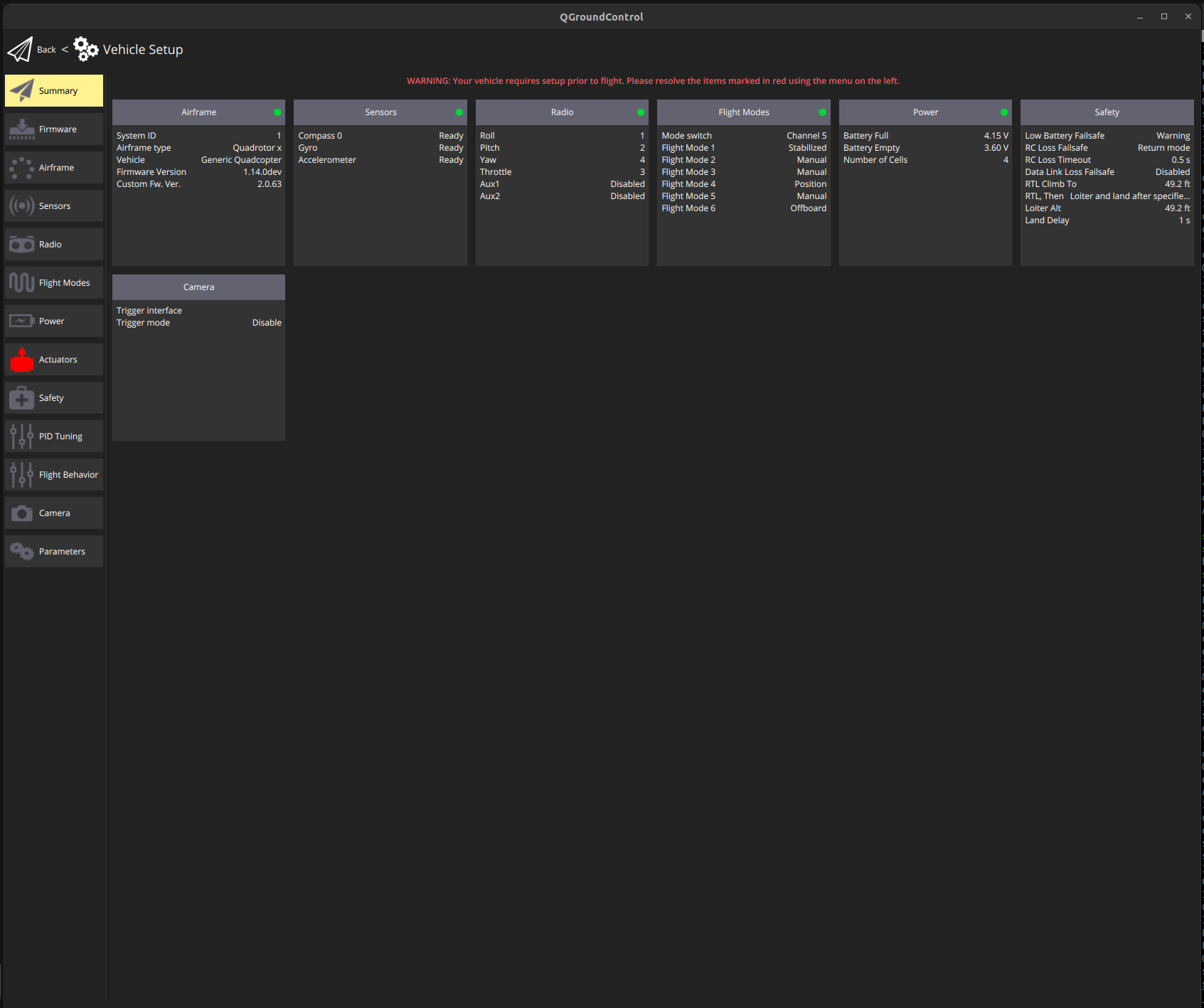
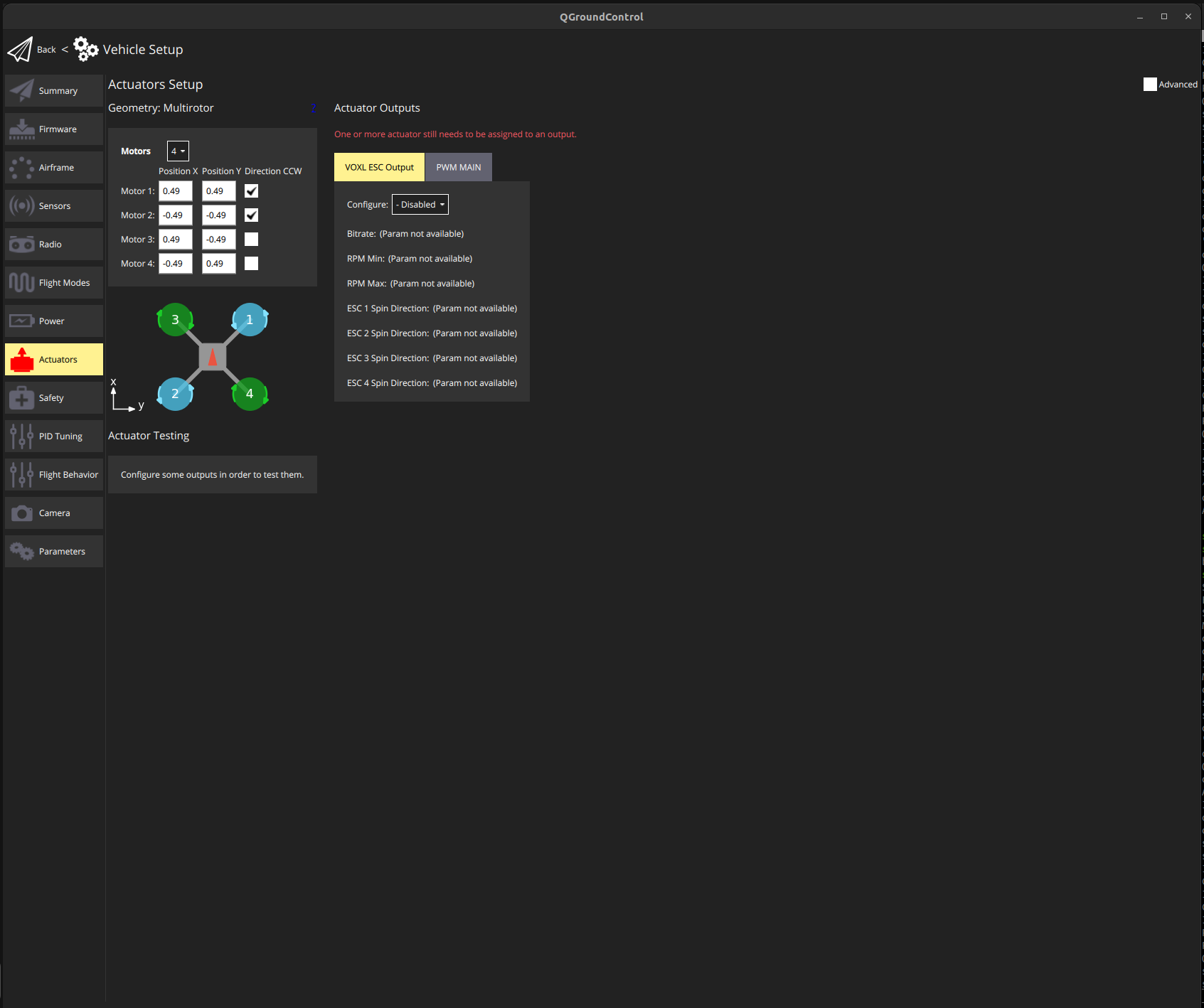
                  @tom I was able to finish the upgrade, but in QGC it shows something about actuators, when I open it opens the esc calibration related page, Do I need to calibrate esc again?
                  7010e546-8d10-4fd0-ab00-f75e514611fc-image.png

                  d038d013-92ff-4af5-b96e-6b71e8e685ad-image.png

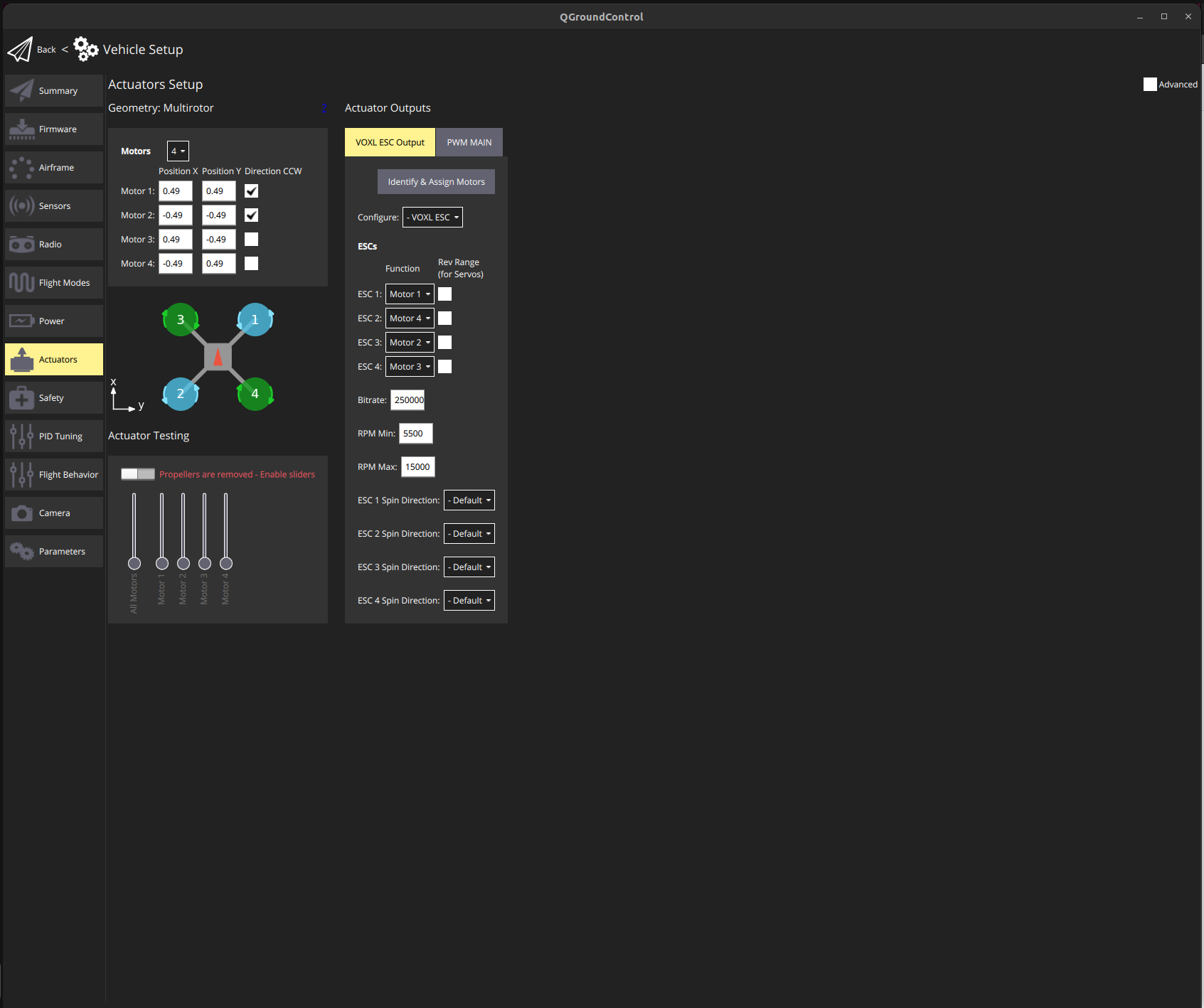
                  Edit: I found this page (https://docs.modalai.com/modal-esc-px4-user-guide/) on ESCs and added the parameters accordingly, the only ones I don't know are the min and max RPM, I am using the voxl 1 m500 with holybro 2216-920kv motors. Also I don't think the motors rotate when I try to using the sliders
                  e4a13997-c405-42af-a8a5-4b56e84ccb89-image.png

                  tomT 1 Reply Last reply
                  0
                  • Darshit DesaiD Darshit Desai

                    @tom I was able to finish the upgrade, but in QGC it shows something about actuators, when I open it opens the esc calibration related page, Do I need to calibrate esc again?

                    7010e546-8d10-4fd0-ab00-f75e514611fc-image.png

                    d038d013-92ff-4af5-b96e-6b71e8e685ad-image.png

                    Edit: I found this page (https://docs.modalai.com/modal-esc-px4-user-guide/) on ESCs and added the parameters accordingly, the only ones I don't know are the min and max RPM, I am using the voxl 1 m500 with holybro 2216-920kv motors. Also I don't think the motors rotate when I try to using the sliders

                    e4a13997-c405-42af-a8a5-4b56e84ccb89-image.png

                    tomT Offline
                    tomT Offline
                    tom
                    admin
                    wrote on last edited by tom
                    #12

                    @Darshit-Desai ~~Can you try loading the FCv1 m500 params from here: https://gitlab.com/voxl-public/voxl-sdk/utilities/voxl-px4-params/-/blob/master/params/v1.14/platforms/M500_FCV1.param~~s

                    Darshit DesaiD 1 Reply Last reply
                    0
                    • tomT tom

                      @Darshit-Desai ~~Can you try loading the FCv1 m500 params from here: https://gitlab.com/voxl-public/voxl-sdk/utilities/voxl-px4-params/-/blob/master/params/v1.14/platforms/M500_FCV1.param~~s

                      Darshit DesaiD Offline
                      Darshit DesaiD Offline
                      Darshit Desai
                      Regular
                      wrote on last edited by
                      #13

                      @tom V1 or V2? Because when I flash firmware it detects v2
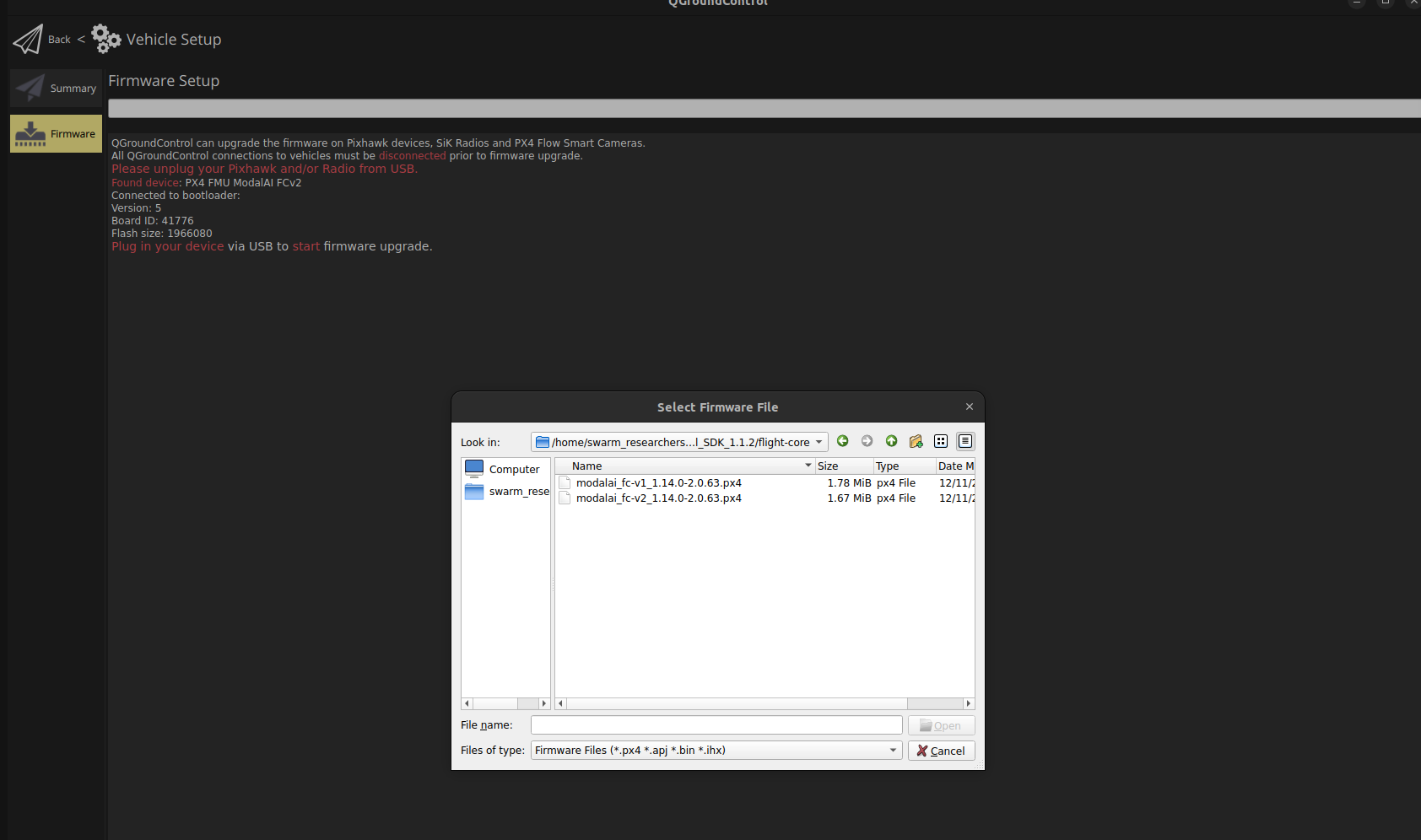
                      6bee05a3-cd22-4d3d-b67e-858f5c631c3b-image.png

                      tomT 1 Reply Last reply
                      0
                      • Darshit DesaiD Darshit Desai

                        @tom V1 or V2? Because when I flash firmware it detects v2

                        6bee05a3-cd22-4d3d-b67e-858f5c631c3b-image.png

                        tomT Offline
                        tomT Offline
                        tom
                        admin
                        wrote on last edited by
                        #14

                        @Darshit-Desai Sorry yes v2 https://gitlab.com/voxl-public/voxl-sdk/utilities/voxl-px4-params/-/blob/master/params/v1.14/platforms/M500_FCV2.params

                        tomT 1 Reply Last reply
                        0
                        • tomT tom

                          @Darshit-Desai Sorry yes v2 https://gitlab.com/voxl-public/voxl-sdk/utilities/voxl-px4-params/-/blob/master/params/v1.14/platforms/M500_FCV2.params

                          tomT Offline
                          tomT Offline
                          tom
                          admin
                          wrote on last edited by
                          #15

                          @tom It's hard for me to follow which hardware you have, so whichever one you have v1 or v2

                          Darshit DesaiD 1 Reply Last reply
                          0
                          • tomT tom

                            @tom It's hard for me to follow which hardware you have, so whichever one you have v1 or v2

                            Darshit DesaiD Offline
                            Darshit DesaiD Offline
                            Darshit Desai
                            Regular
                            wrote on last edited by Darshit Desai
                            #16

                            @tom Yes I am also not sure what came with m500 I recently bought because the earlier ones had v1

                            Edit: The motor issue was resolved with this and I can spin the motors, I will have a flight with the propellers and confirm it

                            Darshit DesaiD 1 Reply Last reply
                            0
                            • Darshit DesaiD Darshit Desai

                              @tom Yes I am also not sure what came with m500 I recently bought because the earlier ones had v1

                              Edit: The motor issue was resolved with this and I can spin the motors, I will have a flight with the propellers and confirm it

                              Darshit DesaiD Offline
                              Darshit DesaiD Offline
                              Darshit Desai
                              Regular
                              wrote on last edited by Darshit Desai
                              #17

                              @tom On the next reboot it's showing esc failure in the logs

                              [13:38:12.651] Info: Kill-switch engaged
                              [13:38:13.768] Info: Kill-switch disengaged
                              [13:39:33.963] Info: Armed by RC
                              [13:39:34.096] Info: logging: opening log file sess114/log100.ulg
                              [13:39:34.296] Critical: Failsafe activated, triggering disarm
                              ESC failure
                              [13:39:34.296] Info: Disarmed by failsafe
                              [13:39:36.780] Info: Armed by RC
                              [13:39:36.781] Info: logging: opening log file sess114/log101.ulg
                              [13:39:37.131] Critical: Failsafe activated, triggering disarm
                              [13:39:37.131] Info: Disarmed by failsafe
                              [13:39:39.424] Info: Armed by RC
                              [13:39:39.465] Info: logging: opening log file sess114/log102.ulg
                              [13:39:39.787] Critical: Failsafe activated, triggering disarm
                              [13:39:39.787] Info: Disarmed by failsafe

                              And the motors try to spin up for a few seconds when arming and then instantly stop

                              When I move this sliders now the motors rotate but when I try to arm the drone using RC it shows the ESC failure error
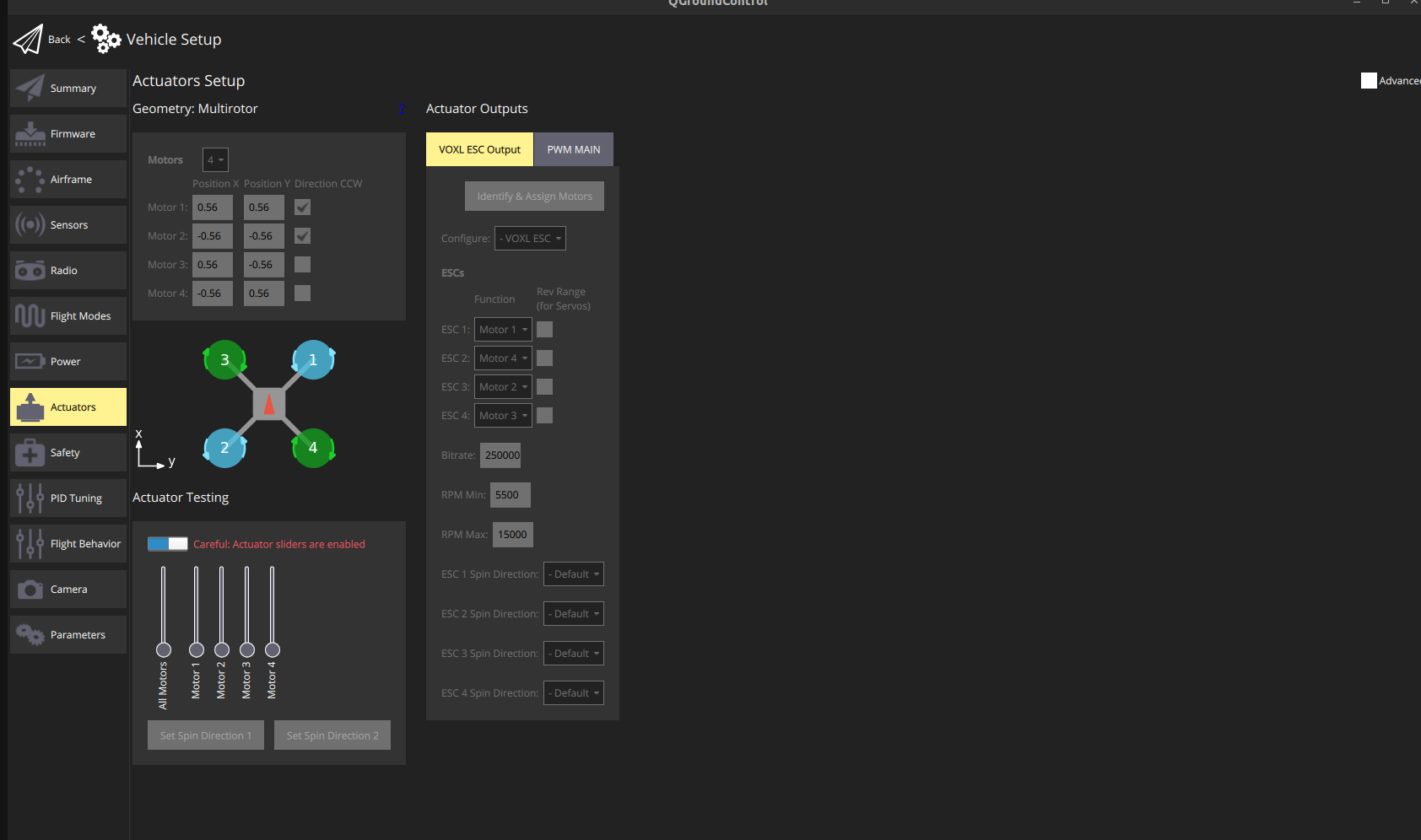
                              a646b685-77d0-4ba3-8d65-72af8e7870ae-image.png

                              tomT 1 Reply Last reply
                              0
                              • Darshit DesaiD Darshit Desai referenced this topic on
                              • Darshit DesaiD Darshit Desai

                                @tom On the next reboot it's showing esc failure in the logs

                                [13:38:12.651] Info: Kill-switch engaged
                                [13:38:13.768] Info: Kill-switch disengaged
                                [13:39:33.963] Info: Armed by RC
                                [13:39:34.096] Info: logging: opening log file sess114/log100.ulg
                                [13:39:34.296] Critical: Failsafe activated, triggering disarm
                                ESC failure
                                [13:39:34.296] Info: Disarmed by failsafe
                                [13:39:36.780] Info: Armed by RC
                                [13:39:36.781] Info: logging: opening log file sess114/log101.ulg
                                [13:39:37.131] Critical: Failsafe activated, triggering disarm
                                [13:39:37.131] Info: Disarmed by failsafe
                                [13:39:39.424] Info: Armed by RC
                                [13:39:39.465] Info: logging: opening log file sess114/log102.ulg
                                [13:39:39.787] Critical: Failsafe activated, triggering disarm
                                [13:39:39.787] Info: Disarmed by failsafe

                                And the motors try to spin up for a few seconds when arming and then instantly stop

                                When I move this sliders now the motors rotate but when I try to arm the drone using RC it shows the ESC failure error

                                a646b685-77d0-4ba3-8d65-72af8e7870ae-image.png

                                tomT Offline
                                tomT Offline
                                tom
                                admin
                                wrote on last edited by
                                #18

                                @Darshit-Desai If you upload the px4 log someone on our team can analyze it

                                Darshit DesaiD 1 Reply Last reply
                                0
                                • tomT tom

                                  @Darshit-Desai If you upload the px4 log someone on our team can analyze it

                                  Darshit DesaiD Offline
                                  Darshit DesaiD Offline
                                  Darshit Desai
                                  Regular
                                  wrote on last edited by Darshit Desai
                                  #19

                                  @tom By px4 log you mean the one mentioned in the post earlier, How can I access the log file which is mentioned here in the QGC log?

                                  @Darshit-Desai said in m500 VOXL Flight sdk update to v1.1.x:

                                  [13:38:12.651] Info: Kill-switch engaged
                                  [13:38:13.768] Info: Kill-switch disengaged
                                  [13:39:33.963] Info: Armed by RC
                                  [13:39:34.096] Info: logging: opening log file sess114/log100.ulg
                                  [13:39:34.296] Critical: Failsafe activated, triggering disarm
                                  ESC failure
                                  [13:39:34.296] Info: Disarmed by failsafe
                                  [13:39:36.780] Info: Armed by RC
                                  [13:39:36.781] Info: logging: opening log file sess114/log101.ulg
                                  [13:39:37.131] Critical: Failsafe activated, triggering disarm
                                  [13:39:37.131] Info: Disarmed by failsafe
                                  [13:39:39.424] Info: Armed by RC
                                  [13:39:39.465] Info: logging: opening log file sess114/log102.ulg
                                  [13:39:39.787] Critical: Failsafe activated, triggering disarm
                                  [13:39:39.787] Info: Disarmed by failsafe

                                  tomT 1 Reply Last reply
                                  0
                                  • Darshit DesaiD Darshit Desai

                                    @tom By px4 log you mean the one mentioned in the post earlier, How can I access the log file which is mentioned here in the QGC log?

                                    @Darshit-Desai said in m500 VOXL Flight sdk update to v1.1.x:

                                    [13:38:12.651] Info: Kill-switch engaged
                                    [13:38:13.768] Info: Kill-switch disengaged
                                    [13:39:33.963] Info: Armed by RC
                                    [13:39:34.096] Info: logging: opening log file sess114/log100.ulg
                                    [13:39:34.296] Critical: Failsafe activated, triggering disarm
                                    ESC failure
                                    [13:39:34.296] Info: Disarmed by failsafe
                                    [13:39:36.780] Info: Armed by RC
                                    [13:39:36.781] Info: logging: opening log file sess114/log101.ulg
                                    [13:39:37.131] Critical: Failsafe activated, triggering disarm
                                    [13:39:37.131] Info: Disarmed by failsafe
                                    [13:39:39.424] Info: Armed by RC
                                    [13:39:39.465] Info: logging: opening log file sess114/log102.ulg
                                    [13:39:39.787] Critical: Failsafe activated, triggering disarm
                                    [13:39:39.787] Info: Disarmed by failsafe

                                    tomT Offline
                                    tomT Offline
                                    tom
                                    admin
                                    wrote on last edited by
                                    #20

                                    @Darshit-Desai The logs can be downloaded through QGroundControl: https://docs.px4.io/v1.11/en/getting_started/flight_reporting.html#downloading-logs-from-the-flight-controller

                                    Darshit DesaiD 1 Reply Last reply
                                    0
                                    • tomT tom

                                      @Darshit-Desai The logs can be downloaded through QGroundControl: https://docs.px4.io/v1.11/en/getting_started/flight_reporting.html#downloading-logs-from-the-flight-controller

                                      Darshit DesaiD Offline
                                      Darshit DesaiD Offline
                                      Darshit Desai
                                      Regular
                                      wrote on last edited by
                                      #21

                                      @tom Here's the ulog file link,

                                      Page Not Found

                                      Web word processing, presentations and spreadsheets

                                      favicon

                                      (drive.google.com)

                                      C Darshit DesaiD 2 Replies Last reply
                                      0
                                      • Darshit DesaiD Darshit Desai

                                        @tom Here's the ulog file link,

                                        Page Not Found

                                        Web word processing, presentations and spreadsheets

                                        favicon

                                        (drive.google.com)

                                        C Offline
                                        C Offline
                                        coreyazion
                                        Contributor
                                        wrote on last edited by
                                        #22

                                        @Darshit-Desai Our m500 also showed something needed to be done with the acutator after updgrade to 1.14. But after loading the parameters (assuming you are using fcv2) and then reboot and it is okay.

                                        p.s. I vaguely rember having to do "loading parameters and rebooting" twice to get everything done. But I'm not very sure about this just I have this impression.

                                        Darshit DesaiD 1 Reply Last reply
                                        0
                                        • C coreyazion

                                          @Darshit-Desai Our m500 also showed something needed to be done with the acutator after updgrade to 1.14. But after loading the parameters (assuming you are using fcv2) and then reboot and it is okay.

                                          p.s. I vaguely rember having to do "loading parameters and rebooting" twice to get everything done. But I'm not very sure about this just I have this impression.

                                          Darshit DesaiD Offline
                                          Darshit DesaiD Offline
                                          Darshit Desai
                                          Regular
                                          wrote on last edited by
                                          #23

                                          @coreyazion @tom This didn't work for me, although the drone esc and the drone functionality overall does work on an older sdk and flight core params, so its the newer version that's causing bugs for me


                                          Darshit DesaiD 1 Reply Last reply
                                          0

                                          Hello! It looks like you're interested in this conversation, but you don't have an account yet.

                                          Getting fed up of having to scroll through the same posts each visit? When you register for an account, you'll always come back to exactly where you were before, and choose to be notified of new replies (either via email, or push notification). You'll also be able to save bookmarks and upvote posts to show your appreciation to other community members.

                                          With your input, this post could be even better 💗

                                          Register Login
                                          Reply
                                          • Reply as topic
                                          Log in to reply
                                          • Oldest to Newest
                                          • Newest to Oldest
                                          • Most Votes


                                          ModalAI
                                          Categories Recent Tags ModalAI.com Docs
                                          © 2026 ModalAI® · Accelerating autonomy for smaller, smarter, safer drones · Powered by NodeBB
                                          • Login

                                          • Don't have an account? Register

                                          • Login or register to search.
                                          • First post
                                            Last post
                                          0
                                          • Categories
                                          • Recent
                                          • Tags
                                          • Popular
                                          • Users
                                          • Groups