Skip to content
  • Categories
  • Recent
  • Tags
  • Popular
  • Users
  • Groups
Collapse
Brand Logo

ModalAI Forum

  1. ModalAI Support Forum
  2. Ask your questions right here!
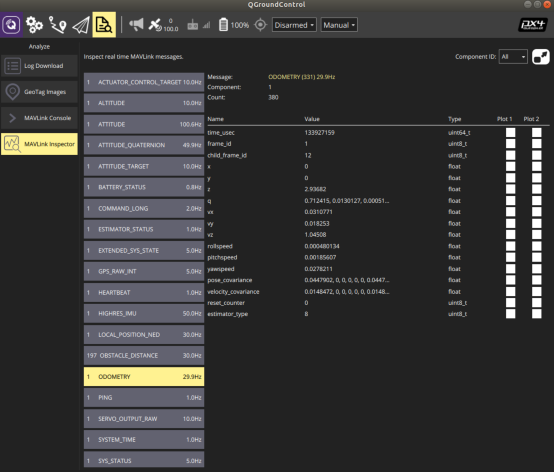
  3. MAVLink Odometry X Y value 0

MAVLink Odometry X Y value 0
Scheduled Pinned Locked Moved Ask your questions right here!
78 Posts 4 Posters 36.2k Views 2 Watching
  • Oldest to Newest
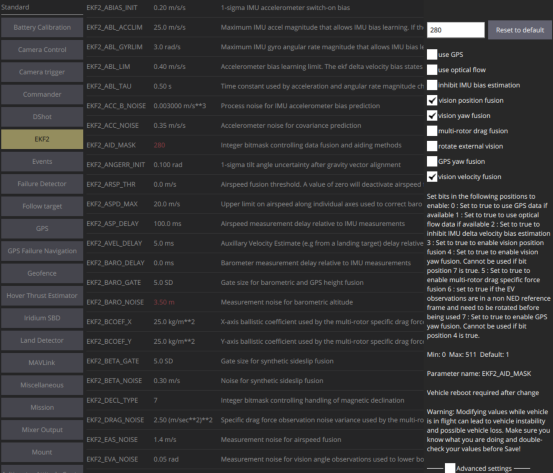
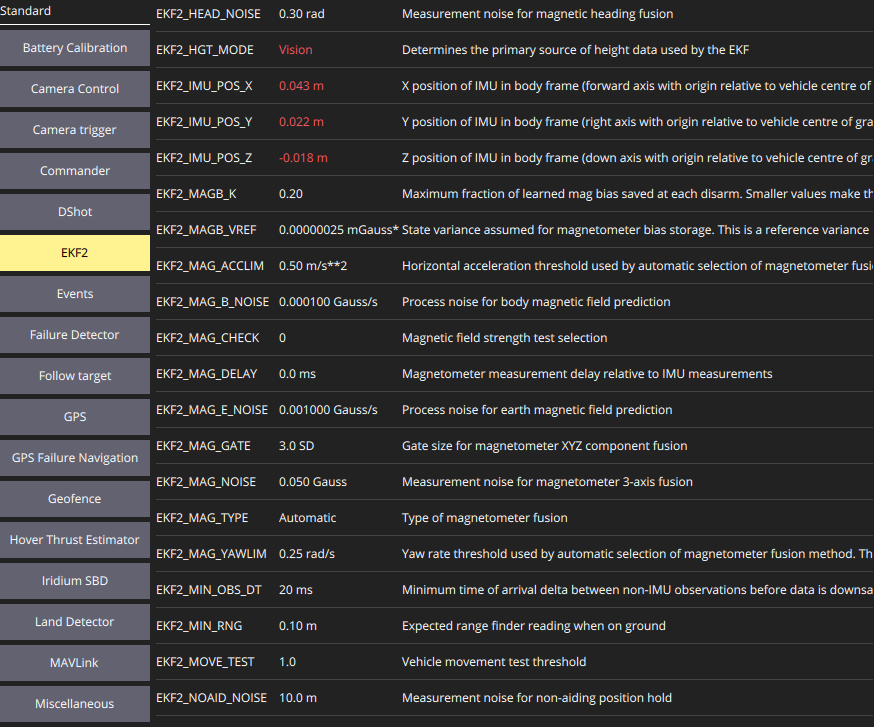
  • Newest to Oldest
  • Most Votes
Reply
  • Reply as topic
Log in to reply
This topic has been deleted. Only users with topic management privileges can see it.
  • KrisK Offline
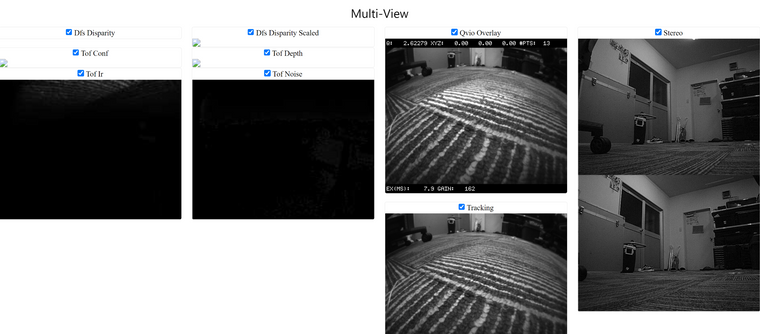
    KrisK Offline
    Kris
    Regular
    wrote on last edited by Kris
    #8

    Has anyone had this error message on their system?

    ERROR validating VIO data received through pipe: read partial packet
    read 156 bytes, but it should be a multiple of 324
    

    If so, how was it resolved?

    Here is my debug odometry;

    voxl:~$ voxl-vision-px4 --debug_odometry
    loading our own config file
    =================================================================
    Parameters as loaded from config file:
    config_file_version:        1
    MAVLINK IO
    qgc_ip:                     192.168.110.146
    en_secondary_qgc:           0
    secondary_qgc_ip:           192.168.1.214
    qgc_udp_port_number:        14550
    udp_mtu:                    512
    en_localhost_mavlink_udp    1
    localhost_udp_port_number:  14551
    VIO
    en_vio:                     1
    vio_pipe:                   qvio
    en_send_vio_to_qgc:         1
    en_reset_vio_if_initialized_inverted: 1
    vio_warmup_s:               3.000000
    APQ8096-ONLY FEATURES
    en_set_clock_from_gps:      1
    en_force_onboard_mav1_mode: 1
    en_reset_px4_on_error:      1
    MISC FEATURES
    horizon_cal_tolerance:      0.450000
    OFFBOARD MODE
    offboard_mode:              trajectory
    follow_tag_id:              0
    figure_eight_move_home:     1
    FIXED FRAME RELOCALIZATION
    en_tag_fixed_frame:         0
    fixed_frame_filter_len:     5
    en_transform_mavlink_pos_setpoints_from_fixed_frame:0
    COLLISION PREVENTION (VOA)
    en_voa:                     1
    en_send_voa_to_qgc:         1
    voa_upper_bound_m:          -0.150000
    voa_lower_bound_m:          0.150000
    voa_memory_s:               1.000000
    voa_input #0
        enabled:            1
        type:               point_cloud
        input_pipe:         dfs_point_cloud
        frame:              stereo_l
    voa_input #1
        enabled:            1
        type:               point_cloud
        input_pipe:         stereo_front_pc
        frame:              stereo_front_l
    voa_input #2
        enabled:            1
        type:               point_cloud
        input_pipe:         stereo_rear_pc
        frame:              stereo_rear_l
    voa_input #3
        enabled:            1
        type:               tof
        input_pipe:         tof
        frame:              tof
    voa_input #4
        enabled:            1
        type:               rangefinder
        input_pipe:         rangefinders
        frame:              body
    =================================================================
    loading extrinsics config file
    exising instance of voxl-vision-px4 found, attempting to stop it
    starting geometry module
    starting px4 monitor
    starting px4 mavlink
    Connected to voxl-mavlink-server
    Detected PX4 Mavlink SYSID 1
    starting udp mavlink
    Adding manual QGC IP address to udp connection list: 192.168.110.146
    Added new UDP connection to 192.168.110.146
    starting px4 shell
    starting fixed pose input
    starting vio manager
    Connected to VIO pipe: qvio
    updating to use imu: imu1
    done updating transforms to use imu: imu1
    ERROR validating VIO data received through pipe: read partial packet
    read 156 bytes, but it should be a multiple of 324
    starting tag manager
    starting voa manager
    Connected to pipe: dfs_point_cloud
    Connected to pipe: tof
    starting horizon cal
    starting offboard trajectory
    Init complete, entering main loop
    ERROR validating VIO data received through pipe: read partial packet
    read 156 bytes, but it should be a multiple of 324
    ERROR validating VIO data received through pipe: read partial packet
    read 156 bytes, but it should be a multiple of 324
    ERROR validating VIO data received through pipe: read partial packet
    read 156 bytes, but it should be a multiple of 324
    ERROR validating VIO data received through pipe: read partial packet
    read 156 bytes, but it should be a multiple of 324
    ERROR validating VIO data received through pipe: read partial packet
    read 156 bytes, but it should be a multiple of 324
    ERROR validating VIO data received through pipe: read partial packet
    read 156 bytes, but it should be a multiple of 324
    detected system time has already been set
    ERROR validating VIO data received through pipe: read partial packet
    read 156 bytes, but it should be a multiple of 324
    WARNING in VOA manager, no attitude data from px4
    ERROR validating VIO data received through pipe: read partial packet
    read 156 bytes, but it should be a multiple of 324
    ERROR validating VIO data received through pipe: read partial packet
    read 156 bytes, but it should be a multiple of 324
    ERROR validating VIO data received through pipe: read partial packet
    read 156 bytes, but it should be a multiple of 324
    ERROR validating VIO data received through pipe: read partial packet
    read 156 bytes, but it should be a multiple of 324
    ERROR validating VIO data received through pipe: read partial packet
    read 156 bytes, but it should be a multiple of 324
    ERROR validating VIO data received through pipe: read partial packet
    read 156 bytes, but it should be a multiple of 324
    ERROR validating VIO data received through pipe: read partial packet
    read 156 bytes, but it should be a multiple of 324
    ERROR validating VIO data received through pipe: read partial packet
    read 156 bytes, but it should be a multiple of 324
    ERROR validating VIO data received through pipe: read partial packet
    read 156 bytes, but it should be a multiple of 324
    ERROR validating VIO data received through pipe: read partial packet
    read 156 bytes, but it should be a multiple of 324
    ERROR validating VIO data received through pipe: read partial packet
    read 156 bytes, but it should be a multiple of 324
    ERROR validating VIO data received through pipe: read partial packet
    read 156 bytes, but it should be a multiple of 324
    ERROR validating VIO data received through pipe: read partial packet
    

    There is also one VOA manager WARNING in my odometry debug, with no attitude data from px4....

    WARNING in VOA manager, no attitude data from px4
    

    😖

    1 Reply Last reply
    0
    • Chad SweetC Offline
      Chad SweetC Offline
      Chad Sweet
      ModalAI Team
      wrote on last edited by
      #9

      From the Troubleshooting VIO docs, can you try these steps?

      QVIO Overlay in voxl-portal
      voxl-inspect-qvio

      KrisK 2 Replies Last reply
      0
      • Chad SweetC Chad Sweet

        From the Troubleshooting VIO docs, can you try these steps?

        QVIO Overlay in voxl-portal
        voxl-inspect-qvio

        KrisK Offline
        KrisK Offline
        Kris
        Regular
        wrote on last edited by
        #10

        @Chad-Sweet Yes, I have read through those steps and tried them. All of my cameras are viewable in voxl-portal. I have also ran the voxl-inspect-qvio and the status was ok with no error's.

        1 Reply Last reply
        0
        • Chad SweetC Offline
          Chad SweetC Offline
          Chad Sweet
          ModalAI Team
          wrote on last edited by
          #11

          Can you please share the output of those steps?

          KrisK 1 Reply Last reply
          0
          • Chad SweetC Chad Sweet

            From the Troubleshooting VIO docs, can you try these steps?

            QVIO Overlay in voxl-portal
            voxl-inspect-qvio

            KrisK Offline
            KrisK Offline
            Kris
            Regular
            wrote on last edited by
            #12

            @Chad-Sweet

            voxl:~$ voxl-inspect-qvio
            waiting for server
            
                T_imu_wrt_vio (m)   |Roll Pitch Yaw (deg)| state| error_code
               -0.00    0.00    0.00|  -0.0    0.0   -0.0| OKAY | ^C
            received SIGINT Ctrl-C
            
            closing and exiting
            
            1 Reply Last reply
            0
            • Chad SweetC Chad Sweet

              Can you please share the output of those steps?

              KrisK Offline
              KrisK Offline
              Kris
              Regular
              wrote on last edited by
              #13

              @Chad-Sweet What would you like to see in my voxl portal?

              1 Reply Last reply
              0
              • KrisK Offline
                KrisK Offline
                Kris
                Regular
                wrote on last edited by
                #14

                Here I have turned the drone about an inch to the left.

                voxl:~$ voxl-inspect-qvio
                waiting for server
                
                    T_imu_wrt_vio (m)   |Roll Pitch Yaw (deg)| state| error_code
                   -0.02    0.00    0.03|   0.3  -10.3    1.7| OKAY | ^C
                received SIGINT Ctrl-C
                
                closing and exiting
                
                
                1 Reply Last reply
                0
                • Chad SweetC Offline
                  Chad SweetC Offline
                  Chad Sweet
                  ModalAI Team
                  wrote on last edited by
                  #15

                  The qvio-overlay in voxl-portal is interesting, but from the voxl-inspect-qvio it looks like VIO is working properly. It's mostly likely PX4 is rejecting position mode, usually because it requires a magnetometer.

                  This section covers position mode rejected issues

                  Do you have a magnetometer connected? If not, are you sure PX4 is not expecting one?

                  KrisK 2 Replies Last reply
                  0
                  • Chad SweetC Chad Sweet

                    The qvio-overlay in voxl-portal is interesting, but from the voxl-inspect-qvio it looks like VIO is working properly. It's mostly likely PX4 is rejecting position mode, usually because it requires a magnetometer.

                    This section covers position mode rejected issues

                    Do you have a magnetometer connected? If not, are you sure PX4 is not expecting one?

                    KrisK Offline
                    KrisK Offline
                    Kris
                    Regular
                    wrote on last edited by
                    #16

                    @Chad-Sweet I haven't added anything special to my Seeker setup.

                    1 Reply Last reply
                    0
                    • Chad SweetC Chad Sweet

                      The qvio-overlay in voxl-portal is interesting, but from the voxl-inspect-qvio it looks like VIO is working properly. It's mostly likely PX4 is rejecting position mode, usually because it requires a magnetometer.

                      This section covers position mode rejected issues

                      Do you have a magnetometer connected? If not, are you sure PX4 is not expecting one?

                      KrisK Offline
                      KrisK Offline
                      Kris
                      Regular
                      wrote on last edited by
                      #17

                      @Chad-Sweet
                      SYS_HAS_MAG
                      SYS_HAS_MAG.png

                      EKF2_MAG_TYPE
                      EKF2_MAG_TYPE.png

                      So, I should enter the 0 value for SYS_HAS_MAG
                      and 5 for the EKF2_MAG_TYPE?

                      1 Reply Last reply
                      0
                      • Chad SweetC Offline
                        Chad SweetC Offline
                        Chad Sweet
                        ModalAI Team
                        wrote on last edited by
                        #18

                        If you are using PX4 1.12 or later, and do not have a magnetometer, and want to use VIO, yes.

                        KrisK 3 Replies Last reply
                        0
                        • Chad SweetC Chad Sweet

                          If you are using PX4 1.12 or later, and do not have a magnetometer, and want to use VIO, yes.

                          KrisK Offline
                          KrisK Offline
                          Kris
                          Regular
                          wrote on last edited by
                          #19

                          @Chad-Sweet OK 👍 I’ll try that 😊

                          1 Reply Last reply
                          0
                          • Chad SweetC Chad Sweet

                            If you are using PX4 1.12 or later, and do not have a magnetometer, and want to use VIO, yes.

                            KrisK Offline
                            KrisK Offline
                            Kris
                            Regular
                            wrote on last edited by Kris
                            #20

                            @Chad-Sweet There is not an option for 5 in EKF2_MAG_TYPE.
                            Should I leave this at “Automatic” or select “None” ?

                            1 Reply Last reply
                            0
                            • Chad SweetC Chad Sweet

                              If you are using PX4 1.12 or later, and do not have a magnetometer, and want to use VIO, yes.

                              KrisK Offline
                              KrisK Offline
                              Kris
                              Regular
                              wrote on last edited by Kris
                              #21

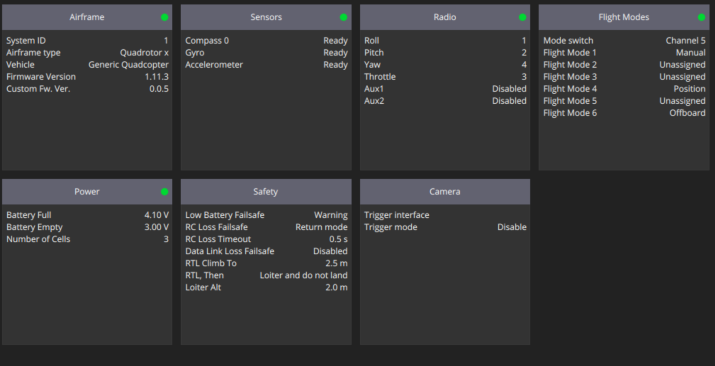
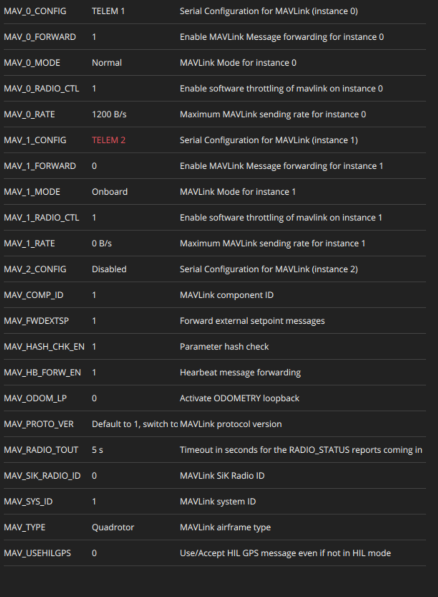
                              @Chad-Sweet I selected "None" for the EKF2_MAG_TYPE and entered "0" for the SYS_HAS_MAG.
                              The Odometry x y values are still at 0.
                              Do I need to change anything in my voxl-vision-px4.conf files now that I am not using a GPS?

                              "config_file_version":  1,                                                                   
                                      "qgc_ip":       "192.168.110.146",                                                           
                                      "en_secondary_qgc":     false,                                                               
                                      "secondary_qgc_ip":     "192.168.1.214",                                                     
                                      "qgc_udp_port_number":  14550,                                                               
                                      "udp_mtu":      512,                                                                         
                                      "en_localhost_mavlink_udp":     true,                                                        
                                      "localhost_udp_port_number":    14551,                                                       
                                      "vio_pipe":     "qvio",                                                                      
                                      "en_vio":       true,                                                                        
                                      "en_send_vio_to_qgc":   true,                                                                
                                      "en_reset_vio_if_initialized_inverted": true,                                                
                                      "vio_warmup_s": 3,                                                                           
                                      "en_set_clock_from_gps":        true,                                                        
                                      "en_force_onboard_mav1_mode":   true,                                                        
                                      "en_reset_px4_on_error":        true,                                                        
                                      "horizon_cal_tolerance":        0.449999988079071,                                           
                                      "offboard_mode":        "trajectory",                                                        
                                      "follow_tag_id":        0,                                                                   
                                      "figure_eight_move_home":       true,                                                        
                                      "en_tag_fixed_frame":   false,                                                               
                                      "fixed_frame_filter_len":       5,                                                           
                                      "en_transform_mavlink_pos_setpoints_from_fixed_frame":  false,                               
                                      "en_voa":       true,                                                                        
                                      "en_send_voa_to_qgc":   true,                                                                
                                      "voa_upper_bound_m":    -0.15000000596046448,                                                
                                      "voa_lower_bound_m":    0.15000000596046448,                                                 
                                      "voa_memory_s": 1,                                                                           
                                      "voa_inputs":   [{                                                                           
                                                      "enabled":      true,                                                        
                                                                              "type": "point_cloud",                                                       
                                                                              "input_pipe":   "dfs_point_cloud",                                           
                                                                              "frame":        "stereo_l"                                                   
                                                                      }, {                                                                                 
                                                                              "enabled":      true,                                                        
                                                                              "type": "point_cloud",                                                       
                                                                              "input_pipe":   "stereo_front_pc",                                           
                                                                              "frame":        "stereo_front_l"                                             
                                                                      }, {                                                                                 
                                                                              "enabled":      true,                                                        
                                                                              "type": "point_cloud",                                                       
                                                                              "input_pipe":   "stereo_rear_pc",                                            
                                                                              "frame":        "stereo_rear_l"                                              
                                                                      }, {                                                                                 
                                                                              "enabled":      true,                                                        
                                                                              "type": "tof",                                                               
                                                                              "input_pipe":   "tof",                                                       
                                                                              "frame":        "tof"                                                        
                                                                      }, {                                                                                 
                                                                              "enabled":      true,                                                        
                                                                              "type": "rangefinder",                                                       
                                                                              "input_pipe":   "rangefinders",                                              
                                                                              "frame":        "body"                                                       
                                                                      }]                                                                                   
                                                      }                                                                                                    
                              

                              Should I just unplug the Cirocomm GPS?

                              1 Reply Last reply
                              0
                              • KrisK Offline
                                KrisK Offline
                                Kris
                                Regular
                                wrote on last edited by
                                #22

                                I unplugged the GPS from the Seeker. I am still not able to get position control in MAVLink and my Odometry x y values are still at 0.
                                Maybe the last option to do is to re-calibrate my cameras...

                                1 Reply Last reply
                                0
                                • Chad SweetC Offline
                                  Chad SweetC Offline
                                  Chad Sweet
                                  ModalAI Team
                                  wrote on last edited by Chad Sweet
                                  #23

                                  If voxl-inspect-qvio shows functioning VIO data, there is no need to calibrate cameras. VIO is working. PX4 is most likely misconfigured.

                                  If you have a GPS, then you likely have a magnetometer?

                                  Seeker should have arrived pre-configured for VIO flight. No need to change anything. VIO is flight tested for 20 minutes before being shipped.

                                  KrisK 2 Replies Last reply
                                  0
                                  • Chad SweetC Chad Sweet

                                    If voxl-inspect-qvio shows functioning VIO data, there is no need to calibrate cameras. VIO is working. PX4 is most likely misconfigured.

                                    If you have a GPS, then you likely have a magnetometer?

                                    Seeker should have arrived pre-configured for VIO flight. No need to change anything. VIO is flight tested for 20 minutes before being shipped.

                                    KrisK Offline
                                    KrisK Offline
                                    Kris
                                    Regular
                                    wrote on last edited by
                                    #24

                                    @Chad-Sweet
                                    Multi-View-r.png

                                    1 Reply Last reply
                                    0
                                    • Chad SweetC Chad Sweet

                                      If voxl-inspect-qvio shows functioning VIO data, there is no need to calibrate cameras. VIO is working. PX4 is most likely misconfigured.

                                      If you have a GPS, then you likely have a magnetometer?

                                      Seeker should have arrived pre-configured for VIO flight. No need to change anything. VIO is flight tested for 20 minutes before being shipped.

                                      KrisK Offline
                                      KrisK Offline
                                      Kris
                                      Regular
                                      wrote on last edited by
                                      #25

                                      @Chad-Sweet
                                      Yes, I have this GPS/Magnetometer that is on the back of the Seeker above the battery compartment.
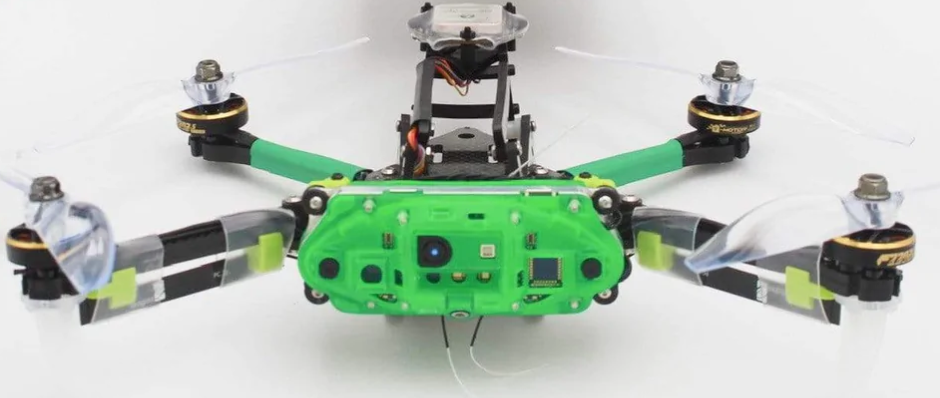
                                      Seeker.png

                                      If my PX4 is possibly misconfigured, should I just remove PX4 and start clean?
                                      Or, is there something you might know that could be causing the problem in PX4?

                                      1 Reply Last reply
                                      0
                                      • Chad SweetC Offline
                                        Chad SweetC Offline
                                        Chad Sweet
                                        ModalAI Team
                                        wrote on last edited by
                                        #26

                                        Here are the default Seeker parameters for PX4 1.11

                                        Here are the helper parameters for Seeker indoor VIO flight

                                        KrisK 1 Reply Last reply
                                        0
                                        • Chad SweetC Chad Sweet

                                          Here are the default Seeker parameters for PX4 1.11

                                          Here are the helper parameters for Seeker indoor VIO flight

                                          KrisK Offline
                                          KrisK Offline
                                          Kris
                                          Regular
                                          wrote on last edited by
                                          #27

                                          @Chad-Sweet Thank you 🙏
                                          I will load these into PX4 and test it.

                                          1 Reply Last reply
                                          0

                                          Hello! It looks like you're interested in this conversation, but you don't have an account yet.

                                          Getting fed up of having to scroll through the same posts each visit? When you register for an account, you'll always come back to exactly where you were before, and choose to be notified of new replies (either via email, or push notification). You'll also be able to save bookmarks and upvote posts to show your appreciation to other community members.

                                          With your input, this post could be even better 💗

                                          Register Login
                                          Reply
                                          • Reply as topic
                                          Log in to reply
                                          • Oldest to Newest
                                          • Newest to Oldest
                                          • Most Votes


                                          ModalAI
                                          Categories Recent Tags ModalAI.com Docs
                                          © 2026 ModalAI® · Accelerating autonomy for smaller, smarter, safer drones · Powered by NodeBB
                                          • Login

                                          • Don't have an account? Register

                                          • Login or register to search.
                                          • First post
                                            Last post
                                          0
                                          • Categories
                                          • Recent
                                          • Tags
                                          • Popular
                                          • Users
                                          • Groups