Skip to content
  • Categories
  • Recent
  • Tags
  • Popular
  • Users
  • Groups
Collapse
Brand Logo

ModalAI Forum

  1. ModalAI Support Forum
  2. Ask your questions right here!
  3. Sentinel VOXL2 Microhard not running

Sentinel VOXL2 Microhard not running
Scheduled Pinned Locked Moved Ask your questions right here!
38 Posts 3 Posters 8.2k Views 1 Watching
  • Oldest to Newest
  • Newest to Oldest
  • Most Votes
Reply
  • Reply as topic
Log in to reply
This topic has been deleted. Only users with topic management privileges can see it.
  • R Offline
    R Offline
    rohitpillai
    Regular
    wrote on last edited by
    #13

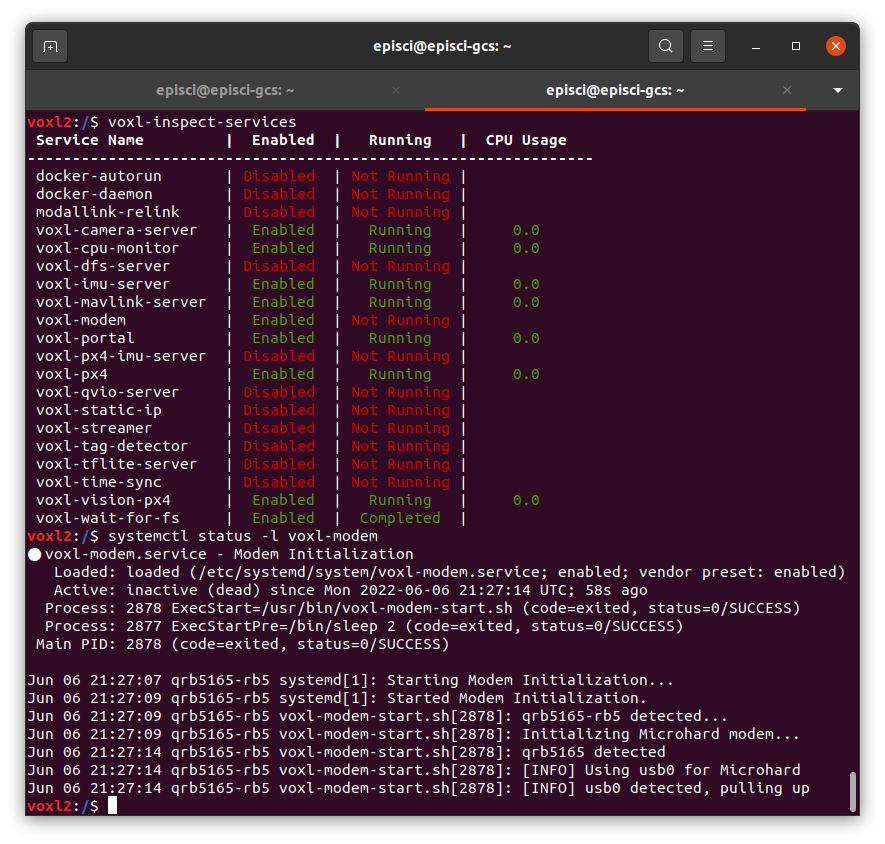
    Here is the output -
    Screenshot from 2022-06-29 11-59-53.png

    If I try to SSH using this IP address, it takes me to this and not VOXL2 -
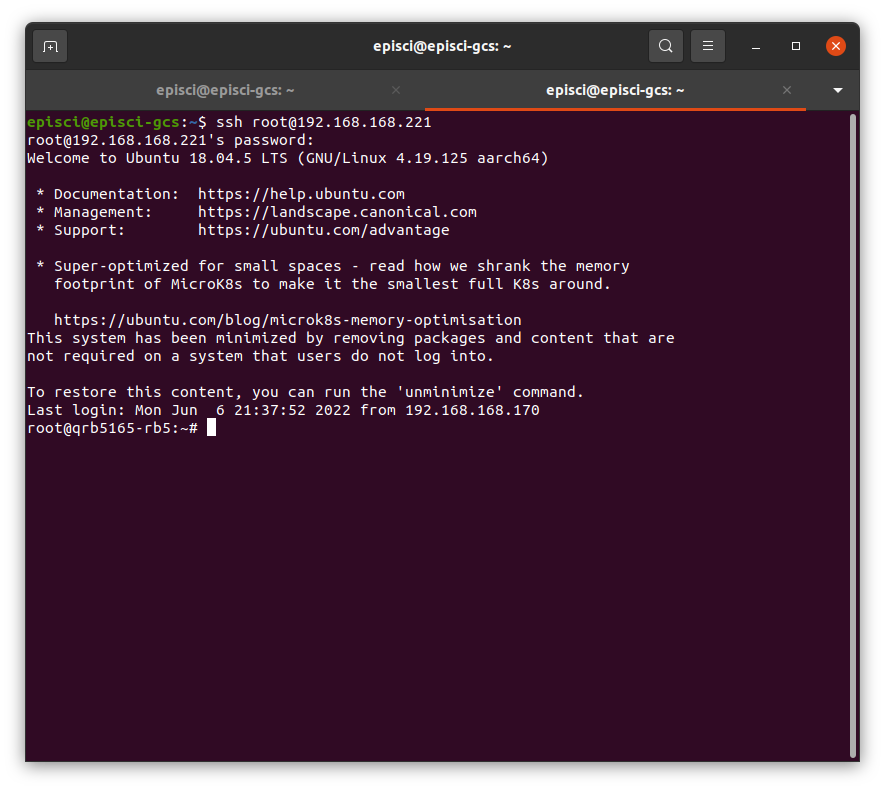
    Screenshot from 2022-06-29 12-00-38.png

    On the other drones it is usually eth0 for the Microhard connection. Why is it defaulting to usb0?

    1 Reply Last reply
    0
    • R Offline
      R Offline
      rohitpillai
      Regular
      wrote on last edited by
      #14

      Okay typing in bash takes me to VOXL2. However, it is not setting the static IP address that I want it to set, which is 192.168.168.60

      1 Reply Last reply
      0
      • tomT Offline
        tomT Offline
        tom
        admin
        wrote on last edited by
        #15

        @rohitpillai I'm still playing around to figure out exactly what is going wrong but here are a couple answers:

        That SSH session is the VOXL2, SSH just doesn't put you in the bash shell by default, if you run bash it should give you the expected voxl terminal you're used to.

        The reason why it is showing up as usb0 and not eth0 is because the Microhard add-on board you're using is a newer flavor than the others "M0048-2" vs "M0048-1" (the silk screen may not reflect that correctly). This newer flavor removes the LAN7500 chip and uses a slightly different driver to enable comms between the chips.

        This functionality is new to voxl-modem as well which is why you're running into this bug, you're one of the first people to actually have one of these new boards in hand.

        1 Reply Last reply
        0
        • R Offline
          R Offline
          rohitpillai
          Regular
          wrote on last edited by
          #16

          Oh cool! Is there anything I can do to help from my side to figure this out?

          1 Reply Last reply
          0
          • tomT Offline
            tomT Offline
            tom
            admin
            wrote on last edited by tom
            #17

            @rohitpillai I will let you know if I need anything from you. I'm screwing around with the voxl-modem source code right now to try to figure out how to fix the issue. I think I've already found a couple things that could resolve it.

            I'll update once I get it going, I may generate a new voxl-modem deb package for you to try out

            1 Reply Last reply
            0
            • R Offline
              R Offline
              rohitpillai
              Regular
              wrote on last edited by
              #18

              Sounds good!

              1 Reply Last reply
              0
              • tomT Offline
                tomT Offline
                tom
                admin
                wrote on last edited by
                #19

                @rohitpillai I believe I have fixed the issue. voxl-modem was jumping ahead and assuming that the modem had enumerated before it had which would cause some of the commands to never be run.

                I have generated a new dev package for you to try out, the download link is:

                404 Not Found

                favicon

                (voxl-packages.modalai.com)

                You can take a look at the source code changes here: https://gitlab.com/voxl-public/voxl-sdk/utilities/voxl-modem/-/commit/0cc330f8fcd6cafc97b80412dfe9994b8389e90b

                In order to try this package out, do the following:

                • download the voxl-modem_0.15.2-202206291955_arm64.deb package using the above link
                • push the package to your VOXL2 in the directory you'd like (I'll use /data) using:
                adb push voxl-modem_0.15.2-202206291955_arm64.deb /data
                
                • Force remove the voxl-modem package on board:
                adb shell
                
                dpkg --purge --force-all voxl-modem
                
                • Install the new dev package:
                cd /data
                
                dpkg -i voxl-modem_0.15.2-202206291955_arm64.deb
                
                • Re-run voxl-configure-modem and choose the IP to your liking

                Verify that the network interface comes up and the IP is what you expect with ifconfig

                Try a couple reboots to confirm that the expected behavior is consistent.

                Let me know if you need any clarity on the above and let me know the outcome of your tests.

                The usb0 network interface won't come up immediately after reboot (may take 10-15 seconds) for it to enumerate

                1 Reply Last reply
                0
                • R Offline
                  R Offline
                  rohitpillai
                  Regular
                  wrote on last edited by
                  #20

                  After a couple of reboots I am getting the same behaviour. It works as it should now! Thanks!
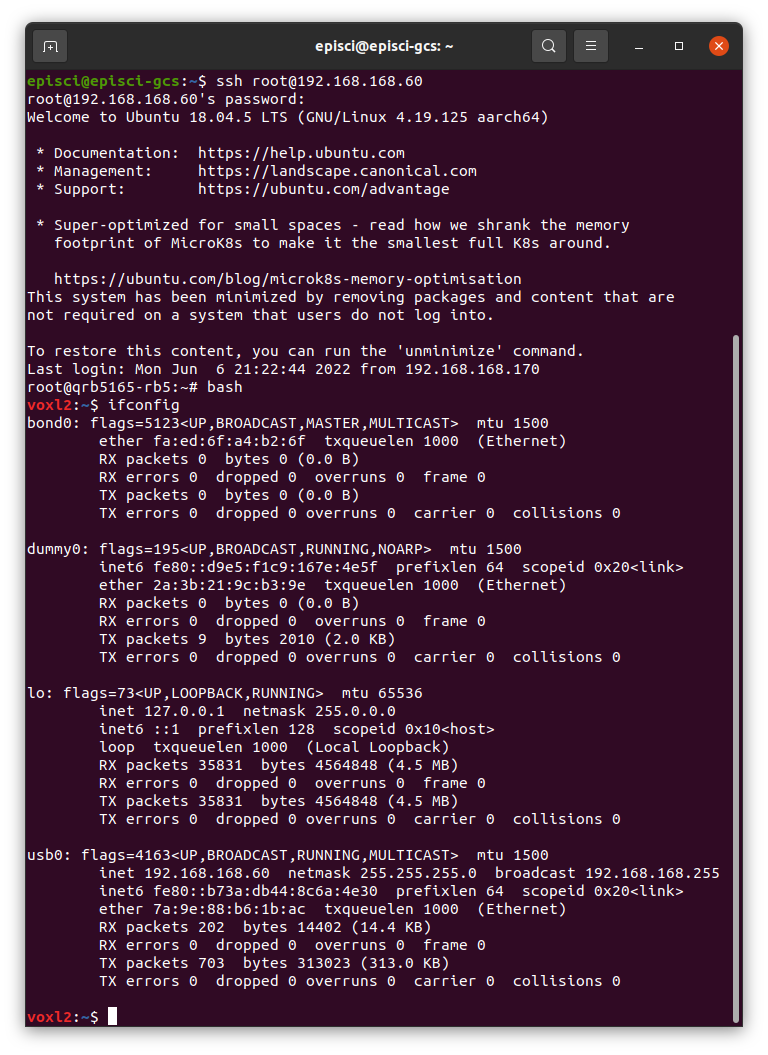
                  Screenshot from 2022-06-29 13-26-16.png

                  1 Reply Last reply
                  0
                  • tomT Offline
                    tomT Offline
                    tom
                    admin
                    wrote on last edited by
                    #21

                    @rohitpillai Woot! Thank you for all of your help! I will go ahead and merge this into master so that it will make it into the next release.

                    wilkinsafW 1 Reply Last reply
                    1
                    • tomT tom

                      @rohitpillai Woot! Thank you for all of your help! I will go ahead and merge this into master so that it will make it into the next release.

                      wilkinsafW Offline
                      wilkinsafW Offline
                      wilkinsaf
                      ModalAI Team
                      wrote on last edited by
                      #22

                      @tom Hey Tom,

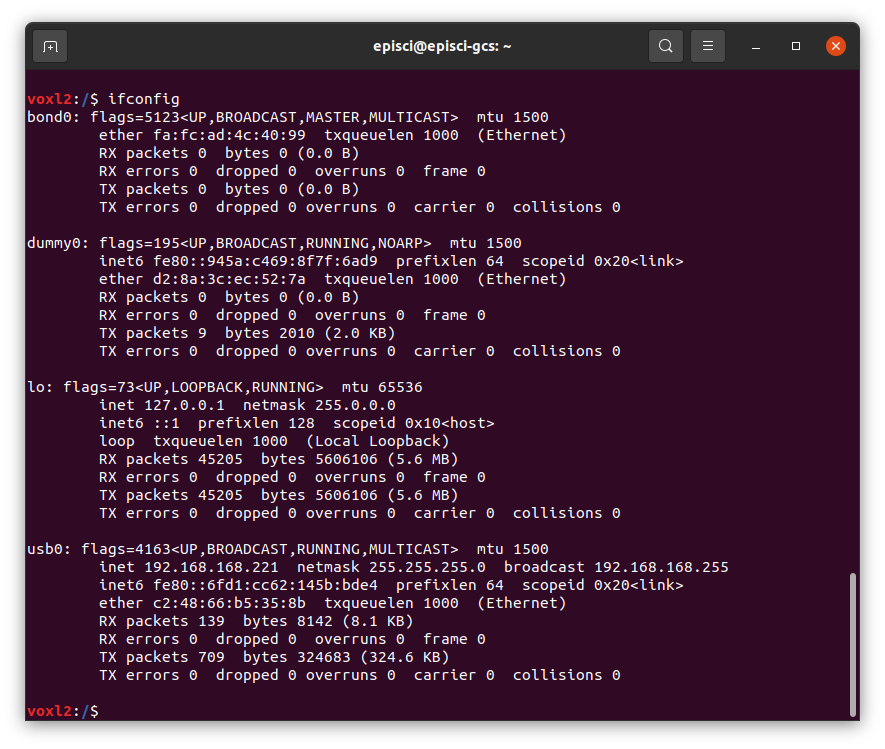
                      I am noticing this issue of microhard not having a static ip on my system as well.
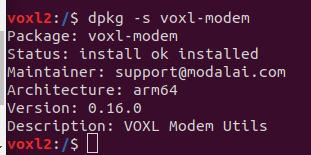
                      10bc948b-8cf9-45ec-bbe4-bf0819d393b6-image.png

                      It appears I am on a later version than the one in the post. Is the voxl-static-ip service now the preferred way to have a static ip?

                      wilkinsafW 1 Reply Last reply
                      0
                      • wilkinsafW wilkinsaf

                        @tom Hey Tom,

                        I am noticing this issue of microhard not having a static ip on my system as well.
                        10bc948b-8cf9-45ec-bbe4-bf0819d393b6-image.png

                        It appears I am on a later version than the one in the post. Is the voxl-static-ip service now the preferred way to have a static ip?

                        wilkinsafW Offline
                        wilkinsafW Offline
                        wilkinsaf
                        ModalAI Team
                        wrote on last edited by
                        #23

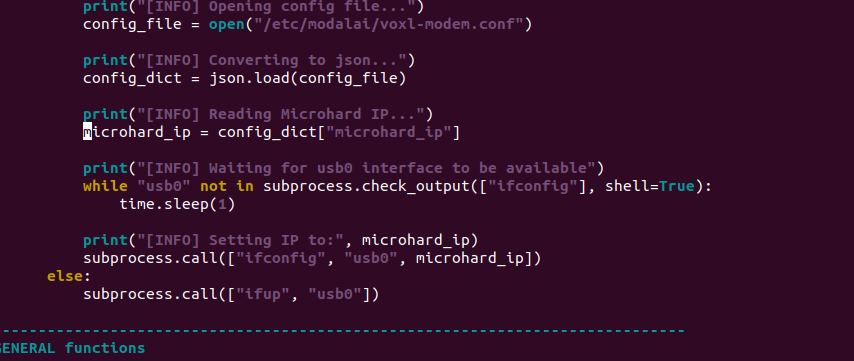
                        @wilkinsaf Code is still there
                        66b46d42-ff6b-469c-b6fd-a9ac143b7c61-image.png

                        wilkinsafW 1 Reply Last reply
                        0
                        • wilkinsafW wilkinsaf

                          @wilkinsaf Code is still there
                          66b46d42-ff6b-469c-b6fd-a9ac143b7c61-image.png

                          wilkinsafW Offline
                          wilkinsafW Offline
                          wilkinsaf
                          ModalAI Team
                          wrote on last edited by
                          #24

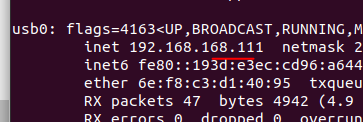
                          @wilkinsaf But ip still is not what is in the config file

                          ip address: 1e15d9f5-c3a7-4e66-83d3-d6f88ab6cd7d-image.png

                          config file:
                          feeb0a0b-b03b-47b5-99c6-ff48c891db04-image.png

                          1 Reply Last reply
                          0
                          • tomT Offline
                            tomT Offline
                            tom
                            admin
                            wrote on last edited by
                            #25

                            @wilkinsaf Interesting, give voxl-static-ip a try and see if it helps. I have yet to integrate that directly into voxl-modem. We have a systemd service setup for it, so I would go ahead and modify /usr/bin/voxl-static-ip and then enable it's service systemctl enable voxl-static-ip

                            wilkinsafW 1 Reply Last reply
                            0
                            • tomT tom

                              @wilkinsaf Interesting, give voxl-static-ip a try and see if it helps. I have yet to integrate that directly into voxl-modem. We have a systemd service setup for it, so I would go ahead and modify /usr/bin/voxl-static-ip and then enable it's service systemctl enable voxl-static-ip

                              wilkinsafW Offline
                              wilkinsafW Offline
                              wilkinsaf
                              ModalAI Team
                              wrote on last edited by
                              #26

                              @tom I did, but i had to add in a huge sleeper and have it After=voxl-modem.service

                              since the voxl-modem is a python script (thank you for that) I am just doing some caveman debugging. will post progress

                              1 Reply Last reply
                              0
                              • tomT Offline
                                tomT Offline
                                tom
                                admin
                                wrote on last edited by
                                #27

                                @wilkinsaf voxl-static-ip is pretty "dumb" as it doesn't check to see if the interface is actually up before trying to modify the IP so that's probably the reason why you need the big sleep, but I'm sure you figured that out already.

                                wilkinsafW 1 Reply Last reply
                                0
                                • tomT tom

                                  @wilkinsaf voxl-static-ip is pretty "dumb" as it doesn't check to see if the interface is actually up before trying to modify the IP so that's probably the reason why you need the big sleep, but I'm sure you figured that out already.

                                  wilkinsafW Offline
                                  wilkinsafW Offline
                                  wilkinsaf
                                  ModalAI Team
                                  wrote on last edited by
                                  #28

                                  @tom Yeah. I think I figured it out

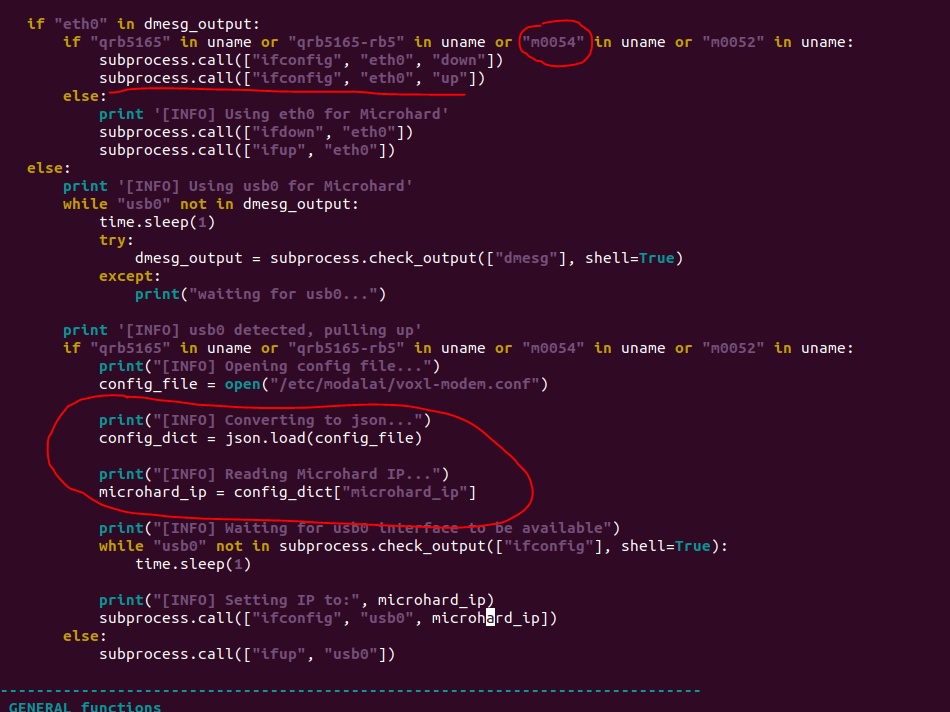
                                  My uname has "m0054". It uses eth0 as interface instead of usb0. i dont see code for setting the ip for eth0. What is weird is that I also see usb0 come up as an interface. But I am going to add some code here to hopefully fix that. Will make a branch or something if it is useful for someone else
                                  70be3696-0b4d-4496-b9ea-5bd60a2cf46b-image.png

                                  1 Reply Last reply
                                  0
                                  • tomT Offline
                                    tomT Offline
                                    tom
                                    admin
                                    wrote on last edited by
                                    #29

                                    @wilkinsaf Do you have any other type of network connection going? WiFi? Ethernet?

                                    I can try to copy your setup, so you've got a VOXL2 w/ Microhard add-on? anything else important connected? mipi cameras and such wouldn't affect this

                                    1 Reply Last reply
                                    0
                                    • tomT Offline
                                      tomT Offline
                                      tom
                                      admin
                                      wrote on last edited by tom
                                      #30

                                      @wilkinsaf Also a voxl-version would be helpful to see. To give you some background on why this part is a little confusing, on newer builds of Microhard add-ons we had to change out a chip due to supply shortages and so the newer Microhard add-ons will be handled as "usb0" instead of "eth0".

                                      wilkinsafW 1 Reply Last reply
                                      0
                                      • tomT Offline
                                        tomT Offline
                                        tom
                                        admin
                                        wrote on last edited by
                                        #31

                                        @wilkinsaf Oh also, while I'm asking you things, the output of the following would be helpful as well:

                                        dmesg | grep eth0
                                        
                                        dmesg | grep usb0
                                        
                                        1 Reply Last reply
                                        0
                                        • tomT tom

                                          @wilkinsaf Also a voxl-version would be helpful to see. To give you some background on why this part is a little confusing, on newer builds of Microhard add-ons we had to change out a chip due to supply shortages and so the newer Microhard add-ons will be handled as "usb0" instead of "eth0".

                                          wilkinsafW Offline
                                          wilkinsafW Offline
                                          wilkinsaf
                                          ModalAI Team
                                          wrote on last edited by
                                          #32

                                          @tom

                                          No other wifi or ethernet. I am connected with adb.

                                          VOXL2 with microhard
                                          cameras: stereo, tracking, hires (although my config only has the tracking and hires turned on rn)

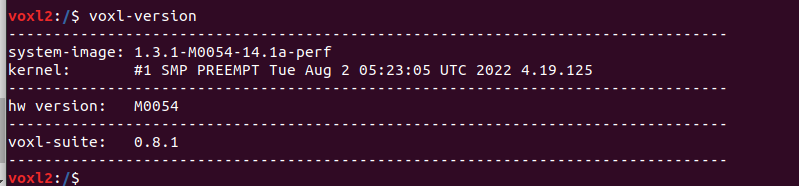
                                          voxl-version:
                                          48d14733-076b-4228-8bb5-0a7009e395cb-image.png

                                          dmesg | grep eth0

                                          [    3.291467] smsc75xx 1-1.1:1.0 eth0: register 'smsc75xx' at usb-xhci-hcd.0.auto-1.1, smsc75xx USB 2.0 Gigabit Ethernet, 42:cd:53:3c:37:18
                                          [    5.516283] IPv6: ADDRCONF(NETDEV_UP): eth0: link is not ready
                                          [    9.465432] IPv6: ADDRCONF(NETDEV_CHANGE): eth0: link becomes ready
                                          [    9.475251] smsc75xx 1-1.1:1.0 eth0: link up, 100Mbps, full-duplex, lpa 0x4DE1
                                          [   14.332677] smsc75xx 1-1.1:1.0 eth0: link up, 100Mbps, full-duplex, lpa 0x4DE1
                                          [   14.345964] smsc75xx 1-1.1:1.0 eth0: link up, 100Mbps, full-duplex, lpa 0x4DE1
                                          [   21.188500] smsc75xx 1-1.1:1.0 eth0: link down
                                          [   22.663119] smsc75xx 1-1.1:1.0 eth0: link up, 100Mbps, full-duplex, lpa 0x4DE1
                                          [   22.682574] smsc75xx 1-1.1:1.0 eth0: link up, 100Mbps, full-duplex, lpa 0x4DE1
                                          [   23.155729] smsc75xx 1-1.1:1.0 eth0: link down
                                          [   23.168624] smsc75xx 1-1.1:1.0 eth0: link down
                                          [   25.801191] smsc75xx 1-1.1:1.0 eth0: link up, 100Mbps, full-duplex, lpa 0x4DE1
                                          [   34.154417] smsc75xx 1-1.1:1.0 eth0: link down
                                          [   35.708201] smsc75xx 1-1.1:1.0 eth0: link up, 100Mbps, full-duplex, lpa 0x4DE1
                                          [   35.723892] smsc75xx 1-1.1:1.0 eth0: link up, 100Mbps, full-duplex, lpa 0x4DE1
                                          

                                          dmesg | grep usb0

                                              2.202994] register_client_adhoc:Client handle 64 usb0
                                          [    5.322266] f_cdev_alloc: port_name:at_usb0 (ffffffdd12c44c00) portno:(0)
                                          [   37.386234] rndis_host 1-1.2:1.0 usb0: register 'rndis_host' at usb-xhci-hcd.0.auto-1.2, RNDIS device, 46:b5:b5:15:45:b0

                                          
                                          
                                          1 Reply Last reply
                                          0

                                          Hello! It looks like you're interested in this conversation, but you don't have an account yet.

                                          Getting fed up of having to scroll through the same posts each visit? When you register for an account, you'll always come back to exactly where you were before, and choose to be notified of new replies (either via email, or push notification). You'll also be able to save bookmarks and upvote posts to show your appreciation to other community members.

                                          With your input, this post could be even better 💗

                                          Register Login
                                          Reply
                                          • Reply as topic
                                          Log in to reply
                                          • Oldest to Newest
                                          • Newest to Oldest
                                          • Most Votes


                                          ModalAI
                                          Categories Recent Tags ModalAI.com Docs
                                          © 2026 ModalAI® · Accelerating autonomy for smaller, smarter, safer drones · Powered by NodeBB
                                          • Login

                                          • Don't have an account? Register

                                          • Login or register to search.
                                          • First post
                                            Last post
                                          0
                                          • Categories
                                          • Recent
                                          • Tags
                                          • Popular
                                          • Users
                                          • Groups