Skip to content
  • Categories
  • Recent
  • Tags
  • Popular
  • Users
  • Groups
Collapse
Brand Logo

ModalAI Forum

  1. ModalAI Support Forum
  2. VOXL Dev Kits
  3. Requesting the factory original calibration files for ADK Ser#M2500000185

Requesting the factory original calibration files for ADK Ser#M2500000185

Scheduled Pinned Locked Moved VOXL Dev Kits
24 Posts 3 Posters 10.8k Views 1 Watching
  • Oldest to Newest
  • Newest to Oldest
  • Most Votes
Reply
  • Reply as topic
Log in to reply
This topic has been deleted. Only users with topic management privileges can see it.
  • L latif

    @latif I meant "voxl-configure-cameras 19"... in the post above.

    tomT Offline
    tomT Offline
    tom
    admin
    wrote on last edited by
    #7

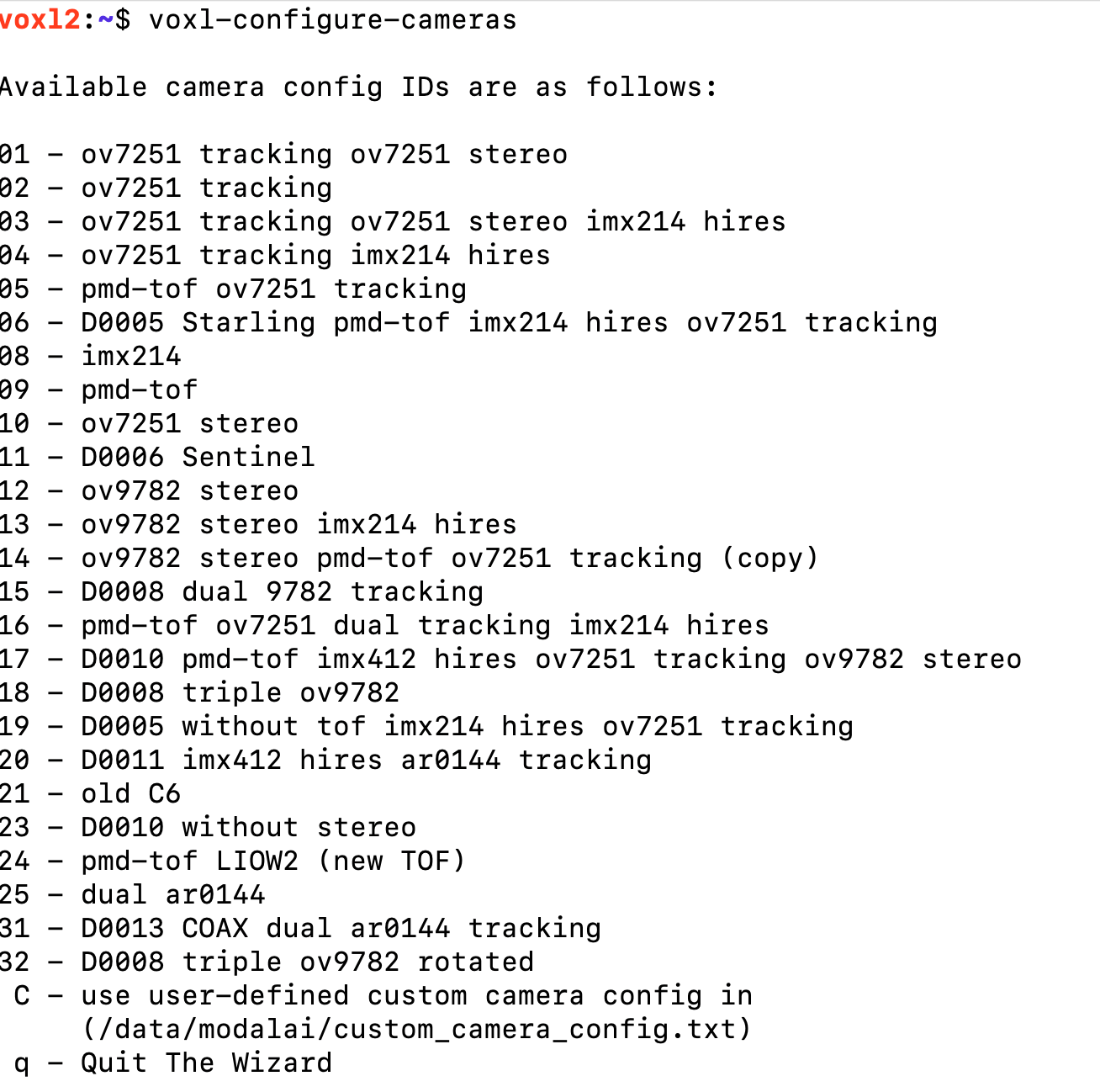
    @latif I wonder if you have the wrong kernel on there. If you run voxl-configure-cameras what options does it give you?

    L 1 Reply Last reply
    0
    • tomT tom

      @latif I wonder if you have the wrong kernel on there. If you run voxl-configure-cameras what options does it give you?

      L Offline
      L Offline
      latif
      Contributor
      wrote on last edited by
      #8

      @tom 610cafc9-ea38-4c27-98bf-6f251b8ed816-image.png

      1 Reply Last reply
      0
      • L Offline
        L Offline
        latif
        Contributor
        wrote on last edited by
        #9

        Maybe a different issue, running configure stand-alone shows this problem:
        2b918483-fbaf-4ba1-bbdc-5b74fe69d605-image.png
        Checking space I see this:
        38c840b4-5eb5-4c4d-a59b-04306a3afeb6-image.png

        tomT 1 Reply Last reply
        0
        • L latif

          Maybe a different issue, running configure stand-alone shows this problem:
          2b918483-fbaf-4ba1-bbdc-5b74fe69d605-image.png
          Checking space I see this:
          38c840b4-5eb5-4c4d-a59b-04306a3afeb6-image.png

          tomT Offline
          tomT Offline
          tom
          admin
          wrote on last edited by tom
          #10

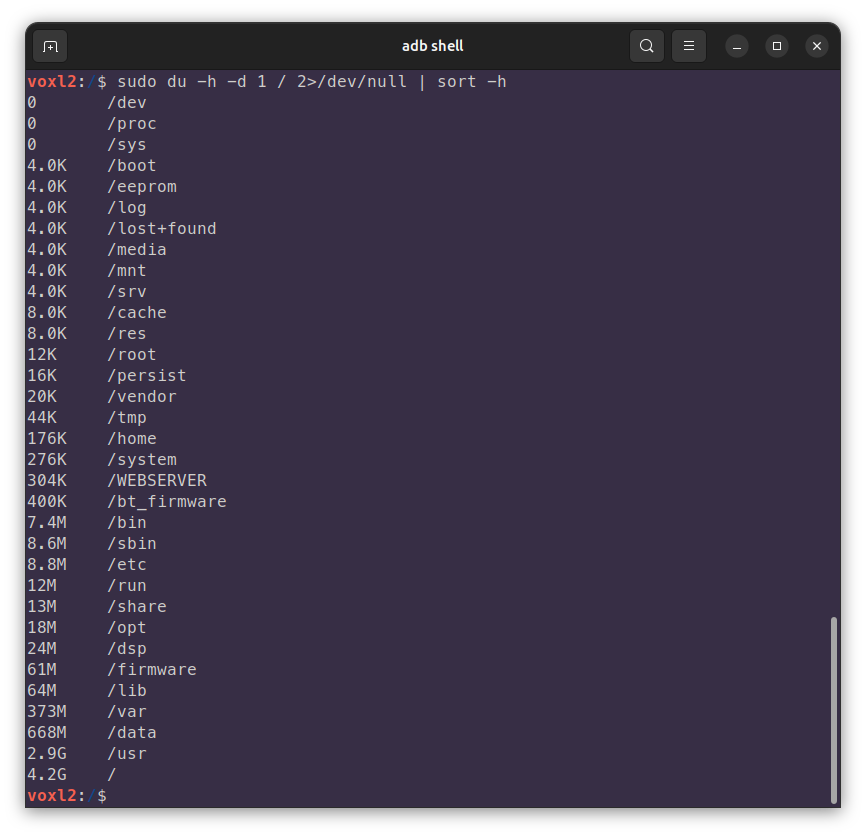
          @latif oh boy, well that is certainly an issue, can you run sudo du -h -d 1 / 2>/dev/null | sort -h to see which directory/partition is full?

          L 2 Replies Last reply
          0
          • tomT tom

            @latif oh boy, well that is certainly an issue, can you run sudo du -h -d 1 / 2>/dev/null | sort -h to see which directory/partition is full?

            L Offline
            L Offline
            latif
            Contributor
            wrote on last edited by
            #11

            @tom Yeah, it's starting to look bleak! Here's the output:
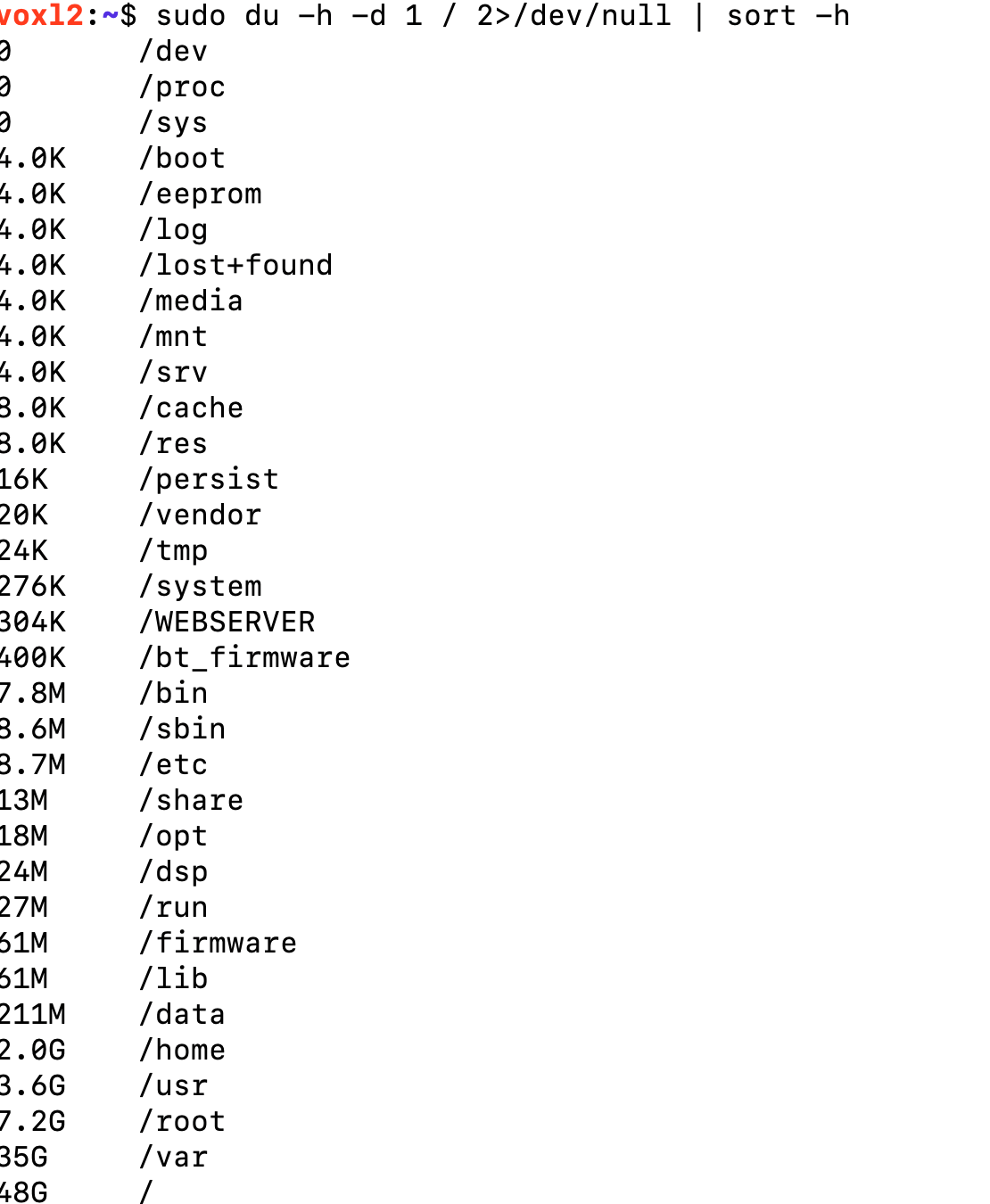
            210015b2-efc8-4ece-ab9f-1e2172c7fc4e-image.png

            The only user data I have is under /home/root, about 1.8GB. I can free up some of it, but how do I redirect the configuration processes to use a different directory other than /usr, /lib, etc.?
            Also, is there a way to increase the overall storage size? I see that the biggest partition ("sda") is only 118G and now full.

            tomT 1 Reply Last reply
            0
            • L latif

              @tom Yeah, it's starting to look bleak! Here's the output:
              210015b2-efc8-4ece-ab9f-1e2172c7fc4e-image.png

              The only user data I have is under /home/root, about 1.8GB. I can free up some of it, but how do I redirect the configuration processes to use a different directory other than /usr, /lib, etc.?
              Also, is there a way to increase the overall storage size? I see that the biggest partition ("sda") is only 118G and now full.

              tomT Offline
              tomT Offline
              tom
              admin
              wrote on last edited by
              #12

              @latif /var being that full is very abnormal, here is a screenshot from one of my drones:

              eb2dc6a3-842d-450d-a522-16ae3674ae9b-image.png

              tomT 1 Reply Last reply
              0
              • tomT tom

                @latif /var being that full is very abnormal, here is a screenshot from one of my drones:

                eb2dc6a3-842d-450d-a522-16ae3674ae9b-image.png

                tomT Offline
                tomT Offline
                tom
                admin
                wrote on last edited by
                #13

                @tom It's possible /var/log/journal/ is full for some reason? You could try clearing stale logs from there

                1 Reply Last reply
                0
                • tomT tom

                  @latif oh boy, well that is certainly an issue, can you run sudo du -h -d 1 / 2>/dev/null | sort -h to see which directory/partition is full?

                  L Offline
                  L Offline
                  latif
                  Contributor
                  wrote on last edited by
                  #14

                  @tom Yeah, it's starting to look dangerous. Here's the output:
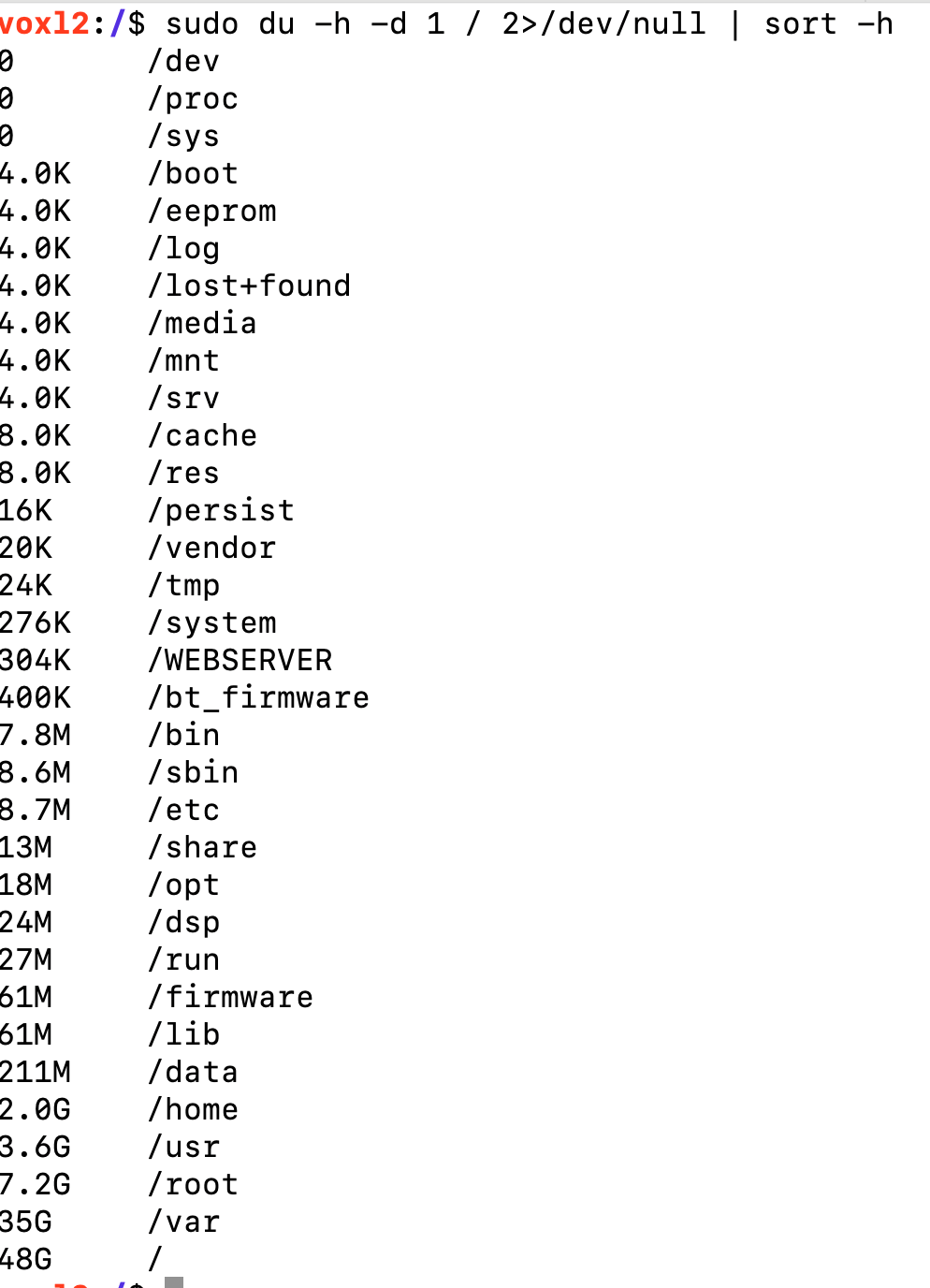
                  4950b4c9-6f61-46c7-aa09-87e8bf9636c4-image.png

                  tomT L 2 Replies Last reply
                  0
                  • L latif

                    @tom Yeah, it's starting to look dangerous. Here's the output:
                    4950b4c9-6f61-46c7-aa09-87e8bf9636c4-image.png

                    tomT Offline
                    tomT Offline
                    tom
                    admin
                    wrote on last edited by
                    #15

                    @latif You should be able to go into /var and see what's full and deleting it

                    1 Reply Last reply
                    0
                    • L latif

                      @tom Yeah, it's starting to look dangerous. Here's the output:
                      4950b4c9-6f61-46c7-aa09-87e8bf9636c4-image.png

                      L Offline
                      L Offline
                      latif
                      Contributor
                      wrote on last edited by
                      #16

                      @latif Thanks! syslog was 27G! Emptied it out and running voxl-configure-cameras again. Hopefully this will fix the other issues.

                      L 1 Reply Last reply
                      0
                      • L latif

                        @latif Thanks! syslog was 27G! Emptied it out and running voxl-configure-cameras again. Hopefully this will fix the other issues.

                        L Offline
                        L Offline
                        latif
                        Contributor
                        wrote on last edited by
                        #17

                        @latif Hi @tom, cleaning up the /var/syslog file enabled the camera server to run - so the cameras are fine. I'm still not sure if all the calibrations are right, I see an error message 38b571ca-0981-47b6-840b-b372622479ca-image.png when I try to bind the Commando8 Controller. Also, could never get a "READY" sign on QGroundControl. Should I run the "Sensor Calibration" options? Not knowing what that'd do, I didn't run them.
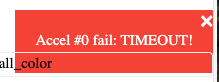
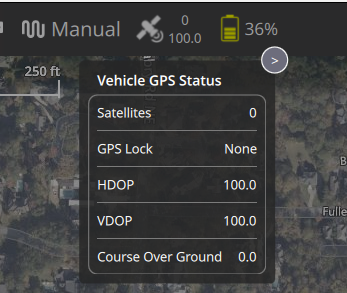
                        If this is relevant information: I'm not getting GPS data consistently (right now getting nothing, but earlier at some point in time I did), right now I see this on QGC: cbaf5101-0eef-4acc-a295-5f60a218b725-image.png
                        tomT 1 Reply Last reply
                        0
                        • L latif

                          @latif Hi @tom, cleaning up the /var/syslog file enabled the camera server to run - so the cameras are fine. I'm still not sure if all the calibrations are right, I see an error message 38b571ca-0981-47b6-840b-b372622479ca-image.png when I try to bind the Commando8 Controller. Also, could never get a "READY" sign on QGroundControl. Should I run the "Sensor Calibration" options? Not knowing what that'd do, I didn't run them.
                          If this is relevant information: I'm not getting GPS data consistently (right now getting nothing, but earlier at some point in time I did), right now I see this on QGC: cbaf5101-0eef-4acc-a295-5f60a218b725-image.png

                          tomT Offline
                          tomT Offline
                          tom
                          admin
                          wrote on last edited by
                          #18

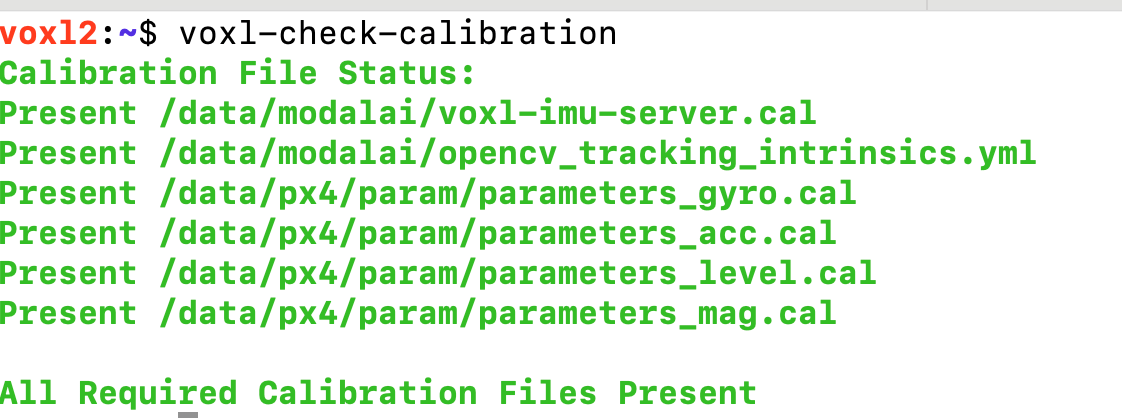
                          @latif What do you see if you run voxl-check-calibration?

                          It sometimes takes a while to get a GPS lock for the first time in a new location, may have to let the drone sit outside for 5-10 minutes for the initial lock, will be much faster after that.

                          L 1 Reply Last reply
                          0
                          • tomT tom

                            @latif What do you see if you run voxl-check-calibration?

                            It sometimes takes a while to get a GPS lock for the first time in a new location, may have to let the drone sit outside for 5-10 minutes for the initial lock, will be much faster after that.

                            L Offline
                            L Offline
                            latif
                            Contributor
                            wrote on last edited by
                            #19

                            @tom I'll let it sit outside for a few minutes for GPS locks. Here's the output for voxl-check-calibration: 79b81c4c-46e8-43f4-9733-0a577fae95f1-image.png
                            Still seeing things like ac080230-6832-4f96-8494-e5cdb4ed5928-image.png

                            tomT 1 Reply Last reply
                            0
                            • L latif

                              @tom I'll let it sit outside for a few minutes for GPS locks. Here's the output for voxl-check-calibration: 79b81c4c-46e8-43f4-9733-0a577fae95f1-image.png

                              Still seeing things like ac080230-6832-4f96-8494-e5cdb4ed5928-image.png

                              tomT Offline
                              tomT Offline
                              tom
                              admin
                              wrote on last edited by
                              #20

                              @latif You'll want to load the GPS specific px4 param file in order for "position" mode to use GPS position as opposed to VIO position.

                              If you run voxl-configure-px4-params -w and navigate to EKF2_helpers you should be able to see the relevant options.

                              L 1 Reply Last reply
                              0
                              • tomT tom

                                @latif You'll want to load the GPS specific px4 param file in order for "position" mode to use GPS position as opposed to VIO position.

                                If you run voxl-configure-px4-params -w and navigate to EKF2_helpers you should be able to see the relevant options.

                                L Offline
                                L Offline
                                latif
                                Contributor
                                wrote on last edited by
                                #21

                                @tom Now that I seem to have a good health check and the cameras working, I'd like to do the simplest possible first flight -- I went through the video directions in the Bootcamp, but wasn't able to go beyond trying to "arm" it.

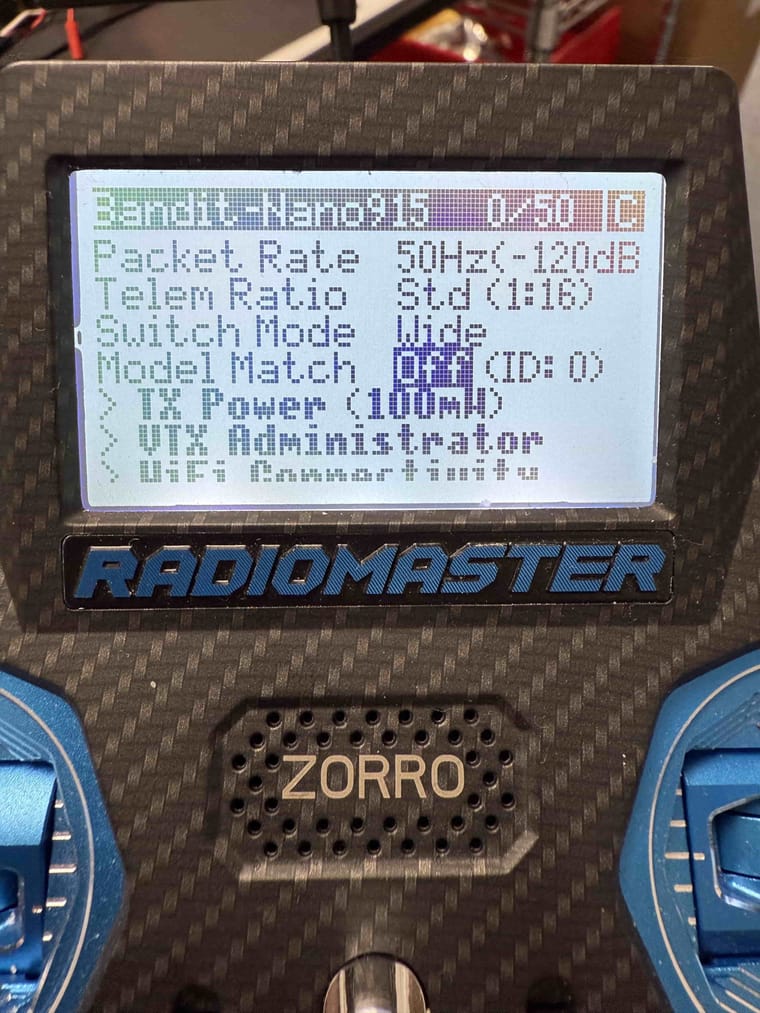
                                • I can't tell if it is binding or not. Tried the voxl-elrs -b, which seems to take it as the blue flashing lights become steady, but no movement of the propellers on trying to arm. I'm seeing a "model mismatch" message on the Commando8 Remote Controller. This shipped with the ADK and nothing has been done to it.
                                • I need some help in flying it, indoors if that's ealier without GPS, but ultimately with GPS mission-planning, but I seem to be far from it, because I haven't done even a simple off-the-shelf type of flight.
                                • This is my first time handling a drone of any kind, so I'm lacking some knowledge and could use some instructions to get this simple first flight job done.
                                L 1 Reply Last reply
                                0
                                • L latif

                                  @tom Now that I seem to have a good health check and the cameras working, I'd like to do the simplest possible first flight -- I went through the video directions in the Bootcamp, but wasn't able to go beyond trying to "arm" it.

                                  • I can't tell if it is binding or not. Tried the voxl-elrs -b, which seems to take it as the blue flashing lights become steady, but no movement of the propellers on trying to arm. I'm seeing a "model mismatch" message on the Commando8 Remote Controller. This shipped with the ADK and nothing has been done to it.
                                  • I need some help in flying it, indoors if that's ealier without GPS, but ultimately with GPS mission-planning, but I seem to be far from it, because I haven't done even a simple off-the-shelf type of flight.
                                  • This is my first time handling a drone of any kind, so I'm lacking some knowledge and could use some instructions to get this simple first flight job done.
                                  L Offline
                                  L Offline
                                  latif
                                  Contributor
                                  wrote on last edited by
                                  #22

                                  @latif 88031482-bb56-49e6-887e-5152cc35af1e-image.png ![7999568d-997f-482e-9793-7c056611fb7b-image.png](Request Entity Too Large)

                                  Maxwell SchaeferM 1 Reply Last reply
                                  0
                                  • L latif

                                    @latif 88031482-bb56-49e6-887e-5152cc35af1e-image.png ![7999568d-997f-482e-9793-7c056611fb7b-image.png](Request Entity Too Large)

                                    Maxwell SchaeferM Offline
                                    Maxwell SchaeferM Offline
                                    Maxwell Schaefer
                                    ModalAI Team
                                    wrote on last edited by Maxwell Schaefer
                                    #23

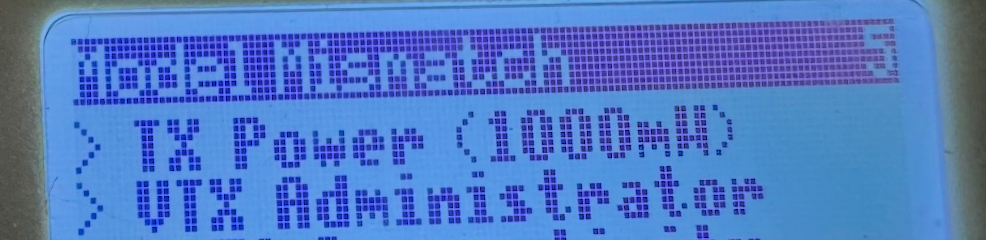
                                    @latif You should be able to disable the model match feature on the same screen which displayed the "Model Mismatch" error. By setting the model match id to 0, it will ignore the model match id set on the receiver and connect. The ExpressLRS documentation has more detail about how to set up the RC connection here.
                                    IMG_4890-min.JPG

                                    L 1 Reply Last reply
                                    0
                                    • Maxwell SchaeferM Maxwell Schaefer

                                      @latif You should be able to disable the model match feature on the same screen which displayed the "Model Mismatch" error. By setting the model match id to 0, it will ignore the model match id set on the receiver and connect. The ExpressLRS documentation has more detail about how to set up the RC connection here.

                                      IMG_4890-min.JPG

                                      L Offline
                                      L Offline
                                      latif
                                      Contributor
                                      wrote on last edited by
                                      #24

                                      @Maxwell-Schaefer Thank you! I was able to set the model match to off using the controller screen.

                                      1 Reply Last reply
                                      0

                                      Hello! It looks like you're interested in this conversation, but you don't have an account yet.

                                      Getting fed up of having to scroll through the same posts each visit? When you register for an account, you'll always come back to exactly where you were before, and choose to be notified of new replies (either via email, or push notification). You'll also be able to save bookmarks and upvote posts to show your appreciation to other community members.

                                      With your input, this post could be even better 💗

                                      Register Login
                                      Reply
                                      • Reply as topic
                                      Log in to reply
                                      • Oldest to Newest
                                      • Newest to Oldest
                                      • Most Votes


                                      ModalAI
                                      Categories Recent Tags ModalAI.com Docs
                                      © 2026 ModalAI® · Accelerating autonomy for smaller, smarter, safer drones · Powered by NodeBB
                                      • Login

                                      • Don't have an account? Register

                                      • Login or register to search.
                                      • First post
                                        Last post
                                      0
                                      • Categories
                                      • Recent
                                      • Tags
                                      • Popular
                                      • Users
                                      • Groups