Skip to content
  • Categories
  • Recent
  • Tags
  • Popular
  • Users
  • Groups
Collapse
Brand Logo

ModalAI Forum

  1. ModalAI Support Forum
  2. Ask your questions right here!
  3. Starling drone shut down mid flight

Starling drone shut down mid flight

Scheduled Pinned Locked Moved Ask your questions right here!
30 Posts 4 Posters 6.4k Views 2 Watching
  • Oldest to Newest
  • Newest to Oldest
  • Most Votes
Reply
  • Reply as topic
Log in to reply
This topic has been deleted. Only users with topic management privileges can see it.
  • Shivam SehgalS Shivam Sehgal

    @Alex-Kushleyev I was able to point out maybe it's the hires camera that's the issue. I don't know why but I was singly able to run all other camera's but not the hires camera.

    What defect should I look for?

    Also, while doing all that I broke the tracking camera's connector and the 2 in 1 camera boards. I will be ordering those. How can I remove the 2 in 1 camera board from the voxl2 board?

    Shivam SehgalS Offline
    Shivam SehgalS Offline
    Shivam Sehgal
    Contributor
    wrote on last edited by
    #18

    @Alex-Kushleyev any update?
    How can can I remove the 2 in 1 camera board?

    Alex KushleyevA 1 Reply Last reply
    0
    • Shivam SehgalS Shivam Sehgal

      @Alex-Kushleyev any update?
      How can can I remove the 2 in 1 camera board?

      Alex KushleyevA Offline
      Alex KushleyevA Offline
      Alex Kushleyev
      ModalAI Team
      wrote on last edited by
      #19

      @Shivam-Sehgal , sorry for the delay!

      Can you please contact our RMA department and send them the pictures of the current state of the board and camera adapter interposers. Our production team can evaluate the pictures. On some products the interposer boards may be glued in place for robustness, so they can suggest best way to handle it.

      In general, here is a diagram from the Hirose's product manual that shows how typically you should remove these connnectors:
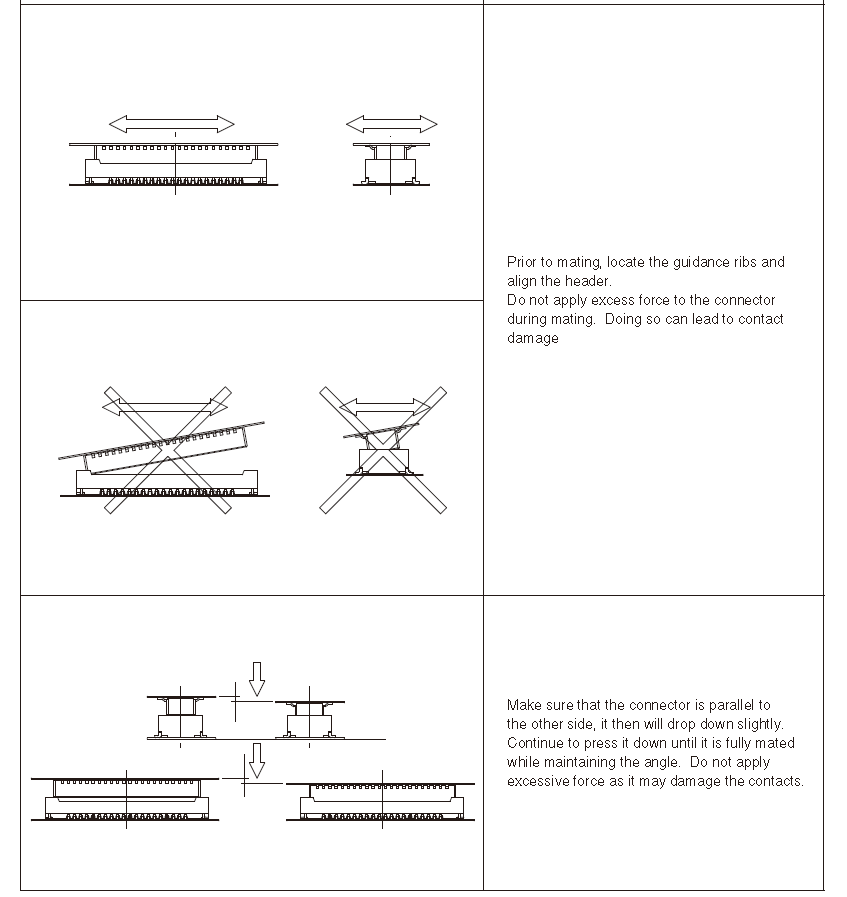
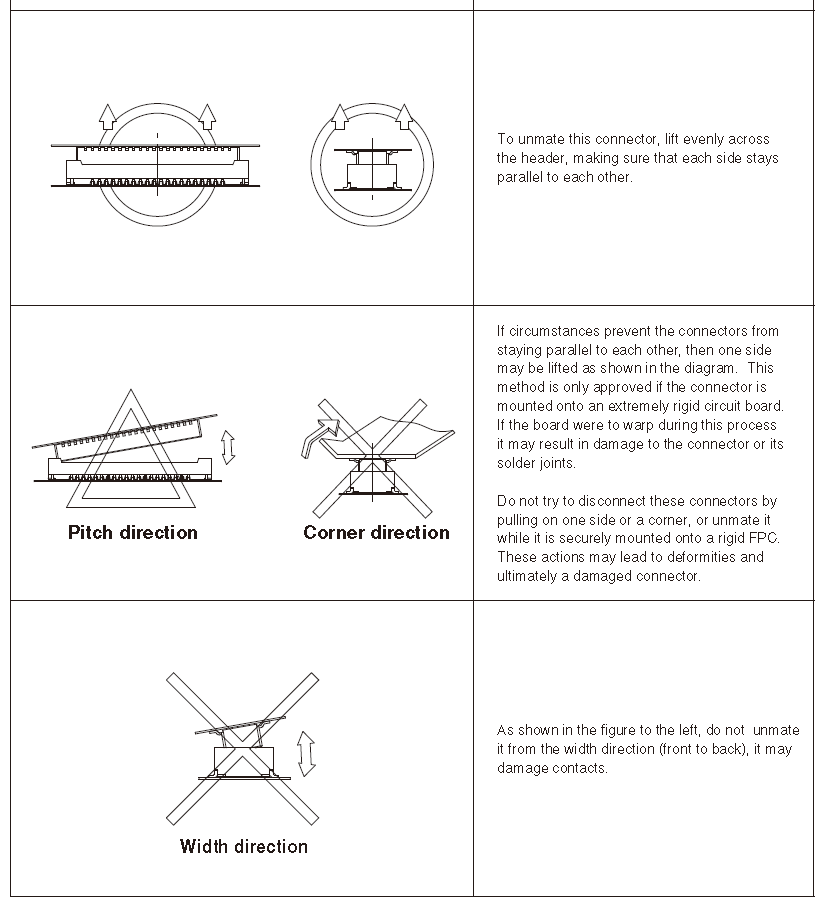
      image (25).png

      image (26).png

      Alex

      Shivam SehgalS 1 Reply Last reply
      0
      • Alex KushleyevA Alex Kushleyev

        @Shivam-Sehgal , sorry for the delay!

        Can you please contact our RMA department and send them the pictures of the current state of the board and camera adapter interposers. Our production team can evaluate the pictures. On some products the interposer boards may be glued in place for robustness, so they can suggest best way to handle it.

        In general, here is a diagram from the Hirose's product manual that shows how typically you should remove these connnectors:

        image (25).png

        image (26).png

        Alex

        Shivam SehgalS Offline
        Shivam SehgalS Offline
        Shivam Sehgal
        Contributor
        wrote on last edited by
        #20

        @Alex-Kushleyev Yes Alex, it's glued to the board. Sorry, how can I connect with RMA department?

        Alex KushleyevA 1 Reply Last reply
        0
        • Shivam SehgalS Shivam Sehgal

          @Alex-Kushleyev Yes Alex, it's glued to the board. Sorry, how can I connect with RMA department?

          Alex KushleyevA Offline
          Alex KushleyevA Offline
          Alex Kushleyev
          ModalAI Team
          wrote on last edited by
          #21

          @Shivam-Sehgal

          Link Preview Image
          Repair Merchandise Authorization

          All of our products are thoroughly tested both functionally and physically prior to shipment. For a copy of your products test records, please message at contact@modalai.com with the serial number.  For troubleshooting and software functionality questions, please refer to our forum. View our terms and conditions. If an

          favicon

          ModalAI, Inc. (www.modalai.com)

          Shivam SehgalS 1 Reply Last reply
          0
          • Alex KushleyevA Alex Kushleyev

            @Shivam-Sehgal

            Link Preview Image
            Repair Merchandise Authorization

            All of our products are thoroughly tested both functionally and physically prior to shipment. For a copy of your products test records, please message at contact@modalai.com with the serial number.  For troubleshooting and software functionality questions, please refer to our forum. View our terms and conditions. If an

            favicon

            ModalAI, Inc. (www.modalai.com)

            Shivam SehgalS Offline
            Shivam SehgalS Offline
            Shivam Sehgal
            Contributor
            wrote on last edited by
            #22

            @Alex-Kushleyev It's a form to send my drone for repair, can't I repair it myself? I have already ordered all the parts required. I just need to understand how to remove the glue.

            tomT Jeremy SchmidtJ 2 Replies Last reply
            0
            • Shivam SehgalS Shivam Sehgal

              @Alex-Kushleyev It's a form to send my drone for repair, can't I repair it myself? I have already ordered all the parts required. I just need to understand how to remove the glue.

              tomT Offline
              tomT Offline
              tom
              admin
              wrote on last edited by
              #23

              @Shivam-Sehgal I will see if a member from our production team can chime in here

              1 Reply Last reply
              0
              • Shivam SehgalS Shivam Sehgal

                @Alex-Kushleyev It's a form to send my drone for repair, can't I repair it myself? I have already ordered all the parts required. I just need to understand how to remove the glue.

                Jeremy SchmidtJ Offline
                Jeremy SchmidtJ Offline
                Jeremy Schmidt
                ModalAI Team
                wrote on last edited by
                #24

                @Shivam-Sehgal
                The glue is an easy to remove RTV silicone adhesive. If you follow the instructions posted by Alex, you should be successful. I've done this myself a couple of times.

                After removing you will need to clean away as much of the remaining glue on the voxl2 as possible before installing the new adapter board. You don't necessarily need to apply glue when installing the new board, but we find it helps with keeping the adapter from accidentally teetering at the hirose connector.

                Please let me know if you need further help with this matter

                Shivam SehgalS 1 Reply Last reply
                0
                • Jeremy SchmidtJ Jeremy Schmidt

                  @Shivam-Sehgal
                  The glue is an easy to remove RTV silicone adhesive. If you follow the instructions posted by Alex, you should be successful. I've done this myself a couple of times.

                  After removing you will need to clean away as much of the remaining glue on the voxl2 as possible before installing the new adapter board. You don't necessarily need to apply glue when installing the new board, but we find it helps with keeping the adapter from accidentally teetering at the hirose connector.

                  Please let me know if you need further help with this matter

                  Shivam SehgalS Offline
                  Shivam SehgalS Offline
                  Shivam Sehgal
                  Contributor
                  wrote on last edited by
                  #25

                  @Jeremy-Schmidt So I don't need heat or any special tool for it I can directly remove by hand?

                  Shivam SehgalS 1 Reply Last reply
                  0
                  • Shivam SehgalS Shivam Sehgal

                    @Jeremy-Schmidt So I don't need heat or any special tool for it I can directly remove by hand?

                    Shivam SehgalS Offline
                    Shivam SehgalS Offline
                    Shivam Sehgal
                    Contributor
                    wrote on last edited by Shivam Sehgal
                    #26

                    @tom I was able to get the camera board out thank you but ...

                    When I again add the 2 new camera boards with out the camera's attached it works I can adb into the board, but as soon as any camera is added I cannot adb into the board.

                    I am using 2 new boards and 2 new camera's tracking and hires it seems like the issue is something else what can I do?

                    tomT 1 Reply Last reply
                    0
                    • Shivam SehgalS Shivam Sehgal

                      @tom I was able to get the camera board out thank you but ...

                      When I again add the 2 new camera boards with out the camera's attached it works I can adb into the board, but as soon as any camera is added I cannot adb into the board.

                      I am using 2 new boards and 2 new camera's tracking and hires it seems like the issue is something else what can I do?

                      tomT Offline
                      tomT Offline
                      tom
                      admin
                      wrote on last edited by
                      #27

                      @Shivam-Sehgal Double check the pinouts to ensure the sensors aren't being plugged in backwards, that is the most likely cause of a board not booting

                      Shivam SehgalS 1 Reply Last reply
                      0
                      • tomT tom

                        @Shivam-Sehgal Double check the pinouts to ensure the sensors aren't being plugged in backwards, that is the most likely cause of a board not booting

                        Shivam SehgalS Offline
                        Shivam SehgalS Offline
                        Shivam Sehgal
                        Contributor
                        wrote on last edited by
                        #28

                        @tom thanks I had opened the board so I did not notice it, only if I had assemble I would have noticed it.
                        Thank you so much it worked!

                        Shivam SehgalS 1 Reply Last reply
                        0
                        • Shivam SehgalS Shivam Sehgal

                          @tom thanks I had opened the board so I did not notice it, only if I had assemble I would have noticed it.
                          Thank you so much it worked!

                          Shivam SehgalS Offline
                          Shivam SehgalS Offline
                          Shivam Sehgal
                          Contributor
                          wrote on last edited by
                          #29

                          @tom @Alex-Kushleyev
                          I corrected everything and it seemed to work for a minute there then again adb connection broke.

                          I disconnect the cameras and I am able to adb but with the cameras it does work for like 10 seconds and then the connection breaks.

                          Alex KushleyevA 1 Reply Last reply
                          0
                          • Shivam SehgalS Shivam Sehgal

                            @tom @Alex-Kushleyev
                            I corrected everything and it seemed to work for a minute there then again adb connection broke.

                            I disconnect the cameras and I am able to adb but with the cameras it does work for like 10 seconds and then the connection breaks.

                            Alex KushleyevA Offline
                            Alex KushleyevA Offline
                            Alex Kushleyev
                            ModalAI Team
                            wrote on last edited by
                            #30

                            @Shivam-Sehgal , does it look like the board is rebooting after 10 seconds of running with cameras enabled? also, what if you ssh into the board, does the SSH connection stay alive when the cameras are connecting?

                            Also, how are you powering the drone for this test - battery or power supply?

                            Alex

                            1 Reply Last reply
                            0

                            Hello! It looks like you're interested in this conversation, but you don't have an account yet.

                            Getting fed up of having to scroll through the same posts each visit? When you register for an account, you'll always come back to exactly where you were before, and choose to be notified of new replies (either via email, or push notification). You'll also be able to save bookmarks and upvote posts to show your appreciation to other community members.

                            With your input, this post could be even better 💗

                            Register Login
                            Reply
                            • Reply as topic
                            Log in to reply
                            • Oldest to Newest
                            • Newest to Oldest
                            • Most Votes


                            ModalAI
                            Categories Recent Tags ModalAI.com Docs
                            © 2026 ModalAI® · Accelerating autonomy for smaller, smarter, safer drones · Powered by NodeBB
                            • Login

                            • Don't have an account? Register

                            • Login or register to search.
                            • First post
                              Last post
                            0
                            • Categories
                            • Recent
                            • Tags
                            • Popular
                            • Users
                            • Groups

