Skip to content
  • Categories
  • Recent
  • Tags
  • Popular
  • Users
  • Groups
Collapse
Brand Logo

ModalAI Forum

  1. ModalAI Support Forum
  2. Ask your questions right here!
  3. Voxl 2 and Doodle Helix

Voxl 2 and Doodle Helix

Scheduled Pinned Locked Moved Ask your questions right here!
10 Posts 5 Posters 1.6k Views 1 Watching
  • Oldest to Newest
  • Newest to Oldest
  • Most Votes
Reply
  • Reply as topic
Log in to reply
This topic has been deleted. Only users with topic management privileges can see it.
  • B Offline
    B Offline
    bendraper
    Regular
    wrote on last edited by
    #1

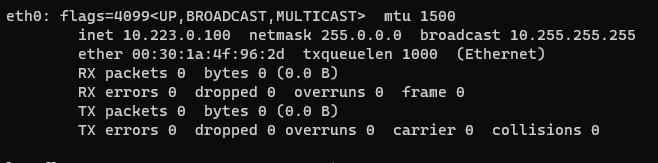
    I'm trying to connect a Voxl 2 to a Doodle Labs Helix radio over USB Host (Using D+ D- and GND from the M0125 board) and I can successfully run the modem configuration and eth0 is alive per ifconfig, but there are no packets in or out of the interface, and I cannot ping other devices on the network (i.e. my host PC connected to the doodle over a wired ethernet connection.
    3de682c5-e1c7-42c5-8547-16babc15a038-image.png

    Does something need to be configured on the radio side to allow communication with the voxl? Perhaps something related to the firewall?

    1 Reply Last reply
    0
    • ModeratorM Offline
      ModeratorM Offline
      Moderator
      ModalAI Team
      wrote on last edited by
      #2

      Have you run the commands in the user's guide? https://docs.modalai.com/doodle-labs-user-guide/#voxl2

      B 1 Reply Last reply
      0
      • ModeratorM Moderator

        Have you run the commands in the user's guide? https://docs.modalai.com/doodle-labs-user-guide/#voxl2

        B Offline
        B Offline
        bendraper
        Regular
        wrote on last edited by
        #3

        @Moderator Yes and they all ran successfully. I will note that I currently only have one radio setup but I'm just doing some benchtop validation testing at the moment. I guess its possible that there's some lan/wan bridging that maybe isn't set up for what I'm trying to do. I cannot ping the radio ip from the voxl and cannot ping the voxl ip from the radio. But the Voxl establishes the correct static IP for itself on eth0. Is this expected?

        tomT 1 Reply Last reply
        0
        • B bendraper

          @Moderator Yes and they all ran successfully. I will note that I currently only have one radio setup but I'm just doing some benchtop validation testing at the moment. I guess its possible that there's some lan/wan bridging that maybe isn't set up for what I'm trying to do. I cannot ping the radio ip from the voxl and cannot ping the voxl ip from the radio. But the Voxl establishes the correct static IP for itself on eth0. Is this expected?

          tomT Offline
          tomT Offline
          tom
          admin
          wrote on last edited by
          #4

          @bendraper You may have to mess with the settings of the doodle radios by opening up their web GUI via. IP address in a web browser. Sometimes there are firewalls enabled or custom settings that can prevent the connection from occurring

          tomT 1 Reply Last reply
          0
          • tomT tom

            @bendraper You may have to mess with the settings of the doodle radios by opening up their web GUI via. IP address in a web browser. Sometimes there are firewalls enabled or custom settings that can prevent the connection from occurring

            tomT Offline
            tomT Offline
            tom
            admin
            wrote on last edited by
            #5

            @tom Doodle also recommends setting the TX power quite low when doing debugging or moving the modems farther apart as there can be some gnarly RF saturation otherwise

            B 1 Reply Last reply
            0
            • tomT tom

              @tom Doodle also recommends setting the TX power quite low when doing debugging or moving the modems farther apart as there can be some gnarly RF saturation otherwise

              B Offline
              B Offline
              bendraper
              Regular
              wrote on last edited by
              #6

              @tom Thanks for the reply. Yea I’ve spent a good while poking around the web page in the past. I’m also not actually connected using a second radio over RF, I have the voxl plugged into the DEV USB of the radio and then my computer plugged into the regular Eth wires of the radio, which could be the issue. If you guys haven’t experienced this tho I can reach out the Doodle too and see if they have any suggestions

              tomT 1 Reply Last reply
              0
              • B bendraper

                @tom Thanks for the reply. Yea I’ve spent a good while poking around the web page in the past. I’m also not actually connected using a second radio over RF, I have the voxl plugged into the DEV USB of the radio and then my computer plugged into the regular Eth wires of the radio, which could be the issue. If you guys haven’t experienced this tho I can reach out the Doodle too and see if they have any suggestions

                tomT Offline
                tomT Offline
                tom
                admin
                wrote on last edited by
                #7

                @bendraper Interesting, I haven't tried doing that type of setup before. I'm sure Doodle would be able to provide some better answers.

                A 1 Reply Last reply
                0
                • tomT tom

                  @bendraper Interesting, I haven't tried doing that type of setup before. I'm sure Doodle would be able to provide some better answers.

                  A Offline
                  A Offline
                  afdrus
                  Regular
                  wrote on last edited by
                  #8

                  @tom I am also facing a similar issue. Despite I am able to ping the doodle's IP from my laptop (but not the IP of the drone), from within the drone I can't ping the doodle's IP. The only action that fixes this issue 100% of the times is to unplug and re-plug the doodle's eth connector. Even the restart of voxl-modem service does not fix the issue. Any suggestions on how to fix this behavior?
                  The pinging problem comes only at bootup, then when I unplug and the replug, everything works as expected.

                  wilkinsafW 1 Reply Last reply
                  0
                  • A afdrus

                    @tom I am also facing a similar issue. Despite I am able to ping the doodle's IP from my laptop (but not the IP of the drone), from within the drone I can't ping the doodle's IP. The only action that fixes this issue 100% of the times is to unplug and re-plug the doodle's eth connector. Even the restart of voxl-modem service does not fix the issue. Any suggestions on how to fix this behavior?
                    The pinging problem comes only at bootup, then when I unplug and the replug, everything works as expected.

                    wilkinsafW Offline
                    wilkinsafW Offline
                    wilkinsaf
                    ModalAI Team
                    wrote on last edited by wilkinsaf
                    #9

                    I am now facing this issue as well.

                    Can ping the radios fine, and the voxl2 has an ip... but for some reason i can not ping the voxl2 from my computer.

                    However, unplugging and replugging does not help

                    wilkinsafW 1 Reply Last reply
                    0
                    • wilkinsafW wilkinsaf

                      I am now facing this issue as well.

                      Can ping the radios fine, and the voxl2 has an ip... but for some reason i can not ping the voxl2 from my computer.

                      However, unplugging and replugging does not help

                      wilkinsafW Offline
                      wilkinsafW Offline
                      wilkinsaf
                      ModalAI Team
                      wrote on last edited by
                      #10

                      I tried on a different voxl2 with voxl-suite: 1.2.0 installed
                      the other one had voxl-suite 1.1.3 installed.

                      Not sure if that makes a difference....or if the configuration of the voxl2 was different.....

                      Either way if you are facing the same issue try SDK 1.2.0

                      1 Reply Last reply
                      0

                      Hello! It looks like you're interested in this conversation, but you don't have an account yet.

                      Getting fed up of having to scroll through the same posts each visit? When you register for an account, you'll always come back to exactly where you were before, and choose to be notified of new replies (either via email, or push notification). You'll also be able to save bookmarks and upvote posts to show your appreciation to other community members.

                      With your input, this post could be even better 💗

                      Register Login
                      Reply
                      • Reply as topic
                      Log in to reply
                      • Oldest to Newest
                      • Newest to Oldest
                      • Most Votes


                      ModalAI
                      Categories Recent Tags ModalAI.com Docs
                      © 2026 ModalAI® · Accelerating autonomy for smaller, smarter, safer drones · Powered by NodeBB
                      • Login

                      • Don't have an account? Register

                      • Login or register to search.
                      • First post
                        Last post
                      0
                      • Categories
                      • Recent
                      • Tags
                      • Popular
                      • Users
                      • Groups

