
Not going in Position mode
-
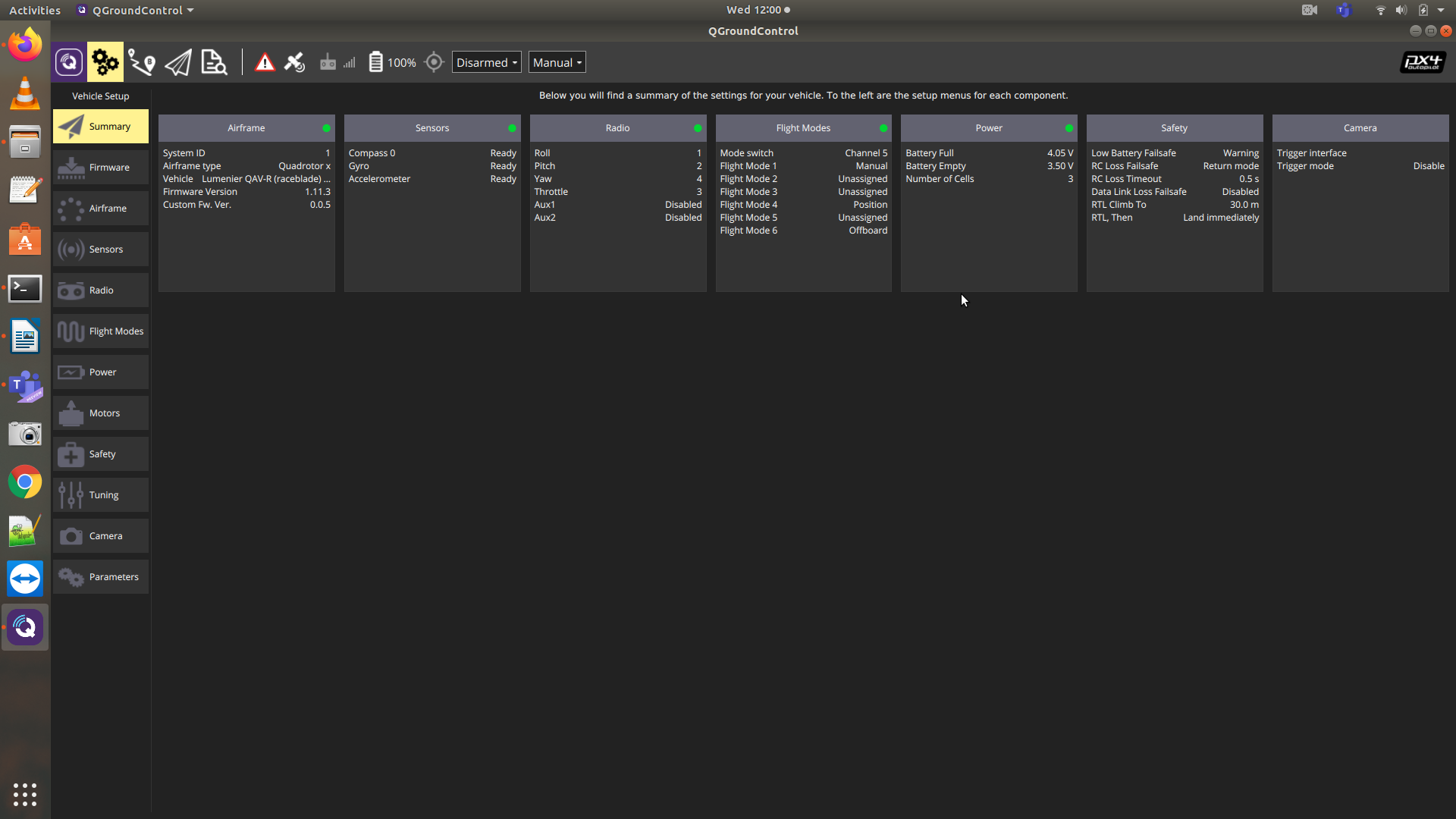
The firmware we are using that 1.11.3.
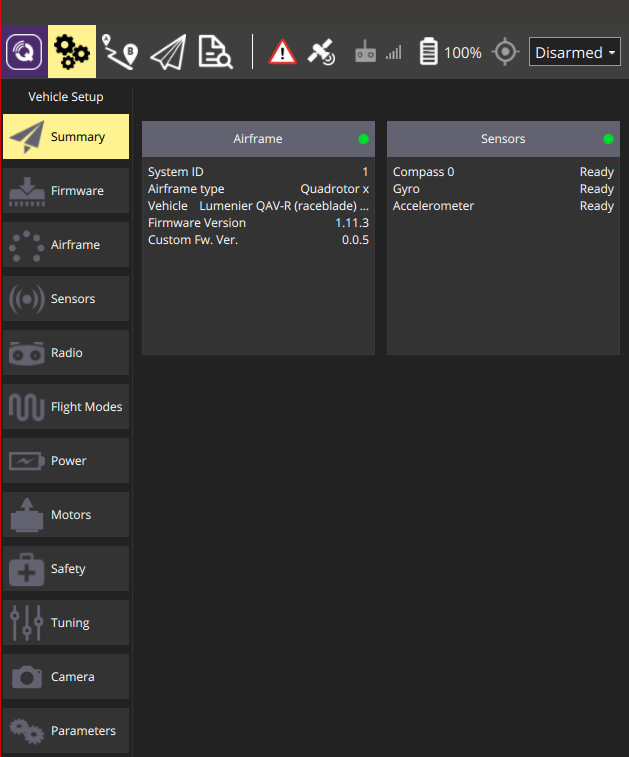
Since we are trying to work on indoor navigation and not rely on gps, so we use two of your helper scripts. One is "sensors_disable_gps_mag.param" and other is "ekf2_indoor_vio.params"
-
That FW version looks good to go, but the screen shot above looks like it's not showing all the typical data.
What about the MAVLink serial setup? https://gitlab.com/voxl-public/flight-core-px4/px4-parameters/-/blob/master/helpers/mavlink_serial_ports.params#L18
This would affect the communications between FlightCore (PX4) and VOXL and then ultimately what comes over WiFI to QGC
-
Sorry, I meant the Serial/MAVLink setup, which may affect this:
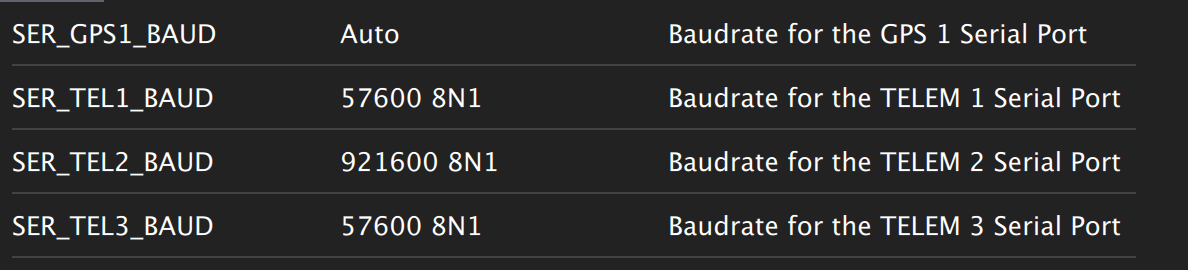
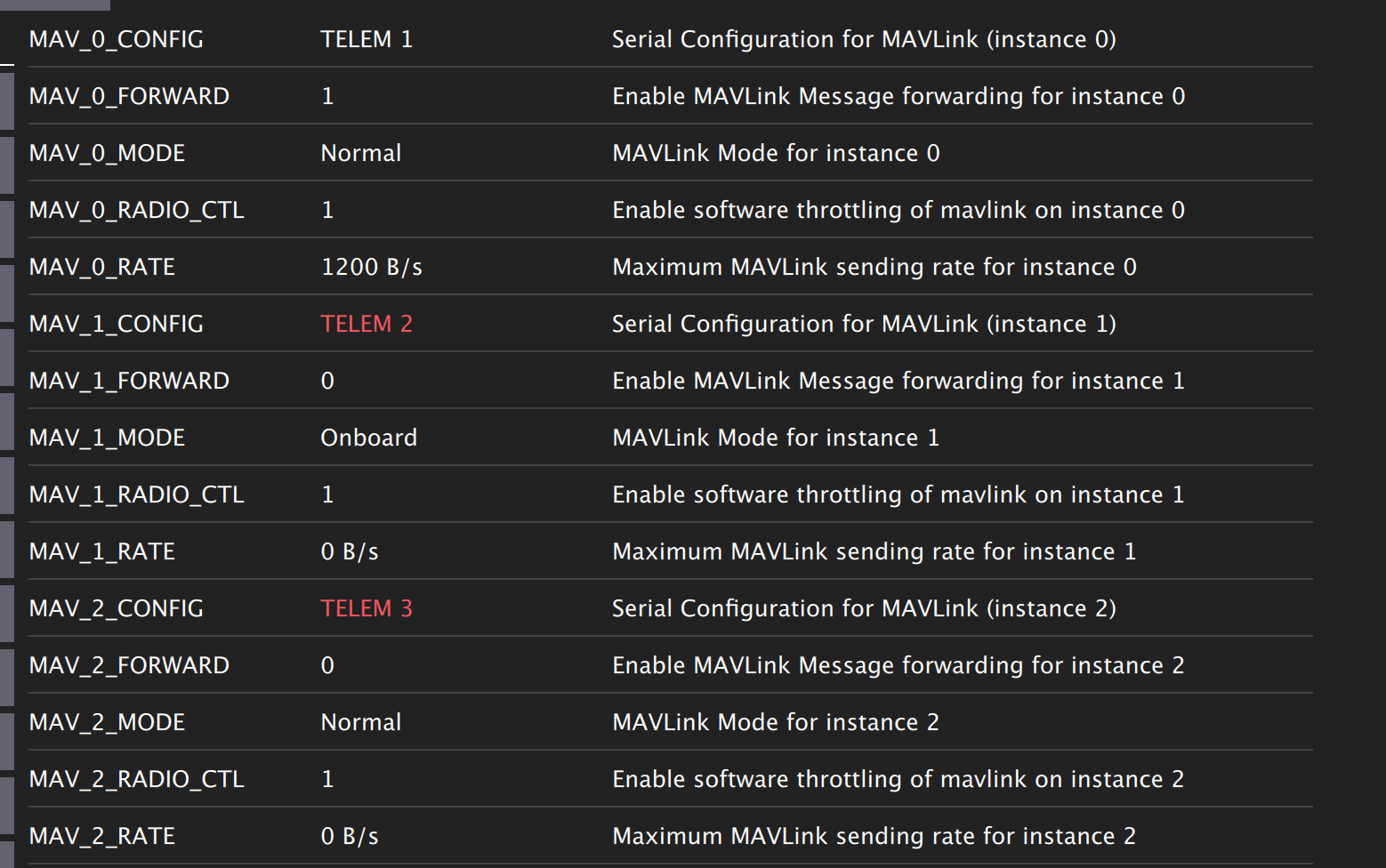
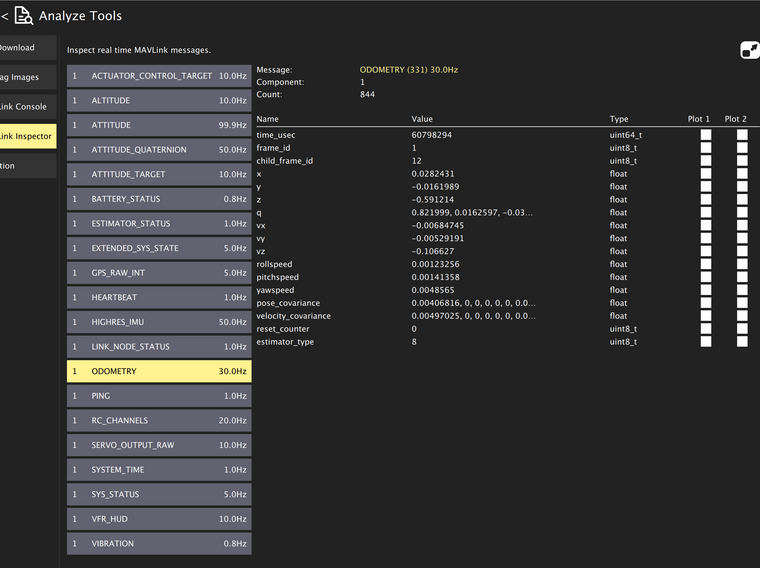
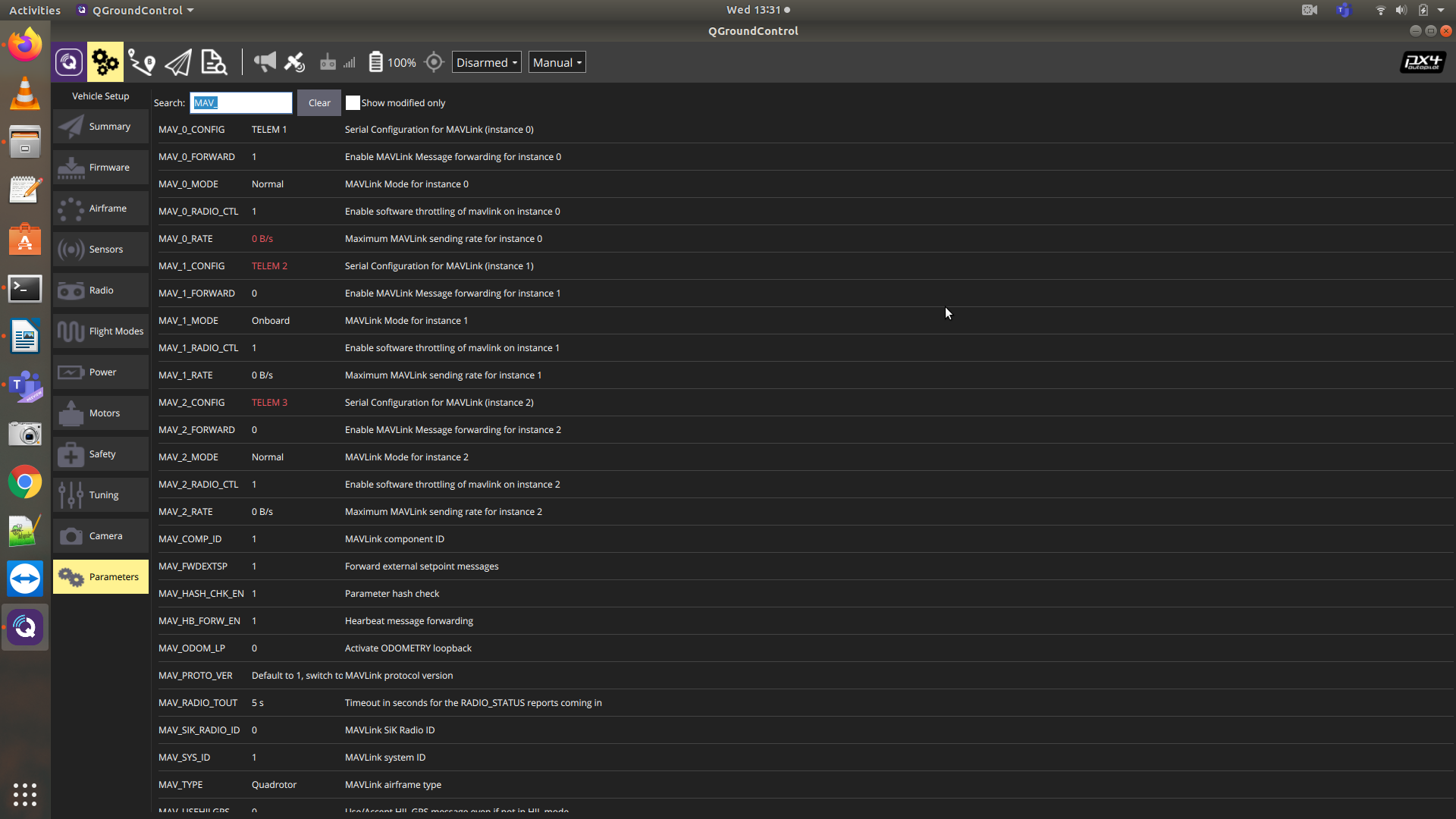
Then in MAVLink inspector, you see more data:
-
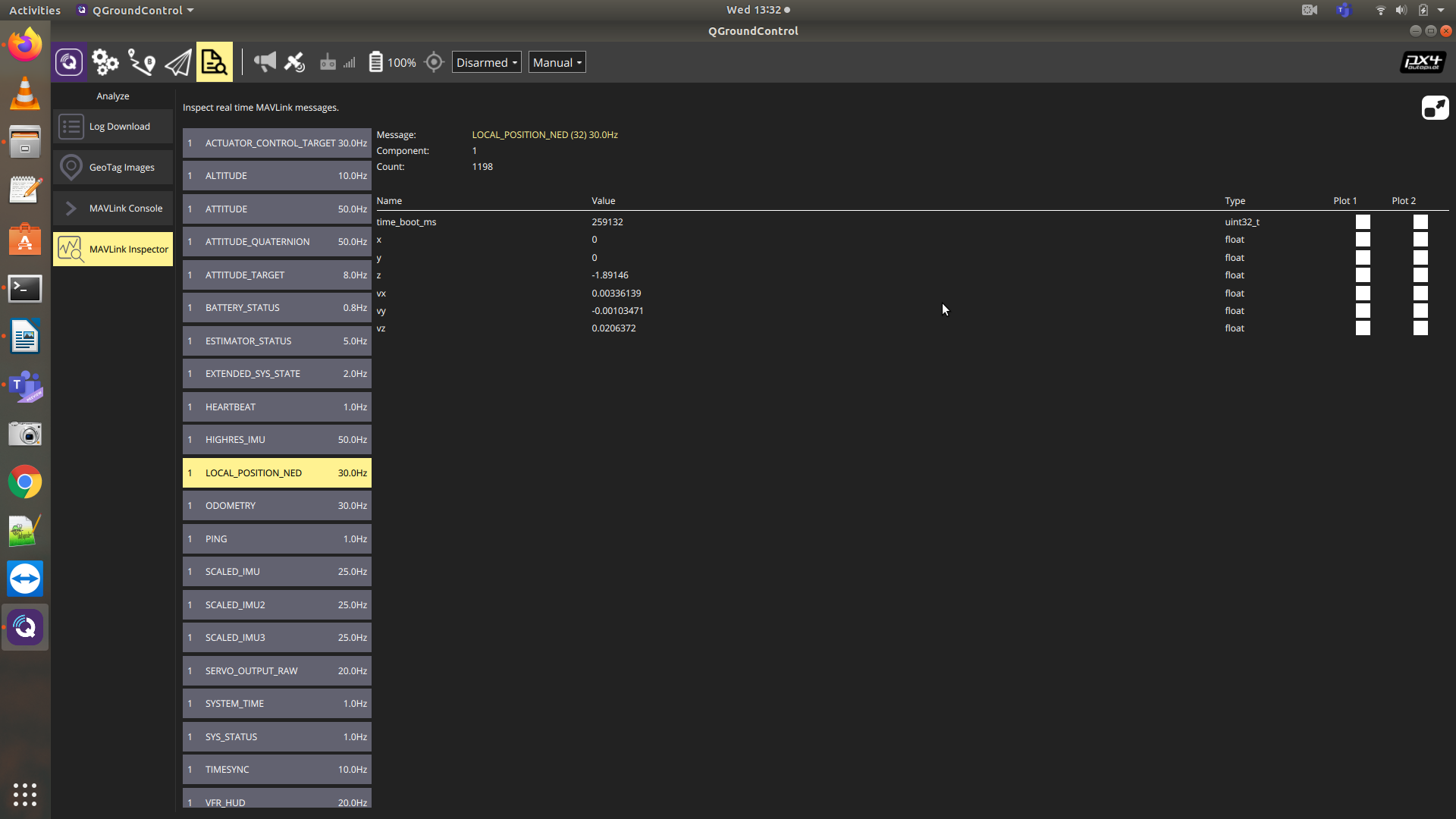
Actually, you want to select LOCAL_POSITION_NED to see the VIO data, I didn't have this until I loaded the https://gitlab.com/voxl-public/flight-core-px4/px4-parameters/-/blob/master/helpers/ekf2_indoor_vio.params
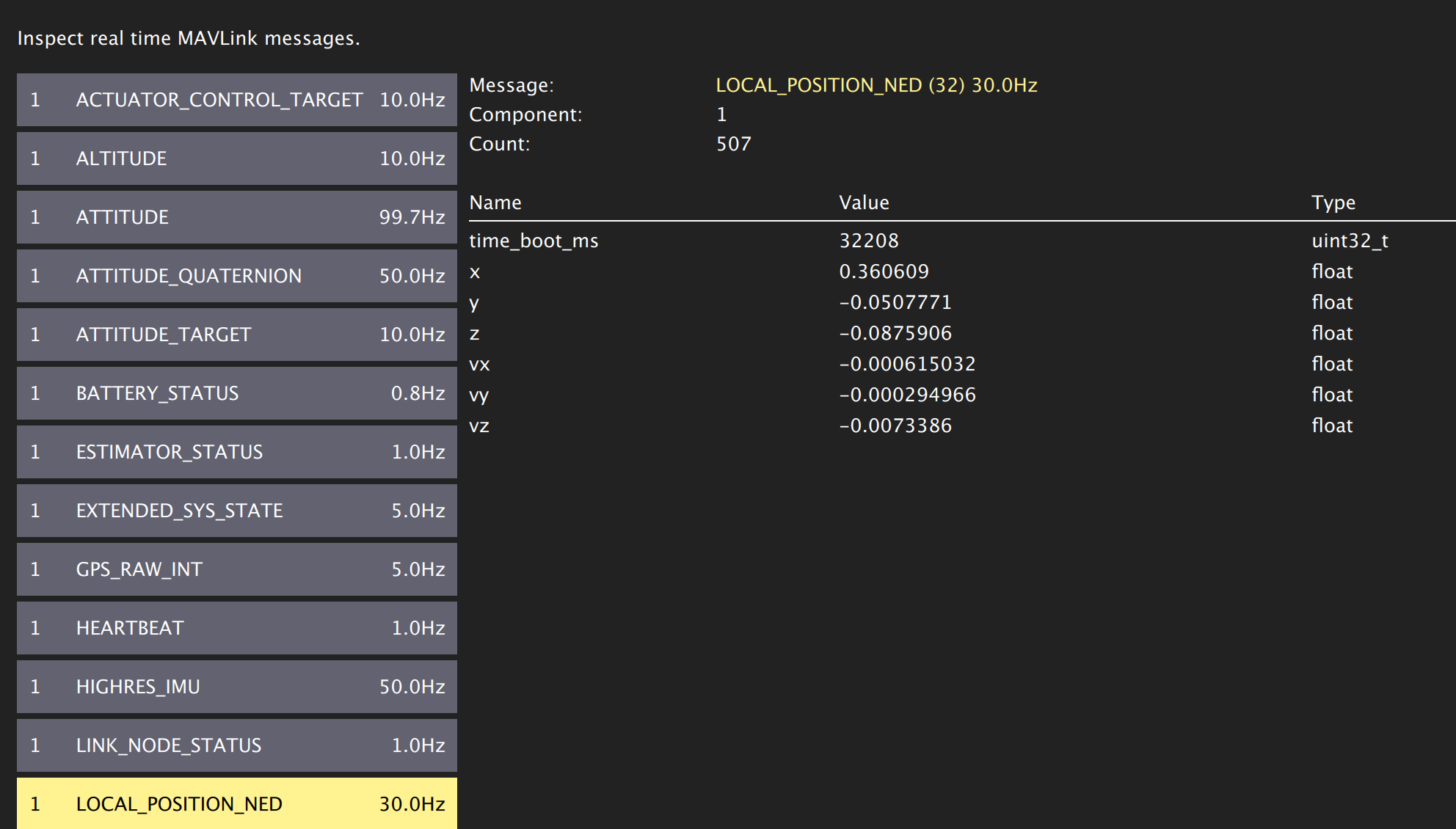
-
@modaltb We have already loaded the ekf2_indoor_vio.params.
Also I'm getting all these data that you just shared. I'm getting the local position ned, but the x and y are zero. Again the point to be noted here is that (also mentioned in the original post), tha I'm connected via USB cable to qgc. When I'm just over the wifi, I get the right odometry but the x and y of local position ned is still 0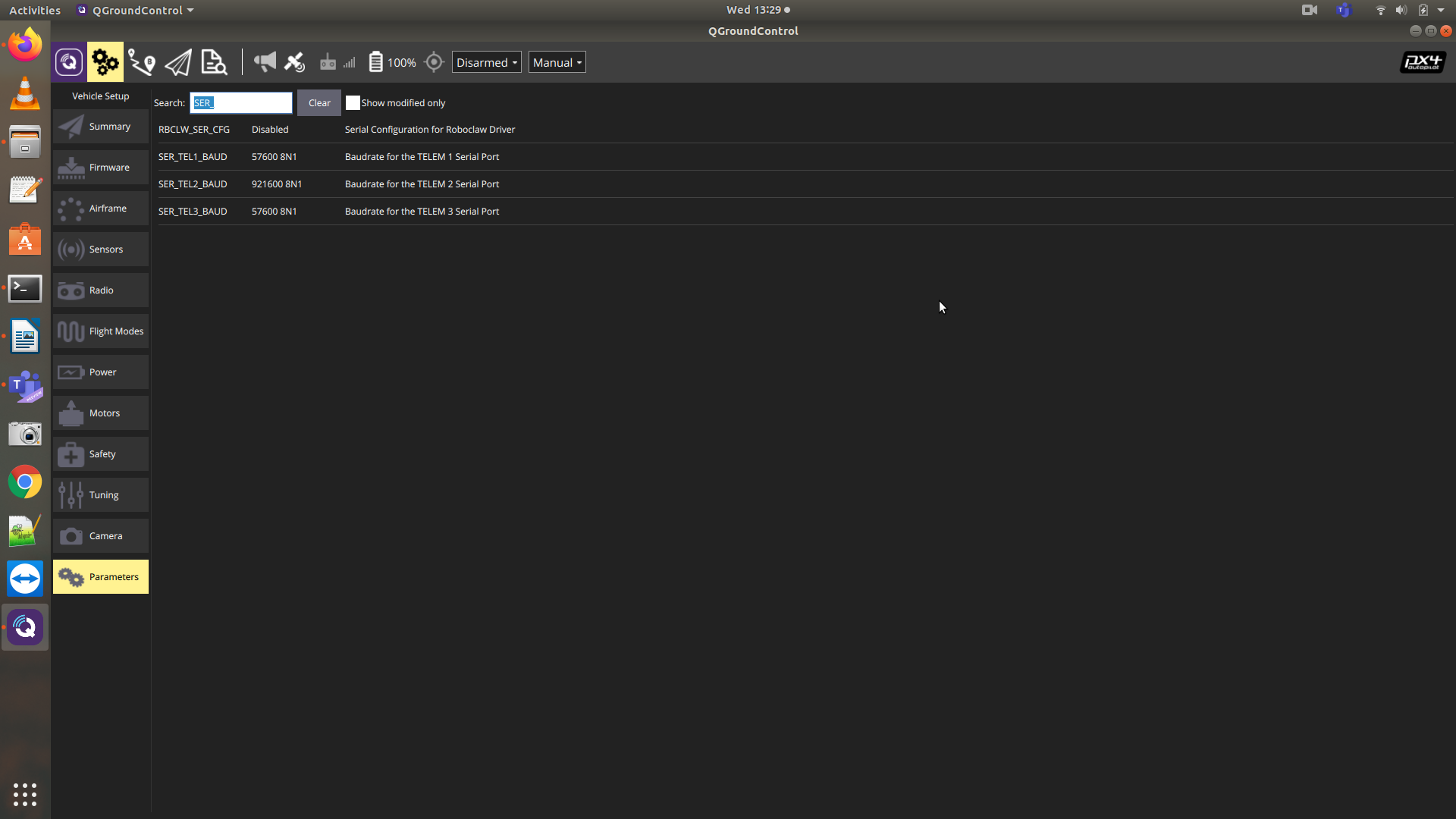
-
@gauravshukla914 said in Not going in Position mode:
"qgc_ip": "NULL",
Looking at your config file in first post above, I'm not sure how you are getting a connection over WiFi without the IP address configured?
If you run
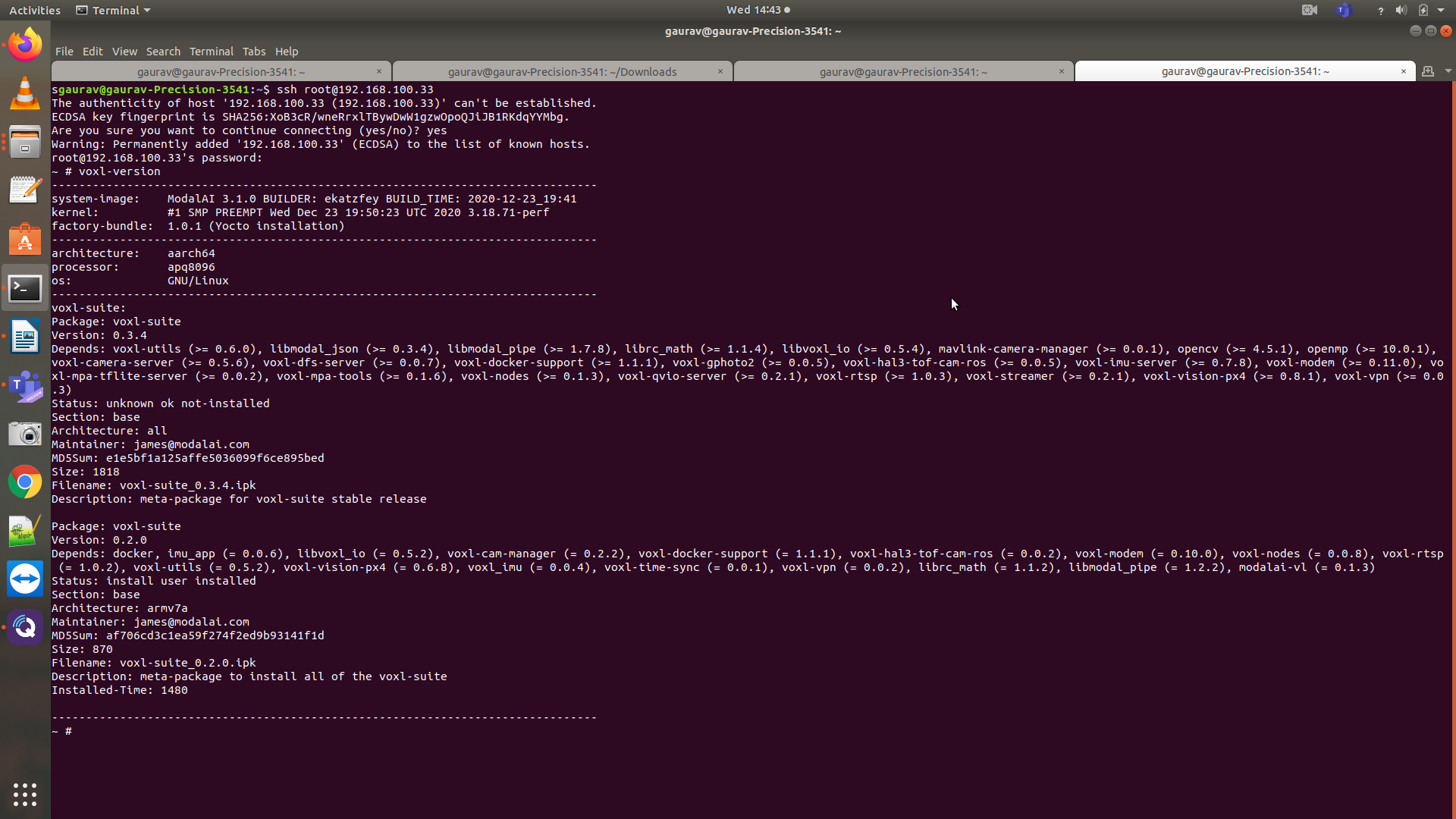
voxl-version, can you paste the output here?And also, can you run
voxl-vision-px4manually from command line and paste output here?Thanks, sorry for missing the first data points.
-
@modaltb Attached the picture of the first output.
~ # voxl-vision-px4 loading config file ================================================================= Parameters as loaded from config file: qgc_ip: NULL en_localhost_mavlink_udp 1 en_secondary_qgc: 0 secondary_qgc_ip: 192.168.1.214 en_vio: 1 en_voa: 0 en_send_vio_to_qgc: 1 en_send_voa_to_qgc: 0 en_adsb: 0 adsb_uart_bus: 7 adsb_uart_baudrate: 57600 px4_uart_bus: 5 px4_uart_baudrate: 921600 offboard_mode: off R_imu_to_body: 0.0000 1.0000 0.0000 1.0000 0.0000 0.0000 0.0000 0.0000 -1.0000 T_imu_wrt_body: 0.0680 -0.0150 -0.0080 height_body_above_ground_m: 0.200 land_on_tag_id: 0 follow_tag_id: 0 en_apriltag_fixed_frame: 0 en_transform_mavlink_pos_setpoints_from_fixed_frame:1 n_fixed_apriltags: 1 Fixed apriltag #0: tag id: 0 R_tag_to_fixed: 0.0000 -1.0000 0.0000 1.0000 0.0000 0.0000 0.0000 0.0000 1.0000 T_tag_wrt_fixed: 0.0000 0.0000 0.0000 T_stereo_wrt_body: 0.1000 -0.0400 0.0000 en_fixed_frame_pipe: 0 fixed_frame_filter_len: 5 ================================================================= WARNING, exising instance of voxl-vision-px4 found, attempting to stop it starting geometry module starting uart mavlink starting udp mavlink Adding manual QGC IP address to udp connection list: NULL WARNING: invalid qgc_ip, this is fine if you don't want to use it starting px4 shell Detected PX4 Mavlink SYSID 1 [293.934196] SNAV INFO: Loading Tracking camera parameters [293.935673] SNAV INFO: Successfully opened file /etc/modalai/vio_apriltag_app.xml [12] [293.937330] SNAV INFO: Read: 4273 characters [293.938443] SNAV INFO: XML parser successfully parsed document. [293.938784] SNAV INFO: Returning pointer to SnavAppParams XML element [293.939035] SNAV INFO: Begin parsing SnavVisionParams... [293.939349] SNAV INFO: Successfully opened file /etc/snav/camera.downward.xml [12] [293.940807] SNAV INFO: Read: 3037 characters [293.941461] SNAV INFO: XML parser successfully parsed document. [293.941740] SNAV INFO: Returning pointer to first child element: SnavCamera [293.941997] SNAV INFO: Parse camera IncludeFile... [293.942216] SNAV INFO: Found "SnavCameraDownward" attribute in xml file. [293.942744] SNAV INFO: Setting override_cam_id to 1 [293.943070] SNAV INFO: Setting pixel_width to 640 [293.943314] SNAV INFO: Setting pixel_height to 480 [293.943849] SNAV INFO: Setting memory_stride to 640 [293.943978] SNAV INFO: Setting image_format to raw10 [293.944094] SNAV INFO: Setting fps to 30 [293.944227] SNAV INFO: Setting default_exposure to 0.125 [293.944341] SNAV INFO: Setting default_gain to 0.5 [293.944464] SNAV INFO: Setting frame_queue_size to 5 [293.944572] SNAV INFO: Setting enable_cpa to 1 [293.944693] SNAV INFO: Setting mv_cpa_type to 1 [293.944850] SNAV INFO: Setting mv_cpa_filter_size to 2 [293.944985] SNAV INFO: Setting mv_cpa_exposure_cost to 0.75 [293.945123] SNAV INFO: Setting mv_cpa_gain_cost to 0.25 [293.945259] SNAV INFO: Setting mv_cpa_hist_exposure_min to 0.001 [293.945388] SNAV INFO: Setting mv_cpa_hist_exposure_soft_max to 0.2 [293.945518] SNAV INFO: Setting mv_cpa_hist_exposure_max to 0.2 [293.945650] SNAV INFO: Setting mv_cpa_hist_gain_min to 0.001 [293.945780] SNAV INFO: Setting mv_cpa_hist_gain_soft_max to 0.3 [293.945916] SNAV INFO: Setting mv_cpa_hist_gain_max to 1.0 [293.946048] SNAV INFO: Setting mv_cpa_hist_log_egp_step_size_min to 0.001 [293.946184] SNAV INFO: Setting mv_cpa_hist_log_egp_step_size_max to 1.0 [293.947018] SNAV INFO: Successfully opened file /etc/snav/mount.snav_dft_vio_app.xml [12] [293.947326] SNAV INFO: Read: 1491 characters [293.947555] SNAV INFO: XML parser successfully parsed document. [293.947675] SNAV INFO: Returning pointer to first child element: SnavMount [293.947776] SNAV INFO: Parse mount IncludeFile... [293.947889] SNAV INFO: Found "SnavMountDownward" attribute in xml file. [293.948031] SNAV INFO: Setting mv_vislam_tbc_1 to 0.019768f [293.948161] SNAV INFO: Setting mv_vislam_tbc_2 to 0.016882f [293.948292] SNAV INFO: Setting mv_vislam_tbc_3 to -0.012101f [293.948422] SNAV INFO: Setting mv_vislam_ombc_1 to -2.313745f [293.948553] SNAV INFO: Setting mv_vislam_ombc_2 to -0.000521f [293.948680] SNAV INFO: Setting mv_vislam_ombc_3 to -0.053149f [293.948816] SNAV INFO: Setting mv_vislam_std0_tbc_1 to 0.005 [293.948945] SNAV INFO: Setting mv_vislam_std0_tbc_2 to 0.005 [293.949061] SNAV INFO: Setting mv_vislam_std0_tbc_3 to 0.005 [293.949186] SNAV INFO: Setting mv_vislam_std0_ombc_1 to 0.04 [293.949323] SNAV INFO: Setting mv_vislam_std0_ombc_2 to 0.04 [293.949450] SNAV INFO: Setting mv_vislam_std0_ombc_3 to 0.04 [293.949631] SNAV INFO: Successfully opened file /etc/snav/calibration.downward.xml [12] [293.949896] SNAV INFO: Read: 2491 characters [293.950272] SNAV INFO: XML parser successfully parsed document. [293.950393] SNAV INFO: Returning pointer to first child element: SnavCalibration [293.950495] SNAV INFO: Parse calibration IncludeFile... [293.950617] SNAV INFO: Found "SnavCalibrationDownward" attribute in xml file. [293.950748] SNAV INFO: Setting calib_pixel_width to 640 [293.950872] SNAV INFO: Setting calib_pixel_height to 480 [293.950992] SNAV INFO: Setting calib_memory_stride to 640 [293.951121] SNAV INFO: Setting principal_point_x to 304.78164 [293.951250] SNAV INFO: Setting principal_point_y to 226.549706 [293.951385] SNAV INFO: Setting focal_length_x to 277.688987 [293.951515] SNAV INFO: Setting focal_length_y to 277.418541 [293.951632] SNAV INFO: Setting distortion_0 to -0.012669 [293.951758] SNAV INFO: Setting distortion_1 to 0.013676 [293.951894] SNAV INFO: Setting distortion_2 to -0.011134 [293.952024] SNAV INFO: Setting distortion_3 to 0.003616 [293.952186] SNAV INFO: Setting distortion_4 to 0 [293.952313] SNAV INFO: Setting distortion_5 to 0 [293.952422] SNAV INFO: Setting distortion_6 to 0 [293.952547] SNAV INFO: Setting distortion_7 to 0 [293.952660] SNAV INFO: Setting distortion_model to 10 [293.952796] SNAV INFO: Attempting to update calibration to match resolution: downward camera... [293.952916] SNAV INFO: Calibration scaled by 1.000000 to match resolution. [293.953028] SNAV INFO: Attempting to update calibration to match resolution: hires camera... [293.953143] SNAV INFO: Calibration scaled by inf to match resolution. [293.953240] SNAV INFO: Attempting to update calibration to match resolution: right stereo camera... [293.953353] SNAV INFO: Calibration scaled by inf to match resolution. [293.953449] SNAV INFO: Attempting to update calibration to match resolution: stereo camera (1/2)... [293.953563] SNAV INFO: Calibration scaled by inf to match resolution. [293.953659] SNAV INFO: Attempting to update calibration to match resolution: stereo camera (2/2)... [293.953769] SNAV INFO: Calibration scaled by inf to match resolution. [293.953865] SNAV INFO: Parse individual parameters... [293.953997] SNAV INFO: Setting tag_size to 0.267 [293.954123] SNAV INFO: Setting enable_apriltag to 1 [293.954247] SNAV INFO: Setting enable_undistortion to 1 [293.954354] SNAV INFO: Setting num_detection_threads to 4 [293.954480] SNAV INFO: Setting quad_decimate to 1.0 [293.954614] SNAV INFO: Setting quad_sigma to 0.0 [293.954734] SNAV INFO: Setting refine_edges to 1 [293.954837] SNAV INFO: Setting refine_decode to 1 [293.954955] SNAV INFO: Setting refine_pose to 1 [293.955061] SNAV INFO: Setting debug to 0 [293.955181] SNAV INFO: Setting enable_vio to 1 [293.955284] SNAV INFO: Setting enable_vio_gps to 0 [293.955402] SNAV INFO: Setting enable_dft to 0 [293.955510] SNAV INFO: Setting enable_dft_idle to 1 [293.955632] SNAV INFO: Setting enable_srw_writer to 0 [293.955742] SNAV INFO: Setting verbose to 0 [293.955867] SNAV INFO: Setting mv_version_strict_checking to 0 [293.956001] SNAV INFO: Setting sensor_imu_api_version_strict_checking to 1 [293.956121] SNAV INFO: Setting log_level to LOG_NOTICE [293.956225] SNAV INFO: Setting imu_raw_sample_rate to 500 [293.956344] SNAV INFO: Setting imu_vio_sample_rate to 500 [293.956450] SNAV INFO: Setting gps_device_num to 0 [293.956573] SNAV INFO: Setting mv_vislam_readout_time to 0 [293.956694] SNAV INFO: Setting mv_vislam_delta to -0.008 [293.956821] SNAV INFO: Setting mv_vislam_std0_delta to 0.001 [293.956954] SNAV INFO: Setting mv_vislam_accel_meas_range to 156 [293.957079] SNAV INFO: Setting mv_vislam_gyro_meas_range to 34 [293.957194] SNAV INFO: Setting mv_vislam_std_accel_meas_noise to 0.316227766016838 [293.957349] SNAV INFO: Setting mv_vislam_std_gyro_meas_noise to 1e-2 [293.957476] SNAV INFO: Setting mv_vislam_std_cam_noise to 100 [293.957613] SNAV INFO: Setting mv_vislam_min_std_pixel_noise to 0.5 [293.957740] SNAV INFO: Setting mv_vislam_fail_high_pixel_noise_points to 0 [293.957850] SNAV INFO: Setting mv_vislam_log_depth_bootstrap to 0 [293.957972] SNAV INFO: Setting mv_vislam_use_log_camera_height to 1 [293.958081] SNAV INFO: Setting mv_vislam_log_camera_height_bootstrap to −1.66 [293.958205] SNAV INFO: Setting mv_vislam_no_init_when_moving to 1 [293.958343] SNAV INFO: Setting mv_vislam_limited_imu_bw_trigger to 35 [293.958473] SNAV INFO: Setting mv_vislam_gps_imu_time_alignment to 0.100 [293.958603] SNAV INFO: Setting mv_vislam_tba_1 to 0 [293.958726] SNAV INFO: Setting mv_vislam_tba_2 to 0 [293.958837] SNAV INFO: Setting mv_vislam_tba_3 to 0 [293.958942] SNAV INFO: Setting mapping to 1 [293.959045] SNAV INFO: Setting mv_dft_max_nr to 150 [293.959148] SNAV INFO: Setting mv_dft_min_nr to 30 [293.959243] SNAV INFO: Finished parsing SnavVisionParams. [293.959388] SNAV INFO: Starting tracking camera manager [293.959561] SNAV INFO: using tracking cam id 1 libcam.enable.publish 1 libcam.enable.publish.dump 0 libcam.publish.buffer.policy max libcam.publish.buffer.max 3 libcam.debug.level info libcam.dump.dir /data/misc/camera/dumps [294.417122] SNAV INFO: Opened camera 1 [294.418634] SNAV INFO: Set preview size: 640x480 [294.419452] SNAV INFO: Using RAW format FASTCV: fcvAvailableHardware Linux MachineVision is licensed as community user LNX_8074 supported? 1 LNX_8096 supported? 1 LNX_IA64 supported? 1 WINDOWS supported? 0 FASTCV: fcvAvailableHardware Linux FASTCV: fcvAvailableHardware Linux [294.449171] SNAV INFO: CameraManager is finished initializing. [294.449468] SNAV INFO: Starting camera image streaming... MachineVision is licensed as community user LNX_8074 supported? 1 LNX_8096 supported? 1 LNX_IA64 supported? 1 WINDOWS supported? 0 AR ERROR: arFileOpen(): Failed to open file: /home/root/vislam/Configuration.SF.xml PX4 Connected over UART with sysid 1 FASTCV: fcvAvailableHardware Linux mempool cur block size 307200, new block size 307200 AR ERROR: arFileOpen(): Failed to open file: /home/root/na [sensor_imu_api_impl.cpp, 126] Creating handle for imu_id: 0 function: 2 description: [SECONDARY-mpu9x50@/dev/spi-1-@500Hz-STANDALONE-00] [SensorImuUtil.cpp, 107] ComputeOffset iteration 0 apps time 1622058299964619355 - dsp time 296415509583 = 1622058003549109772 [SensorImuUtil.cpp, 108] ComputeOffset The apps - dsp offset = [1622058003549109772]ns, Apps ClockType[CLOCK_REALTIME] [SensorImuUtil.cpp, 107] ComputeOffset iteration 1 apps time 1622058299964853991 - dsp time 296415755625 = 1622058003549098366 [SensorImuUtil.cpp, 108] ComputeOffset The apps - dsp offset = [1622058003549098366]ns, Apps ClockType[CLOCK_REALTIME] [SensorImuUtil.cpp, 107] ComputeOffset iteration 2 apps time 1622058299965010971 - dsp time 296415913229 = 1622058003549097742 [SensorImuUtil.cpp, 108] ComputeOffset The apps - dsp offset = [1622058003549097742]ns, Apps ClockType[CLOCK_REALTIME] [SensorImuUtil.cpp, 107] ComputeOffset iteration 3 apps time 1622058299965426702 - dsp time 296416328229 = 1622058003549098473 [SensorImuUtil.cpp, 108] ComputeOffset The apps - dsp offset = [1622058003549097742]ns, Apps ClockType[CLOCK_REALTIME] [SensorImuUtil.cpp, 107] ComputeOffset iteration 4 apps time 1622058299965746287 - dsp time 296416648489 = 1622058003549097798 [SensorImuUtil.cpp, 108] ComputeOffset The apps - dsp offset = [1622058003549097742]ns, Apps ClockType[CLOCK_REALTIME] [SensorImuUtil.cpp, 107] ComputeOffset iteration 5 apps time 1622058299965929048 - dsp time 296416831145 = 1622058003549097903 [SensorImuUtil.cpp, 108] ComputeOffset The apps - dsp offset = [1622058003549097742]ns, Apps ClockType[CLOCK_REALTIME] [SensorImuUtil.cpp, 107] ComputeOffset iteration 6 apps time 1622058299966075559 - dsp time 296416977812 = 1622058003549097747 [SensorImuUtil.cpp, 108] ComputeOffset The apps - dsp offset = [1622058003549097742]ns, Apps ClockType[CLOCK_REALTIME] [SensorImuUtil.cpp, 107] ComputeOffset iteration 7 apps time 1622058299966282643 - dsp time 296417185156 = 1622058003549097487 [SensorImuUtil.cpp, 108] ComputeOffset The apps - dsp offset = [1622058003549097487]ns, Apps ClockType[CLOCK_REALTIME] [SensorImuUtil.cpp, 107] ComputeOffset iteration 8 apps time 1622058299966439779 - dsp time 296417341770 = 1622058003549098009 [SensorImuUtil.cpp, 108] ComputeOffset The apps - dsp offset = [1622058003549097487]ns, Apps ClockType[CLOCK_REALTIME] [SensorImuUtil.cpp, 107] ComputeOffset iteration 9 apps time 1622058299966613582 - dsp time 296417515729 = 1622058003549097853 [SensorImuUtil.cpp, 108] ComputeOffset The apps - dsp offset = [1622058003549097487]ns, Apps ClockType[CLOCK_REALTIME] [294.523253] SNAV INFO: Initializing IMU sensor... [SensorIMU_v2.cpp, 84] Initialize Now calling rpcmem_init... [SensorIMU_v2.cpp, 358] AllocateRpcBuffers Allocating buffers using rpcmem_alloc... [SensorIMU_v2.cpp, 368] AllocateRpcBuffers rpcmem_alloc passed for SensorIMU buffer size(24000) bytes addr(0x4dc888) [SensorIMU_v2.cpp, 381] AllocateRpcBuffers rpcmem_alloc passed for SensorIMU buffer(bias compensated) size(24000) bytes addr(0x4e2650) [SensorIMU_v2.cpp, 396] AllocateRpcBuffers rpcmem_alloc passed for SensorIMU buffer(attitude rotation matrix) size(40000) bytes addr(0x4e8418) [SensorIMU_v2.cpp, 108] Imu Initialization Successful. rpcClientHandle: 2 [SensorImuUtil.cpp, 107] ComputeOffset iteration 0 apps time 294524215313 - dsp time 296418601197 = -1894385884 [SensorImuUtil.cpp, 108] ComputeOffset The apps - dsp offset = [-1894385884]ns, Apps ClockType[CLOCK_MONOTONIC] [SensorImuUtil.cpp, 107] ComputeOffset iteration 1 apps time 294524571825 - dsp time 296418959062 = -1894387237 [SensorImuUtil.cpp, 108] ComputeOffset The apps - dsp offset = [-1894387237]ns, Apps ClockType[CLOCK_MONOTONIC] [SensorImuUtil.cpp, 107] ComputeOffset iteration 2 apps time 294525223703 - dsp time 296419611822 = -1894388119 [SensorImuUtil.cpp, 108] ComputeOffset The apps - dsp offset = [-1894388119]ns, Apps ClockType[CLOCK_MONOTONIC] [SensorImuUtil.cpp, 107] ComputeOffset iteration 3 apps time 294525361985 - dsp time 296419750208 = -1894388223 [SensorImuUtil.cpp, 108] ComputeOffset The apps - dsp offset = [-1894388223]ns, Apps ClockType[CLOCK_MONOTONIC] [SensorImuUtil.cpp, 107] ComputeOffset iteration 4 apps time 294525591100 - dsp time 296419979687 = -1894388587 [SensorImuUtil.cpp, 108] ComputeOffset The apps - dsp offset = [-1894388587]ns, Apps ClockType[CLOCK_MONOTONIC] [SensorImuUtil.cpp, 107] ComputeOffset iteration 5 apps time 294525700476 - dsp time 296420089687 = -1894389211 [SensorImuUtil.cpp, 108] ComputeOffset The apps - dsp offset = [-1894389211]ns, Apps ClockType[CLOCK_MONOTONIC] [SensorImuUtil.cpp, 107] ComputeOffset iteration 6 apps time 294525794434 - dsp time 296420183645 = -1894389211 [SensorImuUtil.cpp, 108] ComputeOffset The apps - dsp offset = [-1894389211]ns, Apps ClockType[CLOCK_MONOTONIC] [SensorImuUtil.cpp, 107] ComputeOffset iteration 7 apps time 294525891310 - dsp time 296420280104 = -1894388794 [SensorImuUtil.cpp, 108] ComputeOffset The apps - dsp offset = [-1894389211]ns, Apps ClockType[CLOCK_MONOTONIC] [SensorImuUtil.cpp, 107] ComputeOffset iteration 8 apps time 294526120686 - dsp time 296420509270 = -1894388584 [SensorImuUtil.cpp, 108] ComputeOffset The apps - dsp offset = [-1894389211]ns, Apps ClockType[CLOCK_MONOTONIC] [SensorImuUtil.cpp, 107] ComputeOffset iteration 9 apps time 294526217717 - dsp time 296420606875 = -1894389158 [SensorImuUtil.cpp, 108] ComputeOffset The apps - dsp offset = [-1894389211]ns, Apps ClockType[CLOCK_MONOTONIC] [294.526534] SNAV INFO: IMU sensor finished initializing. [294.527209] SNAV INFO: IMU sensor settings retrieved. [294.527282] SNAV INFO: Creating IMU thread. [294.527409] SNAV INFO: Creating VISLAM processing thread. [294.527505] SNAV INFO: Creating VISLAM publishing thread. [294.527786] SNAV INFO: ImuManager thread has tid = 3290, nice = -15 [294.527940] SNAV INFO: VISLAM processing thread has tid = 3291, nice = -5 [294.528103] SNAV INFO: VISLAM publishing thread has tid = 3292, nice = -5 Init complete, entering main loop -
@gauravshukla914 Okay, in that case we will want to get you updated to System Image 3.2.0 / voxl-suite 0.3.4.
Before we do that though, I want to make sure you are able to backup your camera calibration files so that you won't need to re-calibrate.
In order to do this you can use the
voxl-backuputility which should currently be installed on your VOXL as it is included in thevoxl-utilspackage.First you will use
voxl-backup -b BACKUP_PATHin order to save your camera calibration files to the specified path. Then, I would recommend pulling these files off of your voxl usingadb pull BACKUP_PATH HOST_PC_DIRso that you have them saved for the future.You can then go ahead and flash System Image 3.2.0, located here.
After you finish flashing you can
adb pushyour camera cal files back onto your VOXL and usevoxl-backup -r BACKUP_ROOTin order to restore them to their correct locations. -
@tom I did that. I flashed with the image that you asked me to. Unfortunately the problem is still there. I'm able to see the odometry on my terminal once I do the "voxl-version-px4 -o". But no luck with the QgroundControl. Basically the same problem!
adb shell / # voxl-version cat: /etc/modalai/voxl-software-bundle-version.txt: No such file or directory -------------------------------------------------------------------------------- system-image: ModalAI 3.2.0 BUILDER: ekatzfey BUILD_TIME: 2021-02-05_19:54 kernel: #1 SMP PREEMPT Fri Feb 5 20:03:22 UTC 2021 3.18.71-perf factory-bundle: 1.0.1 (Yocto installation) -------------------------------------------------------------------------------- architecture: aarch64 processor: apq8096 os: GNU/Linux -------------------------------------------------------------------------------- voxl-suite: Package: voxl-suite Version: 0.3.4 Depends: voxl-utils (>= 0.6.0), libmodal_json (>= 0.3.4), libmodal_pipe (>= 1.7.8), librc_math (>= 1.1.4), libvoxl_io (>= 0.5.4), mavlink-camera-manager (>= 0.0.1), opencv (>= 4.5.1), openmp (>= 10.0.1), voxl-camera-server (>= 0.5.6), voxl-dfs-server (>= 0.0.7), voxl-docker-support (>= 1.1.1), voxl-gphoto2 (>= 0.0.5), voxl-hal3-tof-cam-ros (>= 0.0.5), voxl-imu-server (>= 0.7.8), voxl-modem (>= 0.11.0), voxl-mpa-tflite-server (>= 0.0.2), voxl-mpa-tools (>= 0.1.6), voxl-nodes (>= 0.1.3), voxl-qvio-server (>= 0.2.1), voxl-rtsp (>= 1.0.3), voxl-streamer (>= 0.2.1), voxl-vision-px4 (>= 0.8.1), voxl-vpn (>= 0.0.3) Status: install user installed Section: base Architecture: all Maintainer: james@modalai.com MD5Sum: e1e5bf1a125affe5036099f6ce895bed Size: 1818 Filename: voxl-suite_0.3.4.ipk Description: meta-package for voxl-suite stable release Installed-Time: 1622142966 Package: voxl-suite Version: 0.2.0 Depends: docker, imu_app (= 0.0.6), libvoxl_io (= 0.5.2), voxl-cam-manager (= 0.2.2), voxl-docker-support (= 1.1.1), voxl-hal3-tof-cam-ros (= 0.0.2), voxl-modem (= 0.10.0), voxl-nodes (= 0.0.8), voxl-rtsp (= 1.0.2), voxl-utils (= 0.5.2), voxl-vision-px4 (= 0.6.8), voxl_imu (= 0.0.4), voxl-time-sync (= 0.0.1), voxl-vpn (= 0.0.2), librc_math (= 1.1.2), libmodal_pipe (= 1.2.2), modalai-vl (= 0.1.3) Status: unknown ok not-installed Section: base Architecture: armv7a Maintainer: james@modalai.com MD5Sum: af706cd3c1ea59f274f2ed9b93141f1d Size: 870 Filename: voxl-suite_0.2.0.ipk Description: meta-package to install all of the voxl-suite -
@tom said in Not going in Position mode:
cat /etc/modalai/voxl-vision-px4.conf
cat /etc/modalai/voxl-vision-px4.conf /** * VOXL Vision PX4 Configuration File * */ { "qgc_ip": "192.168.100.174", "en_localhost_mavlink_udp": true, "en_secondary_qgc": false, "secondary_qgc_ip": "192.168.1.214", "qgc_udp_port_number": 14550, "localhost_udp_port_number": 14551, "en_vio": true, "en_voa": false, "en_send_vio_to_qgc": true, "en_send_voa_to_qgc": false, "en_adsb": true, "adsb_uart_bus": 7, "adsb_uart_baudrate": 57600, "px4_uart_bus": 5, "px4_uart_baudrate": 921600, "offboard_mode": "off", "follow_tag_id": 0, "en_apriltag_fixed_frame": false, "fixed_frame_filter_len": 5, "en_transform_mavlink_pos_setpoints_from_fixed_frame": true } -
@tom @modaltb @Jeremy-Schmidt is there anything else I can send?
-
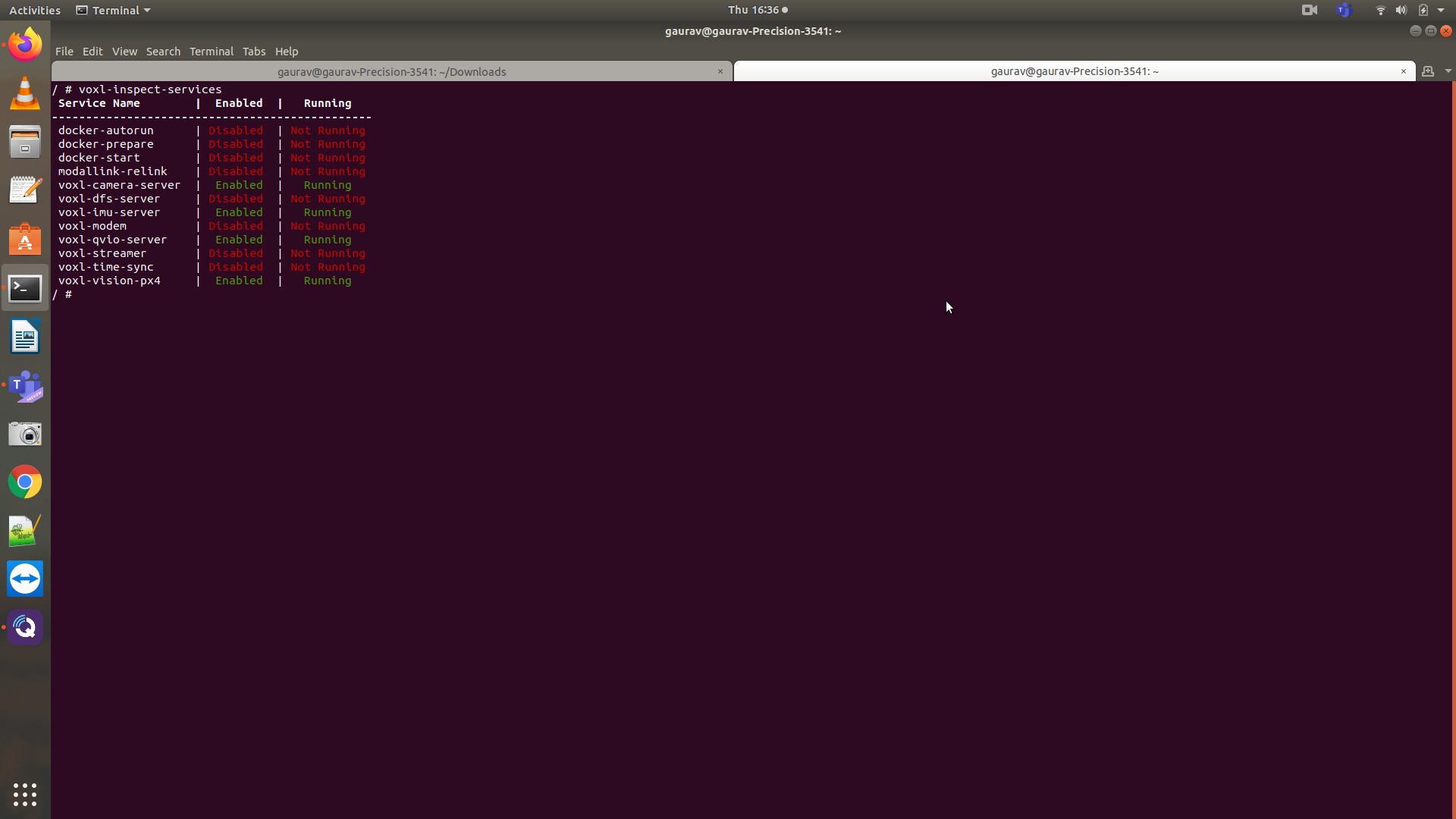
@gauravshukla914 see this post here. In there case they had the same symptom. To fix, they made sure voxl-imu-server and voxl-camera-server were running on boot and feeding the data to voxl-qvio-server
-
@Chad-Sweet I made sure this, but still no luck with the local position ned and its still failing to go into position mode. I have attached the screenshots.
@modaltb @tom @Jeremy-Schmidt is there a way we can set up a screen share for this? I think it'd be great if we can do that and may be together we can come up with a solution for this.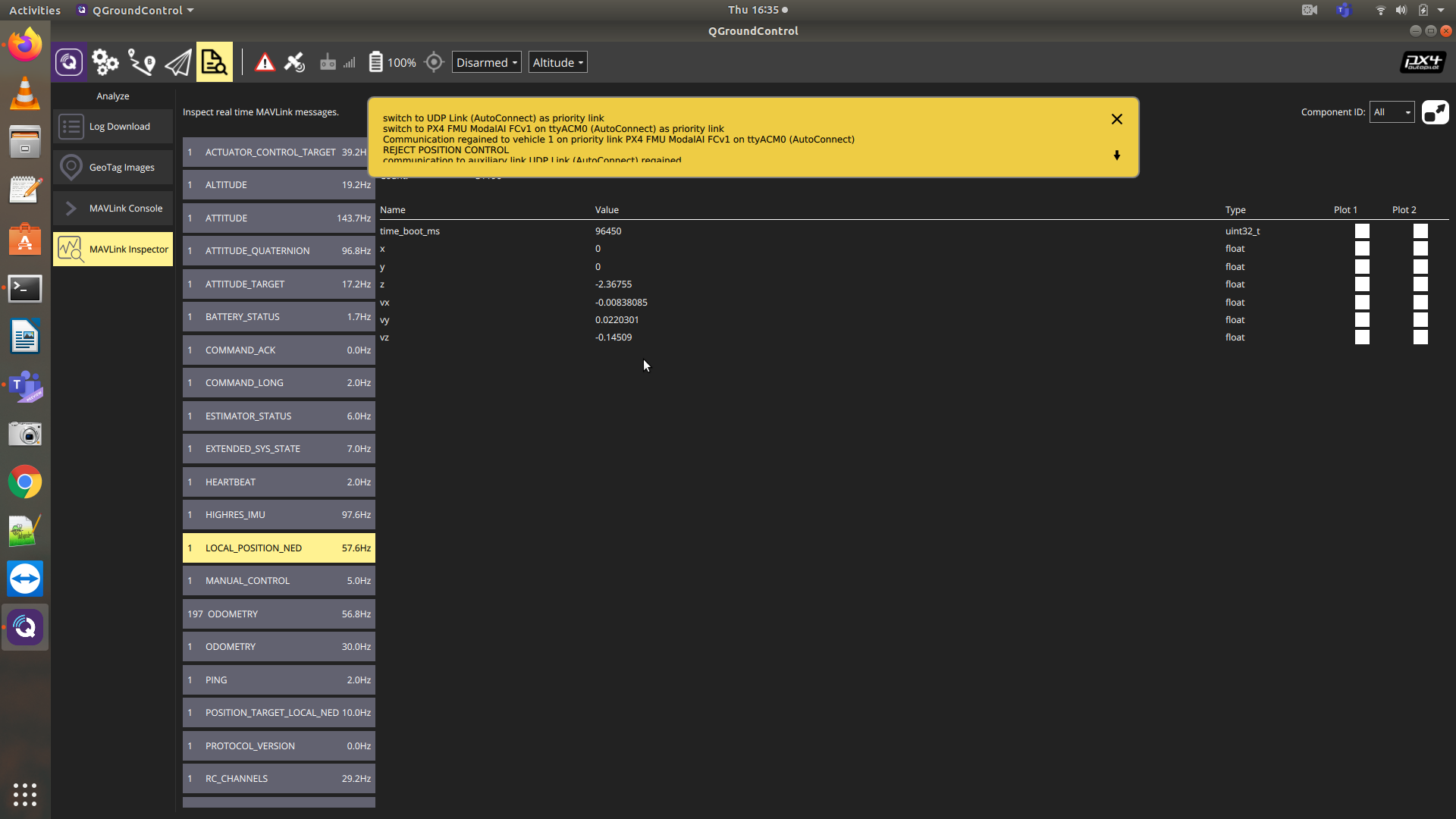
-
Can you report what your EKF2_AID_MASK is set to in PX4 and post the value? thanks.
-
@Cliff-Wong its set to 280. I have also posted the PX4 param above somewhere in the beginning and you can have a look at that too.
-
Have you changed the firmware in some way? This is not normal behavior. You could try going to original firmware and settings: https://docs.modalai.com/flight-core-firmware/




Reading along? Create a free ModalAI Forum account to join in.
With an account you can reply, ask your own question, get an email when a ModalAI engineer answers, and mark the reply that solved it. Your place in each thread is saved between visits.
Questions about VOXL, Flight Core, ESCs and ModalAI drones are answered here by the engineers who build them.
Register Login