Skip to content
  • Categories
  • Recent
  • Tags
  • Popular
  • Users
  • Groups
Collapse
Brand Logo

ModalAI Forum

  1. ModalAI Support Forum
  2. VOXL Dev Drones
  3. VOXL m500 Reference Drone
  4. PX4 disconnected from UART & QGC cannot connected to modalAI

PX4 disconnected from UART & QGC cannot connected to modalAI
Scheduled Pinned Locked Moved VOXL m500 Reference Drone
15 Posts 5 Posters 3.0k Views 1 Watching
  • Oldest to Newest
  • Newest to Oldest
  • Most Votes
Reply
  • Reply as topic
Log in to reply
This topic has been deleted. Only users with topic management privileges can see it.
  • D Offline
    D Offline
    DarkKnightCH
    Contributor
    wrote on last edited by DarkKnightCH
    #6

    More tests have done:
    (1) First, I can ssh into voxl through my laptop. And this means the wifi in VOXL is working.
    (2) I can adb into voxl board, which means that my voxl board is not bricked?
    (3)I can connect my flight core with my QGC via USB.
    (4)I tried to run voxl-inspect-services, and it shows
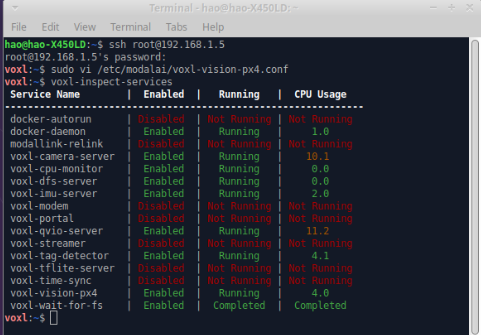
    Screenshot_2022-07-10_16-27-48.png
    (5)I also tried to run voxl-inspect-qvio, and it shows that
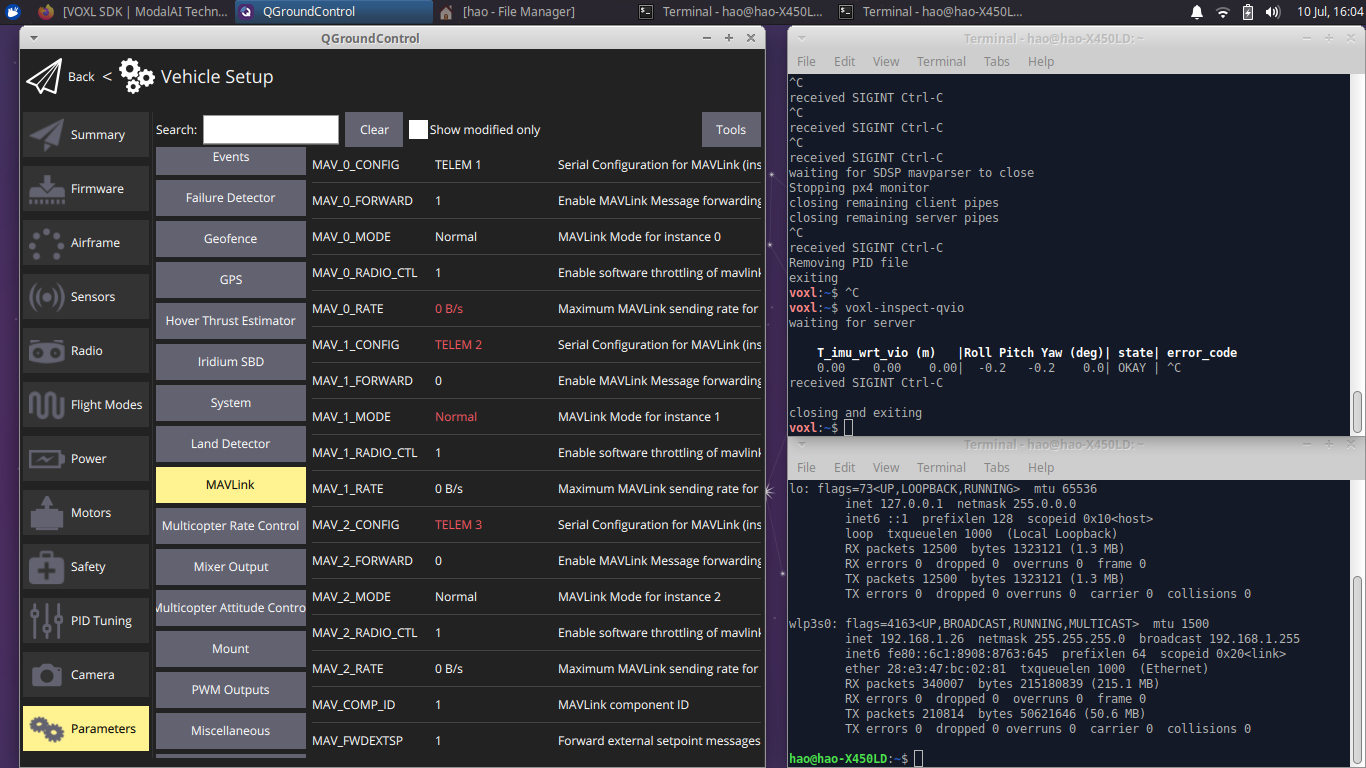
    Screenshot_2022-07-10_16-04-32.png

    (6)I also tried to reset the voxl-vision-px4 by running voxl-configure-vision-px4 as follows
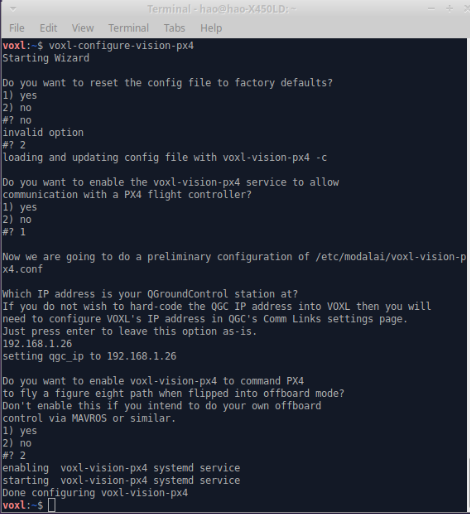
    Screenshot_2022-07-10_16-33-19.png

    But there still is a WARNING show PX4 disconnected from UART.

    Any suggestion😧 ?

    1 Reply Last reply
    0
    • Chad SweetC Offline
      Chad SweetC Offline
      Chad Sweet
      ModalAI Team
      wrote on last edited by
      #7

      That warning implies there is an issue in the comms between the Snapdragon and the STM32F7. Maybe try to reload the STM32F7 (Flight Core) firmware and see if that helps?

      1 Reply Last reply
      0
      • D Offline
        D Offline
        DarkKnightCH
        Contributor
        wrote on last edited by DarkKnightCH
        #8

        @Chad-Sweet Yeah. I already reload a flight core firmware and it doesn't help. Is it possible that voxl-vision-px4 server is broken? The UART wire physical connection looks pretty valid. it is hard for me to find out where the issue is from.

        1 Reply Last reply
        0
        • D Offline
          D Offline
          DarkKnightCH
          Contributor
          wrote on last edited by
          #9

          @Chad-Sweet I would like to update my voxl-suite-ipk meta package since I doubt maybe something is wrong about the voxl-vision-px4? is there a simple way to do it except flashing a new system image of voxl? should I use the following command to do it?

          opkg update && opkg upgrade
          
          1 Reply Last reply
          0
          • Chad SweetC Offline
            Chad SweetC Offline
            Chad Sweet
            ModalAI Team
            wrote on last edited by
            #10

            That warning implies a hardware issue more than a software issue. What if you try the nuttx shell to test connectivity between the Snapdragon and Flight Core?

            D 1 Reply Last reply
            0
            • Chad SweetC Chad Sweet

              That warning implies a hardware issue more than a software issue. What if you try the nuttx shell to test connectivity between the Snapdragon and Flight Core?

              D Offline
              D Offline
              DarkKnightCH
              Contributor
              wrote on last edited by
              #11

              @Chad-Sweet I tried to follow your advice and it shows

              voxl:~$ voxl-px4-shell
              ERROR opening /run/mpa/vvpx4_shell/
              most likely the voxl-vision-px4 service is not running
              

              I also tried to run

              systemctl restart voxl-vision-px4
              

              and

              voxl-vision-px4 status
              

              and it shows

              voxl:~$ voxl-vision-px4 status
              loading our own config file
              =================================================================
              Parameters as loaded from config file:
              qgc_ip:                     192.168.0.121
              en_localhost_mavlink_udp    1
              en_secondary_qgc:           0
              secondary_qgc_ip:           192.168.1.214
              qgc_udp_port_number:        14550
              localhost_udp_port_number:  14551
              udp_mtu:                    512
              en_vio:                     1
              en_voa:                     1
              en_send_vio_to_qgc:         0
              en_send_voa_to_qgc:         0
              en_set_clock_from_gps:      1
              en_force_onboard_mav1_mode: 1
              en_reset_px4_on_error:      1
              qvio_auto_reset_quality:    0.000500
              horizon_cal_tolerance:      0.300000
              voa_upper_bound_m:          1.250000
              voa_lower_bound_m:          1.250000
              en_adsb:                    0
              adsb_uart_bus:              7
              adsb_uart_baudrate:         57600
              px4_uart_bus:               5
              px4_uart_baudrate:          921600
              offboard_mode:              off
              follow_tag_id:              0
              en_tag_fixed_frame:         0
              fixed_frame_filter_len:     5
              en_transform_mavlink_pos_setpoints_from_fixed_frame:0
              =================================================================
              loading extrinsics config file
              starting geometry module
              starting px4 monitor
              starting uart mavlink
              Successfully opened mavparser
              starting udp mavlink
              Adding manual QGC IP address to udp connection list: 192.168.0.121
              Added new UDP connection to 192.168.0.121
              starting px4 shell
              starting fixed pose input
              starting vio manager
              starting tag manager
              starting voa manager
              starting control input pipe
              Init complete, entering main loop
              Connected to voxl-qvio-server
              updating to use imu: imu0
              done updating transforms to use imu: imu0
              Connected to voxl-tag-detector
              Connected to voxl-dfs-server
              WARNING PX4 DISCONNECTED FROM UART
              

              any suggestion?

              1 Reply Last reply
              0
              • Chad SweetC Offline
                Chad SweetC Offline
                Chad Sweet
                ModalAI Team
                wrote on last edited by
                #12

                You could try a fresh install by following the instructions here: https://docs.modalai.com/voxl-suite/ . There does seem to be a chance your hardware is damaged though.

                D 1 Reply Last reply
                0
                • Chad SweetC Chad Sweet

                  You could try a fresh install by following the instructions here: https://docs.modalai.com/voxl-suite/ . There does seem to be a chance your hardware is damaged though.

                  D Offline
                  D Offline
                  DarkKnightCH
                  Contributor
                  wrote on last edited by
                  #13

                  @Chad-Sweet Yeah. I tried the following command

                  voxl-configure-opkg
                  

                  and

                  opkg update
                  

                  and then try to restart the voxl-vision-px4 and it seems nothing helps.

                  Since I can connect to voxl through wifi and adb, I have no idea why voxl will broken since I treat it very carefully. Indeed sometimes this QGC disconnection issue happens randomly. Could I mail back the Flight Core and VOXL to you and would you mind helping me check what is the issue?

                  1 Reply Last reply
                  0
                  • A Offline
                    A Offline
                    Anubhav
                    Regular
                    wrote on last edited by
                    #14

                    @DarkKnightCH
                    Hi,
                    Are you able to connect to QGC now. if yes, what was the issue and how you rectified it?
                    Thanks!

                    T 1 Reply Last reply
                    0
                    • A Anubhav

                      @DarkKnightCH
                      Hi,
                      Are you able to connect to QGC now. if yes, what was the issue and how you rectified it?
                      Thanks!

                      T Offline
                      T Offline
                      tpavlic
                      Contributor
                      wrote on last edited by
                      #15

                      @Anubhav and @DarkKnightCH: Was there any movement on this?

                      We have 7 drones with FCv2 (all of our other m500 drones have different FC's) that were also sent to us with the wrong radios. We were able to reconfigure the PX4 for the desired radios (and confirm RC connection to QGC), but running voxl-mavlink-server manually shows a UART error on the console. We are RMA'ing the 7 units with the bad mavlink back to ModalAI for a fix, but it would be great to save the shipping if a fix was found here.

                      1 Reply Last reply
                      0

                      Hello! It looks like you're interested in this conversation, but you don't have an account yet.

                      Getting fed up of having to scroll through the same posts each visit? When you register for an account, you'll always come back to exactly where you were before, and choose to be notified of new replies (either via email, or push notification). You'll also be able to save bookmarks and upvote posts to show your appreciation to other community members.

                      With your input, this post could be even better 💗

                      Register Login
                      Reply
                      • Reply as topic
                      Log in to reply
                      • Oldest to Newest
                      • Newest to Oldest
                      • Most Votes


                      ModalAI
                      Categories Recent Tags ModalAI.com Docs
                      © 2026 ModalAI® · Accelerating autonomy for smaller, smarter, safer drones · Powered by NodeBB
                      • Login

                      • Don't have an account? Register

                      • Login or register to search.
                      • First post
                        Last post
                      0
                      • Categories
                      • Recent
                      • Tags
                      • Popular
                      • Users
                      • Groups