Skip to content
  • Categories
  • Recent
  • Tags
  • Popular
  • Users
  • Groups
Collapse
Brand Logo

ModalAI Forum

  1. ModalAI Support Forum
  2. Ask your questions right here!
  3. uvc_get_stream_ctrl_format_size failed

uvc_get_stream_ctrl_format_size failed

Scheduled Pinned Locked Moved Ask your questions right here!
39 Posts 3 Posters 14.9k Views 3 Watching
  • Oldest to Newest
  • Newest to Oldest
  • Most Votes
Reply
  • Reply as topic
Log in to reply
This topic has been deleted. Only users with topic management privileges can see it.
  • tomT tom

    @Kris You can read more about how gstreamer and the gst-launch-1.0 command works here: https://gstreamer.freedesktop.org/documentation/tools/gst-launch.html?gi-language=c

    Yes, you would run that command on VOXL2. That specific command pulls frames from /dev/video22 (the UVC camera), it tells it to expect YUY2 formatted frames (you can change this to your liking) and then it converts it to an RTSP video stream. You could modify the pipeline to instead write to a file instead of streaming.

    There is a ton of documentation on gstreamer out there that can help you out with tailoring the pipeline.

    KrisK Offline
    KrisK Offline
    Kris
    Regular
    wrote on last edited by
    #26

    @tom
    Ok, thank you for the explanation.
    I will read up on gstreamer and try to figure this out.
    You mentioned that I would run this on VOXL2.
    I dont have a VOXL2. Does this work on VOXL for the Seeker?

    1 Reply Last reply
    0
    • tomT Offline
      tomT Offline
      tom
      admin
      wrote on last edited by
      #27

      @Kris Apologies, I'm not sure if that will work on VOXL1. Do you have a hires mipi sensor on your VOXL? It would allow you to avoid a lot of trouble

      KrisK 3 Replies Last reply
      0
      • tomT tom

        @Kris Apologies, I'm not sure if that will work on VOXL1. Do you have a hires mipi sensor on your VOXL? It would allow you to avoid a lot of trouble

        KrisK Offline
        KrisK Offline
        Kris
        Regular
        wrote on last edited by Kris
        #28

        @tom
        No, I dont have a hires mipi sensor on my VOXL. I am using the TOF, Stereo, and Tracking sensors specifically for indoor flights.
        I am just trying to record frames or video from a connected uvc camera while in flight.
        I am also trying to set one of my stereo cameras as the QVIO instead of the tracking camera. Again this is just for indoor flights. I have also asked about this QVIO setup in this thread, but have not received a response other than pointing to the extrinsics ModalAi page.

        1 Reply Last reply
        0
        • tomT tom

          @Kris Apologies, I'm not sure if that will work on VOXL1. Do you have a hires mipi sensor on your VOXL? It would allow you to avoid a lot of trouble

          KrisK Offline
          KrisK Offline
          Kris
          Regular
          wrote on last edited by Kris
          #29

          @tom
          The command you sent me earlier this week did not work on the VOXL platform. I tried variations on both our e-CAM83 and Aruducam IMX335 uvc camera modules.

          Could you please point me to a uvc camera that will work with the voxl-uvc-server?
          Our main goal is to connect a uvc camera to the Seeker and be able to capture frames or video (streaming is not necessary) and send them to an onboard SD card (possibly using voxl-logger.

          Would this Blue Robotics uvc module work? Meaning, is it capable of connecting to the voxl-uvc-server and be able to send frames and/or video to the onboard SD card using voxl-logger on the VOXL1 Seeker Dev Drone?

          1 Reply Last reply
          0
          • tomT tom

            @Kris Apologies, I'm not sure if that will work on VOXL1. Do you have a hires mipi sensor on your VOXL? It would allow you to avoid a lot of trouble

            KrisK Offline
            KrisK Offline
            Kris
            Regular
            wrote on last edited by
            #30

            @tom
            I have also noticed that when I updated my platform to 0.9 the streamer.conf has changed.
            Now our Arducam IMX335 is not even working (it had no problems streaming before).

            0.9 streamer.conf

            {
                    "input-pipe":   "hires",
                    "bitrate":      1000000,
                    "decimator":    2,
                    "port": 8900,
                    "rotation":     0
            }
            

            3.8.0-0.7 streamer.conf

            {
                "conf-version":"1.3",
                "configuration": "hires",
                "uvc-generic": {
                    "input": {
                        "interface": "mpa",
                        "mpa-camera": "uvc" },
                    "output": {
                        "stream": {
                            "rotation": 0,
                            "width": 640,
                            "height": 480,
                            "decimator": 1,
                            "bitrate": 1000000 } }
                },
                "uvc-flir-boson": {
                    "input": {
                        "interface": "mpa",
                        "mpa-camera": "uvc" },
                    "output": {
                        "stream": {
                            "rotation": 0,
                            "width": 640,
                            "height": 512,
                            "decimator": 2,
                            "bitrate": 1000000 } }
                },
                "uvc-flir-lepton": {
                    "input": {
                        "interface": "mpa",
                        "mpa-camera": "uvc" },
                    "output": {
                        "stream": {
                            "rotation": 0,
                            "width": 160,
                            "height": 120,        
                            "bitrate": 500000 } } 
                },                                
                "hires": {                        
                    "input": {                    
                        "interface": "mpa",       
                        "mpa-camera": "hires" },  
                    "output": {                   
                        "stream": {               
                            "rotation": 0,        
                            "width": 640,         
                            "height": 480,        
                            "decimator": 2,       
                            "bitrate": 1000000 } }
                },                                
                "hires-logo": {                   
                    "input": {                    
                        "interface": "mpa",       
                        "mpa-camera": "hires" },  
                    "output": {                   
                        "stream": {               
                            "rotation": 0,        
                            "width": 640,         
                            "height": 480,        
                            "decimator": 2,       
                            "bitrate": 1000000 } },
                    "overlay": {                   
                        "location": "/etc/modalai/modalai.png",
                        "offset_x": -1,                        
                        "offset_y": -1 }                       
                },                                             
                "stereo": {                                    
                    "input": {                                 
                        "interface": "mpa",                    
                        "mpa-camera": "stereo" },              
                    "output": {                                
                        "stream": {                            
                            "width": 640,                      
                            "height": 960,                     
                            "decimator": 2,                    
                            "bitrate": 1000000 } }             
                },                                             
                "tracking": {                                  
                    "input": {                                 
                        "interface": "mpa",                    
                        "mpa-camera": "tracking" },            
                    "output": {                                
                        "stream": {                            
                            "width": 640,                      
                            "height": 480,                     
                            "decimator": 2,                    
                            "bitrate": 1000000 } }             
                },                                             
                "dfs-disparity": {                             
                    "input": {                                 
                        "interface": "mpa",                    
                        "mpa-camera": "dfs_disparity" },       
                    "output": {                                
                        "stream": {                            
                            "width": 640,                      
                            "height": 480,                     
                            "decimator": 2,                    
                            "bitrate": 1000000 } }             
                },                                             
                "qvio-overlay": {                              
                    "input": {                                 
                        "interface": "mpa",                    
                        "mpa-camera": "qvio_overlay" },        
                    "output": {                                
                        "stream": {                            
                            "width": 640,                      
                            "height": 544,                     
                            "decimator": 2,                    
                            "bitrate": 1000000 } }             
                },                                             
                "tflite-overlay": {                            
                    "input": {                                 
                        "interface": "mpa",                    
                        "mpa-camera": "tflite" },              
                    "output": {                                
                        "stream": {                            
                            "width": 640,                      
                            "height": 480,                     
                            "decimator": 2,                    
                            "bitrate": 1000000 } }             
                },                                             
                "hdmi-mpa": {                                  
                    "input": {                                 
                        "interface": "mpa",                    
                        "mpa-camera": "v4l2" },                
                    "output": {                                
                        "stream": {                            
                            "width": 640,                      
                            "height": 360,                     
                            "decimator": 2,                    
                            "bitrate": 1000000 } }             
                },                                             
                "gphoto2-mpa": {                               
                    "input": {                                 
                        "interface": "mpa",                    
                        "mpa-camera": "gphoto2" },             
                    "output": {                                
                        "stream": {                            
                            "width": 640,                      
                            "height": 360,                     
                            "decimator": 2,                    
                            "bitrate": 1000000 } }             
                },                                             
                "video-test": {                                
                    "input": {                                 
                        "interface": "test",                   
                        "frame": {                             
                            "width": 640,                      
                            "height": 480,                     
                            "format": "yuv420" } },            
                    "output": {                                
                        "stream": {                            
                            "rotation": 0,                     
                            "width": 640,                      
                            "height": 480,                     
                            "rate": 30,                        
                            "bitrate": 1000000 } }             
                },                                             
                "uvc-video": {                                 
                    "input": {                                 
                        "interface": "uvc",                    
                        "device": "/dev/video0" },             
                    "output": {                                
                        "stream": {                            
                            "rotation": 0,                     
                            "width": 640,                      
                            "height": 360,                     
                            "rate": 15,                        
                            "bitrate": 1000000 } }             
                }                                              
                                                               
            }                           
            
            1 Reply Last reply
            0
            • tomT tom

              @Kris You can see supported format info here: https://gitlab.com/voxl-public/voxl-sdk/services/voxl-uvc-server/-/blob/master/src/main.c#L64

              Another thing to try out is using gstreamer instead of voxl-uvc-server + voxl-streamer with a pipeline similar to the following:

              gst-launch-1.0 v4l2src device=/dev/video2 ! video/x-raw,format=YUY2 ! videoconvert ! x264enc speed-preset=ultrafast tune=zerolatency ! rtph264pay name=pay0 ! udpsink host=192.168.1.97 port=8554

              The pipeline may need to be tweaked slightly but it's one I've used before for other UVC cameras that voxl-uvc-server was unhappy with

              KrisK Offline
              KrisK Offline
              Kris
              Regular
              wrote on last edited by
              #31

              @tom
              Do you happen to know some Gstreamer commands for the Logitech C270 uvc camera?
              I am trying to get either a streaming or recording command to work on the Seeker, with no luck so far.

              1 Reply Last reply
              0
              • tomT Offline
                tomT Offline
                tom
                admin
                wrote on last edited by tom
                #32

                @Kris I don't have that specific webcam or a VOXL1 but with a different one and a VOXL2, all I have to do is run voxl-uvc-server, see output below:

                voxl2:/$ voxl-uvc-server 
                loading config file
                Creating new config file: /etc/modalai/voxl-uvc-server.conf
                =================================================================
                width:                            640
                height:                           480
                fps:                              30
                pipe_name:                        uvc
                =================================================================
                

                I'm able to pull up the stream using voxl-portal (going to IP of my VOXL2 in browser)
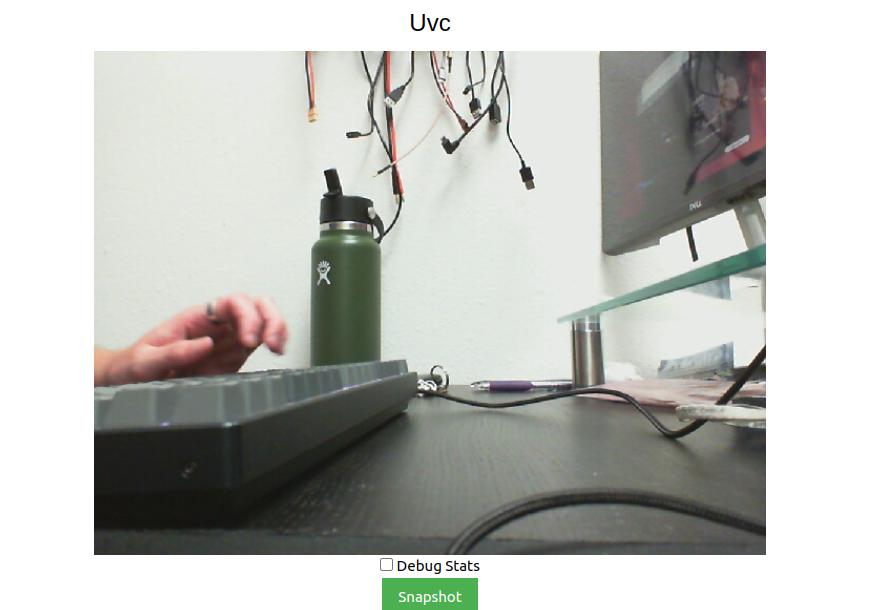
                8ff0d084-6556-4947-8dcb-9e8137d10ae1-image.png

                Then alternatively I'm able to use this gstreamer command:

                gst-launch-1.0 v4l2src device=/dev/video2 ! video/x-raw,format=YUY2 ! videoconvert ! x264enc speed-preset=ultrafast tune=zerolatency ! rtph264pay name=pay0 ! udpsink host=192.168.1.124 port=8554
                

                to pull up the video stream in QGC

                KrisK 1 Reply Last reply
                0
                • tomT Offline
                  tomT Offline
                  tom
                  admin
                  wrote on last edited by
                  #33

                  642ce503-f6b1-4999-9cf2-ba5ac5b8e504-image.png

                  1 Reply Last reply
                  0
                  • tomT tom

                    @Kris I don't have that specific webcam or a VOXL1 but with a different one and a VOXL2, all I have to do is run voxl-uvc-server, see output below:

                    voxl2:/$ voxl-uvc-server 
                    loading config file
                    Creating new config file: /etc/modalai/voxl-uvc-server.conf
                    =================================================================
                    width:                            640
                    height:                           480
                    fps:                              30
                    pipe_name:                        uvc
                    =================================================================
                    

                    I'm able to pull up the stream using voxl-portal (going to IP of my VOXL2 in browser)

                    8ff0d084-6556-4947-8dcb-9e8137d10ae1-image.png

                    Then alternatively I'm able to use this gstreamer command:

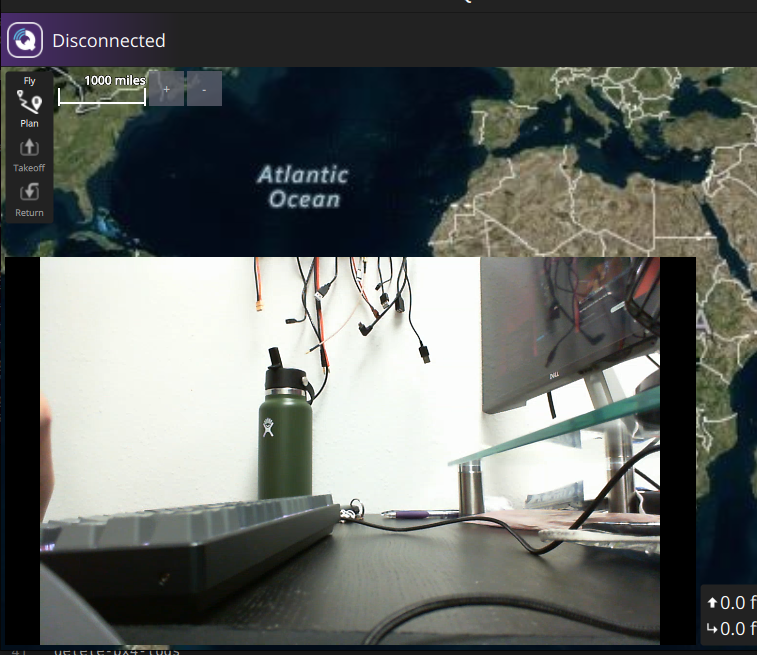
                    gst-launch-1.0 v4l2src device=/dev/video2 ! video/x-raw,format=YUY2 ! videoconvert ! x264enc speed-preset=ultrafast tune=zerolatency ! rtph264pay name=pay0 ! udpsink host=192.168.1.124 port=8554
                    

                    to pull up the video stream in QGC

                    KrisK Offline
                    KrisK Offline
                    Kris
                    Regular
                    wrote on last edited by
                    #34

                    @tom
                    Thank you for your examples.

                    I was asking about the C270 camera because @Eric-Katzfey had mentioned that he starts his camera testings with this model in order to locate where issues are coming from on other camera models.

                    I do appreciate your support.
                    I will continue to try different Gstreamer commands.

                    1 Reply Last reply
                    0
                    • tomT Offline
                      tomT Offline
                      tom
                      admin
                      wrote on last edited by
                      #35

                      @Kris I understand, your solution will likely be similar to what I posted above

                      KrisK 1 Reply Last reply
                      0
                      • tomT tom

                        @Kris I understand, your solution will likely be similar to what I posted above

                        KrisK Offline
                        KrisK Offline
                        Kris
                        Regular
                        wrote on last edited by Kris
                        #36

                        @tom
                        I was able to stream the video from voxl-portal,

                        voxl:~$ voxl-uvc-server -d
                        Enabling debug messages
                        voxl-uvc-server starting
                        Image resolution 640x480, 30 fps chosen
                        UVC initialized
                        Device found
                        Device opened
                        uvc_get_stream_ctrl_format_size succeeded for format YUYV
                        Streaming starting
                        Got frame callback! frame_format = 3, width = 640, height = 480, length = 614400, ptr = (nil)
                         * got image 30
                         * got image 60
                         * got image 90
                         * got image 120
                         * got image 150
                        

                        but I cannot get the Gstreamer to work for QGC.

                        Here is my ERROR;

                        voxl:~$ gst-launch-1.0 v4l2src device=/dev/video2 ! video/x-raw,format=YUY2 ! videoconvert ! omxh264enc ! rtph264pay name=pay0 ! udpsink host=192.168.110.152 port=8554
                        Setting pipeline to PAUSED ...
                        Pipeline is live and does not need PREROLL ...
                        Setting pipeline to PLAYING ...
                        New clock: GstSystemClock
                        **
                        ERROR:/opt/workspace/build/apq8096-le-1-0-1_ap_standard_oem.git/apps_proc/poky/build/tmp-glibc/work/armv7a-vfp-neon-oemllib32-linux-gnueabi/lib32-gstreamer1.0-omx/1.10.4-r0/gst-omx-1.10.4/omx/gstomxh264enc.c:532:gst_omx_h264_enc_get_caps: code should not be reached
                        Aborted
                        

                        Maybe its a CAPS issue?

                        I had to change x264 to omxh264, and had to completely remove speed-preset=ultrafast tune=zerolatency from the command because it wasnt playing well with VOXL1.

                        1 Reply Last reply
                        0
                        • tomT Offline
                          tomT Offline
                          tom
                          admin
                          wrote on last edited by
                          #37

                          @Kris Well now that you have voxl-uvc-server working you should be able to use voxl-streamer on top of that to get a stream going

                          KrisK 1 Reply Last reply
                          0
                          • tomT tom

                            @Kris Well now that you have voxl-uvc-server working you should be able to use voxl-streamer on top of that to get a stream going

                            KrisK Offline
                            KrisK Offline
                            Kris
                            Regular
                            wrote on last edited by Kris
                            #38

                            @tom
                            Yes, I am able to get the stream working with the voxl-streamer -i uvc command,
                            but I am trying to get a Gstreamer command working so that I can build a pipeline to record the frames.

                            voxl:~$ voxl-streamer -i uvc
                            ERROR: object missing input-pipe
                            WARNING: Failed to get default pipe name from configuration file
                            ERROR: object missing bitrate
                            WARNING: Failed to get default bitrate from configuration file
                            Camera server Connected
                            Stream available at rtsp://127.0.0.1:8900/live
                            

                            Gstreamer;

                            voxl:~$ show-video-device-info.sh
                            /dev/video2: UVC Camera (046d:0825) 046d:0825
                            voxl:~$ sudo gst-launch-1.0 v4l2src device=/dev/video2 ! video/x-raw,width=640,height=480,format=YUY2 ! videoconvert ! omxh264enc ! rtph264pay name=pay0 ! udpsink host=192.168.110.152 port=8554
                            Setting pipeline to PAUSED ...
                            Pipeline is live and does not need PREROLL ...
                            Setting pipeline to PLAYING ...
                            New clock: GstSystemClock
                            **
                            ERROR:/opt/workspace/build/apq8096-le-1-0-1_ap_standard_oem.git/apps_proc/poky/build/tmp-glibc/work/armv7a-vfp-neon-oemllib32-linux-gnueabi/lib32-gstreamer1.0-omx/1.10.4-r0/gst-omx-1.10.4/omx/gstomxh264enc.c:532:gst_omx_h264_enc_get_caps: code should not be reached
                            

                            or without width & height;

                            voxl:~$ show-video-device-info.sh
                            /dev/video2: UVC Camera (046d:0825) 046d:0825
                            voxl:~$ sudo gst-launch-1.0 v4l2src device=/dev/video2 ! video/x-raw,format=YUY2 ! videoconvert ! omxh264enc ! rtph264pay name=pay0 ! udpsink host=192.168.110.152 port=8554
                            Setting pipeline to PAUSED ...
                            Pipeline is live and does not need PREROLL ...
                            Setting pipeline to PLAYING ...
                            New clock: GstSystemClock
                            **
                            ERROR:/opt/workspace/build/apq8096-le-1-0-1_ap_standard_oem.git/apps_proc/poky/build/tmp-glibc/work/armv7a-vfp-neon-oemllib32-linux-gnueabi/lib32-gstreamer1.0-omx/1.10.4-r0/gst-omx-1.10.4/omx/gstomxh264enc.c:532:gst_omx_h264_enc_get_caps: code should not be reached
                            
                            Eric KatzfeyE 1 Reply Last reply
                            0
                            • KrisK Kris

                              @tom
                              Yes, I am able to get the stream working with the voxl-streamer -i uvc command,
                              but I am trying to get a Gstreamer command working so that I can build a pipeline to record the frames.

                              voxl:~$ voxl-streamer -i uvc
                              ERROR: object missing input-pipe
                              WARNING: Failed to get default pipe name from configuration file
                              ERROR: object missing bitrate
                              WARNING: Failed to get default bitrate from configuration file
                              Camera server Connected
                              Stream available at rtsp://127.0.0.1:8900/live
                              

                              Gstreamer;

                              voxl:~$ show-video-device-info.sh
                              /dev/video2: UVC Camera (046d:0825) 046d:0825
                              voxl:~$ sudo gst-launch-1.0 v4l2src device=/dev/video2 ! video/x-raw,width=640,height=480,format=YUY2 ! videoconvert ! omxh264enc ! rtph264pay name=pay0 ! udpsink host=192.168.110.152 port=8554
                              Setting pipeline to PAUSED ...
                              Pipeline is live and does not need PREROLL ...
                              Setting pipeline to PLAYING ...
                              New clock: GstSystemClock
                              **
                              ERROR:/opt/workspace/build/apq8096-le-1-0-1_ap_standard_oem.git/apps_proc/poky/build/tmp-glibc/work/armv7a-vfp-neon-oemllib32-linux-gnueabi/lib32-gstreamer1.0-omx/1.10.4-r0/gst-omx-1.10.4/omx/gstomxh264enc.c:532:gst_omx_h264_enc_get_caps: code should not be reached
                              

                              or without width & height;

                              voxl:~$ show-video-device-info.sh
                              /dev/video2: UVC Camera (046d:0825) 046d:0825
                              voxl:~$ sudo gst-launch-1.0 v4l2src device=/dev/video2 ! video/x-raw,format=YUY2 ! videoconvert ! omxh264enc ! rtph264pay name=pay0 ! udpsink host=192.168.110.152 port=8554
                              Setting pipeline to PAUSED ...
                              Pipeline is live and does not need PREROLL ...
                              Setting pipeline to PLAYING ...
                              New clock: GstSystemClock
                              **
                              ERROR:/opt/workspace/build/apq8096-le-1-0-1_ap_standard_oem.git/apps_proc/poky/build/tmp-glibc/work/armv7a-vfp-neon-oemllib32-linux-gnueabi/lib32-gstreamer1.0-omx/1.10.4-r0/gst-omx-1.10.4/omx/gstomxh264enc.c:532:gst_omx_h264_enc_get_caps: code should not be reached
                              
                              Eric KatzfeyE Offline
                              Eric KatzfeyE Offline
                              Eric Katzfey
                              ModalAI Team
                              wrote on last edited by
                              #39

                              @Kris The intention with the Logitech camera was to use it with voxl-uvc-streamer as Tom pointed out. That way you have a complete working setup and then you can start changing one thing at a time to get to what you want. If you want to switch to a different camera then you can see the differences in the new camera from the Logitech camera and try to debug that way. If you want to add a record feature with GStreamer then you can fork our voxl-streamer code and add the functionality into that. If you want to do it with a gst-launch-1.0 command line pipeline then you are farther away from anything we currently support and it's going to be hard for us to offer much help. I do think that what you are trying to do should be possible.

                              1 Reply Last reply
                              0

                              Hello! It looks like you're interested in this conversation, but you don't have an account yet.

                              Getting fed up of having to scroll through the same posts each visit? When you register for an account, you'll always come back to exactly where you were before, and choose to be notified of new replies (either via email, or push notification). You'll also be able to save bookmarks and upvote posts to show your appreciation to other community members.

                              With your input, this post could be even better 💗

                              Register Login
                              Reply
                              • Reply as topic
                              Log in to reply
                              • Oldest to Newest
                              • Newest to Oldest
                              • Most Votes


                              ModalAI
                              Categories Recent Tags ModalAI.com Docs
                              © 2026 ModalAI® · Accelerating autonomy for smaller, smarter, safer drones · Powered by NodeBB
                              • Login

                              • Login or register to search.
                              • First post
                                Last post
                              0
                              • Categories
                              • Recent
                              • Tags
                              • Popular
                              • Users
                              • Groups