Skip to content
  • Categories
  • Recent
  • Tags
  • Popular
  • Users
  • Groups
Collapse
Brand Logo

ModalAI Forum

  1. ModalAI Support Forum
  2. Ask your questions right here!
  3. uvc_get_stream_ctrl_format_size failed

uvc_get_stream_ctrl_format_size failed

Scheduled Pinned Locked Moved Ask your questions right here!
39 Posts 3 Posters 12.0k Views 3 Watching
  • Oldest to Newest
  • Newest to Oldest
  • Most Votes
Reply
  • Reply as topic
Log in to reply
This topic has been deleted. Only users with topic management privileges can see it.
  • tomT tom

    @Kris Yeah that's just the default that voxl-uvc-server uses if not explicitly specified otherwise with the -r flag.

    You can use show-video-device-info.sh and that may provide some clues.

    What is the part number or make and model of the UVC camera you're using? It's possible it's supported image formats don't match up with those supported by voxl-uvc-server

    KrisK Offline
    KrisK Offline
    Kris
    Regular
    wrote on last edited by
    #19

    @tom
    May I ask what image formats the voxl-uvc-serversupports?

    1 Reply Last reply
    0
    • KrisK Offline
      KrisK Offline
      Kris
      Regular
      wrote on last edited by
      #20

      I have a feeling that maybe the problem is deriving from my camera’s GUID Format.
      Does the voxl-uvc-server accept GUID: 4832363400001000800000aa00389b71
      for h264 format?
      How would I go about correcting the guidFormat to match up with the voxl-uvc-server?

      1 Reply Last reply
      0
      • tomT Offline
        tomT Offline
        tom
        admin
        wrote on last edited by
        #21

        @Kris You can see supported format info here: https://gitlab.com/voxl-public/voxl-sdk/services/voxl-uvc-server/-/blob/master/src/main.c#L64

        Another thing to try out is using gstreamer instead of voxl-uvc-server + voxl-streamer with a pipeline similar to the following:

        gst-launch-1.0 v4l2src device=/dev/video2 ! video/x-raw,format=YUY2 ! videoconvert ! x264enc speed-preset=ultrafast tune=zerolatency ! rtph264pay name=pay0 ! udpsink host=192.168.1.97 port=8554

        The pipeline may need to be tweaked slightly but it's one I've used before for other UVC cameras that voxl-uvc-server was unhappy with

        KrisK 4 Replies Last reply
        0
        • tomT tom

          @Kris You can see supported format info here: https://gitlab.com/voxl-public/voxl-sdk/services/voxl-uvc-server/-/blob/master/src/main.c#L64

          Another thing to try out is using gstreamer instead of voxl-uvc-server + voxl-streamer with a pipeline similar to the following:

          gst-launch-1.0 v4l2src device=/dev/video2 ! video/x-raw,format=YUY2 ! videoconvert ! x264enc speed-preset=ultrafast tune=zerolatency ! rtph264pay name=pay0 ! udpsink host=192.168.1.97 port=8554

          The pipeline may need to be tweaked slightly but it's one I've used before for other UVC cameras that voxl-uvc-server was unhappy with

          KrisK Offline
          KrisK Offline
          Kris
          Regular
          wrote on last edited by
          #22

          @tom
          Thank you, I will give this a try.
          I am trying to use H.264 on this camera.
          This is the second UVC camera that I’ve purchased because I am trying to log the frames from voxl-logger. From what I understand, H.264 output is the format that can do this.
          Is there a way to call for only the /dev/video2 to start with the voxl-uvc-server or gstreamer?
          Does the voxl-uvc-server accept h264 1920x1080 @30fps?

          1 Reply Last reply
          0
          • tomT tom

            @Kris You can see supported format info here: https://gitlab.com/voxl-public/voxl-sdk/services/voxl-uvc-server/-/blob/master/src/main.c#L64

            Another thing to try out is using gstreamer instead of voxl-uvc-server + voxl-streamer with a pipeline similar to the following:

            gst-launch-1.0 v4l2src device=/dev/video2 ! video/x-raw,format=YUY2 ! videoconvert ! x264enc speed-preset=ultrafast tune=zerolatency ! rtph264pay name=pay0 ! udpsink host=192.168.1.97 port=8554

            The pipeline may need to be tweaked slightly but it's one I've used before for other UVC cameras that voxl-uvc-server was unhappy with

            KrisK Offline
            KrisK Offline
            Kris
            Regular
            wrote on last edited by
            #23

            @tom
            Do I paste this in the voxl terminal?

            gst-launch-1.0 v4l2src device=/dev/video2 ! video/x-raw,format=YUY2 ! videoconvert ! x264enc speed-preset=ultrafast tune=zerolatency ! rtph264pay name=pay0 ! udpsink host=192.168.1.97 port=8554
            

            Does this have uvc frame or video capture capabilities?

            1 Reply Last reply
            0
            • tomT tom

              @Kris You can see supported format info here: https://gitlab.com/voxl-public/voxl-sdk/services/voxl-uvc-server/-/blob/master/src/main.c#L64

              Another thing to try out is using gstreamer instead of voxl-uvc-server + voxl-streamer with a pipeline similar to the following:

              gst-launch-1.0 v4l2src device=/dev/video2 ! video/x-raw,format=YUY2 ! videoconvert ! x264enc speed-preset=ultrafast tune=zerolatency ! rtph264pay name=pay0 ! udpsink host=192.168.1.97 port=8554

              The pipeline may need to be tweaked slightly but it's one I've used before for other UVC cameras that voxl-uvc-server was unhappy with

              KrisK Offline
              KrisK Offline
              Kris
              Regular
              wrote on last edited by
              #24

              @tom
              Sorry to bother you again, but I am not seeing the h264 format supported in the main.c script you provided for the voxl-uvc-server. Is it possible to edit the voxl-uvc-server main.c script to accept h264 format at 1920x1080 @30fps?

              1 Reply Last reply
              0
              • tomT Offline
                tomT Offline
                tom
                admin
                wrote on last edited by
                #25

                @Kris You can read more about how gstreamer and the gst-launch-1.0 command works here: https://gstreamer.freedesktop.org/documentation/tools/gst-launch.html?gi-language=c

                Yes, you would run that command on VOXL2. That specific command pulls frames from /dev/video22 (the UVC camera), it tells it to expect YUY2 formatted frames (you can change this to your liking) and then it converts it to an RTSP video stream. You could modify the pipeline to instead write to a file instead of streaming.

                There is a ton of documentation on gstreamer out there that can help you out with tailoring the pipeline.

                KrisK 1 Reply Last reply
                0
                • tomT tom

                  @Kris You can read more about how gstreamer and the gst-launch-1.0 command works here: https://gstreamer.freedesktop.org/documentation/tools/gst-launch.html?gi-language=c

                  Yes, you would run that command on VOXL2. That specific command pulls frames from /dev/video22 (the UVC camera), it tells it to expect YUY2 formatted frames (you can change this to your liking) and then it converts it to an RTSP video stream. You could modify the pipeline to instead write to a file instead of streaming.

                  There is a ton of documentation on gstreamer out there that can help you out with tailoring the pipeline.

                  KrisK Offline
                  KrisK Offline
                  Kris
                  Regular
                  wrote on last edited by
                  #26

                  @tom
                  Ok, thank you for the explanation.
                  I will read up on gstreamer and try to figure this out.
                  You mentioned that I would run this on VOXL2.
                  I dont have a VOXL2. Does this work on VOXL for the Seeker?

                  1 Reply Last reply
                  0
                  • tomT Offline
                    tomT Offline
                    tom
                    admin
                    wrote on last edited by
                    #27

                    @Kris Apologies, I'm not sure if that will work on VOXL1. Do you have a hires mipi sensor on your VOXL? It would allow you to avoid a lot of trouble

                    KrisK 3 Replies Last reply
                    0
                    • tomT tom

                      @Kris Apologies, I'm not sure if that will work on VOXL1. Do you have a hires mipi sensor on your VOXL? It would allow you to avoid a lot of trouble

                      KrisK Offline
                      KrisK Offline
                      Kris
                      Regular
                      wrote on last edited by Kris
                      #28

                      @tom
                      No, I dont have a hires mipi sensor on my VOXL. I am using the TOF, Stereo, and Tracking sensors specifically for indoor flights.
                      I am just trying to record frames or video from a connected uvc camera while in flight.
                      I am also trying to set one of my stereo cameras as the QVIO instead of the tracking camera. Again this is just for indoor flights. I have also asked about this QVIO setup in this thread, but have not received a response other than pointing to the extrinsics ModalAi page.

                      1 Reply Last reply
                      0
                      • tomT tom

                        @Kris Apologies, I'm not sure if that will work on VOXL1. Do you have a hires mipi sensor on your VOXL? It would allow you to avoid a lot of trouble

                        KrisK Offline
                        KrisK Offline
                        Kris
                        Regular
                        wrote on last edited by Kris
                        #29

                        @tom
                        The command you sent me earlier this week did not work on the VOXL platform. I tried variations on both our e-CAM83 and Aruducam IMX335 uvc camera modules.

                        Could you please point me to a uvc camera that will work with the voxl-uvc-server?
                        Our main goal is to connect a uvc camera to the Seeker and be able to capture frames or video (streaming is not necessary) and send them to an onboard SD card (possibly using voxl-logger.

                        Would this Blue Robotics uvc module work? Meaning, is it capable of connecting to the voxl-uvc-server and be able to send frames and/or video to the onboard SD card using voxl-logger on the VOXL1 Seeker Dev Drone?

                        1 Reply Last reply
                        0
                        • tomT tom

                          @Kris Apologies, I'm not sure if that will work on VOXL1. Do you have a hires mipi sensor on your VOXL? It would allow you to avoid a lot of trouble

                          KrisK Offline
                          KrisK Offline
                          Kris
                          Regular
                          wrote on last edited by
                          #30

                          @tom
                          I have also noticed that when I updated my platform to 0.9 the streamer.conf has changed.
                          Now our Arducam IMX335 is not even working (it had no problems streaming before).

                          0.9 streamer.conf

                          {
                                  "input-pipe":   "hires",
                                  "bitrate":      1000000,
                                  "decimator":    2,
                                  "port": 8900,
                                  "rotation":     0
                          }
                          

                          3.8.0-0.7 streamer.conf

                          {
                              "conf-version":"1.3",
                              "configuration": "hires",
                              "uvc-generic": {
                                  "input": {
                                      "interface": "mpa",
                                      "mpa-camera": "uvc" },
                                  "output": {
                                      "stream": {
                                          "rotation": 0,
                                          "width": 640,
                                          "height": 480,
                                          "decimator": 1,
                                          "bitrate": 1000000 } }
                              },
                              "uvc-flir-boson": {
                                  "input": {
                                      "interface": "mpa",
                                      "mpa-camera": "uvc" },
                                  "output": {
                                      "stream": {
                                          "rotation": 0,
                                          "width": 640,
                                          "height": 512,
                                          "decimator": 2,
                                          "bitrate": 1000000 } }
                              },
                              "uvc-flir-lepton": {
                                  "input": {
                                      "interface": "mpa",
                                      "mpa-camera": "uvc" },
                                  "output": {
                                      "stream": {
                                          "rotation": 0,
                                          "width": 160,
                                          "height": 120,        
                                          "bitrate": 500000 } } 
                              },                                
                              "hires": {                        
                                  "input": {                    
                                      "interface": "mpa",       
                                      "mpa-camera": "hires" },  
                                  "output": {                   
                                      "stream": {               
                                          "rotation": 0,        
                                          "width": 640,         
                                          "height": 480,        
                                          "decimator": 2,       
                                          "bitrate": 1000000 } }
                              },                                
                              "hires-logo": {                   
                                  "input": {                    
                                      "interface": "mpa",       
                                      "mpa-camera": "hires" },  
                                  "output": {                   
                                      "stream": {               
                                          "rotation": 0,        
                                          "width": 640,         
                                          "height": 480,        
                                          "decimator": 2,       
                                          "bitrate": 1000000 } },
                                  "overlay": {                   
                                      "location": "/etc/modalai/modalai.png",
                                      "offset_x": -1,                        
                                      "offset_y": -1 }                       
                              },                                             
                              "stereo": {                                    
                                  "input": {                                 
                                      "interface": "mpa",                    
                                      "mpa-camera": "stereo" },              
                                  "output": {                                
                                      "stream": {                            
                                          "width": 640,                      
                                          "height": 960,                     
                                          "decimator": 2,                    
                                          "bitrate": 1000000 } }             
                              },                                             
                              "tracking": {                                  
                                  "input": {                                 
                                      "interface": "mpa",                    
                                      "mpa-camera": "tracking" },            
                                  "output": {                                
                                      "stream": {                            
                                          "width": 640,                      
                                          "height": 480,                     
                                          "decimator": 2,                    
                                          "bitrate": 1000000 } }             
                              },                                             
                              "dfs-disparity": {                             
                                  "input": {                                 
                                      "interface": "mpa",                    
                                      "mpa-camera": "dfs_disparity" },       
                                  "output": {                                
                                      "stream": {                            
                                          "width": 640,                      
                                          "height": 480,                     
                                          "decimator": 2,                    
                                          "bitrate": 1000000 } }             
                              },                                             
                              "qvio-overlay": {                              
                                  "input": {                                 
                                      "interface": "mpa",                    
                                      "mpa-camera": "qvio_overlay" },        
                                  "output": {                                
                                      "stream": {                            
                                          "width": 640,                      
                                          "height": 544,                     
                                          "decimator": 2,                    
                                          "bitrate": 1000000 } }             
                              },                                             
                              "tflite-overlay": {                            
                                  "input": {                                 
                                      "interface": "mpa",                    
                                      "mpa-camera": "tflite" },              
                                  "output": {                                
                                      "stream": {                            
                                          "width": 640,                      
                                          "height": 480,                     
                                          "decimator": 2,                    
                                          "bitrate": 1000000 } }             
                              },                                             
                              "hdmi-mpa": {                                  
                                  "input": {                                 
                                      "interface": "mpa",                    
                                      "mpa-camera": "v4l2" },                
                                  "output": {                                
                                      "stream": {                            
                                          "width": 640,                      
                                          "height": 360,                     
                                          "decimator": 2,                    
                                          "bitrate": 1000000 } }             
                              },                                             
                              "gphoto2-mpa": {                               
                                  "input": {                                 
                                      "interface": "mpa",                    
                                      "mpa-camera": "gphoto2" },             
                                  "output": {                                
                                      "stream": {                            
                                          "width": 640,                      
                                          "height": 360,                     
                                          "decimator": 2,                    
                                          "bitrate": 1000000 } }             
                              },                                             
                              "video-test": {                                
                                  "input": {                                 
                                      "interface": "test",                   
                                      "frame": {                             
                                          "width": 640,                      
                                          "height": 480,                     
                                          "format": "yuv420" } },            
                                  "output": {                                
                                      "stream": {                            
                                          "rotation": 0,                     
                                          "width": 640,                      
                                          "height": 480,                     
                                          "rate": 30,                        
                                          "bitrate": 1000000 } }             
                              },                                             
                              "uvc-video": {                                 
                                  "input": {                                 
                                      "interface": "uvc",                    
                                      "device": "/dev/video0" },             
                                  "output": {                                
                                      "stream": {                            
                                          "rotation": 0,                     
                                          "width": 640,                      
                                          "height": 360,                     
                                          "rate": 15,                        
                                          "bitrate": 1000000 } }             
                              }                                              
                                                                             
                          }                           
                          
                          1 Reply Last reply
                          0
                          • tomT tom

                            @Kris You can see supported format info here: https://gitlab.com/voxl-public/voxl-sdk/services/voxl-uvc-server/-/blob/master/src/main.c#L64

                            Another thing to try out is using gstreamer instead of voxl-uvc-server + voxl-streamer with a pipeline similar to the following:

                            gst-launch-1.0 v4l2src device=/dev/video2 ! video/x-raw,format=YUY2 ! videoconvert ! x264enc speed-preset=ultrafast tune=zerolatency ! rtph264pay name=pay0 ! udpsink host=192.168.1.97 port=8554

                            The pipeline may need to be tweaked slightly but it's one I've used before for other UVC cameras that voxl-uvc-server was unhappy with

                            KrisK Offline
                            KrisK Offline
                            Kris
                            Regular
                            wrote on last edited by
                            #31

                            @tom
                            Do you happen to know some Gstreamer commands for the Logitech C270 uvc camera?
                            I am trying to get either a streaming or recording command to work on the Seeker, with no luck so far.

                            1 Reply Last reply
                            0
                            • tomT Offline
                              tomT Offline
                              tom
                              admin
                              wrote on last edited by tom
                              #32

                              @Kris I don't have that specific webcam or a VOXL1 but with a different one and a VOXL2, all I have to do is run voxl-uvc-server, see output below:

                              voxl2:/$ voxl-uvc-server 
                              loading config file
                              Creating new config file: /etc/modalai/voxl-uvc-server.conf
                              =================================================================
                              width:                            640
                              height:                           480
                              fps:                              30
                              pipe_name:                        uvc
                              =================================================================
                              

                              I'm able to pull up the stream using voxl-portal (going to IP of my VOXL2 in browser)
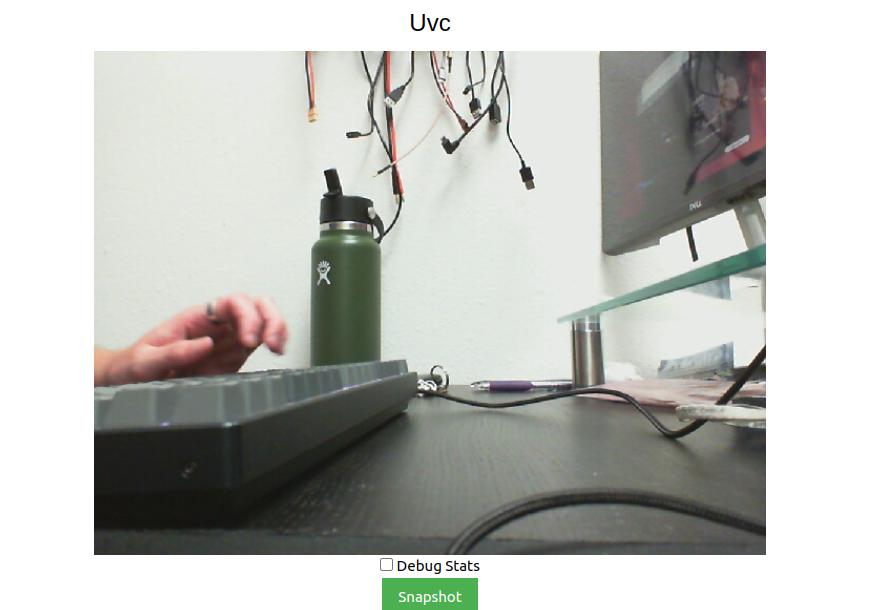
                              8ff0d084-6556-4947-8dcb-9e8137d10ae1-image.png

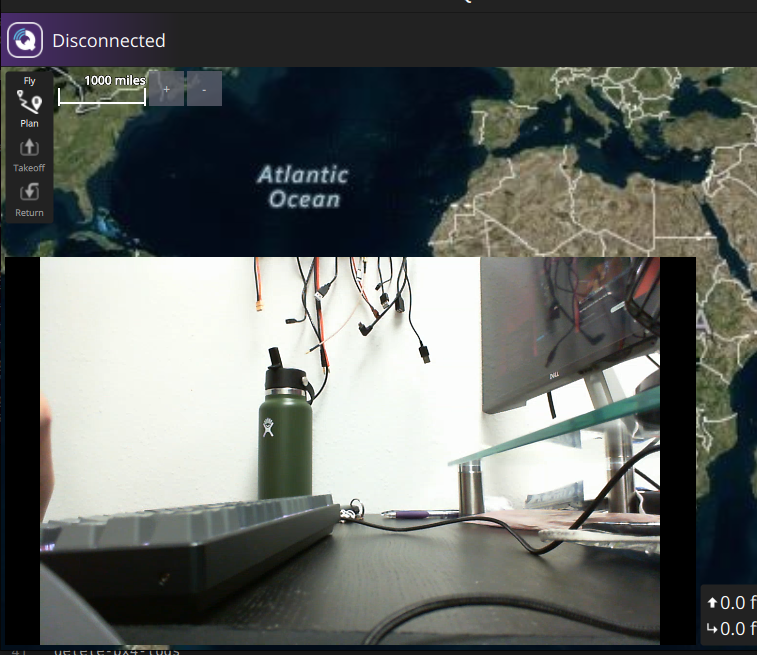
                              Then alternatively I'm able to use this gstreamer command:

                              gst-launch-1.0 v4l2src device=/dev/video2 ! video/x-raw,format=YUY2 ! videoconvert ! x264enc speed-preset=ultrafast tune=zerolatency ! rtph264pay name=pay0 ! udpsink host=192.168.1.124 port=8554
                              

                              to pull up the video stream in QGC

                              KrisK 1 Reply Last reply
                              0
                              • tomT Offline
                                tomT Offline
                                tom
                                admin
                                wrote on last edited by
                                #33

                                642ce503-f6b1-4999-9cf2-ba5ac5b8e504-image.png

                                1 Reply Last reply
                                0
                                • tomT tom

                                  @Kris I don't have that specific webcam or a VOXL1 but with a different one and a VOXL2, all I have to do is run voxl-uvc-server, see output below:

                                  voxl2:/$ voxl-uvc-server 
                                  loading config file
                                  Creating new config file: /etc/modalai/voxl-uvc-server.conf
                                  =================================================================
                                  width:                            640
                                  height:                           480
                                  fps:                              30
                                  pipe_name:                        uvc
                                  =================================================================
                                  

                                  I'm able to pull up the stream using voxl-portal (going to IP of my VOXL2 in browser)

                                  8ff0d084-6556-4947-8dcb-9e8137d10ae1-image.png

                                  Then alternatively I'm able to use this gstreamer command:

                                  gst-launch-1.0 v4l2src device=/dev/video2 ! video/x-raw,format=YUY2 ! videoconvert ! x264enc speed-preset=ultrafast tune=zerolatency ! rtph264pay name=pay0 ! udpsink host=192.168.1.124 port=8554
                                  

                                  to pull up the video stream in QGC

                                  KrisK Offline
                                  KrisK Offline
                                  Kris
                                  Regular
                                  wrote on last edited by
                                  #34

                                  @tom
                                  Thank you for your examples.

                                  I was asking about the C270 camera because @Eric-Katzfey had mentioned that he starts his camera testings with this model in order to locate where issues are coming from on other camera models.

                                  I do appreciate your support.
                                  I will continue to try different Gstreamer commands.

                                  1 Reply Last reply
                                  0
                                  • tomT Offline
                                    tomT Offline
                                    tom
                                    admin
                                    wrote on last edited by
                                    #35

                                    @Kris I understand, your solution will likely be similar to what I posted above

                                    KrisK 1 Reply Last reply
                                    0
                                    • tomT tom

                                      @Kris I understand, your solution will likely be similar to what I posted above

                                      KrisK Offline
                                      KrisK Offline
                                      Kris
                                      Regular
                                      wrote on last edited by Kris
                                      #36

                                      @tom
                                      I was able to stream the video from voxl-portal,

                                      voxl:~$ voxl-uvc-server -d
                                      Enabling debug messages
                                      voxl-uvc-server starting
                                      Image resolution 640x480, 30 fps chosen
                                      UVC initialized
                                      Device found
                                      Device opened
                                      uvc_get_stream_ctrl_format_size succeeded for format YUYV
                                      Streaming starting
                                      Got frame callback! frame_format = 3, width = 640, height = 480, length = 614400, ptr = (nil)
                                       * got image 30
                                       * got image 60
                                       * got image 90
                                       * got image 120
                                       * got image 150
                                      

                                      but I cannot get the Gstreamer to work for QGC.

                                      Here is my ERROR;

                                      voxl:~$ gst-launch-1.0 v4l2src device=/dev/video2 ! video/x-raw,format=YUY2 ! videoconvert ! omxh264enc ! rtph264pay name=pay0 ! udpsink host=192.168.110.152 port=8554
                                      Setting pipeline to PAUSED ...
                                      Pipeline is live and does not need PREROLL ...
                                      Setting pipeline to PLAYING ...
                                      New clock: GstSystemClock
                                      **
                                      ERROR:/opt/workspace/build/apq8096-le-1-0-1_ap_standard_oem.git/apps_proc/poky/build/tmp-glibc/work/armv7a-vfp-neon-oemllib32-linux-gnueabi/lib32-gstreamer1.0-omx/1.10.4-r0/gst-omx-1.10.4/omx/gstomxh264enc.c:532:gst_omx_h264_enc_get_caps: code should not be reached

                                      Aborted
                                      

                                      Maybe its a CAPS issue?

                                      I had to change x264 to omxh264, and had to completely remove speed-preset=ultrafast tune=zerolatency from the command because it wasnt playing well with VOXL1.

                                      1 Reply Last reply
                                      0
                                      • tomT Offline
                                        tomT Offline
                                        tom
                                        admin
                                        wrote on last edited by
                                        #37

                                        @Kris Well now that you have voxl-uvc-server working you should be able to use voxl-streamer on top of that to get a stream going

                                        KrisK 1 Reply Last reply
                                        0
                                        • tomT tom

                                          @Kris Well now that you have voxl-uvc-server working you should be able to use voxl-streamer on top of that to get a stream going

                                          KrisK Offline
                                          KrisK Offline
                                          Kris
                                          Regular
                                          wrote on last edited by Kris
                                          #38

                                          @tom
                                          Yes, I am able to get the stream working with the voxl-streamer -i uvc command,
                                          but I am trying to get a Gstreamer command working so that I can build a pipeline to record the frames.

                                          voxl:~$ voxl-streamer -i uvc
                                          ERROR: object missing input-pipe
                                          WARNING: Failed to get default pipe name from configuration file
                                          ERROR: object missing bitrate
                                          WARNING: Failed to get default bitrate from configuration file
                                          Camera server Connected
                                          Stream available at rtsp://127.0.0.1:8900/live
                                          

                                          Gstreamer;

                                          voxl:~$ show-video-device-info.sh
                                          /dev/video2: UVC Camera (046d:0825) 046d:0825
                                          voxl:~$ sudo gst-launch-1.0 v4l2src device=/dev/video2 ! video/x-raw,width=640,height=480,format=YUY2 ! videoconvert ! omxh264enc ! rtph264pay name=pay0 ! udpsink host=192.168.110.152 port=8554
                                          Setting pipeline to PAUSED ...
                                          Pipeline is live and does not need PREROLL ...
                                          Setting pipeline to PLAYING ...
                                          New clock: GstSystemClock
                                          **
                                          ERROR:/opt/workspace/build/apq8096-le-1-0-1_ap_standard_oem.git/apps_proc/poky/build/tmp-glibc/work/armv7a-vfp-neon-oemllib32-linux-gnueabi/lib32-gstreamer1.0-omx/1.10.4-r0/gst-omx-1.10.4/omx/gstomxh264enc.c:532:gst_omx_h264_enc_get_caps: code should not be reached
                                          

                                          or without width & height;

                                          voxl:~$ show-video-device-info.sh
                                          /dev/video2: UVC Camera (046d:0825) 046d:0825
                                          voxl:~$ sudo gst-launch-1.0 v4l2src device=/dev/video2 ! video/x-raw,format=YUY2 ! videoconvert ! omxh264enc ! rtph264pay name=pay0 ! udpsink host=192.168.110.152 port=8554
                                          Setting pipeline to PAUSED ...
                                          Pipeline is live and does not need PREROLL ...
                                          Setting pipeline to PLAYING ...
                                          New clock: GstSystemClock
                                          **
                                          ERROR:/opt/workspace/build/apq8096-le-1-0-1_ap_standard_oem.git/apps_proc/poky/build/tmp-glibc/work/armv7a-vfp-neon-oemllib32-linux-gnueabi/lib32-gstreamer1.0-omx/1.10.4-r0/gst-omx-1.10.4/omx/gstomxh264enc.c:532:gst_omx_h264_enc_get_caps: code should not be reached
                                          
                                          Eric KatzfeyE 1 Reply Last reply
                                          0

                                          Hello! It looks like you're interested in this conversation, but you don't have an account yet.

                                          Getting fed up of having to scroll through the same posts each visit? When you register for an account, you'll always come back to exactly where you were before, and choose to be notified of new replies (either via email, or push notification). You'll also be able to save bookmarks and upvote posts to show your appreciation to other community members.

                                          With your input, this post could be even better 💗

                                          Register Login
                                          Reply
                                          • Reply as topic
                                          Log in to reply
                                          • Oldest to Newest
                                          • Newest to Oldest
                                          • Most Votes


                                          ModalAI
                                          Categories Recent Tags ModalAI.com Docs
                                          © 2026 ModalAI® · Accelerating autonomy for smaller, smarter, safer drones · Powered by NodeBB
                                          • Login

                                          • Don't have an account? Register

                                          • Login or register to search.
                                          • First post
                                            Last post
                                          0
                                          • Categories
                                          • Recent
                                          • Tags
                                          • Popular
                                          • Users
                                          • Groups
