Skip to content
  • Categories
  • Recent
  • Tags
  • Popular
  • Users
  • Groups
Collapse
Brand Logo

ModalAI Forum

  1. ModalAI Support Forum
  2. VOXL Accessories
  3. Microhard Modems
  4. RC connection/MH carrier directly to VOXL2, while using Flight core V2

RC connection/MH carrier directly to VOXL2, while using Flight core V2

Scheduled Pinned Locked Moved Microhard Modems
7 Posts 2 Posters 945 Views 1 Watching
  • Oldest to Newest
  • Newest to Oldest
  • Most Votes
Reply
  • Reply as topic
Log in to reply
This topic has been deleted. Only users with topic management privileges can see it.
  • Jetson NanoJ Offline
    Jetson NanoJ Offline
    Jetson Nano
    Veteran
    wrote on last edited by Jetson Nano
    #1

    Hello @Vinny @tom
    I am currently working with Flight Core v2 as the External FC. I would like to know if I could connect the RC(SBus ELRS) to VOXL 2 board , instead of connecting to the FC. Since it is similiar to the connection here, where Microhard modem is used with Cube orange - FC.

    Eric KatzfeyE 1 Reply Last reply
    0
    • Jetson NanoJ Jetson Nano

      Hello @Vinny @tom
      I am currently working with Flight Core v2 as the External FC. I would like to know if I could connect the RC(SBus ELRS) to VOXL 2 board , instead of connecting to the FC. Since it is similiar to the connection here, where Microhard modem is used with Cube orange - FC.

      Eric KatzfeyE Offline
      Eric KatzfeyE Offline
      Eric Katzfey
      ModalAI Team
      wrote on last edited by
      #2

      @Jetson-Nano Which connector would you use for this on VOXL 2? In order to send RC values to PX4 running on an external FC v2 you need to send the RC values in an RC_CHANNELS_OVERRIDE Mavlink message. (https://mavlink.io/en/messages/common.html#RC_CHANNELS_OVERRIDE) So, you would need a custom program on the VOXL 2 to read the input from the RC receiver, create the Mavlink message, and send it to the external FC over the UART.

      Jetson NanoJ 1 Reply Last reply
      0
      • Eric KatzfeyE Eric Katzfey

        @Jetson-Nano Which connector would you use for this on VOXL 2? In order to send RC values to PX4 running on an external FC v2 you need to send the RC values in an RC_CHANNELS_OVERRIDE Mavlink message. (https://mavlink.io/en/messages/common.html#RC_CHANNELS_OVERRIDE) So, you would need a custom program on the VOXL 2 to read the input from the RC receiver, create the Mavlink message, and send it to the external FC over the UART.

        Jetson NanoJ Offline
        Jetson NanoJ Offline
        Jetson Nano
        Veteran
        wrote on last edited by
        #3

        @Eric-Katzfey thanks for reverting back. can you be little more specific about where to create the custom program and run it. is it inside any servers or externally.
        could guide me with the development.

        Jetson NanoJ 1 Reply Last reply
        0
        • Jetson NanoJ Jetson Nano

          @Eric-Katzfey thanks for reverting back. can you be little more specific about where to create the custom program and run it. is it inside any servers or externally.
          could guide me with the development.

          Jetson NanoJ Offline
          Jetson NanoJ Offline
          Jetson Nano
          Veteran
          wrote on last edited by
          #4

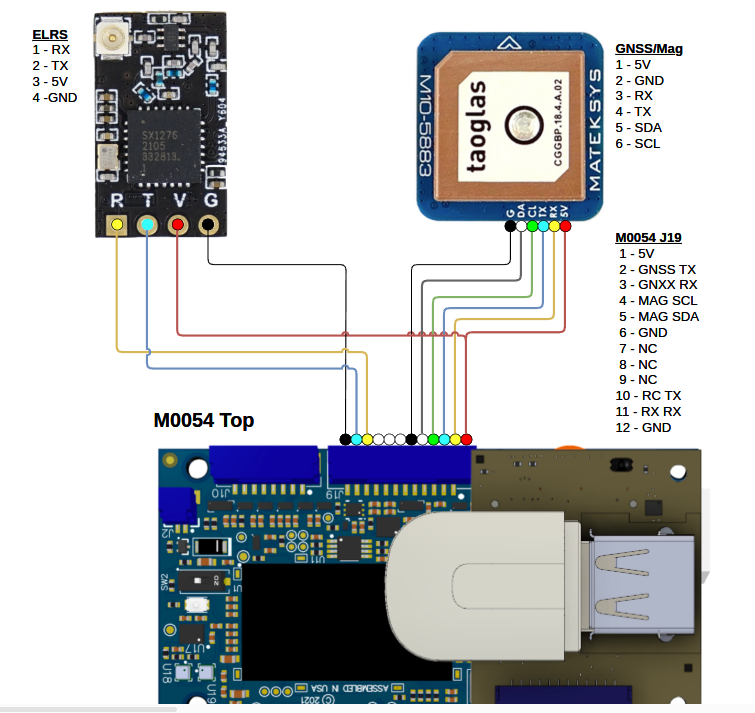
          @Eric-Katzfey I'm planning to use the similar case as in Starling 2 Drone. I'm planning to use the J19 port.
          6fa685c8-55d4-4449-9cb6-1bc29911e065-image.png

          Eric KatzfeyE 1 Reply Last reply
          0
          • Jetson NanoJ Jetson Nano

            @Eric-Katzfey I'm planning to use the similar case as in Starling 2 Drone. I'm planning to use the J19 port.

            6fa685c8-55d4-4449-9cb6-1bc29911e065-image.png

            Eric KatzfeyE Offline
            Eric KatzfeyE Offline
            Eric Katzfey
            ModalAI Team
            wrote on last edited by
            #5

            @Jetson-Nano I think what you are trying to do is entirely possible. But it isn't anything we have ever tried. So I'm just throwing out some ideas that could maybe help you develop this. Or maybe you have some better ideas. One possibility, that I was referring to above, is to create a new program running on the Linux applications processor. It would have to use the libqrb5165-io library to get access to the UART on J19 that is mapped to the SLPI DSP. Another idea is to actually run PX4 on VOXL 2 and either use px4-listener to monitor the input_rc topic or monitor the RC_CHANNELS Mavlink message via voxl-mavlink-server or even voxl-vision-hub and use that to create an RC_CHANNELS_OVERRIDE Mavlink message to send to the external FC. I'm just brainstorming here and can't really provide much more support than offering some high level ideas.

            Jetson NanoJ 1 Reply Last reply
            0
            • Eric KatzfeyE Eric Katzfey

              @Jetson-Nano I think what you are trying to do is entirely possible. But it isn't anything we have ever tried. So I'm just throwing out some ideas that could maybe help you develop this. Or maybe you have some better ideas. One possibility, that I was referring to above, is to create a new program running on the Linux applications processor. It would have to use the libqrb5165-io library to get access to the UART on J19 that is mapped to the SLPI DSP. Another idea is to actually run PX4 on VOXL 2 and either use px4-listener to monitor the input_rc topic or monitor the RC_CHANNELS Mavlink message via voxl-mavlink-server or even voxl-vision-hub and use that to create an RC_CHANNELS_OVERRIDE Mavlink message to send to the external FC. I'm just brainstorming here and can't really provide much more support than offering some high level ideas.

              Jetson NanoJ Offline
              Jetson NanoJ Offline
              Jetson Nano
              Veteran
              wrote on last edited by
              #6

              @Eric-Katzfey Thank you for reverting back. I would like to try out the voxl-mavlink-server approach. I had question with regards to that, how will i be able to get the DATA
              (RC_CHANNELS) from the mavlink-server. Any ideas regarding that.
              @Alex-Kushleyev

              Eric KatzfeyE 1 Reply Last reply
              0
              • Jetson NanoJ Jetson Nano

                @Eric-Katzfey Thank you for reverting back. I would like to try out the voxl-mavlink-server approach. I had question with regards to that, how will i be able to get the DATA
                (RC_CHANNELS) from the mavlink-server. Any ideas regarding that.
                @Alex-Kushleyev

                Eric KatzfeyE Offline
                Eric KatzfeyE Offline
                Eric Katzfey
                ModalAI Team
                wrote on last edited by
                #7

                @Jetson-Nano Here's some example code: https://gitlab.com/voxl-public/voxl-sdk/services/voxl-vision-hub/-/blob/master/src/autopilot_monitor.c?ref_type=heads#L514

                1 Reply Last reply
                0

                Hello! It looks like you're interested in this conversation, but you don't have an account yet.

                Getting fed up of having to scroll through the same posts each visit? When you register for an account, you'll always come back to exactly where you were before, and choose to be notified of new replies (either via email, or push notification). You'll also be able to save bookmarks and upvote posts to show your appreciation to other community members.

                With your input, this post could be even better 💗

                Register Login
                Reply
                • Reply as topic
                Log in to reply
                • Oldest to Newest
                • Newest to Oldest
                • Most Votes


                ModalAI
                Categories Recent Tags ModalAI.com Docs
                © 2026 ModalAI® · Accelerating autonomy for smaller, smarter, safer drones · Powered by NodeBB
                • Login

                • Don't have an account? Register

                • Login or register to search.
                • First post
                  Last post
                0
                • Categories
                • Recent
                • Tags
                • Popular
                • Users
                • Groups